
Author: Ron Daniel
The Easiest Way to Track Vacation, Sick Days, and PTO in One Place
Centralize vacation, sick days, and PTO in one app: set policies, submit requests, auto-sync schedules, and view balances to reduce errors and payroll risk.
Most companies think they’ve nailed time-off tracking - until they’re hit with a payroll discrepancy or an audit. Here’s a stat that might surprise you: 16 U.S. states now mandate payouts for unused PTO, and 76.5% of employees cash in on their unused time off when they leave. If your system is messy or outdated, that’s a financial risk you can’t afford.
At Pebb, we’ve seen it all: managers drowning in spreadsheets, employees confused about their PTO balances, and HR teams scrambling to fix approval errors. It’s not just frustrating - it’s a problem that eats into time, morale, and money. That’s why we built Pebb: an all-in-one employee app for communication and operations where employees can check balances, submit requests, and managers can approve them with zero guesswork.
In this guide, I’ll walk you through how we’ve simplified PTO management - from setting up policies to syncing schedules. Let me show you how we’ve helped teams like yours save time and reduce headaches.
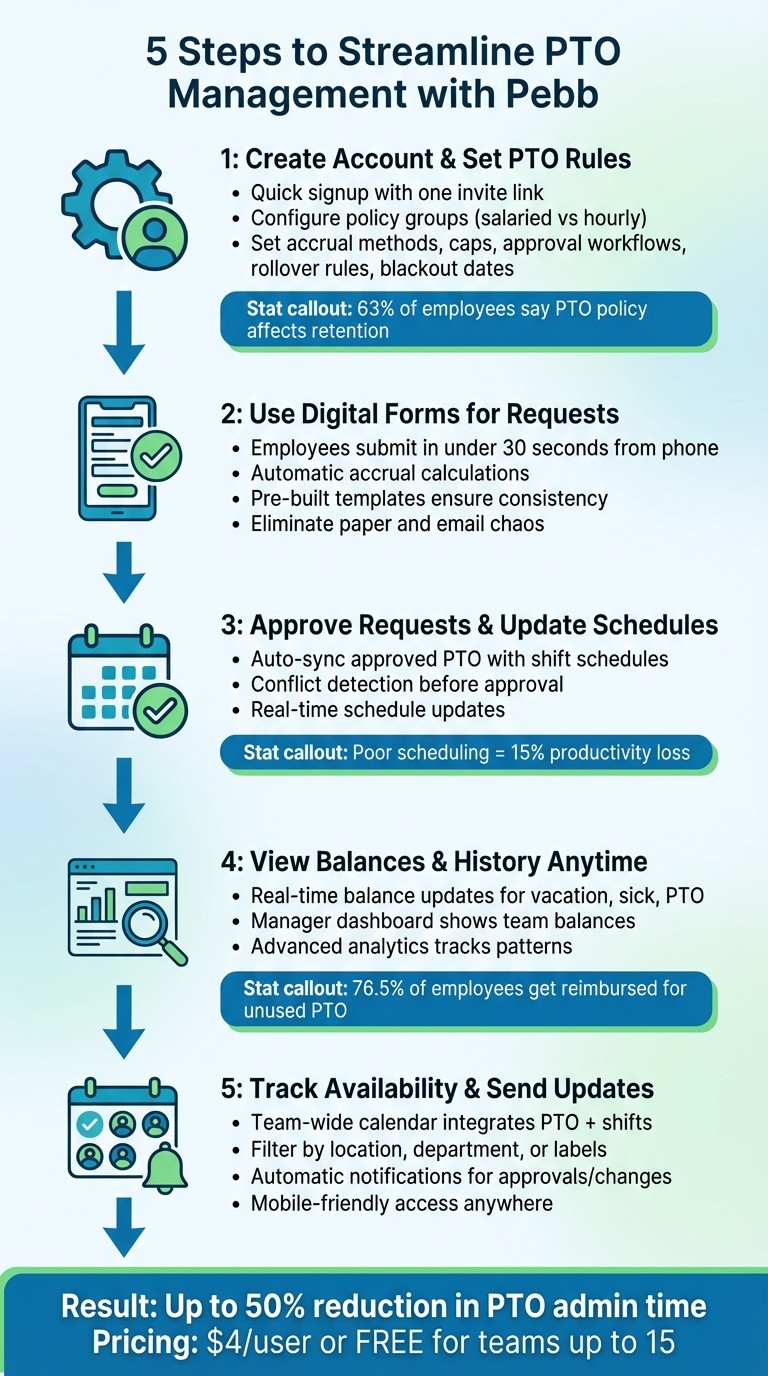
5-Step PTO Management Process with Pebb Platform
Step 1: Create Your Pebb Account and Set Up PTO Rules
Sign Up in Minutes
Let me walk you through how easy it is to get started with Pebb. Signing up is quick and straightforward - just a few clicks, and you’ll have your workspace ready to roll in no time. Even better, onboarding your team is a breeze. Simply share one invite link, and they’re in. No complicated steps, no headaches.
Once your team’s onboard, it’s time to set up PTO policies tailored to your company’s needs. Trust me, this step is where Pebb really shines.
Configure PTO Policies for Your Company
Now, let’s talk about setting up those PTO rules. With Pebb’s built-in system, you can create policy groups that fit the unique needs of your workforce. For instance, salaried employees might get a lump sum of PTO upfront, while hourly workers could earn 1 hour of PTO for every 30 hours they work. And don’t worry about the math - Pebb handles all that for you.
Before diving in, take a moment to think through the details: How will employees earn time off? Who approves requests? What happens to unused PTO at the end of the year? As Dan Robin from our team puts it:
"A good policy is more than a rulebook; it's a statement about your culture. It shows you've thought about being fair and supportive of your team's need to rest".
Here’s a quick snapshot of what you’ll configure:
Policy Element | What to Decide | Example |
|---|---|---|
Accrual Method | How time is earned | Lump sum (salaried) or 1 hour per 30 worked (hourly) |
Accrual Caps | Maximum balance allowed | Cap at 80 hours; accrual pauses until balance drops |
Approval Workflow | Who approves requests | Direct manager approves within 48 hours |
Rollover Rules | What happens at year-end | Roll over up to 40 hours; pay out or expire the rest |
Blackout Dates | When PTO is restricted | Block November 25 – January 2 for peak season |
If you’re currently juggling spreadsheets to track PTO, don’t stress. Migrating those existing balances into Pebb is surprisingly quick - it usually takes just a few hours, not weeks. And here’s the kicker: 63% of employees say a company’s PTO policy is a major factor in whether they stick around. So, getting this right isn’t just about logistics; it’s about showing your team you care.
Step 2: Use Digital Forms to Handle Time-Off Requests
Say Goodbye to Paper and Email Chaos
Let’s face it - paper and email-based time-off requests are a headache. Employees have to double-check their balances manually, while managers and HR teams juggle approvals across scattered inboxes and spreadsheets. It’s a recipe for mistakes and wasted time.
With Pebb's Digital Forms, employees can submit a request straight from their phones in under 30 seconds. The system automatically calculates accruals based on your policies, eliminating the manual errors that come with traditional methods. Plus, every request is standardized through pre-built templates, turning what used to be a messy process into something smooth and predictable.
Ready-Made Templates: The Secret to Consistency
Here’s the thing: consistency is key when it comes to handling time-off requests. Pebb's pre-built templates include all the necessary fields - employee name, type of leave (vacation, sick, or personal), specific dates, and a section for manager approval. No more back-and-forth emails asking for missing details. Every submission follows the same format, making it easier and faster for everyone involved.
Need to tailor the form to your company’s policies? No problem. You can tweak the templates to match your specific rules. Whether it's requiring a 14-day notice for extended vacations or blocking time-off during peak seasons like Black Friday through January 2nd, the system is smart enough to flag or even block requests that don’t align with your guidelines. This means fewer manual checks and more time saved.
"The real measure of success: Can an employee confidently request time off from their phone in 30 seconds? That's the feeling you're after", says Dan Robin from our team.
And honestly, he’s right. When the process is this simple, everyone wins.
Step 3: Approve Requests and Update Schedules
Once employees submit their time-off requests digitally, the next step is keeping everything running smoothly by approving those requests and updating schedules.
Syncing Time-Off with Shifts
Here’s where things get seamless. When you approve a PTO request in Pebb, the system automatically syncs it with your shift schedule. The employee gets removed from any shifts during their time off, which means no more double-booking or last-minute surprises.
Before you hit approve, Pebb double-checks the request against the current schedule. If there’s a conflict - like a coverage gap - it flags it for you. With just one tap, the request is approved, the employee gets notified, and the master schedule updates in real time for everyone to see.
"A schedule built on accurate availability is the foundation of trust. It shows your team you see them as people, not just resources to be managed." - Dan Robin
Keeping Shift Coverage Tight
Here’s the beauty of Pebb: instead of scrambling to call employees to cover shifts, the system does the heavy lifting. It marks the shift as "open", and qualified staff can see and claim it instantly. No back-and-forth emails or phone calls needed.
The drag-and-drop scheduling feature makes reassigning shifts a breeze. Approved PTO shows up right in the interface, so you’re never accidentally assigning someone who’s unavailable. Plus, the system warns you if assigning a shift might push someone into overtime - helping you stay on budget while keeping operations on track. Did you know that poor scheduling can lead to a 15% productivity loss in warehouse settings? It’s one of those things you don’t want to overlook.
After you’ve adjusted the shifts, you can quickly check updated PTO balances and even look back at historical records, all within Pebb. Simple, right?
Step 4: View PTO Balances and History Anytime
Let me tell you, keeping track of PTO balances used to feel like hunting for a needle in a haystack. But with Pebb, it’s a breeze. Whether it’s checking your current balances or diving into detailed PTO history, we’ve made it ridiculously simple.
Check Current Balances Instantly
Imagine this: your team opens the Pebb app and, boom, there it is - vacation, sick days, and PTO balances, all updated in real time. No more back-and-forth emails or waiting for HR to respond. The app takes care of the math for you, automatically calculating balances based on your company’s policy. For salaried employees, that could mean 10 hours per month, while hourly staff might earn 1 hour for every 30 worked. It’s all customized to fit your rules.
And here’s where it gets even better for managers. Our dashboard gives you a clear view of current PTO balances alongside the daily shift schedule. Need to approve a time-off request? You’ll know at a glance whether it’ll leave you short-staffed. Fun fact: 62% of workers don’t use all their vacation time each year. With Pebb, you can easily spot those employees sitting on a mountain of unused PTO and nudge them to take a well-deserved break.
But it doesn’t stop there. Let’s talk about the bigger picture - PTO history.
Access Complete PTO Records
If you’re a manager, you know that PTO history isn’t just about tracking who took a day off last week. It’s about spotting patterns. With our Analytics feature (available in the Premium plan for $4/user/month), you can see it all: who’s been skipping vacations for months, who’s at risk of burning out, and more.
This level of insight isn’t just good for morale - it’s good for your bottom line. Did you know that 76.5% of employees are reimbursed for unused PTO when they leave a job? Those unused hours can add up to serious financial liabilities, especially in states where PTO payout is mandatory. Pebb’s analytics make it easy to stay ahead of the game. You can routinely audit accruals to ensure your records match up with potential payout obligations, giving you peace of mind and keeping your financial planning on point.
With Pebb, managing PTO is no longer a headache - it’s a tool for smarter, more efficient operations.
Step 5: Track Team Availability and Send Updates
Once your PTO balances are updated, the next challenge is staying on top of who’s available and when. Let’s face it - managing team schedules often feels like a juggling act, with managers sifting through multiple calendars, outdated emails, or relying on casual conversations to confirm availability. It doesn’t have to be that way.
See Who's Available at a Glance
With Pebb, we’ve made it simple to get a clear picture of your team’s availability. Our team-wide calendar integrates approved time off with daily shift schedules, so you can find answers in seconds. Wondering if Sarah’s available this Friday or if Tom’s on vacation next week? Just open the app. You can even filter by location, department, or user labels to zero in on exactly what you need - whether it’s ensuring coverage for your Chicago store or checking which warehouse team members can handle an urgent shipment.
And here’s the best part: it’s all mobile-friendly. Whether you’re at your desk or on the go, you can check availability in real-time. Every approval or schedule update reflects instantly on the calendar, so you’re always working with up-to-date information. As Dan Robin from our team likes to say:
"This isn't just a list of dates. It's a single view of reality for a manager, blending time off with daily schedules so there are no surprises."
This level of clarity makes it easier to keep your team in sync and avoid last-minute surprises.
Send Automatic Notifications for Approvals and Changes
Pebb takes communication up a notch by sending automatic notifications whenever a request is approved or denied. Any shift adjustments? Those updates are pushed to the team instantly, so everyone stays informed. Here’s a tip: fine-tune your notification settings to focus on the essentials - like request statuses, time-off confirmations, and schedule changes that directly impact your team.
The payoff? Less back-and-forth, fewer scheduling mishaps, and a team that’s always on the same page. Because let’s be honest - strong communication isn’t just a bonus; it’s the glue that keeps everything running smoothly.
Tips for Better PTO Management in Pebb
Now that you’ve got the basics of Pebb set up, let’s talk about how to take your PTO management from good to great. With a few smart habits and the right tools, you can make a real difference in how your team rests and recharges.
Use Analytics to Spot Patterns
One of the coolest things about Pebb is how the PTO data can reveal trends that might not be obvious at first glance. For example, high PTO balances or long stretches without any time off can be warning signs of burnout. That’s when it’s time for a proactive, empathetic check-in. At Pebb, we always say:
"Good PTO tracking isn't about enforcing rules; it's about enabling rest. The data should prompt curiosity, not just compliance checks. It's a tool for leadership, not just administration."
And there’s another reason to keep an eye on the numbers. Did you know that 62% of workers don’t use all their vacation time? When they leave, 76.5% of them get reimbursed for unused PTO. That’s a pretty hefty financial liability for your company. Pebb’s shift reports combine attendance and time-off data, helping you plan ahead and avoid those last-minute staffing headaches. Use these insights to start conversations - ask why some teams aren’t taking breaks and figure out if workloads or policies need tweaking.
Once you’ve got the data working for you, the next step is making sure everyone knows how to use it effectively.
Train Your Team on PTO Features
Here’s the thing: even the best system won’t work if people don’t know how to use it. Start by training your managers - they’re the ones who will champion the system and guide their teams. But don’t just show them how it works; explain why it matters.
For example, let employees know they can check their PTO balance in just 30 seconds from their phone, submit requests without endless follow-ups, and get instant updates. This is especially important for your frontline teams who aren’t sitting at desks all day. Make sure they know they can handle everything on the go. Use plain language and real-life scenarios, like managing last-minute sick days or planning a family vacation, to show how Pebb makes their lives easier.
Here’s why this matters: companies that get their PTO policies right see a 23% boost in employee satisfaction and 19% lower turnover rates. So, investing the time to train your team isn’t just about smoother scheduling - it’s about building a happier, more loyal workforce.
Wrapping Up
Managing vacation, sick days, and PTO shouldn’t feel like a chore. That’s where Pebb steps in, replacing clunky, outdated systems with a single, easy-to-use platform designed for teams that need real solutions.
Here’s how it works: Digital Forms make submitting requests a breeze, while Shifts Scheduling automatically updates to reflect approved time off. Need to check your balance or see who’s available? You can do it all from your phone in seconds. This kind of simplicity doesn’t just save headaches - it saves time and money.
In fact, managers who move to centralized platforms like Pebb have reported slashing PTO admin time by up to 50%. That’s hours every week you can redirect toward actually leading your team. And with 76.5% of workers getting reimbursed for unused PTO when they leave, having an accurate, automated system in place isn’t just smart - it’s essential.
At Pebb, we’re all about making PTO management work for your team, not the other way around. When submitting a request takes 30 seconds, balances update instantly, and coverage is handled without a second thought, you’re creating a system everyone can trust. And the best part? It’s affordable. For just $4/user/month on our Premium plan - or absolutely free on our Standard plan for up to 15 employees - you’re getting a solution that simplifies everything without breaking the bank.
Why wait? Start with Pebb today and take the stress out of PTO management for good.
FAQs
Can Pebb handle different PTO rules for different teams?
Pebb makes it easy to set up different PTO rules for different teams. Managers can tailor policies to fit their team's unique needs while keeping time-off tracking simple and organized. This way, requests align with what works best for each group without creating chaos in the process.
How do I import current PTO balances into Pebb?
To get PTO balances into Pebb, start by creating a CSV or Excel file with key details like Employee ID, Pay Category, and Balance. Head over to Pebb’s PTO management section, click on the import tool, and upload your file. For a smoother process, download and use the sample template if it’s provided - it’ll help you avoid errors. Need more help? Pebb’s support resources have step-by-step instructions to guide you through.
Can approved PTO automatically update shift schedules?
With Pebb, managing PTO is a breeze. Once PTO is approved, the system automatically updates shift schedules. Thanks to its built-in PTO management and scheduling tools, everything stays in sync without any manual effort. This not only saves time but also helps avoid scheduling mistakes, keeping everything running smoothly.
