

Author: Ron Daniel
Best tools for organizing company events and staff parties
Compare tools for communication, RSVPs, scheduling, shifts, and logistics to run internal company events.
Most teams don’t fail at company events because they pick the wrong venue. They fail because the plan gets split across email, chat, calendars, and one spreadsheet nobody wants to touch. I’ve seen that play out more than once at Pebb.io, and it usually ends the same way: missed RSVPs, mixed-up timing, and a lot of last-minute cleanup.
What jumped out to me in this review is how fast tool gaps show up. A chat app may help with updates, but not headcount. A calendar may show the date, but not who’s covering setup. And once you add frontline staff into the mix, the problem gets bigger because email alone often misses half the team.
So I pulled this down to the part that matters: which apps help with employee communication, which ones help with scheduling, and which ones help run the work around the event. I’ll keep it short, point out where each option fits, and share where we at Pebb think an all-in-one setup saves the most time.
Quick overview:
Pebb: best if I want chat, RSVPs, shifts, and tasks in one app
Slack / Workvivo / Staffbase / Simpplr: best if communication is the main need
CalendarWiz / GroupCal: best if shared dates and reminders are the main job
Zoho Backstage: best for larger, more formal events with registration and check-in
monday Work Management / ClickUp: best if event planning sits inside a task board already
1. Pebb
I’ve seen company events go sideways for one simple reason: the plan lived in five different places. Chat was in one app, schedules were in another, files were buried in email, and someone always had the latest version of the run sheet on their laptop only. At Pebb, we built this to be a lot less messy.
Pebb keeps event planning in one place, with chat, events, shifts, tasks, PTO, and files together. So when I need to plan, staff, and run a company event, I’m not bouncing between tools and hoping nothing slips through the cracks.
Event Communication and Announcements
Inside Pebb, each event lives in a Space and shows up on the Team Calendar, grouped by department, branch, location, or project. That sounds simple, but in practice it saves a ton of back-and-forth. I can see where the event belongs, who needs it, and how it fits into the rest of the team’s schedule.
When I create an event, I can turn on Notify everyone in this Space, and that sends an instant push notification to all members on web and mobile. Let me tell you what happened next the first time we leaned on that hard: response time got a lot shorter, and we stopped chasing people across email and chat.
If plans change, I can post an update to the News Feed and mark it as an Important Post, which means employees have to acknowledge it. That’s a big deal for things like venue updates, arrival times, or last-minute schedule changes.
RSVP and Headcount Tracking
Here’s the thing: headcount can make or break an event budget. Food, seating, transport, swag - it all depends on knowing who’s coming.
In Pebb, employees can tap Attend or Decline right in the app, and the attending and declined lists update in real time. I’ve found that this makes planning much easier for holiday parties, summer BBQs, and team offsites because I’m not waiting on scattered replies.
Pebb also supports two-way Google Calendar sync, so office staff who live in Google Calendar get event details there automatically. That helps a lot when some people work mainly from their inbox and calendar while others stay inside the app.
Shift and Staff Coverage
This is one of those parts people forget until the last minute. It’s not enough to plan the event - you also need to know who’s covering it.
Because shift scheduling is built in, managers can check approved PTO and current shifts before locking in event staffing. I like that because it cuts down on guesswork. You’re not assigning someone who’s already off or already booked.
If I need coverage, I can assign specific employees to event shifts, or I can post an Open Shift and let staff volunteer to claim it with manager approval. That keeps coverage out of random text threads and puts it where the team can actually track it.
Task and Logistics Management
Once the event is moving, the little details pile up fast. Catering. AV. Decorations. Transportation. Someone has to own each piece, or the whole thing gets shaky.
In Pebb, I can assign those jobs with due dates and progress tracking. That gives the team a clear view of what’s done, what’s late, and what still needs attention.
We can also keep event files like contracts, menus, seating charts, and run sheets in the Knowledge Library, so everything stays in the same Space. I can’t overstate how helpful that is when the event day gets busy and no one has time to dig through old messages.
And if we need to settle one last detail - like the menu - we can use posts or polls to gather input, then turn that choice into a task with a clear owner. That handoff matters. A decision without an owner is where a lot of event plans stall.
Standard is free for up to 15 employees. Premium is $4 per user per month.
If your team only needs lighter communication, the next option is a chat-first tool.
2. Slack

I’ve seen Slack shine when a team already spends half the day in chat. At Pebb.io, we’ve tested that kind of setup ourselves, and it’s great for keeping event chatter from spilling all over the place. A dedicated channel, a pinned agenda, and clean thread replies can make things feel under control fast.
Here’s the thing: that setup helps with conversation, but it doesn’t fully run an event. Slack is useful for talking about the event. It’s just not enough on its own for RSVP tracking or day-of coordination.
Event Communication and Announcements
Slack’s channel-based setup makes updates easy to post. I can drop a message, pin key details, and keep side talk in threads. That part is smooth.
The problem shows up when channels get busy. Event updates get buried fast, especially when sales, ops, and leadership all jump into the same workspace at once. I’ve watched a simple announcement disappear under a pile of GIFs, status checks, and product notes in less than an hour.
Slack also has no built-in event calendar, RSVP tracking, or event reminders. So while it works well for quick updates during the event, it’s weaker for formal announcements that need acknowledgment.
RSVP and Headcount Tracking
This is where Slack starts to feel a bit patchwork. There’s no native RSVP tracking, which means managers need to use an outside form or an integration to count attendees.
We’ve run into this issue before. The conversation stays in Slack, but the actual headcount lives somewhere else. That split can be annoying when you’re trying to answer a simple question like, “How many people are coming?”
Shift and Staff Coverage
Slack does offer an event planning template that can help track roles, coverage, and run-of-show ownership. That gives teams a decent starting point.
But staffing still has to be managed by hand. In my experience, that means someone always ends up double-checking schedules, sending follow-ups, and making sure no shift gets missed.
Task and Logistics Management
Workflow Builder and Task Tracker can handle basic tasks and notifications, and integrations can cover the rest. That helps if you already have a stack you like and don’t mind piecing things together.
Still, if your team needs deeper event coordination inside a broader workplace suite, Microsoft Teams is the next option.
3. Microsoft Teams
I’ve seen Microsoft Teams shine when a company is already deep in the Microsoft 365 world. At Pebb.io, we’ve looked closely at setups like this, and here’s the thing: when Teams, Outlook, SharePoint, and Lists are all connected, event planning feels a lot more workable. But there’s a catch. You’re still hopping between a few Microsoft tools to get everything done.
If your team already lives in that ecosystem, that trade-off may feel normal. If not, it can start to feel like you’re opening one door just to find three more behind it.
Event Communication and Announcements
Teams doesn’t give you one built-in event hub out of the box. Instead, Microsoft leans on its SharePoint Event Planning site template to cover that need. I’ve found that this setup gives organizers a central page for updates and files, while still tying back into Teams.
For day-of communication, Teams posts do the job well. If you need to send a same-day reminder, flag a venue change, or push a last-minute start-time update, it’s easy enough to get that in front of people fast.
RSVP and Headcount Tracking
This is where the Microsoft 365 setup starts to matter more. RSVPs usually run through Outlook or the SharePoint Events web part, so headcount tracking depends on how the full stack is set up.
That’s fine for basic tracking. Still, let me tell you what happened next when we compared tools like this side by side: the process worked, but it didn’t feel like one single event system. It felt more like a chain of connected parts, each doing its piece.
Shift and Staff Coverage
Once invites are out and updates are live, scheduling becomes the next job. Teams includes the Shifts app, which helps with assigning coverage and keeping staff schedules in order.
For office-heavy teams, that can make a big difference. Instead of managing coverage in a separate tool, staff scheduling sits right there inside the same Microsoft setup.
Task and Logistics Management
On the planning side, Microsoft adds more structure through SharePoint. The SharePoint Event Planning template includes a content scheduler list in Microsoft Lists, plus document libraries for planning files.
That gives organizers a place to manage logistics without starting from scratch. In my experience, it’s useful if your team already knows how to work inside SharePoint and Lists. If they don’t, there’s a bit more ramp-up than people expect.
Teams makes the most sense for companies already running on Microsoft 365. If that’s your world, it can handle event planning pretty well, even if the work is split across apps. Next up is Workvivo, which leans more into a communication-first style.
4. Workvivo

I’ve seen this play out a lot on internal teams: Microsoft Teams can do a bit of everything, but when we want event communication to actually get seen, Workvivo tends to do a better job. At Pebb.io, we pay close attention to how people respond to event posts, and news-feed style communication usually gets more eyes on it than yet another message buried in chat.
That’s where Workvivo stands out. It’s a social intranet built around a news feed, and in my experience, it works best for teams that want all event communication in one place, not a full planning suite.
Event Communication and Announcements
Here’s the thing: if your team is spread across shifts or sites, blanket messages get ignored fast. Workvivo lets managers publish targeted event posts, attach key files, and send live updates to specific teams or locations. That means one shift, one office, or one department can get the message without everyone else getting flooded.
I like that approach because it cuts the noise. The mobile app also helps with frontline employees who don’t check email often, which is a big deal for companies trying to get event details in front of the right people at the right time. And the results can be hard to ignore.
A Keyloop case study found town hall participation doubled after the company promoted events through Workvivo.
Once communication is handled, the next step is simple: who’s actually showing up?
RSVP and Headcount Tracking
Workvivo includes a dedicated Events feature with RSVPs, reminders, and attendance counts. Employees can confirm from web or mobile, which makes the process easy enough that people are more likely to follow through.
From an organizer’s side, that matters. Getting attendance counts before locking in catering or seating can save a lot of hassle. I’ve been on teams where headcount guesses led to too much food in one case and not nearly enough chairs in another, so having that number early helps.
For internal events, Workvivo handles RSVP tracking well. If the event needs more involved registration, though, you’ll need to send people to an external form.
Shift and Staff Coverage
This is where the gap shows up. Workvivo does not include native shift scheduling. It can handle volunteer requests and sign-ups, but it does not support native shift scheduling.
So if you’re staffing an event and need actual shift assignments, you’ll want a separate scheduling tool next to it. I’ve found that this setup can still work fine, but it does mean one more system to manage.
Task and Logistics Management
Let me tell you what happened next on one project like this: communication was smooth, RSVPs were clear, but the team still needed a home for the moving parts. That’s where Workvivo’s spaces come in.
Workvivo isn’t a task manager, but its spaces give event organizers a simple way to keep logistics together. You can set up an "Annual Company Picnic" space, pin posts with checklists, upload vendor contracts and run sheets, and use comments to confirm progress.
It’s not built for deep project management. But for keeping event updates, files, and team coordination in one spot, it does the job without much fuss.
5. Staffbase
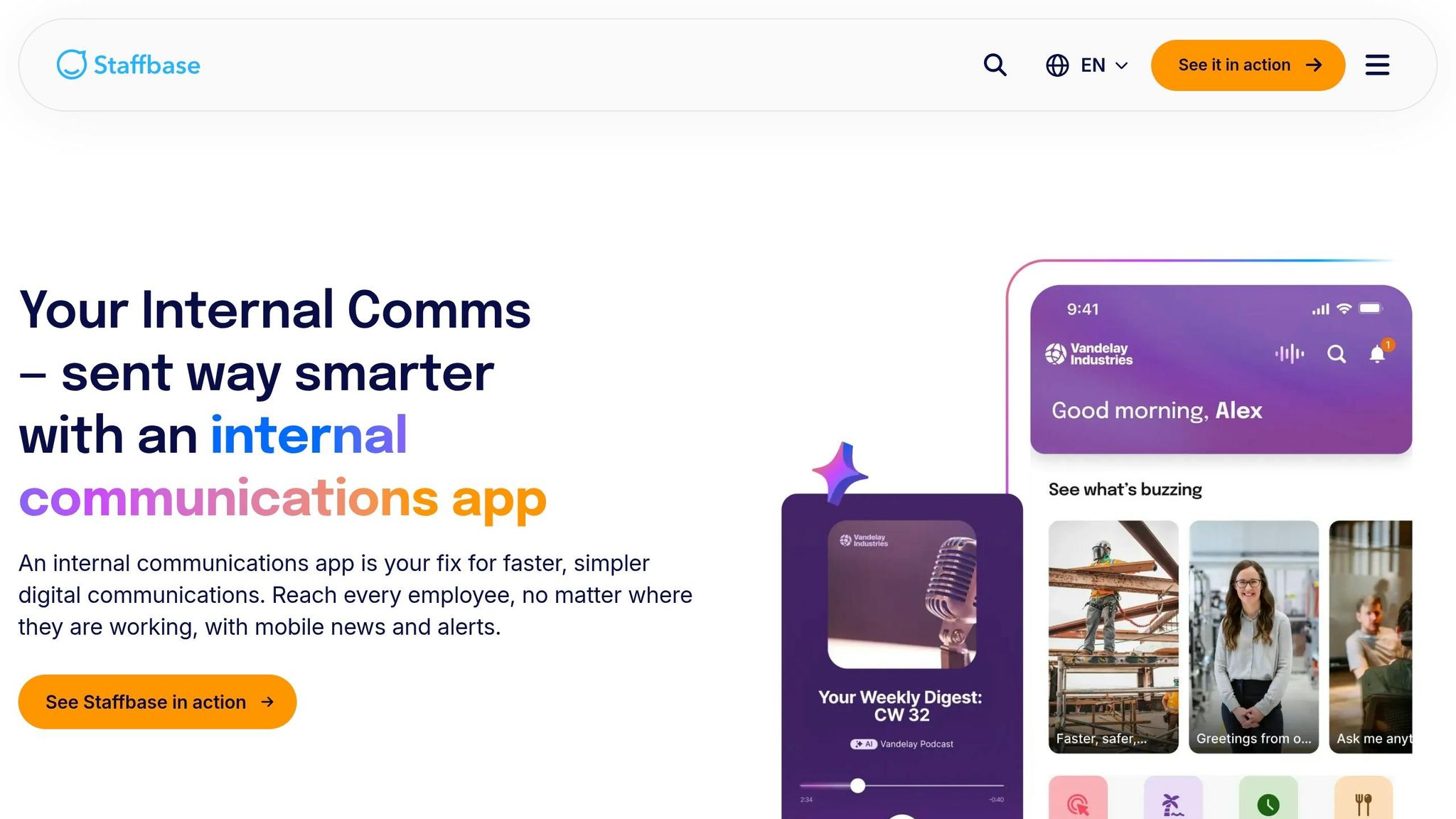
I’ve seen this pattern a lot on internal comms teams at Pebb.io: a company wants one tool to do everything for events, then realizes pretty fast that not every platform is built for the same job.
That’s how I’d frame Staffbase.
From what the sources show here, Staffbase is mainly a mobile-first internal communication tools. So if your team needs a way to get event updates in front of frontline employees, that’s where it makes sense. Think announcements, reminders, and keeping people in the loop without making them dig through email.
Here’s the thing: when I look at Staffbase through an event-planning lens, it sits in the communication layer, not the operations layer.
That distinction matters more than most teams expect.
If I’m trying to help a company run an event from start to finish, I’m not just thinking about who saw the announcement. I’m also thinking about who’s attending, who’s covering shifts, what tasks are done, and what still might fall through the cracks. The sources here don’t show Staffbase going deep in those areas.
More plainly:
The sources here do not show native RSVP or attendance tracking.
The sources here do not show native shift scheduling or coverage tools.
The sources here do not show task assignment or logistics tracking.
So yes, Staffbase stays relevant for announcements and frontline reach. That’s a solid use case. But if your team needs help with the hands-on planning side of events, the next tools on the list cover more of that workflow.
6. Simpplr
I’ve seen this pattern a lot: a team starts with chat and announcements, then hits a wall the moment an event needs more structure. That’s where Simpplr starts to feel different.
At Pebb.io, we pay close attention to tools that go beyond basic communication. Simpplr does that by adding structured event pages and RSVP tracking. It’s still a communication-first intranet, though. So while it handles event pages and RSVPs well, it does not cover staffing or task execution.
Event communication and announcements
What I like here is that Simpplr treats events as a core content type, right alongside pages and news. Employees can find them in site-level Content tabs and in a global Events view, which makes upcoming events easier to spot in one place.
The event pages themselves are built for clarity. You can add a cover image, time, location, maps, and directions, and you can place images or videos right inside the page. That may sound small, but it matters. When people don’t have to dig through three posts and two emails to figure out where to go, attendance usually gets less messy.
Let me tell you what happened next in setups like this: once organizers make updates, Simpplr pushes immediate email updates and invitations to authors, organizers, confirmed attendees, and newly invited users. For larger programs, its Campaigns feature pulls related event pages, posts, media, and support materials into one event campaign and tracks engagement across that group.
RSVP and attendee management
This is where Simpplr gets more practical. It supports RSVP-required events with Yes/No/Maybe responses, deadlines, notes, capacity caps, and confirmation emails.
It also syncs with Google Calendar both ways. So an employee can RSVP from their calendar, and that response flows back into Simpplr. That kind of two-way sync can save a team from a lot of back-and-forth.
There is one catch, and it’s worth saying plainly. RSVP capacity limits do not apply to calendar-synced events, so if a venue has a hard cap, someone still needs to check it by hand. I’ve seen little gaps like that turn into day-of stress, especially when a room fills up faster than expected.
Shift and staff coverage
Here’s the thing: Simpplr does not have native shift scheduling. Managers can look at RSVP data as a rough signal of who may attend, but it’s not built for shift assignment.
If you’re trying to answer, Who is covering setup at 7:00 a.m.? Who is on check-in? Who is staying through teardown? Simpplr won’t solve that part on its own.
Task and logistics management
Simpplr also isn’t a project management app. That said, event pages can still hold instructions, checklists, and embedded documents so event teams stay on the same page, and Campaigns can gather planning materials in one place.
So in practice, I’d think of it like this:
Good fit: event communication, announcements, event pages, and RSVP handling
Weak fit: staffing, shift coverage, and task ownership
Pricing is custom, and there are no public per-seat rates.
If your event workflow needs assignments and deadlines, the next section moves into task-first tools.
7. CalendarWiz
I’ve seen teams overcomplicate event planning fast. One group just wanted a clean place to post office parties, room bookings, and staff events, and somehow they ended up juggling email threads, spreadsheets, and three different calendars. That’s usually when a tool like CalendarWiz starts to make sense.
At Pebb.io, I’d describe CalendarWiz as a solid shared online calendar for teams that want ONE place to publish company events, staff parties, and room bookings. It does scheduling and reminders well. But if you’re hoping it will run the whole event from start to finish, that’s where the cracks start to show.
Event communication and announcements
When I looked at how CalendarWiz handles event messaging, the Invite & Remind tab stood out right away. Inside the event editor, I can send invitations, announcements, and reminders without jumping into another tool.
That sounds simple, but it saves time. I can also attach files and images to those messages, which helps when I need to share a run-of-show doc, parking details, or a last-minute update with the invite. In practice, that means fewer “Where do I find the info?” messages flying around.
Another thing I like is how calendars can be embedded into a company intranet or shared with a plain link. Updates show up on desktop and mobile, so people aren’t stuck hunting for the latest version. And once the invite is out, the RSVP tools help keep headcount out of some lonely spreadsheet no one wants to update.
RSVP and attendee management
Here’s the part that works well for simple events. CalendarWiz supports Accept, Decline, and Maybe RSVP responses, and it sends instant email alerts to the event owner when someone replies.
That makes life easier when I’m trying to get a fast headcount for something like a holiday party or a quarterly lunch. If plans shift, the RSVP summary can be edited too, which is handy.
But let me be straight about it: this is better for simple headcounts than deep attendee management. If I need tighter capacity control or more detailed guest handling, I’d start feeling the limits pretty quickly. That’s usually the point where the next issue pops up - who’s covering the room, the shift, or the event itself?
Shift and staff coverage
CalendarWiz also supports staff scheduling and vacation schedules, which gives teams a broader view of who’s available. If you use CalendarWiz+, you get Timeline and Scheduler views for events, shifts, and room bookings, which can help avoid room and resource conflicts.
I can see HR managing the party calendar while Facilities handles bookings, thanks to role-based permissions. That split is useful. It gives each team control over its own lane without turning the calendar into chaos.
Still, I wouldn’t lean on it too hard for event-day staffing. If I need to assign check-in, setup, cleanup, or other hands-on coverage, I’d probably want a separate scheduling app. CalendarWiz gives visibility, but not the full staffing layer.
Task and logistics management
This is where I think teams need to be careful. You can add notes and attach documents to events, and multi-user editing means different departments can update the same event record. That’s helpful when several teams are involved.
But there aren’t built-in task assignments, deadlines, or checklists. So if I’m managing catering deadlines, vendor follow-ups, or AV setup, I’d treat CalendarWiz as the schedule and communication layer, not the place where all the work gets tracked.
Pricing starts at $9/month for up to 10 users. If I needed more built-in ownership for tasks and timelines, I’d look at the next tool in the lineup.
8. GroupCal
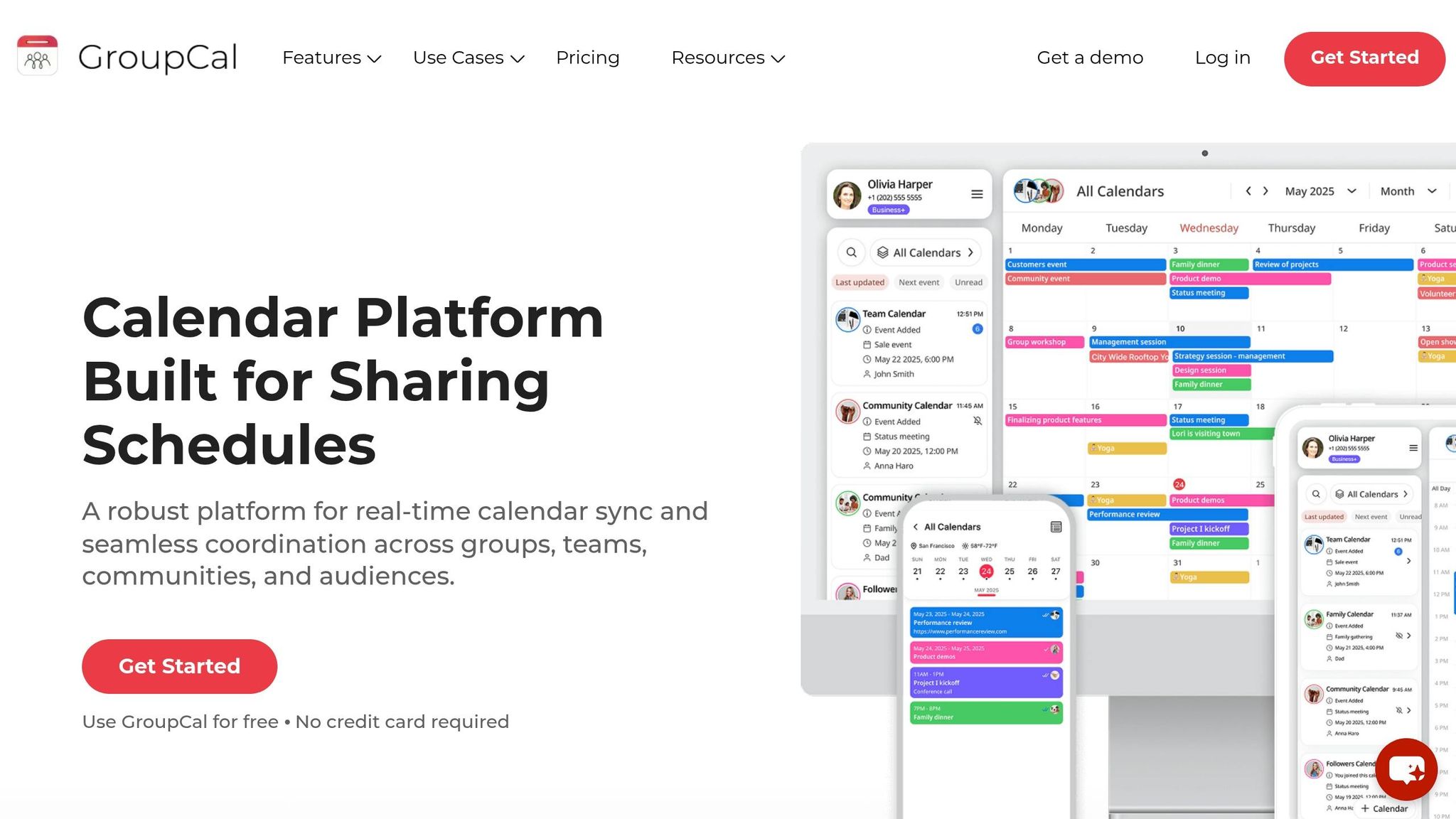
I’ve seen this pattern a lot at Pebb.io: a team starts with a simple shared calendar because they just want everyone to see the same event dates. That’s where GroupCal usually comes into the picture.
After CalendarWiz, which leans more into scheduling and room booking, GroupCal feels lighter. It’s a shared calendar tool for teams that need separate calendars for events, committees, or departments. If all you want is shared visibility, it does that job well. But when we talk with teams that also need chat, announcements, shifts, PTO, and day-to-day teamwork in one place, that’s usually when Pebb ends up being the better fit. GroupCal covers publishing and reminders, not staffing or task execution.
Event communication and announcements
Here’s the thing: not every team wants a heavy setup.
Where CalendarWiz adds more planning structure, GroupCal stays lighter and easier to maintain. I can see why that appeals to smaller teams or groups running simple event schedules. GroupCal keeps event details in one shared calendar view, so managers can post the date, location, agenda, dress code, parking notes, and reminders in one place.
It also connects with Google Calendar, Outlook, and Apple Calendar, which helps people keep schedules visible without exposing personal events. That part matters more than people think. I’ve watched teams get frustrated when work plans spill into private calendars, so keeping that line clear can save a lot of hassle.
RSVP and attendee management
This is where the limits start to show.
GroupCal works for simple attendance visibility. If a manager just wants to see who’s in and who’s out, that may be enough. But it does not handle registration, ticketing, guest lists, or capacity controls.
Let me tell you what happened next in a few cases I’ve seen: teams started with a simple calendar, then ran into trouble the minute an event needed tighter tracking. Once headcount, guests, or space limits entered the picture, they had to patch in other tools.
Shift and staff coverage
GroupCal can help managers flag coverage gaps around an event, but that’s about as far as it goes.
It does not handle shift swaps, overtime, approvals, or compliance. In plain English, you can spot a problem, but you can’t fix it inside the tool. For teams with hourly staff, that gap becomes a pain fast.
At Pebb.io, we’ve learned that visibility alone doesn’t solve staffing issues. People need a way to act on what they’re seeing, not just look at it.
Task and logistics management
GroupCal is best for date coordination and reminders. That’s its lane.
It does not handle budgets, vendor contracts, room resources, attendee segmentation, or task ownership. So if your event planning process includes moving parts, handoffs, and follow-up, you’ll hit the ceiling pretty quickly.
That’s usually the split I share with teams: if you just need a clean shared calendar, GroupCal can work. If you need the work around the event to happen in the same place too, you’ll want more than a calendar.
9. Zoho Backstage
I’ve seen this happen more than once at Pebb.io: a team starts planning a big company event in a basic calendar tool, and everything feels fine... until the guest list grows, check-in gets messy, and people start asking where the latest agenda lives.
That’s where Zoho Backstage starts to make more sense. It fits larger company events better than simple calendar tools. It brings branded event pages, registration, QR check-in, and day-of updates into one system. For bigger gatherings, all-hands meetings, and staffed events where people are arriving in waves, that setup can save a lot of stress.
Event communication and announcements
One thing I like here is how Zoho Backstage keeps event communication tied to the event itself. It supports branded event pages and a branded event app that sends real-time push notifications before and during the event.
So if the agenda changes at the last minute, organizers can post live updates right away, and attendees can check event details in the app instead of digging through email threads. In my experience, that matters more than people think. On event day, no one wants to hunt for the latest link or wonder if the session time changed.
RSVP and attendee management
Registration is one of Backstage’s stronger areas. It supports automated sign-ups, custom registration forms, and RSVP tools that sync right to attendees’ calendars.
That can take a lot of manual work off the team. Then, once people arrive on-site, QR-based check-in helps move the line faster and cuts down on bottlenecks.
Let me tell you what happened next in one example I came across: one organizer used Backstage to run a 450-guest company anniversary event with a landing page, agenda, registration, and role-based access. That gives you a pretty clear sense of where this tool fits. It’s not just for a small lunch-and-learn. It’s built for events with more moving parts.
Once attendance is locked in, the next challenge is making sure the team behind the scenes stays on the same page.
Shift and staff coverage
Backstage supports crew assignments, role-based access, and internal communication tools so staff can stay aligned during the event.
I’ve learned that staff coordination can make or break a live event. You can have a polished registration page, but if the event team is working from old notes or missed updates, things fall apart fast. Backstage helps with that through private internal discussion channels and real-time schedule updates, so teams can work from the latest run sheets instead of guessing.
Task and logistics management
Here’s the thing: once an event gets big enough, ownership has to be clear. Backstage uses role-based access and audit logs to help keep that straight, while event data stays organized for the planning team.
Pricing starts at $99/month for paid plans, with pay-per-event options from $299.
10. monday Work Management
I’ve seen this play out a lot at Pebb.io: a team is already deep in monday Work Management, nobody wants to juggle one more tool, and event planning gets pulled right into an existing board. In that setup, monday makes sense. Still, if you want one place for comms, updates, and day-to-day employee life, Pebb is the better all-in-one choice. monday works best when the event has to live inside a project workflow you already use every day. It’s not a dedicated event platform, but it can handle company-event planning and coordination in one place.
Event communication and announcements
Here’s the thing: with monday, communication happens inside customizable boards. I like that teams can comment right on an item, tag coworkers with @mentions, and attach files like run-of-show docs or vendor contracts so the context stays with the task instead of getting lost in email threads.
Let me tell you what happened next on one internal planning sprint we ran: once everything sat on the same board, it got much easier to track who said what and where the latest file lived. Gmail and Outlook integrations can log event emails to the right board, which helps when vendor messages start flying in. And if your team is onsite, monday’s mobile app gives staff access to checklists, timelines, and live status updates for last-minute changes like a room swap or an updated agenda.
RSVP and attendee management
For simple internal events, monday Forms does the job. Teams can collect RSVPs straight into a board, which makes headcount tracking pretty easy for staff parties and company gatherings.
That’s a nice fit when you just need a clean list of who’s coming, who hasn’t replied, and how attendance is shaping up.
Shift and staff coverage
This is one area where monday feels pretty practical. For event-day staffing, teams can list roles on a board and assign owners through a People Column. Date and status fields can map shift windows and show whether a role is Unassigned, Assigned, or Needs Backup.
We’ve learned the hard way that staffing gaps don’t show up at a good time. They show up the night before. monday’s automations help by notifying staff when they get assigned and sending reminders before a shift starts. Calendar and Gantt views also make it easier to catch double-booking or missing coverage across multi-day events.
Task and logistics management
If your team likes to manage work in a board-first way, the Event Management template can cover a lot: registration, logistics, budgeting, timelines, execution, and review in one workspace. Dependencies help keep tasks in order, and budget plus number columns can track vendor quotes and actual spend.
In my experience, that setup works best for:
internal parties
offsites
recurring company events
Pricing starts at about $9/user/month when billed annually, and the Pro plan is about $19/user/month. So yes, monday can act as a central workspace. But there’s a catch. If you need advanced ticketing, seating charts, or badge printing, you’ll still need an integration.
If you want similar task control with deeper docs and automation, ClickUp is next.
11. ClickUp
When I first used ClickUp for event planning at Pebb.io, I noticed the difference almost right away. If monday feels more board-first, ClickUp gives me more room to shape the setup around how our team actually works. That matters when an event has lots of moving parts, tight timing, and zero room for missed details. Still, from my seat, Pebb is the more complete all-in-one choice when I need both communication and team engagement in one place.
Event communication and announcements
Here’s the thing: event updates fall apart fast when they live in one tool and the work lives somewhere else. In ClickUp, I can use Chat, task comments, and Docs to keep updates tied to the work itself. Planning notes stay attached to the right tasks, which helps us avoid that all-too-common mess where someone says, “Wait, was that in chat or in a doc somewhere?”
RSVP and attendee management
For internal events, I can use ClickUp Forms to collect RSVPs and send responses straight into the event board. That makes setup a lot smoother for the team. Custom Fields also let me track headcount, dietary restrictions, and other attendee details without building a messy spreadsheet on the side.
When events get bigger, though, that’s usually where another tool steps in. In those cases, I’d likely need an integration with something like Eventbrite or Cvent.
Once the headcount is in, Workload and task assignments help me turn those responses into actual coverage. That’s a small detail, but in practice it saves time.
Shift and staff coverage
On event day, staffing can get messy fast. ClickUp helps with that through task assignments and the Workload view, which shows team capacity at a glance. I’ve found that useful when I need to see who’s overloaded and who can still take on one more job. Time estimates also help me size each role before the day gets hectic.
That said, rotating schedules still need a dedicated scheduling app. ClickUp can help with staffing visibility, but it doesn’t fully replace a tool built just for shifts.
Task and logistics management
This is where ClickUp does its best work for event teams. Gantt and Calendar views give planners more than one way to manage production timelines and deadlines. I like that because not everyone on the team thinks the same way. Some people want the big timeline view. Others just want a clean calendar.
Formula Custom Fields can calculate estimated versus actual spend and cost per attendee, which is handy when I’m keeping an eye on budget without jumping between tools. Task Dependencies also help keep the crew moving in the right order on event day. If one piece slips, I can see the ripple effect before it turns into a fire drill.
On pricing, ClickUp has a Free Forever plan, plus Unlimited at $7 per user/month billed annually, Business at $12 per user/month billed annually, and Enterprise with custom pricing. ClickUp Brain is available as an add-on for $9 per user/month.
Strengths and tradeoffs by event workflow
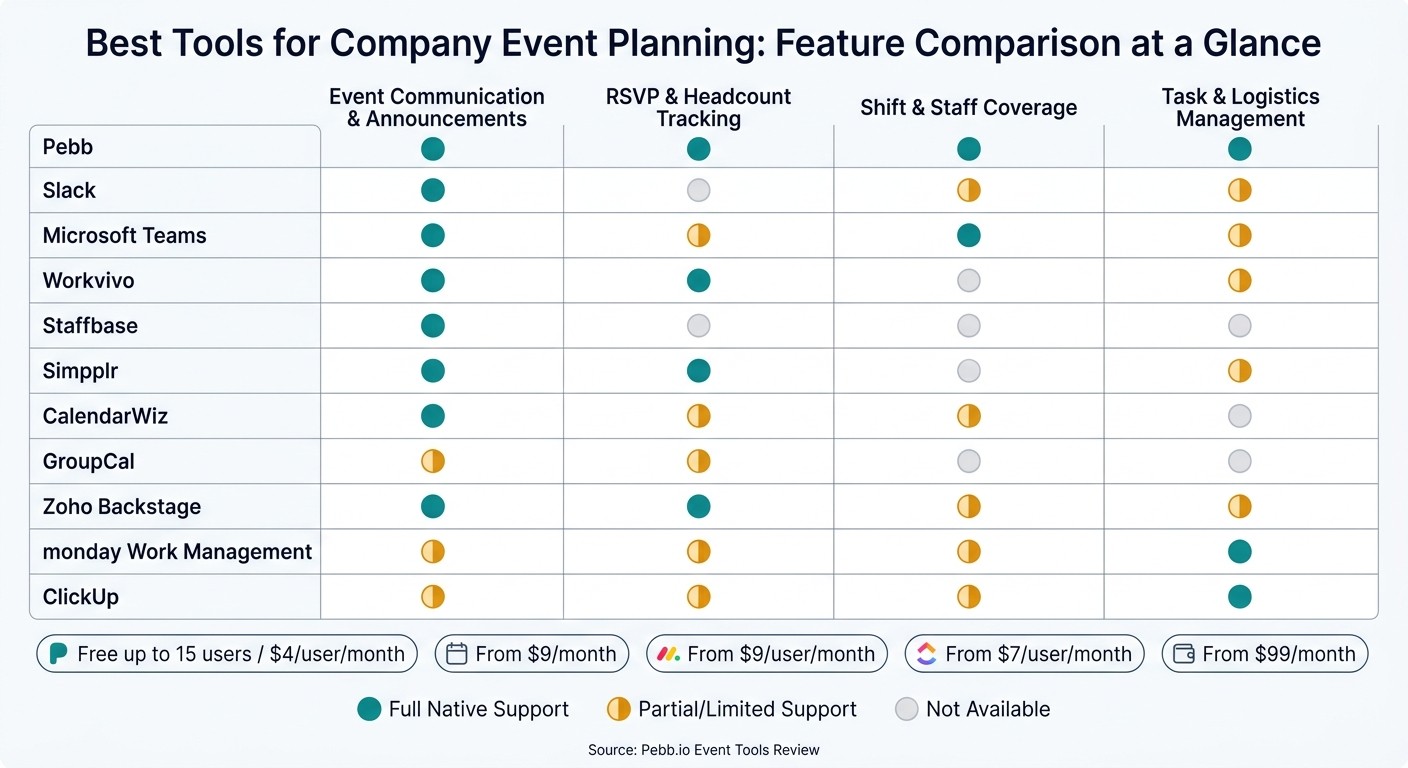
Best Tools for Company Event Planning: Feature Comparison Chart
When I started helping teams at Pebb sort out internal events, I made the same mistake a lot of people make. I compared tools by feature lists alone. On paper, that sounds smart. In practice, it gets messy fast.
Here’s the thing: the better question isn’t which tool has more features? It’s which tool handles the workflow your event actually needs?
That shift saved us a lot of time. Some tools are great when you need fast day-of coordination. Others work better when scheduling is the whole game. And some shine when the event is more formal, with registration, session caps, and check-ins.
This chart is the fastest way I know to see where each one fits best.
Tool | Main advantages | Main drawbacks | Best-fit scenario |
|---|---|---|---|
Pebb | One hub for communication, in-app RSVPs, shifts, and tasks; free plan available; Premium at $4/user/month | Formal ticketing and multi-session registration are not built in | Recurring internal events, mixed frontline/office teams needing a frontline employee portal as a hub |
Slack | Fast real-time coordination; strong channel organization | Limited native RSVP/task tools; often needs add-ons for structured planning | Small, fast-moving events where day-of communication is the priority |
Microsoft Teams | Deep calendar sharing with permission levels; strong for cross-team scheduling | RSVP and shift coverage usually need extra apps | Office-based teams already in the Microsoft 365 ecosystem |
Workvivo | Events appear in the main activity feed and sync to device calendars; strong for company-wide visibility | No native shift scheduling | Company-wide culture events and engagement-focused gatherings |
Staffbase | Strong mobile-first announcements; limited planning depth | Limited project management depth | Large organizations prioritizing broad employee awareness |
Simpplr | Good for company-wide announcements, event promotion, and internal pages | Less suited for operational workflows like shift coverage | Knowledge-worker teams focused on internal culture and communication |
CalendarWiz | Shared calendars, reminders, and RSVP requests; starts at $9/month | No task management or employee messaging | Multi-department scheduling where date visibility is the core need |
GroupCal | Collaborative group calendars; free plan available | Minimal communication and planning features beyond calendars | Small teams needing a simple shared scheduling layer |
Zoho Backstage | Structured registration, attendee caps, session management, and check-in tools | Overkill for casual staff parties; requires a separate comms tool | Formal company conferences, summits, or hybrid events |
monday Work Management | Visual boards, timelines, dashboards, and reusable templates | Not a communication platform; frontline staff rarely log in | Complex multi-team events with many vendors and dependencies |
ClickUp | Flexible views (Gantt, Calendar), Custom Fields for budget tracking, and task dependencies | Shift scheduling still needs a dedicated tool; broad employee reach is limited | High-stakes events with detailed logistics and multiple workstreams |
When we look at this internally, we usually bucket tools into a few simple lanes.
Communication-first tools like Pebb, Slack, and Workvivo help when team alignment matters as much as the event itself.
Scheduling-first tools like CalendarWiz and GroupCal work best when everyone just needs to know when things are happening.
Operations-first tools like monday Work Management and ClickUp help when there are lots of moving parts, vendors, and deadlines.
Event-structure tools like Zoho Backstage make more sense for formal conferences or hybrid events.
I’ve seen teams get stuck because they expected one tool to do every job. Let me tell you what happened next in one case: a team wanted chat, shift coverage, RSVP tracking, session registration, and vendor planning in a single setup. What they had was a patchwork. What they needed was a call on their main workflow first.
That’s why this table matters. If your event is a recurring staff meetup, an all-hands, or a volunteer day, Pebb makes sense because we keep communication, RSVPs, shifts, and tasks in one place, and the free plan plus $4/user/month Premium keeps cost in check. If you’re planning a summit with attendee caps and check-in flows, Zoho Backstage is built for that. If all you need is shared date visibility across departments, CalendarWiz at $9/month may be enough.
The tool should fit the workflow, not the other way around.
Conclusion
I’ve seen this decision get overcomplicated fast.
At Pebb, we’ve had plenty of moments where a team just wanted to run an internal event without juggling five tabs, three group chats, and one mystery spreadsheet that nobody wanted to own. And honestly, that’s usually what this choice comes down to: communication, scheduling, or full event operations.
For recurring internal events, Pebb keeps communication, RSVPs, and follow-up in one place for $4/user/month. In my experience, that matters most when frontline staff and office staff need the same update at the same time. No chasing people across tools. No “I didn’t see the email” loop. If Pebb isn’t your core system, I’d keep your current communication tool and just add the event parts you’re missing: a shared calendar, an RSVP form, and a task board.
When the event gets bigger, the needs change. Zoho Backstage is the better fit for larger events because it handles registration, ticketing, and attendee management. That’s the part a lot of teams learn the hard way. A simple lunch-and-learn doesn’t need much. A staffed event with moving parts, shifts, and guest flow needs scheduling and task control.
Here’s the thing: the right tool usually matches the mess you’re trying to clean up. Simple events need simple tools. Staffed events need more structure. That’s how managers move away from scattered spreadsheets, email threads, and group texts and into one system that people can actually use.
FAQs
How do I choose the right event tool for my team?
I learned this the hard way: the moment our team started planning events across spreadsheets, chat threads, and random calendar invites, things got messy fast. One update lived in one doc, RSVP replies showed up somewhere else, and half the team was working off old info. It felt small at first. Then deadlines slipped.
That’s why I always tell teams to pick an event tool that keeps the whole workflow in one place, makes communication easier, and matches how the team already works. Here’s the thing: when you stop bouncing between disconnected apps, planning gets a lot less chaotic.
What I look for is simple. I want one platform that brings together:
event calendars
task tracking
RSVP management
team communication
At Pebb.io, we built around that exact problem because we kept seeing the same friction again and again. Pebb does this well by putting planning, reminders, RSVP tracking, and event details in one place. For me, that means fewer missed updates, fewer “Wait, which version is right?” moments, and a team that stays aligned without extra hassle.
Let me tell you what happened next when we started relying on one shared system: people came to events more prepared, internal follow-up got easier, and communication stopped feeling scattered. Instead of stitching together fragmented tools, we could focus on the event itself.
What features matter most for company event planning?
When I started working with teams at Pebb.io, I noticed the same problem pop up again and again: people weren’t short on meetings or updates. They were short on one place that made everything make sense.
That’s why I keep coming back to three things: centralization, communication, and clear logistics. If those three are messy, even a simple team event can turn into a headache. I’ve seen it happen - someone misses the video link, another person shows up at the wrong time, and half the team never sees the update in the first place. It’s chaos over small stuff that shouldn’t be hard.
Here’s where Pebb stands out for me. We give each team or department its own calendar, so people can focus on what matters to them without getting buried in noise. At the same time, company-wide updates and local shift briefings stay organized in the same system. That balance matters a lot. Our sales team doesn’t need every ops detail, and our frontline staff shouldn’t have to dig through a pile of posts just to find a shift note.
When we set this up well, day-to-day planning gets a lot smoother. The pieces I always want in place are:
Shared team calendars so everyone sees the same schedule
Automated reminders and RSVP tracking so fewer people miss key events
Easy sharing of agendas, locations, and video links so no one has to hunt for info
Cross-space event posting so one update can reach the right groups
Integration with tools like news feeds, work chat, and task management so events connect to the rest of the work
Let me tell you what happened next when we leaned into that setup internally: less back-and-forth, fewer “Where’s the link?” messages, and a lot more clarity across teams. It sounds simple, but in practice, having calendars tied into chat, updates, and tasks saves people time every single week.
That’s the part many companies miss. A calendar by itself is just a calendar. But when it connects with how your team already works, it turns into the system people can count on.
When do I need an all-in-one event planning tool?
I’ve seen this happen more times than I can count at Pebb.io: an event starts as a simple idea, then suddenly it turns into a mess of spreadsheets, email threads, and random chat messages flying in every direction.
Here’s the thing... event planning gets chaotic fast.
One minute you’re tracking RSVPs in a sheet. The next, you’re checking shift coverage in another tool, chasing updates in email, and hoping nobody missed the latest schedule change. I’ve been there, and it’s the kind of busy work that eats up hours without warning.
When a team runs events through disconnected tools, small problems pile up fast. You can lose time, miss invites, and run into schedule clashes that should’ve been caught earlier. And when you’re trying to keep both frontline and office employees on the same page, that kind of confusion hits even harder.
That’s one reason we built Pebb.io to bring everything into one place. With Pebb, I can keep calendars, reminders, and key documents together instead of bouncing between apps. It makes it much easier for teams to stay lined up, share updates, and keep event details clear from start to finish.
