

Author: Ron Daniel
Streamlining warehouse operations with real-time task tracking
How live task tracking removes visibility gaps in receiving, putaway, picking, packing, and dispatch to cut delays and improve labor use.
Most warehouse delays don’t start with slow people. They start with old status.
I’ve seen teams work hard all shift and still fall behind because receiving, putaway, picking, packing, and dispatch were all looking at different updates. One data point from the article says 30.2% of warehouse leaders call visibility gaps a top pain point. That tracks with what I see at Pebb.io. When task updates lag, handoffs slip, dock time grows, and supervisors spend too much of the day chasing answers instead of moving work.
From my seat at Pebb, the fix is not more radio calls or one more spreadsheet. It’s a live view of work that shows who owns what, what changed, what is blocked, and what needs attention now. Teams that use real-time task tracking can react within 15 to 30 minutes, and some teams see 10% to 20% lower order cycle times plus 15% to 25% better labor use.
In this piece, I’m breaking down what that shift looks like in plain English: where warehouse flow stalls, how live task tracking tightens handoffs, and what changes when tasks, forms, schedules, and clock-ins sit in one place.
Where warehouse operations break down without live task visibility
I’ve seen this up close at Pebb.io: most warehouse delays don’t start with lazy teams or bad intent. They start with old information.
That sounds small, but on a busy floor, it snowballs fast.
A survey of more than 100 warehouses found that 30.2% of warehouse leaders named visibility breakdowns as a top operational pain point. That stat doesn’t surprise me at all. When people can’t see what’s happening right now, they end up working off yesterday’s version of the truth. And that’s where the mess begins.
How missing handoffs cause receiving, putaway, and restocking delays
Let me paint the picture, because this happens in warehouses across the U.S. every single day.
Inbound trucks pull in. Receiving clerks log loads on paper. Pickers head out with printed lists that were generated hours ago. Everything looks fine at first glance. Then mid-afternoon hits, and workers walk to pick locations that the system says are stocked, only to find empty shelves because replenishment never happened.
I’ve watched this kind of chain reaction play out before. One missed update at receiving doesn’t stay in receiving. It moves downstream and gums up the whole floor.
When receipt updates lag by hours, dock congestion follows. Trailers sit at doors longer than planned. Putaway gets pushed back. Fast-moving SKUs run out while new inventory just sits in staging, with nobody assigned to move it. And without a live assignment, putaway often waits until a supervisor steps in.
Here’s the thing: the delay usually isn’t just the task itself. It’s the hidden handoff between one task and the next.
If receiving can’t signal putaway right away, putaway slows. If putaway slows, replenishment misses its window. If replenishment misses its window, picking walks straight into empty slots. Same team. Same warehouse. Different parts of the process stuck waiting on each other.
How changing priorities slow down picking, packing, and dispatch
This gets even more painful once priorities change during the day.
Static pick lists don’t handle real-time shifts well. The second a rush order drops in or a zone runs low on inventory, those lists are already out of date. But the team on the floor keeps going because that’s the only instruction they have in front of them.
So packers keep working lower-priority orders. Pickers keep following old paths. Dispatch has no clue some pallets are still missing from staging until someone walks over and checks by hand.
I’ve learned that this is where speed starts to fool people. Everyone looks busy. Everyone is moving. But they may be moving in the wrong direction.
The warehouse-to-transport handoff usually makes it worse. When outbound status lives in spreadsheets and gets passed around by phone or email, transportation planners schedule pickups based on what was supposed to happen, not what’s actually ready. Trucks show up before loads are staged. Drivers wait around. Loads get sent to the wrong dock because a dock change never made it to the floor.
And in U.S. operations with strict carrier cut-off times, that’s not a minor hiccup. It turns straight into detention fees, rebooking costs, and late deliveries.
That’s why I’m such a big believer in live task boards and mobile updates. They make each handoff visible as it happens, so receiving, putaway, picking, packing, dispatch, and transport aren’t all running on separate versions of the same day.
How real-time task tracking fixes coordination problems on the floor
I’ve seen this play out more times than I can count at Pebb.io: a team fixes handoffs, feels good for about a week, and then runs into the next wall. The work is visible, sure, but it still isn’t moving fast enough.
That’s where real-time task tracking changes the game.
When every task becomes actionable the second it appears, supervisors stop working off half-old updates and gut feel. They get one live view of open tasks, task owner, due times, and blockers. On the floor, that kind of shared visibility matters. A live board shows task status across receiving, putaway, picking, packing, and dispatch, so everyone can see what’s moving, what’s stuck, and what needs help now.
Live task boards and mobile updates keep work moving
Here’s the part I like most: the same live view doesn’t stay trapped at the supervisor level. Frontline workers get it on mobile too.
Associates receive tasks on their phones, accept them, and update status with a tap. That sounds simple, but in practice it cuts out a ton of wasted motion. No hunting someone down. No radio chain. No “I thought someone else had it.”
Let me tell you what happened next in one case we worked through. A supervisor needed urgent replenishment handled fast, while hot outbound orders were already stacking up. Instead of calling around or walking the floor, they pushed the work to the nearest qualified associate right away. The hot orders jumped to the top of the queue at once. Urgent work moved first, blockers showed up right away, and the supervisor didn’t have to chase people for updates.
That’s the shift. Work keeps moving because the system shows what matters now.
Digital forms create cleaner handoffs and faster issue reporting
This is another spot where small changes save a lot of time.
Digital forms capture exceptions at the moment they happen, attach key details, and create the next task automatically. So if someone spots damage, they don’t scribble a note, send a message, and hope it gets picked up later. A damage report triggers a follow-up task for inventory control, visible on the board within seconds.
The same applies to count mismatches. They link directly to the affected PO and notify relevant roles automatically. What used to take hours to escalate now takes minutes.
I’ve found that this matters most during busy shifts, when tiny delays pile up into big ones. If the issue gets logged and routed right away, the team can deal with it while the context is still fresh.
How shift scheduling and clock-in data help managers allocate labor mid-shift
One of the biggest misses I see is assuming the schedule tells the full story. It doesn’t.
Shift scheduling tools define the plan, but clock-in data shows the reality. And on the floor, reality wins every time.
If the board shows work piling up, labor can be moved before delays spread. Say only two of four scheduled receivers have clocked in by 6:15 AM, and inbound volume is already building. A manager can spot that gap right away and move cross-trained workers from a slower zone to the docks before a backlog forms.
That kind of intraday adjustment is where teams save the shift.
At Pebb.io, we pay close attention to this because timing matters more than people think. Real-time intraday optimization like this can reduce order cycle times by 10% to 20% and improve labor utilization by 15% to 25%. Responding to staffing gaps within 15 to 30 minutes prevents backlogs before they spread.
Here’s the thing: this works best when task flow, staffing, and communication all live in one platform. When those pieces sit in separate tools, managers spend too much time stitching together the story instead of acting on it.
Using one platform to manage warehouse communication and task execution
Why fragmented tools create extra work for managers
I’ve seen this play out in warehouses more times than I can count at Pebb.io: the work itself isn’t always the main problem. The mess between tools is.
A supervisor reassigns a task in chat. Then they update a spreadsheet. Then they file a damage form somewhere else. Then they check PTO in another portal. After that, they still have to match everything with time-clock data in a different system. Let me tell you what happened next in one case I remember well: the manager spent more time chasing status than fixing the issue on the floor.
That’s where the handoff gap gets ugly.
When task updates, chat, forms, and scheduling all live in separate tools, managers lose time at every step. They can’t quickly see who owned the task, whether someone acknowledged it, or when it was done. And in a warehouse, those few missing minutes can snowball fast.
That’s why we built Pebb to bring warehouse communication and task execution into one app.
How Pebb helps warehouse leaders run daily operations in one app
Here’s the thing: when I talk to warehouse leaders, they don’t ask for “more software.” They want LESS jumping around.
With Pebb, we put work chat, tasks, digital forms, shift scheduling, PTO management, clock-in, groups, and voice and video calls into one app for both frontline workers and office staff.
So instead of piecing together five systems, managers can open one app and see:
clock-ins
open tasks
submitted forms
team conversations
For frontline workers, it’s just as simple. They get one place to check what comes next, respond, and move.
I like this part because it sounds small, but it changes the day-to-day flow in a big way. When everyone shares the same view, updates move faster, issues get handled faster, and accountability gets a lot easier shift by shift.
We also made pricing simple. Pebb’s free plan covers up to 15 employees, and Premium starts at $4 per user per month.
In my experience, that shared view is what turns faster updates into faster resolution. And in warehouse ops, that kind of speed matters a lot.
What improves after real-time task tracking is in place
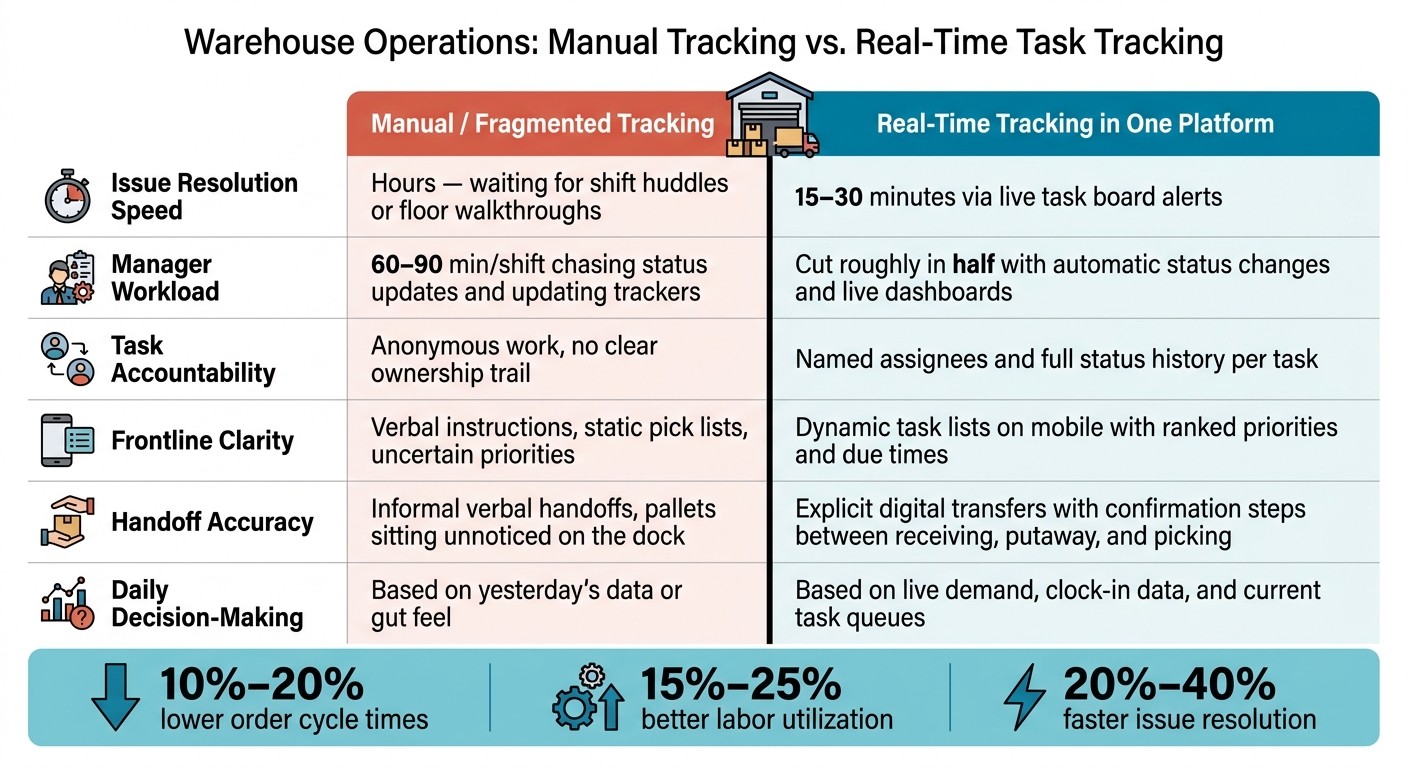
Warehouse Operations: Manual Tracking vs. Real-Time Task Tracking
Faster issue resolution, clearer accountability, and more predictable shifts
I’ve seen this happen on warehouse floors more than once: a task looks fine on paper, but on the shift itself, it quietly gets stuck. Nobody notices at first. Receiving slows down, picking starts waiting, packing gets jammed, and dispatch feels the hit last. By then, the whole shift is playing catch-up.
That’s where real-time task tracking changes the game for us at Pebb.io.
When task status, staffing, and handoffs sit in one shared view, we stop waiting for problems to grow teeth. Supervisors can see a task sitting in “in progress” longer than it should and step in before it creates a mess across receiving, picking, packing, restocking, and dispatch. In many U.S. warehouses, that kind of live visibility can cut issue resolution times by 20% to 40%.
Here’s the thing: speed matters, but clarity matters just as much.
Once every task has a clear owner and a status history, accountability stops being fuzzy. If a shipment misses a carrier cutoff, managers don’t have to rely on memory, hallway conversations, or guesswork. They can trace where the delay started and who owned that step. I like this because it changes the tone of the whole conversation. Instead of finger-pointing, you get a clean record that helps with coaching.
I’ve also seen how much easier shift management gets when labor data is part of that same view. If a pack line backs up or a dock stalls, supervisors can move two associates within 15 to 30 minutes of spotting the gap, not after the shift is already lost. That kind of mid-shift response cuts overtime and keeps labor where it needs to be.
Before and after real-time tracking in warehouse operations
When we break it down, the gains tend to show up in three areas: how fast issues get fixed, how clear ownership is, and how well labor gets used.
Area | Manual / Fragmented Tracking | Real-Time Tracking in One Platform |
|---|---|---|
Issue resolution speed | Hours - waiting for shift huddles or floor walkthroughs | 15–30 minutes via live task board alerts |
Manager workload | 60–90 min/shift chasing status updates and updating trackers | Cut roughly in half with automatic status changes and live dashboards |
Task accountability | Anonymous work, no clear ownership trail | Named assignees and full status history per task |
Frontline clarity | Verbal instructions, static pick lists, uncertain priorities | Dynamic task lists on mobile with ranked priorities and due times |
Handoff accuracy | Informal verbal handoffs, pallets sitting unnoticed on the dock | Explicit digital transfers with confirmation steps between receiving, putaway, and picking |
Daily decision-making | Based on yesterday's data or gut feel | Based on live demand, clock-in data, and current task queues |
Conclusion: build a warehouse workflow that teams can actually follow
Let me tell you what happened next when teams started working from one shared board instead of scattered updates: the floor got calmer.
Not perfect. Not magically easy. But calmer.
Real-time task tracking closes the visibility gap across receiving, picking, packing, restocking, and dispatch, so managers catch problems early, handoffs land cleanly, and frontline teams know what comes next without stopping to ask. From my side at Pebb.io, that’s the part that sticks with me most. One app and one shared view keep the floor aligned, shift after shift.
FAQs
How does real-time task tracking reduce warehouse delays?
I’ve seen warehouse delays snowball from the smallest things. One missed handoff, one update buried in a chat, one paper checklist left on a desk, and suddenly the whole shift is playing catch-up.
That’s why real-time task tracking matters so much. It cuts delays by stripping out the communication gaps and manual steps that slow everything down. Instead of guessing what’s done, what’s late, or who owns the next step, managers can see task status, employee progress, and shift handoffs as they happen. That kind of instant visibility keeps everyone on the same page and makes accountability a lot easier.
At Pebb.io, we’ve built this into how teams work day to day. Our platform brings task management, digital forms, and scheduling into one app, which means supervisors don’t have to jump between tools or chase updates across different channels.
Here’s what that looks like on the floor:
Supervisors assign tasks right away
Teams track progress in real time
Updates get shared instantly
Shift handoffs are less likely to slip through the cracks
Let me tell you what happens next when that system is in place. Teams solve issues faster. Missed handoffs drop. Operations keep moving instead of stalling while people wait for answers or hunt down paperwork.
Here’s the thing: when everyone can see what’s happening right now, the warehouse runs with a lot less friction.
What warehouse tasks should be tracked in real time?
I’ve seen this play out on the warehouse floor more times than I can count: a shift ends, a new one starts, and one missed handoff turns into a pileup by lunch.
That’s why we keep a close eye on tasks that need clear ownership, smooth shift-to-shift coordination, and fast visibility into bottlenecks. In my experience at Pebb.io, the big ones usually look like this:
opening and closing checklists
inventory checks
machine repairs
quality checks
operational handoffs
Here’s the thing: when those jobs live in scattered notes, radio calls, or someone’s memory, things slip. A repair gets delayed. A quality issue sits too long. A restocking task stalls picking and packing before anyone spots the holdup.
With Pebb, we pull task management into one place, so supervisors can assign work right inside chat threads or in dedicated spaces. That’s been a big help for teams handling picking, packing, restocking, and dispatch. Everyone can see what’s assigned, what’s due, what’s blocked, and what’s done without chasing updates across different tools.
Let me tell you what happened next when we started working this way: handoffs got cleaner, follow-up got easier, and managers had a live view of status, deadlines, and progress as the shift moved. That kind of visibility matters a lot when the floor gets busy fast.
How hard is it to switch from manual updates to one platform?
I’ve seen this happen up close: a team starts the morning buried in spreadsheets, sticky notes, and back-and-forth messages, and by the end of the day, they’re running in Pebb.
That sounds like hype, but it’s not. Some teams have moved their entire operation to Pebb in just one day.
Here’s the thing: the switch feels lighter than most people expect. A big reason is that Pebb has an intuitive, mobile-first interface. People don’t need to wrestle with clunky tools or hunt for basic info. They can pick it up fast and get on with their work.
What I’ve watched again and again is this: once everything lives in one place, the day gets less messy. Instead of jumping between spreadsheets, sticky notes, and walkie-talkies, teams use one app for:
communication
task tracking
scheduling
That cuts down the daily friction in a big way. Fewer handoffs. Fewer missed updates. Less of that “wait, where was that posted?” chaos.
And when a team no longer has to patch together five different tools just to get through a shift, work starts to feel a lot smoother.
