

Author: Ron Daniel
How to streamline PTO and vacation requests for frontline staff
Centralize PTO requests, set clear rules, check live staffing, and send decisions in one mobile app.
Nothing frustrates a frontline team faster than a time-off request that vanishes. At Pebb.io, I’ve watched a simple vacation ask turn into a missed shift, a confused manager, and a stressed employee in less than a day. When requests live in texts, side chats, or memory, the process breaks down fast.
The cost adds up. Unplanned absences can cut productivity by 36%, and managers can lose nearly a full workweek each year chasing schedules, checking coverage, and sorting out who approved what. I’ve seen the same pattern across retail, hospitality, logistics, and manufacturing: when there’s no single process, people wait too long for answers, schedules clash, and trust slips.
This pattern points to a simple fix. I’m going to walk through what I’ve seen work best: one request channel, one approval flow, live schedule checks before any decision, and clear updates in the same app. If you want PTO requests to stop creating chaos, this is the setup I’d start with.
A few lessons I keep coming back to:
Put every request in one place
Set clear rules before requests come in
Check staffing before approving leave
Send every decision through the same system
Keep PTO policy easy to find on mobile
When we tightened these steps at Pebb, approval times dropped, back-and-forth slowed down, and managers stopped piecing together requests from five different places. That’s the goal: fewer surprises, cleaner records, and a process frontline staff will actually use.
Map a clear PTO approval workflow before you change tools
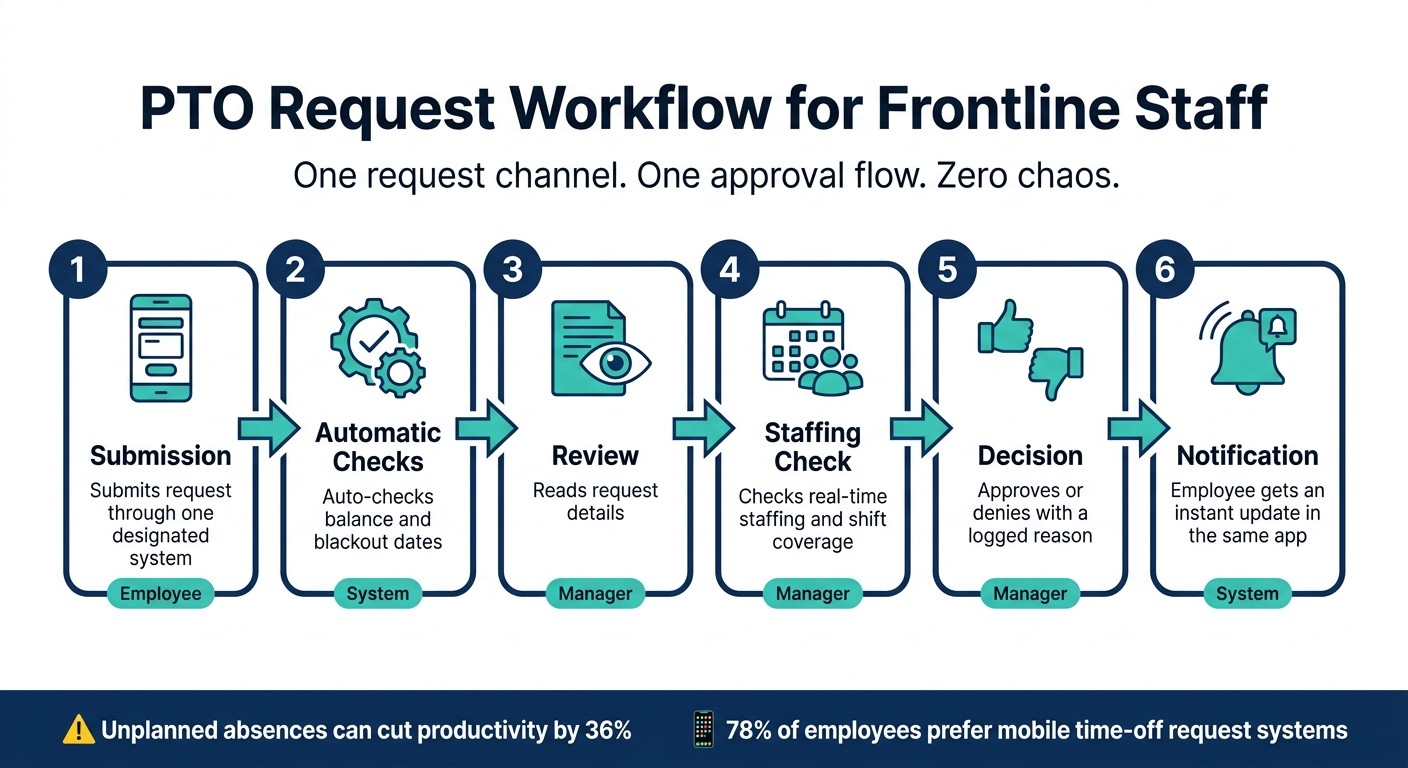
PTO Request Workflow for Frontline Staff: 6 Steps to Streamlined Approvals
I’ve seen teams rush to swap software, hoping the new app would fix PTO chaos on its own. It never does.
At Pebb.io, we learned this the hard way. If the process is messy, the tool just makes the mess faster. So before you touch a new platform, map the PTO workflow first. Get clear on where requests go, who looks at them, how coverage is checked, and where the final call gets recorded.
Here’s the thing: when those parts are fuzzy, requests stall, managers make different calls, and employees start feeling like approvals depend on luck.
Define each step from request to final decision
The cleanest PTO workflow I’ve worked with has six stages. Every person in the chain should be able to explain them without guessing.
Workflow Step | Owner | Action |
|---|---|---|
Submission | Employee | Submits request through one designated system |
Automatic checks | System | Auto-checks balance and blackout dates |
Review | Manager | Reads request details |
Staffing check | Manager | Checks real-time staffing and shift coverage |
Decision | Manager | Approves or denies with a logged reason |
Notification | System | Employee gets an instant update in the same app |
One rule I always push for: log each decision in the same system.
That sounds small, but it saves a ton of friction later. When someone asks why a request was denied, or when HR needs a record, nobody has to dig through texts, emails, and sticky notes. It’s all in one place.
Once those steps are locked in, the next move is simple: remove the stuff that makes requests bounce back.
Set request rules that reduce back-and-forth
Incomplete requests slow everything down. I’ve watched managers waste time chasing basic details that should’ve been there from the start.
So we make the form do more of the work.
Every request should include:
employee name
department or location
specific dates
the exact shifts or hours affected
PTO type
an optional notes field for context
Shift details matter more than people think. “June 15” leaves room for confusion. “June 15, 7:00 a.m.–3:00 p.m. day shift” gives a manager what they need to act.
Let me tell you what happened next when we tightened this up on one team: approval time dropped because managers stopped sending requests back for missing details. No drama. Just fewer loose ends.
Beyond the form itself, I’d set two rules upfront and make them impossible to miss: advance notice and blackout dates. For routine PTO, a two-week notice window is a common baseline, with about a month for longer vacations. Blackout dates or peak periods need to be spelled out and shared before the busy season starts.
In my experience, posting those dates in only one place isn’t enough. Put them in the form, the break room, and your knowledge base. If people can’t find the rule, they’ll say the rule doesn’t exist.
After the form is set, lock in the standards managers will use when they make the call.
Use consistent decision criteria across managers
This is usually where things start to drift, especially across many locations or shifts.
One manager says yes. Another says no. A third says, “It depends.” That’s when trust starts to crack.
The fix is plain: agree on shared criteria before requests start coming in. At Pebb.io, I’ve found that managers need the same playbook on:
first-come, first-served
minimum staffing by shift and role
overlapping requests
whether seniority matters during peak periods
If seniority matters, write it down and tell people clearly. Don’t leave it floating as some unwritten rule people only hear about after they get denied.
Document the criteria in a shared policy and make sure every manager has it. Denials should tie back to those standards, not gut feel. That’s what keeps the process steady and helps people trust it, even when they don’t get the answer they wanted.
Once the workflow is set, move every request into one digital channel.
Move PTO requests into one digital workflow
I’ve seen this go sideways more than once.
At Pebb.io, we’ve worked with teams that still handled PTO through texts, hallway chats, sticky notes, and the occasional “I told my manager last Tuesday” moment. It sounds harmless until two people ask for the same day off, a shift gets missed, and suddenly everyone’s digging through messages trying to figure out what happened.
Here’s the thing: once the workflow and rules are set, the next job is simple. Every PTO request needs to land in one system.
Use one official channel for submitting time-off requests
We always push for one official PTO system so every request is tracked in one place. If someone wants to ask a status question in chat, that’s fine. But the actual request should live in a formal PTO workflow, not inside a DM thread that disappears the minute things get busy.
In my experience, this is where a lot of teams trip up. They think, “We already use chat, so why not just handle PTO there too?” Let me tell you what happened next in cases like that: requests got buried, managers missed messages, and no one felt sure about what was approved.
That’s why we use mobile-first frontline worker solutions for requests, balances, schedules, and approvals. It gives us a single source of truth. General chat tools are great for talking. They are not PTO systems.
Standardize digital forms, routing, and notifications
A good digital form does a lot of the work before a manager even opens the request.
It should ask for:
the employee’s name
location or department
exact dates
specific shifts affected
PTO type
That sounds basic, but missing one of those details can slow down approval and create schedule issues later.
Once requests are in one place, we set up routing and alerts so the system handles the busywork. When each employee profile is tagged by location and department, the request goes straight to the right approver. No one has to forward it by hand. For larger teams, we add escalation paths too. So if a manager doesn’t respond within a set time window, the request moves up the chain on its own.
The notifications matter just as much. Employees get instant confirmation when they submit. Managers get alerted the moment a request comes in. Schedulers get notified as soon as it’s approved. And maybe my favorite part: employees can check the status themselves instead of chasing managers for updates.
The difference on the ground is immediate. A manual setup depends on paper handoffs, unread texts, and people remembering what happened across five channels. A digital workflow keeps every request in one place, routes it on its own, and gives both employees and managers a clear, time-stamped record.
That usually means faster approvals and fewer schedule conflicts.
And the preference from employees is clear too: 78% of employees prefer mobile time-off request systems over older methods, and satisfaction goes up when managers can approve requests through a push notification with a single tap.
Use scheduling and staffing visibility before approving leave
I’ve seen this pattern more times than I can count at Pebb.io: a team gets PTO requests out of email and spreadsheets, everyone feels relieved for about five minutes, and then the next problem shows up. Approval still slows down because managers need one thing they can’t skip - live coverage data.
Here’s the thing: digital requests help, but they don’t solve much if a manager still has to guess whether the team can handle the shift.
Check shift coverage and role requirements in real time
Before I approve a PTO request, I want to see the live schedule for those exact dates and shifts. That’s where the decision gets simple.
I’m usually looking at a few plain questions:
Is the shift fully staffed?
How many people in the same role are already off?
Are the critical roles still covered?
That sounds basic, but in day-to-day work, it changes everything.
Let me give you a real-world example. A restaurant might need one shift lead plus enough line cooks to keep service moving. A warehouse might need a minimum number of forklift-certified staff on site. If I can see that in the schedule right away, I’m not making a gut call. I’m making a clean call based on coverage.
When those staffing rules live inside the scheduling tool, approvals move faster and feel a lot less random from one manager to the next.
Use a shared PTO calendar to prevent scheduling conflicts
I’m a big fan of shared calendars for one reason: they make hidden problems show up early.
Instead of every manager keeping separate notes or trying to remember who’s off, everyone works from the same view. That includes pending requests, approved time off, and blackout dates. We can filter that by location, team, or role, which saves a lot of back-and-forth.
And yes, this matters in the messy parts of work, not just in theory.
If two line cooks already have approved time off for the same Saturday evening, that should be visible right away. If several forklift-certified staff ask for the same overnight shift off, the calendar should make it plain that saying yes to all of them would break the minimum staffing rule. If I’m looking at holiday retail coverage, I can switch to a cashier view and see fast whether one more approval would leave the store short on the floor.
That kind of visibility cuts down on those painful last-minute scramble moments we’ve all dealt with.
PTO decisions with vs. without schedule visibility
I’ve worked around both setups, and the gap is night and day.
With live schedule visibility, managers can catch conflicts, staffing gaps, and overtime risk before they approve leave. Without it, they’re approving blind. That’s when overlaps pile up, coverage holes show up late, and somebody has to reshuffle the schedule at the last minute.
Inside Pebb, we keep the PTO request, the live schedule, and the shared calendar in the same place. I like that because it means I can check coverage without bouncing between tools or tabs.
Once managers can see coverage in one view, the next move is making the rules and decisions easy for employees to find and understand.
Keep PTO communication consistent and easy to follow
I’ve seen this play out more times than I’d like to admit at Pebb.io: a team gets PTO coverage visibility sorted out, everyone feels good for a week, and then the cracks show up again. Why? Because the rules still live in five different places.
One manager has an old PDF. HR has a newer doc in a shared drive. A supervisor explains the policy in a group chat. Someone else heard a different version during onboarding. That’s when PTO starts to feel messy all over again.
Here’s the thing: seeing coverage is only half the job. Once that part is in place, we have to make the rules dead simple to find and follow.
Publish PTO rules in a mobile-friendly knowledge base
What worked best for us was putting every PTO rule in one place employees could open right from their phones. No hunting around. No “Can someone send me the latest version?” No separate login.
We made sure the key details were all there:
eligibility
accrual rules
notice windows
blackout periods
request priority
denial contacts
Short articles work best. Clear headings help. Plain language matters more than people think. If someone can type “blackout dates” or “how much PTO do I have” and get an answer right away, HR gets fewer repeat questions and employees stop guessing.
At Pebb.io, this matters a lot because people don’t want to bounce between tools just to figure out one policy. The Knowledge Base lives in the same app where they check schedules and submit time-off requests. That one change cuts a ton of friction.
And I’ll be blunt here: the rule source and the approval message have to match. If the policy says one thing and the manager note says another, trust drops fast.
Send clear approval and denial updates through the same system
I’ve also learned that status updates can either calm people down or set off a wave of frustration.
Every PTO update should go through the same system as a push notification: approved, denied, or needs more info. And it should include the basics every time: dates, shifts, decision, and a short note with a clear reason, like staffing levels or a published policy rule.
That last part matters a lot. A flat denial with no context feels arbitrary. Once that happens, people start assuming the process is unfair, even when it isn’t.
Let me tell you what happened next on one team we worked with. Managers were denying requests with one-word replies like “No” or “Can’t approve.” The policy itself wasn’t the problem. The communication was. Once they started adding a short reason tied to staffing or a posted rule, pushback dropped almost right away.
The same standard should apply when policies change. If there’s a new blackout period, an updated accrual rate, or a holiday change, post it once in the company news feed with the same wording for every location. No secondhand versions. No local rewrites that muddy the message.
That kind of consistency matters more than most teams think. According to Pew Research Center data, 46% of U.S. workers only use some of their PTO. Clear, steady communication helps close the gap between the policy on paper and the time off people take.
Conclusion: build one process your team will actually use
This is the lesson I keep coming back to: one process, one place.
Map the workflow. Move requests into a single digital channel. Connect approvals to live schedule data. Then send rules and decisions through that same system every single time.
Frontline teams stick with PTO processes that don’t slow them down. When the request form, schedule, Knowledge Base, and approval notice all live in one app - like Pebb - the process moves faster, feels clearer, and works across locations without gaps.
FAQs
How do I handle urgent same-day PTO requests?
At Pebb.io, I’ve seen this play out the hard way: when teams rely on scattered texts, sticky notes, or paper forms, time-off requests turn into a mess fast.
That’s why we push for a centralized digital workflow with Pebb. When an employee sends a request in the app, the manager gets alerted right away. From there, they can check it against current staffing levels and the master schedule without digging through messages or chasing someone down.
Here’s the part I like most: if the request gets approved, the schedule updates on its own and the team gets notified. That one step helps avoid coverage gaps and cuts down on those frantic phone calls nobody wants to deal with.
It sounds simple, and honestly, that’s the point. We’ve found that when the process lives in one place, people move faster, managers make better calls, and the whole team stays in the loop.
Who should approve PTO for multi-location teams?
I learned this one the hard way while working with multi-location teams at Pebb.io. We had a simple PTO request turn into a small relay race. A team member asked their manager, then the request went to a director, then HR got pulled in, and by the time it came back, everyone was annoyed.
Here’s the thing: for multi-location teams, the direct manager should be the first and only stop for PTO approvals. Once more people get added to that chain, delays start piling up fast.
In my experience, direct managers usually have the best read on day-to-day workloads, project timing, and who’s already out. They know when a deadline is tight and when the team has room to breathe. That means they can make the call faster and with a lot less back-and-forth.
We’ve also seen that this keeps the experience more consistent across locations. Instead of every office or region handling time-off requests a little differently, the decision stays with the person closest to the work. That cuts bottlenecks and makes the process feel much less frustrating for employees.
What should employees see in a PTO denial message?
I’ve seen this matter more than people think. When someone puts in a PTO request and it gets declined, the worst part usually isn’t the “no.” It’s the silence after.
Employees should see a clear, transparent status update in the app showing that the PTO request was declined.
Here’s the thing: that notice should appear right away. No waiting. No awkward follow-up. No chasing a manager just to figure out what happened.
At Pebb.io, we’ve learned that speed and clarity cut down a lot of friction. When scheduling and calendar data are tied to the request, employees can see the updated status in real time. That means they can adjust plans, check coverage, and move forward without extra back-and-forth or confusion.
