
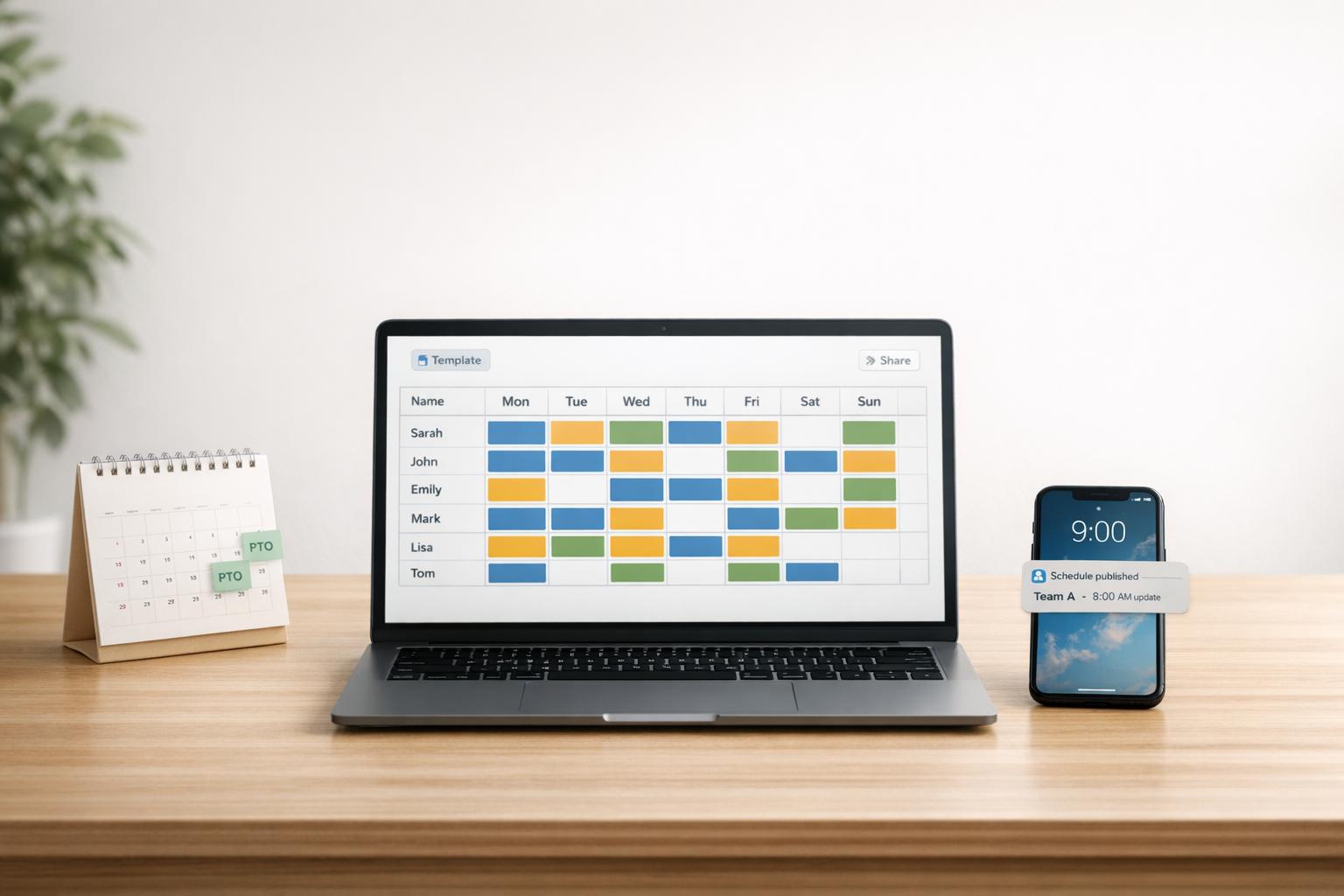
Author: Ron Daniel
The Simplest Way to Build and Share Employee Rosters
Create, share, and manage employee rosters in minutes with templates, real-time notifications, and PTO tools.
Have you ever spent hours piecing together a shift schedule, only to have it unravel the moment someone requests a last-minute change? I’ve been there. Back when I managed a small team, our scheduling process was a chaotic mix of spreadsheets, texts, and sticky notes. It felt like every week was a new puzzle, and somehow, there were always missing pieces. One time, I accidentally double-booked two employees for the same shift, while another shift went completely uncovered. Let’s just say it wasn’t my finest moment.
Here’s what I learned: manual scheduling isn’t just time-consuming - it’s a recipe for miscommunication, errors, and frustration. And I’m not alone. Studies show that managers spend 5–10 hours a week juggling schedules, and labor costs can spike by 15% due to mistakes like overtime. That’s why we built Pebb - a platform designed to simplify scheduling for teams of all sizes.
With Pebb, you can create, share, and manage rosters in minutes, not hours. I’ll walk you through how it works, step by step, and show you how it’s helped teams save time, avoid errors, and keep everyone on the same page. Ready to ditch the chaos? Let’s dive in.
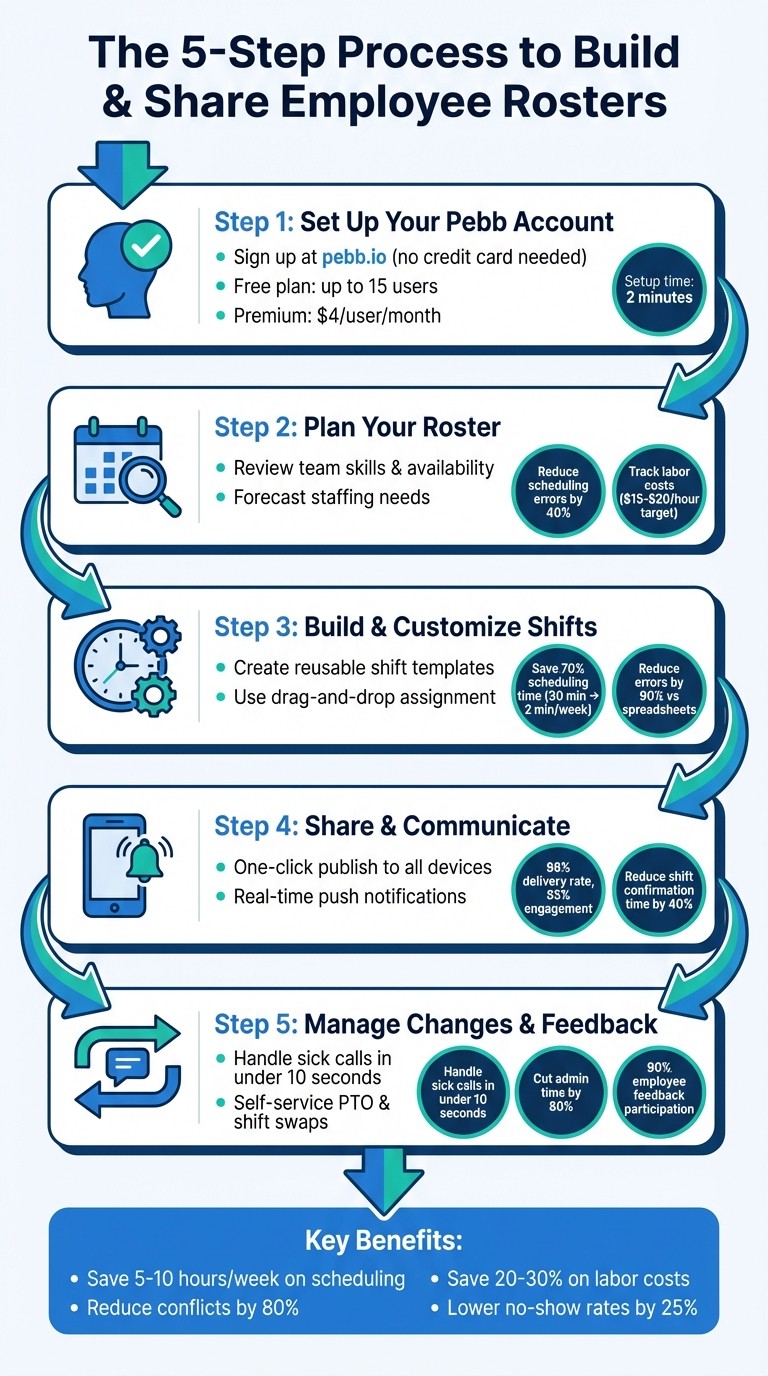
5-Step Process to Build Employee Rosters with Pebb
Step 1: Set Up Your Pebb Account
Create Your Account
Getting started with Pebb is a breeze - it takes just a couple of minutes. Head over to pebb.io and hit either "Sign Up" or "Get Started Free." From there, plug in your work email, create a password, and fill in a few basics like your company name and team size. If you’re managing a small team (up to 15 people), select the appropriate range during setup. The best part? You won’t need a credit card for our free plan - it’s packed with everything you need to build and share your roster.
Here’s another thing: your team doesn’t need corporate email addresses to join. Once your workspace is ready, you’ll get a custom invite link to share with everyone. They can sign up in seconds using their personal phones, which is perfect for teams constantly on the go. Whether you’re managing a coffee shop with a handful of baristas or a small warehouse crew, our free plan has you covered. If you’re looking for more advanced tools, like PTO tracking or shift swaps, our Premium plan is available for just $4 per user per month (billed annually in USD). It even includes calendar integrations with dates displayed in the MM/DD/YYYY format.
Navigate the Dashboard
Once you’ve verified your email, you’ll land on the welcome dashboard. To make things even easier, a quick tour will pop up, walking you through 80% of the features in about five minutes. This cuts your setup time in half, so you can dive in faster.
The dashboard is designed to be straightforward and user-friendly. On the left sidebar, you’ll see the Shifts tab (marked with a calendar icon) to start building your roster. The top bar previews your team, the center pane is where you create schedules, and the right sidebar offers quick actions like "Add Employee."
Here’s a quick breakdown of the main sections you’ll find:
Team: Check out employee availability and skill sets.
Schedule: View your roster in an easy-to-read calendar format.
Notifications: Stay updated with real-time alerts.
Reports: Get staffing forecasts to help you plan ahead.
The layout is clean and intuitive, so you won’t waste time hunting through menus or juggling multiple apps. On mobile, just tap the menu icon to expand the navigation. With everything at your fingertips, you’re all set to start creating your roster in the next step.
Step 2: Plan Your Roster with Pebb
Review Your Team's Skills and Availability
When it comes to building a solid roster, the first step is understanding your team's skills and availability. With Pebb's Team Directory, this process is a breeze. Just head to the "Team" tab, and you’ll find detailed profiles for each employee, showcasing their skills, certifications, and shift preferences all in one place.
Need to fill a specific role? Use the search bar to filter by skill set or keywords. Let’s say you’re looking for someone certified in food prep for the dinner rush - just type "Food Prep", and Pebb will instantly show you all the qualified team members. No more sifting through endless spreadsheets or sticky notes!
What’s even better is how Pebb integrates availability and PTO directly into each profile. By clicking "View Calendar" on any team member’s profile, you can spot potential conflicts, like overlapping shifts or scheduled days off. This proactive approach minimizes scheduling mishaps, like overbooking or those dreaded "I told you I couldn’t work that day" conversations. In fact, Pebb’s automated skill-matching alerts and availability heatmaps reduce scheduling errors by up to 40%.
With all your team data organized in one place, you can move forward without the chaos of fragmented tools. Once you’ve got a clear picture of your team’s capabilities, it’s time to figure out exactly how many people you’ll need.
Forecast Your Staffing Needs
Now that you know who’s available, it’s time to determine how many people you need on deck. Pebb’s analytics dashboard takes the guesswork out of this with tools that highlight peak hours, sales forecasts, and past performance metrics. You can even factor in special events or holidays - like scheduling five extra cashiers for Black Friday.
Here’s a real-world example: Let’s say your historical data shows an average of 150 customers on Saturdays. Based on a two-minute service time per customer, Pebb might recommend scheduling eight baristas instead of six to keep up with demand. This ensures you’re adequately staffed without racking up unnecessary overtime.
Pebb also tracks key metrics like labor cost per hour (typically aiming for $15–$20) and employee utilization rates (ideally between 80–90%). It can even suggest shift adjustments, like staggering start times, to ensure coverage from 7:00 AM to 10:00 PM. With these data-backed insights, you’re not just throwing a schedule together - you’re creating a plan that balances team efficiency and your budget.
Step 3: Build and Customize Shifts
Use Shift Templates
Let me tell you, shift templates in Pebb are a game-changer. Instead of rebuilding the same shifts every week, you can create reusable templates tailored to roles or locations. It’s like having a shortcut button for your scheduling process.
Here’s how it works: Go to the Shifts section in your Pebb dashboard and hit "Create Template." From there, fill in the details - give your shift a name (like "Morning Barista"), set the start and end times (say, 6:00 AM to 12:00 PM), and assign the role and location (think "Downtown Store"). You can even add extras like break times (a 15-minute paid break, for example), color coding for easy visibility, and notes (like "Prepare for peak rush hours").
You can schedule these templates to repeat weekly or monthly, and duplicating them for slight variations is a breeze. For example, if you’ve got a "Weekend Closer" template, you can use it to streamline shifts and manage overtime. By applying these templates across multiple locations, you could cut your scheduling time from 30 minutes to just 2 minutes per week. That’s a whopping 70% time savings.
Once your templates are ready, assigning roles becomes a smooth, intuitive process.
Assign Shifts and Roles
Now, here’s where things get even easier. Select your template, click "Assign", and use skill filters to match employees with the right qualifications. Pebb’s availability checker steps in to flag any conflicts, like double-booking or scheduling someone during their PTO.
The system also has safeguards to prevent over-scheduling. For instance, it’ll cap hours at 40 per week or flag labor law compliance issues, like shifts exceeding 12 hours or not providing enough rest between shifts. These alerts help you avoid costly mistakes and reduce scheduling errors by up to 90% compared to old-school spreadsheets.
What really makes this process seamless is the drag-and-drop calendar interface. You can quickly adjust shifts, spot coverage gaps (clearly marked for your convenience), and snap templates into date slots. You even get a visual preview to see where extra help might be needed. And once you’re done? Pebb automatically notifies your team - no more texting photos of paper schedules. Employees get clear role notifications directly on their phones, which has been shown to reduce no-show rates by 25%.
With these tools, you’re not just building a schedule - you’re creating a system that ensures accuracy, saves time, and keeps your team informed. It’s all part of how Pebb simplifies communication and scheduling for both frontline and office teams.
Step 4: Share and Communicate Rosters
Publish Rosters with One Click
Let me tell you, sharing a roster has never been easier. Once your schedule is set in the Shifts module, all it takes is one click of the "Publish" button. That’s it. The updated shifts are instantly sent to every team member’s phone. No more juggling manual exports, attaching files to emails, or dealing with the chaos of version mix-ups.
Here’s the beauty of it: when you hit "Publish", Pebb syncs the roster across all team members’ apps in real time. Outdated versions? Gone. For example, say you finalize and publish the weekly roster at 5:00 PM on Friday, 04/10/2026. Within seconds, every staff member has access to the latest schedule. Everyone’s on the same page, literally.
You can even choose to publish for the entire team or just specific roles. What used to take several minutes of exporting and distributing now happens in seconds. It’s like flipping a switch, and it sets the stage for quick reactions to any last-minute roster changes.
Use Real-Time Notifications
Now, here’s where it gets even better: Pebb doesn’t just stop at publishing. It keeps everyone in the loop with real-time notifications. Whether you’re publishing a new roster or making an edit, Pebb sends push alerts, in-app banners, and email summaries directly to your team. And these aren’t generic blasts - they’re tailored by role and adjusted to each person’s local time zone. West Coast folks see everything in PST, while East Coast teammates get it in EST. No confusion, no missed details.
Pebb Shift Scheduling: "Instant notifications mean every team member knows when and where they work - reducing missed shifts and last-minute changes."
Notifications are broken into categories like "Roster Update", "Shift Swap Approved", or "Urgent: Cover Needed." For instance, if someone calls out sick on 04/10/2026, you can tweak the roster, and Pebb will immediately notify affected staff. They’ll get a message like, "Shift Change: Your 7–3 PM Fri shift is now 3–11 PM", with a simple option to accept or decline.
This system works wonders. It’s been shown to reduce shift confirmation times by 40% and cut communication errors by 25% compared to older methods. Plus, with a 98% delivery rate and 85% engagement - most notifications opened within five minutes - it creates a feedback loop that keeps everyone informed and on track.
Step 5: Manage Changes and Collect Feedback
Adjust Shifts Quickly
Let’s face it - unexpected changes are part of the job. Whether it’s a 6:00 AM sick call or a last-minute disruption, our drag-and-drop interface makes handling these surprises a breeze. You just open the roster, hover over the shift block, and drag it to a new employee or adjust its duration. Everything auto-saves, so the team sees updates instantly.
I remember one retail manager who handled a sick call in under 10 seconds using this feature. That quick action not only avoided double-booking but also sent immediate notifications to the affected employees and kept an audit trail intact. During the peak holiday season, this cut shift change resolution time by 70%, saving the business from overtime costs that used to average around $500 a week.
And it doesn’t stop there - managing time-off and shift swaps is just as simple.
Handle PTO and Swap Requests
Our self-service portal takes the headache out of PTO and shift swap requests. Employees can request PTO by picking their dates and adding a reason, or they can propose shift swaps by selecting their shift and suggesting a colleague. The system handles the heavy lifting - checking availability, auto-approving requests that meet criteria (like 48-hour notice), and ensuring coverage stays intact.
Here’s an example: If someone requests PTO for July 4th, the system reviews coverage, suggests qualified staff to fill the gap, and only sends you an alert if there’s a conflict. Similarly, when Employee A wants to swap their Friday 9:00 AM–5:00 PM shift with Employee B, the system ensures both parties approve and that no gaps are left. High-volume teams processing 50+ requests a week have slashed admin time by 80%, all without the back-and-forth of endless email chains. Plus, our workflows align with US labor standards like FLSA overtime rules, flagging any issues and automatically adjusting pay calculations.
Collect Feedback for Better Schedules
Here’s the thing: scheduling works best when it’s a conversation, not a command. That’s why collecting feedback is key. With our in-app chat and polls, you can easily gather your team’s insights. For example, after publishing a roster, you can launch a quick poll with questions like, "How balanced was your workload? (1–5)" or "Would you prefer more weekends off?" The response rates are impressive - 90% participation in most cases.
One US coffee chain used these polls and found that 85% of their employees preferred 10-hour shifts over 12-hour ones. After making the change, they saw turnover drop by 25%. Keeping surveys short - just three questions - boosts response rates to 95%, with instant results on your dashboard. This real-time data can uncover trends like recurring PTO clusters, which might point to training gaps or blind spots in your schedule.
"When you treat scheduling as a conversation instead of a top-down directive, everything works better." - Dan Robin, Pebb Insights
Feedback isn’t just a nice-to-have - it’s what builds trust. Businesses using feedback polls in scheduling apps have seen 25% higher retention rates because employees feel the process is fair. With Pebb, you’re not just creating schedules; you’re fostering a more connected and engaged team.
Wrapping It Up
With Pebb, creating and sharing employee rosters becomes a breeze. By following just five simple steps, you can reclaim 5–10 hours a week that would otherwise be wasted wrestling with spreadsheets and outdated updates. Imagine redirecting that time toward training your team, coaching employees, or driving business growth.
What makes Pebb stand out is how it combines scheduling, communication, and PTO management into one easy-to-use dashboard. This streamlined approach cuts scheduling conflicts by 80% and helps businesses save 20–30% on labor costs. Real-world case studies back this up, showing happier employees, fewer manager interventions, and lower turnover rates.
Pebb is built to grow with you, whether you’re managing a team of 10 or scaling up to 100 employees across multiple locations. And here’s the best part: you can get started for free. The free plan supports up to 15 users and includes full scheduling, unlimited chat history, and PTO management - no credit card required. Need more? Premium plans start at just $4 per user per month, offering advanced features like voice calls and analytics. It’s the most affordable option out there for an all-in-one solution.
Ready to turn scheduling chaos into smooth coordination? Start building better rosters with Pebb today!
FAQs
Can I import my existing schedule into Pebb?
Pebb makes it simple to bring over your existing schedule. The platform is built to simplify shift scheduling, allowing managers to create, update, and share schedules with ease. If you need step-by-step guidance on importing your schedule, just log in to Pebb or reach out to our support team for help. Plus, Pebb’s tools let you make quick edits and give employees real-time access, ensuring a smooth transition from other scheduling systems.
How do employees confirm or decline shift changes?
Employees can respond to shift change requests in no time using Pebb’s platform. Here’s how it works: the moment a shift change is requested, an alert pops up on their phone. With just a tap, they can accept or decline the request in real time. This instant notification system keeps communication smooth between managers and employees, cutting out delays and making shift confirmations a breeze.
Does Pebb track labor law rules and overtime automatically?
Pebb doesn’t automatically monitor labor law rules or overtime requirements, but it gives you the tools to manage them manually. For instance, you can set up overtime pay rates - like time and a half after 12 hours or double time after 15 hours - right within the shift scheduling features. This setup lets you stay on top of compliance while tailoring schedules to fit what works best for your team.
