
Author: Ron Daniel
From Shift Rota to PTO Calendar: Every Step in One Solution
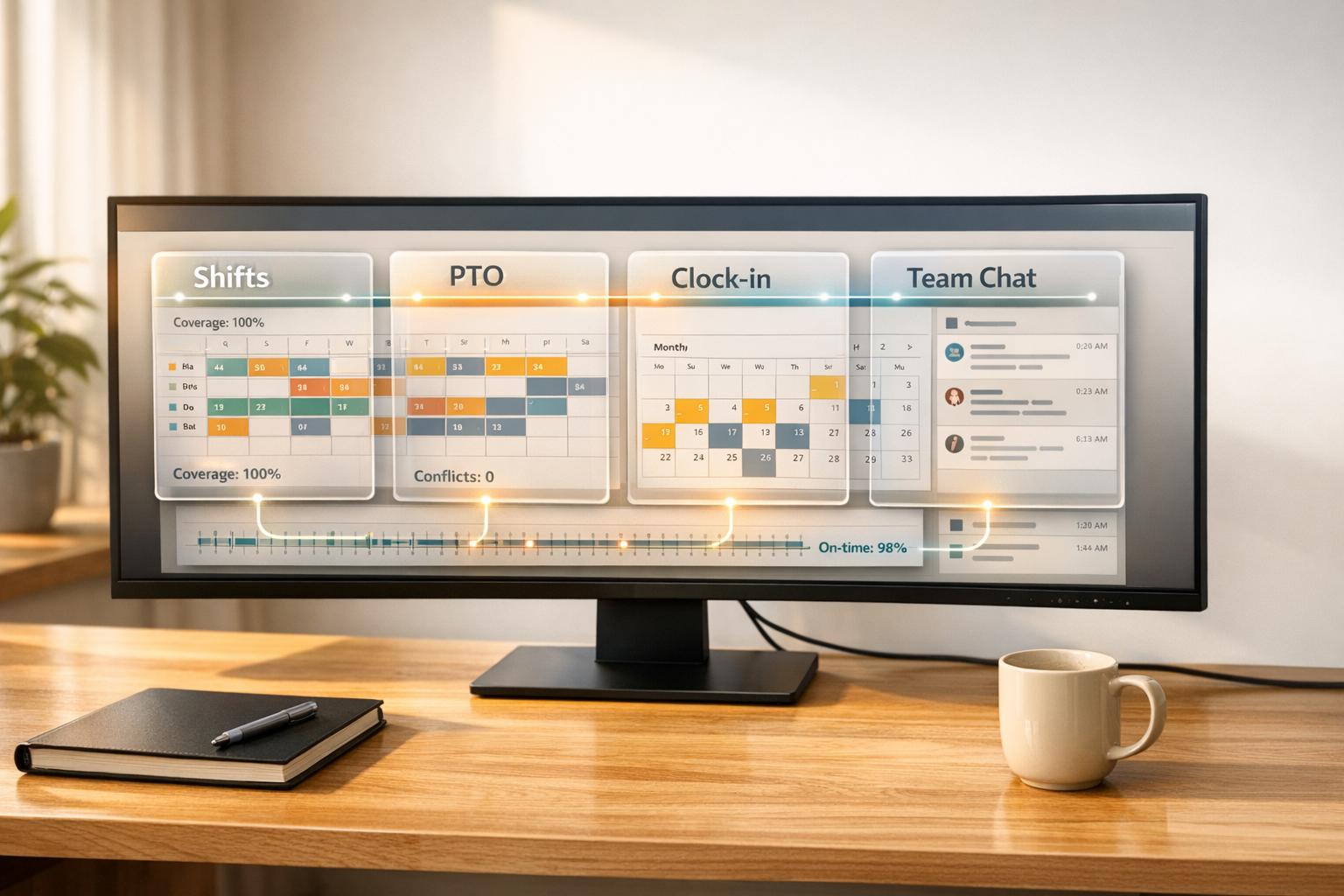
Manage shifts, PTO, clock-ins, and team communication in one integrated system to cut scheduling errors, reduce admin time, and improve shift coverage.
Have you ever felt like managing your team’s schedule is more like solving a Rubik’s cube blindfolded? I’ve been there. Back when I first started managing shifts, I had one app for scheduling, another for PTO requests, and a spreadsheet that seemed to have a personal vendetta against me. The result? Missed PTO approvals, double-booked shifts, and a lot of late nights trying to piece it all together. It wasn’t just frustrating - it was chaos.
Here’s the kicker: I wasn’t alone. Teams using disconnected systems see 15-20% more shift coverage issues and higher overtime costs. Employees feel out of the loop, managers waste hours cross-checking, and the whole system feels like it’s held together with duct tape. Sound familiar?
That’s why we built Pebb. It’s the all-in-one employee app that brings everything - shift scheduling, PTO tracking, clock-ins, tasks, digital forms, events, and team communication - into one place. No more app-jumping, no more missed updates, no more chaos. Let me show you how we turned scheduling headaches into smooth, efficient workflows. Trust me, it’s a game-changer.
Why Multiple Tools for Shifts and PTO Don't Work
Disconnected Tools Lead to Errors and Confusion
Imagine this: your shift schedule is managed in one app, while PTO requests live in another. It’s a recipe for chaos. A manager might approve a vacation in the PTO tracker, but the scheduling app doesn’t get the memo. Suddenly, an employee is scheduled to work during their vacation, leaving a gap that needs to be covered.
This kind of disconnect creates a ripple effect. Double-bookings, missed shift updates, and incorrect PTO balances become the norm. Supply chain companies relying on separate systems report 15-20% more shift coverage issues and increased overtime costs. These problems disappear when systems actually communicate with each other.
And shift swaps? They’re another headache. If one platform doesn’t sync with another, employees are left juggling multiple apps just to confirm their schedule. These gaps in communication lead to missed updates, unexpected absences, and operational disruptions. The fallout? Productivity takes a hit, and managers are left untangling the mess.
More Work for Managers
Here’s the thing: disconnected tools don’t just create errors - they create work. If you’re a manager, you know the drill. You’re logging into one app to build schedules, another to approve PTO, a third to monitor clock-ins, and then manually cross-checking everything to fix mistakes. It’s a time sink, plain and simple.
"The most expensive part of bad scheduling isn't the direct cost, but the opportunity cost. It's the leadership, growth, and customer service that never happens because your managers are trapped in administrative quicksand." – Dan Robin, Pebb
Every hour spent reconciling systems is an hour you’re not coaching your team, planning ahead, or focusing on the bigger picture. These inefficiencies don’t just weigh on management - they ripple out, impacting the whole team’s morale and effectiveness.
Employees Get Frustrated and Disconnect
No one wants to jump between apps just to figure out their schedule or confirm a PTO request. When employees face unsynced changes, missed updates, or a shift swap that doesn’t show up on their calendar, frustration builds. And in industries like healthcare or retail, where schedules are already complicated, these issues can feel unbearable.
The result? Employees lose trust in the system. They stop checking for updates, disengage, and eventually start looking for jobs where their time and effort are respected. A disconnected system doesn’t just complicate workflows - it pushes your best people out the door.
How Pebb Brings Everything Together
When we started building Pebb, it wasn’t just about creating another tool - it was about solving a problem we saw everywhere. Managers juggling too many apps, employees frustrated with confusing schedules, and everyone losing time to inefficiency. We knew there had to be a better way, so we set out to bring everything under one roof.
What Pebb Offers
Pebb is like the Swiss Army knife of workforce management. It combines shift scheduling, PTO tracking, clock-ins, work chat, a news feed, digital forms, tasks, calendar events, files and links, knowledge library, and voice and video calls - all in one place. Here’s how it works:
Shift scheduling: Drag and drop to create rotas in minutes.
PTO tracking and approvals: Real-time balance checks make it easy to approve requests without second-guessing.
GPS clock-ins: Employees clock in via mobile, and GPS geofencing helps prevent time theft.
News feed: Announcements and updates go straight to everyone’s phone, so nothing gets missed.
For retail managers, Pebb replaces the chaos of Google Sheets, email threads, and personal messaging apps. Let’s say someone requests vacation - Pebb automatically checks their PTO balance, flags any scheduling conflicts, and sends notifications through chat. And because clock-in data syncs with schedules and PTO balances, payroll becomes more accurate, cutting admin time by 30% as schedules adjust automatically for approved time off.
Why Pebb Stands Out
Here’s the kicker: we’re the only platform offering a completely free plan for teams of up to 15 employees. That’s right - unlimited shift scheduling, PTO tracking, clock-ins, and chat with admin & data limitations. Small businesses can finally ditch the patchwork of tools without spending a dime.
Our premium plan? Just $4 per user per month. It includes everything: shift scheduling, PTO management, clock in, chat, news feed, tasks, digital forms, calendar, knowledge library, voice and video calls, analytics, integrations, and Enterprise SSO. Compare that to Slack at $7.25+ per user or Microsoft Teams at $4–$12.50 per user - neither of which gives you PTO tracking or shift scheduling without pricey add-ons. With Pebb, you get a complete workforce management solution for 40–50% less.
We’ve also packed in features you won’t find fully integrated elsewhere:
Tasks management: Assign and track progress so work stays aligned across your team.
Digital forms: Share and collect data without chasing paper or separate tools.
Calendar events: Keep shifts, updates, and important dates organized in one place.
These tools don’t just sound good - they deliver. Teams using Pebb cut overstaffing by 20% and admin time by 50%. And because we’re mobile-first, your team can manage everything on the go, which is ideal for frontline workers who aren’t tied to a desk.
With Pebb, managing your team isn’t just easier - it’s smarter. Stick around, and I’ll show you how to get started with Pebb and streamline your team management in just a few steps.
How to Manage Your Team with Pebb
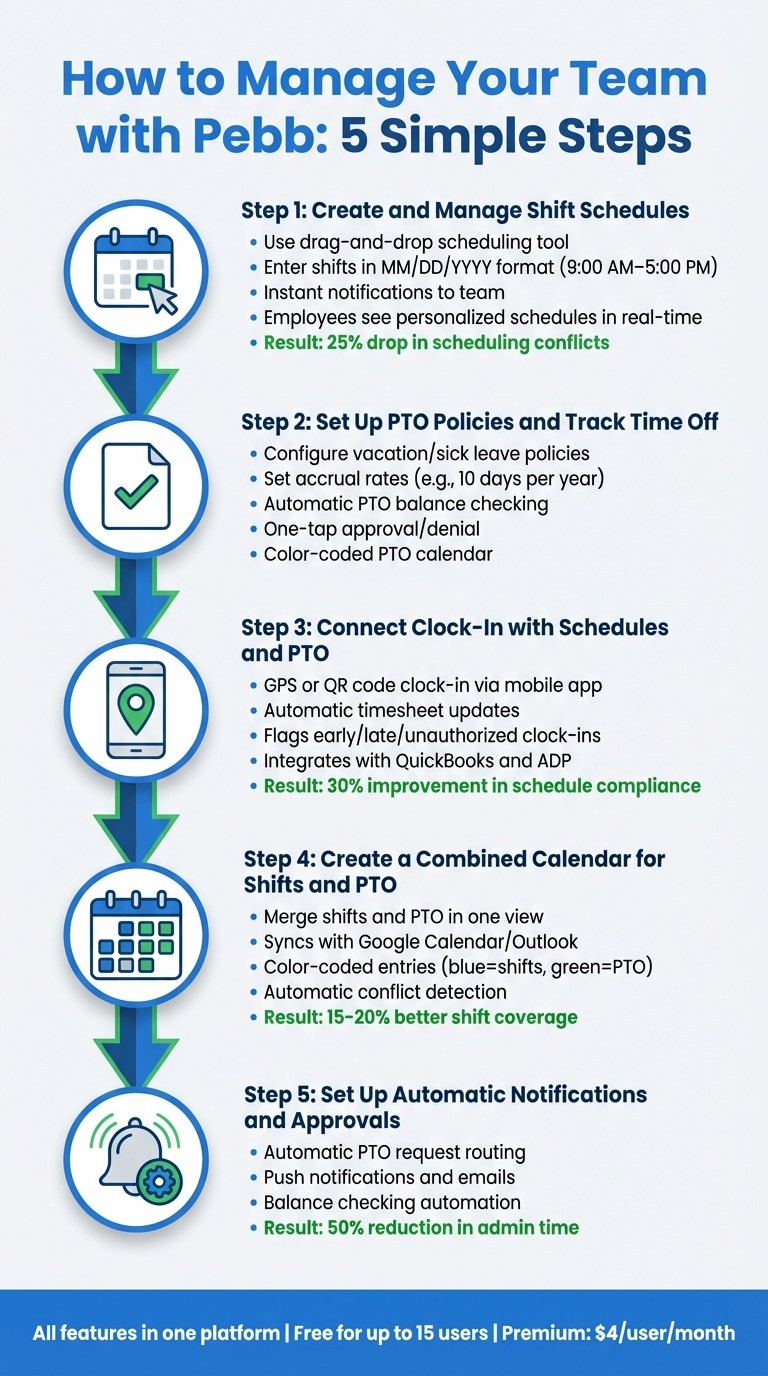
5 Steps to Manage Team Schedules with Pebb Workforce Management
Managing a team can feel like juggling a dozen tasks at once, but with Pebb, the process becomes straightforward. Let me walk you through the steps we’ve crafted to make team management seamless and efficient.
Step 1: Create and Manage Shift Schedules
Start by logging into the Pebb dashboard and heading to "Shifts Scheduling." This is where you can build your team's schedule in a snap. You’ll enter shift details using the MM/DD/YYYY and 12-hour format (like 9:00 AM–5:00 PM), and our drag-and-drop tool lets you assign shifts in just a few clicks. The best part? Any changes you make send instant notifications to your team, and employees can see their personalized schedules - including flagged conflicts or approved swaps - in real time.
Here’s what makes it even easier: employees can update their availability directly in the app before you create the schedule. You’ll know who’s free, who’s requested time off, and who’s nearing overtime - all at a glance. If someone needs to swap shifts, they can request it through the app, and you can approve it with a single tap. One US retail chain we worked with saw a 25% drop in scheduling conflicts because these updates were visible to everyone in real time.
Step 2: Set Up PTO Policies and Track Time Off
Next, head to "PTO Policies" in the settings to configure your time-off rules. You can define policies like vacation or sick leave, set accrual rates (e.g., 10 days per year, which is common in the US), and assign them to employees. When someone requests time off, they can do it through the app or a digital form. Pebb automatically checks their PTO balance, so you’ll never have to guess if they’ve got enough days available.
Approving or denying requests is just as simple - one tap, and the PTO calendar updates instantly. It even uses color coding to show different leave types, making it easy to avoid double-bookings. If someone tries to clock in during approved leave, Pebb flags it immediately, keeping your records accurate.
Step 3: Connect Clock-In with Schedules and PTO
Once your PTO policies are set, you can tie everything together with Pebb’s clock-in feature. Employees can clock in using GPS or by scanning a QR code through the mobile app. The system automatically updates their timesheets, syncing with schedules and PTO balances. If someone clocks in early, late, or during approved time off, you’ll see it flagged on your dashboard in real time.
This setup helps improve schedule compliance by 30% because managers can rely on live data instead of guesswork. Plus, it includes integrations, cutting down on manual entry errors. For logistics companies running 24/7, this visibility has helped reduce overtime costs and ensure shifts are properly covered.
Step 4: Create a Combined Calendar for Shifts and PTO
To simplify planning even further, use the "Combined Calendar" feature to merge shifts and PTO into one easy-to-read view. This calendar keeps everything up to date in MM/DD/YYYY format. Employees can access this unified view on their mobile devices, with color-coded entries - blue for shifts, green for PTO - for clear daily planning.
The system also detects scheduling conflicts automatically. If you accidentally assign someone to work during approved leave, Pebb flags it before it becomes an issue. Teams using this feature reported 15–20% better shift coverage because managers could plan around time off without juggling multiple spreadsheets.
Step 5: Set Up Automatic Notifications and Approvals
Finally, enable automations in "Notifications & Approvals." When someone submits a PTO request, the system checks their balance and routes it to you for approval or denial. Push notifications and emails ensure everyone stays in the loop.
These automations take care of the repetitive tasks, freeing you up to focus on more strategic priorities. Managers who use these features have cut their admin time in half, no longer needing to chase confirmations or manually calculate balances. By following these steps, you’ll not only save time but also keep your team aligned and on track.
What You Get: Better Communication and Less Admin Work
When Pebb becomes part of your team's routine, the changes are immediate and noticeable. It’s like flipping a switch on how your team operates day-to-day.
Better Team Coordination
Imagine this: shifts, PTO, and clock-ins all in one place. No more chasing down updates in scattered spreadsheets or email threads. With Pebb, your team gets a unified calendar and clear notifications, so everyone stays on the same page. Plus, the central news feed and built-in chat make announcements more interactive. Instead of feeling like just another memo, they spark conversations that make everyone feel included and informed.
Save Time and Money
Here’s where it gets even better for managers: approvals happen with a single tap. That means no more hours spent tweaking spreadsheets. Timesheets? They’re automated and sync directly with payroll, which slashes errors and trims overtime costs by 15–20%. And because Pebb replaces multiple systems with one easy-to-learn platform, training takes less time, saving resources while simplifying operations.
A Better Experience for Employees
Let’s talk about what this means for your team. Pebb’s mobile-first app gives employees the power to manage their schedules on the go. They can request PTO, swap shifts, or sync calendars without waiting for a manager to step in. This kind of control matters - a lot. Did you know 82% of shift workers say schedule flexibility is a top priority? And 40% would even take a pay cut for more say over their hours. With everything laid out in one clean, easy-to-use interface, employees spend less time scrambling for details and more time focusing on what’s important. The payoff? Fewer scheduling headaches, higher engagement, and a team that feels confident about what’s coming next.
Wrapping It All Up
Managing shifts and PTO doesn’t have to feel like a constant battle against spreadsheets, emails, and confusion. By consolidating everything into one platform, you can eliminate those headaches - no more spreadsheet mistakes, no more approvals lost in email threads, and no more employees left wondering when or where they’re supposed to work.
That’s exactly why we built Pebb. It’s a single place for shift scheduling, PTO tracking, clock-ins, tasks, digital forms, calendar events, and team communication - fully accessible from any mobile device. And the results speak for themselves: companies using integrated systems like ours report a 30% boost in schedule adherence and save 15–20% on overtime costs. That’s not just smoother operations; it’s real savings and more time back in your day.
But here’s the best part: your employees feel empowered. They can request time off, swap shifts, and stay connected - all from one app. Giving your team this kind of flexibility doesn’t just make life easier; it keeps them engaged and helps reduce turnover.
Whether you’re running a retail store, a restaurant, or managing a distributed workforce, Pebb delivers the efficiency you need without breaking the bank. Our free plan supports up to 15 employees, and the premium plan is just $4 per user per month. It’s the most affordable all-in-one solution out there.
Why not give Pebb a try today? See how seamless operations can be when everything works together.
FAQs
How long does it take to set up Pebb for a team?
Setting up Pebb for your team is as straightforward as it gets. In just a few minutes, managers can create, publish, and update schedules without jumping through hoops or dealing with complicated configurations. It's all about getting your team up and running quickly and smoothly, so you can focus on what really matters - your work.
Can Pebb handle different PTO rules for different roles?
Pebb makes managing different PTO rules for various roles a breeze. With its flexible features, you can customize shift schedules, PTO policies, and workforce operations to align perfectly with the unique needs of each role. This ensures your team runs smoothly while accommodating diverse requirements.
Will Pebb sync schedules and time off with payroll?
Pebb makes managing schedules and PTO a breeze by syncing them directly with payroll. With this integration, you can handle employee time management more efficiently while ensuring payroll is processed accurately. It cuts down on administrative headaches and saves valuable time.
