

Author: Ron Daniel
How to secure company files while sharing them with field staff
Practical steps to protect files shared with frontline teams: role-based access, single source of truth, mobile controls, and audit trails.
Most file leaks don’t start with a hacker. They start with a shortcut. At Pebb.io, I’ve seen teams send a safety PDF by text, drop an HR form into a group chat, or email a checklist “just for today,” only to find old copies still floating around weeks later.
That’s the part that hits hard. The 2025 Data Breach Investigations Report said the human element played a role in 60% of breaches, and a 2023 breach report found misconfigurations were up 78%. In plain English: the risk often comes from everyday habits and loose access settings, not some big movie-style attack.
So I keep this simple. If I want field staff to get the right file on the spot without losing control, I focus on three things: limit access by role, keep one current version, and lock down mobile use. Based on that pattern, here’s what works when you need fast file sharing that doesn’t turn into a cleanup job later.
Give people access only to the files tied to their job
Keep one approved version in one place
Use MFA, SSO, expiring links, and view-only access where needed
Review file activity and permissions every 90 days
Stop files from spreading across email, texts, and personal apps
I’ve learned that when the secure path is also the easy path, field teams follow it. And when files, chat, forms, and knowledge base live in one app, it gets a lot easier to keep everyone on the same page.
The biggest file-sharing risks for frontline teams
I’ve seen this play out more times than I’d like at Pebb.io. A manager sends one file to help a team move faster, and suddenly that same file is sitting in five inboxes, two phones, and a shared tablet at the front desk. What started as a simple handoff turns into a mess.
For frontline teams, the biggest risks usually show up in three patterns: exposure, stale versions, and device access. And it starts the second a file leaves a controlled system. From there, it gets much harder for managers to keep a grip on shift documents, site checklists, safety manuals, and HR forms that teams use every day.
Forwarded links and attachments expose sensitive information
Here’s the thing: once a file lands in someone’s inbox or chat, control gets slippery fast.
That person can forward it, download it, or pass it to someone you never meant to include. One click, and the file is outside your line of sight. Roughly 94% of malware is delivered through email attachments.
For frontline teams in retail, hospitality, and logistics, this gets risky fast. I’ve watched how a shift schedule or safety checklist sent to one supervisor can spread far beyond the first person. It can end up with ex-employees, outside contacts, or staff at the wrong location.
And forwarding is only part of the problem. Once files get copied, a second issue shows up: old versions start hanging around.
Outdated documents cause safety and operational mistakes
Every time someone sends a file as an attachment, they create another copy. Those old copies stick around in inboxes, downloads, and phone storage. That’s how teams end up with piles of the same file in different places.
Let me tell you what happens next. One person opens the latest version. Another opens the one they downloaded last month. A third pulls up a copy from their email because it feels faster. Now the team is working from three different versions, and nobody means to cause a problem.
In manufacturing, that can get serious. A technician following an outdated lockout/tagout procedure saved on their phone could miss a safety step added after a near-miss incident. The problem isn't carelessness - it's that the system makes it easy to act on old information without realizing it.
I think that’s the part people miss. Most frontline mistakes around documents don’t start with bad intent. They start with friction. If the old file is easier to reach than the current one, people will use the old file.
The risk gets even bigger when those files live on phones and shared tablets instead of one controlled system.
Lost phones and shared devices open files to the wrong people
Frontline work happens on the move. Drivers, floor supervisors, and hotel staff access company files on personal phones or shared tablets. When a device is lost or stolen, any locally stored files go with it.
I’ve seen teams underestimate this because the device feels small and ordinary. But a phone can hold schedules, HR forms, incident notes, and internal checklists. Lose the phone, and you may lose all of that with it.
Shared devices add another layer. If a warehouse supervisor steps away from a tablet without logging out, the next person - a temp worker or contractor - inherits open access to HR reports, incident logs, and SOPs. Saved sessions can keep files open even after the device is set down.
That’s where things get uncomfortable. Nobody hacked anything. Nobody broke into a system. The file was just there, still open, waiting for the next set of hands.
From what I’ve seen, this is why access rules, device protections, and audit trails matter before files leave the office.
Set up access rules before sharing any file
Frontline File Sharing Security: Role-Based Access Control Guide
I learned this one the hard way: if we share files before we lock down access, we’re asking for trouble.
At Pebb.io, I’ve seen teams get excited about rolling out docs to field crews, only to realize later that people had access to things they never should’ve seen in the first place. And once a file starts bouncing between phones, inboxes, and random apps, pulling that control back gets messy fast.
That’s why I always start with policy first, sharing second.
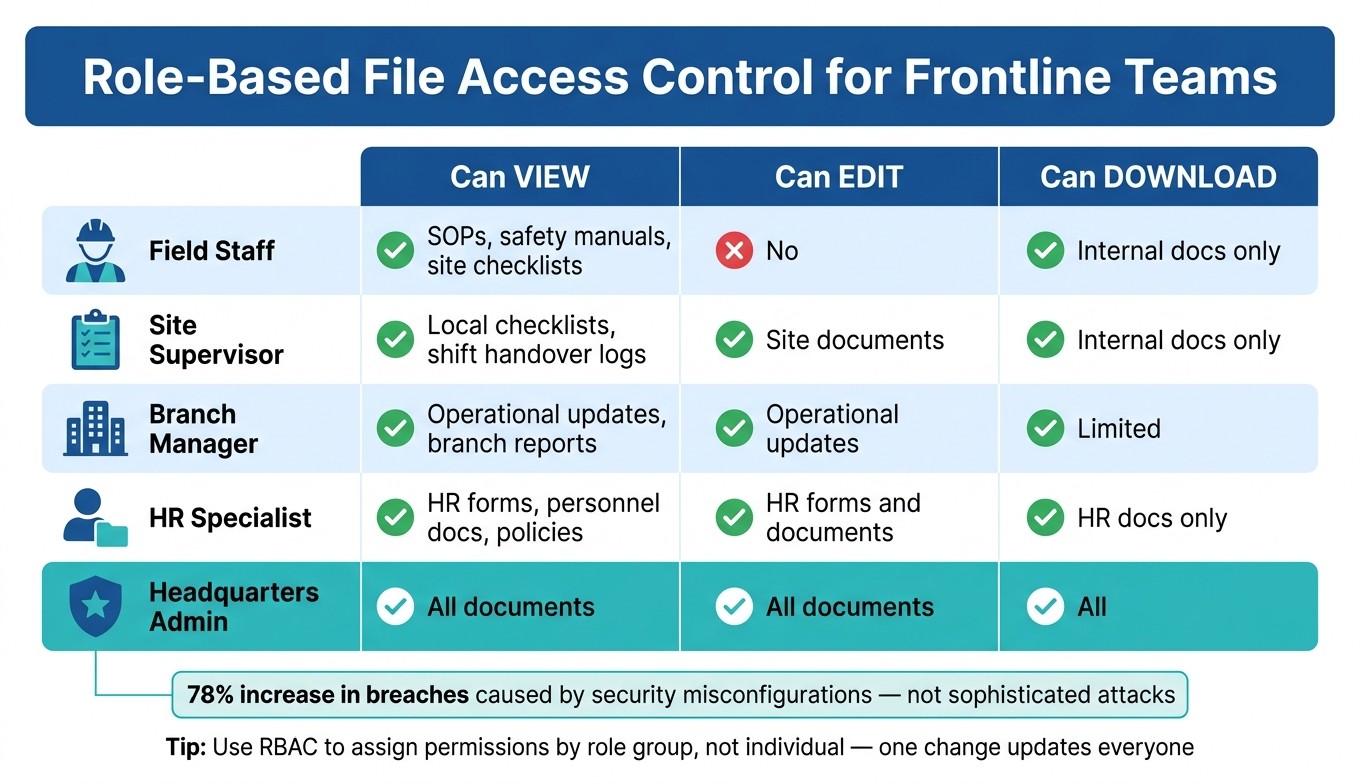
The data backs that up. A 2023 Annual Data Breach Report found a 78% increase in data breaches caused by security misconfigurations - not sophisticated attacks, just poorly set permissions. Here’s the thing: fancy software won’t save us if the access settings are sloppy. Once a file leaves the office, control gets harder to recover.
Give employees access only to the files their role requires
When I’m setting this up, I keep it simple: each person should only see the files they need to do their job. Nothing more.
That applies to SOPs, safety manuals, site checklists, shift logs, and HR forms. Not every employee needs all of it, and giving broad access “just in case” is how teams create problems for themselves.
The cleanest way we handle this is with role-based access control (RBAC). Instead of setting permissions one person at a time, we tie access to job roles. So rather than chasing down every employee manually, we define groups like Field Staff, Site Supervisor, Branch Manager, HR Specialist, and Headquarters Admin, then assign file permissions to those groups.
Let me tell you what happened next when we started thinking this way: admin work got much easier. When someone joins, switches branches, gets promoted, or leaves, we don’t rebuild access from scratch. We just update their group membership. One change, done.
Role | Can View | Can Edit | Can Download |
|---|---|---|---|
Field Staff | SOPs, safety manuals, site checklists | No | Internal docs only |
Site Supervisor | Local checklists, shift handover logs | Site documents | Internal docs only |
Branch Manager | Operational updates, branch reports | Operational updates | Limited |
HR Specialist | HR forms, personnel docs, policies | HR forms and documents | HR docs only |
Headquarters Admin | All documents | All documents | All |
Label files by sensitivity and set permissions to match
This is where a lot of teams slip. They set access once, then forget to create a system that people can follow day after day.
What’s worked best for us is a three-tier system: Public, Internal, and Confidential. That gives every branch and crew a shared language. No guessing. No “I thought this was okay to send.”
Here’s how I think about it:
Public files can be viewed and downloaded by anyone.
Internal files, like SOPs, safety manuals, training materials, and shift notices, are for employees only. Editing stays limited to document owners.
Confidential files, like HR forms, incident investigations, and audit reports, stay restricted to specific roles. In many cases, they’re view-only, with downloads and external sharing blocked completely.
The part people miss? Labels only work if they point to one current file. If the same document is sitting in five places across different devices, the label doesn’t mean much.
Keep one current version of every important document
This might be the least flashy part of file control, but it saves a ton of headaches.
After permissions are in place, I make sure every approved document lives in one source that everyone knows is the source. That way, field staff always open the current version instead of some old copy sitting in an email thread from three months ago.
At Pebb.io, we push teams to keep one official version in one central system and to be very direct about what not to do: don’t save copies to personal drives, don’t pass them around by email, and don’t stash them in unmanaged apps.
When a procedure changes, we update the file in that central system and add a short change log that spells out what changed, why it changed, and the effective date. Then we move the old version into a restricted folder marked "Retired – Do Not Use". That keeps it available for audits, but out of sight for field crews who just need the latest version.
We also notify the right teams through work chat or in-app announcements before their next shift starts. That timing matters more than people think. A message that lands after the shift begins is often too late to help.
For critical safety updates, I don’t like leaving anything to chance. We ask supervisors to confirm that their teams reviewed the new version. It doesn’t have to be complicated. A simple read receipt or a short acknowledgment form does the job. And if an audit or incident review comes later, that confirmation becomes the paper trail we can point to.
Control mobile access, links, and file activity in the field
I learned this one the hard way.
A while back, we were looking at how field teams used company files on their phones. On paper, access looked fine. People could open what they needed, when they needed it. But once we dug in, the cracks showed up fast. A password alone wasn’t enough. A link shared too loosely stuck around too long. And when someone opened or downloaded a file, we didn’t always have a clean trail.
That’s why, at Pebb.io, I’ve come to see mobile file control as a three-part job: secure sign-in, controlled links, and audit trails. If even one of those is loose, field files get risky fast.
Require secure sign-in and device protections
I always start with multi-factor authentication (MFA) on every app that touches company files, along with single sign-on (SSO) tied to a corporate identity. It’s one of those moves that seems basic until a password gets stolen. Then it becomes the line between a close call and a mess. MFA and SSO keep a stolen password from opening files.
But sign-in is only part of it. The device itself matters just as much.
In the field, phones get lost, shared, dropped in trucks, left on dashboards, or used at the end of a long shift when people are tired. So we push for device rules that are simple but strict: a strong PIN or biometric unlock, a short auto-lock timeout, and session timeouts that log users out at the end of a shift. We also require OS updates and use MDM to block unpatched devices.
Here’s the thing: even a well-set-up app can’t do much if the phone itself is wide open.
For confidential files - HR records, incident reports, controlled safety procedures - I’m a big fan of in-app viewing only. No local downloads. That way, field staff can read what they need inside a managed app, but the file never lands in personal storage or a consumer cloud service.
That one setting can save you from a lot of cleanup later.
Use expiring links and view-only permissions for sensitive documents
Not every file should be shared the same way. I’ve seen teams treat all links like they’re equal, and that’s where things start to slip.
What works better is matching the link to the file’s lifespan.
A standing SOP or safety manual usually makes sense with a permanent link under role-based access. People need it again and again, so the setup should be stable. But a one-day shift brief or a temporary lockout/tagout procedure during a maintenance window is a different story. That should use an expiring link that closes when the job is done.
Sharing method | Best use case | Recommended settings |
|---|---|---|
Permanent links | Ongoing SOPs, safety manuals, standard HR forms | Role-based access, SSO + MFA, version control, no public/guest access |
Expiring links | Job-specific instructions, temporary procedures, shift briefs | Short expiry (hours to days), authenticated users only, view-only for sensitive docs |
For HR and compliance files viewed on phones, I stick with access that is authenticated, view-only, and time-limited.
Let me tell you what happened next when one team skipped that approach. They used a normal shared link for a short-term file, and days later people were still opening an old version because the link never closed. No disaster, but a clear warning. If a document only matters for a short window, the link should expire with it.
Track file access with audit trails and regular reviews
Once devices are locked down, I focus on how files leave the system. And once sharing is limited, audit logs tell the real story: did people use files the way they were supposed to?
At Pebb.io, I look at audit logs as the bridge between policy and proof. Audit logs show who opened, downloaded, shared, changed, or deleted each file. For field teams, that means knowing whether a crew member pulled up the latest safety manual before a job, or whether someone downloaded an HR form to a personal device - both of which should be visible and reviewable.
That level of detail matters more than most teams think. It’s not about spying on people. It’s about being able to answer simple, high-stakes questions when something goes wrong.
We review access every 90 days because permissions drift. People change roles, move between sites, or leave the company. It happens all the time. If nobody checks, old access tends to hang around longer than it should.
I also like pairing those reviews with alerts for unusual activity, such as:
large download bursts
access from unexpected locations
repeated failed MFA attempts
That gives the system a chance to flag problems before they turn into something bigger. Logs also show whether teams opened the current file or an outdated copy, which is a small detail right up until someone follows the wrong procedure in the field.
Use Pebb as a secure source of truth for field and office staff
I’ve seen this happen more times than I’d like to admit: a field employee needs one file, right now, and ends up digging through chat threads, old email links, and three different apps just to find it. By the time they open the document, nobody’s even sure it’s the latest version.
Here’s the thing: once access rules are set, the last move is simple but huge. Put files in one secure place instead of scattering them everywhere. Once sign-in, link controls, and audit trails are in place, I always push for centralizing files in one app so field staff use the same source of truth every time.
Centralize files, knowledge, and communication in one app
At Pebb, we built the platform to close that gap. I’ve watched teams struggle when they have to jump between tools just to find a single document. It slows people down, and it opens the door to mistakes. So in Pebb, everything lives in one place: work chat, news feed, knowledge base, files, and digital forms. That keeps the right information inside one secure workflow.
We use Spaces to separate files by branch, department, or job site. Think Dallas Warehouse, Kitchen Team, or HR. That setup matters a lot in day-to-day work. A maintenance tech should only see what’s tied to their site, not HR records from another location.
I’ve found this keeps things cleaner for managers too. They can give most employees view-only access and limit edits to document owners. That helps keep the library tidy and cuts down on accidental overwrites, which, let me tell you, saves a lot of headaches.
A simple way I explain it to teams is this:
Use the Knowledge Library for SOPs and policies that should have one current version
Use Files for PDFs, spreadsheets, and site checklists
Match Pebb features to common frontline security needs
One thing I like about the setup is that it works for small teams and bigger organizations too. The free plan covers chat, knowledge, files, forms, scheduling, and PTO for up to 15 employees. For larger or more regulated organizations, the premium plan is $4 per user per month and adds granular permissions control, analytics, enterprise SSO, and advanced collaboration features.
That premium plan also connects Pebb to your identity provider for centralized access control. So when someone’s role changes, access updates centrally too. In my experience, that’s one of those details people overlook until a transfer, promotion, or exit exposes the gap.
Here’s how common frontline file-sharing security needs map to what Pebb does:
Security need | How Pebb helps | Example document |
|---|---|---|
Limit access by role and branch | Spaces and permissions share files only with relevant teams or locations | Branch-specific SOPs, site checklists, local safety procedures |
Ensure only the latest version is used | Knowledge Library stores one official version; news feed announces updates | Safety manuals, equipment operating procedures, emergency response plans |
Protect sensitive HR and personnel data | Restricted Spaces with controlled access | PTO request forms, incident reports, performance review templates |
Prevent uncontrolled downloads and forwarding | View-only settings and link controls applied inside the app | Compliance policies, internal investigation documents |
Capture field data securely | Digital Forms keep submissions inside controlled Spaces | Safety inspection forms, incident reports, maintenance requests |
Centralized access keeps permissions current when roles change.
One stat sticks with me every time I talk to frontline teams: 69% of frontline workers resort to personal messaging apps to communicate about work. That’s not a people problem. It’s a tools problem. I’ve seen teams take that route when the company app feels slow, confusing, or incomplete.
When that happens, people don’t stop communicating. They just work around the system.
That’s why we designed Pebb so the secure option is also the easiest one. If security adds friction, people avoid it. If security fits naturally into the way people already work, habits start to shift.
With files, knowledge, and chat in one system, field staff stop hunting across apps and start using the same approved version.
Conclusion: make secure file sharing simple, consistent, and mobile-first
I’ve seen teams spend weeks talking about access rules, device locks, and audit trails, then still trip over the same old problem: files living everywhere.
Here’s the thing: secure file sharing usually comes down to a few simple habits done the same way every time. You need role-based access, one current version, and mobile controls that people can use in the field without a headache.
In my experience at Pebb.io, the hardest part isn’t the tech. It’s the mess. Files get buried in email threads, saved on personal phones, and spread across too many apps. That’s where slip-ups begin. Not with some dramatic hack movie scene. With someone opening the wrong PDF, sending the old checklist, or using a file they downloaded three months ago and forgot to update.
Let me tell you what happened next in one rollout I was close to: the team didn’t start by moving everything. We picked one document set first. Safety manuals and site checklists were the obvious choice because people used them every day, and mistakes there cost time fast. We moved those files into one permission-controlled space and treated that version as the ONLY version.
That one change made day-to-day work a lot cleaner.
Instead of emailing attachments back and forth, we shared the link to the single source. From there, we layered in the stuff that keeps control tight without making work slower:
Add role-based access
Use expiring links for contractors
Review permissions every quarter
That’s the point of Pebb. We built it to give frontline teams one trusted app for files, knowledge, and communication.
FAQs
What files should field staff access?
I learned this one the hard way.
Early on at Pebb.io, we saw a simple pattern: when field staff had to dig through too many files, work slowed down. Not because people didn’t care. They were just stuck sorting through stuff they didn’t need, while the files they did need for that shift were buried in the noise.
That’s why we keep it simple. Field staff should only see the files tied to their day-to-day work and role, so they can move fast without bumping into private information that has nothing to do with their job.
With Pebb, we share mobile-friendly files that teams can open on the go, right from the field. That includes SOPs, safety manuals, site checklists, shift schedules, HR forms, and role-based training guides. At the same time, we use role-based access so private files stay restricted to the people who should see them.
Here’s the thing: when the right file shows up for the right person at the right time, the whole workday feels smoother. Less hunting. Less confusion. Fewer mistakes.
How can I stop employees from using old file versions?
I learned this the hard way: when five people are editing the same doc, nobody knows which file to trust.
At Pebb.io, we’ve seen how fast things get messy. A policy gets updated, someone shares an older draft, and suddenly the frontline team is looking at two different versions on their phones. That’s when mistakes creep in.
So we keep it simple. We create a single source of truth in one central knowledge hub like Pebb.
Here’s what that looks like in practice:
We use clear version labels like v1.0 and v1.1 to separate drafts, review copies, and final locked files.
We limit editing rights to designated authors, so not everyone can jump in and change things.
Everyone else sees only the final version, which cuts down confusion fast.
Here’s the thing: version control sounds boring until the wrong file hits the field.
That’s why we also rely on real-time syncing and approval workflows. When a file gets approved, frontline staff can open the latest version right from mobile and know it’s the one they’re supposed to use. No guessing. No digging through old attachments. No “Wait, is this the current one?”
It saves time, but more than that, it keeps everyone aligned when it matters most.
What’s the safest way to share files on mobile devices?
I learned this one the hard way.
Early on, I saw teams try to share work through consumer chat apps and personal drives because it felt fast. And for a minute, it did. Then files got buried, access got messy, and nobody felt sure who could see what. That’s when things start slipping through the cracks.
At Pebb.io, we push teams toward a centralized, secure platform instead of scattered tools people use in their personal lives. Here’s the thing: convenience means nothing if your company data is floating around in five different places.
What we look for is pretty clear:
Encryption to protect data
Role-based access so the right people see the right stuff
Granular permissions for tighter control
Audit trails so we can track who did what
Expiring links to limit loose access
Mobile-friendly or offline access inside a secure, company-approved workspace
That combo matters more than most teams think. If someone is on the road, working from a phone, or dealing with spotty Wi-Fi, they still need access. But they need it inside a workspace the company trusts, not through random apps duct-taped together.
I’ve found that when everything lives in one secure place, work gets simpler. People spend less time hunting for files, less time asking for access, and a lot less time worrying about where sensitive information ended up.
