

Author: Ron Daniel
The ROI of switching to an all-in-one employee management app
Switching to one app cuts duplicate SaaS spend, saves manager admin hours, and improves frontline communication.
The average company doesn’t lose money on employee software in one big hit. It loses it in small leaks: one more app, one more missed update, one more manager spending paid time chasing info that should be in one place. Working at Pebb.io, I’ve seen those leaks turn into thousands of dollars per year without anyone noticing at first.
What surprised me most is how often the problem isn’t too little software - it’s too much overlap. Teams pay for chat, scheduling, PTO, forms, and updates across different tools, while managers burn hours switching between them. Research tied to this topic points to 10%–30% of SaaS spend going to duplicate features, and nearly 30% of software budgets being wasted on underused apps.
So I want to break down what this looks like in plain numbers: where the waste shows up, how we think about ROI at Pebb.io, and which metrics I’d track before and after the switch. If you’re trying to cut software costs without making work harder for your team, this is the part worth looking at first.
The hidden costs of using separate employee tools
I’ve seen this happen over and over at Pebb.io: a company adds one tool for chat, another for scheduling, another for PTO, another for forms, and suddenly the stack looks harmless on paper but expensive in practice.
At first, nobody feels the pain all at once. It shows up in little ways. A manager is hunting for an update. An employee misses a policy change. Finance sees another monthly charge hit the card. Then one day, someone adds it all up, and the leak is impossible to ignore.
That’s the part many teams miss. The cost of fragmented tools stays hidden until you compare it with one connected system.
Higher software spend from overlapping subscriptions
Let me tell you what I’ve noticed. For a 150-employee U.S. business, it’s not hard to spend $2,000–$5,000 per month on overlapping tools for chat, comms, scheduling, PTO, and forms, and that’s before you factor in IT time and integration costs.
But the monthly bill isn’t even the whole story.
The bigger drag is overlap. Teams often pay for the same feature three different ways and don’t even realize it. One app handles announcements, another has a feed, and a third also sends updates. You’re paying more, but you’re not getting more. Research suggests that 10–30% of SaaS spend on employee tools goes toward redundant features rather than unique value.
At Pebb.io, this is one of the first places I look when talking with teams about ROI. If one platform already covers the work, every extra subscription with duplicate features becomes dead weight.
Manager hours lost to admin work and tool switching
This one hits hard because it doesn’t always show up as a line item, but it drains money all the same.
A manager can lose 10 hours a week to admin work and jumping between apps. At $28 per hour, that adds up to about $14,560 per year. Spread that across 10 locations, and you’re looking at $145,600 per year that isn’t going toward customers, coaching, or team growth.
I’ve watched this happen in busy teams. A manager starts the day trying to approve time off, answer a message, check a schedule update, post an announcement, and track down a form. None of those tasks seems huge on its own. Put them together across a week, and half the job starts to feel like system maintenance.
And the research backs up what we see in the field:
The average digital worker toggles between apps and websites nearly 1,200 times per day, spending about 4 hours per week simply reorienting after switching tools - equivalent to roughly five full working weeks per year.
That’s not a small annoyance. That’s paid time disappearing into friction.
The upside, though, is plain: those are recoverable labor hours. The moment a team moves from scattered tools to one connected system, that waste starts to shrink.
More errors, slower communication, and lower frontline engagement
Here’s where the problem stops being just about spend and starts affecting day-to-day operations.
I’ve seen how fragmentation creates mistakes that should never happen. A shift change gets updated in one app but not another, and someone misses work. A policy update sits on the intranet, but it never reaches the mobile app, so part of the team keeps following the old version.
That kind of gap slows everything down. Messages travel slower. Updates get missed. Managers have less visibility. Frontline teams get left out.
And there’s already a big gap to deal with: only 23% of frontline workers currently have access to digital tools to support their work. When companies spread communication across multiple apps, that problem gets worse, fast.
From where I sit at Pebb.io, this is the real business case for consolidation. It’s not just about cutting software spend. It’s about removing the daily friction, missed updates, and avoidable errors that pile up when tools don’t talk to each other.
How an all-in-one app like Pebb changes the economics
I’ve seen this play out up close at Pebb.io. A team starts with one tool for chat, another for schedules, another for PTO, and then a patchwork of forms, updates, and policy docs living who-knows-where. On paper, it looks manageable. In day-to-day work, it turns into small delays all over the place.
One platform for chat, news feed, scheduling, PTO, clock-in, forms, and knowledge
Pebb replaces fragmented workforce tools with one app for chat, news, scheduling, PTO, clock-in, forms, and knowledge. That’s the part people notice first. The part they feel next is the time they stop wasting.
Here’s what that looks like in plain English: a frontline employee can check a shift, clock in, request time off, read an announcement, and message a coworker without jumping between screens or logging into something else. We built Pebb to keep daily work in one place, and that removes a lot of friction fast.
I’ve also watched managers deal with the other side of the mess. Approvals sit in texts. Updates get buried. Attendance checks turn into a scavenger hunt. With Pebb, managers handle approvals, updates, and attendance in one workflow. Those hidden leaks are exactly what consolidation fixes.
Where savings and productivity gains actually come from
This is where the math starts to make sense.
A shift swap, PTO request, or policy update moves through one workflow instead of texts, spreadsheets, and follow-ups. That cuts labor time, scheduling mistakes, and missed communication in the same move, often by refining your internal communications strategy. It’s not one big dramatic change. It’s a stack of small fixes that add up across the week.
A PwC-based source says consolidating workplace technology can cut IT and HR operations costs by up to 25%.
That lines up with what we see teams chase most often:
Lower license spend
Fewer manager hours lost to admin
Fewer scheduling or communication errors
And those gains don’t just happen once. They keep stacking across daily workflows.
Why Pebb is a cost-efficient choice for frontline and office teams
Let me tell you what happened next in a lot of these buying conversations: once teams compare platform costs side by side, the case gets much easier to see.
Pebb offers a free all-in-one communication plan and a premium plan at $4 per user per month. That matters. Separate tools that each charge per user can pass that number fast, and teams still end up with duplicate features and extra IT work to manage it all.
We’ve seen companies pay for one app to message staff, another to handle scheduling, and another to manage requests or internal updates. The spend climbs, but the employee experience still feels clunky. Consolidating onto one platform removes that redundancy entirely.
From my seat at Pebb.io, that’s why the ROI math tends to feel straightforward once teams map out what they’re paying for today and where time is getting lost. Those gains are measurable, which makes the ROI calculation straightforward. Next, turn those savings into a simple ROI model.
How to calculate ROI from switching to one employee management app
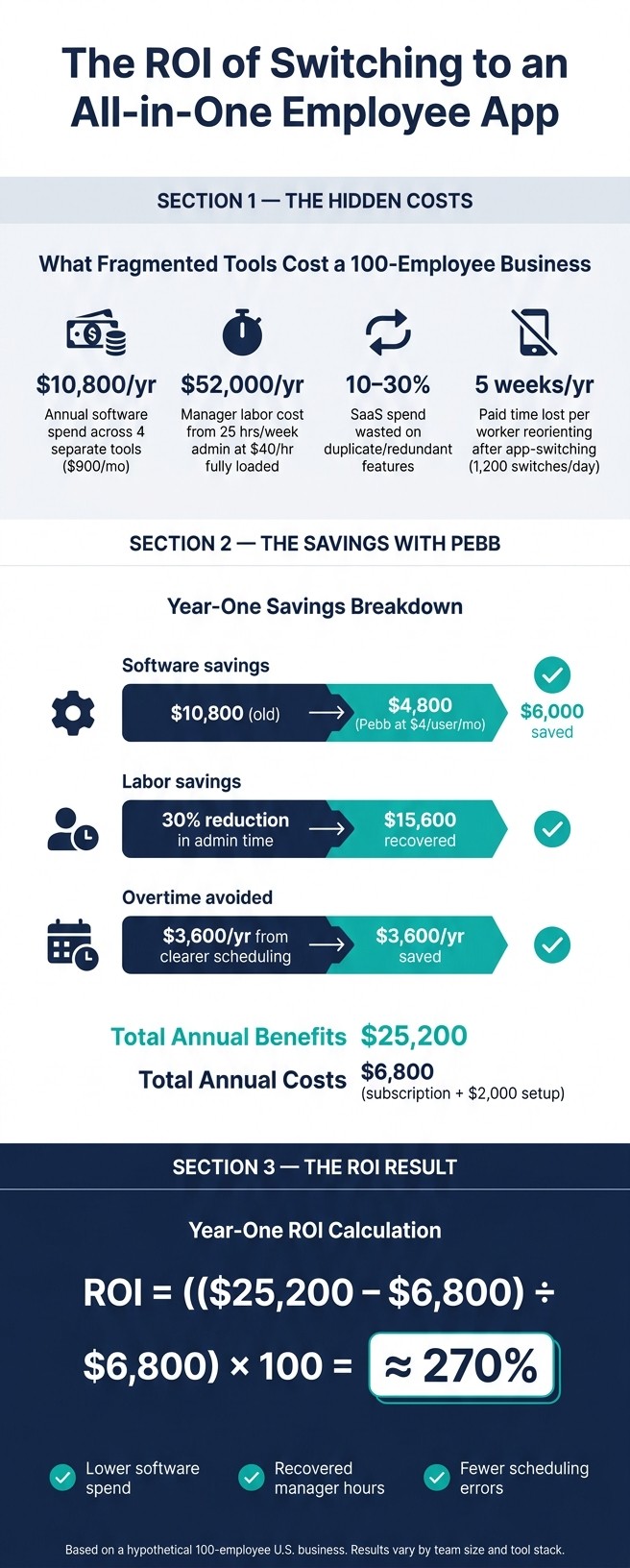
The Hidden Cost of Fragmented Employee Tools: ROI of Switching to All-in-One
I’ve had this conversation a lot at Pebb.io: a team knows their stack is messy, everyone feels the drag, but they still ask, “How do we prove the switch pays off?”
Here’s the thing: the math doesn’t need to be fancy. It just needs to be clean.
A simple ROI formula and the benefit categories to track
When we build an ROI model, we use the same cost drivers from the last section. That keeps the case grounded in numbers people can check, not wishful thinking.
Use this formula: ROI = ((Total Annual Benefits − Total Annual Costs) ÷ Total Annual Costs) × 100.
What matters most is being clear about what goes into costs and what goes into benefits.
Total costs should include your Pebb subscription, any one-time setup and training time, and any one-time migration costs.
Total benefits usually fall into six buckets:
retired software subscriptions
manager and HR hours recovered
fewer scheduling errors and missed shifts
less overtime due to clearer communication
productivity gains
At Pebb.io, I’ve seen the labor piece click fastest with finance teams. Recovered hours should be treated as labor savings. Use fully loaded hourly rates from payroll, which means base pay plus benefits and taxes, then work out what that admin time costs over a year. If Pebb cuts those hours, that recovered time becomes a financial benefit you can defend.
The cleanest way to make the case is to pressure-test it with a simple year-one scenario.
A hypothetical U.S. example of software and labor savings
Let me show you what that looks like for a 100-employee U.S. business using Pebb instead of four separate tools.
Current annual software spend: Four separate tools totaling $900/month, or $10,800/year.
Pebb at $4/user/month: 100 × $4 = $400/month, or $4,800/year. That’s $6,000/year in software savings.
Now let’s look at labor.
Managers spending a combined 25 hours per week on manual admin at a fully loaded rate of $40/hour costs $52,000/year. If that admin time drops by a conservative 30%, the business gets back 7.5 hours per week. That recovered time is worth about $15,600/year.
Then add $3,600/year in avoided overtime from clearer scheduling and communication.
That brings total annual benefits to $25,200.
With total annual costs at $6,800 - the subscription plus a one-time $2,000 setup cost spread across year one - the ROI looks like this:
ROI = (($25,200 − $6,800) ÷ $6,800) × 100 ≈ 270%
I like this example because it’s simple, but not fluffy. It shows software savings, labor savings, and overtime impact in one view.
The metrics to review before and after rollout
This is where a lot of teams slip. They build the estimate, launch the app, and then never check whether the savings showed up.
We push teams to track the same inputs before launch and after rollout. That’s how an estimate turns into a measured result.
Metric | Baseline | Target | Data Source | Review Cadence |
|---|---|---|---|---|
Total monthly workforce software spend | $900/month | ≤ $450/month | Finance/AP records | Monthly |
Manager admin hours per week | 25 hours/week | ≤ 15 hours/week | Time study, calendars | Quarterly |
Missed shifts and no-shows per month | 40/month | ≤ 25/month | Scheduling & time-clock reports | Monthly |
Time to communicate urgent updates | 2 hours | ≤ 30 minutes | App message logs, manager reports | Quarterly |
Employee app adoption (weekly active users) | 50% | ≥ 80% | App analytics | Monthly |
PTO request processing time | 3 days | ≤ 1 day | HR system, app workflow logs | Quarterly |
Annual employee turnover rate | 40% | ≤ 32% | HRIS data | Annually |
From what I’ve seen at Pebb.io, patience matters here. Give each metric at least 6–12 months of post-rollout data before making the call. Shorter windows can get distorted by seasonal swings instead of showing a real shift.
Before go-live, fill in your own baseline numbers, set targets you can actually hit, and review them on the cadences listed above. That gives you a clean starting point for the next step: checking whether the rollout delivered the savings you projected.
What to evaluate after consolidation and how to make the switch
I’ve seen this mistake more than once at Pebb.io: a team launches, everyone feels good for a week, and someone says, “Looks like it’s working.” Not so fast.
Here’s the thing: launch day is not the finish line. It’s the starting point. If we want to know whether consolidation paid off, we have to compare results to the baseline metrics from the ROI model. If we skip that step, the ROI is just a guess on a slide.
Business outcomes to monitor after the switch
When we help teams make the move, we look at the first 90 days in stages.
In the first 30 days, I’d watch missed shifts, update reach, and app adoption like a hawk. The early goal is simple: get people in and using it. A good benchmark is 80%–90% adoption in month one.
By day 60, I’d start checking whether manager admin time is dropping. That means tracking admin hours per week and announcement read rates. One of the clearest signs that the switch is working is when critical updates move from roughly 65%–70% visibility in old channels to 90%+ in-app visibility by day 90.
By day 90, I’d look at knowledge base usage, two-way engagement such as comments and feedback forms, and early signs in attendance and retention data. That’s where the bigger business case starts to show up: lower turnover costs, fewer mistakes, and less friction in the day-to-day work.
A practical transition plan from fragmented tools to Pebb
Once the 90-day scorecard is set up, I’d move from measurement to migration.
The first step is boring, but it pays off: audit every tool, use case, user count, and monthly cost. We’ve done this with teams that thought they had “just a few apps,” then found extra spend hiding in SMS, spreadsheets, paper processes, and old subscriptions nobody wanted to own. That inventory makes it much easier to see which legacy tools should go first, and it helps the consolidation case click before anyone even opens the ROI model.
After that, map each workflow into Pebb and start with the highest-friction ones first: chat, scheduling, PTO, clock-in, announcements, and knowledge. In my experience, scheduling, shift swaps, and clock-in should move early because people feel those changes right away. You get quick wins. Then the later weeks can cover things like digital forms and the knowledge base.
I’d also run a pilot with one location or team for four to eight weeks before rolling it out more broadly. Then expand in waves every two to four weeks and set a hard retirement date for each legacy tool. Let me tell you what happened next in a few rollouts I’ve watched: when there’s no cutoff date, old habits hang around forever. Someone keeps using text. Another manager goes back to paper. A spreadsheet rises from the dead. That’s why the retirement date matters.
That pilot window is also where we refine setup, gather feedback, and spot internal champions - the managers and frontline leads who can help other teams during the larger rollout.
Current Tool | Function | Pebb Replacement | Target Decommission |
|---|---|---|---|
WhatsApp / SMS | Team Chat | Work Chat | Week 4 |
Excel / Google Sheets | Shift Scheduling | Drag-and-Drop Scheduling | Week 2 |
Email / paper | PTO Requests | PTO Management | Week 2 |
Paper timesheets | Time Tracking | GPS Clock-In | Week 2 |
Conclusion: the clearest sources of ROI from an all-in-one employee app
Once the last legacy tool is gone, the ROI gets a lot easier to see. I’m talking about lower software spend, less admin time, fewer errors, faster communication, and stronger engagement. Each one can be measured. Put them together in one platform, and the effect stacks up.
What makes Pebb a practical fit for many U.S. teams, from what I’ve seen inside the company, is the mix of broad functionality and price. The free plan covers up to 15 employees with work chat, news feed, scheduling, PTO, clock-in, digital forms, and a knowledge library. The premium plan runs $4 per user per month. For a lot of teams, that price difference is where the ROI story starts to feel concrete.
The math works. The hard part is the human part: making the switch, sticking with it, and retiring the old tools once Pebb is live. That’s what turns projected ROI into actual ROI - not piling one more app onto the stack, but consolidating and removing the duplicates.
FAQs
How long does it take to see ROI after switching?
I’ve seen this play out faster than a lot of teams expect. In many cases, businesses start seeing ROI from an all-in-one platform like Pebb within 3 to 6 months.
Here’s where that payoff usually starts: we help teams cut the slow, messy work that eats up hours every week. Paper-based processes move into digital forms. Manual scheduling gets cleaned up. Day-to-day communication stops bouncing across too many tools.
That may sound simple, but let me tell you what happened next for a few teams I’ve worked with at Pebb.io: once those small friction points disappeared, admin time started dropping almost right away. And when you save time on repeat tasks, the math starts working in your favor pretty fast.
A big reason is speed. Because Pebb supports rapid deployment, teams can reach 80% adoption in the first week and start seeing savings sooner rather than later.
From my side, that first week matters more than most people think. If people actually use the platform early, you don’t get stuck waiting months for momentum. You start seeing gains while the rollout is still fresh.
What costs should I include in an ROI calculation?
I’ve seen teams get fooled by the sticker price.
On paper, one tool might look cheap. Then a few months go by, and we realize we’re paying in places nobody flagged at the start. That’s usually where the budget starts to leak.
Look past the subscription fee. I always tell people to count the direct costs and the productivity hit, such as:
manual admin time, including the 3 to 8 hours managers lose each week on shift scheduling
costs from human error, like overtime or lost sales from understaffed shifts
staff replacement costs tied to unpredictable schedules
hidden costs of app fragmentation, including 32 lost productivity days per person each year
Here’s the thing: those hidden costs add up fast. I’ve watched a team save on software one month, then lose far more in manager time, scheduling mistakes, and extra turnover the next. What looked cheap at first ended up costing us more where it hurt most: time, output, and team morale.
How can I roll out Pebb without disrupting teams?
Rolling out Pebb felt a lot less painful than most software rollouts I’ve been part of. At Pebb.io, we built it so teams can get in fast without sitting through hours of training or digging through long setup docs. The interface is simple, so people tend to click around and get the hang of it on their own. In a lot of cases, I’ve seen teams move over in as little as one day.
Here’s the thing: that speed matters. When a rollout drags, people lose interest fast. We’ve learned that the easier it is to start, the better the adoption tends to be.
Onboarding has been especially smooth for frontline and hourly workers. That was a big deal for us. In plenty of companies, those employees don’t have a corporate email address, which turns even a basic login into a mess. Pebb skips that roadblock.
Because it’s built for mobile first, employees can jump in on their own phones and get what they need fast:
Schedules
Updates
Chat
I’ve watched this make a big difference for teams that don’t sit at desks all day. Instead of chasing info or waiting to get back to a shared computer, they can check what’s happening right from their device. Let me tell you what happened next in a few of these rollouts: once people saw how easy it was to log in and find what they needed, the pushback dropped almost right away.
