

Author: Ron Daniel
Reducing labor costs with demand-based shift scheduling
Use sales, traffic, and staffing data to build hourly, role-based schedules that cut overtime and lower labor costs.
Most teams don’t have a labor budget problem. They have a timing problem.
I’ve seen stores hit their weekly hour target and still bleed money because the wrong people were on the floor at the wrong time. In retail, labor can eat up 50% to 60% of operating costs, and overtime can jump to 1.5x pay fast. That means a schedule that looks fine on Monday can still cost a team thousands by Sunday.
From my seat at Pebb.io, the fix usually isn’t cutting hours across the board. It’s using demand data to place hours where sales, traffic, and workload actually show up. In this piece, I’ll walk through what fixed schedules get wrong, how demand-based planning cuts waste, and the weekly habits I’ve seen help managers keep payroll under control without hurting service.
Why fixed schedules quietly waste payroll
I’ve seen this play out more times than I can count at Pebb.io. A team sets one schedule, repeats it every week, and hopes the day unfolds the same way. On paper, it looks neat. In practice, it burns money.
Here’s the thing: fixed scheduling treats customer demand like it’s frozen in time. But it never is. Mondays don’t look like Fridays. The lunch rush doesn’t look like 3:00 p.m. A promo week doesn’t look like a normal one. When we ignore that, the roster stops matching the work.
Demand-based scheduling flips that around. We start with the workload we expect, then build staffing from there. That one shift in thinking can change a frontline operation fast.
How overstaffing, understaffing, and overtime all trace back to the same scheduling mistake
The root issue is simple: assuming demand stays flat. I’ve watched that one bad assumption trigger three cost problems at once.
If you overstaff a slow period, you’re paying people to stand around with little to do. That may not sound dramatic in the moment, but it adds up fast. Having just three extra employees during a four-hour lull can waste more than $46,000 per year in payroll.
Then the opposite happens.
A busy window hits, but the schedule still reflects a “normal” day. Now you’re short-staffed. Lines get longer. Service slows down. Some customers wait, get annoyed, and leave. Sales that should’ve been easy wins just disappear.
And when demand jumps, managers usually do what managers always do: extend shifts or call people in. I’ve seen how those small overtime bumps seem harmless at first, then pile up across a whole team. Before long, labor costs are way higher than anyone planned.
At Pebb.io, we keep coming back to three numbers because they tell the story fast:
SPLH
Labor cost percentage
Overtime hours
When those numbers drift, it usually means staffing missed demand. And when staffing missed demand, the schedule needs to change.
The real cost of last-minute schedule changes
Let me tell you what happened next in one case I remember well. A manager already spent hours building the week’s schedule by hand. Then demand shifted, call-outs came in, and customer traffic didn’t match the original plan. Suddenly, they weren’t leading the floor anymore. They were stuck patching holes.
That’s the hidden cost of last-minute schedule changes. They don’t just hit payroll. They pull managers away from the work that moves the business forward.
Manual scheduling already eats 5–10 hours of manager time per week. Add reactive fixes on top of that, and schedule management starts to feel like a full-time job instead of a planning task.
That’s usually the moment we see teams realize the schedule isn’t the plan. It’s the problem.
The next step is turning demand data into staffing targets.
How demand-based shift scheduling cuts labor costs
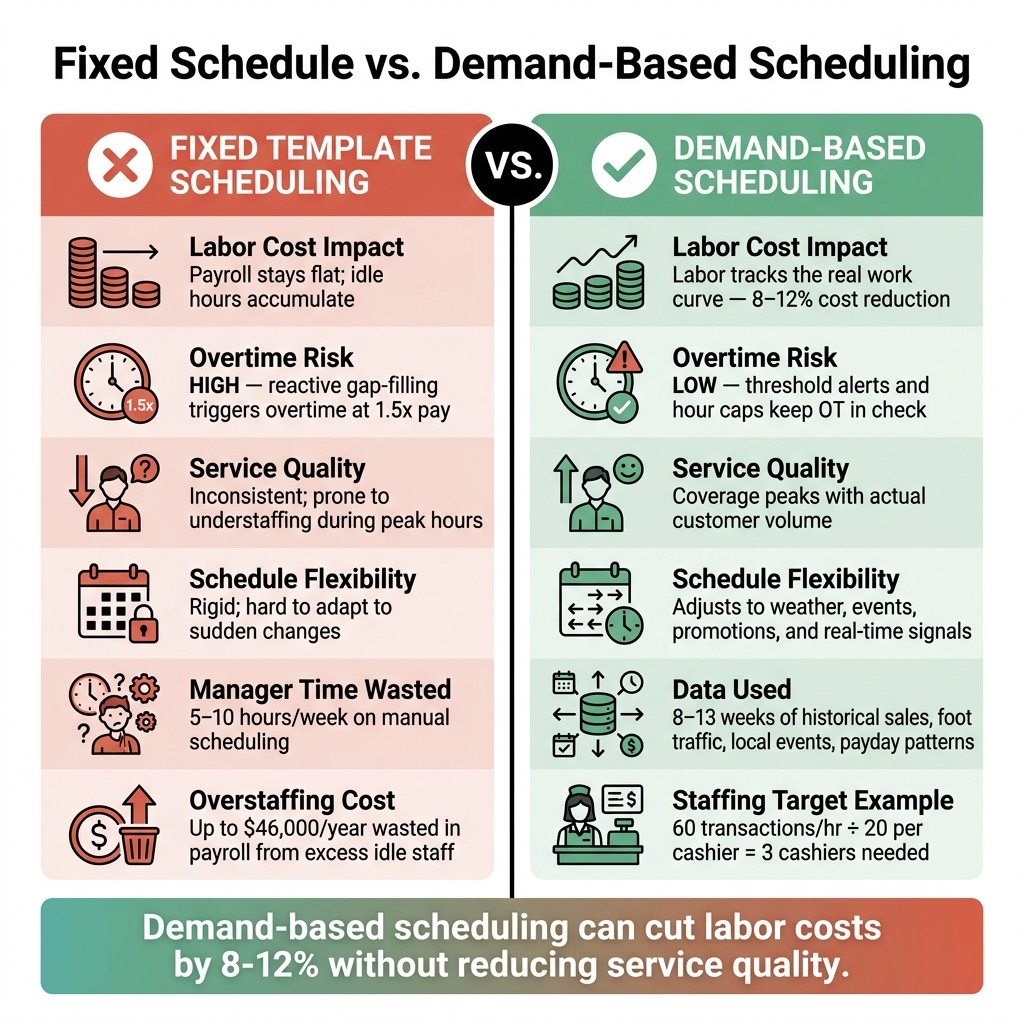
Fixed Schedule vs. Demand-Based Scheduling: Cost & Performance Comparison
I’ve seen this play out up close at Pebb.io: the fastest way to cut labor waste isn’t slashing hours across the board. It’s putting hours where the work actually shows up, then pulling them back when things go quiet.
That’s the whole point of demand-based scheduling. You move labor into busy periods and trim it during slow ones.
When companies use past data to build schedules, they can cut labor costs by 8–12% without hurting service quality. On a big labor budget, that’s not a tiny tweak. That’s money you feel.
Use sales, traffic, and workload data to forecast staffing needs
Here’s the thing: if I only look at sales, I’m already a step behind.
Hourly sales are useful, but they lag demand. Foot traffic gives me an earlier signal. In retail, that matters a lot. If people are walking in now but transactions haven’t happened yet, I still need the right people on the floor. Scheduling to foot traffic instead of transactions alone helps close that gap.
What worked best for us was looking back far enough to spot patterns without getting lost in noise. Managers can improve forecasts by reviewing 8–13 weeks of past data to find recurring hourly and weekly trends. Once those patterns show up, it gets much easier to staff up before demand climbs and scale down before it drops.
And this isn’t just about past sales charts. We also need to factor in what’s about to hit:
bookings
promotions
weather
local events
payday patterns
That mix gives managers a much clearer read on what each day is likely to look like.
The practical result is a staffing plan by hour and by role. That’s where this shifts from theory to day-to-day action. Instead of running the same headcount from open to close, you can add extra midshift coverage during peak windows like lunch or the afternoon rush. I’ve found that staggered shift start and end times help even more, because coverage stays tied to the real workload instead of forcing everyone to start and stop at the same time.
Fixed schedule vs. demand-based schedule: a side-by-side comparison
Let me tell you what happened next in teams that made this switch: the difference showed up almost immediately in day-to-day operations.
Feature | Fixed Template Scheduling | Demand-Based Scheduling |
|---|---|---|
Labor cost impact | Payroll stays flat; idle hours accumulate | Labor tracks the work curve |
Overtime risk | High; reactive gap-filling triggers OT | Low; threshold alerts keep hours in check |
Service quality | Inconsistent; prone to understaffing during rushes | Coverage peaks with actual customer volume |
Schedule flexibility | Rigid; hard to adapt to sudden changes | Adjusts to weather, events, and real-time signals |
What I’ve learned is that this kind of alignment doesn’t happen by luck. It only works when managers have the right data and a simple workflow they can use without slowing down. To do that well, they need clean data, role-level targets, and a fast way to update shifts.
The data and workflow managers need to build smarter schedules
I’ve seen this play out more times than I can count at Pebb.io: a manager builds a schedule that looks fine on paper, then the week starts, demand shifts, someone stays 20 minutes late, and suddenly labor costs are off and coverage is thin.
Here’s the thing: smarter schedules don’t start with guesswork. They start with clean data and a workflow that doesn’t make managers bounce between five different tools.
Start with historical sales, clock-in records, and role-level coverage
When I help teams think through scheduling, I always start with hourly sales or transaction data from the POS and compare it with scheduled labor. That gives us the first honest look at what was planned versus what the business actually needed.
But I never trust raw data right away. We clean it first.
If a day got thrown off by a power outage, a one-time private event, or extreme weather, I take it out before using averages. Otherwise, the numbers can send managers in the wrong direction.
Then I layer in clock-in and clock-out records. This is where things usually get interesting.
The gap between scheduled hours and worked hours shows where labor is leaking. I’ve seen teams think they had a scheduling problem, when the bigger issue was the same late-afternoon block running over again and again. When the same hours keep running hot, that’s usually a sign the schedule missed the real demand curve.
Once that data is cleaned up, the next move is simple: turn demand into hourly staffing targets.
Convert demand into staffing targets by hour and by role
This is the part that makes the schedule less reactive and a lot more grounded.
Once I have clean demand data, I translate it into headcount by hour and by role. Not just “we need more people,” but which people and when.
I start by defining hourly capacity for each role, meaning how much one person can handle in an hour. Let’s say one cashier can handle 20 transactions per hour. If expected demand is 60 transactions that hour, you’re looking at about three cashiers.
It sounds simple, and honestly, that’s why it works.
I also use SPLH to check whether labor is lined up with sales. If SPLH is rising, that usually points to understaffing. If it’s falling, that usually means there’s extra labor in the schedule.
For restaurants, one guardrail I keep in mind is labor cost per shift. A common target is 25% to 35% of revenue. Go too far above that and margins get squeezed. Go too far below it and service can start slipping.
Overtime is another place where small misses turn into a bigger payroll problem. I’ve watched managers shrug off 15 extra minutes here and there, but across a 20-person team, that stacks up fast.
A couple of habits help a lot:
Build a 2-hour buffer
Cap full-time staff at 38 hours per week
That way, when someone has to stay late once in a while, it doesn’t push everyone straight into overtime.
Use Pebb to manage scheduling, clock-in data, forms, and communication in one place
Let me tell you what happened next in a lot of these cases: even when managers had the right numbers, execution still broke down because availability changes, schedule updates, and time data were spread across separate tools.
That’s where mistakes creep in fast. A missed message becomes an overtime shift. An old availability note turns into a coverage gap.
At Pebb, we built Pebb to keep scheduling, clock-ins, PTO, forms, and team communication in one place. That means managers can update shifts faster when demand changes and keep coverage lined up without digging through scattered threads.
The pricing is simple too: Standard is free for teams up to 15 employees, and Premium is $4 per user per month.
When staffing targets and team communication live in the same place, managers can move a lot faster when the week changes on them. That’s the setup the next section builds on.
A week-by-week plan to cut labor waste
A few months ago, one of our managers at Pebb told me something that stuck: “I don’t need more scheduling advice. I need a week that doesn’t fall apart by Tuesday.”
That’s the whole game, isn’t it?
Setting staffing targets is one thing. Turning them into a weekly system your team can stick to is where the savings show up. Inside Pebb, we’ve seen that the teams who do this well don’t wing it. They run the same weekly rhythm again and again, and that’s what keeps labor waste from sneaking back in.
5 steps to build demand-based schedules in Pebb
Here’s the flow we use. Each step builds on the one before it, and we run it through Pebb so details don’t get lost in texts, sticky notes, or “I thought someone else handled that” moments.
Step | Key Task | Data Used | Pebb Feature |
|---|---|---|---|
1. Analyze | Review last week's planned vs. actual labor | Historical sales & clock-in records | Analytics & Reporting |
2. Forecast | Forecast next week's demand using traffic, events, and callout history | Foot traffic, local events, callout history | Shift Scheduling |
3. Convert | Set hourly staffing targets by role (e.g., 1 server per 6 tables) | Coverage units per role | Drag-and-Drop Builder |
4. Publish | Release the schedule to your team at least 14 days out | Employee availability & PTO | Push Notifications / News Feed |
5. Compare | Review planned vs. actual hours worked each week | Real-time clock-in data | Attendance Tracking |
In plain English, here’s what that looks like in practice:
We look back at last week’s plan versus what people actually worked.
We estimate next week’s demand based on traffic, events, and callout history.
We turn that demand into role-by-role coverage targets.
We publish the schedule early.
Then we check what happened and tighten the plan for the next round.
That fourth step matters more than a lot of teams think. Post schedules 14 days in advance; some U.S. cities require it and may assess predictability pay for late changes.
I’ve seen managers save themselves a pile of stress just by getting that part right. Fewer last-minute scrambles. Fewer “I can’t work that shift” messages. Fewer payroll surprises.
Cut overtime and coverage gaps with faster communication
Here’s the thing: even a good schedule can fall apart fast if updates crawl from one person to the next.
I’ve watched this happen the old way. A callout comes in. The manager texts three people. One person replies an hour later. Another never sees it. Someone else picks up the shift, but now the manager has already asked a person who’s headed into overtime. Total mess.
That’s why I’m big on using one channel for shift updates, swaps, PTO, and alerts.
In Pebb, team chat and groups let managers post open shifts straight to the right people. Digital forms handle swap and time-off requests without the usual back-and-forth. Push notifications help make sure updates don’t sit unread. When someone calls out, the manager can post the shift and fill it before start time - without adding overtime.
Let me tell you what happened next on one team I worked with: once they stopped juggling texts, paper notes, and separate apps, response time dropped fast. The manager didn’t have to guess who had seen the message. The team knew where to look. That alone made coverage easier.
Cross-training helps too. When demand changes or callouts hit, managers need options. If employees can move between roles - say, cashier and floor support - fewer people are needed on the schedule to keep coverage in place.
That doesn’t mean running lean just for the sake of it. It means building enough flexibility that one absence doesn’t wreck the shift.
Conclusion: match labor to demand, protect service, and simplify scheduling
From where I sit at Pebb, the biggest win is simple: when scheduling, clock-ins, PTO, and team communication all live in one place, managers spend less time hunting for info and more time running the operation.
That’s why we built Pebb to handle those moving parts together. We offer a free plan, and Premium starts at $4 per user per month. The aim is simple: give managers a schedule that matches demand and stays easy to adjust.
FAQs
How do I start demand-based scheduling?
I learned this one the hard way. Early on at Pebb.io, I saw teams build schedules by copying last week’s template, tweaking a few names, and hoping for the best. Sometimes it worked. A lot of times, it didn’t. We’d end up overstaffed during slow stretches and stretched thin right when demand hit.
Here’s the thing: better scheduling starts when we stop looking backward as the main playbook and start planning around what’s about to happen.
Instead of repeating old templates, I build schedules around future activity. That means using data like point-of-sale transactions, foot traffic, seasonal trends, and local events to create a forecast by the hour, or even every 15 minutes when the pace is tight. That level of detail changes everything. If a lunch rush usually spikes at 12:15 p.m. or a local game sends traffic up at 6:00 p.m., I want the schedule to reflect that before the rush shows up.
Let me tell you what happened next when teams started doing this more carefully: staffing got tighter, waste dropped, and shifts felt less chaotic. Not perfect, of course. Forecasting can still miss. Weather changes, events run late, and customer flow doesn’t always follow the script. But planning from expected demand beats guessing from old patterns every time.
After that, I set the labor budget based on the target labor percentage and the revenue projection. This gives the schedule a clear guardrail. Without that step, it’s easy to build a schedule that looks fine on paper but blows past payroll goals.
From there, we shape schedules to match demand peaks while still dealing with the human side of work. That means balancing a few things at once:
Cover the busiest periods first
Stay within labor laws
Factor in employee preferences where possible
That last part matters more than some managers think. I’ve seen schedules hit the numbers and still create headaches because they ignored availability, burnout, or fairness across the team. A good schedule doesn’t just match traffic. It also works for the people showing up to run it.
What data matters most for better schedules?
I learned this the hard way: if we build a schedule on gut feel alone, we usually pay for it later.
At Pebb.io, we kept seeing the same pattern. A store would look calm on paper, then get slammed at 12:30 p.m. on Thursday. Or we'd staff up for a slow shift and burn payroll for no good reason. That’s why we start with historical demand data.
We look at sales history, transaction times, and foot-traffic counts, usually from the past 8 to 13 weeks. That window gives us a solid read on what tends to happen again and again. I’m talking about the hourly rushes, the quiet pockets, and the weekly patterns that show up like clockwork.
Then we layer in the stuff raw numbers can’t explain on their own.
That includes seasonal trends, local events, holidays, and weather. A rainy Friday doesn’t look the same as a sunny one. A holiday weekend can throw off a normal staffing pattern fast. And if there’s a big event across town, that can change traffic in ways last month’s numbers won’t show by themselves.
We also have to deal with internal limits, because scheduling isn’t just about demand. It’s about what’s possible in the real world.
Here’s what we factor in on the team side:
Employee availability
Skill coverage
Role needs
Labor budget limits
Here’s the thing: even if the data says you need five people on the floor, that schedule still falls apart if only three team members are available, or if no one on that shift can cover a key role.
That’s where Pebb helps. We bring these inputs together in one place so teams can build balanced schedules based on actual business needs, not guesswork or last-minute scrambling.
How often should I adjust the schedule?
I learned this the hard way at Pebb.io.
Early on, we treated scheduling like a box to check. We’d build the schedule, send it out, and move on. Then the week would hit us with the usual chaos: a shift swap, a late delivery, a weather change, or a last-minute spike in demand. Let me tell you what happened next: the schedule looked fine on paper, but real life had other plans.
Here’s the thing: scheduling works better when we treat it as a continuous cycle, not a one-time task.
Each week, we follow a simple rhythm. We forecast demand, set budgets, build shifts, and then look back at the previous week’s performance so we can make the next schedule better. That review step matters more than most people think. It’s where we spot what went off track and what needs fixing before it turns into a bigger mess.
And during the week, we don’t just sit back and hope the plan holds. We make short-term changes for the next 0 to 7 days when things shift. That can mean handling shift swaps, reacting to weather changes, or dealing with delivery delays that throw staffing needs off balance.
That steady weekly rhythm helps us keep staffing lined up with what demand looks like in the moment, not what we guessed it might be days ago.
