
Author: Ron Daniel
How to Prevent Time Theft with a Clock In App
Prevent time theft with a clock-in app using geofencing, GPS stamps, photo/face checks, schedule enforcement and audit logs.
Here’s a question for you: How confident are you that your team’s hours match up with the work being done? A few years ago, I wouldn’t have thought much about it. But then, during a routine payroll review, I noticed something odd - our numbers weren’t adding up. It wasn’t just a few minutes here and there. Over time, those small discrepancies ballooned into a bigger problem: time theft.
Here’s the kicker - time theft doesn’t always look like blatant dishonesty. Sometimes it’s an innocent mistake, like longer-than-allowed breaks or forgetting to clock out. Other times, it’s more deliberate, like a coworker clocking in for someone else (a sneaky move called “buddy punching”). Either way, the costs can be staggering. Did you know that buddy punching alone costs U.S. businesses $373 million annually?
We decided it was time to tackle this head-on, and that’s when we built Pebb’s Clock-In feature. It’s designed to stop time theft in its tracks while making life easier for managers and employees alike. Let me walk you through what we learned, the tools that worked, and how you can protect your payroll without turning into Big Brother.
How Clock-In Apps Stop Time Theft
Key Features to Look for in a Clock-In App
When it comes to tackling time theft, clock-in apps are game-changers, and the best ones share a few standout features that make all the difference.
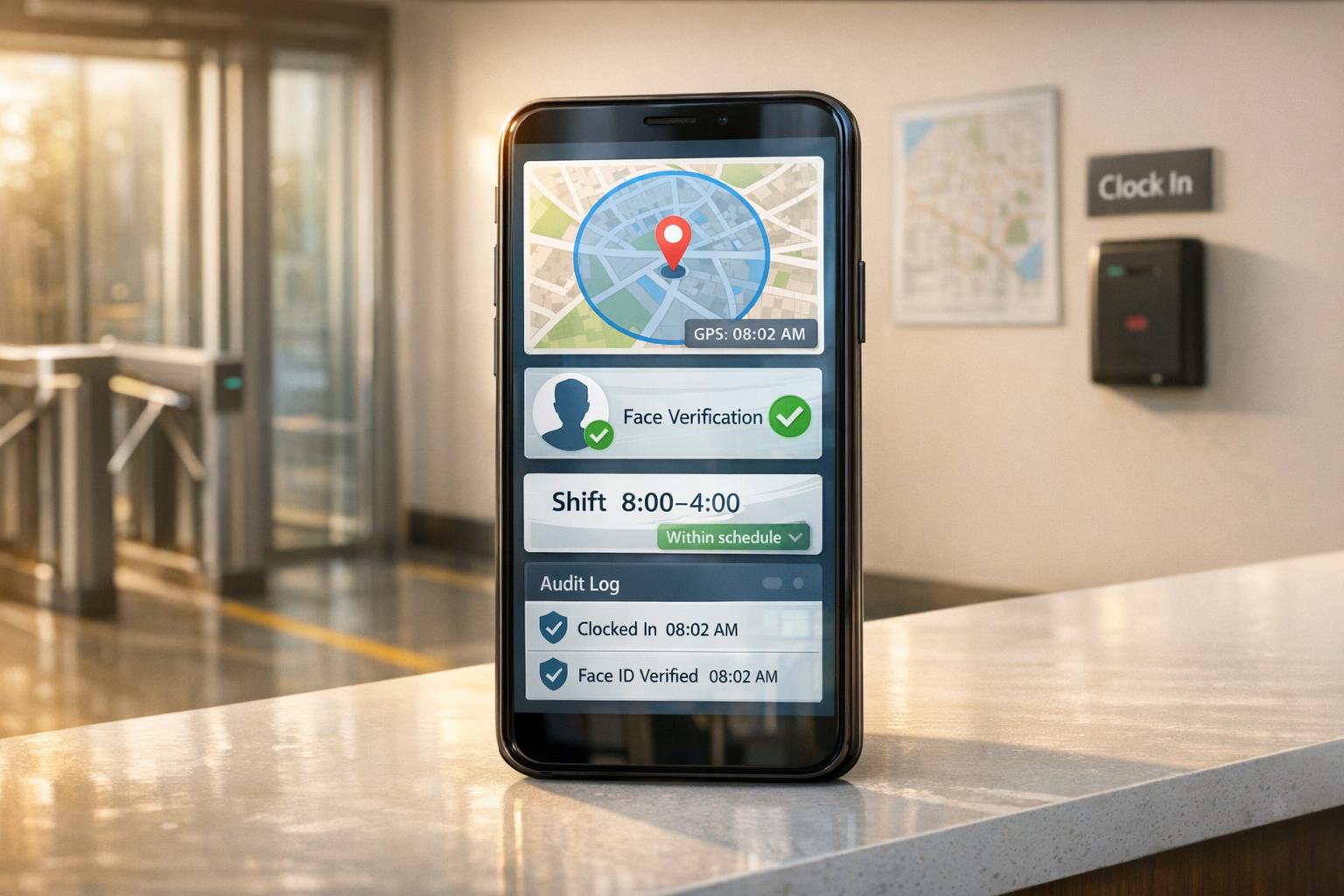
First up, real-time clock-ins with audit logs. Every clock-in action is timestamped automatically, and any edits are meticulously logged, showing exactly who made changes and when. This alone cuts down on timesheet padding because it’s impossible to fudge the numbers without leaving a trail.
Then there’s GPS location checks and geofencing. These features ensure employees are clocking in from the right place. A GPS check verifies the device's location at the time of clock-in, while geofencing restricts clock-ins to a specific area, like a 150-foot radius around your business. It’s important to note that this isn’t about tracking someone’s every move - it’s just a quick location check at the moment they punch in.
"A location feature should be a single, momentary check-in, not a live feed of someone's movements. Its only job is to confirm they were where they were supposed to be when they punched the clock." - Pebb
Finally, schedule enforcement ties it all together. By linking clock-ins to pre-set schedules, the app blocks early or unauthorized punches - like someone trying to clock in before their allowed 7-minute window. This keeps everything aligned and fair.
These features are the backbone of how Pebb ensures precise and hassle-free time tracking.
How Pebb Stands Out
Pebb takes these core features and builds on them with an all-in-one approach that not only prevents time theft but also streamlines employee management. By combining clock-ins, scheduling, PTO tracking, and team chat into one seamless platform, Pebb creates a system where accountability is baked into every step.
Here’s how it works: Pebb connects schedules and attendance, so the app enforces rules based on context. For instance, if an employee is on approved PTO, the system automatically blocks them from clocking in during that time. No more double-pay scenarios where someone is logged as both on leave and working. And when a shift gets covered, the app adjusts the clock-in window for the new schedule.
To tackle buddy punching, Pebb employs GPS geofencing with 50-foot precision, QR code scans, photo clock-ins, and even facial recognition. Managers can see at a glance who’s clocked in, where they are, and what shift they’re covering - all from a single dashboard. Since the app also handles team chat and shift details, employees are more likely to use it consistently. After all, when the clock-in button is right next to their schedule, it’s hard to forget.
"It's about replacing that friction with flow. It's about building a foundation of trust from the first minute of the workday, guaranteeing every employee is paid accurately for every minute they work." - Dan Robin, Pebb
And the best part? Pebb’s premium plan, which includes all these features, costs just $4 per user per month.
Real Examples of Time Theft Prevention in Action
Let me share a few real-world stories to show how Pebb’s features are making a difference.
At a fast-casual restaurant in Texas, buddy punching was a common problem. Employees who were running late would text their coworkers to clock in for them. But after switching to Pebb, every employee had to clock in using their own smartphone within a geofenced area around the restaurant. If someone wasn’t on-site, the app automatically blocked the clock-in attempt. Problem solved.
Over at a multi-location retail business in California, employees were clocking in 20–30 minutes early, racking up paid time before their shifts even started. The owner used Pebb to enforce a 7-minute clock-in window before scheduled shifts. Now, when someone tries to clock in too early, the app logs the attempt and displays a message explaining the rules. No need for a manager to step in - the system handles it.
Meanwhile, in a warehouse in Ohio, employees were staying 30–45 minutes past their scheduled shifts without approval, and it was flying under the radar. Pebb’s automated reports flagged these patterns, giving managers the data they needed to address the issue. Once employees realized the system was tracking their hours closely, the behavior stopped.
These examples show how Pebb doesn’t just prevent time theft - it also makes life easier for managers and employees alike. By automating accountability, everyone benefits.
How to Set Up a Clock-In App: A Step-by-Step Guide

How to Set Up a Clock-In App to Prevent Time Theft: 3-Step Guide
Step 1: Review Your Current Time-Tracking Process
Before jumping into app setup, take a step back and assess how you're tracking time right now. Are your employees still relying on paper timesheets, shared spreadsheets, or an old-school punch clock? It's important to pinpoint the weak spots.
Watch for warning signs like frequent payroll corrections, disputes over clock-in and clock-out times, or managers spending hours fixing manual errors. These issues aren’t just frustrating - they’re expensive. According to the American Payroll Association, manual timekeeping can bloat payroll costs by 1–8% due to mistakes and intentional over-reporting.
"Start by listening... Don't ask what features they want in an app - ask them what's broken right now." - Dan Robin, CEO, Pebb
If your current system wouldn’t hold up under an audit, it’s time for a change. Once you’ve identified the pain points, you’ll be ready to build a more efficient and secure process.
Step 2: Configure Your Clock-In App
Now that you’ve spotted the gaps, it’s time to set up your Pebb clock-in app. Start by adding your worksites into the app and enabling geofencing. If your business operates from a single location, set a tight geofence radius - 50 to 100 feet should do the trick.
Next, integrate your shift schedules. This allows the app to automatically flag early or late punches, show who’s on shift, and block clock-ins outside scheduled hours. You can also set grace periods, like allowing employees to clock in up to 7 minutes before their shift starts while flagging earlier attempts. Don’t forget to configure overtime rules based on federal standards (like 40 hours per workweek) and any additional state-specific regulations. Decide whether unpaid meal breaks require manual clock-outs or if they’ll be auto-deducted.
Before rolling it out company-wide, run a pilot program at one location for a single pay period. This gives you a chance to identify any rule gaps or unexpected issues before launching on a larger scale.
Step 3: Train Your Team and Set Clear Policies
Once the app is configured, it’s time to get your team up to speed. Training works best when it’s tailored to specific roles and built around real-world scenarios.
For employees, focus on the essentials: how to clock in and out, log meal breaks, and handle missed punches. Managers will need additional training on reviewing and approving timecards, addressing missed punches, and interpreting reports on overtime and punctuality. It’s crucial to frame this rollout as a tool for fairness, not surveillance. When employees see that the app is designed to protect their paychecks and minimize errors, they’ll be much more open to using it.
"People don't resist change; they resist being changed. If your team understands this tool is for them - to protect their paychecks and simplify their workday - they will be your biggest supporters." - Dan Robin, CEO, Pebb
Use Pebb’s built-in communication tools to keep everyone informed. Post policy summaries and step-by-step clock-in instructions in the news feed, and send reminders at the start of each pay period. Pin your attendance policy so it’s easy to find, and use in-app chat to answer questions quickly. This ensures consistent communication across your team and provides a clear record in case of any disputes later on.
Clock-In App Strategies for Different Work Environments
Let’s face it, not all teams operate the same way. So why should your clock-in system be a cookie-cutter solution? At Pebb, we’ve built features that fit your work environment - whether you’re managing retail staff, remote teams, or juggling multiple locations. Here’s how we tackle the unique challenges in different workplaces.
Retail, Hospitality, and Shift-Based Teams
If you’ve ever managed a retail or hospitality team, you know how tricky it can be to keep everything running smoothly. Time theft, for instance, can quickly become a headache. That’s why we’ve implemented tools like geofencing to limit clock-ins to specific locations and shifts. Picture this: a 5–10 minute geofence around the worksite ensures no one can clock in from their couch or start early.
Breaks? We’ve got those covered, too. You can set up separate rules for paid and unpaid breaks. For example, if a 15-minute paid break stretches into 20 minutes, the system triggers an alert. And since scheduling and clock-ins are fully integrated, every shift stays accurate and accountable from start to finish.
Remote and Field Teams
Now let’s talk about remote and field teams - think technicians, sales reps, or home health workers. For these teams, it’s all about verifying they’re where they need to be when they clock in. Pebb solves this by capturing a GPS-stamped entry at every clock-in and clock-out. No need for constant tracking (because who wants that?), just a simple confirmation at punch time.
For teams hopping between job sites, the app can require a job or work order code with each clock-in. This ties hours directly to specific projects or clients, making billing and verification a breeze. Oh, and if you’re worried about spotty Wi-Fi? No problem. The app stores timestamps and GPS data locally and syncs it once the connection is back. No hours lost, no stress.
Multi-Site and High-Turnover Operations
Managing multiple locations or high-turnover teams can feel like spinning plates. Inconsistent practices across sites can open the door to time theft, but Pebb’s got your back. Role-based permissions let local managers handle timecard approvals and minor edits, while admins control geofence settings and system rules.
Our centralized dashboard is like your command center. It flags anomalies - like sudden overtime spikes or frequent edits - so you can stay in the loop without micromanaging. And for high-turnover teams, onboarding is a breeze. New hires get instant access to clock-in policies, attendance rules, and break instructions right in the app. From day one, they’re set up for success.
Pebb’s tools are built to meet your team where they are, no matter the environment. It’s time tracking made simple, secure, and tailored to you.
How to Measure Results and Keep Improving
Let’s talk about how to gauge the success of your clock-in app and make sure it’s always working for you. The data is already at your fingertips - it's just about using it wisely to fine-tune your time-tracking policies.
Metrics to Track
Here’s what you want to keep an eye on: scheduled vs. worked hours, unapproved overtime, and time log edits. For example, if your team is scheduled for 1,000 hours per pay period but consistently clocks 1,080, that extra 80 hours could be a red flag for time theft. When you see the gap between scheduled and worked hours shrink over time, that’s a sign your tracking accuracy is improving.
Another metric to watch is how often managers are manually editing clock-ins or adding missing punches. A drop in these edits means your system is doing its job - capturing time correctly without a lot of manual fixes.
Pebb’s dashboard makes this process simple. You can filter metrics by location, team, or role, and exception reports highlight anomalies like clock-ins outside geofences or unexpected overtime spikes. This way, you’re always focusing on the data that matters most.
Compare Results Before and After
Before introducing any new tool, gather 60–90 days of baseline data from your current system. Look at total hours paid, overtime costs, timesheet corrections, and how long payroll prep takes. Then, after running the app for two to three full pay cycles, compare those numbers.
Here’s why this matters: The American Payroll Association estimates that U.S. businesses lose up to 7% of payroll to time theft, and manual timecards have an error rate of 1–8% of total payroll. Even small improvements - like cutting unexplained extra time from 10 minutes per shift to 2–3 minutes - can save a 20-person team hundreds of dollars every month. When you stack those savings against Pebb’s $4/user/month premium plan, the return on investment becomes crystal clear.
Adjust Policies and Settings Over Time
Data is only as good as what you do with it. For example, if you notice frequent clock-ins outside the geofence, tweak the radius or update the mapping. If certain teams have a lot of missed punches, it’s probably a training issue - something a quick refresher can resolve.
"Adoption isn't about features; it's about feel. A poorly designed tool adds friction to an already busy day. A great one fades into the background." - Dan Robin, Founder, Pebb
To stay on top of things, we recommend a simple review schedule:
Weekly: Check exception reports.
Per pay period: Look at edit volume and payroll corrections.
Quarterly: Review big-picture trends like overtime as a percentage of labor costs.
As your team grows or your operations evolve, Pebb grows with you. Adding new locations, adjusting permissions, or tightening workflows takes just minutes - no need for a support ticket.
FAQs
How do I choose the right geofence size for my worksites?
When it comes to choosing the perfect geofence size, the goal is to strike the right balance. You’ll want a virtual boundary that fully covers the work area - whether that's a job site, a store, or a warehouse. The trick is to keep it small enough to ensure accountability and block clock-ins from outside the zone, but large enough to accommodate GPS inaccuracies or larger workspaces.
Here’s where Pebb steps in. With our platform, you can limit clock-ins strictly to these defined areas. This means employees can only start their shifts when they’re physically present in the designated zone. It’s a simple way to keep things fair and ensure everyone’s where they need to be.
What should employees do if they forget to clock in or out?
If someone forgets to clock in or out, they can quickly fix it by submitting a correction request right from the Pebb app on their phone. No need to deal with messy email chains or piles of paperwork. Once the request is sent, managers get an instant notification to review and approve it. This keeps attendance records accurate and payroll smooth without any headaches.
How can I roll out a clock-in app without hurting trust?
Rolling out a clock-in app can feel like walking a tightrope - you want to streamline operations without making employees feel like they’re under a microscope. The secret? Frame it as a tool for fairness, not surveillance.
When we introduced this at Pebb, we focused on how it ensures accurate paychecks and clears up any confusion about hours worked. Nobody wants disputes over their paycheck, right? That’s the angle we emphasized. Plus, platforms like ours make the process smooth and unobtrusive, blending right into the flow of the workday.
We also highlighted features that protect employees. For example, preventing buddy punching isn’t just about accountability; it ensures fairness across the board. When everyone knows the system is designed to be fair, trust naturally follows.
