

Author: Ron Daniel
How to prevent shift overlaps and scheduling conflicts
Prevent double-bookings with one live schedule: collect availability, flag conflicts before publishing, use alerts, and monitor clock-ins.
The average no-show can cost $800 to $1,600, and I’ve seen one bad shift edit set that loss in motion faster than most teams expect. At Pebb.io, I’ve watched managers spend more time fixing schedules than building them, all because one PTO note sat in chat, one swap stayed off the record, or two people got booked into the same slot.
What stood out to me was simple: most shift conflicts don’t start on the floor. They start before the shift, when scheduling, time-off requests, attendance, and team messages live in different places. Research shows workforce scheduling systems can cut scheduling errors by up to 90% and trim admin time by 75% to 80%, which lines up with what I’ve seen firsthand.
So what’s the fix? It comes down to a few habits that stop problems early: keep one live schedule, collect availability before writing shifts, flag conflicts before publish, and check attendance as the day starts. I’ll walk through the parts that made the biggest difference for us at Pebb.io, and where teams still trip up.
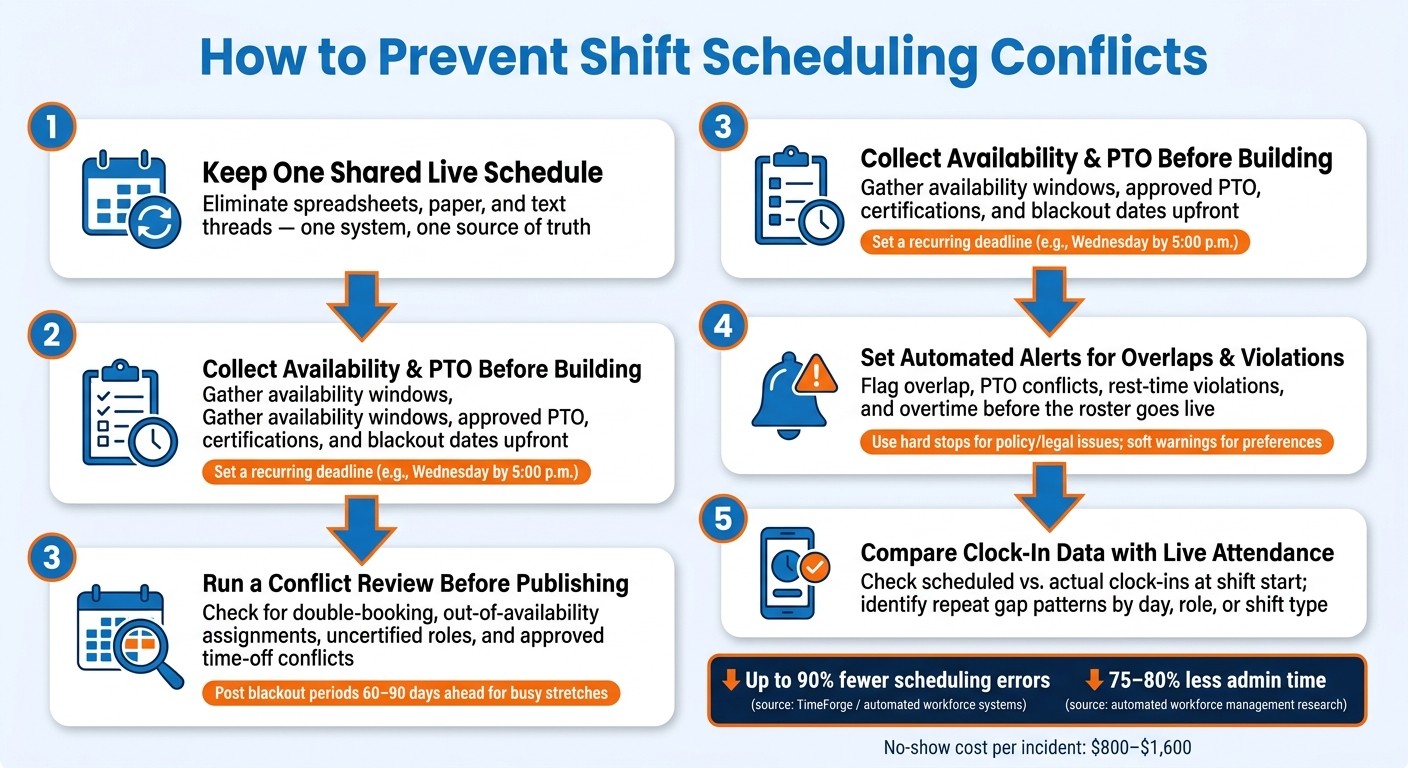
How to Prevent Shift Overlaps: 5-Step Scheduling Conflict Prevention Workflow
Keep every shift in one shared schedule
I’ve seen this go sideways more times than I’d like to admit. At Pebb.io, one of the first things I learned is that shift chaos usually doesn’t start with bad intent. It starts with too many versions.
Someone updates a spreadsheet on their laptop. Someone else is still looking at Monday’s file. A manager sends a quick text about a shift change, and that text gets buried under ten other messages. Then a printed schedule is still taped up in the break room even though Tuesday’s swap already changed everything.
That’s how overlapping shifts happen. That’s how coverage gets missed.
The fix is simple: one live schedule for every shift. Not paper. Not spreadsheets. Not text threads. One shared place that everyone uses.
Here’s the thing: this only works when every update lands in the same system. If changes live across separate files and message threads, the schedule stops being a schedule and turns into a guessing game. According to TimeForge, automated workforce management systems can reduce scheduling errors by up to 90% and cut scheduling time by 75–80% - mostly because they remove this kind of fragmented process.
What’s worked best for us is organizing shifts by team, role, and location in one tool. That gives managers a clean way to filter what they need, whether that’s “Downtown store cashiers” or “Warehouse East pickers,” without losing the live roster.
Once every shift lives in one shared schedule, the next problem shows up fast: who gets to edit it.
Set clear edit rules before the schedule goes live
Let me tell you what happened next in one case I remember well. A team had a shared roster, which sounded good on paper. But edit access was too loose. Before long, people were making changes on the fly, swaps weren’t tracked, overtime slipped in without review, and a few shifts only “existed” because someone mentioned them in passing.
That’s one of the most common mistakes I see.
When anyone can change the live roster, things get messy fast. You end up with undocumented swaps, unreviewed overtime, and shifts that live in someone’s head instead of in the system.
A simple tiered model usually works best:
One schedule owner has final edit rights and is in charge of publishing the roster.
Supervisors can suggest changes or coverage fixes in draft form.
Employees can view the schedule and submit swap requests or availability issues without changing the published schedule directly.
I like this setup because it keeps things clean without making the process feel heavy. It’s not about distrust. It’s about making sure every change is logged, reviewed, and visible to the right people before it affects coverage.
We’ve also found that the rules need to be written down, not left to memory. Share them during onboarding. Repeat them often. If someone tries to arrange a swap over text, log it in the system and point them back to the right process. After a while, people stop fighting the process because they see that the formal route usually means faster approval and fewer headaches.
Make schedule updates visible on mobile for every employee
Most frontline workers aren’t checking schedules from a desktop. They’re checking on their phones, often between tasks, during a commute, or right before a shift starts.
If schedule changes don’t show up on mobile in real time, people miss them. I’ve seen that happen with teams that thought sending a text was enough. It wasn’t. Someone missed the update, showed up late, or went to the wrong site, and the whole shift started under pressure.
That’s why I always push for mobile visibility tied straight to the live schedule. Use push notifications so the people affected see changes the moment they’re published. Not because a manager remembered to text them, but because the system does the job every time.
It also helps to show the store, site, or department right in the mobile view. That one detail saves a lot of confusion, especially for teams working across more than one location.
With that visibility in place, the schedule still needs those same clear edit rules before it goes live.
Collect availability, PTO, and blackout dates before building the schedule
I learned this one the hard way at Pebb.io.
Early on, I’d start building the weekly roster with half the info in my head, a few details buried in chat, and one or two PTO notes sitting in old messages. It felt fine in the moment. Then the problems showed up. I’d put someone on a Saturday closing shift, and a few hours later I’d find out they had submitted PTO two weeks earlier. At that point, I wasn’t scheduling. I was doing cleanup.
Here’s the thing: availability, PTO, blackout dates, training sessions, certifications, and approved work locations need to come first. If those details live in separate places, the roster gets built before all the limits are clear. That’s when scheduling turns into guesswork and last-minute fixes.
What changed for us was simple. We started treating employee constraints as inputs, not after-the-fact corrections.
At Pebb.io, I’ve seen how much smoother scheduling gets when each person has one employee profile with the details we need in one place:
Weekly availability windows
Approved PTO blocks
Roles they’re certified for
Sites they can cover
That one shift in process saves a lot of back-and-forth. Instead of chasing people down, I can filter by date, time, role, and location and get the answer right away. And once those inputs are clean, the next job is catching the conflicts that still sneak through before anything gets published.
Give employees one standard way to submit availability changes
One of the biggest fixes we made was giving employees one standard way to submit availability changes.
Before that, updates came from everywhere. A direct message here. A hallway note there. A quick “Can you remember I’m out next Thursday?” after a meeting. You can probably guess how that went. Stuff got missed.
Now I push everything through one digital form. That means every change is timestamped and visible before scheduling starts. No hunting. No guessing. No “I thought someone told me that.”
The form covers three things:
Whether the change is recurring or one-time
The day and time ranges in 12-hour format, like 8:00 a.m.–4:00 p.m.
Any PTO or time-off dates
We also set a recurring deadline, like Wednesday by 5:00 p.m. for the following week’s schedule. I’ll drop a reminder in team chat at the start of the week, collect updates through the form, and then lock inputs after the cutoff.
Let me tell you what happened next when we started doing that: late requests didn’t vanish, but they stopped running the whole process. They became exceptions, not the norm. That’s a big difference.
Review conflicts before publishing the weekly roster
Even with clean inputs, I never publish a weekly roster without doing one last conflict review.
At that stage, I check PTO, availability, certifications, location coverage, and blackout dates. I want to confirm that no one is:
Double-booked
Assigned outside their stated availability
Placed in a role they’re not certified for
Scheduled during approved time off
That final review has saved us from a lot of avoidable mistakes.
Blackout periods matter too. If you already know a busy stretch is coming - like Thanksgiving week - post those blackout periods 60–90 days ahead. That gives employees time to plan, and it cuts down on last-minute friction.
The point isn’t to build a perfect roster every single time. In my experience at Pebb.io, the point is to catch conflicts before the roster goes live. And if a few still slip through, that’s where automated alerts and fast team communication step in before the shift starts.
Use automated alerts and clear handoff communication to catch problems early
I’ve learned this the hard way at Pebb.io: even when our availability and PTO data look clean, the schedule can still go sideways at the last minute.
A shift gets swapped 20 minutes before start time. PTO gets approved after the roster is already done. A manager misses that one person is covering two roles at once. On paper, everything looks fine. In practice, it can turn into a mess fast.
That’s why we don’t stop at clean data. We add automated checks on top of it. The first alerts I like to set up are simple and practical: overlap, PTO, rest-time, and overtime alerts.
Flag overlaps, double-booking, and leave conflicts before publishing
At Pebb.io, I treat automated conflict alerts like a last sweep before publishing the schedule. It’s that final pass that saves you from the “how did we miss this?” moment later.
I usually set alerts for:
Overlap or double-booking
PTO or leave conflict
Rest-time or overtime violation
Here’s the thing: not every alert should carry the same weight.
If it’s a legal or policy issue, I want a hard stop. No publishing until it’s fixed. If it’s more about preferences, I’d rather use a soft warning. That way the alert helps the manager act, instead of dumping a pile of noise on them.
I’ve seen too many teams ignore alerts because they were getting pinged for everything under the sun. Once that happens, the system stops helping. It just becomes background clutter.
Once the schedule is clean and the handoff is clear, the next check is whether people actually showed up as scheduled.
Confirm handoffs in team chat with shift notes
Shift handoffs break more often than most teams expect. I’ve seen small misses turn into long afternoons. One person leaves without mentioning a broken scanner. Another forgets to note that a teammate will be late. Then the next shift walks into chaos.
That’s why I like keeping handoffs simple and public.
We use one shared channel per location or team, and every outgoing shift leaves a short note before clock-out. I ask people to cover four parts:
Status
Open tasks
Issues
Coverage changes
For example: "End of morning shift. Promo questions are high at the front table. Register 3 scanner is glitchy - use manual entry. Lisa will be late by ~10 minutes; Sam is covering fitting rooms until she arrives."
That kind of note does a lot of work in a few lines. It tells the next shift what’s happening right now, what still needs attention, what’s broken, and who’s covering what.
Let me tell you what happened next when we started pushing this more firmly: handoff confusion dropped fast. Not because people suddenly got perfect, but because they had a clear pattern to follow.
I also like pinning a template at the top of the channel so nobody has to think too hard about format. They can copy it, fill it in, and post. Add an automatic reminder near the end of each scheduled shift, and you’ve got a simple habit that sticks.
From there, I compare the roster with clock-in data to catch no-shows and early departures before coverage breaks down.
Check clock-in data and keep scheduling, communication, and PTO in one tool
Compare scheduled hours with live attendance
I learned this one the hard way.
A clean handoff means almost nothing if live attendance falls apart five minutes into the shift. So after we post handoffs, my last check is always the live dashboard. At 9:05 a.m., I open it and compare scheduled hours with clock-ins. It’s a small habit, but it saves a lot of chaos.
Here’s the thing: if two cashiers are on the schedule and only one is actually on the floor, I don’t wait for the line to snake around the front. I reassign coverage right away.
What helped me even more was looking past the one-off miss and finding the repeat gaps. When I filter clock-in data by day of week, shift type, or role, the pattern usually jumps out fast. One restaurant manager I know spotted that Friday night hostess shifts kept running 15–20 minutes short because staff were clocking in late. She changed the start time, added a small buffer, and the issue stopped. That’s the kind of fix I like - simple, direct, and tied to what the data is saying.
When I see the same gap more than once, I use that pattern to adjust:
start times
staffing levels
shift length
Then I watch the next few cycles and see if the fix holds.
Build a simpler workflow with Pebb
Let me tell you what happened next when we looked at the bigger picture.
A lot of scheduling problems didn’t start with the schedule itself. They started because scheduling, PTO, clock-ins, and chat were sitting in different tools. One app had the roster. Another had time-off requests. A third had messages. By the time someone figured out who was out and who could cover, the team was already behind.
At Pebb.io, we’ve seen how much smoother this gets when shift scheduling, PTO management, clock-in tracking, work chat, and digital forms live in one mobile-first app. Approved leave can update the roster automatically, and managers can message coverage in the same place. That means I can fix a gap from my phone instead of bouncing between apps and hoping nothing gets missed.
For me, that’s the big win. The schedule fix stays connected to the original problem, instead of getting scattered across three or four systems.
Conclusion: Build a scheduling process that prevents conflicts by design
I’ve seen this play out more times than I can count at Pebb.io: scheduling conflicts usually don’t happen because managers don’t care. They happen because the process is split across too many places.
Here’s the thing: when availability lives in one tool, PTO sits in another, shift notes get buried in chat, and clock-ins show up somewhere else, small mistakes turn into missed shifts and last-minute fire drills. I’ve watched teams work hard and still get tripped up by a messy setup.
What changed for us was treating scheduling like one connected workflow, not a bunch of separate tasks.
A shared schedule keeps everyone looking at the same plan. Upfront availability and PTO help us build around actual limits, not guesses. Automated alerts catch overlaps before the roster goes live. Clear handoffs close the “I thought someone else had it” gap. Then live clock-in checks show us whether the schedule is holding up in the real world, not just on paper.
That one shift makes a big difference.
A steady schedule gives employees more clarity. It also gives managers fewer last-minute fixes. And if you’ve ever had to patch a shift five minutes before open, you know how much that matters.
The payoff is simple: fewer double-bookings, fewer missed shifts, less confusion, and less manual cleanup. In my experience, the goal isn’t a perfect schedule every single week. It’s a process that catches problems early, before they snowball.
That’s why an all-in-one system matters so much. When scheduling, PTO, clock-ins, and team chat live in one place, we spend less time fixing gaps and more time running the team.
FAQs
What causes shift overlaps most often?
I’ve seen this play out more times than I’d like to admit at Pebb.io. On paper, a schedule can look fine at 9:00 a.m. By the time the week actually starts, though, someone’s school pickup has changed, a childcare plan fell through, or a personal commitment shifted. That’s usually where the mess begins.
Most shift overlaps and scheduling conflicts happen because employee availability is outdated or unclear. And when managers are stuck using paper forms or spreadsheets, small changes slip through the cracks fast. One old file, one missed update, and suddenly two people are booked for the same shift while another slot sits empty.
Here’s the thing: manual tracking sounds simple until real life gets involved. People’s schedules change. Families need flexibility. Plans move around. If the system for tracking availability doesn’t keep up, mistakes pile up.
I’ve also noticed these issues get worse when teams rely on disconnected tools. One update lives in a spreadsheet, another sits in email, and a last-minute note gets buried in chat. That’s when double-bookings, missed coverage, and communication gaps start hitting all at once.
Let me tell you what happened next in cases like this: managers don’t just lose time fixing the schedule. The whole team feels the ripple effect. One person scrambles to cover, another shows up confused, and the shift starts with stress instead of focus.
How can I catch schedule conflicts before publishing?
At Pebb.io, I learned this the hard way: once team availability, PTO, and scheduling live in different places, things get messy fast.
We’d see it happen all the time. A manager would build a schedule, feel good about it, and then spot a problem after it was already out in the wild. Someone was double-booked. Someone else got hit with a back-to-back clopening shift. And every now and then, overtime sneaked in when no one meant for it to.
That’s why I’m a big fan of using an integrated platform like Pebb as one place for team availability, PTO, and scheduling. It gives us a single source of truth, which sounds simple, but it saves a ton of hassle in day-to-day work.
Here’s the thing: Pebb checks shifts against real-time availability and flags conflicts before you publish the schedule. That one step can save managers from a pile of cleanup later.
In practice, that means we can catch issues early, like:
double-bookings
back-to-back clopening shifts
overtime risks
Instead of finding gaps or overlaps after the schedule is live, we can fix them upfront. For me, that’s the big win. Less scrambling, fewer surprises, and a schedule the team can trust a lot more.
What should I track besides employee availability?
I learned this the hard way: if shift data lives in three different places, scheduling turns into guesswork fast.
At Pebb.io, we’ve seen how much easier planning gets when we track historical shift data, attendance trends, total hours worked, no-show rates, peak demand hours, overtime, and back-to-back shifts in one spot. Before teams do this, they’re often stuck reacting at the last minute. After they do, they can spot coverage gaps 7 to 14 days ahead instead of scrambling the night before.
Here’s the thing: those numbers don’t just help with staffing. They also help us stay in line with labor laws and cut down on burnout. If one person keeps picking up overtime or getting scheduled for back-to-back shifts, the pattern shows up fast. That gives us a chance to fix the schedule before it becomes a bigger problem.
At Pebb, we keep this data, along with PTO and clock-in records, in one centralized place. That means we’re not bouncing between spreadsheets, chat threads, and time logs just to build next week’s schedule. We can make better calls with less stress and a lot fewer surprises.
