

Author: Ron Daniel
Why Pebb is the best choice for non-profit team management
All-in-one coordination beats tool sprawl: unify chat, scheduling, forms, and time tracking to reclaim hours for the mission.
Most non-profits do not have a staffing problem first. They have a coordination problem first.
I’ve seen teams with strong people, clear goals, and deep commitment still lose hours every week because updates live in text threads, schedules sit in another app, and forms get buried in email. One 2023 data point stuck with me: 43% of nonprofits used seven or more tools each day, leading to about $25,000 in waste and over 400 hours a year lost to inefficiency. That is a brutal trade when every hour and dollar should go back into the mission.
From my seat at Pebb.io, that pattern kept showing up: chat in one place, scheduling in another, forms somewhere else, and staff left stitching it all together by hand. So in this piece, I’m going to break down why that stack keeps slowing non-profits down, where tools like Slack, Teams, Workvivo, Staffbase, and Firstup fall short for program teams, and why we built Pebb to keep staff, volunteers, and field teams aligned in one place.
Quick overview:
Pebb combines chat, news, forms, scheduling, clock-in, tasks, PTO, and knowledge tools in one app
Slack and Microsoft Teams help with communication, but often need extra tools for shifts, forms, and leave
Workvivo, Staffbase, and Firstup focus more on internal communications than daily team workflows
Pebb pricing stays simple: free plan available, or $4/user/month, with a 50% nonprofit discount
If your team is tired of patching together software just to run a food drive, youth program, shelter shift, or field visit, this is the part worth looking at.
Why we built Pebb as the all-in-one platform for non-profit teams

I’ve seen this play out too many times. A non-profit team starts the day in one chat tool, checks schedules in another app, hunts down a form in someone’s inbox, and then pings three people just to confirm who’s actually showing up. By noon, half the energy is gone.
That mess is a big part of why we built Pebb the way we did.
At Pebb.io, we didn’t want to make another chat app and stack it on top of a scheduling tool and a form builder. We wanted one system for communication and operations, all in one place, so non-profit teams could stop juggling apps and get back to the work that matters.
Pebb brings communication, operations, and engagement into one platform. Inside the app, teams get chat, news, forms, scheduling, knowledge, clock-in, tasks, PTO, directory access, and voice and video calls in one mobile-first setup. In my experience, that matters most when staff and volunteers need the same update at the same time. If one person gets the memo and another misses it, things fall apart fast.
And this isn’t just a hunch. A 2022 nonprofit research study found that nearly half of nonprofit professionals use at least six digital tools to do their jobs, and 78% reported spending at least 25% of their workday managing multiple systems instead of focusing on mission-critical work. When that many tools are pulling at people all day, one platform stops being a nice extra. It becomes an operational edge.
We kept pricing simple too. The Standard plan is free. The Premium plan is $4 per user per month. And non-profit organizations get a 50% discount.
How Pebb keeps staff and volunteers on the same page
One thing I learned early is that non-profit coordination breaks down in small, quiet ways before it breaks down in big, obvious ones. A volunteer misses a shift update. A site lead can’t find the right contact. A new team member uses an old policy by mistake. None of that sounds dramatic, but it adds up.
That’s why the coordination side of Pebb is built around four tools working together: Work Group Chat, News Feed, Knowledge Base, and the people directory.
Work Group Chat is where fast, real-time updates happen. I’m talking about the kind of message that used to get buried across a dozen text threads. A program manager can post a same-day shift change in the right group and know the whole team sees it, not just the people who happened to look at their phones at the right moment.
The News Feed handles the bigger updates. That includes organization-wide announcements, policy changes, event reminders, and leadership messages that need to reach everyone, not just one department. Here’s the thing: not every message belongs in chat. Some updates need more visibility and a little more shelf life.
The Knowledge Base solves one of those problems that sounds small until you deal with it every week: "Where do I find the latest version of that policy?" We built it so onboarding guides, safeguarding procedures, volunteer instructions, and training materials all live in one searchable place. I’ve seen how much time teams lose resending the same documents over and over. With this setup, new volunteers can just look things up themselves.
Then there’s the people directory. It sounds simple, but when a site lead needs the right contact fast - maybe a field coordinator, maybe a program director - it helps to find them in seconds instead of digging through old emails and signature lines.
How Pebb handles day-to-day operations without extra software
Let me tell you what happened next for a lot of teams we spoke with: once communication got cleaner, the next pain point showed up right away. Operations were still scattered.
Coverage, attendance, compliance, and follow-up often live in separate tools. Usually that means one app for scheduling, one for forms, one for time tracking, and another for tasks. We built Pebb to pull that work into one app too.
Digital Forms handle incident reports, field checklists, intake forms, and internal sign-offs without the usual email back-and-forth. Shift Scheduling keeps coverage organized, whether a team is running a rotating shelter schedule, a weekly food distribution route, or a one-time outreach event.
Clock-in creates attendance records, with optional GPS verification so managers can confirm who was on-site. Tasks give managers a way to assign follow-ups and track completion without pulling in a separate project tool. PTO tracking gives small admin teams a simple way to handle leave without needing a dedicated HR system.
I think this is where the all-in-one setup starts to click for people. A lean team can publish a shift, have volunteers clock in when they arrive, collect a safety check form, and assign follow-up tasks in the same app. That means fewer missed shifts, cleaner attendance records, faster follow-up, and less admin drag.
And in non-profit work, every hour saved on admin is an hour that can go back into the program itself. That’s the difference I’ve seen with Pebb. It’s not just built for messaging. It’s built for the day-to-day work that happens after the message is sent.
Pebb vs Slack and Microsoft Teams for non-profit team management
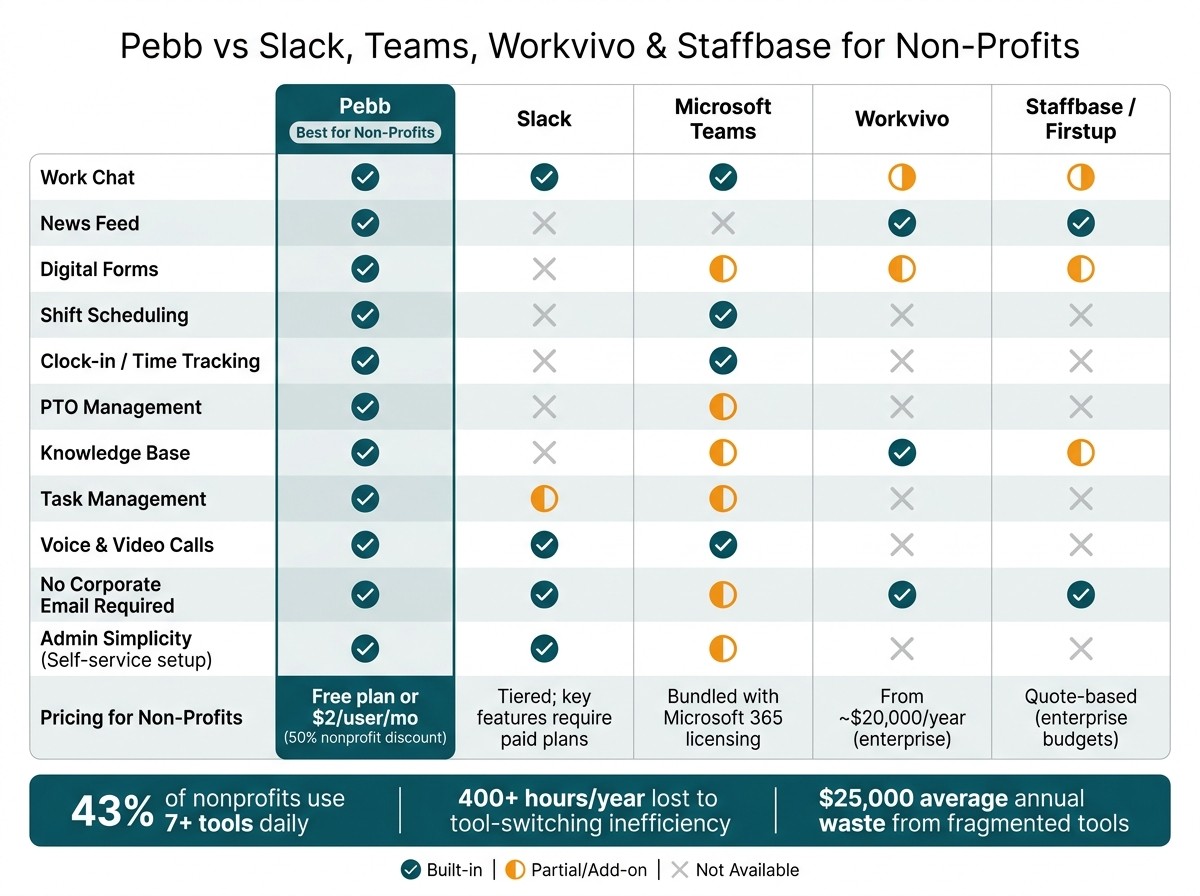
Pebb vs Slack, Teams, Workvivo & Staffbase: Non-Profit Tool Comparison
Where Slack and Teams help and where they fall short for non-profits
I’ve seen this play out over and over with non-profit teams. At first, Slack or Microsoft Teams feels like enough. You’ve got chat, file sharing, calls, and everyone can stay in touch. For office-heavy non-profits, that can work just fine.
But here’s the thing: most non-profits don’t just need a place to talk. They need a place to run the day.
I’ve watched teams hit that wall fast. One group needed to manage volunteer shifts for a food pantry. Another needed to check who actually clocked in at a site visit. Someone else needed field staff to send in incident reports without texting random screenshots. Then PTO came into the mix, and now the program manager had to make sure coverage didn’t fall apart.
That’s usually when the tool stack starts growing.
Slack doesn’t come with native shift scheduling, time tracking, or digital forms. Microsoft Teams goes a bit further because it includes Shifts for schedule management and clock-in/out, but it still sits inside the larger Microsoft 365 setup and can mean extra licensing, setup work, or more workforce tools on top. In my experience, that’s not a small headache for a non-profit ops lead. It’s time, money, and mental load they usually don’t have.
At Pebb.io, we built the app to keep those day-to-day workflows in one place, so our teams can handle communication and operations without bouncing between tools.
Comparison table: Pebb, Slack, and Microsoft Teams
When I compare these platforms for non-profits, I don’t start with chat. Chat is the easy part. I look at whether the platform helps the team handle the work around the chat.
Capability | Pebb | Slack | Microsoft Teams |
|---|---|---|---|
Work chat | Included, unlimited history | Included, limited history on free plan | Included |
News feed | Built-in, targeted for staff and volunteers | Not native; relies on channels | Not native; relies on channels/SharePoint |
Digital forms | Built-in; structured and reportable | Requires third-party apps | Requires Microsoft Forms or Power Apps |
Shift scheduling | Built-in | Not native; requires separate tools | Included via Shifts app |
Clock-in / time tracking | Built-in | Not native | Included in Shifts |
PTO management | Built-in with approvals | Not native | Available through Microsoft ecosystem tools |
Knowledge base | Built-in | Not structured; relies on channel history | Via SharePoint/Wiki |
Tasks | Built-in, tied to work groups | Usually requires a separate task tool | Via Planner/To Do |
Voice and video calls | Included on Premium | Included | Included |
Pricing clarity | Transparent; free plan or $4/user/month | Tiered; key features require paid plans | Bundled with Microsoft 365 licensing |
Need for extra tools | Low | High | Medium to high |
That’s the split I keep seeing in the field. Slack and Teams do a good job with communication, but Pebb keeps scheduling, forms, attendance, PTO, and tasks inside the same flow.
And for non-profit teams, that matters a lot. In my experience at Pebb.io, this is the point where many teams outgrow chat-only tools - not because chat stopped working, but because the rest of the work kept spilling into other apps.
Pebb vs Workvivo, Staffbase, and Firstup for non-profit operations
Why communications platforms alone do not cover program team needs
A while back, I was talking with a team that ran weekend food distribution. They didn’t need another shiny channel for top-down updates. They needed to know who was covering Saturday’s shift, whether the site lead had checked in at the right location, and how to collect incident reports from volunteers who didn’t even have company email accounts.
That’s where I’ve seen the split up close at Pebb.io.
Workvivo, Staffbase, and Firstup are strong internal communications tools, but they are not built to run non-profit operations. They help large organizations share news and run engagement campaigns across mobile, email, and signage. If the main job is sending polished announcements to thousands of employees, that’s their lane. The gap gets easier to spot when you stack them next to tools made for enterprise communications rather than day-to-day program work.
Here’s the thing: most non-profit program teams are not sitting around planning internal comms campaigns.
They’re dealing with the stuff that has to happen today. Who’s covering the Saturday food distribution shift? Did the site lead clock in at the right place? Did the volunteer submit the incident report? And can all of that happen without bouncing between three or four systems?
Workvivo, Staffbase, and Firstup are internal communications tools. They rely on separate scheduling tools, time-clock systems, and forms platforms to cover operational needs. For a lean non-profit team, that means more handoffs, more missed updates, and more admin work - with Workvivo's Business plan starting at around $20,000 per year for companies with 250–2,000 employees, and Staffbase and Firstup both built for enterprise budgets.
I’ve seen what happens when teams try to patch this together. One tool for updates. Another for scheduling. Another for forms. Then someone misses a shift change because the message went out in one place, but the schedule lived somewhere else. It’s messy fast.
At Pebb, we took a different path. A volunteer coordinator can post a shift, send a group message, collect a digital form, and check who clocked in without leaving the app. To me, that’s the real question here. It’s not which platform sends updates best. It’s which one helps a non-profit actually run its work.
Comparison table: Pebb, Workvivo, Staffbase, and Firstup
Capability | Pebb | Workvivo | Staffbase | Firstup |
|---|---|---|---|---|
All-in-one coverage | Communication + Operations | Communications only | Communications only | Communications only |
Mobile usability for frontline teams | Built-in; no corporate email required | Built-in | Built-in | Built-in |
Shift scheduling | Built-in | Requires integration | Requires integration | Requires integration |
Clock-in / attendance tracking | Built-in | Not standard | Not standard | Not standard |
Digital forms | Built-in | Limited / survey-based | Limited / survey-based | Add-on |
Knowledge base | Built-in | Included | Included | Limited / add-on |
Admin simplicity | Self-service setup | Enterprise implementation required | Enterprise implementation required | Enterprise implementation required |
Price accessibility for non-profits | Free plan + $4/user/month | Quote-based, high minimum spend | Quote-based | Quote-based |
When I look at this side by side, the difference is pretty plain. Workvivo, Staffbase, and Firstup do communications. Pebb handles communications and operations.
That matters most for non-profits that need one place to manage the work, not a stack of separate systems held together by hope and extra admin time. And from what I’ve seen, that same edge becomes even clearer when Pebb is put next to broader workplace platforms.
Why Pebb is the right choice for non-profit team management
The cost and efficiency case for choosing Pebb
I’ve seen this moment happen over and over at Pebb.io. A nonprofit team finishes comparing tools, pricing, and feature lists, and then the talk shifts. It stops being about which app has what and starts being about something much more practical: can one platform replace the stack without making life harder?
Here’s the thing: in most cases, yes. And when it does, the math gets pretty simple. One platform means less tool sprawl, fewer handoffs, and less admin work eating up the day.
At Pebb, we keep pricing low on purpose. There’s a free plan, Premium is $4 per user per month, and nonprofits get a 50% discount. For lean teams, that matters. I’ve talked to teams juggling separate tools for chat, scheduling, forms, and time tracking, and the monthly total adds up faster than people expect.
But the bigger win isn’t just the subscription bill. It’s the time.
Let me tell you what happens when scheduling, clock-in, forms, and team communication all sit in one place. Operations managers stop stitching data together across different systems. Volunteer coordinators stop chasing confirmations in one app, updates in another, and reports somewhere else. Staff and volunteers can clock in, check schedules, and submit incident reports from the same mobile app, without company email.
That last part matters more than many people think. In nonprofit work, not everyone has a company inbox. So if your system depends on one, people get left out. We built around that gap because we kept seeing it slow teams down.
When nonprofit leaders look at the choice, I usually see them come back to three practical checks:
Fewer tools and lower cost: If you’re paying for three or more separate subscriptions, Pebb can replace most of what you need in one place.
Higher volunteer adoption: If people are only half-using your current tools, those coordination gaps are already costing you time and missed follow-through.
Clear visibility into attendance, engagement, and compliance: When everything sits in Pebb, leadership has one place to see what’s happening across programs and locations.
That’s why I think Pebb works so well for lean nonprofit teams. We give them one place to communicate, coordinate, and manage daily work.
FAQs
How quickly can a nonprofit get started with Pebb?
I’ve seen nonprofit teams go from “We need a better way to stay on top of things” to fully up and running on Pebb in just minutes.
Here’s what that looks like in practice: we create a workspace, share one invite link with the team, and they can jump straight into Pebb. From there, they start using communication, scheduling, and collaboration tools right away.
The part I like most? There’s no long setup process and no tangled training plan slowing everyone down. We just set it up, invite the team, and start managing day-to-day work from one app that same day.
For nonprofit teams, that matters. You don’t want to spend weeks rolling out software when you’ve already got programs to run, people to support, and a million moving pieces. With Pebb, we keep it simple so teams can get to work fast.
Can volunteers use Pebb without a company email?
I’ve seen this come up a lot when teams mix paid staff with volunteers, and the short answer is yes.
Volunteers can join and use Pebb alongside staff through a shared invite link.
Here’s the thing: once they’re in, they can access Spaces for chat, schedules, tasks, forms, and time/clock-in. That makes it much easier for us to keep everyone in one place instead of juggling texts, email threads, and paper sign-in sheets.
One detail I paid close attention to on my side at Pebb.io was whether volunteers needed a company email to get started. Based on the provided material, nothing says a company email is required.
So if you’re bringing in volunteers and want them working in the same flow as your staff, that setup is supported.
Which tools can Pebb replace for nonprofit teams?
At Pebb.io, I’ve seen this play out more times than I can count: a nonprofit team starts with one tool for chat, another for calls, something else for schedules, and then a messy folder system for files. Before long, people are bouncing between tabs all day just to get through basic work.
That patchwork slows teams down.
What we built at Pebb can replace that sprawl by bringing communication, team connection, day-to-day work, and document sharing into one place. For nonprofit teams, that means less tool-juggling and fewer “Wait, where was that again?” moments.
Here’s what that looks like inside Pebb:
Work group chat
Voice and video calls
News feed
Groups
People directory
Shift scheduling
Clock-in/out
PTO
Tasks
Digital forms
A centralized knowledge library for files and updates
Here’s the thing: when all of that lives in one system, work feels a lot less scattered. I’ve watched teams go from chasing links across five apps to finding what they need in minutes. And when you’re running a nonprofit, that kind of time savings matters. Every hour you get back can go into the mission instead of admin drag.
