

Author: Ron Daniel
Why mobile-first intranets are replacing traditional company portals
Desktop portals fail when work is mobile; mobile-first intranets deliver chat, schedules, forms and targeted updates on phones.
Most company portals fail the moment work leaves the desk.
I’ve seen that gap up close at Pebb.io. A company rolls out a portal, leaders assume communication is handled, and then frontline staff miss updates because the system works best on a desktop they barely touch. When people rely on phones during shifts, a portal built for office workers starts to feel like a dead end.
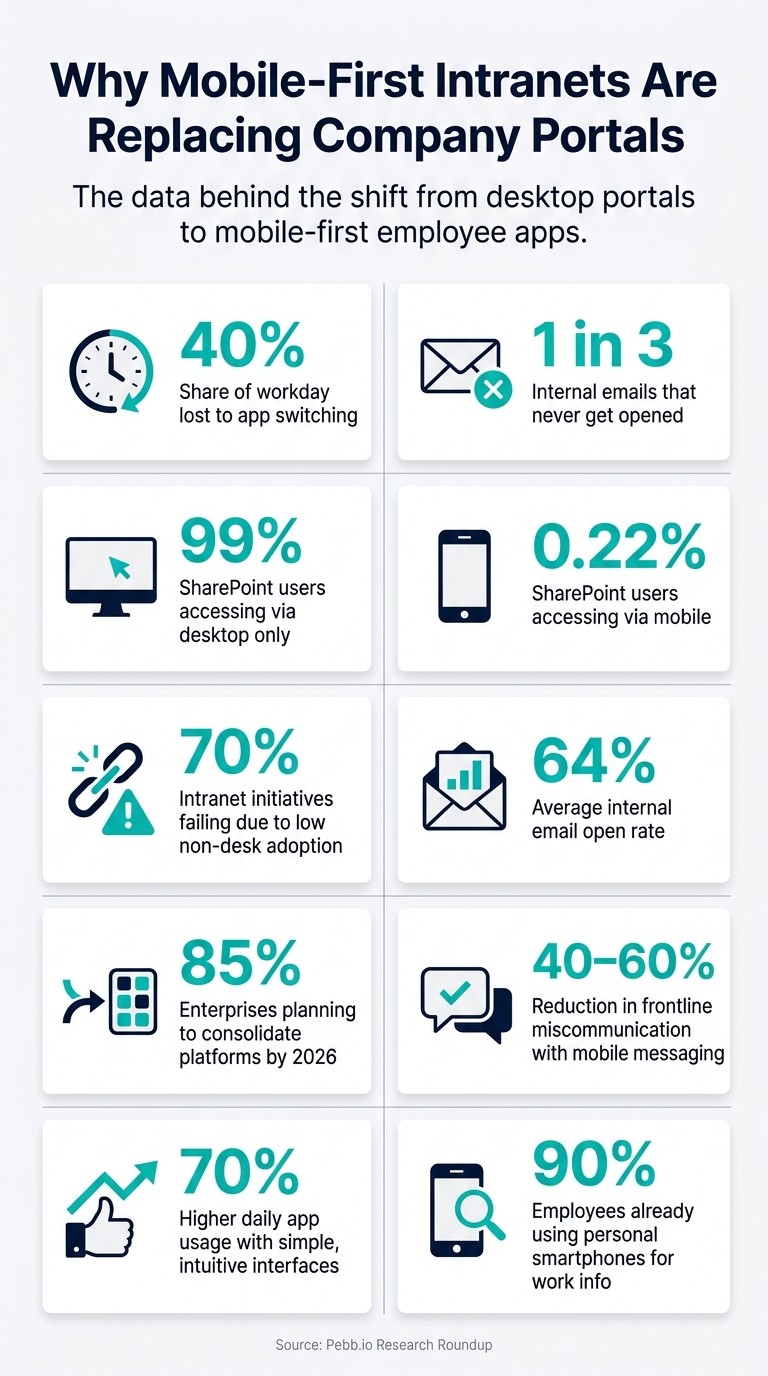
The numbers make the problem hard to ignore. Employees can lose up to 40% of their day switching between apps, and many teams still depend on email even though about 1 in 3 internal emails never gets opened. Add weak phone access, scattered tools, and shift-based work, and it’s easy to see why old portals stop getting used.
So what changed? I’ll break down where company portals fall short, why mobile-first intranets are taking over, and what I’ve learned at Pebb about putting chat, schedules, forms, and updates into one app people will use.
If you’re trying to reach frontline or distributed teams without sending them through five logins and a desktop-only maze, this is where to start.
Quick overview:
Old portals were built for desk-based work
Mobile-first intranets meet employees where they already are: on their phones
One app cuts time lost to scattered tools
Push updates, chat, forms, and schedules help teams act during a shift, not after it
Better access usually means better use
What I’ve learned is simple: when work is mobile, the employee home base has to be mobile too.
Why Mobile-First Intranets Are Replacing Company Portals: Key Stats
The real problems with company portals today
I’ve seen this play out over and over at Pebb.io. A company rolls out a portal, leadership feels good about it, and for a while it looks like the job is done. Then the cracks show. Frontline teams don’t use it, updates get missed, and managers end up chasing people across three or four apps just to keep a shift on track.
Here’s the thing: most company portals weren’t built for the way frontline people actually work.
Desktop-first design leaves frontline workers out
One stat says it all: 99% of employees access SharePoint via desktop, while only 0.22% access it via phone. When I first saw that number, it hit me hard. It explains why so many phone-first workers get left behind.
Frontline work doesn’t happen at a desk. It happens on the move, on shared devices, during short breaks, and in those tiny in-between moments when someone has maybe 30 seconds to check an update before getting back to work. I’ve watched teams struggle with so-called mobile portals that are just desktop pages squeezed onto a small screen. That’s not a mobile experience. That’s a desktop experience in disguise.
And when the setup starts from desktop, adoption falls fast. The cost is bigger than poor UX, too. Organizations with this kind of disconnected setup see 70% of intranet initiatives fail due to low adoption among non-desk workers.
Static content does not help fast-moving teams
A lot of old-school portals were made to store information, not get it to people at the right moment. In plain English, they act like digital bulletin boards. Stuff gets posted, but that doesn’t mean anyone sees it when it matters.
I’ve seen this lead to a familiar mess. Teams stop trusting the official channel, then drift into consumer apps, side chats, and random workarounds. It feels easier in the moment, but it creates a bigger problem later.
The numbers back that up. The average internal email open rate sits at 64%, meaning roughly 1 in 3 corporate emails goes unread. Let me tell you what happened next in cases like this: once people feel the main system is slow or easy to miss, they build their own path around it. That’s where communication slips, policy gaps, and compliance risk start showing up.
Static portals also fall short for another reason: they don’t help work move. They hold information, but they don’t push action.
Too many separate tools create confusion and wasted time
This is the part frontline managers complain about the most. One app for scheduling. Another for chat. A different place for HR tasks. Somewhere else for documents. By the middle of the day, people are bouncing between tabs and logins just to do basic work.
I’ve talked to teams dealing with exactly that kind of setup, and the issue isn’t just annoyance. It’s the work that gets dropped in the gaps. Missed scheduling updates. Delayed approvals. Tasks that sit untouched because the alert lived in the “other” app.
That’s a big reason 85% of enterprises plan to consolidate their scattered communication and operational platforms by 2026 to reduce "app fatigue". And honestly, that move makes sense. When updates and tasks live in too many places, daily coordination starts to break down.
That is why mobile-first intranets bring communication, scheduling, and tasks into one phone-first workflow.
What a mobile-first intranet does differently
I’ve seen this play out up close at Pebb.io: the problem usually isn’t that teams lack information. It’s that the information shows up at the wrong time, in the wrong place, or in a format no one wants to fight with on a phone.
A mobile-first intranet changes that. It’s built for mobile from day one, not shrunk down from a desktop setup. That sounds like a small detail, but on a busy shift, it changes everything. People aren’t sitting at a desk with 20 minutes to click around. They’re checking a schedule, reading a fast update, or sending in a form between tasks. In my experience, that difference shows up in three places: communication, operations, and access to knowledge.
One app for communication, updates, and team coordination
Let me tell you what happens when updates live everywhere at once. One message is in email, another is in a group text, and a third is buried in chat. That’s when teams miss things.
A mobile-first intranet fixes that by putting updates in one place and sending them in a way people will actually see. Push notifications help teams catch time-sensitive news fast, and work chat keeps job-related messages out of personal texts and random group threads. I like this part a lot because it draws a clean line between work communication and personal life.
There’s a hard business upside too: targeted messaging can cut miscommunication in frontline operations by 40% to 60%. When the right people get the right update at the right moment, fewer things slip through the cracks.
Operational tools employees can use during a shift
Here’s the thing: communication alone doesn’t fix the workday. People also need to do their tasks without hopping between apps.
That’s why mobile-first intranets pull daily tools into the same flow. Shift schedules, PTO, clock-in tools, and forms all live in one app. I’ve watched how much smoother this feels for teams. Instead of stopping work to hunt for a link or log into a second system, they can handle what they need and move on.
And simple design matters more than most teams think. Apps with simple, intuitive interfaces see 70% higher daily use than complex alternatives. I’ve seen that pattern again and again. If something takes too many taps, people stop using it. It’s that simple.
Knowledge and resources available from a phone
This is the part many companies miss until something goes wrong. People need answers while they’re working, not hours later.
With a mobile-first intranet, SOPs, training videos, and digital forms are available right from a phone on the floor, in the field, or on-site. That means employees don’t have to wait until they get back to a desktop, and managers don’t have to answer the same question five times in one day.
The behavior is already there. 90% of employees use their personal smartphones to find work-related information. We’re not teaching people a new habit. We’re giving them a better place to do what they already do.
When resources are one search away, people move faster and make fewer mistakes. I’ve found that this is where mobile-first tools start to feel less like “just another app” and more like part of how the day actually gets done.
How mobile-first intranets fix specific workplace problems
I’ve seen this play out up close at Pebb.io. The gap between an old-school portal and a mobile-first intranet isn’t some big theory debate. It shows up in the small daily messes that slow people down: missed updates, scattered chat, and admin work that somehow takes way longer than it should.
And once you notice those gaps, you can’t unsee them.
Missed updates become easier to act on
One of the biggest problems with old portals is simple: people have to remember to go check them.
That sounds minor until you’re dealing with frontline teams, shift workers, or people who aren’t sitting at a desk all day. In those cases, “check the portal later” often means the update gets buried, skipped, or seen too late to matter.
With a mobile-first intranet, news lands right on employees’ phones. That changes the rhythm. Instead of hoping people log in at the right time, we bring the update to them when it matters.
Here’s the thing: shorter updates tend to work better. I’ve watched teams get more traction when they turn long internal posts into quick micro-briefs:
What changed
What to do
Where to get help
That format cuts through the noise. It also gives managers a better way to track what happened next. Instead of leaning on pageviews, they can measure acknowledgments and form completions.
When updates start moving faster, though, the internal communications strategy must keep the channel clean. If it turns into a pile of alerts, people tune out.
Secure work chat replaces personal texting
Let me tell you what happened next in a lot of teams we’ve looked at: once updates improve, chat becomes the next weak spot.
If employees are bouncing between texts, group chats, and random apps, shift details get lost fast. A built-in secure work chat fixes that by keeping those conversations in one place, right next to the news feed and team updates.
That matters more than most people think. When chat lives inside the same space as company news, people spend less time chasing context. They’re not digging through personal text threads trying to find a schedule note from two days ago.
And yes, it also cuts down on the awkward mix of work messages inside personal texting apps.
The same logic carries over to forms and approvals too.
Manual admin tasks move into one mobile app
This is where things get very practical, very fast.
PTO requests, incident reports, shift swaps, and clock-ins don’t need to live in four or five places. Putting them into one mobile app removes a lot of friction for employees and managers alike.
I’ve found that this is often the point where people stop seeing the intranet as “just another communication tool” and start seeing it as part of how work gets done.
A good example is Pechanga Resort & Casino. Their employees could access HR information at midnight instead of waiting for office hours.
That kind of access makes a big difference when your workforce doesn’t run on a 9-to-5 schedule.
That’s why the next step is leveraging the benefits of mobile apps for frontline employee communication by putting these tools into one app.
Why Pebb fits the move to mobile-first intranets
I’ve seen this play out more than once at Pebb.io. A company decides its old portal isn’t working, swaps it out, and then runs into the same mess all over again. Different tool, same headache. The core issue usually isn’t the label on the software. It’s that the new setup still asks people to bounce between too many places just to get through a normal shift.
Pebb puts the full employee experience in one app
Here’s the thing: that problem only goes away when the replacement feels easier than the portal it replaces. If the new system doesn’t pull work into one place, people drift right back to old habits.
That’s the gap we built Pebb to fix.
At Pebb.io, we bring work chat, news feed, shift scheduling, PTO, clock in, forms, and a knowledge library into one app. I’ve watched how much smoother things get when employees don’t have to open five or six tools just to check an update, swap a shift, or find a policy. It sounds small until you see the time drain up close.
And the numbers back it up. Employees lose up to 40% of their day to context-switching between different apps.
That ties straight back to the same pain point we see again and again: low adoption, fragmented tools, and weak mobile access. Pebb is built to avoid that from the start.
A simpler rollout than stacking separate tools
Let me tell you what happened next in a lot of these rollouts. Teams start with one app for communication, another for scheduling, another for updates, and one more for forms. On paper, it looks fine. In practice, it gets messy fast.
I’ve learned that when those parts live in separate systems, setup takes longer, training gets harder, and employees check out before the launch even settles in.
That’s why we kept Pebb simple.
Standard is free for up to 15 employees
Premium is $4 per user per month
Single-link invites and QR code onboarding help employees get started without a corporate email address
For frontline teams, that last part matters a lot. We’ve seen how much easier adoption becomes when people can join right away instead of waiting on IT, inbox access, or extra setup steps.
Conclusion: The new employee home base is mobile
I think this is the part many companies are finally waking up to. Old company portals were built for people sitting at desks, checking email, and clicking through menu after menu. That’s just not how most teams work now.
At Pebb.io, we built for the way work looks today: on the move, on the floor, between tasks, and often on a phone.
That’s why Pebb works as the daily employee home base, not just another portal. One app. One place. No tool-stacking required.
FAQs
What makes an intranet truly mobile-first?
I learned this the hard way at Pebb.io.
Early on, we kept saying our intranet worked on mobile. And technically, it did. You could open it on a phone. You could tap around. You could sort of get things done.
But let me tell you what happened next: that wasn’t enough.
A mobile-first intranet isn’t just a desktop site squeezed onto a smaller screen. It works well when employees use their smartphones as their main way to get work done. That changes everything. The navigation has to be thumb-friendly. Pages need to load fast, even on shaky Wi‑Fi. And the stuff people do every day can’t feel buried or clunky.
At Pebb.io, we saw that if a frontline employee had to pinch, zoom, wait, or jump through five screens just to check one thing, we’d already lost them.
Here’s what mobile-first looks like in practice:
Easy navigation with one hand
Fast loading on weak or spotty Wi‑Fi
Simple access to common daily tasks
And that’s only part of it.
A mobile-first intranet should also push instant, targeted updates to the right people at the right time. If a shift changes, a policy gets updated, or a team lead needs to share news, people should see it right away, not hours later after digging through email.
It should also make the basics dead simple: schedules, knowledge, chat, calls, and daily tools all need to be close at hand. No app-hopping. No hunting through menus. No wasting time just to start work.
That’s the bar we keep coming back to at Pebb.io: if someone can pull out their phone and handle the day’s main tasks in seconds, we’re on the right track.
Which teams benefit most from a mobile-first intranet?
I’ve seen this up close at Pebb.io. The teams that get the most from a mobile-first intranet usually aren’t sitting at desks all day. They’re frontline, deskless, and spread across different places, doing the kind of work that happens on the move.
I’m talking about retail staff helping customers on the floor, warehouse crews moving fast between tasks, hotel staff handling guest needs, nurses during busy shifts, and drivers out on the road. For these teams, a phone isn’t a backup device. It’s the main way work gets done.
Here’s the thing: when people can open one app on their phone and get what they need right away, a lot of small frustrations start to disappear. That matters more than most leaders think.
With mobile access, quick content delivery, and real-time tools like chat, voice and video, updates, schedules, and forms, we make it far easier for people to stay in sync without slowing down their day. Leadership messages don’t get stuck at HQ. Daily tasks don’t get lost in the shuffle. Information reaches people where the work is actually happening.
I’ve watched this play out again and again. A store associate doesn’t have to wait for a manager to pass along an update. A nurse can check key info during a shift. A driver can pull up a form without digging through email. It sounds simple, but in fast-moving jobs, cutting even a few steps can make a big difference.
That’s why mobile-first intranets work so well for these teams: they reduce friction and help communication flow in the same place people already are - on their phones, in the middle of the workday.
How can companies switch from a portal without hurting adoption?
I’ve seen this play out the hard way at Pebb.io: a company picks a new internal tool, leadership announces it from the top, and everyone hopes adoption will just... happen. It usually doesn’t.
Here’s the thing: people don’t want another system dropped on them in the middle of a busy shift. The rollouts that work are the ones that fit into the day people already have. That means meeting employees where they already work, not where we wish they worked.
When we talk about rollout plans, we push teams to line them up with shift changes, not random calendar slots. A five-minute handoff before or after a shift can do more than a long company-wide announcement. We’ve also seen peer champions make a big difference. When a trusted coworker shows someone how to use a tool, it lands better than a top-down mandate almost every time.
And access has to be fast. If logging in feels like a chore, people bail.
For deskless workers, I’ve learned that delivery beats browsing every time. They’re not sitting around scrolling through pages of company content. They need the right update, the right task, and the right action point - fast.
That’s why role-specific views matter so much. A frontline manager needs something different from a warehouse picker or a field tech. When each person sees what fits their job, the tool feels useful right away instead of noisy and cluttered.
We also try hard to cut app switching. Let me tell you what happened next on one rollout: once we trimmed the number of places people had to check for updates and tasks, adoption got a lot smoother. Not perfect, but smoother. Fewer taps, fewer dead ends, fewer “Where do I find this?” moments.
Simple access helps too. Options like QR code enrollment remove friction at the start, and that first step matters more than most teams think. If someone can get in within seconds, you’ve already cleared one of the biggest hurdles.
When I look at whether a rollout is working, I don’t just look at launch-day buzz. I look at two simple signals:
Active usage
Fewer repeated help desk questions
If people keep coming back and support teams stop getting the same questions over and over, that’s usually a good sign the setup is doing its job.
