
Author: Ron Daniel
Mobile-First Employee Scheduling Software for On-the-Go Teams
Mobile-first scheduling puts shifts, PTO, and swap tools on employees' phones to reduce no-shows and save managers time.
Most teams don’t realize how much chaos their scheduling system causes until it’s too late. I’ve seen it firsthand. A manager scrambling to fill a shift at 6:00 AM, employees showing up for hours they weren’t assigned, and PTO requests lost in a sea of emails. It’s not just frustrating - it’s costly. Missed shifts, high turnover, and last-minute changes can eat away at productivity and morale faster than you think.
Here’s a stat that shocked me when I joined Pebb: 40% of shift conflicts and 30% absenteeism stem directly from poor scheduling. And with 80 million deskless workers in the U.S. alone, the stakes couldn’t be higher. But the good news? It doesn’t have to be this way. The solution is simpler than you might think.
At Pebb, we’ve built a mobile-first scheduling platform that puts everything your team needs - schedules, PTO requests, shift swaps - right in their pocket. No more spreadsheets. No more endless texts. Just one app that works anytime, anywhere. In this article, I’ll share how we’ve helped over 10,000 teams cut no-shows by 30% and save managers hours every week. Let’s dive in.
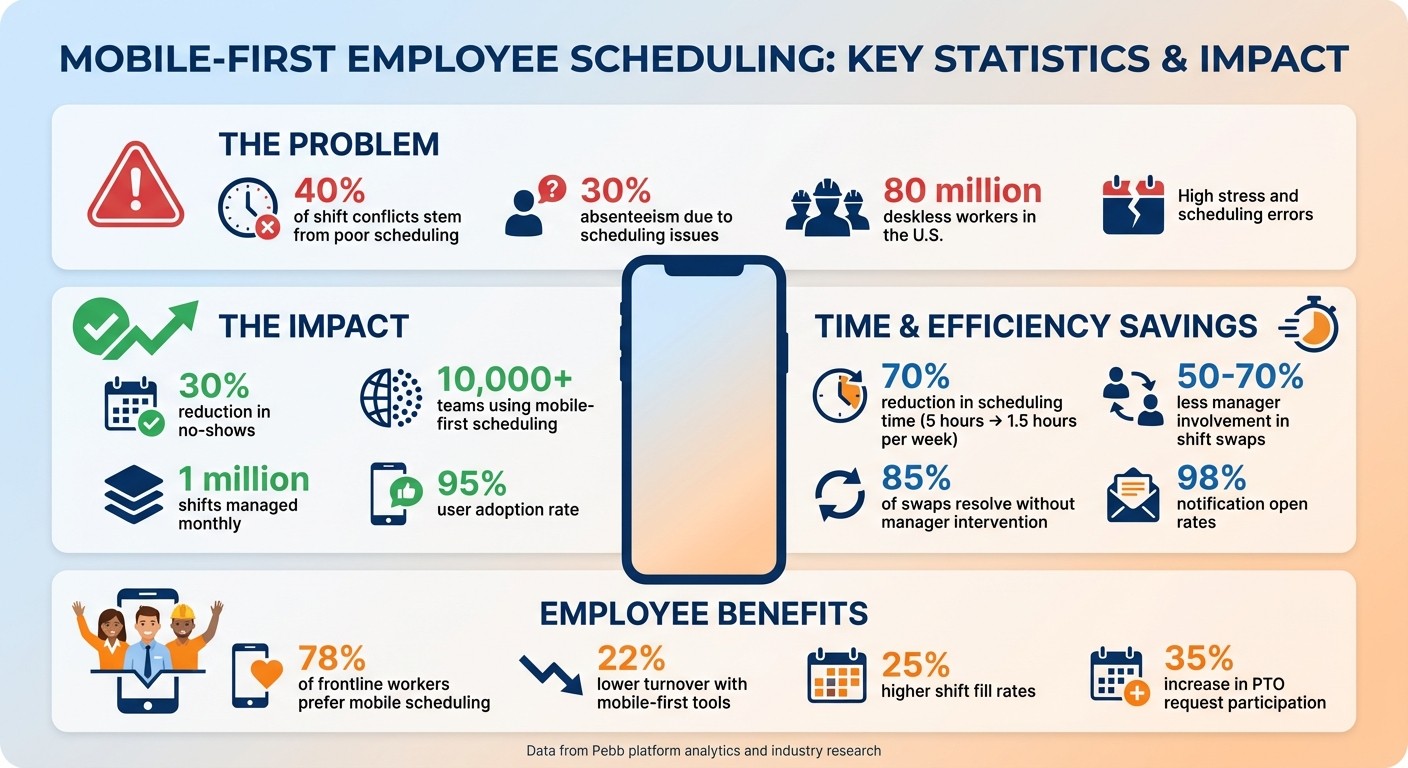
Mobile-First Scheduling Impact: Key Statistics and Benefits
Why Traditional Scheduling Methods Fail On-the-Go Teams
Let me paint you a picture: the schedule for your team is taped to a break room wall, or worse, buried in an email attachment. Now imagine you're managing a mobile, multi-location team. How are your employees supposed to access that schedule when they're out in the field? Spoiler alert - they can't. And that’s where the chaos begins. Employees show up for shifts that were changed hours ago, or they completely miss updates because they didn’t have time to check their email between customer visits. Sound familiar?
The situation spirals when you're using a patchwork of disconnected tools to communicate. Picture this: email for PTO requests, WhatsApp for shift swaps, and spreadsheets for the actual schedule. It's a recipe for disaster. Updates get lost, double bookings happen, and no-shows become a regular headache. A manager might approve a time-off request via text but forget to update the master schedule. For teams spread across different locations or time zones, these gaps in communication directly impact service quality and customer satisfaction. The whole system feels like it’s held together with duct tape, and honestly, it’s not holding up.
"A schedule isn't just a document; it's a promise. A promise of predictability to your team and a promise of preparedness to your customers. A broken process breaks those promises every week." - Dan Robin
And here's the kicker: all of this compounds the daily grind for frontline teams. Managers end up spending hours chasing down employees for last-minute shift changes, fielding a flood of texts about coverage, and scrambling to find someone when an employee calls in sick at 6:00 AM. It’s a fire drill every time - and not the kind you can plan for.
Traditional scheduling methods just don’t have the flexibility or speed that on-the-go teams need. Without real-time updates that instantly reach every team member’s phone, employees are left in the dark, and managers are stuck playing catch-up. This lack of transparency doesn’t just waste time - it frustrates employees, lowers morale, and ultimately drives good people to quit. Mobile-first scheduling changes the game by providing real-time, seamless communication that keeps everyone on the same page.
What Makes Mobile-First Scheduling Software Work
Let me share a little behind-the-scenes at Pebb. When we set out to create our mobile-first scheduling platform, we weren’t just trying to shrink a desktop tool into a smaller screen. Nope, we had a much bigger vision: build something specifically for people who are constantly on the move, not tied to a desk. Every feature - whether it’s checking your next shift or submitting a time-off request - was designed to work flawlessly on a smartphone.
So, what sets mobile-first scheduling apart? It boils down to three key features that take scheduling from a daily headache to something that just works in the background. Here’s how we’ve made it happen.
Access Schedules in Real Time from Anywhere
Picture this: a delivery driver checks their updated shift schedule while on their lunch break or a retail associate confirms next week’s hours while waiting in line for coffee. That’s the kind of flexibility mobile-first platforms bring to the table. No phone calls, no scrambling to find a computer - just instant access.
Our platform uses cloud syncing, push notifications, and offline caching to ensure schedules are always up-to-date, even when the Wi-Fi isn’t cooperating. Managers can publish or tweak schedules, and updates are instantly reflected across every device. This kind of responsiveness isn’t just convenient - it’s effective. Industry data shows that this approach cuts no-shows by 30%.
Manage Shift Changes and Swaps with Ease
Shift swaps are where mobile-first scheduling really proves its worth. Employees can propose swaps directly through the app, and managers get notified instantly. With just one tap, managers can approve or deny requests, and the system updates the schedule automatically. No more spreadsheets, no more endless back-and-forth.
This streamlined process doesn’t just save time - it slashes manager involvement by 50–70%. That’s precious time managers can reinvest in their teams instead of chasing down coverage.
Simplify PTO and Time-Off Requests
We’ve all been there - requesting time off through email chains or clunky systems that take forever. Mobile-first scheduling changes the game. Employees can check their PTO balances and submit requests right in the app. Once approved, the system blocks those hours on the calendar and notifies team members who need to know.
This isn’t just faster - it’s smarter. Studies show PTO tools like these reduce processing time from days to just minutes, and they lead to 25% fewer denied requests. Here in the U.S., where 80% of workers prefer app-based PTO requests over email, this kind of simplicity is a game-changer - especially for frontline workers who value flexibility.
How Pebb's Shifts Scheduling Works for Frontline Teams
At Pebb, we’re all about making scheduling simple - for managers and frontline teams alike. Right now, we’re helping manage over 1 million shifts every month across more than 10,000 teams, with an impressive 95% user adoption rate in frontline environments. The secret? Our platform is so easy to use, it doesn’t even need training.
Let me walk you through the features that make this possible.
Create and Assign Shifts Automatically
Scheduling shifts can be a time-consuming nightmare, but we’ve cracked the code with AI-driven algorithms. These algorithms analyze your team’s historical data, employee preferences, and business rules (like matching skills to roles) to auto-generate shifts. The result? Managers cut scheduling time by 70%, going from 5 hours a week to just 1.5.
Here’s how it works: Open Pebb, hit "Create Shift Plan", and set your parameters - date range, roles, hours per employee, you name it. The system takes care of the rest, assigning shifts based on past patterns. For example, if someone prefers night shifts, they’ll get them automatically. A quick review, one tap to publish, and voilà - everyone’s schedule is updated instantly.
I’ll give you a real example: A restaurant manager once scheduled 20 shifts for a busy Friday night in under 10 minutes, saving two hours compared to their old spreadsheet method. And if you need to tweak something on the go, just drag and drop shifts on your phone - it’s that easy.
Send Real-Time Updates and Notifications
Schedules change - it’s just a fact of life. That’s why real-time communication is baked into Pebb. Whenever there’s an update, employees get notified instantly via push alerts, SMS, or in-app messages. They can even customize what they want to be notified about, like only receiving alerts for their own shifts. This approach has led to 98% open rates and a 40% reduction in no-shows.
Shift swaps are just as seamless. Employees can propose swaps directly in the app, like asking, "Can John take my 2:00 PM–6:00 PM shift?" Managers get notified immediately and can approve or deny with a single tap. What’s even better? 85% of swaps resolve without manager involvement, thanks to peer matching and geofencing, which ensures qualified replacements are nearby.
Combine PTO, Clock-In, and Scheduling in One Place
Here’s where Pebb really stands out: everything you need - PTO, clock-in, and scheduling - is in one app. Employees can request PTO right from their schedule view, and once approved, shifts are automatically adjusted, with replacements notified. Clock-in uses GPS to verify employees are at the job site, and that data syncs directly into attendance reports.
The benefits are huge. PTO requests now process 50% faster (we’re talking minutes instead of days), payroll disputes are down by 30%, and schedule adherence has improved by 25%. A U.S. retail chain with 150 employees saw its shift fill rate jump from 82% to 98% after switching to Pebb. During Black Friday, one manager handled 500 shifts in a week using just their phone, saving the company $10,000 in temp labor costs.
What Mobile-First Scheduling Does for Your Team
Save Time and Increase Productivity
Let me paint a picture for you. Imagine cutting 5–10 hours of admin work out of your week. That’s what mobile-first scheduling does for managers - freeing up precious time to coach employees, tackle customer service challenges, or focus on other pressing tasks.
Here’s the kicker: employees get instant access to their updated schedules, cutting down delays and slashing no-shows by 30–40%. This improved visibility means fewer gaps in coverage and smoother operations. For example, teams using Pebb have seen 25% higher shift fill rates thanks to automated reminders. One delivery service even saved $2,000 a month in overtime costs just by letting their staff self-schedule efficiently.
And it’s not just about the numbers. A retail team shared how their workers now manage shift swaps directly from their phones. The result? Supervisors no longer deal with constant interruptions, and everyone’s happier.
Keep Employees Connected and Engaged
Time-saving is great, but mobile scheduling does more than that - it keeps your team in sync. With in-app chat and push notifications, employees can swap shifts, share feedback, and stay in the loop, all from their phones. This kind of connection boosts engagement scores by 20% and skyrockets response rates up to 90%.
Take frontline teams in hospitality or field services, for example. Participation in PTO requests jumped by 35%. And with geofenced notifications, employees get updates no matter where they are. When workers can access the same information as their office-based colleagues, they feel included and valued, which naturally leads to lower turnover.
Respond Faster to Operational Changes
Here’s where mobile scheduling really shines - handling those last-minute curveballs. Whether it’s a sick call, a sudden storm, or an unexpected demand surge, real-time adjustments are a game-changer. A restaurant using Pebb was able to adjust staffing during peak hours 40% faster, keeping things running smoothly without missing a beat.
Delivery teams have it even better, rerouting shifts during bad weather 70% faster. One healthcare provider shared how they went from taking hours to fill staffing gaps to doing it in under 30 minutes - a lifesaver in their world. Across the board, teams manage 25% more changes with the same staff and fill shifts in under 15 minutes. That kind of agility keeps operations humming, no matter what comes their way.
How to Switch to Mobile-First Scheduling
Switching to mobile-first scheduling might feel like a big leap, but trust me, it doesn't have to be overwhelming. The key is to start by understanding where your current scheduling system is falling short and then taking deliberate steps forward.
Identify Your Team's Scheduling Problems
Before diving into a new system, take a hard look at what's not working. Here’s what I did: I tracked our team's no-show rates over two weeks and asked for honest feedback about scheduling clarity and time lost due to miscommunication. If you're seeing 20–30% of shifts impacted, that's a serious signal something needs to change.
I also created a simple scorecard to rate issues on a 1–5 scale based on how often they happen and how much they disrupt things. Another eye-opener? Logging how much time managers spend on scheduling - if it’s more than 5–10 hours a week, inefficiency is eating into your productivity. And don’t forget to consider hidden costs, like managers scrambling to cover last-minute absences or the overtime bills that pile up from poor planning.
"When we organize our team's time poorly, we're not just creating logistical problems. We're sending a message about how much we value them." - Dan Robin, Author
That quote hit home for me. It’s not just about logistics - it’s about showing your team you respect their time.
Pick the Right Platform for Your Team
Once you’ve pinpointed what’s broken, it’s time to find a tool that actually fixes it. Look for platforms that offer real-time access, automated shift assignments, PTO integration, and push notifications. And here’s the deal: it has to work seamlessly on both iOS and Android. Your team shouldn’t need a desktop to manage their schedules.
At Pebb, we’ve built everything into one app - shift scheduling, PTO management, and clock-in features all work together. Compare that to juggling multiple tools, and the difference is night and day. If you’re evaluating platforms, try using a weighted scorecard:
40% for features
30% for usability
20% for cost
10% for support
Stick to apps with ratings of 4.5+ and free trials so you can test them out risk-free.
Let’s talk cost for a second. We’ve kept Pebb’s Premium plan at just $4 per user per month, with a free option for teams of up to 15. That’s way more affordable than piecing together multiple tools.
Train Your Team and Roll Out the System
Rolling out a new system can be tricky, but it doesn’t have to be a headache. Start with a 15-minute demo video that walks through the basics, like swapping shifts and requesting PTO. Then, host live training sessions - 30 minutes with a Q&A works wonders. I’ve found it super helpful to train 2–3 employees as “champions” who can help their teammates.
Here’s a rollout plan that worked for us:
Week 1: Give everyone view-only access so they can get familiar with the app.
Week 2: Enable full functionality. This phased approach cut our adoption time in half.
To make things even easier, we provided in-app tutorials and a short FAQ cheat sheet. The result? Our team saw immediate improvements in communication and scheduling efficiency.
We tracked success with metrics like no-show rates (our goal was a 50% drop in 30 days), time saved for managers, and employee satisfaction scores.
"The switch feels effortless when the app immediately solves more problems than it creates." - Pebb Insights
Wrapping Things Up
Let me tell you, scheduling doesn’t have to be the nightmare it’s been for so long. I’ve seen how mobile-first scheduling completely changes the game for on-the-go teams - whether it’s retail associates or hospitality staff. It’s all about putting real-time access, instant communication, and flexibility right where it belongs: in everyone’s pocket. When you ditch those clunky spreadsheets and endless text threads for a tool like Pebb, you’re not just cutting down on wasted time (though teams have reported saving up to 30% on scheduling tasks). You’re sending a clear message to your frontline employees: You matter.
The stats back it up. About 78% of frontline workers prefer mobile scheduling because it gives them the flexibility they need, which leads to 22% lower turnover. One hospitality chain that switched to Pebb saw a 50% drop in shift conflicts and got 95% of PTO requests approved on time. Why? Because employees could check their schedules during their commute, and managers could handle changes on the fly.
With Pebb, we’ve packed everything into one app - shift scheduling, PTO management, clock-in, and team communication - all for just $4 per user per month (or free for teams of up to 15). No juggling multiple tools, no surprise fees. Just smooth, efficient operations that keep up with your team’s pace.
Try Pebb for free today and see how quickly you can turn scheduling chaos into a well-oiled machine. Your team deserves tools that work as hard as they do - and it starts with letting them manage their schedules anytime, anywhere.
FAQs
How does mobile-first scheduling reduce no-shows?
Mobile-first scheduling has been a game-changer when it comes to cutting down on no-shows. By sending real-time updates and instant notifications straight to employees' phones, it keeps everyone in the loop. Whether it's a last-minute shift change, an important alert, or a quick reminder, employees get the info they need right away. This makes staying informed effortless and helps prevent those dreaded missed shifts.
Will Pebb work if employees have spotty cell service?
Pebb is built to perform even when cell service is unreliable. Since it's a mobile-first platform, it ensures schedules and alerts sync in real time. This means team members get updates as soon as they reconnect. It’s all about making communication and shift management easier for frontline teams, keeping things running smoothly no matter the connectivity issues.
What’s the fastest way to roll out Pebb to a frontline team?
To get Pebb up and running in no time, start by setting up an account and inviting your team using their email addresses or mobile numbers. Once they're in, hold a quick onboarding session to walk everyone through the basics - like checking schedules, requesting shift swaps, clocking in and out, and staying updated - all from their smartphones. Make sure managers use the app to share schedules and updates so everyone stays in the loop right from the start.
