
Author: Ron Daniel
Mobile Clock In App for Field Workers
Mobile time tracking for field teams with GPS verification, offline clock-ins, break tracking, and payroll export.
Have you ever spent a Friday afternoon chasing down timesheets, only to realize half of them are missing or filled with errors? I’ve been there. Back when I first started managing field teams, tracking work hours felt like a never-ending maze of paper, memory, and guesswork. And let’s not even talk about the payroll headaches that followed. But here’s the kicker: time theft and manual entry errors can cost businesses up to 4.5% of their gross payroll. That’s thousands of dollars slipping through the cracks every year.
So, we asked ourselves at Pebb, “What if clocking in could be as simple as a single tap on your phone?” That’s where our mobile clock-in app comes in. It’s not just about saving time (though it does that too); it’s about giving managers a clear, real-time view of their team, wherever they’re working. No more lost timesheets. No more guessing who’s on the clock.
In this article, I’ll walk you through how mobile clock-in apps are changing the game for field teams, the features that make them indispensable, and why we built Pebb to solve these challenges head-on. Let’s dive in.
What Is a Mobile Clock In App and How Does It Work?
Picture this: instead of fumbling with paper timesheets or standing in line at a wall-mounted punch clock, employees simply open an app on their phone, tap a button, and boom - their shift starts. That’s the magic of a mobile clock in app. It turns any smartphone or tablet into a time clock that’s not only efficient but also incredibly accurate. Every clock-in is timestamped, verified, and logged automatically.
Here’s why this is such a game-changer. Traditional methods like wall-mounted terminals tie employees to a specific location. That’s fine if everyone works in one office, but what if your team is scattered across job sites, client properties, or delivery routes? Fixed systems just don’t cut it. Plus, manual entry errors are a real headache - error rates can climb as high as 8%. A mobile clock in app eliminates these issues entirely.
Core Functions of a Mobile Clock In App
Let’s break down what a mobile clock in app does best:
Records clock-ins and clock-outs: No more guesswork or manual entries.
Verifies location: GPS geofencing ensures employees are where they’re supposed to be before they can clock in, preventing buddy punching and location mistakes.
Tracks breaks: Keeps tabs on when employees take their breaks, ensuring compliance with labor laws.
Syncs to payroll: Time data flows directly into payroll systems, cutting out the middleman (and the errors).
Field teams especially love features like offline mode, which lets them clock in even when there’s no internet. The app saves the data locally and syncs it once they’re back online. At Pebb, we’ve baked these features into our app to make sure clocking in is smooth and reliable, no matter where your team is.
Here’s a quick comparison between the old-school methods and mobile clock in apps:
Feature | Paper / Wall Clock | Mobile App |
|---|---|---|
Location flexibility | Fixed (office or break room) | Anywhere - job site, vehicle, client location |
Data entry | Manual, handwritten | Automatic, digital |
Verification | Physical supervision | GPS, geofencing, photo |
Payroll sync | Manual export or re-entry | Seamless, real-time integration |
Visibility | Delayed (end of week) | Live dashboard |
Connectivity | N/A | Offline mode with auto-sync |
As Dan Robin from Pebb says:
"It's about replacing that friction with flow. It's about building a foundation of trust from the first minute of the workday, guaranteeing every employee is paid accurately for every minute they work."
Use Cases Across Industries
Mobile clock in apps aren’t just for one type of business - they’re versatile enough to work across industries. For example:
Construction: Crews can clock in at job sites that change weekly, and GPS verification ensures they’re where they need to be.
Field services: Think HVAC or pest control. Technicians move between multiple client locations, and the app tracks each stop.
Transportation and delivery: Drivers can clock in from their vehicles before starting their routes.
Retail and hospitality: Staff working at different stores or properties can punch in from wherever they’re assigned for the day - no shared terminal required.
Compliance with US Timekeeping Regulations
Accurate timekeeping isn’t just smart; it’s the law. Under the Fair Labor Standards Act (FLSA), employers must keep precise records of hours worked, including overtime. Mobile clock in apps create an immutable audit log - a tamper-proof digital record of every punch, edit, and approval. If there’s ever a wage dispute or a Department of Labor audit, this log acts as your safety net.
And here’s the kicker: integrated mobile tools can reduce payroll errors by up to 50%. That means fewer disputes, fewer corrections, and a much cleaner record-keeping process. With Pebb’s mobile clock in app, you’re not just streamlining operations; you’re also protecting your business by staying compliant with FLSA standards. It’s a win-win for managers and employees alike.
Features Every Mobile Clock In App Should Have
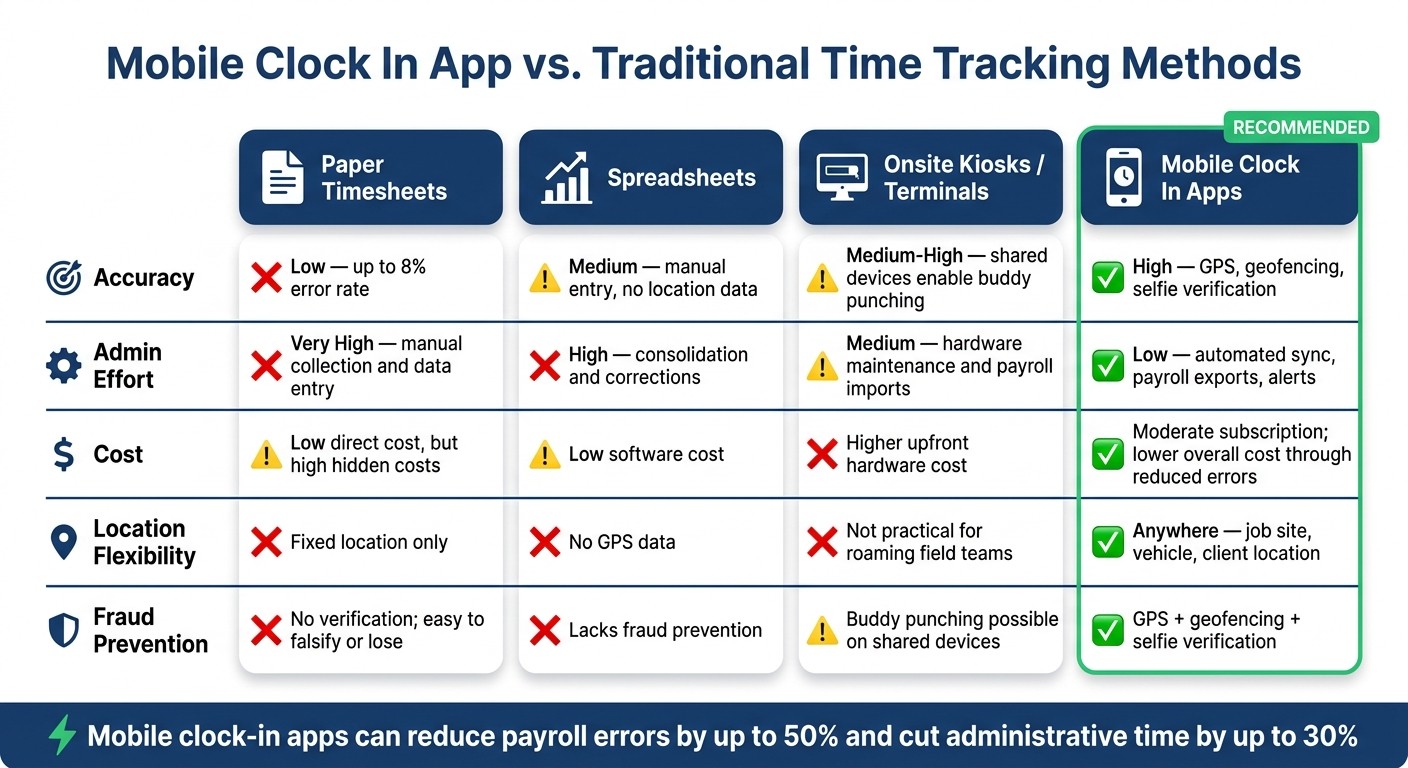
Mobile Clock In App vs. Traditional Time Tracking Methods
Must-Have Features for Field Teams
When you're managing a team that’s constantly on the move - whether they're bouncing between job sites, driving to client locations, or working in areas with spotty internet - your time-tracking app has to keep up. The essentials aren’t just nice-to-haves; they’re deal-breakers.
Take GPS-based clock in, for example. It pins every punch to a specific location, so there’s no second-guessing where someone clocked in. Add geofencing to the mix, and you’ve got virtual boundaries that restrict clock-ins to specific job sites. This means workers can only punch in when they’re physically where they’re supposed to be - no extra micromanaging required.
Another game-changer? Offline capability. Imagine a worker out in a remote area with zero signal. The app should still let them clock in, store the data locally, and sync everything automatically once they’re back online. And let’s not forget usability. The interface has to be simple - think large buttons, minimal steps, and clear indicators like “Clocked in at 7:02 AM.” When you’re working outdoors, maybe with gloves on or under glaring sunlight, ease of use isn’t optional - it’s essential. These are the features we’ve built into Pebb’s all-in-one platform to make life easier for field teams right from the start of their day.
But there’s more. Once the basics are covered, advanced features can take productivity and accuracy to the next level.
Advanced Features That Improve Productivity
Let’s talk about cost code tagging. This feature lets workers assign their time to specific tasks right at clock-in. It’s a lifesaver for finance teams trying to match estimated labor costs against actual hours worked.
Then there’s selfie verification. This quick identity check is a simple yet effective way to prevent buddy punching, especially with large or rotating crews where supervisors can’t personally verify everyone. And let’s face it, buddy punching is a real issue for many businesses in the U.S.. A quick selfie at clock-in? Problem solved.
One feature I love is mileage tracking. When it’s built into the app, workers can log their work-related driving alongside their time punches. With the IRS mileage rate set at $0.67 per mile for 2024, having accurate, job-tied mileage records can make a big difference for reimbursements and even tax documentation.
Finally, real-time manager dashboards bring it all together. Supervisors can see exactly who’s clocked in, where they are, and what they’re working on - all live. No more waiting for weekly timesheets to figure out what’s happening on the ground. These features are part of how we at Pebb keep field management seamless and efficient, all within one platform.
Mobile Clock In Methods Compared
Let’s step back for a second and compare mobile clock-in apps to other common methods used in field-based industries. Here’s how they stack up:
Method | Accuracy | Admin Effort | Cost | Weakness |
|---|---|---|---|---|
Paper timesheets | Low - up to 8% error rate | Very high - manual collection and data entry | Low direct cost, but high hidden costs | No verification; easy to falsify or lose |
Spreadsheets | Medium - manual entry, no location data | High - consolidation and corrections | Low software cost | Lacks GPS data and fraud prevention |
Onsite kiosks / terminals | Medium-high - better timestamps, but shared devices enable buddy punching | Medium - hardware maintenance and payroll imports | Higher upfront hardware cost | Not practical for roaming field teams |
Mobile clock in apps | High - GPS, geofencing, selfie verification | Low - automated sync, payroll exports, alerts | Moderate subscription cost; lower overall cost through reduced errors | Requires a smartphone and clear usage policy |
Here’s the thing: moving from hardware to mobile-first isn’t just a passing trend; it’s a practical shift that reflects how field teams actually operate. Fixed kiosks might work for a single location, but they’re useless when your crew is constantly on the go. That’s why mobile clock-in apps, like what we offer at Pebb, are perfectly suited to the fast-paced, ever-changing demands of fieldwork.
Benefits of Mobile Clock In Apps for Teams and Businesses
Switching from paper timesheets to a mobile clock-in app is more than just a tech upgrade - it’s a game-changer for everyone involved. At Pebb, we’ve seen how our app makes life easier for managers, payroll teams, and field workers. It’s about creating a system that’s not only efficient but also fair and transparent.
For Managers: Real-Time Oversight Without the Hassle
Managers often spend way too much time chasing timesheets and double-checking hours. With a mobile clock-in app, those headaches disappear. A live dashboard shows who’s clocked in, where they are, and what they’re working on - all in real time. Instant alerts notify managers of missed clock-ins or late starts, so they can act quickly without manual follow-ups. Automating these tasks frees up hours every pay period, letting managers focus on more impactful work.
For Payroll Teams: Fewer Mistakes and Lower Costs
Here’s a staggering fact: manual time tracking can lead to error rates as high as 8%, which means payroll discrepancies and endless corrections. By automating data transfers, Pebb’s system slashes those errors and cuts administrative costs by as much as 50%. Plus, with running hour totals updated throughout the pay period, managers can spot when someone’s nearing 40 hours and adjust schedules before overtime kicks in. It’s a win-win for accuracy and cost control.
For Field Workers: Quick, Transparent, and Trustworthy
Field workers often bear the brunt of outdated systems, but with a mobile clock-in app, things get a lot simpler. Instead of juggling paper timesheets, they can clock in with just a tap. They also get instant access to their daily and weekly totals, so they can double-check their hours and flag any issues before payroll closes. That kind of transparency isn’t just convenient - it builds trust and reduces unnecessary tension.
"A fair system for tracking time isn't just an operational upgrade; it's a promise to your team that their work is valued." - Dan Robin, Founder, Pebb
Whether it’s about saving time, cutting errors, or fostering trust, mobile clock-in apps deliver benefits that ripple through the entire team.
How Pebb's Mobile Clock In Feature Stands Out
Let me tell you, when I talk to field teams, one thing comes up again and again: they’re juggling way too many tools for time tracking, scheduling, and communication. That’s exactly why we built Pebb. Our Clock In feature isn’t some separate bolt-on - it’s baked right into the app your team already uses to chat and stay connected. By combining mobile time tracking with other essential tools, Pebb simplifies the chaos of workforce management.
All-in-One Integration with Pebb
Here’s where things get exciting. Imagine this: a manager publishes the weekly schedule in Pebb, and like magic, clock-in hours automatically sync with each worker’s assigned shifts and jobs. No more messy, manual reconciliation of timesheets. Plus, PTO approvals are handled in the same system. So, when someone’s time off gets approved, the schedule updates instantly - no double-bookings, no scrambling to find last-minute coverage.
This is a game-changer for field crews who are always on the move. With Pebb, a technician or crew lead can open a single app to check their job assignment for the day, clock in, and even request time off - all without hopping between tools. Businesses using systems like this report cutting administrative time by up to 30%. That’s a huge win.
A Simple Clock In Experience for Workers and Managers
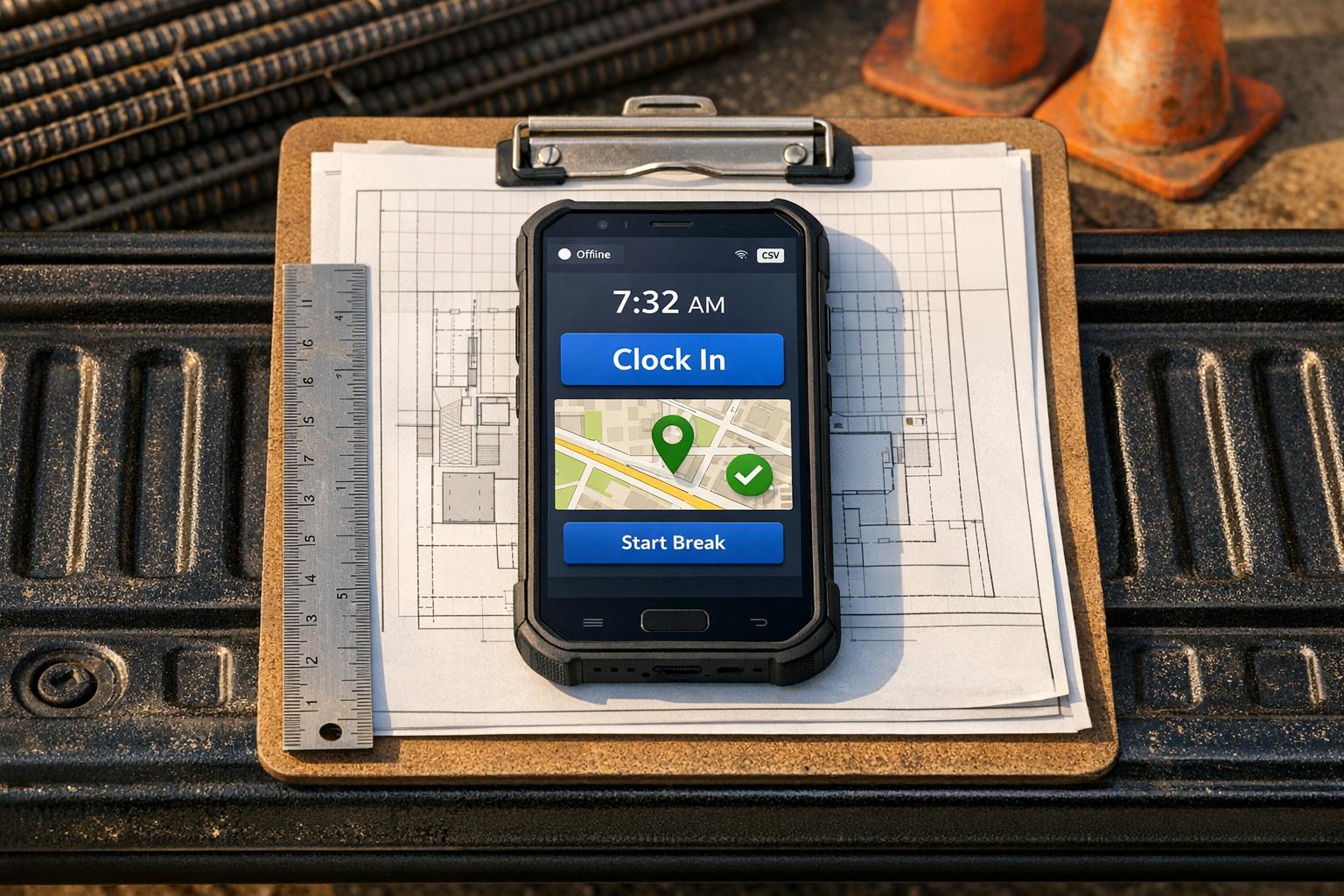
Now, let’s talk about how easy it is to actually clock in. For workers, it’s as simple as one tap. The time is logged instantly in a clean, familiar format (think 7:58 AM), and if GPS tracking is enabled, their location is captured too. Need to take a break? Tap Start Break and then End Break when you’re back - unpaid time is logged separately, so payroll is always accurate. Workers can even review their total hours right in the app, which means fewer disputes and smoother operations.
For managers, it’s just as straightforward. A live dashboard shows who’s clocked in, where they are, and how long they’ve been on the clock. If someone forgets to punch in or starts late, Pebb flags it right away - no need for tedious manual follow-ups.
Pricing That Works for Field Teams
Here’s the best part: Pebb’s pricing is designed to make sense for field teams. The Standard plan is completely free for teams of up to 15 users. That includes Clock In, shift scheduling, PTO management, and team chat - all at no cost. If you need more, like advanced analytics, payroll integrations with providers like QuickBooks, ADP, and Gusto, or voice and video calls, the Premium plan is just $4 per user per month. And there’s no base fee.
Let’s break it down. For a team of 25 field employees, you’re looking at roughly $100/month for an all-in-one platform. Compare that to standalone time-tracking tools that charge $8–$10 per user per month just for time tracking. With Pebb, you’re getting time tracking, scheduling, communication, and more - all in one place and at a price that works whether you’re running a small landscaping crew or scaling a home-services business.
Conclusion: Managing Field Workers More Easily with Pebb
Let me paint a picture for you. Imagine no more chasing paper timesheets, no more untangling messy spreadsheets, and no more guessing who actually clocked in for their shift. Sounds like a dream, right? That’s exactly what a solid mobile clock-in app can deliver. And when it’s part of a platform your team already uses every day, the results are even better.
That’s the heart of what we’ve created at Pebb. Field workers can clock in with just one tap on their phones. Managers get instant updates on who’s working and where they are. Payroll teams? They get clean, accurate data without the hassle. And the best part? Everyone stays connected through the same app - no switching between tools, no lost information.
Whether you’re running a small crew of 8 or managing a growing team of 50+, our free Standard plan has you covered with clock-in, shift scheduling, PTO management, and team chat - all at zero cost. When you’re ready to take it up a notch, the Premium plan costs just $4 per user per month - no hidden fees, no surprises.
If you’re still juggling manual processes or trying to make disconnected tools work together, maybe it’s time to simplify. Check out Pebb’s features and pricing at pebb.io and see how effortless managing your field team can be.
FAQs
Do workers need cell service to clock in?
No cell service? No problem. With Pebb, workers can clock in even when they're offline. The app stores attendance data directly on the device, so there’s no need to worry about losing track of hours. As soon as the device reconnects to a network, everything syncs automatically in real time. It’s seamless, accurate, and keeps timekeeping running smoothly without any hiccups.
How do you stop buddy punching in the field?
Let me tell you about a game-changer for managing attendance in the field. At Pebb, we’ve moved away from old-school manual logs and embraced digital tools to tackle a sneaky issue called buddy punching. You know, when someone clocks in for a coworker who isn’t actually there? Yeah, that’s a headache no one wants.
Here’s how we’ve got it covered: we rely on GPS tracking and geo-fencing. These tools make sure employees can only clock in when they’re physically at the worksite. How? Clock-ins are tied to specific locations, and any attempt to check in from outside the designated area? Blocked. Simple as that.
The result? Every shift entry is not just accurate but also verified in real time. It’s like having a digital attendance watchdog that keeps everything accountable and location-locked.
How hard is it to set up payroll exports?
Setting up payroll exports with Pebb is a breeze. Here’s how it works: clock-in data is automatically synced with schedules and PTO updates. That means any changes to shifts or time off are reflected instantly, keeping your payroll data accurate without extra effort. This setup can cut down manual work and admin time by around 30% - a game-changer for busy teams.
On top of that, Pebb’s shift scheduling feature lets you download detailed shift reports directly. These reports provide everything you need to create reliable payroll exports without the usual hassle. It’s all about making the process smoother and saving you time.
