

Author: Ron Daniel
How to manage part-time staff availability without spreadsheets
Centralize staff availability, PTO, preferences, and clock-ins in one system to cut scheduling errors and speed shift coverage.
Most teams don’t have a scheduling problem. They have a data problem. At Pebb, I’ve seen part-time teams lose hours every week because availability lived in texts, paper notes, and old spreadsheet tabs. One update gets missed, one shift gets filled from the wrong file, and now a manager is fixing a Friday night mess at 5:12 p.m.
The cost adds up fast. One stat in the source material stuck with me: 55% of managers spend more than 8 hours a week building schedules by hand, and teams using scheduling software see 30% faster schedule creation plus 55% fewer scheduling errors than spreadsheet-based setups. That gap isn’t small. It hits labor costs, no-shows, and team trust.
From what I’ve learned at Pebb, the fix starts with one rule: availability needs one home. In this piece, I’ll walk through the simple system we use to collect availability, track shift preferences and time-off, and handle last-minute coverage without turning every update into a scavenger hunt.
If you’re tired of chasing “latest versions,” this will show you what to change first, what to stop doing, and where one app can save you hours every week.
Quick takeaways:
Use one form for all availability updates
Keep PTO, preferences, and shifts in the same app
Send updates to the right group instead of mass texting everyone
Link schedule changes to mobile alerts so staff see them fast
Track clock-ins against shifts to spot issues before the shift falls apart
What I’ve found is simple: when the source of truth is clear, scheduling gets a lot less painful.
Build one source of truth for staff availability
I’ve seen this go sideways more times than I’d like to admit. A manager gets availability in a text, another update lands in email, someone mentions a class change in passing, and then Saturday’s schedule blows up because nobody was looking at the same version.
At Pebb, we learned the hard way that staff availability falls apart when updates live in five different places. So we changed the setup. We replaced scattered submission channels with one approved workflow. Managers connect forms, scheduling, groups, and the people directory so approved changes update the schedule automatically.
That one shift cuts out a ton of back-and-forth. It also gives the whole team one place to check before assigning hours.
Standardize how staff submit their availability
Here’s the thing: multiple submission channels create multiple versions fast. One person sends a DM. Another drops a note in one of many work chat apps. A third tells the shift lead in person. Before long, nobody knows which update is the latest.
The fix is simple: one form, every time.
In Pebb, managers build a weekly availability template that captures the basics staff need to share:
which days an employee can work
start and end times
preferred shift windows like mornings or closing
ongoing limits such as class schedules or a second job
Once the form is live, we share it in the app and make it the only place availability changes go. New hires use it on day one. Returning staff resubmit it on a regular cadence, like each semester or quarter.
That gives managers a consistent, reviewable record for everyone, without digging through old messages to figure out what changed.
Once every update follows the same form, it gets much easier to route people to the right manager.
Organize teams by location, role, or shift group
This is where things start to click. Group staff by location, role, and shift type so the right manager sees the right people.
In Pebb, each employee’s profile links to one or more groups, and managers filter by those groups when coverage is needed. Let me tell you what happened next in one common use case: a Saturday shift opens up, a retail manager opens the weekend associate group, and sees who’s available right away - no spreadsheet scanning required.
I like this setup because it also helps when staff work across locations or roles. That matters more than most teams think. Without clear grouping, it’s easy for someone to get missed when coverage is needed somewhere unexpected.
With intake and grouping in place, the last piece is using a system that moves faster than a spreadsheet.
Centralized employee app vs. spreadsheet tracking
I’ve worked with both, and the gap is obvious pretty fast.
Pebb updates instantly, flags conflicts, and keeps employees and managers on the same page. Spreadsheets need manual edits, drift into different versions, and make current availability hard to find.
One system keeps availability current and usable for scheduling. The other does not.
Handle shift preferences, PTO, and availability changes digitally
I’ve seen what happens when teams try to manage shift preferences, PTO, and availability changes across texts, side chats, and random hallway conversations. It starts out feeling manageable. Then one person changes their Friday hours, someone else asks for time off, and suddenly the schedule in the spreadsheet is already wrong.
At Pebb.io, we learned pretty fast that if availability is already in one place, the next move is simple: handle preferences, PTO, and schedule changes in that same app. Requests come in, managers review them, and the schedule updates to match what’s actually going on, without anyone digging through a master file and editing it by hand.
Here’s the thing: I always tell teams to start with preferences first. They shape the schedule before PTO requests and unavailability start changing it.
Collect shift preferences without back-and-forth messages
One of the biggest mistakes I’ve watched teams make is collecting shift preferences through DMs or quick verbal chats. It feels fast in the moment. It’s a mess later.
We’ve had much better results using a standard form. In Pebb, employees submit:
preferred days
shift windows like 4–10 p.m.
hour limits
start and end dates, so preferences expire on their own
That last part matters more than most people think. I’ve seen old preferences hang around for weeks and throw off planning because nobody realized they were no longer current.
Once those preferences are in the system, managers can weigh them against skills and labor rules before shifts go live. That gives us a cleaner process and fewer last-minute fixes.
And once that flow is in place, it makes sense to use the same setup for time off and recurring availability updates too.
Process PTO and recurring changes in the same app
If you work with part-time teams, you already know this: availability changes constantly.
I’ve seen it happen for all the usual reasons. A college employee gets a new class schedule for the semester. Someone takes on a second job. A parent’s childcare setup changes. None of that is unusual. But if those changes don’t hit the schedule right away, problems show up fast.
In Pebb, employees submit those updates as formal availability changes with a start date, end date, and exact unavailable windows. The app stores them as dated changes, so the scheduler can avoid conflicts during that period.
Let me tell you what happened next when we started doing this in one place: managers stopped getting blindsided. They could look ahead at upcoming changes and plan coverage before the schedule got tight. That’s a big deal, especially when you’re staffing week to week and one missing person can throw everything off.
Every change is also logged. The timestamp and approver record make each update easy to check later. If there’s ever confusion, we’re not guessing who said what or when.
The last piece is speed. It’s not enough to record a change. The right people need to see it right away.
Cut confusion with automatic notifications
This is where a lot of manual systems fall apart.
When an employee submits a PTO request in Pebb, the right supervisor gets an in-app alert. Once it’s approved, the employee gets a notification confirming the decision. And for bigger changes, like a recurring Friday unavailability update, both the employee and the right shift leads get notified, so nobody gets surprised when building next week’s schedule.
The live schedule updates as soon as the change is approved. That’s the part I like most, because it cuts out the lag between decision and action.
At that point, the setup is pretty clean: notifications tell the right people, the live schedule shows the current state, and work chat handles any follow-up. That keeps the schedule current, even when a shift opens up at the last minute.
Handle last-minute coverage and schedule changes in real time
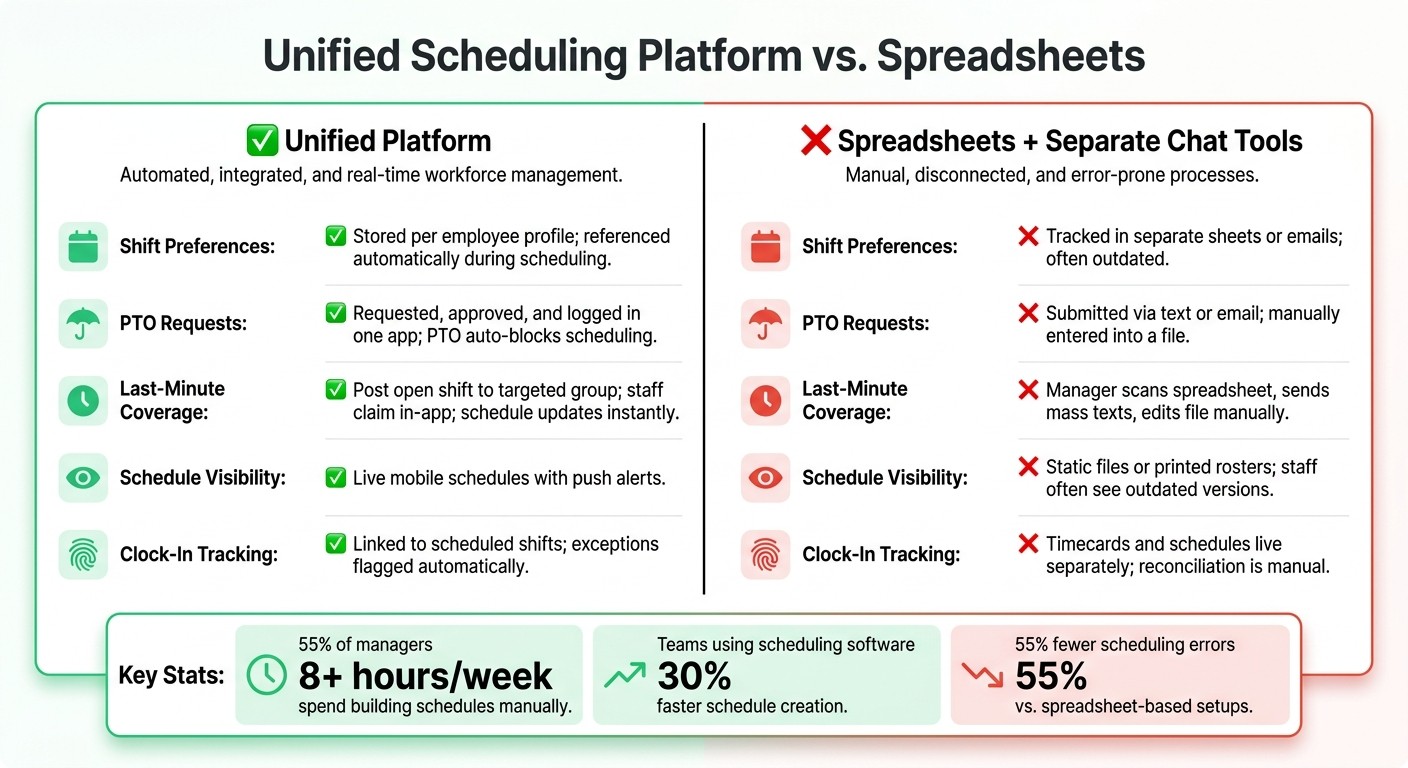
Unified Scheduling Platform vs. Spreadsheets: Side-by-Side Comparison
I’ve seen this play out more times than I’d like to admit: everything looks fine on paper, then an hour before the Friday dinner rush, someone calls out.
That’s when the old system starts to crack.
Before we built this flow into Pebb, managers were stuck bouncing between spreadsheets and group texts. One file said a server might be free. A text thread hinted someone could help. Then came the slow part: messaging people one by one and hoping someone replied before the line started forming at the host stand.
Let me tell you what happened next when we handled that same mess inside Pebb.
Fill open shifts faster with group chat and schedule updates
Instead of digging through an old spreadsheet, the manager filters part-time servers at that location who are free on Friday evenings. Then they drop an open shift card right into the "Downtown – Servers" group chat.
That’s it.
Staff get a push notification, tap to claim the shift, and the schedule updates on its own. The news feed shows who picked it up, so nobody’s left guessing. Since the message goes to the right location and role group, it doesn’t turn into noise for the rest of the company.
I like this part because it cuts out the usual back-and-forth. No duplicate messages. No “Wait, did Jamie take it?” No chasing people down across three apps.
Of course, claiming a shift is only half the battle. The next part is making sure the person who grabbed it actually walks through the door on time.
Use clock-in data and mobile schedules to cut no-shows
This is where linking clock-in to the schedule helps a lot.
Managers can see who clocked in, who’s late, and who missed the shift without opening a separate timesheet. That means they can act while there’s still a shot at finding backup coverage, not two hours later when the damage is done.
On the staff side, mobile schedule access clears up one of the biggest reasons people miss shifts in the first place: they didn’t see the update, or they were looking at an old version.
With Pebb, employees can:
check upcoming hours from their phone
see approved PTO next to their schedule
get a push notification the moment a change happens
It sounds simple, and honestly, that’s the point. When people can see the right schedule at the right time, fewer things slip through the cracks.
From scattered tools to one platform: a side-by-side look
Here’s the side-by-side view I usually share when someone asks me why this setup feels so much easier inside Pebb:
Workflow | Unified platform like Pebb | Spreadsheets + separate chat tools |
|---|---|---|
Shift preferences | Stored per employee profile and referenced during scheduling | Tracked in separate sheets or emails; often outdated |
PTO requests | Requested, approved, and logged in one app; PTO automatically blocks scheduling | Submitted via text or email, then manually entered into a file |
Last-minute coverage | Post an open shift to a targeted group; staff claim it in-app; the schedule updates instantly | Manager scans a spreadsheet, sends mass texts, and edits the file manually |
Schedule visibility | Live mobile schedules with push alerts | Static files or printed rosters; staff often see outdated versions |
Clock-in vs. schedule | Clock-in linked to scheduled shifts; exceptions stand out | Timecards and schedules live separately, so reconciliation is manual |
Here’s the thing: the biggest win isn’t one flashy feature. It’s the fact that everything lives in one place.
When I’ve watched teams use scattered tools, the same problems keep showing up: duplicate data, version mix-ups, and endless follow-up on who said yes to what. When the schedule, chat, PTO, and clock-in all sit inside the same system, those headaches drop fast.
We’ve also made Pebb easy to try. There’s a free all-in-one plan for up to 15 employees, and the premium plan starts at $4 per user per month.
That’s what changes the day-to-day experience. You’re not stuck cleaning up the mess after the shift starts. You’ve got a shot to fix it while it still matters.
Conclusion: A simpler way to manage part-time availability
I’ve seen this play out more times than I can count at Pebb.io. A team starts with spreadsheets, and at first, it feels fine. Then real life kicks in.
A student updates their class schedule halfway through the semester. Someone misses a 4:00 p.m. Saturday shift. A manager needs a fix in minutes, not after digging through three tabs, two text threads, and an old file no one updated.
Here’s the thing: spreadsheets start to crack the moment availability changes every week.
The bigger issue runs deeper. In most teams, availability, PTO, schedules, and clock-in records live in separate tools on purpose. That split is what slows everyone down. I’ve watched managers bounce from one system to another just to answer a simple question: Who can actually work this shift right now?
That’s why we built the workflow in Pebb to live in one place. Staff submit availability in the app. Managers approve PTO there too. Schedules go out with current data already built in. And when an open shift pops up, teams can fill it through group chat without starting from scratch.
So instead of juggling scattered updates, we keep:
availability
PTO
scheduling
clock-ins
in one workflow.
And yes, that time drain is real. Research shows 55% of managers spend over 8 hours a week building schedules manually. I’ve worked with teams who felt that pain every single week. When you cut that admin load, you usually cut the mess that comes with it too: fewer errors, fewer understaffed shifts, and less schedule churn.
If you’re done chasing spreadsheets and patching together fixes at the last minute, start with Pebb.
FAQs
How do I get staff to stop sending availability by text?
I’ve seen this go sideways more than once. A manager gets three text messages, one email, and a last-minute call about schedule changes, and suddenly nobody knows which version is right.
That’s why we push teams to give staff a dedicated, mobile-first self-service tool instead of leaning on texts. At Pebb, our employees can update availability right from their phones, and those changes sync instantly to the manager dashboard.
Here’s the thing: that simple shift cuts out a lot of noise.
Instead of piecing together fragmented text threads or digging through email chains, we keep everything in one source of truth. Requests are logged, tracked, and approved or denied in the same app we use for team communication.
In my experience, that makes a big difference on busy weeks. People know where to go, managers see updates fast, and the whole process feels a lot less messy.
What should an availability form include?
I learned this the hard way after chasing down three different availability updates in one afternoon. One person had sent a note by email, another dropped a message in chat, and a third updated a spreadsheet that nobody else had seen. By the time we caught the conflict, the schedule was already off.
Here’s the thing: an effective availability form should give us one clear, self-serve record of when employees can and can’t work.
That means we need the basics spelled out with no guesswork:
Specific dates
Clear time windows
Start and end times
But the best forms don’t stop there. In my experience at Pebb.io, they also need to cover the softer limits that shape someone’s day. Think study schedules, childcare needs, medical appointments, and formal time-off requests. Those details matter because they help us plan around real life, not just empty calendar slots.
When we keep all of that in one place, everything gets easier. In a centralized system like Pebb, updates sync to one dashboard, so scheduling happens in real time without scattered spreadsheets or endless email tracking.
That single view saves a lot of back-and-forth, and honestly, it cuts down on mistakes fast.
How can I handle last-minute callouts faster?
At Pebb, I’ve seen this play out the hard way. A manager posts an open shift through phone calls or a messy text chain, and suddenly one small gap turns into 20 minutes of chasing people down. It’s draining, and honestly, it slows everyone down.
That’s why we lean on an integrated, mobile-first system like Pebb.
Here’s what that looks like in practice: we post open shifts right inside work group chats, and qualified staff can claim them on the spot. No hunting through old messages. No waiting for someone to call back.
Then the next part kicks in fast. With real-time sync, managers can drag and drop a replacement into the schedule, and the employee gets an immediate push notification. Let me tell you what happened next when teams started doing this more often: the back-and-forth dropped, the scramble eased up, and shifts got filled in minutes instead of hours.
