

Author: Ron Daniel
Managing multi-location retail stores from one communication hub
Centralize updates, tasks, schedules, and feedback in one hub to align HQ, managers, and frontline staff across locations.
71% of retail staff say communication is the hardest part of their job. When I look at multi-store retail teams, that stat tracks. At Pebb.io, I’ve seen stores work hard and still miss promos, policy updates, and shift changes just because the message lived in the wrong place.
The pattern is simple: when updates sit across email, texts, printed notes, and chat apps, store execution starts to drift. One location gets the new pricing. Another sees the old SOP. A third misses the memo until the weekend rush hits. And when employees use 10+ apps, communication issues jump to 54%.
Based on what I’ve seen, the fix is not more messages. It’s one hub for updates, tasks, schedules, and store feedback. In this piece, I’ll walk through what that hub should do, where teams get stuck, and how we use Pebb to keep HQ, managers, and frontline staff on the same page.
Step 1: set up one hub for company-wide, regional, and store-level communication
When I first saw how many updates were flying around between HQ, district leaders, and store teams, it hit me fast: if everything lives everywhere, people miss what matters. At Pebb.io, we’ve learned that the fix starts with structure. You need separate company-wide, regional, and store-level communication so the right people see only the updates they need. That setup keeps promotions, policies, and tasks lined up across every store.
Create separate spaces for HQ updates, store chats, and cross-store groups
We usually build the hub in three layers.
The first layer is company-wide channels. Think spaces like Company Announcements, HR & Benefits, and Safety & Compliance. These are for HQ posts that go to everyone. In practice, only HQ admins and regional managers post there. Everyone else reads, reacts, and stays in the loop without the noise.
The second layer is one store chat per location, named the same way every time, like Store 214 – Dallas Northpark. This is where each store team handles the day-to-day stuff: callouts, shift coverage, and local issues. It sounds simple, but this naming system saves a ton of back-and-forth when you’re managing many locations.
The third layer is cross-store role groups. We’ve seen groups like District 5 Managers, Visual Merchandising – East Region, and Loss Prevention – Southwest work well because they connect people doing the same job across locations.
Here’s the thing: this setup makes handoffs much smoother. When HQ posts a promotion, district managers see it in their group and add region-specific notes. Then store managers turn those notes into local tasks. No guessing. No messy relay race.
Build one source of truth for SOPs, policies, and promotions
One of the biggest messes in retail communication is version confusion. I’ve seen teams lose time digging through email threads just to confirm which promo guide or return policy was current. That’s why a searchable knowledge base inside the hub matters so much. It gives every store one playbook.
We organize it by category, with sections like Opening/Closing Procedures, Customer Service & Returns, Visual Merchandising & Planograms, and Campaign & Promotions. Each entry needs a clear version number and effective date. For example, "Return Policy – v3, effective 10/01/2026" gives a cashier one clear answer when they search return policy instead of three old ones.
Let me tell you what happened next in one rollout like this: during a nationwide campaign, HQ uploaded the promotion brief, timelines, and merchandising instructions once, tagged it by region and store type, and it was right there in the news feed. No hunting through old emails. No forwarded PDFs with conflicting notes.
We’ve also found it helps to link checklists straight to SOP entries. So if holiday hours change or a new card verification step rolls out, the linked checklist stays tied to the current SOP. That cuts down on slipups at the store level.
Set roles and permissions by job level
Permissions don’t need to be messy, but they do need to be set with care. In my experience, a clean four-level model works well for most U.S. retail operations:
Role | What they can do |
|---|---|
HQ Admin | Manage global channels, SOPs, announcements, and sensitive data |
Regional/District Manager | Post in district groups and assign store tasks |
Store Manager | Run store chat, approve shift changes, and confirm completion |
Associate | Read updates, flag issues, and confirm coverage |
Sensitive content like financial performance, HR investigations, or compliance reports should stay in private channels that only HQ and the right managers can see. Everything else can move through the right layer so frontline staff stay in the loop fast, right from their phones, without needing corporate email or VPN access.
Once those roles are in place, the same hub can handle daily updates, tasks, and replies without making people jump between tools.
Step 2: run daily retail communication and execution from one place
I’ve seen this happen more times than I can count at Pebb.io: a team sends out an update, everyone reacts with a thumbs-up, and then... nothing moves. The message landed, but the work didn’t.
That’s why this step matters so much. If we want store teams to act, every update has to end with a clear next step. No guesswork. No “someone will handle it.” Just a clear action tied to the message.
Use chat for fast coordination and a news feed for important updates
Here’s the simple rule we keep coming back to: if it affects multiple shifts, it goes in the news feed; if it's a same-shift issue, use chat.
That one line clears up a lot of chaos.
In practice, store-level chats are for fast, in-the-moment coordination. Stuff like, “We're low on size 8 in black sneakers” or “Customer at register 3 needs a manager override.” It’s quick, direct, and meant for the team handling the floor right now.
The news feed plays a different role. That’s where I’d put a national promotion, an updated return policy, or a compliance reminder that every store may need to check later. If people need to find it again next week, it belongs there.
Message Type | Where It Goes | Example |
|---|---|---|
National/regional promotion | News feed | "Buy 2, Get 1 Free denim promo runs July 1–31" |
Policy or SOP update | News feed | "Return window extended from 30 to 45 days, effective 08/01/2026" |
On-shift stock question | Store chat | "Anyone know if we have more of the grey hoodie in XL?" |
Customer escalation | Store chat | "Manager needed at fitting room 3, customer dispute" |
Safety or compliance alert | News feed | "Updated cash handling procedure - all stores must review by 07/05/2026" |
Here’s the thing: when teams mix these up, people miss what matters. I’ve watched stores bury policy changes inside busy chat threads, and by the next day, nobody could find them. That’s when mistakes show up on the floor.
Turn updates into trackable tasks by store and due date
Posting an announcement is only half the job. What happened next always told us whether the message would lead to action or just sit there.
When HQ publishes a promotion in the news feed, the next move should be a checklist-based task set. That might mean updating window signage, resetting the endcap, verifying pricing in the POS, and briefing the team on promo rules. Each task should go to the right role, whether that’s the store manager, visual merch lead, or assistant manager.
And the due date has to match local time. That sounds small until you’re working across Eastern, Central, Mountain, and Pacific time zones. I’ve seen teams think they were aligned, only to find out one region was working off the wrong deadline.
District and regional managers also need real-time visibility into completion rates across every location. A dashboard showing which stores finished on time and which ones are overdue beats waiting on check-in calls every single time. If a store is behind, a follow-up notification can go out on its own, and regional leaders can step in before the deadline gets missed.
Let me tell you what happened next when teams skipped this part: people assumed the work was getting done because the announcement had been posted. Then the promo launched, signage was half-finished, and pricing wasn’t set right in the POS. That’s a rough morning.
For me, the rule is simple: every instruction needs a clear owner and a deadline. Otherwise, it’s just information, not execution.
Keep communication two-way so stores can flag issues early
One of the best lessons we’ve learned at Pebb.io is that stores that can speak up early save everyone time.
A two-way hub changes the game. Associates can comment right under an announcement, tag the right manager, and attach a photo in the same place they got the original update. That cuts out a lot of back-and-forth.
Say the POS code for a new promo isn’t active at a store in Denver. That associate shouldn’t have to call a district manager, send a separate text, and then wait around. They should be able to post it in the announcement thread right away. If several stores flag the same issue, HQ can spot the pattern fast, whether it’s a pricing error, an inventory gap, or a signage problem.
Targeted messaging by shift, role, or location can reduce miscommunication in frontline operations by 40% to 60%. I think that stat makes sense because the win isn’t just sending the right message down the chain. The win is making it just as easy for stores to send information back up.
Photos help a lot here too. A store manager can upload a photo of a damaged shipment or a misaligned display, and regional leadership can confirm or correct it without an on-site visit. That kind of feedback loop helps teams catch problems early and stay lined up without piling on extra meetings.
Next, bring scheduling, shift swaps, and PTO into the same hub.
Step 3: coordinate schedules, shift changes, and PTO across locations
I’ve seen this happen more than once at Pebb.io: a company cleans up communication, gets store updates into one place, and then runs straight into the next mess. Staffing is still sitting somewhere else.
Here’s the thing: updates alone don’t fix store coverage. If one system handles news and tasks, but schedules live in another app - or worse, on printed sheets taped in the back room - managers still waste time chasing answers. That’s why we push teams to run scheduling, shift swaps, and PTO in the same hub where employees already get daily updates.
When everything sits together, the day just runs smoother. Fewer missed shifts. Fewer “I didn’t see it” excuses. Far less back-and-forth.
Post schedules where employees already get updates
One lesson we learned fast: don’t make people hunt for their schedule.
If employees already check one hub for store updates, that’s where the schedule should live too. No separate scheduling app. No printed sheets. No bouncing between systems just to figure out who’s on the floor at 2:00 p.m.
At Pebb, managers can draft, balance, and publish schedules in one flow. Then, the second a schedule goes live, each assigned employee gets a notification. It sounds simple, but that one step cuts a lot of confusion.
For companies spread across states, local time zones matter more than people think. I’ve watched teams trip over this. A schedule looks fine at first glance, then someone realizes the shift was viewed in the wrong time zone. Putting schedules in one hub with local time built in helps people work from the right clock.
And the payoff isn’t small. In a Gap Inc. study of 28 U.S. stores over nine months, responsible scheduling increased productivity by 5.1%, lifted sales by 3.3%, and cut labor hours by 1.8%.
Once the schedule is easy to see, the next headache usually shows up five minutes before a shift starts.
Handle shift swaps and callouts without back-and-forth messages
Retail callouts are part of the job. July 4th weekend, Black Friday, a huge promo Saturday - it happens. The hard part isn’t the callout itself. It’s the flood of texts, side chats, and group messages that come after it.
Let me tell you what happened next on teams that cleaned this up: the scramble got shorter.
A better flow looks like this:
An associate submits a callout through the hub
The system posts the open shift in the store’s staffing channel
Eligible employees, based on role, availability, and overtime limits, get notified
They tap to claim the shift
The manager reviews the volunteer list, picks one based on hours or experience, and approves
The schedule updates, and the channel gets a confirmation
That one process replaces a messy text chain with something clear and trackable.
The same idea works for shift swaps. One employee asks for a swap, a coworker agrees, and the manager can approve or decline after seeing both employees’ weekly hours, overtime risk, and coverage. No guesswork. No hidden trade-offs. Every change is time-stamped and logged, which helps a lot when payroll or HR needs a clean record later.
And once that piece is in place, PTO gets a whole lot easier to manage too.
Manage PTO requests with clear visibility into coverage
One of the fastest ways a store gets understaffed is overlapping PTO. I’ve seen managers approve time off with good intentions, only to find out three people in the same role are gone that same weekend.
That usually happens because they can’t see the full picture at the moment they approve the request.
When PTO runs through the same hub, managers can check a coverage snapshot right next to the request. They can see who’s scheduled, who already has approved time off, and whether store rules apply, like a cap on how many associates in the same role can be out on the same weekend.
Approved time off should also block that employee from the schedule right away. That matters. It keeps managers from assigning a shift by accident and finding out too late.
High-demand periods make this even more important. Think Thanksgiving weekend or the back-to-school rush in mid-August. In those windows, managers can set blackout dates and pin a reminder in the store channel, like "Limited PTO approvals: 08/10–08/25." Requests submitted for those dates can trigger an automatic warning before the manager even opens them.
I like this setup because it cuts down on surprises. Managers don’t need to piece coverage together from memory, a spreadsheet, and three different apps. They can see the impact before they click approve.
When communication and staffing live in one hub, coverage gaps get fixed faster, and store managers spend less time playing detective.
Step 4: use Pebb as the communication hub for multi-location retail
Pebb vs. Slack, Teams & Internal Comms Tools for Multi-Location Retail
I’ve seen this happen over and over at Pebb.io: a retail team starts with one tool for chat, another for schedules, a shared doc for SOPs, and then a checklist app duct-taped on top. At first, it feels manageable. Then Friday hits, a promo changes, two stores miss the update, and someone’s texting screenshots at 9:30 p.m.
Here’s the thing: the last step isn’t adding one more tool. It’s picking one place that holds the whole workflow together.
How Pebb brings communication, operations, and collaboration into one app
At Pebb, we built the app so announcements, store chat, SOPs, schedules, PTO, and task tracking live in one place. That means teams don’t have to bounce between separate tools for communication, scheduling, SOPs, and follow-through.
Let me tell you what that looks like in practice.
A district manager can post a weekend promotion to all stores in the news feed. At the same time, a store manager can ask a location-specific question in that store’s chat. Meanwhile, an operations lead can drop the updated merchandising SOP into the knowledge base. Same app. Same moment. No hunting through inboxes or chasing links.
What I like most is the follow-through. Managers can see whether all stores have acknowledged a promotion update and completed the related checklist. That closes the loop, which is where a lot of retail teams get stuck.
One place for updates and follow-through keeps managers and associates aligned.
If you’re comparing tools, this is where Pebb stands apart.
How Pebb compares to Slack, Teams, Workvivo, Staffbase, Firstup, and simpplr

I’ve had a lot of these conversations, and the biggest difference comes down to scope.
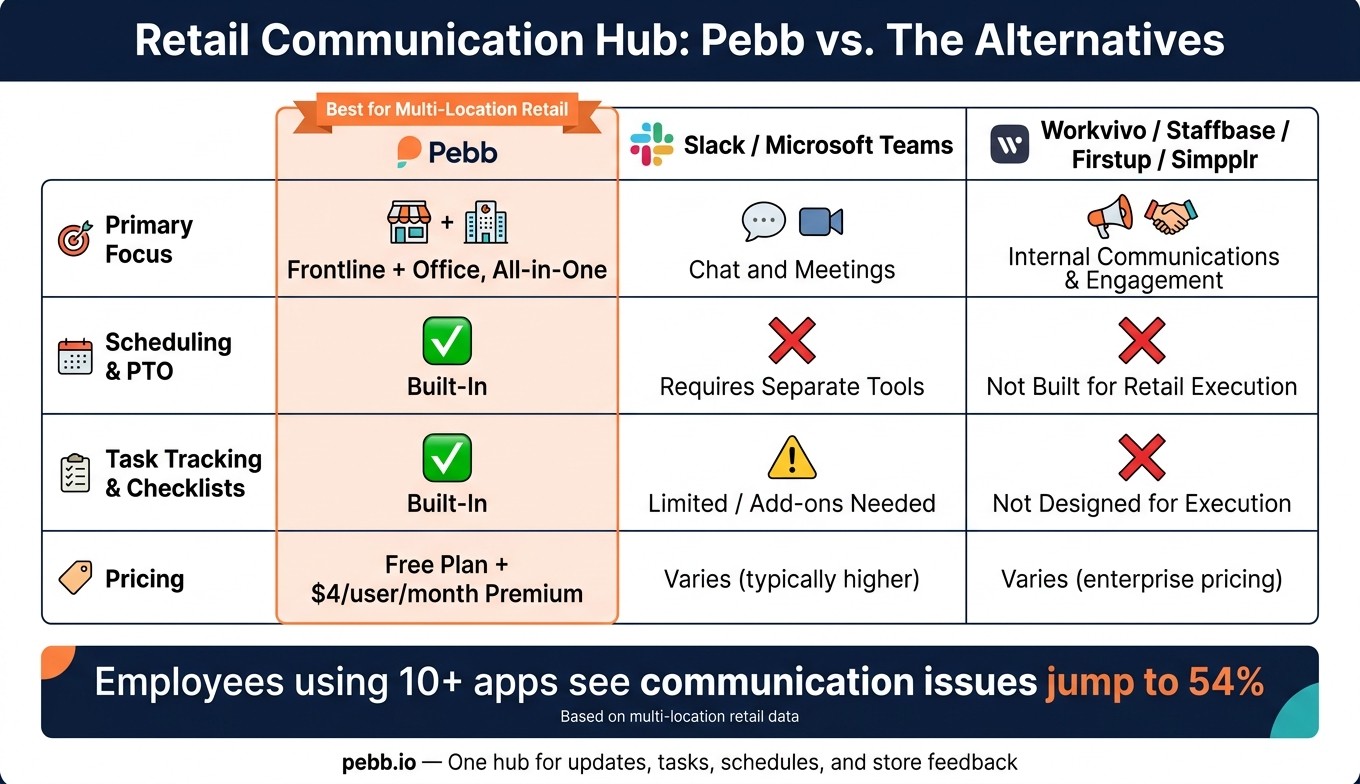
Pebb combines chat, news feed, scheduling, PTO, and task follow-through in one app. Slack and Teams focus on chat and meetings. Workvivo, Staffbase, Firstup, and simpplr focus more on internal comms than daily retail execution.
We also offer a free all-in-one option and a Premium plan at $4 per user/month.
Feature | Pebb | Slack / Teams | Workvivo / Staffbase / Firstup / simpplr |
|---|---|---|---|
Primary focus | Frontline + office, all-in-one | Chat and meetings | Internal communications and engagement |
Scheduling & PTO | Built-in | Depends on separate tools | Not built for retail execution |
Price | Free plan + $4/user/month Premium | Varies | Varies |
For multi-location retail, the value is simple: fewer tools, fewer gaps, faster execution.
Conclusion: one hub to keep every store on the same page
From what I’ve seen, one hub keeps every store on the same page, from HQ updates to daily execution.
FAQs
How do I roll out one communication hub across all stores?
I’ve seen this go sideways when a company dumps everyone into one big workspace and hopes for the best. What usually happens? Store updates get buried, shift notes land in the wrong place, and people stop paying attention. So at Pebb.io, we set things up with a bit more care from day one.
Start with an Everyone Space for company-wide updates. That becomes the home base for news that every employee should see. Then build separate Spaces for each store or department so daily communication stays tight and relevant. We usually group teams by location, role, or shift, because that’s what keeps the right information in front of the right people.
Here’s the thing: structure saves time. When a cashier only sees what matters to their store and shift, they don’t have to dig through posts meant for warehouse staff or head office. It sounds simple, but it changes how people use the platform.
From there, I assign features based on what each team needs. Some teams lean hard on task management. Others use the news feed more often. And the people directory becomes a go-to when employees need to find the right person fast without asking around.
With Pebb, we keep shift scheduling, SOPs, and updates in one place across mobile and desktop. That means fewer scattered tools, fewer missed messages, and a setup that feels a lot more natural for teams who are already juggling a busy day.
What should live in chat versus the news feed?
I learned this one the hard way at Pebb.io.
Early on, we saw teams drop big updates into chat because it felt fast. And sure, it got attention for a minute. Then the message disappeared under a pile of shift swaps, quick questions, and “can someone cover this?” posts. A day later, people were asking for the same update again.
Here’s the thing: chat and the news feed do two very different jobs, and when we use each one the right way, team communication gets a lot less messy.
Use chat for immediate, tactical coordination. That means shift changes, floor issues, and quick team questions. It works best when people need real-time, back-and-forth communication and a fast answer.
Use the news feed for high-level updates. That includes company announcements, policy changes, promotions, and safety protocols. We use it when the message needs to stay visible, not vanish five minutes later. It also makes those updates easy to find when someone needs to check them again.
How can I make sure store teams complete updates?
I’ve seen this happen over and over at Pebb.io: a team thinks it has “communicated,” but all it’s done is spray messages across chat, email, and random paper forms. Then the follow-up starts. Who saw it? Who owns it? Who’s stuck? That’s when things get messy.
Here’s the thing: passive communication slows people down.
What works better is moving to integrated, trackable workflows. In Pebb, we centralize updates so people don’t have to piece together scattered messages on their own. They get clear tasks, one place to respond, and a much better sense of what needs to happen next.
Let me tell you what that looks like in practice.
We can assign tasks right inside Pebb, so work doesn’t disappear into a chat thread. Employees can track progress as they go, and if something’s unclear, they can ask questions in real time instead of waiting for the next meeting or chasing someone down.
We also swap paper for digital forms, which saves a lot of back-and-forth. No lost paperwork. No guessing whether someone turned something in. It’s all there in one place.
And when we need to share an update, we don’t blast it to everyone and hope the right people notice. We can target updates by location or role, which means the message gets to the people who need it most. On top of that, we can track who has read it, so there’s no mystery about whether the update landed.
For me, that’s the big shift: less noise, more clarity, and a workflow we can actually follow from start to finish.
