

Author: Ron Daniel
How to manage logistics and delivery driver communication
Map workflows, set message rules, use one hub, and standardize handoffs to reduce delivery delays and improve driver coordination.
By 10:15 a.m., a delivery day can already be off the rails. I’ve seen one missed route update turn into a late stop, an upset customer, and a dispatcher digging through texts to figure out what happened. In U.S. delivery teams, that kind of slip adds up fast.
At Pebb.io, we kept seeing the same pattern: too many tools, too many side conversations, and not enough follow-through. One logistics case study found that more than 5% of deliveries were delayed by dispatcher or driver errors, and a 2023/24 report showed 37% of retailers tie last-mile issues to tech-stack sprawl. That lines up with what I’ve seen on the ground.
This points to three things that make the biggest difference: clear message rules, one place for updates, and tight daily handoffs. I’m going to walk through what we’ve learned, where teams get stuck, and the simple moves that help drivers, dispatch, and warehouse staff stay in sync without the usual chaos.
Map your communication workflows before choosing channels
A while back at Pebb.io, we saw a pattern that was hard to ignore: the same update would show up in chat, text, email, and sometimes a phone call on top of that. Everyone was talking, but not always in the same place. That’s when things started slipping through the cracks.
So we changed the order of operations.
Instead of picking channels first, we mapped how information already moved across the team. We looked hard at the workflows tied to safety, timing, and delivery quality. Then we matched each workflow to one main channel: chat, forms, or broadcasts. That simple shift gave us a cleaner system and cut down on duplicate updates.
Here’s the thing: once you map the workflow, choosing the channel gets a lot easier. You stop scattering updates across tools and start giving each type of message one clear home.
List the workflows that need real-time updates
These are the workflows I’d define first. For each one, I make sure we spell out the trigger, owner, required fields, and required response. That way drivers, dispatch, and warehouse teams know exactly what to send and what action to take.
Workflow | Trigger | Owner | Required Fields | Required Response |
|---|---|---|---|---|
Shift handoff | Shift change | Outgoing shift lead or dispatcher | Open tickets, incomplete deliveries, out-of-service vehicles, route numbers, key customer notes, ETA updates in local time | Incoming lead confirms in writing and tags affected drivers |
Driver check-in | Start, mid, or end of shift | Driver | Vehicle condition, fuel level (gallons), starting mileage (miles), load status, safety concerns | Dispatcher reacts or replies; maintenance notified if needed |
Route change | Traffic, cancellation, or customer request | Dispatcher | Route ID, affected stops, updated sequence, new ETA windows in local time, reason, special handling instructions | Driver confirms receipt |
Dispatch announcement | Systemwide update | Dispatcher, shift lead, or warehouse supervisor | Affected region or route group, time window, operational impact, contact for questions | Drivers acknowledge if required |
POD update | Delivery completed | Driver | Order or tracking number, delivery time with time zone, recipient name, signature or photo, exceptions | Auto-logged; dispatcher notified of exceptions |
Incident report | Accident, near miss, damage, or safety hazard | Driver | Time, address or GPS coordinates, vehicle ID, photos, description, whether authorities were contacted | Supervisor acknowledges and opens a case |
One lesson we learned fast at Pebb.io: if a route crosses state lines, time can trip people up in a hurry. For multi-state routes, always include the time zone in ETAs and delivery windows. We also stick to one U.S. format for dates, times, miles, gallons, and currency. It sounds small, but it saves a lot of back-and-forth.
Set message rules, response times, and escalation paths
Once the workflows are mapped, I like to set a simple three-tier priority system so drivers and dispatchers know how fast to respond and what happens next.
Priority 1 – Critical: accidents, safety hazards, and major route changes. Confirm receipt within 2–5 minutes or dispatch calls at once; if unreachable, a supervisor checks GPS or telematics.
Priority 2 – Important: non-urgent route adjustments, customer notes, and minor delays. Confirm within 15–30 minutes or by the next planned stop.
Priority 3 – Informational: policy reminders, schedule previews, and routine updates. Track reads, not replies.
Let me tell you what happened next when we put rules like this in place internally: people stopped guessing. That was the big win. A driver didn’t have to wonder, Should I call? Should I message? Should I wait? Dispatch didn’t have to chase every update like it was a five-alarm fire.
Our rule of thumb is simple. Chat stays in play for routine updates, POD submissions, and standard check-ins - anything that needs a written record. A call happens at once for any P1 safety event, or for a P2 issue where a key decision is blocked after written back-and-forth. Then we post those rules in one place so nobody has to hunt for them mid-shift.
That shared playbook is what makes the next step possible: putting those workflows into one system everyone can use without second-guessing.
Build a single communication hub for drivers and logistics teams
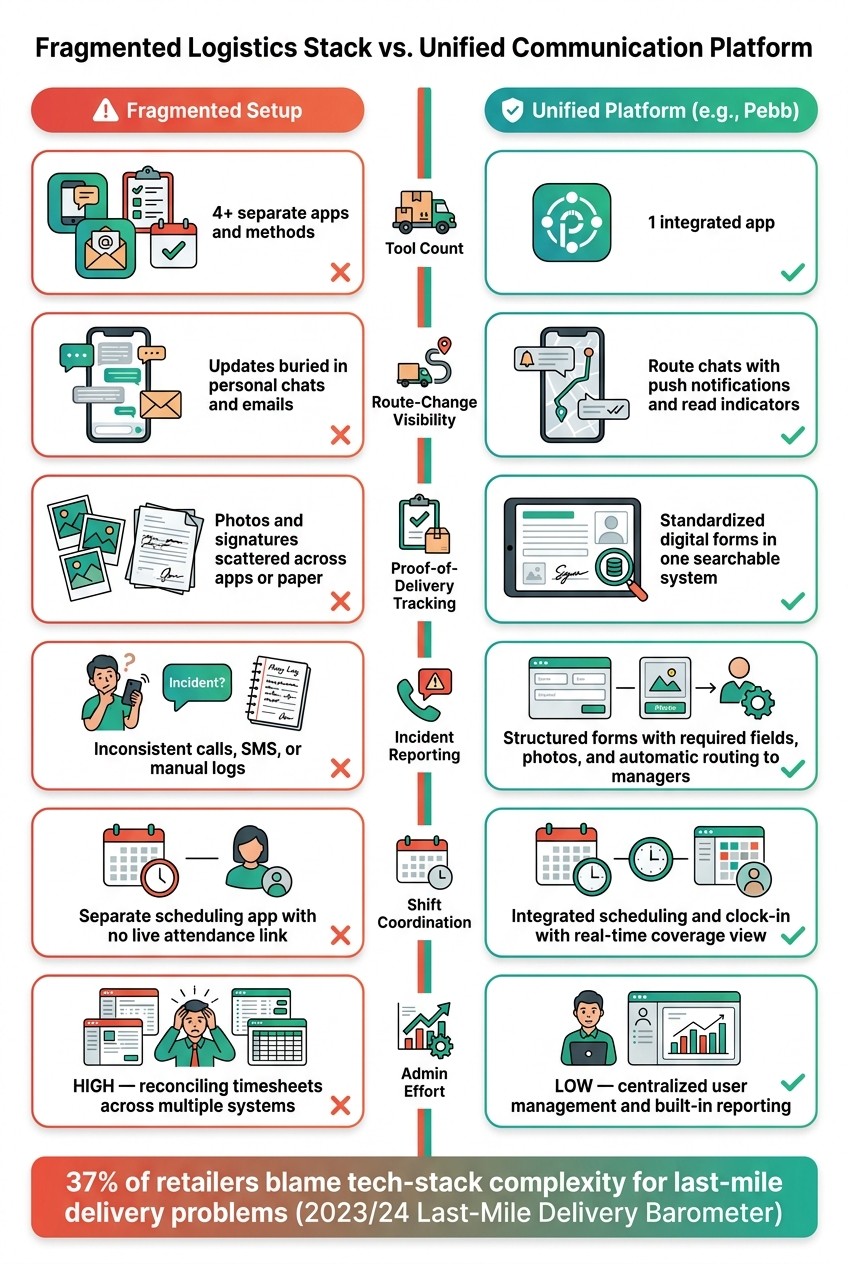
Fragmented Logistics Stack vs. Unified Communication Platform
I’ve seen this play out more times than I’d like to admit: a driver gets a route update in chat, a shift note lives in email, proof of delivery sits on paper, and dispatch is stuck piecing it all together like a bad puzzle.
Here’s the thing: once your workflows and response rules are set, each one needs a single home. At that point, picking a platform stops being just a software call. It becomes a workflow call.
And the data backs that up. A 2023/24 last-mile delivery barometer report found that 37% of retailers blame tech-stack complexity for last-mile problems. To me, that says the issue isn’t the driver. It’s the pile of tools.
Use chat, news feed, forms, scheduling, and clock-in together
At Pebb.io, we’ve learned that these tools work best when they support the workflows teams already use instead of forcing people to jump through hoops.
Group chat is where route-level coordination happens. Drivers and dispatch can stay aligned in real time with route chats, push notifications, and read indicators. If a stop changes or there’s a delay on the road, the right people see it fast.
The news feed is better for broad updates. Instead of posting the same message in five places, teams can post it once, show it to everyone who needs it, and track who has read it. That cuts down on the “I never saw that” problem.
Digital forms replace paper PODs with structured submissions. That means key delivery details live in one form instead of being scattered across loose notes, photos, and half-filled paperwork.
Then there’s scheduling. Drivers get a clear view of their assigned shift and route, which sounds simple, but it saves a lot of back-and-forth. And when clock-in ties right into that schedule, dispatch can see live who’s on duty and who hasn’t started yet.
When all of this works inside one platform, drivers open one app and get one source of truth. No bouncing between apps. No paper trail getting lost in the cab.
How Pebb supports logistics communication without a fragmented stack

This is the exact mess we built Pebb to fix.
At Pebb.io, we use Pebb as an all-in-one frontline communication and operations platform. It brings together group and 1:1 chat, a news feed with acknowledgment tracking, custom digital forms, shift scheduling, and clock-in under one login.
I like this setup because it cuts out so much friction. One user list. One audit trail. One app to train new drivers on.
And it’s not hard to get started. The free plan covers teams up to 15 users, which makes it a practical way to start with a single depot or a pilot route group. If a team wants more, the premium plan is $4 per user per month.
That price point matters. I’ve watched teams hold off on fixing a messy setup because they assumed it would take a huge budget. In many cases, it doesn’t.
Fragmented setup vs. a unified platform: a side-by-side look
This is where the difference becomes obvious. Some updates move work forward. Others disappear into the cracks.
Dimension | Fragmented setup | Pebb |
|---|---|---|
Tool count | 4+ separate apps and methods | 1 integrated app |
Route-change visibility | Updates buried in personal chats and emails | Route chats with push notifications and read indicators |
Proof-of-delivery tracking | Photos and signatures scattered across apps or paper | Standardized digital forms in one searchable system |
Incident reporting | Inconsistent calls, SMS, or manual logs | Structured forms with required fields, photos, and automatic routing to managers |
Shift coordination | Separate scheduling app with no live attendance link | Integrated scheduling and clock-in with a real-time coverage view |
Admin effort | High - reconciling timesheets and records across systems | Low - centralized user management and built-in reporting |
I’ve seen fragmented tools slow teams down in small but painful ways. A missed route update. A delivery photo nobody can find. A manager chasing timesheets across two or three systems. Each issue feels minor on its own, but together they drag the whole operation.
Once the hub is in place, the next step is to tighten the handoffs and alerts that still slow things down.
Standardize communication for the situations that cause delays
I’ve seen this play out more times than I can count at Pebb.io: a team buys into one central hub, everyone feels good for a week, and then delays creep right back in. Not because the tool failed. Because the handoffs stayed messy.
Here’s the thing: one hub only works if the day-to-day rhythm inside it is tight.
Once we had the channel setup in place, we learned we also had to lock down the small daily routines that stop missed updates before they start.
Run clean shift handoffs and driver check-ins
A shift handoff should be boring in the best way. The next dispatcher or supervisor should be able to jump in and know exactly what’s happening without chasing someone down, digging through texts, or piecing together half-finished notes.
What worked best for us was keeping it simple with three recurring digital forms: start-of-shift, mid-shift, and end-of-shift. Nothing fancy. Just the minimum facts dispatch needs to keep deliveries moving.
Form | Required fields |
|---|---|
Start of shift | Driver name, route ID, vehicle number, open deliveries, anticipated delays, break status |
Mid-shift check-in | Last completed stop, ETA to next stop, delay reason (from a predefined list), any vehicle or customer issues |
End of shift | Completed stops, unresolved deliveries, handoff notes, next-day flags |
Let me tell you what happened next when teams started using required fields: incomplete updates dropped fast. Dispatch spent less time asking, “Who’s on this route?” or “What’s the issue here?” and more time fixing problems.
The predefined delay reasons helped a lot too. Instead of ten people describing the same problem ten different ways, everyone picked from the same list, like road construction, customer unavailable, or vehicle issue. That made the data cleaner and cut down on follow-up calls.
Handle route changes and dispatch alerts in real time
One mistake I’ve watched teams make is sending route changes through personal text threads. It feels faster in the moment, but it turns into a mess later. Someone misses the update. Someone else can’t find it. Then operations is left trying to figure out what changed and when.
That’s why every route change should run through a route channel. When it lives there, the whole operations team can see it, and it’s searchable later if something goes sideways.
We also found that the message has to follow the same template every single time. No guessing. No rewriting from scratch.
Route 14: add stop at 2450 Lakeview Ave; priority high; same-day delivery requested; 20-minute delay to final stop; reply ACK.
That kind of format saves time because people know where to look and what matters.
For fleet-wide issues like weather or road closures, pin the alert at the top of the channel so nobody has to hunt for it. If a driver is already on the road, use a voice call first, then log the outcome afterward. That part matters. If the call happens but the result never gets recorded, the team is back in the dark.
The same approach works for delivery proof and incident logs too: capture it once, in the field.
Capture proof of delivery and incidents without back-and-forth
I’ve learned that back-and-forth usually starts with one bad submission. Missing photo. No signature. No timestamp. Vague note. Then dispatch, customer service, or billing has to chase details that should’ve been there from the start.
The fix is pretty straightforward: use one mobile form that requires a photo, signature, timestamp, delivery notes, and an exception code. Once the stop is done, the loop is closed. Dispatch sees it right away, and customer service and billing can move without sending a follow-up.
We apply the same structure to incidents. The form should capture what happened, where, when, whether the delivery was completed, and what action was taken. That way, each report comes in the same format and is ready to escalate without relying on open-text messages.
A case study from Shorr reported an 87% reduction in routing time after adopting digital routing and proof-of-delivery tools that let drivers capture photos and signatures on the spot.
Measure results and keep improving
I’ve seen this part get skipped more times than I’d like to admit.
A team sets up the channels, writes the playbooks, tells drivers where updates should go, and then... everyone just hopes it’s working. That hope usually lasts until a route change gets missed, a POD comes in late, or an incident report sits untouched longer than it should.
Here’s the thing: the last step is proving the system works. Once those routines are in place, measurement shows whether they’re actually sticking. I always look at whether shift handoffs, route changes, POD updates, and incident reports are moving fast enough.
Track the metrics that show communication is working
When we talk with ops teams at Pebb.io, I usually break this into two buckets: operational outcomes and message speed with follow-through.
On the operations side, I’d watch:
On-time delivery rate - 95%+ is a solid target for standard routes
Delivery exception rate
Re-delivery attempts per week
Then I’d look at the communication side:
Average acknowledgment time for route changes
Missed updates per 100 messages
POD submission speed
Average incident resolution time
For POD, I’d aim for submissions within 5–10 minutes of drop-off. For non-critical issues, same-day resolution is a good benchmark.
Let me tell you what happened next on one team review I sat in on. The delivery numbers didn’t look terrible at first glance, but scheduling data told a different story. A route kept starting late, and that late start was quietly throwing off the rest of the day. That’s why I always like pairing delivery metrics with percentage of shifts started on time. Scheduling and clock-in data often exposes a missed update before the bigger problem shows up.
Inside Pebb, we use Important posts and acknowledgments to measure whether people actually received critical updates. That acknowledgment data is where things get honest fast. You can see where messages stall instead of guessing.
This is the data operations managers need to review every week. I’m a big fan of a simple traffic-light dashboard for acknowledgment time:
Green for under 5 minutes
Yellow for 5–15 minutes
Red for anything over 15 minutes
Review it with dispatch leads weekly.
Conclusion: keep drivers informed, responsive, and aligned
Measurement closes the loop.
Everything in this guide comes back to one idea: communication only works when it’s predictable. When drivers know where to look, how fast to respond, and what counts as confirmed, delays drop and coordination gets better.
That means defining workflows before picking tools, standardizing the messages that cause the most delays, and checking week after week whether the system is holding up.
At Pebb.io, we built Pebb to make this easier for frontline operations teams. We keep communication, scheduling, and follow-up in one place. The free plan covers teams up to 15 people, and the premium plan costs $4 per user per month.
For me, the goal has never been perfection. It’s steady improvement. A measurable system keeps drivers informed, responsive, and aligned.
FAQs
How do I choose the right channel for each delivery update?
I learned this one the hard way at Pebb.io.
Early on, we had updates flying everywhere. A route change landed in one chat, a weather alert showed up somewhere else, and a driver sent a private note that should’ve gone to the whole group. Let me tell you what happened next: people missed things, dispatch got pulled in five directions, and everyone felt a bit scrambled.
That’s when we got stricter about where each type of message belongs.
Use Pebb group chats for active route coordination and real-time problem-solving. That’s the place for live back-and-forth when drivers and dispatchers need to sort something out fast.
Put company-wide announcements or weather alerts in the news feed. When the whole team needs to see the same update, this keeps it in one clear spot instead of buried inside a busy chat thread.
For quick private questions, stick to direct messages. Short, one-to-one notes work well there, especially when the update doesn’t affect the full team.
And when something is urgent, don’t play ping-pong with text. Use voice or video calls for issues that need immediate, two-way communication. Sometimes a 2-minute call saves 20 minutes of confusion.
Here’s the thing: clear channel rules cut down noise. They help prevent missed information, and they keep dispatchers and drivers aligned when timing matters most.
What should I include in a driver handoff or route-change message?
When I’m sending an update to a driver in Pebb, I’ve learned the hard way that speed matters less than clarity. Early on, we’d post vague notes like “Route updated” and hope the driver would piece it together on the fly. That didn’t end well. Missed stops, late arrivals, and a lot of back-and-forth followed.
So now, we keep it simple and direct.
Include the key details the driver needs right away:
what changed in the route, stop order, or task priority
why it changed
what to do next
updated arrival or delivery expectations
Here’s the thing: a driver shouldn’t have to dig through five messages to figure out their next move. If Stop 4 is now Stop 2 because a customer asked for an early drop-off, say that plainly. If a task moved up because of a time-sensitive delivery, spell that out. Then make the next step obvious.
I also make sure the message is linked to the right job ticket or route space in Pebb. That keeps the update tied to the work itself, not floating around in chat where it gets lost. It also makes shift handoffs much smoother, because the next person can open the same route or ticket and see the full story in one place.
Which metrics show if logistics communication is improving?
I learned this one the hard way: sending a message doesn’t mean the team saw it, understood it, or did anything with it.
At Pebb.io, we’ve had moments where a post looked fine on the surface, but the results told a different story. A message might get published on time, yet if read rates are low or response rates are flat, that’s a red flag. Here’s the thing: I don’t just want communication to go out. I want it to land.
So when we track internal communication, we keep a close eye on a few numbers that tell the real story:
Read rates
Response rates
Adoption rates
Time-to-read
Feedback from polls or reactions
Those metrics show me if messages are reaching teams, making sense, and pushing people to act.
But I never stop at engagement stats alone. Let me tell you what happened next when we started looking deeper: we saw that the best communication showed up in day-to-day work, not just on a dashboard.
That’s why we also watch operating results like delivery times, delivery accuracy, fewer customer check-in calls, and less manual coordination. If those numbers start moving in the right direction, I know the message didn’t just get viewed, it helped people do their jobs better.
At Pebb.io, our built-in analytics make this easier because we can monitor these engagement metrics in real time and spot what’s working before small issues turn into bigger ones.
