

Author: Ron Daniel
The best way to manage janitorial and cleaning staff schedules
Map zones and tasks, tie recurring checklists to shifts, name backups, and centralize schedules to reduce no-shows and overtime.
Most cleaning schedule problems don’t start with lazy teams. They start with bad visibility.
I’ve seen a schedule look fine at 3:00 PM and fall apart by 7:00 PM because one person called out, one zone had no clear owner, and one weekly task lived on a paper note instead of inside the shift. Across U.S. cleaning crews, even small gaps like that can turn into missed restrooms, extra overtime, client complaints, and hours of supervisor follow-up.
From my seat at Pebb.io, I’ve learned that solid janitorial scheduling comes down to a few simple moves: map work by site and zone, tie recurring tasks to the shift, assign clear backup coverage, and keep updates, chat, and clock-ins in one place. In this article, I’ll walk through the lessons that have worked for us - and the mistakes that taught us what to fix.
Map demand by building, zone, and task frequency
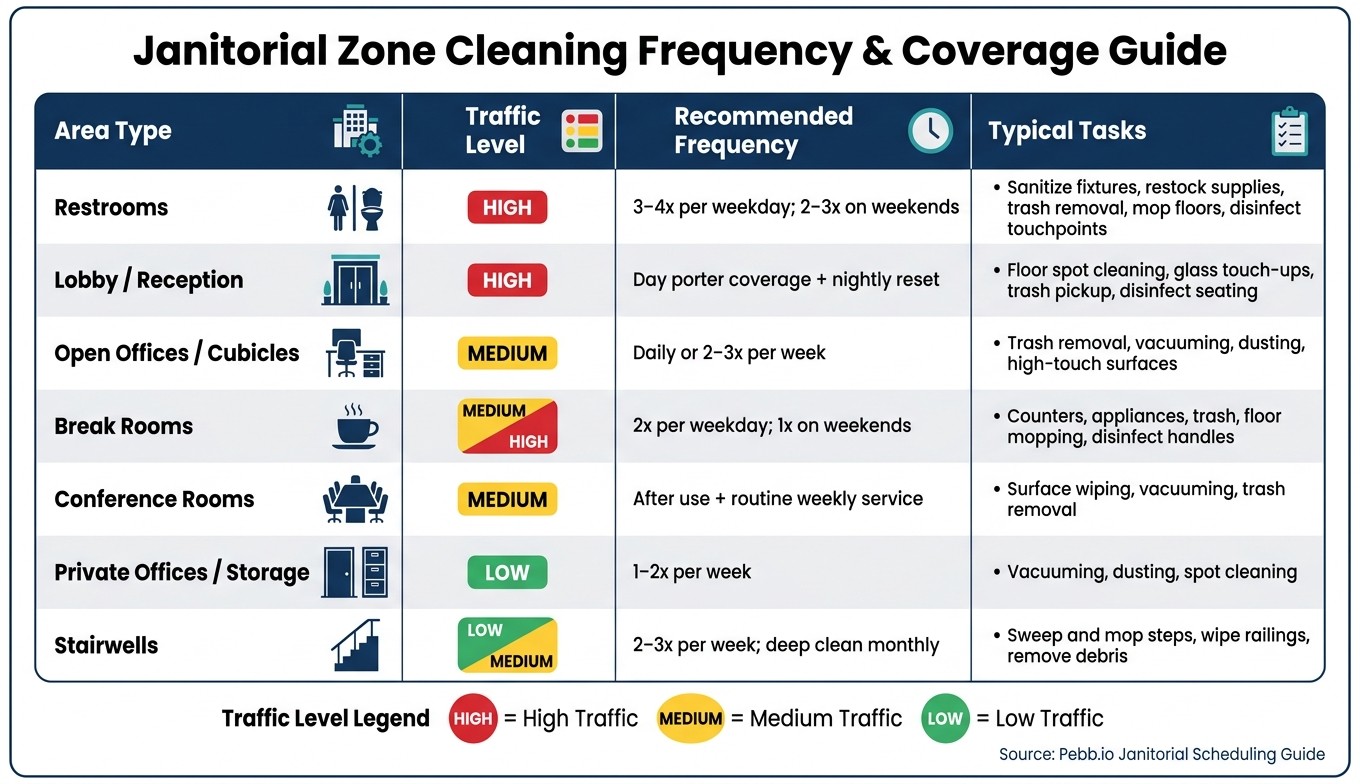
Janitorial Zone Cleaning Frequency & Coverage Guide
The first time I helped plan labor for a multi-area site at Pebb.io, I made a mistake that looked small on paper and messy in real life: I treated the whole building like it needed the same level of care.
It didn’t.
A 50,000 sq ft office can look uniform on a floor plan, but once you walk it, the truth hits you fast. The lobby gets hammered all day. Restrooms never stay quiet for long. Meanwhile, that back storage room? It may only need attention once or twice a week. When we use one flat schedule for every space, we miss the busy spots and waste time in the slow ones.
So before I schedule labor, I map the work first. I start with a site walk and list each space by:
type
square footage
traffic level
coverage window
I also split coverage into daytime, after-hours, and weekend needs. That part matters more than people think. Office buildings usually follow one rhythm. Retail and healthcare sites often don’t. They need coverage across more time windows, and if we ignore that, the schedule breaks fast.
I assign each space a traffic level: high, medium, or low. A downtown office lobby with 500+ daily visitors is high traffic. A file storage room is low. Simple labels, but they make staffing a lot easier.
Sort recurring work by daily, weekly, and monthly frequency
Once I’ve mapped the spaces, I sort recurring work into three buckets: daily, weekly, and monthly.
This is where the schedule starts to feel usable instead of theoretical.
I separate compliance-critical work from appearance work. Restroom sanitation, trash removal, and high-touch surface disinfection are daily tasks because they affect hygiene and compliance directly. Weekly work like vacuuming low-traffic offices, dusting surfaces, and wiping interior glass still matters, but we have more room to move it around. Monthly work like carpet extraction, machine floor scrubbing, high dusting, and vent cleaning helps protect the building over time.
Here’s the thing: if the task frequency lives only in someone’s head, the shift gets shaky the second coverage changes.
That’s why we label each recurring task right in the checklist. If someone new steps into a building, they open the checklist for that zone and see what’s due. No guessing. No hunting down a supervisor. No “I thought someone else handled that.”
From there, I turn those task frequencies into zone-level time blocks so labor matches the work, not just the clock.
Divide each site into zones with time estimates
One thing that has saved me a lot of cleanup later is giving each zone one clear owner.
Let me tell you what happened next when we started doing that more strictly. Accountability got a lot cleaner. In a 5-story office building, for example, one cleaner can own all restrooms across every floor, another can handle open office areas and cubicles, and a third can cover common areas like lobbies, elevators, and stairwells. Everyone knows their territory. Work stops slipping through the cracks because each zone belongs to someone.
When I estimate time per zone, I don’t just count the cleaning itself. That’s where a lot of labor plans go sideways.
I add buffer for:
restocking
spill response
access delays
equipment retrieval
Those little interruptions add up fast.
A 2- to 4-fixture restroom takes about 15 to 20 minutes per full cleaning. But in a busy office, that same restroom may need multiple cleanings per day. If I only plan for the base cleaning time and ignore repeat visits, the whole shift gets squeezed.
Here’s a practical reference I use for common area types in U.S. commercial buildings:
Area type | Traffic level | Recommended frequency | Typical tasks |
|---|---|---|---|
Restrooms | High | 3–4x per weekday; 2–3x on weekends | Sanitize fixtures, restock supplies, trash removal, mop floors, disinfect touchpoints |
Lobby/Reception | High | Day porter coverage + nightly reset | Floor spot cleaning, glass touch-ups, trash pickup, disinfect seating |
Open offices/cubicles | Medium | Daily or 2–3x per week | Trash removal, vacuuming, dusting, high-touch surfaces |
Break rooms | Medium/High | 2x per weekday; 1x on weekends | Counters, appliances, trash, floor mopping, disinfect handles |
Conference rooms | Medium | After use + routine weekly service | Surface wiping, vacuuming, trash removal |
Private offices/storage | Low | 1–2x per week | Vacuuming, dusting, spot cleaning |
Stairwells | Low/Medium | 2–3x per week; deep clean monthly | Sweep and mop steps, wipe railings, remove debris |
With demand mapped, I can build the schedule around stable site, shift, and crew assignments.
Build stable schedules by site, shift type, and crew role
Once I’ve mapped demand, I turn labor hours into fixed shift blocks - usually 4-hour, 6-hour, or 8-hour shifts - that match the coverage window. That sounds simple, but this is where a lot of schedules either hold together or fall apart.
I’ve seen both.
At one smaller office, we only needed a single 4-hour evening shift to keep the place in shape. On the other hand, for a hospital wing or a campus site, we’ve had to split work across 6-hour and 8-hour crews to keep coverage steady without burning people out. Here’s the thing: I try hard not to slice the schedule into too many short, odd shifts. That’s usually when handoff issues start creeping in and coverage gaps stack up.
Once those shift blocks are locked, I assign people based on three things: site familiarity, skill set, and coverage window.
That part matters more than most teams think.
When a cleaner already knows a building, they move faster and make fewer mistakes. If a job calls for floor stripping, carpet extraction, or biohazard cleanup, I only put trained staff on it. And not everyone works best in the same setting. Some team members do their best work during client-facing daytime hours. Others are far better on quiet overnight shifts, when they can focus and move fast without foot traffic.
Pick the right assignment model for your operation
I’ve learned there’s no one-size-fits-all setup here. What works for one contract can be a mess for another. In my experience at Pebb.io, the three models that make the most sense are assigning by building, by zone, or by shift type. Sometimes we mix them too - for example, building-based assignments across a multi-site contract, then zone-based coverage inside each large location.
Assignment model | Best for | Advantages | Limitations |
|---|---|---|---|
By building | Multi-site contracts or single-site facilities with recurring crews | Strong site familiarity, consistent accountability, fewer handoff errors | Less flexible during sudden staffing gaps |
By zone | Large buildings, campuses, hospitals, airports, or warehouses | Reduces travel time, creates section ownership, works well for recurring tasks | Requires backup coverage when a zone runs short |
By shift type | 24/7 operations or facilities with distinct day, evening, and overnight needs | Matches skills to coverage windows, supports specialized crews, easy to standardize | Can create communication gaps between shifts if handoffs aren't documented |
One thing I always add, no matter which model I use, is a named backup for every hard-to-fill shift.
Let me tell you what happened next when we skipped that step once: a single callout turned into a mini fire drill. Managers were texting, people were swapping shifts on the fly, and everyone lost time. After that, we stopped leaving backups to chance. Now, when someone calls out, the replacement is already chosen. No scrambling. No last-minute chaos. It also makes same-day coverage a lot easier to handle.
Use Pebb to publish schedules and manage crews in real time
This is one area where we’ve seen a big difference with Pebb. We keep shifts, PTO, work chat, and clock-ins in one place, so managers can publish schedules and send updates without everyone wondering which version is the latest. That alone cuts down a lot of noise.
For cleaners, it’s even better. They can pull up shift details on their phones instead of calling in or digging through old text threads. And Pebb’s location-based clock-in gives managers a clearer view of where work took place, which helps cut down on time disputes across multi-site teams.
Once schedules are published in one place, I move straight into shift confirmation and gap-filling, because that’s where the day-to-day pressure usually shows up first.
Cut no-shows and coverage gaps with confirmations and live updates
I learned this the hard way at Pebb.io: publishing the schedule is not the finish line. It’s the starting line.
We’ve seen it over and over. A schedule can look perfect on paper on Monday, then fall apart by Friday night if nobody confirms, nobody owns backup coverage, and updates live in random text threads. That’s when no-shows slip through, supervisors start chasing people after hours, and clients feel the mess before the team can fix it.
Here’s the thing: crews stay on track when the schedule stays confirmed and current right up until shift start.
Set up a simple shift confirmation and backup coverage process
One habit that keeps paying off is posting shifts at least 14 days in advance. In my experience, that extra runway matters a lot for cleaning teams. People are juggling overnight routes, weekend work, and sometimes more than one site. If they can see their shifts early, they can plan their week instead of reacting to it.
Once shifts are posted, we make confirmation part of the routine. Every cleaner confirms their assignment a few days before the shift window. If an overnight or weekend shift still isn’t confirmed, it gets flagged for supervisor review before it turns into a last-minute problem.
What helped us even more was tying a named primary and backup to each recurring route or site. Let me tell you what happened next when we started doing that: callouts stopped feeling like chaos. If the primary calls out, the supervisor assigns the backup, gets confirmation, and updates the shift. That’s it. No frantic group texts. No guessing who might be free. And once the shift is confirmed, the backup is already visible in the same schedule view.
That one small setup can save a lot of stress.
Track attendance with Pebb chat, clock-in, and task records
Even with confirmations, stuff still happens. Someone runs late. A cleaner gets stuck outside a locked building. A route starts off track because the first stop goes sideways. I’ve seen all of it.
What matters most isn’t whether problems show up. It’s how fast the team sees them and how fast someone can act.
Inside Pebb, we use site-specific group chat channels like "Downtown Office – Night Shift" or "Retail Route – Saturday Evening" so every message tied to that job stays in one place instead of getting buried in personal texts. That changes a lot. When a cleaner hits an access issue or is running behind, they post in the channel, and the supervisor can redirect, reassign, or notify the client before it becomes a visible issue. Clock-in tracking also ties attendance to location, so managers aren’t left wondering if someone actually started the shift.
One Friday overnight route still sticks with me. A cleaner called out before the shift. In a lot of teams, that would’ve kicked off a messy chain of calls and missed details. But in Pebb, the callout, backup reassignment, clock-in, checklist completion, and next-morning review all stayed in one system. Every change was logged. Coverage stayed visible. And when it came time to tighten the next schedule, the manager had clean attendance and task records to look back on.
That kind of visibility doesn’t just help in the moment. It makes the next schedule better too.
Keep teams aligned and improve schedules over time
I’ve learned this the hard way at Pebb.io: publishing the schedule is the easy part. What happens after that is where things either stay smooth or fall apart.
A shift looks fine on paper at 3 p.m. Then by 6 p.m., a tenant adds a late event, an entry point gets locked, or a supply item runs out. If that update lives on a paper sheet or in some buried text thread, the crew walks in blind. And when people start a shift with bad info, the whole night gets harder than it needs to be.
Use digital checklists and site channels to prevent miscommunication
Most breakdowns happen when crews show up without the latest site update. I’ve seen all kinds of last-minute changes hit at once: a corporate tenant books the conference center for a late event, the north entrance locks after 8 p.m., or the glass cleaner is out of stock. A static paper list just can’t keep up.
That’s why site-specific channels in Pebb help so much. A manager can post straight into the Downtown Office – Night Shift channel and put the update where the crew will actually see it:
ALERT: Client event in the lobby tonight. Add 9 p.m. trash pickup and carpet spot-checks. Use the loading dock; north door locks after 8 p.m.
Here’s the part I like most: every cleaner assigned to that site sees the update before they arrive, and they see it in the same place as their shift details. No guessing. No “I never got that message.” No working off yesterday’s plan.
Then we update the digital checklist too. So when the crew opens the shift, they see what’s expected right now, not an old version that no longer fits the site.
We use the same channel for things like:
disinfection changes
supply shortages
access updates
Let me tell you what happened next when teams started doing this the right way: fewer missed tasks, fewer back-and-forth calls, and a lot less confusion at clock-in.
When updates stay tied to the shift, the next move is simple. Look at the results and use them to fix the next schedule.
Review completion rates, overtime, and complaints to refine the next schedule
This is where good teams separate themselves. We review the schedule every week and make small fixes before little misses turn into habits. The teams that run best don’t wait for a month of problems to pile up. They check what happened last week and act on it.
I usually look at weekly numbers by site, zone, and shift because team-wide totals can hide the real issue. One building can be slipping while the rest of the team looks fine on paper.
Metric | How to measure | Target range | What to adjust if off-target |
|---|---|---|---|
Task completion rate | % of checklist items marked done vs. assigned | Above 85% | Review time estimates per zone; simplify or reassign unclear tasks |
Coverage reliability | Scheduled shifts fully covered as planned | Above 95% | Tighten confirmation process; build a named backup pool |
Scheduled vs. worked hours | Actual hours worked vs. scheduled hours | Keep variance under about 5% | Rebalance workloads; adjust recurring task frequencies |
Complaint patterns | Client complaints by building or route each month | No repeat complaints | Inspect site checklists; increase task frequency or supervisor visits |
Here’s the thing: when one of those numbers falls outside the target range, the answer usually is not to rebuild the whole schedule.
It’s usually a local fix.
If Building C keeps getting complaints about the lobby, that’s a zone problem, not a company-wide one. If one overnight route keeps running over on hours, the time estimate for that route is probably off. I’ve seen managers waste time trying to change everything when the issue was sitting in one route, one entrance flow, or one checklist.
That’s why reviewing by site, zone, and shift matters so much. It helps us see where the schedule is actually failing instead of where we assume it is.
Once we spot the issue, we use those results to tighten next week’s staffing, task load, and backup coverage.
FAQs
How do I choose between building, zone, or shift-based scheduling?
I learned this one the hard way: the “right” setup on paper can still fall apart on the floor if it doesn’t match how your janitorial team actually works day to day.
At Pebb.io, we’ve seen this play out again and again. One crew is tied to a single property. Another is moving between floors, departments, or wings. Another is filling open shifts across a few sites. Same company, same goals, totally different coverage needs.
Here’s the thing: the best choice usually comes down to where gaps show up most often.
Building-based: best for cleaners assigned to specific properties
Zone-based: best for larger sites split into areas like floors or departments
Shift-based: best for rotating crews or filling gaps across multiple sites
Let me tell you what happened next when teams got this part right. Scheduling got less messy. Handoffs got clearer. People stopped wasting time hunting for the latest checklist or texting three different supervisors for updates.
In Pebb, we can organize teams by location, department, or crew. We also use templates so schedules, task checklists, and team communication stay in one place. That sounds simple, and honestly, that’s the point. When everything lives together, it’s a lot easier for crews to know where to go, what to do, and who’s covering what.
What should I do first when a cleaner calls out?
I learned this one the hard way: informal call-outs to my personal phone turn into chaos fast.
At Pebb.io, we stopped leaning on random texts and moved to a more formal call-out process. Instead of messaging people one by one, we post the open shift in Pebb so all qualified staff can see it at the same time.
Here’s what changed for us. The first person to claim the shift gets it. That simple rule cuts out the back-and-forth, saves time, and keeps the schedule out in the open for everyone.
It also helps us avoid the old scramble of calling cleaners one by one, hoping someone picks up. My phone got a lot quieter, and our scheduling got a lot cleaner.
How can I tell if my cleaning schedule is working?
I’ve learned this the hard way at Pebb.io: a cleaning schedule isn’t doing its job just because it exists. It’s working when the day feels less chaotic, the team knows what’s going on, and I’m not stuck sending follow-up messages every few hours.
Here’s the thing: the best schedule is the one that keeps everyone lined up without constant chasing.
When our process was messy, the warning signs showed up fast. We’d deal with last-minute changes, coverage gaps, and way too much time spent tracking people down for basic updates. Time-off requests got clunky. Payroll took more effort than it should have. And instead of checking things on their own, staff would text us for details they should’ve been able to find in seconds.
Now, when I look at whether a schedule is working, I look for simple signs:
Fewer last-minute changes
Fewer coverage gaps
Less time spent chasing staff
Smoother time-off and payroll processes
A team that feels informed and uses self-service tools
One of the biggest shifts for us was keeping everything in one place. Shifts, site notes, and checklists all need to live together. That cuts down on confusion fast. If people still have to bounce between apps or send texts for basic details, something’s off.
That’s usually my gut check. If I’m still juggling multiple tools just to keep a single shift covered, the schedule needs work.
