

Author: Ron Daniel
How to keep non-desk employees connected to corporate HQ
Unify schedules, announcements, SOPs and forms in one mobile app so frontline teams receive timely, role-based updates and HQ can track reads.
Most companies don’t have a message problem. They have a reach problem. I’ve seen HQ teams send polished updates, detailed policy notes, and urgent shift changes - only to find out later that the people on the floor never saw them. At Pebb.io, that gap shows up fast when a company leans on email, desktop portals, or paper notices for people who spend their day away from a desk.
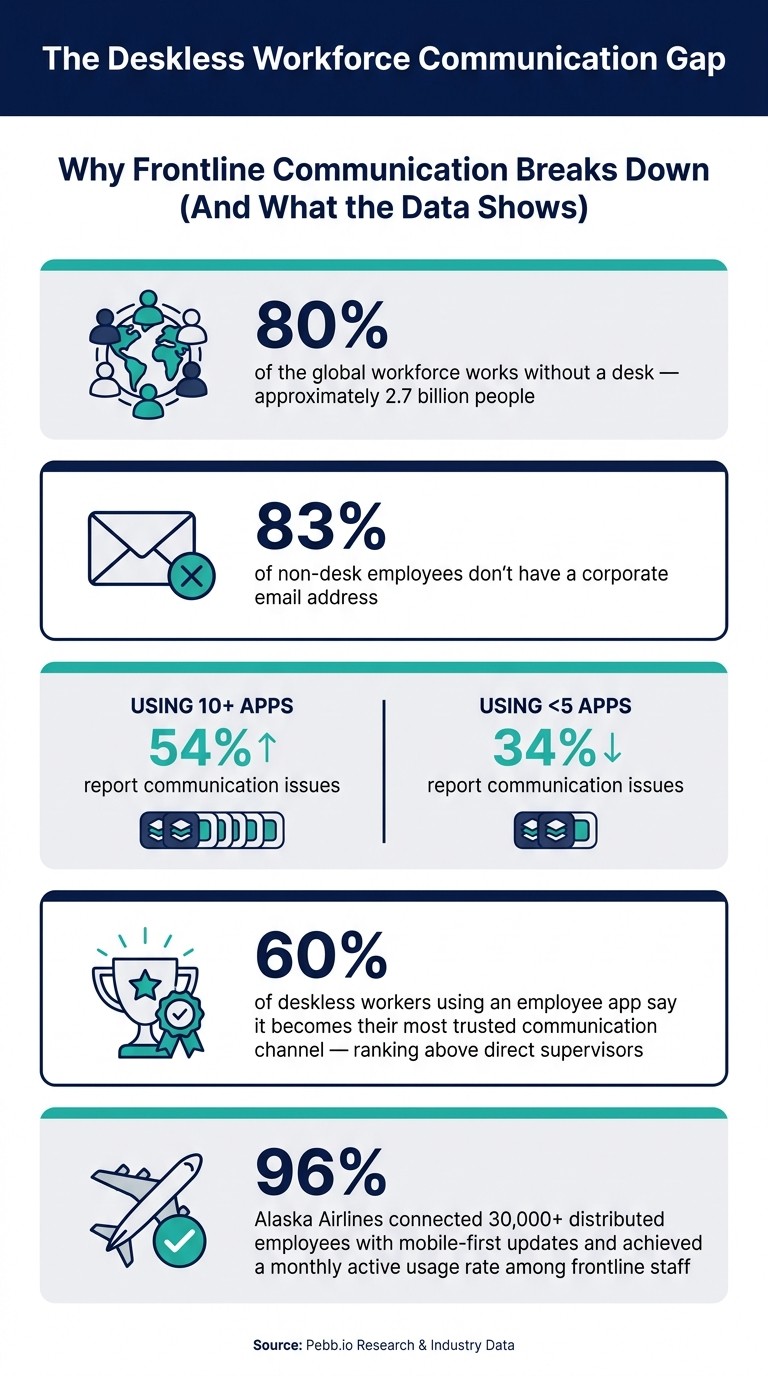
The scale of it is hard to ignore. About 80% of the global workforce - around 2.7 billion people - works without a desk, and 83% of non-desk employees don’t even have a corporate email address. So when HQ uses desk-based tools as the main path for updates, a huge share of the workforce gets left behind before the message even starts moving.
Based on what I’ve seen, the fix is not “more communication.” It’s one mobile place for updates, actions, and follow-up. I’m going to break down what tends to go wrong, what we’ve seen work better, and the simple steps teams can use to keep frontline employees in sync with HQ without adding more noise.
The Deskless Workforce Communication Gap: Key Stats
Set up one mobile hub for HQ communication
A while back, I watched a store manager at Pebb.io juggle four places just to get one update out. She emailed the formal note, dropped the “urgent” version into WhatsApp, taped a paper schedule in the break room, and told people to use the HR portal for PTO. By the end of it, she looked wiped.
Here’s the thing: that kind of tool sprawl wears people down fast.
When schedules live in one place, messages in another, policies somewhere else, and requests behind a different login, employees stop trusting the system. They have to remember where everything lives. Managers repeat the same update three or four times just to make sure it lands. It’s draining, and it falls apart as teams grow.
What I’ve learned at Pebb.io is simple: the fix is one mobile hub for schedules, messages, policies, and requests. But it only works if employees can use it fast, on any shift, without training.
Choose tools frontline employees can use in under a minute
This part matters more than most teams think.
If an app takes too long, people won’t use it. They’ll go right back to texts, side chats, and word of mouth. I’ve seen it happen. If someone can’t find the update they need in seconds, the app loses.
The bar should be simple: an employee opens the app, checks their schedule, reads the update, and moves on in under a minute.
That usually means:
Native iOS and Android apps
Push notifications that deep-link straight to the right item
A home screen with three or four clear actions
Shared-device support matters too. In food service or manufacturing, people often can’t carry a personal phone on the floor. So a kiosk tablet or back-of-house shared device has to allow quick sign-in and role-based views, so multiple people can use it without seeing each other’s information.
That’s one reason we built Pebb this way at Pebb.io. Pebb puts Shifts, Messages, and Requests right up front. It supports push notifications for shift changes and approvals. It also lets employees join with a phone number instead of a corporate email, which helps a lot when not everyone has a company inbox.
Once the hub is easy to use, the next job is making it the one place people trust for updates.
Replace scattered channels with one source of truth
I’ve seen what happens when managers only have to publish once.
They post the update, and it appears in the right employees’ feeds with a push notification. HQ decisions stay aligned across locations. No copying the same message into a group chat. No printing a revised schedule. No crossing your fingers and hoping the night shift saw the paper notice.
The numbers back this up. Employees using more than 10 apps report communication issues at a rate of 54%, compared to 34% for those using fewer than five. That gap says a lot. More tools don’t always mean better communication. Sometimes they just mean more confusion.
And there’s another stat that stuck with me: among deskless workers who do use an employee app, 60% say it becomes their most trusted communication channel - ranking it above direct supervisors or management memos.
That trust matters. Once people know, “If it’s in the app, it’s the latest version,” communication gets a lot cleaner.
At Pebb.io, we built Pebb to bring chat, a news feed, scheduling, PTO, forms, and a knowledge base into one app. There’s a free plan for small teams, and premium starts at $4 per user.
With one trusted hub in place, HQ can send role-based updates without stacking on yet another channel.
Send updates through mobile chat, announcements, and a company news feed
When we first started cleaning up internal communication at Pebb.io, one problem kept smacking us in the face: too many updates were getting buried. Not because people didn’t care. Because the message showed up in the wrong place, at the wrong time, for the wrong people.
Here’s the thing: once you’ve got one hub in place, the next step is deciding how updates should move through it. We’ve found that three mobile channels work best together: mobile chat, targeted announcements, and a company news feed. Each one has its own job. Put them together, and they do a much better job than long email threads nobody wants to dig through. The goal from there is pretty simple: get each update to the right people, on mobile, when they need it.
Use shift-based and role-based announcements
I’ve seen HQ teams make the same mistake again and again: they blast one message to everyone and hope it lands. It usually doesn’t.
A policy change for closing-shift cashiers does not need to hit the phones of the morning warehouse crew. When people keep getting alerts that don’t matter to them, they start tuning all of it out. That’s when the stuff that does matter gets missed.
What worked better for us was targeting announcements by store, department, role, and shift. That way, each location sees only the instructions tied to their job. Let me give you a simple example. If your returns policy changes tonight, send that message only to closing-shift cashiers and supervisors, and send it just before the shift starts. That timing matters.
We also learned to keep these alerts tight:
one line
three bullets
one link to the SOP
That format cuts the fluff. People know what changed, what they need to do, and where to go next.
Use announcements for action. Use the feed for context.
Post company updates in a news feed employees will actually read
A company news feed only works if people can scan it fast and move on. At Pebb.io, we’ve learned that the best posts are short, visual, and easy on the eyes. Think clear headlines, photos, short videos, quick polls, and recognition shout-outs. If it looks like a wall of text, people skip it. If it feels easy to read, they come back.
One small move that helps a lot: pin the most critical post of the day at the top. That keeps it in view until it’s no longer relevant. We also like adding a clear next step, something like "Questions? Ask in #store-ops-questions" so replies don’t spill all over the place.
That split tends to work well: use the feed for short, visual updates; use chat for replies and questions.
There’s a good proof point here too. In January 2026, Alaska Airlines connected over 30,000 distributed employees - including flight and ground crews - with mobile-first updates and reached a 96% monthly active usage rate among its frontline workforce.
That stat hits home for me because it shows what happens when updates are built for how frontline people work, not how office teams wish they worked.
At Pebb, we built this flow so teams can post updates and handle replies in one app, which means employees don’t need yet another login. And when a message changes a process, we always link the SOP or form they need next. That one step saves a lot of confusion later.
Keep teams aligned with a knowledge base, digital forms, and daily workflows
I learned this the hard way at Pebb.io: sending the update isn’t the win. The win is when someone on the floor sees it and can do the next step right there, without bouncing between apps, PDFs, and old links.
That’s where a lot of teams get stuck. HQ posts an update, everyone says it went out, and then... nothing changes. Why? Because employees still have to hunt for the SOP, find the right form, or ask a manager which version is current. That extra friction adds up fast.
Once employees see the message, they still need the next step in the same place. Getting updates out is only half the job; the rest is putting SOPs, forms, and workflows in the same mobile hub so employees can act immediately.
Publish SOPs and policy updates in a searchable knowledge base
At Pebb.io, we’ve found that the knowledge base works best when it mirrors how frontline teams already think. We keep it organized around four clear categories: Safety, Operations, HR, and Training.
That means:
Under Safety, employees can find PPE requirements and incident reporting steps.
Under Operations, they get opening and closing checklists.
Under HR, they can check PTO policies and pay practices.
Under Training, they can open short onboarding guides and microlearning videos.
Here’s the thing: none of this helps if it feels like reading a giant binder on a phone. So we make each item easy to scan on a small screen. We use step-by-step checklists instead of long manuals, short how-to videos with captions, and plain titles like "Forklift Pre-Shift Safety Checklist" instead of vague names like "Safety Doc v3."
We also show the effective date on every SOP. That sounds small, but it cuts out a ton of confusion. People know which version applies, and managers don’t have to answer the same question five times in one shift.
Let me tell you what happened next when we started linking the updated SOP straight from the announcement. Adoption got a lot smoother. Employees didn’t have to search again after reading the update. They tapped once, opened the right doc, and moved on. That turns policy updates into action instead of a scavenger hunt.
Connect shifts, PTO, clock-in, and forms to HQ communication
This is the part I care about most. The strongest communication tools show up where work is already happening.
When someone checks a shift, clocks in, or submits a form, that’s the moment to surface the update, link the SOP, and capture acknowledgment in the same flow. Not later. Not in a separate system. Right then.
At Pebb.io, we’ve seen how much smoother things get when SOPs, shifts, time tracking, policy acknowledgments, PTO requests, incident reports, and pulse surveys all live in one mobile system. That setup creates a digital trail showing HQ exactly who completed what and where follow-through is missing.
And honestly, that visibility matters. Without it, leaders assume the message landed. With it, they can spot the gaps fast.
Pebb keeps communication, scheduling, forms, and knowledge in one app so employees can see it, understand it, and act on it in the same place.
Build two-way communication and track whether employees are actually informed
I’ve seen this play out more times than I’d like to admit at Pebb.io: HQ sends an update, everyone assumes it’s done, and then the next shift starts with half the team still out of the loop.
That’s the trap.
Sending the message is just the first step. The hard part is knowing whether people actually saw it, understood it, and did anything with it. That’s where a lot of HQ teams lose sight of what’s happening on the ground.
Here’s what we watch closely: reach, acknowledgment rate, and unresolved questions. Those three signals tell us a lot, fast. If a policy update goes out to 200 employees and only 60% acknowledge it before the next shift starts, that usually points to a timing issue or a message that didn’t land clearly enough. The good news is the data shows us where to dig in instead of leaving us guessing.
Let me tell you what happened next in cases like that: we didn’t just resend the same post and hope for the best. We looked at who missed it, when it was sent, and whether people had questions sitting unanswered. That changed the conversation from “We posted it” to “Did the team get it?”
And that’s where managers matter most. They’re the last mile between HQ and the floor.
Give managers a clear role in reinforcing HQ messages
One thing I’ve learned at Pebb.io is that local managers are often the most ignored part of frontline communication strategies, even though they’re usually the people who make the message stick.
When HQ posts an update, managers shouldn’t get dumped into the same stream as everyone else with no extra context. They need a short briefing they can use in a pre-shift huddle. Simple. Direct. Easy to repeat.
Inside Pebb, managers can check acknowledgment status right in the app. If someone on their crew hasn’t tapped "Got it" by shift start, the manager knows before the shift begins, not after a mistake happens. That turns follow-up into a five-minute task instead of a bigger cleanup later. And if they need to find someone fast, the people directory helps them get to the right person without wasting time.
Here’s the thing: managers should reinforce the same HQ message, not spin up a second version of it. Once people start hearing different versions from different sources, things get messy fast.
Conclusion: keep communication simple, mobile, and two-way
I’ve found that when the data is weak, the smartest move is to fix the message before the next shift starts, not days later when the damage is already done.
Two-way communication matters because it gives frontline teams a way to respond through comments, polls, forms, and chat. It also gives HQ proof that the message landed. That’s what we aim for at Pebb.io: not just sending updates, but closing the loop with feedback and acknowledgment data so each message leads to fewer missed steps, faster follow-up, and one clear communication loop.
FAQs
How do I choose the right mobile hub for frontline teams?
I learned this the hard way: when teams have to bounce between five different apps just to get through one shift, things start slipping. A missed message here. An unseen task there. Before long, people feel like they’re working around the system instead of with it.
That’s why I always lean toward an all-in-one, mobile-first platform that puts communication and day-to-day work in one app. At Pebb.io, we’ve seen how much smoother things run when people can check their schedule, message teammates, read updates, and manage tasks without jumping from tool to tool.
Here’s the thing: platform-hopping sounds small until you see what it does at scale. It slows people down, creates confusion, and makes basic work feel harder than it should.
So when I’m looking at a platform, I focus on a few simple things:
One app for the core stuff: shift scheduling, work chat, a news feed, and task management
Audience segmentation: so the right people get the right message, not everyone all at once
Ease of use: because if people need training just to post an update, that’s a problem
Strong iOS and Android performance: since frontline teams live on their phones, not at a desk
Cost that makes sense: like Pebb’s $4 per user plan
Let me tell you what happened next when teams got this right: adoption got easier. People actually used the app. Managers spent less time repeating themselves. And employees had one clear place to go instead of a messy stack of disconnected tools.
What should HQ measure to know employees got the message?
I learned this one the hard way at Pebb.io.
We’d post an update from HQ, assume everyone saw it, and then watch the same questions roll in from three different teams. That was the moment it hit me: sending a message is not the same as landing a message.
HQ needs to measure whether employees read updates and how they engage with them. Inside Pebb, read tracking shows us who saw a message. Then I look at comments, likes, and direct questions to figure out whether people just glanced at it or actually understood it.
Here’s the thing: a quick thumbs-up can tell me the post got attention, but a thoughtful comment or follow-up question tells me the message clicked. That difference matters a lot when you’re trying to keep everyone aligned.
We also saw a big shift when we stopped relying on scattered channels. When updates live across too many tools, HQ ends up piecing together half-signals and guesswork. Using one system instead gives us clearer visibility and stronger feedback loops in real time.
Let me tell you what happened next: once our updates, replies, and read signals were all in one place, it became much easier for us to spot gaps fast. We could see who had seen the message, who was engaged, and where people needed more context before small misunderstandings turned into bigger ones.
How can managers reinforce updates without causing confusion?
I’ve seen this go sideways more times than I’d like to admit. At one point, we had updates floating across email, text threads, and even old-school bulletin boards. The result? People weren’t just missing messages - they were guessing which channel mattered most. And when your team has to guess, things slip.
That’s why we kept pushing toward one digital home for company communication at Pebb. Instead of sending people on a scavenger hunt, we give them one place to check for updates. It cuts the noise fast.
Here’s the thing: clarity isn’t just about sending more messages. It’s about sending the right message to the right people. I’ve found that targeted messaging makes a huge difference, especially when teams are split by role, location, or shift. A warehouse worker in Dallas doesn’t need the same update as a sales rep in Chicago, and treating them the same usually creates confusion.
What helped us most was keeping communication simple and easy to track inside one platform:
Targeted messages by role, location, or shift
Read receipts so managers can see who saw what
Attachments for files, docs, or schedules
Message priority for urgent updates
Searchable posts so people can find answers on their own
Let me tell you what happened next when we leaned into this approach: managers spent less time repeating themselves, and employees spent less time chasing down basic info. Instead of asking, “Where was that posted?” they could just open Pebb and find it. That small shift saved time and cut a lot of day-to-day friction.
