

Author: Ron Daniel
How to improve transparency with a company-wide news feed
Make transparency real with a single company news feed: what to post, posting rules, tool roles, and metrics to measure success.
Most companies don’t have a transparency problem. They have a location problem. At Pebb.io, I’ve watched one update get posted in chat, emailed again, mentioned in a huddle, and then retold on the floor until half the team heard a different version. By the time it reached the late shift, the message had changed enough to cause missed steps and a pile of follow-up questions—a common challenge when trying to improve communication with frontline employees.
The numbers match what I’ve seen. 25% of workers say they don’t know where to find key information, and 22% say there are too many places to look. On top of that, about 70% of leaders think communication works well, while only 51% of frontline employees agree. That gap is where trust starts to slip.
I’ve learned that a company-wide news feed works best when it becomes the one place for official updates , similar to a frontline employee portal, not a catch-all for every message. In this guide, I’ll walk through what should go in the feed, how we handle posting and approvals at Pebb, and which numbers I watch to see if transparency is getting better or if we’re just adding more noise.
Decide what belongs in the news feed and what does not
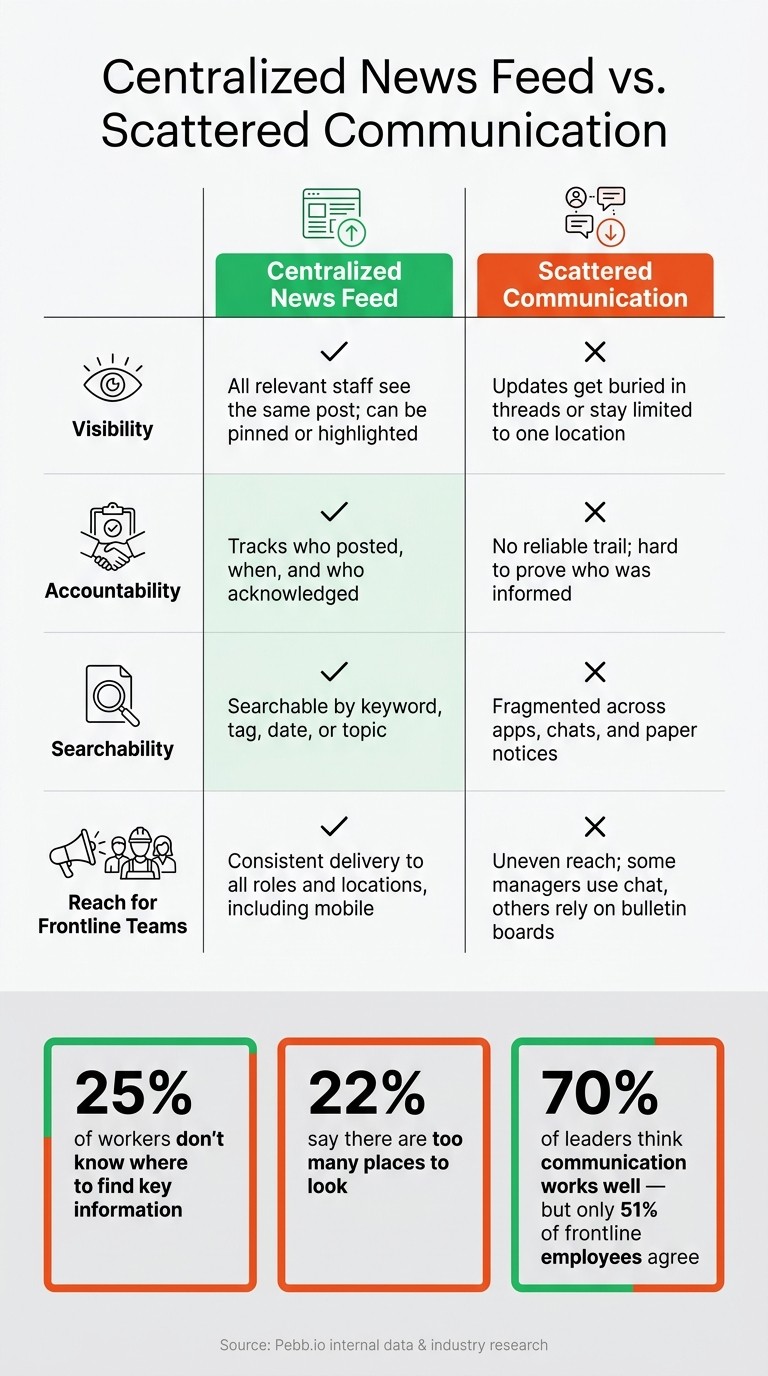
Centralized News Feed vs. Scattered Communication: What's the Difference?
I learned this one the hard way at Pebb.io.
Early on, we saw teams post everything into the feed - big policy changes, random shift chatter, local follow-ups, one-off questions. For a few days, it felt active. Then the feed started to feel noisy, and the posts that mattered got buried. That’s when it hit us: a feed only works as a source of truth when everyone uses it for the same kind of update.
So we drew a clear line. The feed is for company-wide updates, not every update. Once we set that boundary, things got a lot cleaner. People knew where to look, and managers stopped sending mixed signals.
Post these updates in the feed every time
Some updates are too important to scatter across chat, texts, or side conversations. In my experience, these should go in the feed every single time:
Shift and schedule changes - anything affecting when or where people work
New SOP announcements - updated safety procedures, quality checks, or customer service scripts, with a link to the full document
Operational milestones - new site openings, product launches, system rollouts, or major performance goals reached
Here’s the thing: not everything belongs there.
Day-of shift swaps, local coordination, and back-and-forth replies should stay out of the feed. Those belong in Work Chat. If you mix those into the main stream, people stop trusting the feed because they have to sift through too much clutter just to find one policy update.
Use simple posting rules to avoid mixed messages
We also found that a category list by itself isn’t enough. If every manager writes updates in a different style, people still get confused.
That’s why we pushed for one simple format for every post. The goal was speed. Someone on a break or walking the floor should be able to scan the update in seconds and know what changed.
Each update should include:
Title - clear and specific (e.g., "Policy Update – Meal Break Procedures")
Tag - location or team
Summary - what changed and why, in plain language
Effective date - in U.S. format ("Effective August 5, 2026, 5:00 PM CT")
Who it affects - ("Applies to all hourly employees in Texas locations")
Action required - with a deadline and where to complete it
Let me tell you what happened next when we started sticking to that format: fewer repeat questions, less room for rumor, and a much easier time getting people aligned.
One rule mattered more than I expected: do not restate policy details in chat. If someone asks about a policy in Work Chat, point them back to the feed post or Knowledge Base entry. That keeps both as the authoritative sources.
And if something needs to be fixed, don’t quietly edit and hope no one notices. Publish a follow-up post labeled "Correction" that references the original title and date - for example, "Correction: Schedule Update, July 20, 2026" - and update the Knowledge Base entry too.
Centralized news feed vs. scattered communication
This sounds simple, but it makes a big difference. Scattered communication hides updates. A central feed keeps them in plain sight.
Centralized News Feed | Scattered Communication | |
|---|---|---|
Visibility | All relevant staff see the same post; it can be pinned or highlighted | Updates get buried in threads or stay limited to one location |
Accountability | Tracks who posted, when, and who acknowledged | No reliable trail; hard to prove who was informed |
Searchability | Searchable by keyword, tag, date, or topic | Fragmented across apps, chats, and paper notices |
Reach for frontline teams | Consistent delivery to all roles and locations, including mobile | Uneven reach; some managers use chat, others rely on bulletin boards |
At Pebb.io, I’ve seen this play out again and again. When updates live in one place, people spend less time hunting for answers and more time doing the job. When messages are scattered, teams miss things - not because they don’t care, but because the system makes it too easy to miss them.
Build a clear posting workflow with Pebb's core tools
I’ve seen this play out more times than I can count at Pebb.io: once a company stops treating every post the same, communication gets a lot less messy.
Here’s the thing... when the feed is saved for official updates, everything else starts to fall into place. Questions go to the right spot. policies live where people can find them later. acknowledgments don’t get lost in a comment thread. We end up with one place for announcements, one for discussion, one for policies, and one for responses. That simple split is what makes transparency work day to day.
Use the News Feed for official updates and Work Chat for follow-up questions
In our setup, the News Feed is where official updates go. If HR shares a new attendance policy or operations posts a shift scheduling change, that belongs in the News Feed. If acknowledgment is needed, we mark it Important.
But the discussion? That goes somewhere else.
We usually add a line like this in the post: "Questions? Ask in a dedicated Work Chat channel." It sounds small, but it makes a huge difference. The feed stays clean, and employees know exactly where to go if they need clarity.
I like this setup because it cuts down on the usual chaos. Instead of people replying all over the place, every follow-up has a clear home in Work Chat.
Store policies in the Knowledge Base and collect responses with Digital Forms
When we share a procedure change in the News Feed, we link straight to the full document in the Knowledge Base. That’s where we keep SOPs, HR policies, training guides, and FAQs, basically anything people may need to check more than once.
Let me tell you what happened next when teams started doing this well: repeat questions dropped, and managers spent less time digging up old files or re-explaining the same rule.
For acknowledgments and tracked responses, we use Digital Forms. We link the form right inside the News Feed post and add a clear deadline, like "Complete the acknowledgment form by 08/15/2026". Then we capture the employee’s name, location, and date.
That gives us a trackable, auditable record by location, which is a lot better than hoping someone saw a post and clicked a thumbs-up.
When to use News Feed, Work Chat, Knowledge Base, or Digital Forms
When I’m helping a team set this up, I keep the rule simple: match the message to the tool.
Tool | Use it when… | Needs discussion? | Needs a recorded response? |
|---|---|---|---|
News Feed | It's official, affects workflows, or must be visible to all | Optional; redirect to Work Chat | Sometimes; link to a Digital Form |
Work Chat | You need real-time conversation or clarification | Yes | Rarely |
Knowledge Base | Content is long-form, reference material, or version-controlled | No | No |
Digital Forms | You need structured input, acknowledgments, or compliance records | No | Yes |
What I like most is that Pebb keeps all of this in one app. When each tool has one clear job, employees know where to look, where to ask, and where to respond.
Set ownership, approval rules, and posting routines
The first time we treated our News Feed like the main source of truth at Pebb.io, one problem showed up almost at once: people knew where updates lived, but not always who should post them. That sounds small. It wasn’t.
A policy note from HR shouldn’t feel the same as a shift update from a local manager. And if everyone posts everything, the feed gets messy fast.
Here’s the thing: once ownership is clear, approval rules help us keep the feed fast and accurate.
Assign who posts company, HR, operations, and location updates
We’ve learned to give each update type one clear owner. No guessing. No overlap. No “I thought someone else had it.”
At Pebb.io, we split ownership into four roles:
Executive leadership owns company direction, major milestones, and strategy
HR owns benefits, policy changes, and compliance notices
Operations leaders own SOPs, schedules, and process changes
Local managers own site-specific notices, shift updates, and recognition posts
Once those roles are set, we store the ownership matrix in the Knowledge Base and pin it in the News Feed. That way, employees can see where a message comes from right away. They also know whether a policy update from a local manager carries the same weight as one from HR.
That one move cuts down confusion more than most teams expect.
Set simple standards for timing, approvals, and version control
One mistake I’ve seen teams make is giving every post the same approval path. That slows everything down.
What worked better for us was matching approval depth to content risk.
Routine updates like shift reminders, local recognition, and event announcements can go out after a quick manager review. Operational changes that affect more than one site should pass through a department reviewer before publishing. Sensitive updates like pay changes, legal notices, or policy overhauls need HR and legal review, plus executive sign-off.
For higher-stakes updates, we make the dates impossible to miss. We show the effective date and last updated date in both the News Feed post and the linked Knowledge Base article. That way, employees can tell what’s current and what’s been replaced without digging around.
Timing matters too. A weekly operations update, a monthly HR roundup on the first business day, and a daily pre-shift post for frontline teams create a steady rhythm. People stop wondering when updates will show up because they already know.
Inside Pebb, scheduled posts help us automate recurring updates, and role-based permissions make sure only the right people can publish to the right spaces. Local managers post inside their branch or location space. HQ posts to the Everyone space. That scope control helps stop duplicate or conflicting messages before they spread.
HQ-led posting vs. manager-led posting
I’ll put it simply: use the posting model that fits the message type, not the job title of the sender.
Model | Advantages | Disadvantages | Best-fit use cases |
|---|---|---|---|
HQ-led posting | Consistent messaging across all locations; central oversight reduces legal risk; cleaner versioning | Can feel distant to frontline teams; slower to respond to local events; potential delays | Company strategy, official HR policies, compliance notices, crisis communication |
Manager-led posting | Timely and locally relevant; builds location-level ownership and engagement; captures wins HQ would miss | Higher risk of inconsistency without clear guidelines; possible duplication with HQ messages | Shift changes, local recognition, site-specific notices, daily briefings |
We’ve seen both models work well when teams use them on purpose.
For example, if a warehouse supervisor needs to post a PPE reminder, they shouldn’t rewrite the full safety policy from scratch. They should point people back to the official HQ policy and then add the local context that matters for that team. That keeps location communication lined up with official policy instead of drifting away from it.
And let me tell you what happened next when we got this right: reporting got much easier. Clear ownership made reach and acknowledgment data far easier to measure later.
Track whether transparency is actually improving
When we first rolled this out at Pebb, I noticed something a lot of teams miss: once the workflow is live, people assume the job is done. It isn’t. The feed needs proof, not guesswork.
What I look for is simple. Is the feed cutting confusion, or are we just posting into the void?
That’s why we track reach, acknowledgments, and repeat questions - not just likes and reactions. Likes and reactions tell me someone saw a post. They do not tell me that person understood it or knew what to do next.
Measure reach, acknowledgments, and repeat questions
The metrics we watch most are reach, acknowledgments, and repeat questions.
Reach tells me whether an update got to the right people. I review reach by location, role, and shift because gaps show up fast when you look at it that way. If a policy update reaches headquarters but misses a warehouse or retail team, that’s not a transparency win. That’s a distribution gap.
Acknowledgments take it one step further. For safety notices, compliance updates, and major policy changes, we mark posts as Important in Pebb, which turns on the Acknowledge button. That gives us a direct count of who confirmed they read the update. If acknowledgment rates are low, we don’t sit back and hope for the best. We follow up with those teams directly.
Repeat questions are the clearest signal of all. We track repeat questions before and after each major update goes live. Here’s the thing: if managers are still getting hit with “What’s the new schedule?” or “Did the SOP change?” in Work Chat after we already posted a clear update in the feed, then the post missed the mark. If those questions drop, the feed is doing its job. If they don’t, we usually need to rewrite the post with a clearer subject line, shorter copy, and one direct action step.
I’ve seen this happen more than once. A post can look fine to the person who wrote it, but if employees still have to ask around, it didn’t land.
Use analytics and employee feedback to close information gaps
At Pebb, we’ve learned that metrics show delivery, but feedback shows comprehension.
So we run short pulse check-ins every month. Just three to five questions. Nothing heavy. We ask employees whether they saw the update, understood what changed, and knew what to do next.
The most useful open-ended question we’ve found is: "What information still requires follow-up?"
That one question tells us a lot. Sometimes the problem is the content. Sometimes it’s timing. Sometimes the format is off. And sometimes we posted in the wrong channel. If people still need to ask around after the post, the feed is not yet doing its job.
When I segment analytics by location, shift, and role, patterns show up fast. A site that keeps missing updates usually points to a timing problem - posts are going out when that crew isn’t checking the feed. A role with low acknowledgment rates often means the update wasn’t written with that group in mind. Once we spot the gap, fixing it gets a lot easier.
Let me tell you what happened next on one rollout: one location kept missing policy updates, and at first we thought people were ignoring them. They weren’t. We were posting during a window that didn’t match that team’s shift. We changed the timing, and the gap closed.
Conclusion: make communication visible, consistent, and trackable
Here’s what we’ve learned building this at Pebb: transparency isn't a feature you turn on. It’s a habit. We build it through steady posting, clear ownership, and honest measurement.
The news feed works when it becomes the first place employees check - not a backup channel and not some nice extra. That means checking whether the feed and its connected tools cut missed updates and repeat questions. It means measuring whether the message reached the right people and whether people actually received, understood, and acted on what we posted - not just whether they saw it.
Gallup data shows that clarity of expectations has declined by roughly nine points since 2020, and 35% of employees say better communication would most help them understand what's expected of them at work. A well-run news feed speaks right to that gap. Important information becomes easy to find, easy to trust, and easy to act on.
That is how a news feed makes transparency visible, consistent, and trackable.
FAQs
How do we launch a company-wide news feed without creating more noise?
I learned this one the hard way at Pebb.
Early on, we pushed too many updates into the same places. A company note would sit right next to a quick team ping, and before long, people started tuning things out. Not because the updates were bad, but because too much of it felt like noise.
Here’s the thing: people pay attention when the message feels meant for them.
So now, we put a lot more weight on relevance and structure. We tailor messages by role, department, or location so employees see what matters to their day-to-day work, not a flood of stuff that doesn’t apply. Inside Pebb, we use the Everyone Space for company-wide announcements, and we keep team updates inside dedicated spaces.
That small shift made a big difference. Teams knew where to look. Leaders stopped repeating themselves. And employees didn’t have to dig through updates to find the one thing they needed.
We also got clear about channel rules, because without that, every tool turns into a free-for-all.
At Pebb, we keep it simple:
Use Work Chat for quick questions and back-and-forth messages
Use the News Feed for official updates
Let me tell you what happened next: once those rules were clear, communication got calmer fast. Fewer mixed signals. Less clutter. A lot less “Wait, where was that posted?”
We also became much stricter with notifications. Push notifications are now saved for urgent matters. Routine updates go out as silent posts, and when we can combine messages into one update, we do it. That helps people stay informed without feeling like their phone is buzzing every 10 minutes.
If you want internal communication to work, don’t just send more messages. Send the right message, to the right people, in the right place.
Who should be allowed to post official updates in the news feed?
I learned this one the hard way.
At one point, our news feed started feeling noisy. Important company updates were mixed in with random team notes, and people weren’t always sure what needed attention. When that happens, trust slips fast. If everything looks urgent, nothing does.
Here’s what worked for us at Pebb: we got clear about who posts what.
For official updates, we keep things tight. A central admin team - usually HR, Internal Communications, or Operations - handles major company-wide announcements. That gives the feed a clear source of truth, which makes a big difference when employees are scanning updates between meetings or on the go.
Managers and team leads handle the day-to-day side. They post team-specific news, quick changes, and local updates that matter to their people. That split keeps communication clean without turning the feed into a free-for-all.
In Pebb, we also give managers a couple of simple tools that help a lot:
They can schedule announcements ahead of time
They can require acknowledgments when a message needs to be seen
That setup keeps communication steady and organized, especially when multiple teams are moving at once. Let me tell you what happened next: once posting roles were clearer, people spent less time guessing and more time paying attention to the updates that mattered.
How can we tell if our news feed is actually improving transparency?
I learned this one the hard way: a post can get plenty of views and still change almost nothing.
At Pebb.io, we’ve seen teams celebrate view counts, then wonder why the same questions keep hitting support or why people miss key policy changes. Here’s the thing: views are only the starting line. What matters is what people do next.
With Pebb’s analytics, I focus on outcome-based signals like:
Adoption
Weekly engagement from frontline staff
Acknowledgment rates on critical updates
Those numbers tell me a lot more than raw traffic ever could. If a policy update gets seen but not acknowledged, that’s a red flag. If frontline engagement dips week after week, I know we need to fix the message, the timing, or the channel.
I also like to pair the numbers with direct employee feedback. At Pebb.io, we use pulse surveys and reaction buttons to get a quick read on how people are feeling and what they understood. Sometimes the data says a message landed, but the feedback tells a different story. That gap matters.
Let me tell you what happened next on one internal rollout we watched closely. Once communication got clearer, we started seeing the kind of changes you can’t fake: fewer support tickets after policy updates and fewer safety incidents after protocol announcements. That’s when you know transparency isn’t just being talked about. It’s working on the ground.
For me, that’s the benchmark. I’m not just asking, Did people see it? I’m looking at whether people understood it, trusted it, and acted on it.
