

Author: Ron Daniel
How to track employee attendance without expensive hardware
Low-cost ways to track attendance using mobile clock-ins, QR codes, kiosks, and geofencing — plus scheduling, PTO, and rollout tips.
Most teams don’t have an attendance problem. They have a tool sprawl problem.
I’ve seen managers spend more time fixing bad records than checking who missed a shift. And the math gets ugly fast: manual timecard work can take up to 7 minutes per employee per pay period, while payroll mistakes tied to manual systems can cost up to 8% of annual payroll. At that point, buying another wall-mounted device doesn’t fix much. It just adds another bill.
At Pebb.io, we kept seeing the same pattern. Teams were using one system for schedules, another for PTO, a spreadsheet for exceptions, and text messages for last-minute shift changes. The result was simple: no one had a clean answer to, “Who’s here right now?” What worked better was software on devices employees already had, with clock-ins tied to schedules, time off, and team updates in one place.
So let’s get into what matters most: how to pick a low-cost attendance method, how to connect it to daily team workflows, and how to roll it out without turning day one into a mess.
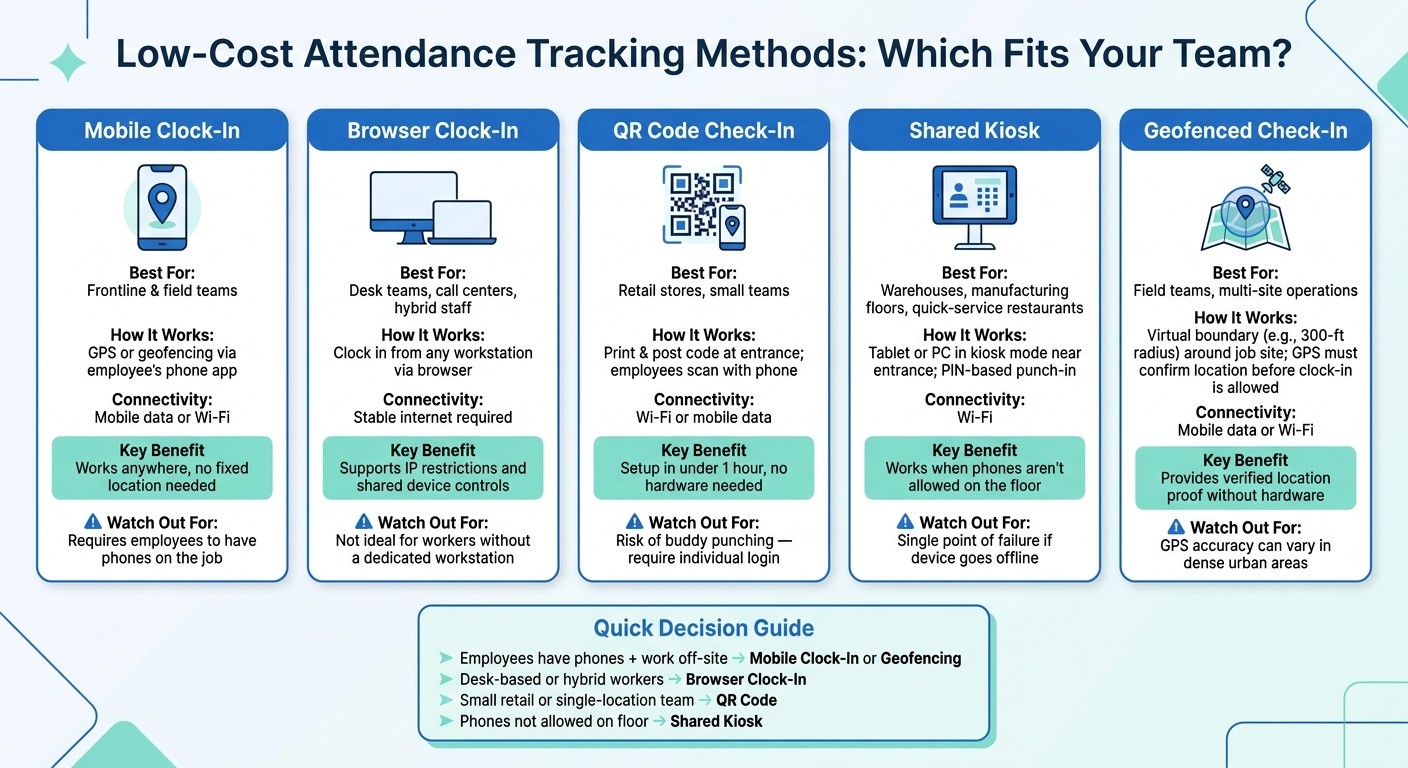
Low-Cost Employee Attendance Tracking Methods Compared
1. Decide what your team actually needs from attendance tracking
I’ve seen this go sideways more times than I’d like to admit. A manager gets frustrated with messy attendance records, buys a new tool fast, and hopes the problem disappears. Let me tell you what happened next in one case: the team still had the same blind spots, just sitting inside a shinier dashboard.
Here’s the thing: before you pick any tool or method, you need to get clear on what your team actually needs to track.
Map your workforce setup and risk points
At Pebb.io, we’ve learned that team setup changes everything. A restaurant team usually needs entrance or break-room clock-ins, break tracking, and shift-swap handling. A retail chain needs the same rules across every store, plus one place for managers to see what’s going on. A field crew often needs mobile clock-ins with location checks.
I always come back to four simple questions:
Are people hourly or salaried?
Are shifts fixed or rotating?
Do they have steady Wi-Fi, or do they need offline support?
Are phones allowed on the job or not?
Those answers point you toward the right setup. Maybe that’s geofencing. Maybe it’s a shared kiosk. Maybe it’s just a simple mobile app. Either way, it keeps you from paying for something that looks good in a demo but falls apart in daily use.
And that answer drives which records you need to capture every shift.
List the records you need to collect every shift
When records live in five different places, payroll questions turn into detective work. I’ve watched teams dig through messages, spreadsheets, and time logs just to answer one basic issue about a missed punch.
At minimum, U.S. employers should capture scheduled vs. actual clock-in and clock-out times, break start and end times, no-shows and tardiness, and approved PTO. U.S. employers must keep accurate hour records for 3 years under the FLSA. Inaccurate records are a compliance risk.
That’s not just admin busywork. It’s the difference between solving a payroll dispute in two minutes or burning half a morning on it.
When those records are split apart, every payroll question becomes a manual search. When they sit in one system, you can pull one report by date range, employee, or location without the usual back-and-forth.
Replace fragmented tools with one digital workplace platform
This is the part where a lot of teams trip up. They know what they want to track, but the records still sit in separate tools. One app for schedules. Another for timecards. Another for PTO. Then someone swaps a shift, and only one system gets updated.
I’ve seen how that creates chaos. The schedule says one thing, the timecard says another, and suddenly you’re dealing with payroll disputes and no-shows that never should have happened.
That’s one reason we built Pebb the way we did. Pebb keeps scheduling, clock-in, PTO, chat, and announcements in one app, so approved changes update attendance automatically.
For teams trying to clean up attendance tracking, that one shift matters a lot. Fewer gaps. Fewer manual fixes. Far less scrambling when payroll comes around.
2. Choose a low-cost attendance method that fits how your employees work
I’ve seen this mistake up close at Pebb.io: a company picks one attendance method, rolls it out to everyone, and then wonders why the whole thing gets messy fast.
Here’s the thing - an office team, a field crew, and a warehouse shift don’t work the same way. So they shouldn’t clock in the same way either.
Once your records are set, the next step is simple: match the clock-in method to how people actually work day to day.
Use mobile or web clock-ins for teams with phone or computer access
When we talk with customers at Pebb.io, this is usually the first split we make.
For frontline and field teams, mobile clock-ins tend to make the most sense. For desk teams, call centers, and hybrid staff, browser clock-ins are often the cleaner option.
Mobile clock-in runs on the employee’s phone. It can use GPS or geofencing, and it works on mobile data or Wi‑Fi. That makes it a good fit for people who aren’t sitting at one workstation all day.
Browser clock-in works from any workstation and supports IP restrictions plus shared device controls. The tradeoff is pretty simple: it needs a stable internet connection.
At Pebb, we put clock-ins and schedules in the same place, so managers can see coverage in real time. That matters more than it sounds. I’ve watched teams spot gaps early just because attendance and scheduling weren’t living in separate tools anymore.
Use QR codes, shared kiosks, or geofencing when location control matters
Sometimes a basic clock-in isn’t enough. You also need proof the person was there.
I’ve seen three methods work well for this, and the nice part is that none of them need special hardware.
QR code check-ins are usually the fastest to launch. You print a code, post it at the store entrance or in the break room, and employees scan it with their phones. That ties the clock-in to a physical location without extra equipment. A small retail store can get this live in under an hour. The downside? A coworker could scan for someone else. The fix is to require each person to log in on their own account.
Shared kiosks help when not everyone has a phone, or when phones aren’t allowed on the floor. I’ve seen this come up a lot in warehouses, manufacturing floors, and quick-service restaurants. You can mount an existing tablet or PC near the entrance, run the clock-in app in kiosk mode, and let employees punch in with a PIN.
Geofenced check-ins are a strong fit for field teams and multi-site groups that need location proof. The system creates a virtual boundary - say, a 300-foot radius around a job site - and the app only allows a clock-in if the employee’s GPS shows they’re inside that area.
Use digital forms for missed punches, shift changes, and manager approvals
No matter how good your setup is, people will still miss punches.
That part never goes away. Someone forgets to clock out. Two employees swap a shift at the last minute. A manager needs to approve a timesheet fix. I’ve seen teams try to handle all of that through texts, paper notes, and random messages. It gets ugly fast, and your audit trail disappears.
Digital forms clean that up.
When someone misses a punch, they submit a short form saying what happened. If two employees want to swap shifts, they send that request through the same system. Then the manager reviews and approves it in one place, and the record attaches to the timesheet by itself.
That means:
no chasing people for details
no hunting through texts later
no guessing during payroll review
At Pebb.io, we’ve learned it’s much easier to use one digital form flow for missed punches, shift swaps, and manager approvals, so every exception stays tied to the timesheet.
Once attendance is being tracked cleanly, the next move is to connect it with schedules and announcements so missed shifts show up earlier.
3. Connect attendance tracking to scheduling, PTO, and daily communication
I learned this one the hard way at Pebb.io.
Early on, I saw teams keep attendance in one tool, schedules in another, PTO in a spreadsheet, and shift updates buried in chat threads. On paper, it looked workable. In practice, it was chaos. Managers spent way too much time matching records, and by the time an issue showed up, payroll was already around the corner.
Here’s the thing: once clock-ins are clean, you want to connect them to schedules, PTO, and messages so problems show up before payroll does. When attendance, schedules, PTO, and communication sit in one system, managers can stop playing detective across separate records.
Start with digital shift schedules and approved availability
This is usually the first fix I point to.
The simplest way to cut missed shifts is to make sure employees always know exactly when and where they’re expected to be. Sounds obvious, right? But it only works if the schedule matches real life before it gets published.
That means pulling in availability and time-off requests first, not trying to patch conflicts later. We’ve seen how much smoother things run when schedules, PTO, and availability all live in one place. Conflicts get flagged before the roster goes live. You don’t end up scheduling someone who already has vacation approved, and you’re not scrambling at 7:00 a.m. because a shift has no coverage.
Let me tell you what happened next on one team I worked with: once they moved schedule planning into one place, the number of last-minute “I can’t work today” surprises dropped fast. Not because people changed overnight. The schedule just stopped fighting against reality.
And when a manager makes a change, the employee gets a notification on their phone right away. That cuts out the old line we’ve all heard before: “I didn’t see the updated schedule.”
Use chat and announcements to prevent missed shifts before they happen
Most no-shows aren’t people trying to cause trouble.
Usually, someone forgot. Or missed an update. Or thought a shift swap wasn’t final. I’ve seen that pattern again and again. The answer isn’t jumping straight to discipline. It’s getting ahead of the problem with clear communication.
We use automated reminders before each shift and post open shifts in group announcements. That matters more than people think. Employees check one app. Managers send one message. The record stays attached.
At Pebb, chat, announcements, and scheduling live in one system, so every update has a clear record attached and nothing slips through.
That last part is a big deal. If a manager sends a shift update and an employee confirms it, there’s no guessing later. No one has to dig through texts, emails, or side conversations to figure out what happened.
Track exceptions and trends so managers can act early
This is where attendance data starts to earn its keep.
Once attendance is flowing cleanly, it starts showing patterns you just can’t spot when everything is split across tools. I’ve watched managers go from spending hours fixing messy records to spending a few minutes reviewing what actually needs attention.
A weekly review of exception reports - late clock-ins, no-shows, early departures, missed punches - takes minutes instead of hours when it all sits in one dashboard.
But the main point isn’t just correcting timesheets.
It’s seeing the pattern before it turns into a bigger mess:
The same employee showing up late three Mondays in a row
One location staying understaffed week after week
A shift time that keeps leading to call-outs
That’s the stuff that helps a manager act early. You can coach sooner, fix staffing gaps, or adjust policy before the same issue keeps repeating. And sometimes the pattern tells you something else: your rollout rules need to be tighter.
I’ve found that the best managers don’t wait for attendance issues to pile up. They review the pattern weekly, make one or two smart changes, and keep the system clean as they go.
4. Set up a simple rollout your frontline team will actually follow
I’ve seen this part go wrong more than once.
At Pebb.io, we learned that connecting tracking and scheduling is only half the job. The last mile is the one that trips teams up: getting people to use the system the same way every single day. If the rules feel fuzzy or the launch is too big, things get messy fast.
Here’s the thing... rollout problems usually don’t start with bad intent. They start with small workarounds. One person texts a manager instead of clocking in. Another keeps a paper note “just in case.” A third person forgets which rule applies on breaks. A week later, managers are stuck cleaning up punches and payroll is chasing missing details.
Pick one method per team and write down the rules clearly
What worked for us was simple: one team, one clock-in method.
If a team clocks in through the app, that’s the method. Full stop. No texting a manager to log a punch. No paper backup running next to the app. No side path that turns into the main path by accident.
Then we wrote the rules down in plain English. Not a long policy nobody reads. Just a short guide that answers the stuff people ask in the first week anyway:
When exactly can I clock in? For example, within 5 minutes of your scheduled start
How do I record breaks?
What do I do if I miss a punch?
Who approves corrections?
We keep that guide in the same app people already use to clock in. A pinned post in Pebb works well for this. That way nobody has to dig through email or ask around in chat when they’re standing at the start of a shift.
Train employees in a few minutes and test one location first
One mistake I’ve watched teams make is turning training into a mini seminar. That usually backfires.
What we do instead is a five-minute live walkthrough. Phones out. Real clock-in. Real schedule check. Done.
The point isn’t to teach every feature in the software. The point is to cut confusion at the exact moment someone starts work. That’s where most slip-ups happen.
Let me tell you what happened next when we kept training short and hands-on: people got it much faster. Fewer “I didn’t know where to tap” issues. Fewer missed punches on day one. Managers spent less time doing cleanup.
Before going company-wide, we also test the setup at one location first. That pilot matters more than people think. It helps us catch the boring but costly stuff early:
missed punches
approval delays
schedule mismatches
During the pilot, we check live attendance, punch corrections, and payroll-ready timesheets. Then we ask the pilot team for quick feedback: what felt confusing, what slowed them down, what didn’t match real shift flow. We fix those issues first, then roll the same rules to the next location.
That step saved us from repeating the same mistake across every site.
Use one platform to keep rollout costs low and adoption high
I’ll be blunt: every extra app creates one more chance for things to fall apart.
Another login gets forgotten. Another record ends up out of sync. Another manager has to jump between tools just to answer a basic question.
That’s why I’m a big fan of keeping clock-in, scheduling, PTO, chat, and announcements in one place. Employees learn one tool. Managers work from one dashboard. It cuts down on confusion and helps people stick with the system instead of working around it.
That’s the setup we built Pebb around.
And in my experience, that’s what makes rollout stick: not more process, not more documents, just a system simple enough that people will keep using it every day.
Conclusion: The best attendance system is the one your team will actually use
A while back at Pebb.io, I watched a team spend more time fixing time records than checking who was late. That’s when this clicked for me: the best attendance setup isn’t the fanciest one. It’s the one people use every shift, with no side doors, no weird hacks, and no constant cleanup.
Here’s the simple answer: you do not need expensive hardware to track attendance in a reliable way. You need a method your employees will use every single shift. That’s the part that matters. So the next move is simple too: choose the easiest option your team will stick with.
For most frontline teams, the basics do the job:
Mobile clock-ins
QR codes
Shared kiosks
Geofencing
Digital forms
I’ve seen this firsthand: once the method matches how the team already works, attendance gets a lot easier to manage. Then you connect it to scheduling and PTO, and the records stop drifting out of sync.
Here’s the thing: the big win isn’t just tracking who clocked in. It comes from tying attendance to scheduling, PTO, and team updates in one place. When schedules, PTO, and clock-ins all live in the same app, there’s no end-of-pay-period reconciliation. That means fewer disputes, fewer corrections, and faster payroll.
That’s a big part of why we built Pebb the way we did. At Pebb.io, we combine clock-in, scheduling, PTO, chat, and announcements in one free app for teams up to 15, then $4 per user per month. In my experience, that’s what helps keep attendance accurate without piling on hardware.
If I were setting this up from scratch, I’d keep it plain and practical: pick one method, write the rules in plain English, and test it with one team first. Let me tell you what happened next when teams did that well - they usually didn’t need more tools. They just needed a setup that was simple, mobile-first, and all in one place.
FAQs
What’s the cheapest way to track attendance?
I’ve seen teams spend way too much on attendance tracking when the simple fix was sitting in their pockets the whole time.
The cheapest way to track attendance is a mobile clock-in system with geofencing. In plain English, that means employees clock in from their phones, and the app checks whether they’re at the right location. No extra hardware. No pricey biometric scanner. No wall-mounted time clock.
At Pebb.io, that’s one of the first things we point people to when they want to cut costs without making a mess of payroll. Here’s the thing: once you remove hardware from the equation, the math changes fast. You’re not paying for installation, repairs, or replacements. You’re just giving people a simple way to clock in from the devices they already use every day.
Our free plan for up to 15 users includes:
mobile clock-in
shift scheduling
PTO management
team communication
That setup can replace biometric scanners or old-school time clocks, and it also helps cut down on manual errors. I’ve watched teams go from fixing timesheets by hand to having a much cleaner process in a matter of days. Let me tell you what happened next in a few of those cases: managers spent less time chasing missed punches, and employees had a clearer view of their shifts and time off in one place.
If you’re trying to keep attendance tracking low-cost, mobile clock-in with geofencing is usually the smartest place to start.
Which attendance method fits my team best?
The best attendance method comes down to how your team works day to day. I’ve seen this firsthand at Pebb.io. What looks perfect on paper can fall apart fast if it doesn’t match the way people actually start their shifts.
For field teams or companies spread across more than one site, mobile clock-in with geofencing tends to work well. We’ve found it helps cut down on guesswork because people can clock in from the right place without extra back-and-forth.
If the goal is speed and simplicity, one-tap mobile clock-in/out is a solid option. Sometimes you don’t need bells and whistles. You just need a fast check-in that people will use without friction.
Here’s the thing: once scheduling, time tracking, PTO, and team messages live in separate tools, little mistakes start piling up. That’s why, when a team needs attendance, scheduling, PTO, and communication in one place, an all-in-one platform like Pebb can make a big difference. In my experience, it helps streamline day-to-day work and cuts manual errors that usually show up when managers are stuck jumping between systems.
How do I stop missed punches and payroll errors?
I learned this one the hard way. Early on, we saw how a tiny clock-in mistake could snowball into a payroll mess by Friday. One missed punch here, one manual fix there, and suddenly someone’s hours didn’t line up. That’s when we leaned harder into a reliable, automated attendance system inside Pebb.
With Pebb’s clock-in and shift scheduling features, we cut a lot of that friction fast. Our team can clock in on mobile, and the GPS and geofencing layer helps us confirm people are where they’re supposed to be. It also helps stop buddy punching and off-site clock-ins, which, let’s be honest, are a headache no manager wants to deal with.
Here’s the thing: manual entry sounds harmless until it starts feeding bad data into payroll. A few wrong timestamps can turn into pay errors, back-and-forth messages, and frustrated employees. We’ve seen that happen, and it’s never fun.
What made the biggest difference for us was connecting attendance data to the rest of the workflow:
Payroll integration keeps pay tied to recorded hours
Detailed timesheets make it easier to check shifts and punch history
Attendance summaries give managers a clean view of patterns
Real-time alerts flag late or missing punches before they become a bigger issue
Let me tell you what happened next: instead of scrambling at the end of the pay period, we could catch issues early. That meant payroll stayed tied to accurate, timestamped records, and our team spent less time fixing errors by hand.
It’s a small shift on paper, but in day-to-day work, it saves a lot of stress.
