
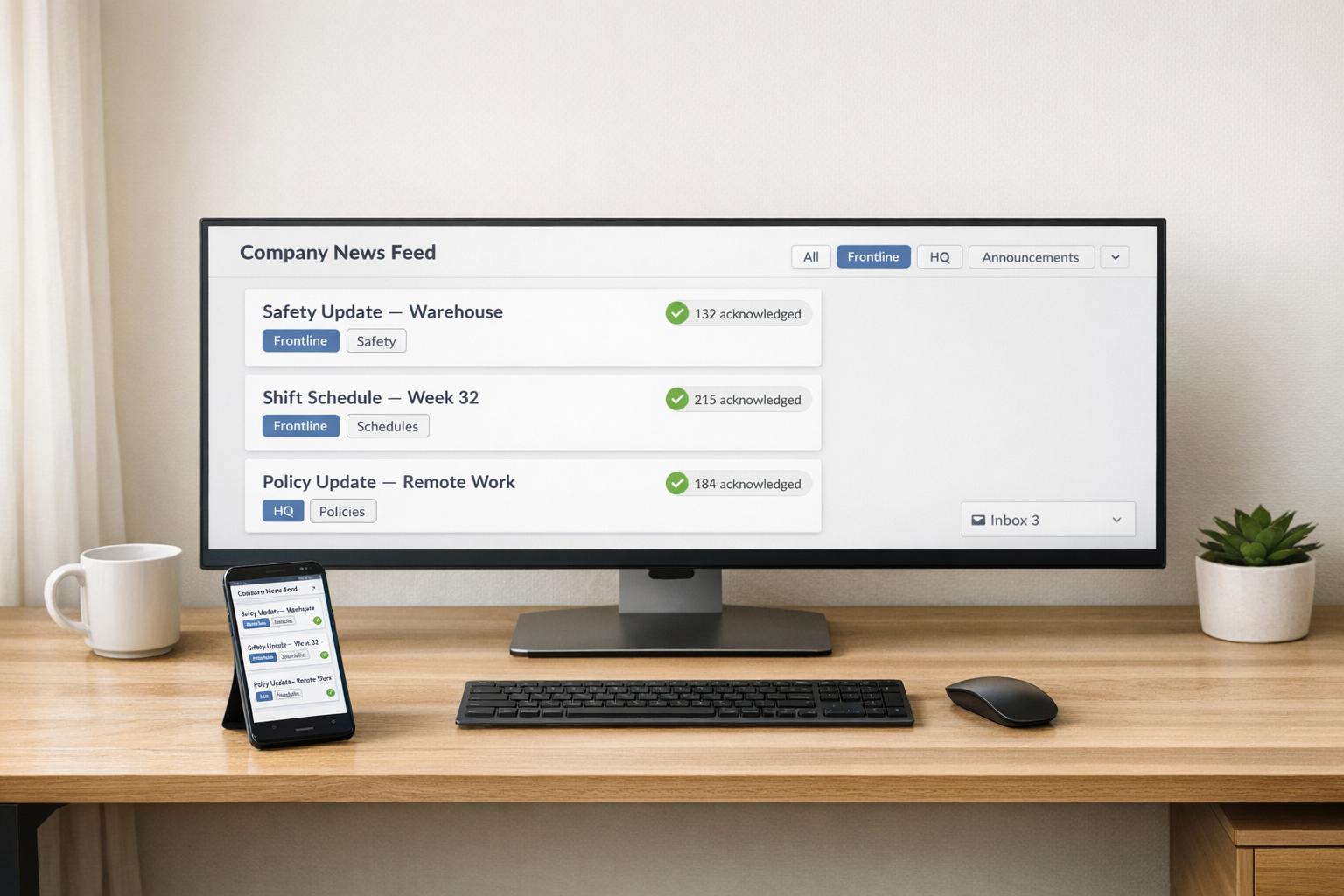
Author: Ron Daniel
How to reduce internal emails with a company news feed
Centralize recurring company updates in a targeted news feed to cut inbox clutter, reach frontline staff, and track acknowledgments.
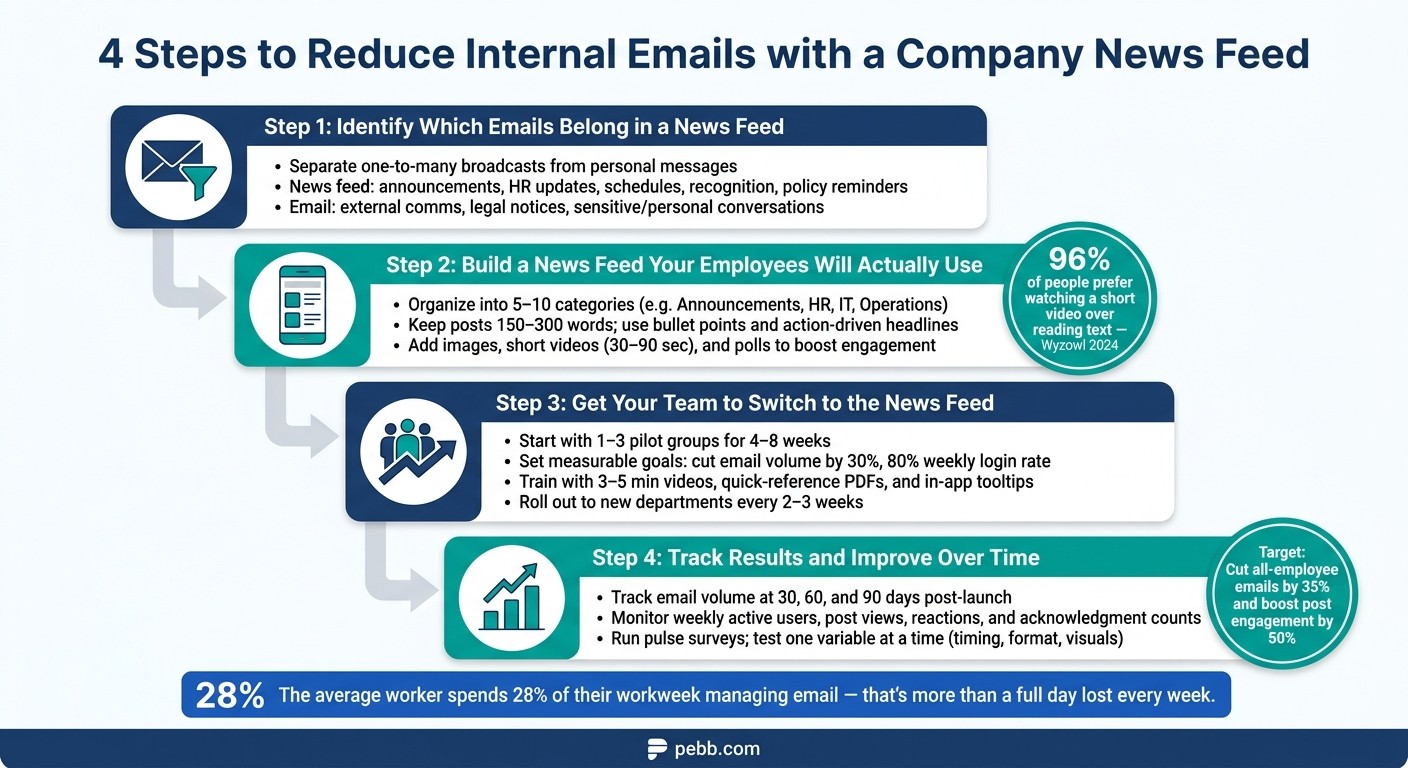
Have you ever felt like your inbox was running your day instead of the other way around? I know I have. A few months ago, I realized I was spending hours every week just sorting through emails - most of them weren’t even relevant to me. Company announcements, HR updates, shift schedules, even birthday shout-outs - it was all piling up. And I wasn’t alone. Studies show the average worker spends 28% of their workweek managing email. That’s more than a full day lost every week. Let that sink in.
Here’s the kicker: for frontline workers - like retail staff or nurses - it’s even worse. Many don’t have access to corporate email during their shifts, so they miss updates entirely. Managers end up repeating the same messages through texts, verbal reminders, or even pinning notes to bulletin boards. It’s frustrating, inefficient, and honestly, kind of outdated.
That’s when we decided to try something different at Pebb. Instead of drowning in endless email threads, we shifted to a centralized company news feed. It’s been a game-changer, and I’m here to share how we made it work, the challenges we faced, and the lessons we learned along the way. Stick with me - I’ll show you how this simple shift can save your team time, reduce stress, and make communication way more effective.
4 Steps to Reduce Internal Emails with a Company News Feed
Step 1: Identify Which Emails Belong in a News Feed
Let me tell you, one of the biggest game-changers in reducing email overload is knowing what belongs in your inbox and what’s better suited for a news feed. It’s all about separating updates meant for the masses from those that need a personal touch. Once you get this distinction down, your inbox - and your team - will thank you.
What to Post on the News Feed
Think about the emails your team sends on repeat - things like company announcements, HR updates, shift schedules, or policy reminders. These are classic one-to-many broadcasts: the same info going to a large group, with no expectation of individual replies. That’s exactly the kind of content that belongs on the news feed.
Here’s a simple rule I use: if you’ve sent a similar message to a group more than twice in the last month, it’s a prime candidate for the feed.
Here’s a quick cheat sheet to help you decide:
Message Type | Best Channel | Why |
|---|---|---|
Company-wide announcements | News feed | Easy to reference and reaches everyone |
HR updates & benefits reminders | News feed | Visible, searchable, and accessible |
Shift schedules & roster changes | Targeted news feed | Timely and mobile-friendly |
News feed | Boosts morale and team visibility | |
Policy & compliance reminders | News feed | Acknowledgment tracking ensures accountability |
External client or vendor communication | Formal record required for outside parties | |
Legal notices or investigations | Email or secure system | Confidential and traceable |
Personal performance conversations | Email or HR system | Individual and sensitive matters |
This kind of categorization keeps your news feed focused and ensures the right messages land in the right place.
When Email Still Makes Sense
Of course, email isn’t going anywhere. It’s still the go-to for external communication, sensitive discussions, and anything requiring a formal record. For example, legal notices, disciplinary actions, or compensation conversations should stay in email - or a secure system - where privacy and traceability are non-negotiable.
Here’s the golden rule I follow: if the message is non-confidential, relevant to multiple people, and doesn’t require a personal response, it belongs on the feed. If it’s private, sensitive, external, or legal, email is your best bet.
By drawing this line, you’ll cut through the clutter and set the stage for a smoother, more efficient communication system with Pebb.
How Pebb Delivers Updates to the Right People
Now, once you’ve figured out what belongs on the feed, the next step is making sure it reaches the right audience. Here’s where Pebb really shines. Instead of dumping every update into one giant feed, you can target posts to the exact groups that need them.
For instance, a store manager in Dallas can post a Black Friday schedule update directly to the "Store #218 – Dallas" branch feed, and only the Dallas team sees it. HR can share open enrollment details in an "HR & Benefits" space, keeping it relevant to those who need it. And for critical updates, like a new safety protocol, we’ve got a "Set as Important" feature that includes an Acknowledge button. This way, you can track exactly who’s seen the update without chasing people down with follow-up emails.
On the flip side, for non-urgent updates - like weekly team photos or recaps - you can use the Silent Post option. It skips notifications entirely, so you’re not pinging people unnecessarily. This level of targeting transforms your news feed from a chaotic bulletin board into a tool that actually works for your team. Trust me, it makes a world of difference.
Step 2: Build a News Feed Your Employees Will Actually Use
Getting a news feed live is just the beginning. The real challenge? Making it a daily go-to for your team. To pull this off, you need a feed that's intuitive, well-organized, and works seamlessly on mobile. Let me walk you through how we approach this.
Keep Content Clear and Easy to Navigate
Here’s the thing: if your employees can’t quickly find what they need on your internal comms platforms, they’ll bounce back to email faster than you can say “inbox overload.” And they’re not alone - studies from Nielsen Norman Group reveal that people spend just 10–20 seconds scanning a page before deciding to stay or leave. That’s not a lot of time to grab their attention.
The trick is to organize your feed into 5–10 categories that reflect your company’s workflow. Think along the lines of "Company Announcements", "HR & Benefits", "IT Updates", "Operations", and "People & Culture." Each post should fit into one main category, but you can add tags like #Safety, #Dallas, or #OpenEnrollment to make filtering easier.
When it comes to writing posts, keep them short and to the point - 150–300 words max. Start with a one-sentence summary, use bullet points for key details, and stick to action-driven headlines. For example, “Action Required by July 1: Update Your Benefits Elections” is much better than something vague like “Important Update.”
Use Images, Videos, and Polls to Drive Engagement
Once your feed is easy to navigate, it’s time to make it pop. Visuals and interactivity are your best friends when revolutionizing workplace communication platforms. According to Wyzowl’s 2024 survey, 96% of people would rather watch a short video than read a wall of text. That’s huge.
Short videos - ideally 30–90 seconds - are perfect for leadership messages or quick tool tutorials. Pair them with a text summary for clarity. Annotated screenshots or before-and-after images can also make complex updates crystal clear. And don’t underestimate polls. They’re a simple way to gather feedback on everything from training schedules to office events. Just don’t forget the follow-up - share the results and explain how you’ll act on them. This turns a passive announcement into an active conversation.
How Pebb's News Feed Makes Content Easy to Access
At Pebb, we’ve baked all these principles into our News Feed. Our post composer has quick-access buttons for images, videos, GIFs, and file attachments, plus a rich text editor for bold headlines and scannable formatting. Need feedback? You can embed polls right into posts.
For critical updates, we’ve got a “Set as Important” feature that pairs perfectly with rich media - think a 60-second safety video employees must acknowledge they’ve watched. For lighter updates, like team photos, the Silent Post option lets you share without bombarding everyone with push notifications. And since Pebb is fully mobile-optimized, your team gets a clean, easy-to-use experience whether they’re in the office or out in the field.
Step 3: Get Your Team to Switch to the News Feed
Roll Out the News Feed in Phases
Let me tell you, flipping the switch for everyone on day one is a recipe for chaos. A phased rollout is almost always the way to go - it’s smoother, smarter, and way less stressful.
Here’s how we’ve done it: start with 1–3 pilot groups that deal with heavy email traffic. Think customer support, sales, or even a cross-functional project team. These teams often feel the pain of email overload the most, so they’ll notice the benefits quickly. Plus, pick groups where at least one manager is open to trying something new. Their energy can be contagious, and it makes a world of difference.
Set a clear 4–8 week pilot window with measurable goals. For example, aim to cut internal email volume by 30%, move company-wide announcements to the news feed, and get 80% of participants logging in at least three times a week. Once the pilot wraps up, review the data, gather feedback, and then expand to the next wave of departments. Rolling out every 2–3 weeks works well. Oh, and don’t forget to lean on your pilot participants - they’ve already worked out the kinks and can rally their peers far better than any corporate memo.
Train Employees and Managers to Use It Correctly
Here’s the thing: training doesn’t need to be a snooze-fest. Forget those all-day workshops. Instead, go for 3–5 minute videos, quick-reference PDFs, and in-app tooltips. People love bite-sized, practical tips they can use right away.
For employees, focus on the basics: what to post on the news feed (announcements, policy updates, event details), what still belongs in email (confidential matters, one-on-one chats), how to follow channels, and how to tweak notifications so they don’t feel bombarded. Managers, on the other hand, need a little extra guidance. Teach them how to tag the right audiences, moderate comments, and use engagement data to ensure critical updates are actually being seen.
One trick that worked for us? Have managers kick off team meetings by reviewing recent feed posts. It takes less than a minute but sends a clear message: this is where the important stuff lives now. Pair that with a one-page decision guide - a simple flowchart answering “should I post this on the feed or send an email?” - and you’ll clear up confusion in no time.
How Pebb Makes Adoption Easier
Here’s why Pebb feels different: we’ve designed it to be easy from day one. The interface mimics familiar social interactions - likes, emoji reactions, comments - so employees don’t feel like they’re learning yet another complicated tool.
For frontline and field workers, our mobile app (on iOS and Android) keeps them connected, even if they’re rarely at a desk. Push notifications handle urgent updates like safety alerts or HR announcements, while the Silent Post feature ensures non-urgent content doesn’t clutter their day. And for those must-read updates? The "Set as Important" feature requires employees to hit an "Acknowledge" button, giving managers peace of mind without the need for endless follow-up emails.
With Pebb, we’ve cut through the noise and made staying informed effortless - because who has time for email overload?
Step 4: Track Results and Improve Your News Feed Over Time
Metrics to Watch
Once your news feed is live, it’s time to measure its impact. Start by tracking the change in email volume. Here’s how: count the number of internal broadcast emails, all-staff announcements, and dreaded reply-all chains your team sends in a typical week before launch. Then, compare those numbers at 30, 60, and 90 days post-launch. If the feed is doing its job, you should see a steady decline in these email numbers.
But email volume is just one piece of the puzzle. Keep an eye on feed engagement metrics like unique views per post, reactions, comments, and acknowledgment counts for critical updates. Another key stat? Weekly active users - the percentage of your team logging in and actually reading the feed. This gives you a clear picture of how many people are truly onboard.
Quick pulse surveys posted directly in the feed are also gold. Ask employees if they feel better informed or if they’re still digging through their inboxes for updates that should be on the feed. These insights will help you fine-tune your approach and ensure the feed is hitting the mark and driving continuous improvement.
Use Engagement Data to Improve Your Posts
Data isn’t just for tracking; it’s your guide to making better posts. Start by analyzing your top-performing posts - the ones with the most views, reactions, or clicks. Look for patterns. Was it the timing? The format? Maybe a killer graphic? Then, flip the script and do the same for posts that flopped.
Here’s the trick: test one variable at a time. For example, try posting mid-morning on a Tuesday instead of Monday, or swap out plain text for a video or bold visuals. Over time, you’ll figure out what resonates with your team. Also, take a closer look at targeted posts. Do they get more engagement than company-wide updates? Sending irrelevant content to everyone creates noise, and that’s the last thing you want.
How Pebb's Analytics Keep You on Track
Here’s where Pebb really shines. Our Premium plan analytics dashboard breaks down everything you need to know - from engagement rates by post type to activity levels by department. You’ll see which formats drive the most clicks, which teams are the most engaged, and where communication gaps still exist.
One feature I love is the "Acknowledged by" count. It’s a lifesaver for compliance-heavy updates like safety protocols or HR announcements. You can see exactly who’s confirmed they’ve read the message and follow up with anyone who hasn’t - no need for extra emails. Combine this with the Silent Post feature for less urgent updates, and you’ve got a system where critical messages cut through the noise while routine ones stay low-key. It’s all about keeping communication clear and efficient.
To stay on top of things, set up a simple measurement routine. Review key metrics weekly to catch any dips in engagement. Do a deeper dive into content performance monthly, and share a quick internal report quarterly. For example, you could say something like, "We cut all-employee emails by 35% and boosted post engagement by 50% since Q1." This not only keeps leadership in the loop but also gives your team a sense of progress and a reason to stick with the feed.
Conclusion: Cut Email Clutter and Communicate Better with Pebb
Let’s face it - email overload is a productivity killer. We’ve all been there, drowning in endless threads that seem to go nowhere. It’s frustrating, time-consuming, and, frankly, a universal pain point for teams everywhere.
Here’s what works: shifting those recurring, company-wide updates into a centralized news feed. By doing this, email is freed up for what it’s meant for - private, sensitive, or one-on-one conversations. This simple change doesn’t just clear the clutter; it makes room for Pebb’s powerful internal communications strategy to shine.
What’s great about a centralized news feed like Pebb’s is that it becomes your team’s go-to source for updates. Everyone - from frontline workers to remote team members - gets the same information at the same time. That means no more rumors, no more "I missed that email", and no more confusion over which version of an announcement is the latest.
With Pebb, you can go further. Targeted posts ensure your message lands with the right people. Acknowledgment tracking guarantees critical updates are seen and understood. And engagement analytics? They give you insights into what’s resonating and where you can improve. It’s communication that works - clear, efficient, and actionable - in a way email just can’t compete with.
FAQs
What should stay in email vs go in the news feed?
When it comes to keeping everyone informed, our Pebb news feed is a game-changer. We use it to share company-wide updates, like big announcements, policy changes, and project milestones. The best part? It’s interactive. Employees can leave comments, participate in polls, and engage directly, making it more dynamic than a one-way email blast.
Speaking of email, we’ve made a conscious choice to reserve it for external communication. Why? To cut down on the overwhelming clutter that internal emails can create. Instead, we’ve centralized critical, static documents - like policies and procedures - in a searchable Knowledge Library. It’s easy to access, mobile-friendly, and ensures no one’s digging through endless threads to find what they need.
This system has been a win for us. It keeps updates clear, ensures everyone’s on the same page, and eliminates those fragmented email chains that drive everyone crazy. Plus, it makes internal communication more actionable and less of a hassle.
How do we get employees to actually use the news feed?
To get employees excited about using a company news feed, it’s all about keeping things relevant, engaging, and consistent. At Pebb, we’ve nailed this by using audience segmentation to deliver content that actually matters to specific roles or locations. No one likes scrolling through a flood of irrelevant updates, so we cut the noise and keep it focused.
Here’s what works for us: we make posts short, visual, and easy to relate to - no stiff corporate speak here. We also encourage interaction by inviting comments and likes, and we mix in a healthy dose of updates, team shout-outs, and recognition. Plus, sticking to a predictable posting schedule helps build trust and keeps people coming back.
And let’s not forget about accessibility. With Pebb’s mobile-friendly approach, everyone - whether they’re in the office or working remotely - can stay in the loop. It’s all about making the news feed a place people want to check, not just another tool they have to use.
How can we prove the news feed is reducing emails?
Reducing internal emails can be as simple as leveraging Pebb’s News Feed. Here’s how it works: managers can track engagement metrics in real time, seeing exactly who viewed or interacted with posts. This gives them a clear picture of how far their message has reached. By swapping out email updates for posts, inbox clutter becomes a thing of the past.
Features like acknowledgments and polls make it easy to confirm that employees have received and understood important updates. No more chasing down replies or sending endless follow-up emails - it’s all streamlined into one platform.
