
Author: Ron Daniel
How to organize company policies so employees actually find them
Make policies easy to find: centralize docs, use plain-language titles and tags, add templates, link actions, and assign owners.
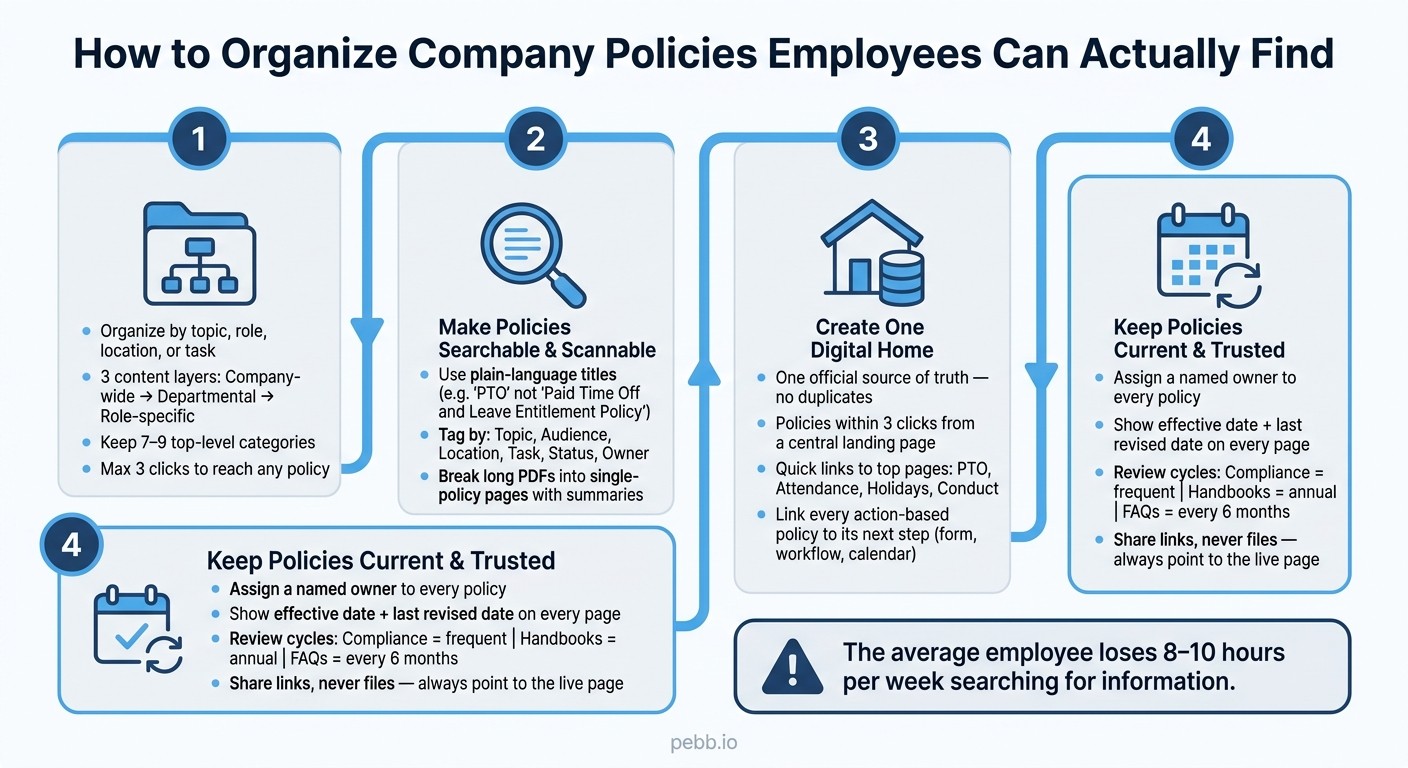
The average employee can lose 8 to 10 hours a week just searching for information. I’ve seen that show up in a smaller, messier way at Pebb too: one person asks for a time-off policy, and three links appear from three different places. Same question, different answers, and suddenly a simple task turns into a time drain.
What I’ve learned is that policy problems usually aren’t writing problems. They’re access problems. When files sit across chat threads, shared drives, PDFs, and inboxes, people stop looking and start guessing. That’s when mistakes, repeat questions, and mixed manager answers pile up.
So I want to show you what we’ve seen work at Pebb: how to give policies one home, name them the way employees search, and connect each page to the next action. If your team is tired of hearing “Where do I find that?” this will help you fix it without turning your policy library into a maze.
How to Organize Company Policies Employees Can Actually Find
1. Build a policy structure employees can predict
When I first started helping teams sort their policy docs at Pebb.io, I saw the same mess over and over. People weren’t confused because the rules were hard. They were confused because the structure kept changing. One policy lived under HR, another sat in a random shared folder, and a third had a name that made sense only to the person who wrote it.
Here’s the thing: if employees can predict where something lives, they stop asking around. And once that happens, search and naming get a whole lot easier.
Organize by topic, role, location, or task
I’ve found that people usually look for policies in four simple ways: by topic like benefits or safety, by role like manager or hourly staff, by location like state, site, or store, or by task like how to request PTO or how to report an incident. A good system needs to support all four in one place.
At Pebb.io, we’ve seen that this works best when content is grouped into three layers:
Company-wide policies
Departmental playbooks
Role-specific guides
That setup keeps things simple without making the library feel shallow.
I also try to keep navigation tight. In most cases, 7 to 9 top-level categories is the sweet spot. More than that, and people start hesitating. Less than that, and categories get too broad. I’ve also learned to keep the structure flat. If a policy takes more than three clicks to reach, flatten the hierarchy.
Set up a core policy taxonomy with clear categories
When we talk to teams about building a knowledge base, this is usually the starting point I share. It works across most teams because the labels are plain and familiar.
Category | What Goes Here |
|---|---|
HR & People | Hiring, compensation, benefits, leave, code of conduct |
IT & Security | Acceptable use, passwords, data handling, device management |
Finance & Expenses | Procurement, travel, reimbursement, budget approvals |
Legal & Compliance | Regulatory requirements, conduct standards, required acknowledgments |
Workplace & Facilities | Office protocols, safety, parking, building access |
Operations | Opening/closing checklists, store playbooks, site-specific rules |
Management | Disciplinary procedures, manager sign-offs |
Onboarding | First-day guide, tool setup, org chart, "Start Here" essentials |
Let me tell you what happened next when teams started using labels like these: support questions got less fuzzy. Instead of “Where do I find that doc?” people came in with better guesses, and most of the time, they were right.
That’s the goal. Employees should be able to guess the category from the question they’re asking. The labels need to match the words employees already use when they ask for help, not internal jargon that sounds nice in a planning doc.
For multi-location teams, I’ve also seen a big difference when you use permissions or location filters. That way, employees only see the policies tied to their role, department, or site. It cuts noise fast.
Use one standard page template for every policy
This part sounds small, but it saves a lot of time. When every policy page looks different, employees slow down before they even start reading. They have to figure out the layout first, and that extra friction adds up.
A standard template fixes that. At Pebb.io, I always push for every policy page to include the same core pieces: a short purpose statement, a scope statement, the effective date, the last revised date, the policy owner, and revision notes.
For longer policies, I like adding a plain-language summary right at the top. That gives people the short version first. Then the main body can handle the rest with clear headings, role-based guidance, related links, and contact information.
One thing I never skip is the opening purpose line. Start each policy with one or two sentences that explain why the policy exists. It helps employees scan faster, and just as important, it helps them trust the page.
Once that structure is in place, the next job is making those pages easy to find by the words employees actually type.
2. Make policies searchable and easy to scan
I’ve seen this happen more than once at Pebb.io: we publish a policy, everyone nods, and then two days later someone pings us asking where it is. Not because the policy was missing. Because the name sounded like it came from a legal binder, not from the way people talk at work.
Here’s the thing: once people know where policies live, the next hurdle is helping the right page show up in search. That means the title, tags, and page layout need to match the words employees use every day.
Rename policies using plain language employees already use
One of the fastest fixes I’ve worked on is renaming policies.
A lot of policy titles sound stiff. “Paid Time Off and Leave Entitlement Policy” may look neat on paper, but most employees aren’t typing that into search. They’re typing “PTO” or “Time Off.” So we strip out version labels and use the name employees already use.
I’ve also found that process docs do better with action-based titles. Pages like “How to Request Time Off” or “Store Opening Checklist” work well because they line up with how people search in the first place.
Titles help people make a guess. Tags help search back that guess up.
Add tags and metadata that match real employee questions
This part sounds small, but it saves a lot of friction.
We tag each policy by topic, audience, location, task, status, and owner. Then we write those titles and tags around the words employees type into search. So if someone looks for “sick days,” “CA overtime,” or “new hire checklist,” the right page has a much better shot of showing up.
Let me tell you what happened next when we skipped this step once: different teams tagged similar docs in different ways. HR used “Leave.” Operations used “Time Off.” Same idea, different labels. Search got messy fast, and filters stopped being useful.
That’s why we write the tagging rules down before anyone starts. A short metadata dictionary keeps everyone using the same terms.
A few fields matter most:
Topic
Audience
Location
Task
Status
Owner
We also track zero-result searches because they tell the truth fast. If people search and get nothing, that usually points to missing tags, missing synonyms, or a gap in the content itself.
Search gets people to the page. Scan-friendly formatting tells them they landed in the right spot.
Break long PDFs into linked pages with summaries
I’ve learned this one the hard way: long handbooks are rough on mobile.
When everything sits inside one giant PDF, people have to pinch, zoom, scroll, and hunt. Most won’t. So we split long handbooks into one-policy pages with one URL each.
For longer policies, we put a short summary at the top, then break the rest into linked pages. We use clear H2s and H3s so people can skim instead of digging through a wall of text. At the end of each page, we add links to related policies and any forms they need to take action.
That small shift gives employees a clean next step instead of leaving them stuck at the bottom of a document wondering what to do next.
3. Put policies in one digital home and connect them to daily work
I’ve seen this happen more times than I’d like to admit at Pebb.io: a company does the hard part, writes the policy, names it well, makes it searchable... and people still can’t find the right version when they need it.
That’s where things fall apart.
If an employee has to dig through shared drives, old chat threads, and buried emails just to confirm a PTO rule, the policy might as well not exist. Here’s the thing: even a well-written policy fails when access is messy.
Pick one official source of truth for all policies
What’s worked best for us is simple. We keep one official home for policies, and every other place points back to it. The second a policy gets copied into five other places, version control starts to slip.
In Pebb, that home is the Knowledge Library. We keep company-wide policies in an "Everyone" space, and we place local procedures inside location- or department-specific Spaces. That way, people see the version that applies to them, not some old file from six months ago.
I learned this the hard way. Early on, we saw teams saving policy PDFs to local folders "just in case." Let me tell you what happened next: people started following old rules, managers gave mixed answers, and HR had to clean up the confusion.
So before moving anything, we always audit what’s already there. Then we move the canonical version into the new system and retire the old copies. No duplicates. No guessing.
Once that source is locked in, the next step is making the route to each policy dead simple.
Design navigation around the policies employees use most
A central library sounds good on paper, but it only works if employees can get to what they need fast. Our rule of thumb is to keep policies within three clicks. If someone has to go deeper than that, the setup is too deep.
The setup I keep coming back to is a Policies and Procedures landing page. At the top, we place quick links to the pages people use most:
PTO
Attendance
Holidays
Conduct
Under that, we group policies by topic, role, and location. That matters more than most teams expect. A frontline employee should see the site guides tied to their day-to-day work. A manager or HR lead may need access to compensation or disciplinary policies that shouldn’t sit in front of everyone else.
We also add a contact to every policy page. That sounds small, but it saves a ton of back-and-forth. In Pebb, our people directory and groups help employees find the right HR contact or policy owner without playing detective.
And even then, finding the policy is only half the job.
Turn policy actions into digital forms and workflows
This is the part a lot of teams miss.
Policies break down when they stop at information. If a policy tells someone what to do but doesn’t give them the next step, they stall out. Then the questions start: Who do I send this to? Where’s the form? Is this still the process?
We fix that by linking every action-based policy to the thing the employee needs next.
Policy Page | Linked Action |
|---|---|
PTO & Leave Policy | PTO Request Form / Calendar |
Shift Swap & Attendance Rules | Shift Scheduling / Chat |
Expense & Reimbursement Policy | Expense Submission Form / Receipt Upload |
Incident Reporting Guide | Digital Incident Report Form |
Your First Day Guide | New Hire Checklist / Profile Setup |
So the PTO policy links straight to the PTO request form. The expense policy goes right to the expense submission workflow. The incident reporting guide opens the digital incident report form. That one step clears out the "where do I send this?" problem almost at once.
Inside Pebb, chat, PTO, scheduling, forms, and the knowledge base all connect. That means an employee can read the policy and act on it in the same place, without bouncing between tools.
"The ultimate measure of your system isn't its technical sophistication. It's how quickly it gets out of the way so your people can get to work." - Dan Robin, Pebb
4. Keep policies current, visible, and trusted
I learned this one the hard way at Pebb.io.
We once had a policy page that was easy to find, neatly tagged, and linked in all the right places. On paper, it looked fine. In real life? It was out of date. A teammate followed it, hit a snag, and then messaged HR instead of trusting the system. That was the moment it clicked for me: if employees land on stale policy pages even once or twice, they start doubting all search results.
That’s why keeping policies current matters just as much as making them easy to find.
Assign owners, review dates, and update announcements
At Pebb.io, we don’t leave policy ownership vague. Every policy has a named owner. Not just “HR” or “Operations,” but one person who’s on the hook for keeping it right. We also place the effective date, last revised date, and policy owner at the top of each page so people can tell right away if what they’re reading is current.
Here’s the thing: dates only help if someone is watching them.
So we match review timing to the type of policy. Compliance policies get shorter review cycles. Handbooks get annual reviews. Evergreen FAQs get checked every six months. We also use automated reminders, so owners get a heads-up before review dates hit. And if someone reviews a policy and nothing needs to change, we still log a "reviewed, no changes" note. It sounds small, but it keeps the audit trail clean and saves a lot of back-and-forth later.
When a policy does change, we don’t bury it in email. We post it in Pebb’s news feed with a short summary and a link to the updated policy page. And yes, it’s always a link to the live page, not a file floating around in five inboxes.
That last part matters more than people think.
Ownership and review dates only matter if employees can tell when something changed.
Use manager training and employee feedback to fix weak spots
One rule we repeat a lot inside Pebb.io is simple: share the link, not the document.
That one habit cuts down version confusion fast. If people pass around PDFs or old attachments, the whole system starts to drift. But when they share the live page, everyone lands on the same source.
Let me tell you what happened next when we leaned into feedback. We started spotting patterns. The same policy questions kept showing up in chat, email, and HR’s inbox. At first, it looked like people just weren’t reading. But that wasn’t the full story. In many cases, the policy existed - the title, tag, or summary just didn’t match the way employees were searching for it.
So we made feedback part of the page itself. We collect "Was this helpful?" ratings, comments, and a Request an Update button right on policy pages. That gives us a direct line into what’s working and what’s not.
Track whether employees can actually find policies
For me, this is the gut-check. Not whether the library looks organized. Not whether every page has a neat owner field. The real test is whether employees can get an answer without asking around.
We watch a few signals closely:
Metric | What It Tells You |
|---|---|
Zero-result searches | Policy titles or tags don't match how employees actually search |
Search-to-click rate | Whether search results are relevant enough to open |
Repeat questions by topic | A policy exists, but it's still hard to find or understand |
Sign-off completion rate | Whether employees are actually seeing mandatory updates |
Time to answer for top HR questions | Whether the system is fast enough to use in the moment |
Inside Pebb, analytics show us which pages get the most traffic and which searches come up empty. That’s where things get interesting. If failed searches keep piling up around the same topic, that’s usually not an employee problem. It usually means we need to fix the title, tags, or summary.
And honestly, that small tweak can make the difference between an employee finding the answer in 10 seconds or giving up and sending a message instead.
Conclusion: Turn policies into everyday tools instead of static documents
I’ve seen this play out up close at Pebb.io: the problem usually isn’t that a company has no policies. It’s that the policies sit in some dusty corner of the digital office, neatly stored and barely used.
Here’s the thing: this guide isn’t about making policies easy to file away. It’s about making them easy to use in the middle of a workday.
When we set policies up around the way employees actually look for answers, a few good things happen fast. Put everything in one official digital home. Name pages in plain English. End each page with a clear next step. Do that, and repeat questions start to fall, decisions move faster, and frontline employees can get answers right when they need them.
That’s the part that matters most to me. A good policy shouldn’t feel like a wall of rules. It should fade into the background of the workflow, then pop up at the exact moment someone needs help.
That’s also why the platform matters so much. At Pebb, we built the product to make this easier in day-to-day work. Pebb brings together a knowledge base, news feed, work chat, digital forms, shift scheduling, PTO management, groups, a people directory, and voice and video calls in one mobile-friendly app. There’s a free plan, and premium starts at $4 per user per month.
Let me tell you what happened next when teams started using one place for all of this: fewer “Where do I find this?” messages, less back-and-forth, and a lot less time wasted chasing basic answers. That’s when policies stop being static documents and start doing their job.
FAQs
How do I audit scattered policies before reorganizing them?
I’ve seen this go sideways more than once.
At Pebb.io, one of the first mistakes teams make is jumping into migration before they know what they even have. That sounds small, but it snowballs fast. You move a pile of old files, half-finished docs, and duplicate policies into one place, and suddenly your so-called knowledge hub turns into a nicer-looking mess.
So we always start with a full inventory.
That means pulling together every policy document from email threads, personal drives, shared folders, and chat channels. Yes, all of it. The buried PDF in someone’s inbox from last spring? That counts. The file sitting in a random team folder with “final_v2_NEW” in the name? That too.
For each document, I make sure we answer a few basic questions:
Is this the current version?
Who owns it?
Are there duplicates?
Does it conflict with another policy?
When was it last updated?
Here’s the thing... this step feels slow at first, but it saves a ton of pain later. I’ve watched teams skip it, only to spend days fixing confusion after launch because employees found two different versions of the same policy.
I also bring in department leaders early. They usually know where the gaps are, and just as important, they know what lives outside formal documents. Some of the most useful knowledge sits in the heads of team experts, not in a folder. If you don’t pull that into the process, your new hub will still miss the stuff people ask for every week.
Let me tell you what happened next on one project I worked on: we found policy info spread across shared drives, Slack threads, and private notes. On paper, it looked like we had coverage. In practice, ownership was fuzzy, some files contradicted each other, and nobody could say with confidence which version was right.
So before migration, we cleaned that up.
We resolved conflicts, named a clear owner for each document, and made sure the right people signed off. That way, when content moved into the knowledge hub, it had a job, a home, and someone responsible for keeping it up to date.
That’s how your knowledge hub starts becoming a single source of truth people can trust, instead of just another place to search.
What should I do if employees still can’t find policies after search updates?
I learned this one the hard way at Pebb.io.
Early on, we treated our knowledge base like a file cabinet. We’d publish a page, check the box, and move on. But here’s the thing... people don’t work that way. Teams change. Tools change. Questions change. If the knowledge base stays frozen, it starts letting people down fast.
So now we treat our knowledge base like a living system, not a set-it-and-forget-it document.
That means we stay close to where employees get stuck. We ask them what slowed them down, look at the search terms they use, and keep an eye on which articles get opened the most. That gives us a pretty honest read on what people need help with right now, not what we think they need help with.
Let me tell you what happened next when we started paying attention to that data. We found pages that looked fine on the surface but weren’t doing the job. Some had old steps. Some used names no one searched for. A few answered the wrong question entirely. Once we started updating content on a regular basis, it became much easier for people to find the right answer and trust what they were reading.
We also got stricter about structure. Policies need to live in logical topic groups, not get scattered all over the place. If time-off rules sit in one area, expense rules should be just as easy to spot in their own section. That sounds small, but it saves people from clicking around like they’re lost in a maze.
Naming matters too. If one page says “PTO,” another says “Vacation Policy,” and a third says “Leave Guidelines,” search gets messy fast. We’ve seen that kind of mismatch confuse people more than the policy itself. Using the same names across pages makes content easier to find and easier to trust.
And then there’s the writing. I always push for clear, simple language. No one wants to decode stiff policy text at 4:45 p.m. on a Friday. If a policy is easy to read, people are far more likely to use it, follow it, and believe it’s up to date.
At Pebb.io, that shift changed how we think about internal docs:
We listen for friction
We review search behavior
We update pages often
We group policies by topic
We keep names consistent
We write like real people talk
That’s when a knowledge base starts doing its job.
How often should company policies be reviewed?
I learned this one the hard way at Pebb.io.
Early on, we treated policy reviews like one big calendar chore. Same rhythm, same timing, same process. It sounded neat on paper. In practice? Not so much. A stable policy that barely changed did not need the same attention as an IT guide tied to tools, access, or security steps.
Here’s the thing: a tiered review schedule works far better than a one-size-fits-all setup.
Stable policies are usually reviewed annually. That cadence makes sense when the content does not shift much from month to month. But high-impact or technical content, like IT guides, needs monthly or quarterly checks. Those docs can go stale fast, and when that happens, people stop trusting them.
Inside Pebb, we built for that reality. We can flag policies for annual review or set expiration dates so nothing quietly lingers past its shelf life. That has saved us more than once, especially when a team changed a process and an old doc was still floating around.
I’ve also seen that timing alone is not enough. Every policy needs a clear owner and a formal review cycle. If no one owns it, it usually gets ignored. And if there’s no set review rhythm, accuracy starts slipping before anyone notices.
That simple setup keeps policies accurate and reliable without turning reviews into busywork.
