
Author: Ron Daniel
Free Staff Rota Template for Restaurants, Retail, and Hotels
Free customizable weekly rota for restaurants, retail, and hotels. Tracks shifts, breaks, weekly hours, overtime risk, and CSV export.
Most managers I know - myself included - have been there: staring at a chaotic schedule, trying to plug last-minute gaps, and wondering how things got so messy. I remember one Friday night at a restaurant I used to manage when two servers called out sick, leaving us scrambling. We overstaffed the next day to avoid a repeat, only to end up with too many hands and not enough tables. The result? Frustrated staff and a hit to our bottom line. It was a wake-up call that scheduling isn’t just about filling shifts - it’s a balancing act that can make or break your business.
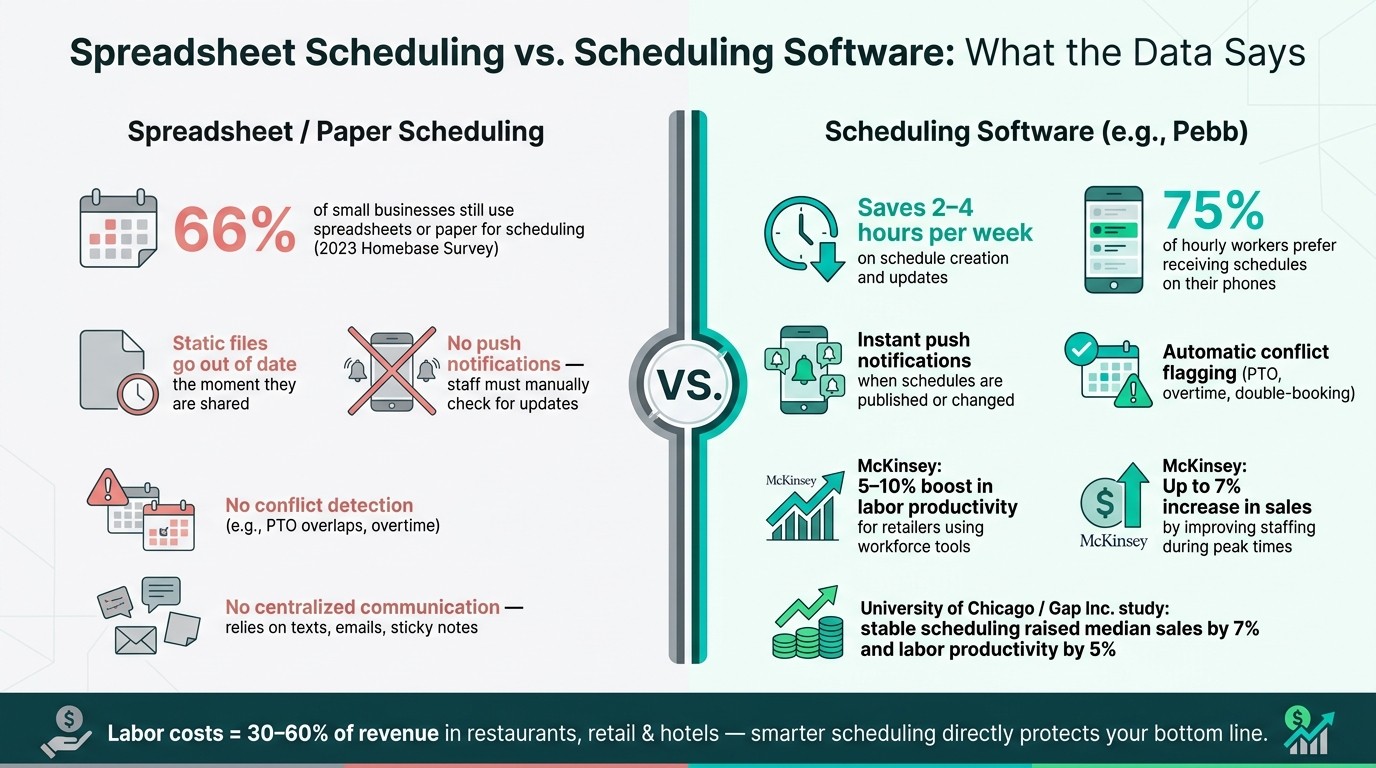
Here’s the kicker: labor costs in industries like restaurants, retail, and hotels can eat up 30–60% of your revenue. Even small errors - like overstaffing during slow hours or understaffing during peak times - can cost you big. Add in part-time workers with ever-changing availability, legal compliance headaches, and last-minute no-shows, and it’s no wonder scheduling feels like a constant uphill battle.
That’s why I’m excited to share something that’s helped me and countless teams I’ve worked with: a free staff rota template designed to simplify scheduling. It’s not just a spreadsheet - it’s a tool to help you plan smarter, spot overtime risks early, and keep your team on the same page. And when you pair it with Pebb, our all-in-one communication and operations platform, it transforms into a dynamic system that updates in real time. Let me show you how it works and how it can save you hours of stress every week.
What the Free Staff Rota Template Includes
Let me walk you through what makes this free rota template a real game-changer for scheduling. It’s not just about plugging in shifts - it’s about creating a system that works for you and your team.
Template Layout and Key Elements
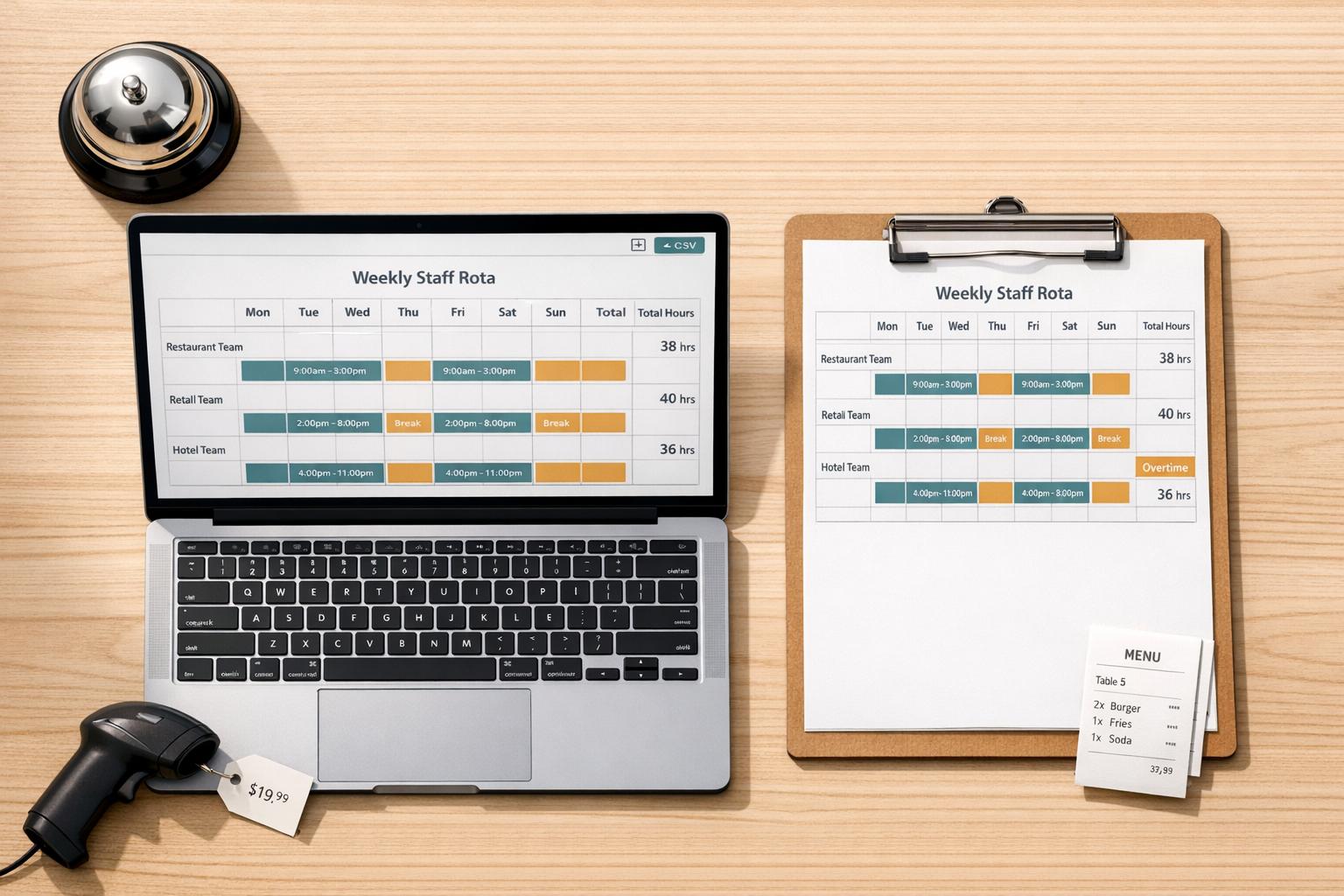
The template is designed around a simple yet effective weekly grid. Across the top, you’ve got the days of the week, while employee names are listed down the left-hand side. Each row clearly maps out the essentials: shift times, breaks, and total weekly hours.
What’s especially handy is the total weekly hours column. It helps you spot any potential overtime before it sneaks up on you. Plus, there’s a dedicated Notes section for things like shift swaps, time-off requests, or even reminders about upcoming training.
"The goal isn't just to cover shifts. It's to build a rhythm the team can depend on. To free up their mental energy for the actual work." - Dan Robin, Pebb
Role-Based Groupings by Industry
Here’s where it gets even more practical. Employees are grouped by their roles, and for industries like restaurants, retail, or hotels, it’s all color-coded and labeled by zones. This makes spotting gaps in coverage a breeze.
Here’s a quick breakdown:
Industry | Role Groupings in the Template |
|---|---|
Restaurant | Chefs, Waiters, Hosts, Bartenders, Dishwashers, Prep Cooks, Shift Leaders |
Retail | Cashiers, Floor Staff, Stockroom Workers, Store Managers, Supervisors |
Hotel | Front Desk Agents, Housekeeping, Maintenance, Night Audit, Breakfast Service |
Another thoughtful touch? The template includes cross-training notes. So, if a waiter is also trained to bartend, that info is right there. It’s a lifesaver when someone calls in sick last minute.
"A roster shouldn't just tell you who is working. It should tell you what your team is capable of at any given moment." - Dan Robin, Pebb
Optional Data and Automation Features
Now, if you’re looking to take this template to the next level, it’s got some optional bells and whistles. For instance, you can track labor costs by entering each role’s hourly wage (e.g., $18/hour for a cashier or $22/hour for a line cook). Built-in formulas will automatically calculate the estimated weekly labor costs for each role and department.
There’s also a toggle for unpaid breaks - so if employees take a 30-minute unpaid lunch, it’s automatically deducted from their total paid hours. And for those who like to keep an eye on the bigger picture, there’s a section to input daily sales figures, letting you compare labor costs against revenue as you go.
Lastly, the template is CSV-compatible, meaning you can easily export or import data into scheduling tools like Pebb. It’s like having a lightweight labor management system right at your fingertips.
How to Set Up and Customize the Template
Downloading and Preparing the Template
Let’s get you started. First, hit that "Download Free Template" button and save the .xlsx file to your computer. If you’re more of a cloud person, upload it to Google Drive and open it with Google Sheets. You can also use the File → Import option to add it to an existing sheet.
Once you’ve got the file, save a master copy and then create your working version. Name it something like Rota_StoreName_05-26-2026_to_06-01-2026 to keep things organized. Next, locate the "Week Start (MM/DD/YYYY)" cell in the top-left corner of the sheet. Enter the start date for your schedule (e.g., 06/01/2026), and watch the rest of the week’s column headers auto-fill thanks to some handy date formulas. If you’re using Google Sheets, double-check that the cell is formatted as Format → Number → Date to keep the US date format intact.
Adding Employees and Roles
Now that your template is ready, it’s time to add your team details. Head over to the "Employee List" tab and input each team member’s full name, their primary and secondary roles, employment type, and hourly rate. Using full names is a must - trust me, it’ll save you from those "Which John are we talking about?" moments.
For the "Role" column on the schedule sheet, set up data validation to keep roles consistent. If you’re handling pay rates, it’s a smart move to store them on a separate, password-protected tab. This keeps sensitive info secure and ensures only managers have access.
With your team roster in place, you’re ready to map out shifts and make sure all bases are covered.
Filling In Daily Shifts and Ensuring Coverage
Start by defining your shift blocks. For instance:
Restaurants: Breakfast (7:00 AM–11:00 AM), Lunch (11:00 AM–3:00 PM), and Dinner (4:00 PM–10:00 PM).
Retail: Blocks like Opening, Mid, and Closing.
Hotels: 24-hour coverage with shifts such as 7:00 AM–3:00 PM, 3:00 PM–11:00 PM, and 11:00 PM–7:00 AM.
Setting up these blocks ahead of time makes it easy to reuse them each week.
Once you’ve mapped out the shifts, assign names to each block. Use this formula to calculate hours per shift: =(End Time - Start Time) * 24. To keep things efficient, add conditional formatting to flag anyone nearing 40 hours per week. For example, you can set the cell to turn red when someone is close to hitting overtime.
Finally, include a summary row at the bottom of each day. This row should show totals for each role (e.g., 3 servers, 1 bartender, 2 cooks for Friday dinner). It’s a quick way to check if you’ve got enough staff for each shift - or if you need to make adjustments to fill gaps.
How to Use Pebb Alongside Your Rota Template
Spreadsheet vs. Scheduling Software: Key Stats for Restaurant, Retail & Hotel Managers
Why a Standalone Spreadsheet Falls Short
Let’s be honest - spreadsheets are great for laying down the basics, but they can’t keep up with the real-world chaos of managing a team. The moment you share a rota as a static file, it’s already at risk of being outdated. If someone calls in sick or swaps a shift, how many people are still looking at the wrong version? Too many.
A 2023 Homebase survey revealed that 66% of small businesses still rely on spreadsheets or even paper for scheduling. But here’s the kicker: those who switched to scheduling software saved 2–4 hours per week just on creating and updating schedules. That’s hours you could spend focusing on your team or customers instead of chasing down who’s working when.
And then there’s the issue of notifications - or lack thereof. Seventy-five percent of hourly workers prefer to get their schedules on their phones. A static .xlsx file doesn’t ping anyone; it just sits there, waiting to be ignored or misread. This is where Pebb steps in to completely change the game.
Pebb Features That Support Scheduling
Think of Pebb as the engine that turns your rota template into a living, breathing schedule. After you finalize the week’s shifts, you can transfer them into Pebb’s scheduling view. It organizes everything by employee, role, and location, making it easy to spot gaps or overlaps. Once you hit publish, the magic happens: every team member gets an instant push notification.
Let’s say a server swaps their Tuesday dinner shift for a Saturday brunch. All you have to do is update the shift in Pebb, and voilà - everyone involved gets notified immediately. No texting, no confusion. And because Pebb flags conflicts (like scheduling someone during their approved PTO), you avoid those awkward “Wait, I can’t work that day!” moments spreadsheets can’t catch without complicated formulas.
Speaking of PTO, Pebb makes managing time-off requests a breeze. Staff can submit requests directly in the app, and managers can approve or deny them in one click. Approved days are automatically visible when you’re building the next schedule, so there’s no need to dig through old emails, texts, or sticky notes to figure out who’s unavailable.
How Pebb Keeps Teams Connected and Productive
Scheduling is just the start. Pebb brings your entire team together in one app, making communication seamless. With our integrated work chat, you can create groups like “Night Shift Crew,” “FOH Team,” or “Store #4 Managers.” Need someone to cover a shift last minute? Post in the group, and responses stay in one thread - no more juggling between apps or chasing down replies.
Our news feed acts like an internal social platform. Post updates about things like holiday hours, new menu rollouts, or even reminders about dress codes, and your team will naturally see them as they scroll through the app. Plus, with integrated voice calls and a searchable people directory, finding and contacting colleagues is quick and professional - no mixing work and personal calls.
Here’s the best part: Pebb offers all of this for just $4 per user/month on the Premium plan. And if your team has 15 people or fewer, you can use the Standard plan completely free. Scheduling, communication, PTO management - it’s all in one place, without the hassle of bouncing between multiple tools.
Best Practices for Keeping Your Rota Accurate and Up to Date
How to Avoid Scheduling Errors and Overtime
Let me tell you, nothing disrupts a team like scheduling mistakes or unexpected overtime. One trick I’ve learned? Always double-check total weekly hours before hitting "publish." A simple tool like conditional formatting can save you a ton of headaches - set it to flag shifts nearing overtime (say, orange at 38 hours and red at 40). It’s also a good idea to color-code shifts by role. That way, you can quickly spot gaps in coverage.
Another thing to watch out for is back-to-back shifts. Many U.S. cities, like New York and Chicago, have fair scheduling laws designed to prevent burnout. These rules not only protect employees but also keep you out of legal trouble.
Speaking of numbers, never forget to compare your scheduled labor hours to projected sales. Overtime eats into your profit margins, and for most restaurants, labor costs should stay within 20–25% of projected sales. Keep an eye on that ratio, and you’ll thank yourself later.
How to Keep Staff Informed and Reduce Miscommunication
Once you’ve nailed down an accurate schedule, the next hurdle is making sure everyone’s on the same page. Here’s what works for us: lock the schedule once it’s finalized, so no one can make sneaky changes, and label it clearly. Then, publish it through Pebb and pin it for easy access. This way, your team knows exactly where to find the latest version.
If anything changes - a shift swap, a call-out, or even a tweak to start times - it should all go through Pebb. Updates become instantly visible to everyone, cutting down on confusion.
We also keep a detailed change log in a separate tab. It includes the date, employee affected, original shift, new shift, the reason for the change, and who approved it. This isn’t just about staying organized - it’s crucial in cities like New York or Chicago, where predictive scheduling laws can require premium pay (anywhere from $10 to $75 per shift) for last-minute adjustments. A well-documented log can save you from legal headaches.
"A bad schedule isn't a planning problem; it's a culture problem. It sends a clear message that the team's time isn't valued." - Dan Robin, Pebb
Once your team has a locked, clearly communicated schedule, it’s time to focus on refining the process itself.
How to Improve Your Scheduling Process Over Time
Here’s the thing about scheduling: what works in February might completely flop in July. That’s why we review our scheduling data every quarter. We look at labor costs as a percentage of sales, overtime hours, no-shows, and how often we’ve had to make changes to the schedule. This kind of review highlights weak spots in the process.
For example, if you notice a rush consistently hitting at 11:30 a.m., but your mid-shift starts at noon, it’s time to adjust those start times. Or, if you see hosts stepping in to help servers too often, maybe it’s time to add more hosts or focus on cross-training.
One study that really stuck with me was the University of Chicago’s Stable Scheduling Study, done with Gap Inc. They found that stable, data-driven scheduling boosted median sales by 7% and labor productivity by 5%. Those numbers prove that small, thoughtful adjustments can lead to big results over time.
Conclusion: Start Scheduling Smarter with the Free Rota Template and Pebb
Let me break it down: the free rota template is where you map out your plan - roles, shifts, and weekly coverage, all in one neat and organized spot. Then there’s Pebb, the tool that takes that plan and makes it work in real life. It’s where schedules get shared, adjusted, and kept up to date when things inevitably change.
This combo doesn’t just make life easier; it delivers results. McKinsey reports that retailers using workforce management tools can see 5–10% boosts in labor productivity and up to a 7% increase in sales by improving staffing during peak times. Those are numbers that speak for themselves.
No matter your industry, the process is simple: draft your schedule in the template, then let Pebb bring it to life. Your team gets the schedule on their phones, swap requests are handled seamlessly, and everyone stays in sync.
Ready to give it a go? Download the free template and create your free Pebb account. It takes less than an hour to set up, even for smaller teams. And if you want to unlock even more features, Pebb’s premium plan is just $4 per user/month - a small price for a big upgrade in efficiency.
Say goodbye to scheduling headaches. Start with the free template, connect it to Pebb, and watch your operations run smoother than ever.
FAQs
How do I handle last-minute call-outs with this rota?
Managing last-minute call-outs can feel like juggling flaming torches, but Pebb’s real-time scheduling makes it a breeze. With our drag-and-drop interface, you can quickly reassign shifts, approve swaps, and update staff availability - all without breaking a sweat.
Here’s where it gets even better: once you make a change, the system instantly notifies your team through push notifications or group messages. No more endless texts or phone calls. Plus, it’s smart - Pebb flags potential conflicts, like overlapping shifts or PTO, before you finalize anything.
And if you’re worried about last-minute chaos, you can set cutoff times for swaps to keep things running smoothly. Even when the unexpected happens, you’ll stay in control.
What’s the best way to track overtime and break time in the template?
To keep an eye on overtime and break times, start by adding columns to your spreadsheet for shift start/end times and breaks (mark unpaid ones if applicable). Then, use formulas to calculate total hours worked, subtracting break times. It’s also a good idea to flag employees nearing or exceeding the 40-hour weekly threshold.
Here’s where tools like Pebb come in handy. They handle the heavy lifting by automatically tracking hours, sending alerts when someone is at risk of hitting overtime, and ensuring compliance with labor laws. This not only saves time but also helps you keep labor costs under control.
How do I sync the spreadsheet schedule into Pebb?
To integrate your spreadsheet schedule with Pebb, start by saving it as a CSV file - this strips away any extra formatting that might cause issues. Once you have the file ready, upload it into Pebb’s scheduling system. During the upload, you’ll match the columns (like Employee Name, Shift Start, and Shift End) to ensure everything aligns correctly.
After importing, you can fine-tune the schedule using Pebb’s intuitive drag-and-drop tools. Need to make changes? No problem. You can quickly adjust shifts and use Pebb’s built-in chat and notifications to instantly update your team. It’s an easy way to keep everyone on the same page without the usual scheduling headaches.
