
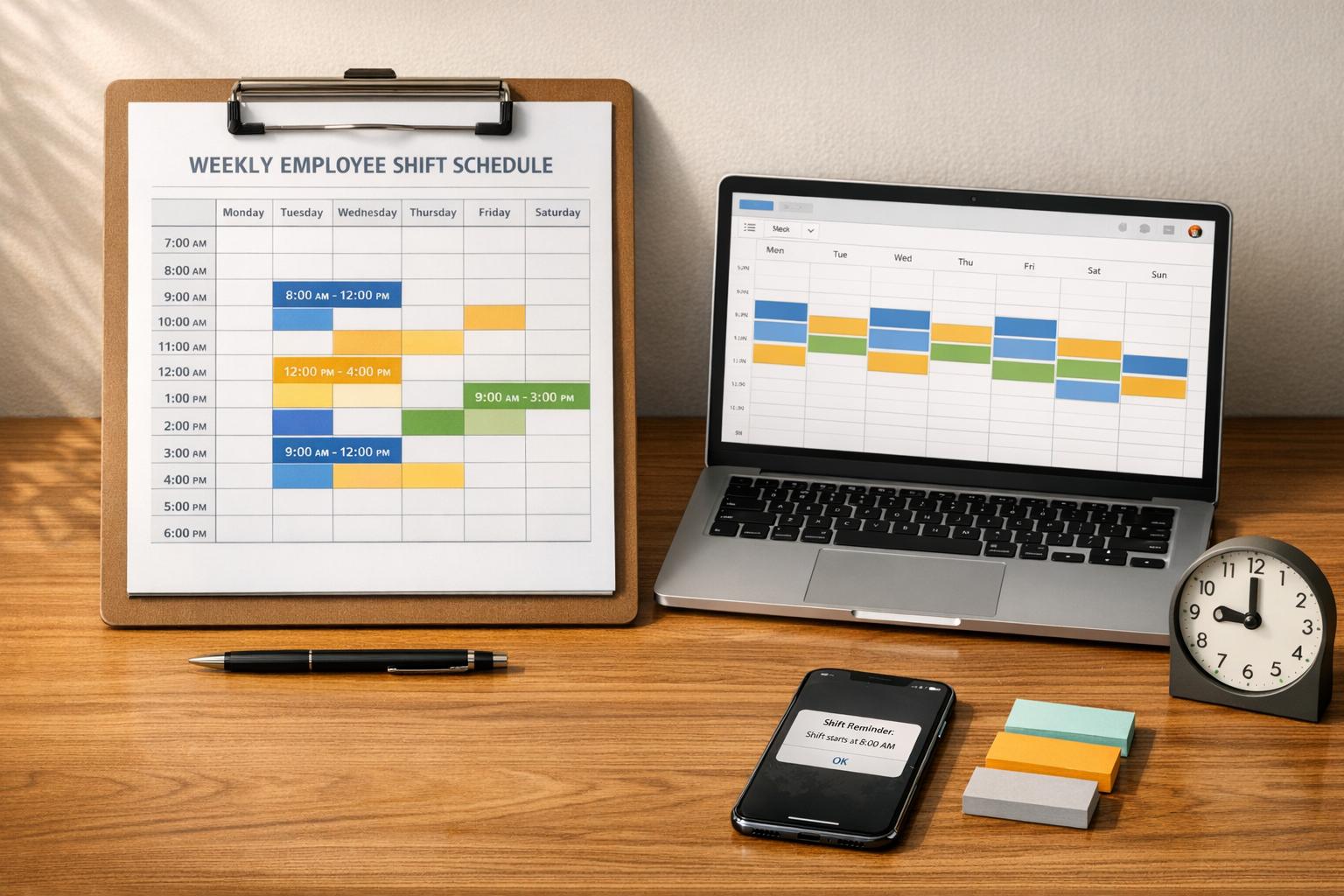
Author: Ron Daniel
Free Employee Shift Schedule Template for Small Businesses (2026 Guide)
Manual shift scheduling wastes hours and creates costly errors; a clear template and digital tools make staffing fair, fast, and reliable.
Have you ever spent your Sunday night drowning in spreadsheets, trying to piece together a shift schedule while juggling last-minute changes? I have, and let me tell you - it’s a nightmare. One time, I thought I had everything sorted, only to realize I’d double-booked two employees for the same shift and completely missed someone’s time-off request. The fallout? A frustrated team and hours wasted fixing mistakes. Turns out, I wasn’t alone - did you know small business owners spend 5 to 10 hours every week just managing schedules? That’s time that could be spent growing the business or focusing on customers.
Here’s the deal: manual scheduling is a recipe for chaos. From double bookings to clopenings (those dreaded shifts where someone closes late and opens early), it’s easy to see how things spiral out of control. And when someone calls in sick? Forget about it - it’s a scramble to find coverage, and communication often gets lost in the shuffle. The result? Higher stress, unexpected labor costs, and unhappy employees. There’s got to be a better way, right?
That’s where a solid shift schedule template comes in. It’s like having a cheat sheet that simplifies everything. With the right template, you can create a schedule in just 15 minutes and avoid the common pitfalls like overlapping shifts or missed requests. In this guide, I’ll walk you through how to pick the best template for your business, customize it for your team, and even take things to the next level with tools like Pebb. Let’s dive in and save you some time (and sanity).
How to Pick the Right Shift Schedule Template
When it comes to workforce planning, picking the right shift schedule template can make or break your operations. Think about it - what works for a 24/7 hospital won't cut it for a boutique that's open from 10:00 AM to 6:00 PM. The trick is to align your scheduling template with your business hours and your team's specific needs.
Templates for Different Business Types
Your industry plays a huge role in determining the best scheduling rhythm. For example, restaurants often rely on split shifts to handle the lunch and dinner rushes. On the other hand, warehouses and manufacturing plants might use the DuPont schedule - a 4-week cycle where employees get an entire week off every month.
Healthcare and emergency services tend to favor the 2-2-3 (Panama) pattern, where staff work 2 days, take 2 days off, then work 3 days. The pattern flips weekly, giving employees a long 3-day weekend every other week.
For businesses with consistent hours - like a coffee shop open daily from 6:00 AM to 2:00 PM - a fixed shift template provides stability and simplicity. However, if you're running a 24/7 operation and want to distribute overnight and weekend shifts fairly, rotating shifts are the way to go. Just keep in mind that rotating schedules can strain sleep and health, so recovery time is a must.
Key Features Your Template Should Have
A good template isn’t just about plugging in names and hours; it needs to work for you. At the very least, it should include:
Employee names and their specific roles (e.g., "barista" or "line cook")
Start and end times for each shift
Built-in formulas to calculate total weekly hours automatically
Why are these formulas so important? They help you spot accidental overtime before it happens, keeping you compliant with FLSA regulations and avoiding unexpected labor costs.
Another key feature is the ability to flag potential issues, like clopenings (those dreaded shifts where someone closes late and opens early the next day). And let’s talk about version control - don’t fall into the "Schedule_v3_FINAL.xlsx" trap. Stick to a single, live document so everyone stays on the same page.
If you're managing complex schedules like DuPont or Panama, opt for a multi-week or monthly view instead of a simple weekly template. Seeing the entire cycle at once makes it easier to spot gaps and ensure everyone is treated fairly.
Next up, we’ll dive into how to download and customize a free template to fit your team’s unique needs. Stay tuned!
Setting Up Your Free Shift Schedule Template
How to Download the Template
You can grab your free shift schedule template directly from Pebb's insights page. Check out articles like "The Shifts Schedule Template That Actually Works" or "A Calmer Way to Manage Shifts" - you’ll find the templates waiting for you there. We’ve got you covered with three formats: Microsoft Excel (.xlsx), Google Sheets, and CSV. The CSV option is perfect if you need to import the schedule into other tools or the Pebb app.
Once you’ve downloaded the template, it’s time to make it your own.
Customizing the Template for Your Team
Here’s where the magic happens. Start by focusing on what Dan Robin from Pebb calls the "unbreakable essentials":
Who: Use full names - think "Jennifer Aniston", not just "Jen."
What: Be specific about roles, like "Shift Lead" or "Barista."
When: Always include exact times, such as "9:00 AM - 5:00 PM", instead of vague terms like "Morning Shift".
"A schedule isn't just a list of times. It's a promise to your team and your customers about who will be where, and when." – Dan Robin, Pebb
From there, add columns that reflect your unique business needs. For instance:
Retail stores might need a "Store Zones" column to indicate "Front Register" or "Stockroom."
Healthcare facilities could include "Certifications" to ensure compliance.
Warehouses might benefit from a column for "Equipment Credentials".
Don’t forget to include contact details - phone numbers can be a lifesaver when someone’s running late or you need to fill a last-minute gap. This setup not only reduces errors but also keeps your team running smoothly.
Tips for Organizing Shift Information
Once your template is customized, it’s all about organizing the details for maximum clarity. Here are a few tips to keep things clean and easy to understand:
Use color-coding to separate departments or roles. For example, blue might represent kitchen staff, while green is for front-of-house.
Stick to full names instead of initials to avoid confusion between employees with similar names.
Be precise with shift times. Instead of just writing "Lunch", specify "12:30 PM - 1:00 PM" so there’s no ambiguity.
It’s also essential to keep your team’s availability updated. Life happens - childcare schedules, college classes, and other commitments can shift. What worked in October might not work in April. Save your final schedule as a CSV file to ensure it imports cleanly into digital tools without messy formatting issues like merged cells.
Once your schedule is clear and organized, you’re ready to dive into building a fair rotating shift system.
How to Create a Fair Rotating Shift Schedule
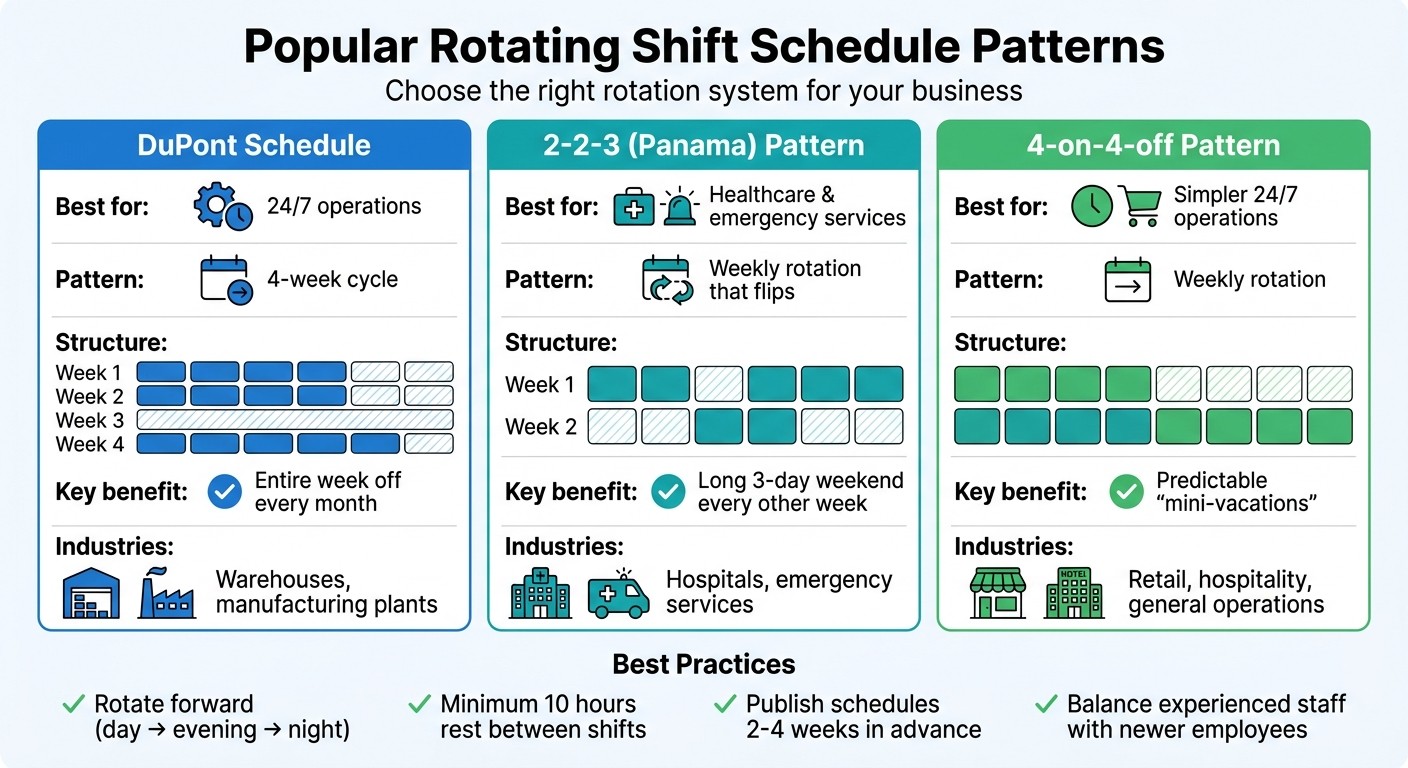
Comparison of Popular Rotating Shift Schedule Patterns for Small Businesses
What Rotating Shift Schedules Are
A rotating shift schedule means employees alternate between mornings, evenings, and nights instead of sticking to the same hours week after week. This setup ensures that less desirable shifts - like late nights or weekends - are shared equally over time, whether that's on a weekly or monthly basis.
Imagine the difference: in a fixed schedule, someone might always work 9:00 AM–5:00 PM, while another person is stuck with every Saturday night. With a rotating schedule, those tough shifts get spread out, which helps keep morale high and prevents burnout. This is especially important in industries like healthcare, where nearly 27% of workers are on overnight shifts.
"The best rotating shift schedule is the one your team can understand and trust. Predictability is the bedrock of fairness." – Dan Robin, Pebb Insights
So, how do you create a system that feels fair to everyone? Let’s break it down.
Steps to Build a Fair Rotation System
Start by having an open conversation with your team about what fairness means to them. For some, it’s about balancing total hours worked. For others, it’s about rotating those dreaded weekend and holiday shifts evenly. Once you’ve defined fairness together, you can craft a system that earns their trust.
Next, choose a rotation pattern that fits your needs. For 24/7 operations, the DuPont schedule is a solid option. It works like this: employees work 4 nights, take 3 days off, work 3 days, take 1 day off, and then enjoy a full week off. If you want something simpler, the 4-on-4-off pattern is a great choice - 4 consecutive workdays followed by 4 days off. It’s predictable and gives your team regular "mini-vacations".
Here are a few key tips to keep things running smoothly:
Always rotate forward (day shift → evening shift → night shift). This aligns with natural circadian rhythms and reduces physical strain.
Ensure a minimum of 10 hours' rest between shifts to avoid "clopenings" (closing late and opening early).
Balance teams by mixing experienced staff with newer employees, so trainees aren’t left handling difficult shifts alone.
Publish schedules 2–4 weeks in advance to give employees time to plan their personal lives.
Once you’ve nailed down a fair rotation system, tools like Pebb’s digital scheduling platform can make managing it easier than ever.
Using Pebb's Digital Scheduling Tools
Why Pebb's Shift Scheduling Works Better
Let me tell you, juggling schedules, PTO requests, and team communication used to feel like trying to solve a Rubik’s Cube blindfolded. That’s why we created Pebb’s shift scheduling platform - to simplify everything and make life easier for small business owners like you.
Here’s how it works: instead of hopping between spreadsheets and apps, Pebb puts everything in one place. Got a PTO request? It automatically blocks those hours on the calendar - so no more accidental double-booking. Need to approve a shift swap? One click, and the schedule updates instantly, notifying everyone involved. It’s that seamless.
And the clock-in feature? Total game changer. It uses GPS and photo verification to confirm on-site presence, cutting time theft by up to 25%. Plus, it auto-populates hours for payroll, keeping you in line with FLSA overtime rules - no more manual calculations. Employees can manage their shifts, request swaps, and update their availability right from their phones, which means no more late-night group texts or scheduling chaos.
"When you plug your rotation into a platform like Pebb, the game changes. The schedule stops being a static document and becomes a live, interactive hub." – Dan Robin, Pebb
Here’s the part I love most: real-time updates. Publish a schedule or make a change, and push notifications go out instantly to everyone’s phones. Businesses using Pebb save 10-15 hours a week on scheduling and report 70% fewer no-shows thanks to automated reminders. That’s time and stress saved, plain and simple.
As your team grows, those old templates just won’t cut it anymore. That’s where Pebb’s unified platform steps in to handle the complexity without breaking a sweat.
Replace Templates with Pebb
Let’s be honest - templates are fine for a while, but they fall apart when your team starts growing or when things get tricky. That’s why so many small businesses are ditching spreadsheets and cobbled-together tools for Pebb. It’s not just about scheduling - it’s a one-stop shop for chat, PTO management, and time tracking. One manager told us switching to Pebb saved them 2-3 hours a day because they weren’t bouncing between platforms anymore. Imagine what you could do with that extra time.
Here’s how easy it is to get started: import your team roster and recurring shifts from your current setup, set your availability rules and PTO policies, and publish your first schedule. The system handles notifications automatically, employees clock in through the app, and you can dive into analytics to spot trends and fine-tune staffing. One café with 10 employees reported zero scheduling conflicts in their first month with Pebb - down from 12 conflicts the month before when they were still using spreadsheets.
And here’s the kicker: Pebb’s Standard plan is free for up to 15 users. You get shift scheduling, chat, PTO management, and clock-in tools all included. Need more? The Premium plan is just $4.00 per user per month, offering extras like voice and video calls plus analytics. Compare that to Slack Pro at $7.25 per user or Microsoft Teams starting at $4.00 per user - and remember, we’re the only one with scheduling built right in, not tacked on through third-party apps.
If you’re tired of wrestling with templates and piecemeal tools, it’s time to let Pebb do the heavy lifting. You’ll wonder how you ever managed without it.
Wrapping Things Up: Simplify Your Shift Scheduling
Let me tell you, shift scheduling doesn’t have to be a headache. If you’re still stuck in the chaos of spreadsheets or sticky notes, it’s time to make a change. Start small - grab our free template. It’s perfect for documenting your workflow, clearing up roles, and cutting down those pesky scheduling conflicts. It’s a simple way to move from messy guesswork to something that actually works, helping you run smoother operations and keep communication flowing with your team.
But here’s the thing - templates are only a stepping stone. If you’re spending hours every week manually piecing together schedules, dealing with version mix-ups, or chasing shift swaps, it’s a sign. You’re ready for something stronger.
"A schedule isn't a document you 'finish.' It's a living system that needs to adapt. When your tool can't do that, you become the tool, manually stitching everything together." – Dan Robin, Pebb Insights
This is exactly where Pebb steps in. Our platform takes the manual labor out of scheduling and grows with you. With features like scheduling, chat, PTO management, and clock-in all rolled into one, it’s designed to save you time and sanity. And the best part? Our Standard plan is free for teams of up to 15 people. No more juggling spreadsheets or wrestling with clunky third-party tools - just one straightforward system that actually makes your life easier.
So, don’t settle for "Final_Schedule_v7" any longer. Download the template, get your process in order, and when you’re ready, let Pebb help you step into 2026 with the most organized system you’ve ever had. Your team (and your future self) will thank you.
FAQs
How do I choose weekly vs. multi-week scheduling?
When it comes to scheduling, the choice between weekly and multi-week plans really boils down to what works best for your team. If your team deals with frequent changes or unpredictable hours, weekly schedules offer the flexibility to adapt quickly. On the other hand, multi-week schedules are perfect for teams with steady staffing needs and a predictable rhythm.
At Pebb.io, we’ve made it simple to manage either approach. Our drag-and-drop tools let you create and tweak schedules effortlessly, so you can match your planning style to your team’s unique workflow and preferences. Whether you're juggling last-minute updates or sticking to a long-term plan, we’ve got you covered.
How can I prevent clopenings and accidental overtime?
Creating schedules that work for everyone can feel like solving a puzzle, but Pebb's shift scheduling tools make it easier to get it right. With features like drag-and-drop editing, automatic shift repetition, and open shifts, you can design clear, structured schedules that minimize errors and ensure every shift is covered.
Here’s a tip we swear by: schedule at least 10 hours between shifts for the same employee. This simple rule helps prevent "clopenings" (those dreaded close-then-open shifts) and keeps your team rested. Plus, with automatic notifications for updates and swaps, everyone stays in the loop, reducing the chance of last-minute confusion or conflicts. It's all about making life smoother for you and your team.
When should I switch from a template to Pebb?
When scheduling feels like a puzzle you can't solve - too many moving parts, too much time wasted, and too many mistakes - it's time to switch to Pebb. Sure, templates can handle the basics, but they fall short when you need automation, real-time updates, or features like managing multiple locations and generating detailed reports.
With Pebb, you get an all-in-one platform that takes the headache out of shift management. It minimizes errors, saves time, and grows with your team. And the best part? It’s just $4 per user. For any business on the rise, it’s a no-brainer.
