
Author: Ron Daniel
Free Employee Scheduling Software for Small Teams
Free scheduling tools can end shift chaos for small teams—compare four top options to simplify shifts, PTO, time clock, and team chat.
Managing schedules for small teams can be a nightmare. Trust me, I’ve seen it all - frantic managers buried in spreadsheets, group texts flying around at midnight, and Post-it notes slapped on breakroom walls. The result? Chaos. Missed shifts. A 50% spike in no-shows because last-minute updates don’t reach the right people. It’s exhausting for everyone involved.
But here’s the good news: it doesn’t have to be this way. Free employee scheduling software can simplify everything - and I mean everything - without costing you a dime. At Pebb, we’ve seen firsthand how the right tools can save time, reduce stress, and keep teams running like clockwork. Today, I’ll walk you through four great options - Pebb, Sling, Homebase, and Zoho Shifts - and show you how they stack up.
Let’s dive in and see how these platforms can help you ditch the chaos for good.
1. Pebb
Free Plan User Limits
Let me start with the basics: our "Always Free" Standard plan is designed for small teams, supporting up to 15 users - no credit card needed. You’ll also get 3 Spaces to organize your teams, locations, or departments. It’s perfect for setups like a main store and a couple of satellite outlets.
Shift Scheduling Features
Scheduling doesn’t have to be a headache. With Pebb, you can build schedules in minutes using our drag-and-drop interface. Assigning shifts is quick, and if your team follows a regular weekly pattern, recurring schedule templates save you loads of time. Got an unexpected absence? The auto-fill for open shifts feature helps you find coverage fast. Plus, conflict alerts flag any scheduling issues before they turn into real problems.
And here’s the best part: employees get instant push notifications when schedules are published or updated. No more excuses about missed messages - everyone stays in the loop.
Communication Tools
What’s a great schedule without seamless communication? On the free plan, you get unlimited chat history, along with a News Feed and People Directory. It’s all built-in, so your team can coordinate shift swaps, share availability, and post updates without hopping between apps.
The News Feed acts like a virtual bulletin board for company-wide announcements, while the People Directory makes it easy to look up coworkers’ roles and contact info. It’s all about keeping things simple and streamlined.
Additional Management Features
Now, let’s talk about the little extras that make a big difference. The free plan includes GPS-verified mobile clock-in/out, so you know your employees are on-site when their shifts start. Managers can approve hours and export timesheets in US dollar format, making payroll a breeze.
Need to handle time-off requests? With PTO management, employees can submit requests directly through the app, and the schedule updates automatically to avoid coverage gaps. You’ll also find tools like task checklists for daily routines, a Knowledge Library for training materials and SOPs, and digital forms for reports or safety checklists.
One retail team of eight shared that they cut scheduling conflicts by 70% after switching to Pebb. That’s the kind of impact these tools can have when everything is in one place.
2. Sling

Free Plan User Limits
Sling’s free plan allows up to 30 users, making it a practical choice for teams managing multiple shifts or locations. What’s great is that you don’t need a credit card to get started, so you can dive right in without worrying about upfront costs.
Shift Scheduling Features
Sling shines when it comes to scheduling. The drag-and-drop schedule builder makes assigning shifts straightforward, and the shift templates are a lifesaver for recurring schedules. Managers can post open shifts that employees can claim directly, cutting down on back-and-forth communication. Plus, conflict alerts flag overlapping schedules, while employees can easily submit their availability or time-off requests through the app. The option for shift trades is another handy feature, letting team members swap shifts without the usual hassle.
Lee Weiss, Assistant General Manager at The Musket Room, shared: "Sling has been a great organizational tool for our restaurant! It allows me to easily arrange schedules, keeping up with our staff's different requests, and serves as a platform for all internal communication."
Communication Tools
Sling includes built-in communication features like private messaging, group chats, and a company-wide newsfeed. Real-time notifications ensure everyone stays in the loop and can interact with updates as they happen.
Additional Management Features
The free plan doesn’t stop at scheduling and communication. It also offers task management with checklists tied to specific shifts, document storage for items like licenses or contracts, and mobile access through iOS and Android apps. However, features like time tracking, geofencing, and payroll exports are only available on paid plans, which start at $1.70 per user per month. While Sling limits these advanced tools to its paid tiers, Pebb includes many of these capabilities in its free plan, giving users more flexibility without extra costs.
3. Homebase
After exploring Sling's extensive offerings, let me introduce you to Homebase - a platform designed for smaller teams with a more targeted set of features.
Free Plan User Limits
Homebase's free "Basic" plan is perfect for teams operating out of a single location with up to 10 employees. With over 100,000 small businesses on board - particularly in industries like restaurants, retail, and healthcare - Homebase has become a go-to for streamlined workforce management. The platform makes scheduling and managing small teams a breeze with its intuitive tools.
Shift Scheduling Features
Creating schedules has never been easier, thanks to Homebase's drag-and-drop builder. You can reuse past schedules or rely on templates for recurring patterns, which is a lifesaver if your team has a predictable routine. Employees can share their availability directly through the app, and managers can include shift notes to communicate critical details. One feature that stands out? The ability to schedule beyond 10 days without extra charges - something many competitors reserve for paid plans.
Amanda Jensen, the owner of Golden Hour Designs, raves: "I love the ease of making my team's schedule every week! I can do it from my phone wherever I'm at and that's a game changer for someone who's always on the move like myself!"
Communication Tools
Homebase keeps everyone on the same page with in-app messaging and automated shift reminders sent via email or push notifications. These tools ensure that schedule updates reach your team in real time.
Additional Management Features
Beyond scheduling, Homebase offers tools to simplify on-site management. For example, the free plan includes a digital time clock that uses GPS snapshots to confirm employees are clocking in or out at the right location. This clock-in data is automatically converted into timesheets, stored for up to 90 days, and integrates with popular POS systems like Square, Toast, Clover, and Shopify.
The platform also includes basic hiring tools, letting you post job openings and track applicants. It even keeps an eye on hours worked, sending alerts when employees are nearing overtime limits. While the free plan is packed with features, advanced options like shift swapping and detailed time-off approvals are part of the paid plans, which start at $24 per location per month. Managers using Homebase reportedly save up to 5 hours each week, freeing them up for other priorities.
4. Zoho Shifts
Let me tell you about Zoho Shifts - it’s a platform that really stands out with its ability to handle scheduling conflicts effortlessly. It’s designed to simplify managing shifts across multiple locations, no matter how many spots you’re juggling.
Free Plan User Limits
Here’s the deal: Zoho Shifts offers a free plan that supports up to 25 users across unlimited locations. That’s a big win if you’re running operations across several sites and want to keep costs down. If you need more than that, the paid plans are super affordable, starting at just $1 per user per month. It’s a budget-friendly option as your team grows.
Shift Scheduling Features
One of its best tricks? The platform’s conflict-free scheduling logic. It automatically flags overlapping shifts or availability problems before you hit publish, saving you from last-minute headaches. The drag-and-drop builder makes creating schedules a breeze, and you can even track shifts in real time. That said, the free plan has its limits - you won’t get shift swaps or recurring templates, so you’ll need to recreate schedules manually each week.
Communication Tools
Zoho Shifts doesn’t stop at scheduling. It’s got a built-in messenger that covers all the bases: direct messages, group chats, announcement channels, plus email and push notifications for updates. It’s a handy way to keep everyone on the same page without needing separate tools.
Additional Management Features
The platform goes beyond just schedules. It centralizes time-off requests and uses GPS tagging with geo-fencing to ensure employees clock in at the right locations. You can even export timesheets directly to your payroll software. Just keep in mind, advanced reporting features are locked behind the paid plans.
Tracy Musser from Canine Country Club Inc shared this about Zoho Shifts: "Shifts efficiently manages scheduling for our 80 employees across two locations... The flexible reporting and accessible support chat have proven valuable for resolving issues".
While Zoho Shifts nails scheduling and conflict detection, Pebb takes it a step further. We’re the only platform that combines these features with a full communication suite - all included in our free plan. That’s a game-changer for teams who want everything in one place.
Strengths and Weaknesses
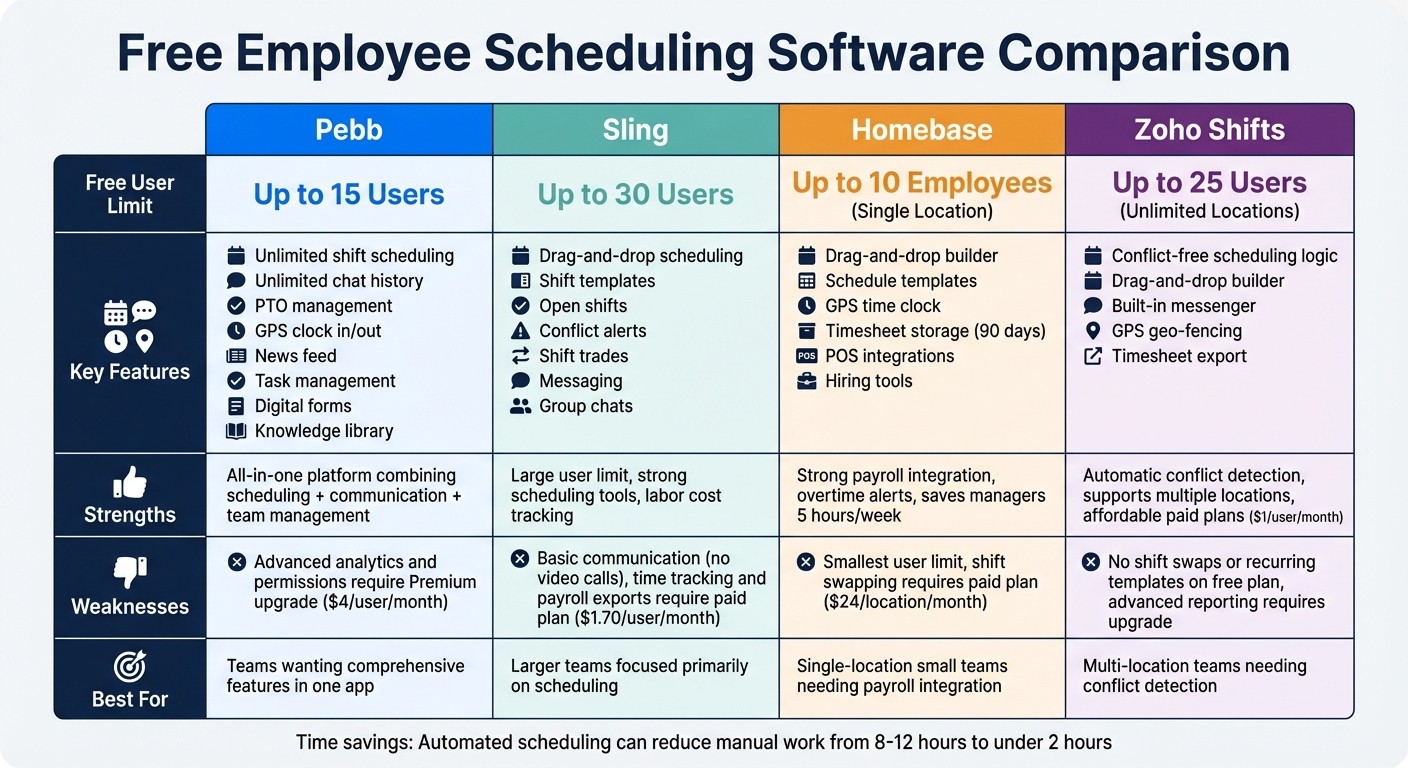
Free Employee Scheduling Software Comparison: Pebb vs Sling vs Homebase vs Zoho Shifts
Juggling schedules and communication across multiple tools can feel like a never-ending puzzle. To help you see how Pebb stacks up against its competitors, here’s a quick breakdown of strengths and weaknesses:
Platform | Strengths | Weaknesses |
|---|---|---|
Pebb | Free for up to 15 users with unlimited shift scheduling, work chat with unlimited history, PTO management, clock in/out, news feed, and task management. Opting for the Premium plan at $4/user/month unlocks advanced features like voice & video calls, detailed analytics, and enhanced permission controls for a more comprehensive experience. | The free plan has some limits on admin and data features - advanced analytics and permissions require a Premium upgrade. |
Sling | The free plan supports unlimited users and offers drag-and-drop scheduling, shift swaps, and time-off requests. It also includes a time clock and labor cost tracking to help manage budgets. | Communication tools are basic, with no video calls or advanced chat options. Features like auto-scheduling are only available in paid plans. |
Homebase | Free for up to 10 employees, it provides strong scheduling tools, time tracking, and team messaging. It integrates smoothly with payroll systems and even offers hiring tools. | Communication is limited to basic messaging. Features like labor cost controls and HR compliance tools are only available with paid tiers. |
Zoho Shifts | Free for up to 25 users, it offers standout conflict detection that flags overlapping shifts automatically. It supports multiple locations and includes a built-in messenger with group chats. Paid plans start at just $1/user/month. | The free plan lacks shift swaps and recurring templates, meaning schedules might need to be recreated weekly. Advanced reporting features require upgrading. |
Here’s why Pebb stands out: it combines scheduling, communication, and team management into a single, seamless platform. While competitors like Sling, Homebase, and Zoho Shifts shine in specific areas like scheduling or payroll integration, they don’t offer the all-in-one experience Pebb brings to the table. With Pebb, you get everything from chat to PTO management in one app - and you can unlock premium features like voice and video calls, detailed analytics, and enhanced controls for just $4/user/month.
And the time savings? Automated tools like Pebb can slash manual scheduling from 8–12 hours down to under 2 hours. That’s time you can use to focus on growing your business.
Conclusion
After diving into the comparisons, one thing is clear: Pebb offers something others just don’t. Sure, platforms like Sling, Homebase, and Zoho Shifts have their perks, but they often come with trade-offs - whether it’s limited features or a steeper learning curve that slows things down.
Pebb, on the other hand, was designed to simplify everything. It’s not just a scheduling tool - it’s an all-in-one platform that brings scheduling, unlimited chat, PTO management, clock in/out, news feed, and task management together in one place. And here’s the kicker: it’s free for teams of up to 15 users. No juggling between apps, no fragmented workflows - just a seamless experience.
If you’re starting small, our free Standard plan has you covered with all the basics. Growing fast? The Premium plan is just $4 per user per month and unlocks features like voice and video calls, detailed analytics, and advanced permission controls.
Ready to streamline your team's operations? Give Pebb a try and see how easy workforce management can be.
FAQs
How hard is it to switch from spreadsheets to Pebb?
Switching from spreadsheets to Pebb has been a game-changer for us. It's straightforward, intuitive, and saves a ton of time while cutting down on mistakes. With Pebb’s all-in-one platform, scheduling becomes a breeze thanks to its drag-and-drop tools, real-time updates, and centralized communication.
No more juggling multiple tools or dealing with scattered processes. Now, we can create schedules, notify employees, and manage PTO - all from one place. The best part? The transition process is designed to be as smooth and efficient as possible, so you can hit the ground running.
Can employees swap shifts and request time off in Pebb?
When it comes to flexibility, Pebb makes life easier for everyone. Employees can quickly swap shifts or request time off without any hassle. Here's how it works: they submit a shift swap request directly through the platform, and managers can approve it in real-time. This streamlined process keeps scheduling seamless and ensures everyone gets quick answers.
Does Pebb work for multiple locations or departments?
Pebb is designed to make managing multiple locations or departments a breeze. Whether you're juggling shifts across branches, departments, or various job roles, it simplifies the process. Managers can easily coordinate schedules for distributed or rotating teams, ensuring everything runs smoothly. This way, communication stays clear, and teams remain connected and organized - no matter where they’re located.
