
Author: Ron Daniel
Ultimate Guide to Overcoming Bias in Engagement Surveys
Practical steps to reduce bias in employee engagement surveys: design neutral questions, boost participation, ensure anonymity, and analyze fairly.
Have you ever looked at an employee engagement survey score and thought, “Well, that’s not the whole story”? I’ve been there. A couple of years ago, we rolled out what we thought was a solid engagement survey at Pebb. The results came back with a glowing 80% satisfaction rate, and we were ready to celebrate. But then we dug deeper. Turns out, our night-shift teams barely participated, and some frontline workers skipped questions entirely. That 80%? It wasn’t telling us the full truth.
Here’s the kicker: engagement surveys are only as good as the data behind them. If certain groups don’t participate or feel pressured to give “safe” answers, the results can lead to decisions that miss the mark. And when leadership acts on skewed insights, trust erodes fast. Research backs this up - employees are far less likely to respond honestly if they don’t see meaningful action after sharing feedback.
So, how do you fix it? How do you design surveys that employees trust, collect data you can rely on, and turn those insights into action? That’s exactly what we’re diving into. I’ll break down the common types of bias that can sneak into your surveys and share practical steps to reduce them. By the end, you’ll have a clear roadmap to get engagement data that actually reflects what’s happening in your organization. Let’s get started.
How to Run a Bias-Free Employee Engagement Survey
Common Types of Bias in Engagement Surveys
Bias in engagement surveys can sneak in from all directions - whether it’s through poorly phrased questions, uneven participation, or skewed sampling methods. Spotting these pitfalls is crucial if you want results that actually reflect what’s happening in your organization. Let me walk you through some of the most common types of bias that can throw your data off track.
Non-response Bias
This one’s a silent disruptor. Non-response bias happens when certain groups of employees don’t - or can’t - participate in the survey. Think about night-shift workers, part-time staff, or remote team members in far-flung locations. When their voices are absent, the data you’re left with might only reflect the experiences of those who had the time or comfort level to respond. The result? A skewed, overly positive picture that doesn’t tell the whole story.
Response Bias
Have you ever felt like you had to answer a question a certain way because of who might be reading it? That’s response bias in action. It’s what happens when employees give the answers they think are expected, rather than their honest opinions. This often stems from a lack of psychological safety - people worry about being judged or facing consequences, so they stick to neutral or overly positive responses. The downside? You miss out on the raw, unfiltered feedback that could actually drive change.
Question Wording Bias
Here’s where the phrasing of your survey questions can quietly nudge people in a particular direction. For example, asking, “Don’t you agree that our leadership communicates effectively?” subtly pushes respondents to say “yes” before they’ve even had a chance to think critically. Similarly, vague questions can leave people guessing what you’re really asking, which leads to unreliable data. The fix? Stick to clear, neutral phrasing that lets employees respond without feeling cornered.
Sampling Bias
This type of bias creeps in when the group you’re surveying doesn’t accurately represent your entire workforce. A classic example? The 1936 Literary Digest survey that infamously predicted the wrong U.S. presidential winner because it relied on phone books and car registrations - missing lower-income voters entirely during the Great Depression. The same thing can happen in engagement surveys. If you’re only reaching employees through email, for instance, you might overlook frontline workers who don’t have regular access to a computer.
"If the management can't rely on or trust the research results for accuracy, then it's a lose-lose situation for all people involved." - Qualtrics
How to Design Engagement Surveys That Reduce Bias
Understanding bias is one thing, but designing surveys that actively minimize it? That’s where the magic happens. The way we phrase questions, structure them, and even test them before rolling them out highlights the role of employee surveys in engagement and the quality of feedback we collect. Let’s dive into some practical ways to make engagement surveys as unbiased as possible.
Use Neutral and Clear Language
Crafting unbiased questions is trickier than it sounds. Even subtle wording can influence responses without us realizing it. For instance, adjectives like "excellent", "toxic", or "world-class" (yes, even positive ones!) can skew results. Absolute terms like "always" or "never" also push employees toward extremes. Consider this: "How satisfied are you with our excellent leadership team?" That question practically answers itself. A more neutral alternative would be: "How satisfied are you with the effectiveness of your leadership team?"
To make questions even clearer, tie them to specific behaviors and time frames. Instead of asking something vague like, "I feel valued at work", try, "In the last three months, I received recognition when I did good work." It’s measurable, concrete, and leaves less room for interpretation. And here’s a tip I swear by: aim for an 8th-grade reading level. Why? Because even if someone’s rushing through the survey on a quick break, they’ll still understand the questions without a second thought.
Ask About One Topic Per Question
Let me tell you, double-barreled questions are a sneaky culprit for biased feedback. These are the ones that try to ask about two things at once, forcing employees to give a single answer even if their opinions differ. Take this example: "I am satisfied with my pay and career development opportunities." What if someone’s happy with their pay but frustrated about career growth? You’ll never know. Instead, split it into two clear questions:
"I am satisfied with my pay."
"I am satisfied with my career development opportunities."
Here’s an insider tip: scan your draft for words like "and" or "or." They’re often the giveaway for double-barreled questions. Research even shows that 10–20% of items in professional surveys fall into this trap. It’s surprisingly common, but also fixable with a little extra scrutiny.
Pilot Test Before Full Rollout
Before hitting "send" on your survey, test it out with a small, diverse group - about 5–10% of your workforce. This step is a game-changer. Two techniques I’ve found super effective are cognitive interviews and small-sample pilots.
With cognitive interviews, you ask a handful of employees to explain what they think each question means and why they answered the way they did. This helps uncover any misinterpretations. Meanwhile, a small-sample pilot lets you check for skipped questions, low response rates, or items where everyone gives the same answer. If every response to a question is identical, chances are it’s too vague or leading.
Refine your survey based on this feedback, and you’ll be in a much better position to gather consistent, reliable results. Trust me, this extra step is worth every minute.
How to Increase Participation for More Balanced Results
Let me tell you, a survey is only as good as the number of people who actually take it. But here's the kicker - it’s not just about hitting a high response rate. What really matters is getting balanced participation across all groups. Think about it: if your night-shift warehouse team doesn’t weigh in, but your corporate office does, you’re missing big chunks of the story. Industry data shows that engagement survey response rates typically hover between 30% and 80%. The goal? Make sure every voice is heard.
Make Surveys Easy to Access on Any Device
You know what drives people away from surveys? Friction. If an employee has to hunt down a company email, wrestle with a VPN, or squint at a desktop-formatted survey on their phone, chances are they’ll skip it. That’s why we’ve made mobile-first design a priority - it’s not a nice-to-have, it’s a must.
Here’s what we do: we keep our surveys short and sweet - just 10 to 20 questions that take under 5 minutes to complete. We’re upfront about the time commitment too, with a quick note like, “This will take about 4 minutes.” And we make access a breeze. Whether it’s through SMS links, QR codes in break rooms, or a direct link in the employee app everyone already uses, we’ve removed the usual hurdles. These small tweaks make a big difference for frontline and hourly workers.
Use Anonymity to Build Trust
Let’s face it - nobody wants to share their honest opinions if they think it could come back to haunt them. That’s why we double down on building trust through anonymity. It’s not enough to just say, “Your responses are anonymous.” You have to show it.
We’re crystal clear about how confidentiality works. Only aggregated results are shared, and individual responses are never visible to managers. We also group results in batches of 5 or more to protect identities. Just as important, we make it clear that survey answers are not tied to performance reviews or disciplinary actions. And instead of sending a generic HR email, we use trusted channels - like updates through our employee app - to get the message across. When people know their feedback is safe, they’re much more likely to participate.
Show Employees What Changed Because of Their Feedback
Here’s the thing: nothing kills survey participation faster than radio silence after the fact. If employees don’t see any action, they’ll assume their input went straight into a black hole. That’s why we follow a simple three-step loop after every survey:
Step 1: Share what we heard within 2–4 weeks.
Step 2: Highlight the actions we plan to take, focusing on 2–3 key areas (not an overwhelming list).
Step 3: Link the changes back to the feedback when they’re rolled out.
For example, if a survey reveals that shift scheduling is a major pain point, we might test out a self-service shift swap feature. By closing the loop like this, we’ve seen participation jump by 10–20 percentage points. Why? Because people start to believe their voices actually matter.
At Pebb, we know that every voice counts. These steps are how we make sure no one gets left out of the conversation.
How to Analyze Survey Results Without Adding More Bias
Once the survey responses are in, the real challenge begins: making sense of the data without letting bias creep back in. It’s a delicate process because even the most well-intentioned analysis can skew results if you’re not careful. Here’s how we ensure our approach stays fair and balanced.
Break Down Results by Group to Spot Patterns
Let me give you an example. Say your overall engagement score comes in at 74%. That doesn’t sound bad, right? But when you break it down by department, role, or location, you might uncover some glaring disparities. What looks fine on the surface can hide deeper issues. That’s why we always segment our results in meaningful ways - like comparing frontline employees to desk-based ones or analyzing responses by tenure (0–6 months, 6–24 months, 2+ years).
The key is to focus on consistent patterns rather than one-off anomalies. For instance, if warehouse staff across multiple sites all report scoring 20+ points lower on a question like, “I have the tools to do my job,” that’s a red flag worth investigating. On the other hand, if only a handful of responses show an issue, we treat it as a hypothesis rather than a definitive conclusion. To maintain privacy and avoid overanalyzing tiny samples, we stick to groups with at least 5–10 respondents.
One tool we rely on heavily is a heatmap. It’s a simple but powerful visual where rows represent employee groups, columns stand for survey questions, and color bands indicate score ranges (think red for scores below 60, yellow for 60–75, and green for 75+). It’s like having the story jump off the page - and trust me, it’s a game-changer when you’re presenting findings.
Look for Gaps in Who Responded
Before we share results with leadership, we always take a step back to check whether the respondents truly represent the workforce. Here’s why: if 60% of your employees are frontline workers but only 35% of them filled out the survey, that’s a problem. To catch these gaps, we compare response rates by factors like location, role type, shift, and tenure, ranking groups from highest to lowest participation.
Transparency is critical here. Instead of saying, “Our engagement is 78% favorable,” we might say, “Among the 62% of employees who responded, engagement is 78%. However, frontline and night-shift teams were underrepresented, so we’re treating these results as partial.” Leaders appreciate this honesty - it’s far better than presenting polished numbers that could mislead.
These participation gaps also guide our next steps. For example, if night-shift teams didn’t respond in large numbers, we might organize manager-led survey sessions or send out quick pulse polls through Pebb to capture their input. This way, we’re not just identifying the gaps but actively working to close them.
Use Both Numbers and Written Feedback Together
Here’s where things get interesting. Numbers can tell you what changed, but written feedback reveals why it changed. For every major theme - like Communication or Career Growth - we compare the average scores with open-ended comments. Then, we categorize those comments into sub-themes to make sense of them.
Take “Communication,” for example. We might notice comments like “too many channels,” “last-minute schedule changes,” or “night shift never hears anything.” From there, we cross-check: do these comments explain the scores? If the feedback aligns with the numbers, we know we’re onto something solid. But if the comments are scattered or contradictory, it’s a signal to dig deeper before jumping to conclusions.
This method keeps us from falling into one of the easiest traps: cherry-picking a few dramatic quotes to support a pre-existing narrative. By combining quantitative data with qualitative insights, we ensure our findings are as accurate and actionable as possible.
How Pebb Helps You Run Bias-Free Engagement Surveys
Let me tell you, even the best analysis in the world won’t matter if employees don’t see or trust the survey in the first place. At Pebb, we’ve built a communication platform that ensures every team member not only receives the survey but also feels encouraged to participate with unbiased, clear invitations and follow-ups.
Rolling Out Surveys With Pebb's Communication Tools
Here’s the deal: one of the biggest reasons surveys fail is that some employees never even see the invitation. That’s where Pebb steps in. We broadcast survey invites right in the company news feed and even target specific groups like "Store #12 – Chicago" or "Night Shift – Warehouse East." This way, no one gets left out. For those who still don’t respond, we send friendly nudges directly from HR or their manager to keep things on track.
The language we use matters a lot. For example, saying, "We want to understand your experience," feels welcoming and encourages honesty. Compare that to, "We expect everyone to participate and be constructive," which sounds like there’s a “right” answer. We also time reminders to match actual shift patterns, so night-shift and weekend crews get their notifications when they’re on the clock. By using multiple channels and thoughtful messaging, we make sure every employee has a fair chance to participate, no matter where they are or what device they use.
Making Participation Easy, Wherever Employees Work
You know what else can mess up survey results? Tech-related roadblocks. That’s why we’ve made sure survey delivery fits seamlessly into the tools employees already rely on. With Pebb, the survey link is right there in the app they use for things like shift schedules, chat, and company updates. No need to dig around or hunt for links.
We also go the extra mile by offering QR codes for quick access and sharing simple visual guides - like screenshot walkthroughs or short how-to videos - so even employees who aren’t tech-savvy can navigate with ease. This approach ensures that everyone, from office staff to frontline workers, can participate without a hitch.
Once we’ve gathered responses from across the board, the real work begins: closing the feedback loop.
Sharing Results and Next Steps With Your Team
Here’s a truth I’ve learned: collecting feedback is just the first step. If employees don’t see what happens with their input, they’re far less likely to engage the next time around. That’s why closing the loop is non-negotiable.
With Pebb, we make it simple to share results transparently. Using the news feed, we post a plain-language summary of the key themes - no overwhelming 40-slide decks here. Instead, we focus on clarity: "Here’s what we heard, here’s what we’re doing about it, and here’s when you’ll see changes." These updates are targeted and concise, ensuring every group feels acknowledged.
This “you said, we did” approach isn’t just about ticking boxes; it’s about building trust. When employees see their feedback leading to real action, they’re far more likely to view surveys as part of an ongoing, honest conversation rather than a one-off task. And that’s when engagement truly starts to grow.
Conclusion: How to Build an Engagement Survey Process That Actually Works
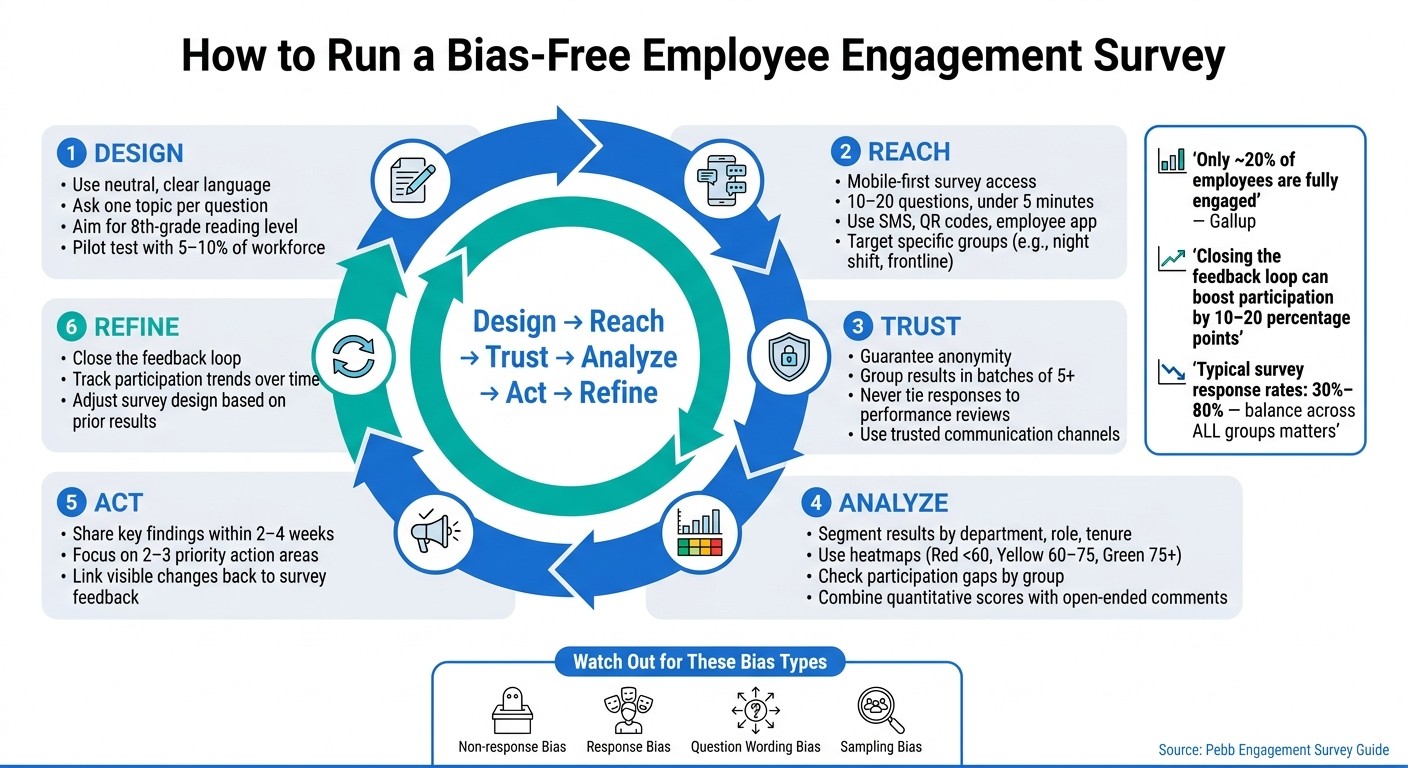
Let me tell you, tackling bias in employee surveys isn’t a one-and-done deal - it’s a cycle. Here’s how it flows: design → reach → trust → analyze → act → refine. This loop is the backbone of everything we’ve talked about, helping you create surveys that deliver clear, actionable insights into employee engagement.
Here’s the reality: Bias creeps into every stage of the survey process. It’s not just about crunching numbers - it’s about making sure every voice gets heard. Did you know Gallup reports that only about 20% of employees are fully engaged? And when surveys fail to capture feedback from frontline or hourly workers, the data becomes even more skewed.
The good news? You don’t need a massive budget or a fancy analytics team to fix this. Centralizing your survey process and focusing on a few key areas - like writing neutral questions, using multiple channels to reach employees, and always following up on feedback - can make a huge difference. Even small, visible changes after each survey cycle build trust and keep participation rates high. That’s exactly why we built Pebb - to make the entire process seamless, from sending out invites to turning results into real action. No employee gets left out.
The best organizations treat surveys as an ongoing conversation, not just a box to check once a year. Start there, and everything else falls into place. When your survey process works, every insight you gather can lead to real, meaningful change.
FAQs
How can I tell if my survey results are biased?
Spotting bias in survey results isn't always straightforward, but there are telltale signs to watch out for. Keep an eye out for consistent differences in responses between groups or participation rates that seem unusually low. For instance, if frontline teams consistently report lower engagement scores, it could hint at biased questions or challenges in accessibility. To tackle this, tools like Pebb’s analytics can pinpoint underrepresented groups, and offering anonymous feedback options can encourage more honest responses. These steps go a long way in reducing bias and ensuring your insights are as accurate as possible.
How can I get honest answers without risking anonymity?
Getting honest feedback from employees can be tricky, but it's absolutely essential for uncovering meaningful insights. The key? Protecting their anonymity. When people feel safe to share their thoughts without fear of judgment or repercussions, that's when you get the real, unfiltered truth.
One way we tackle this at Pebb is by using tools that make anonymous feedback easy and accessible. For example, features like mobile-friendly anonymous polls and surveys allow employees to share their opinions comfortably, no matter where they are. These tools create a secure environment where everyone feels their voice matters.
By offering this kind of safe space for input, you’re not just collecting feedback - you’re building trust. And trust is the foundation for genuine responses that can actually lead to better engagement and meaningful workplace improvements. It’s a simple approach, but it makes all the difference.
What should I do when key groups don’t respond?
Start by making sure your messages hit the right people at the right time. Using role-based filtering, you can send updates tailored to specific teams or shifts. This way, no one gets bogged down with notifications that don’t apply to them - a surefire way to lose their attention. Keep an eye on engagement metrics, too. If you notice certain groups aren’t responding much, tweak your approach or try a different method to get through.
Want to make feedback easier? Add quick polls, reaction buttons, or short surveys to your communication toolkit. These are simple ways to collect input without overwhelming anyone. For a more personal touch, consider reaching out directly or using interactive options like video calls. It’s a great way to show people that their opinions really count.
