
Author: Ron Daniel
Employee Roster Templates You Can Use Right Now (Free Download)
Free, customizable roster templates and tips to streamline scheduling, prevent overtime, and improve team communication.
Have you ever stared at a scheduling spreadsheet, wondering how it all went so wrong? That was me last year, managing a team of 20 at Pebb. Everything looked perfect on paper - until the first no-show. Then came the frantic calls, the last-minute swaps, and the inevitable overtime costs that blew our budget. It wasn’t just frustrating; it was exhausting.
Here’s the kicker: we’re not alone. Over 25 million workers in the U.S. deal with rotating or irregular schedules, and businesses lose up to 10-15% of productivity to scheduling errors. Add in compliance headaches - like "predictability pay" penalties for last-minute changes - and it’s no wonder so many managers feel like they’re drowning.
That’s why I’m sharing something that changed the game for us: free employee roster templates. These aren’t just grids of names and times - they’re tools that simplify scheduling, cut down on errors, and keep everyone on the same page. Whether you’re managing a small team or a 24/7 operation, these templates can save you hours of stress and help you avoid costly mistakes.
In this guide, I’ll walk you through seven templates we’ve used at Pebb to transform chaos into calm. From weekly schedules to industry-specific options, I’ll show you how to pick the right one for your team - and why it works. Let’s dive in.
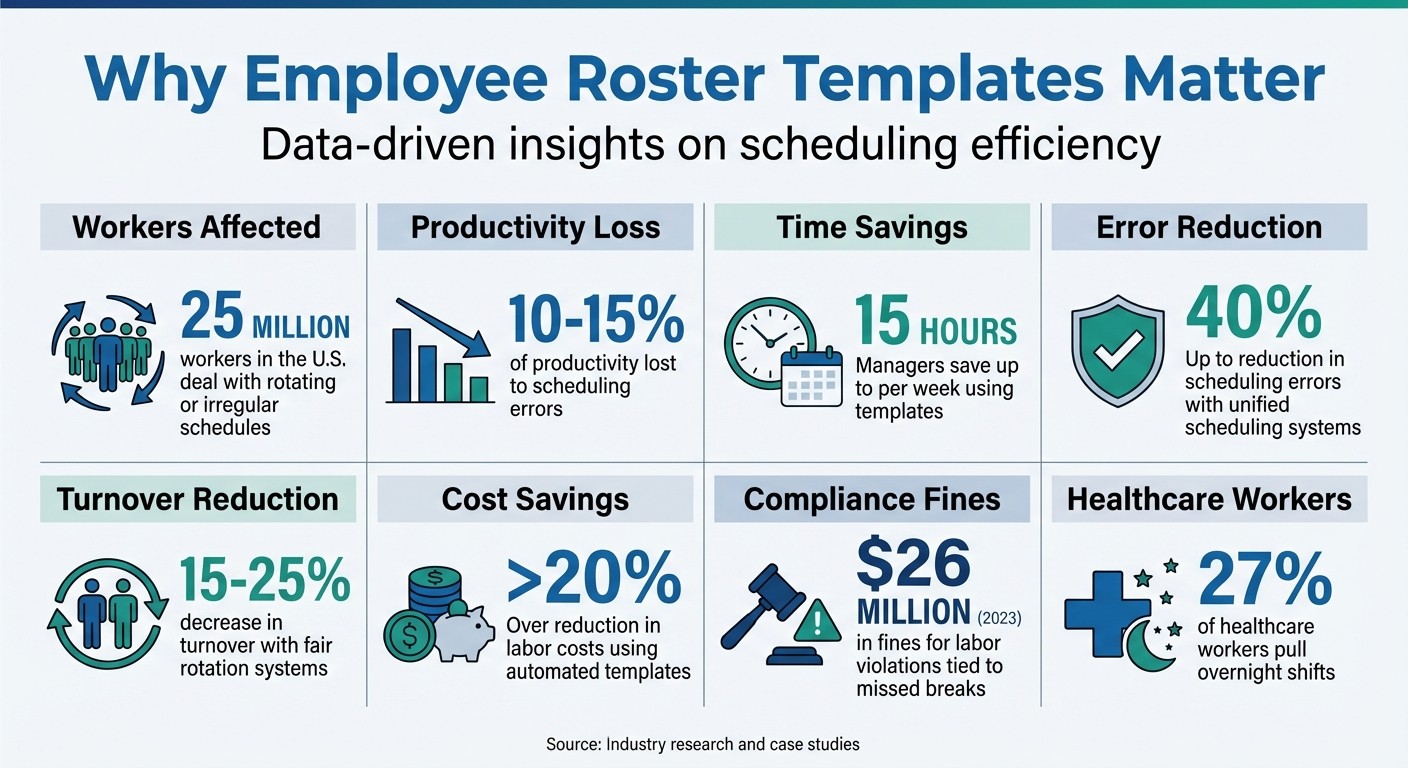
Employee Scheduling Statistics: Impact of Roster Templates on Productivity and Retention
The Benefits of Using Employee Roster Templates
Let me tell you, a solid roster template isn't just a handy tool - it’s a game-changer for anyone managing schedules. Think about it: instead of juggling endless texts, emails, and side conversations, you’ve got one central record that keeps everything crystal clear. If a shift change or swap doesn’t make it onto the sheet, it’s like it never happened. That clarity alone can save you from the chaos of miscommunication and scheduling headaches.
Here’s where it gets even better. Templates transform how you approach scheduling. Instead of rushing to fill open slots based on who messages you first, you can take a more strategic approach. Start with what’s called demand-led planning. Identify the "ghost shifts" - the exact number of people you need to cover your bases for safety and service - before assigning anyone. It’s a smarter way to ensure your business needs are met without just reacting to availability. As CrewHR puts it, “The template represents the demand; the roster represents the supply”.
Now, let’s talk about compliance. If you’re operating in cities with Fair Workweek laws like New York, Seattle, or Chicago, you know how tricky it can be to stay on top of everything. Templates help you keep things clean and compliant. They timestamp schedules, track total hours to avoid accidental overtime, and flag issues like "clopenings" (those dreaded close-then-open shifts that violate rest period rules). Plus, they help you stay on the right side of predictability pay laws, where last-minute changes can cost you extra wages.
And don’t even get me started on payroll. With templates that have built-in formulas, you can automatically calculate total hours worked, flag anyone nearing the 40-hour threshold, and get clean, error-free data ready for payroll processing. No more manual math errors. No surprise overtime costs. Just accurate numbers flowing straight into payroll.
The communication perks are just as impressive. Publishing schedules two to four weeks in advance using a template means your team can actually plan their lives. Whether it’s childcare, a second job, or just some downtime, that predictability is a gift. And here’s the kicker: giving your team that kind of reliability can cut turnover by 15–25%. At Pebb, we’ve seen it ourselves. Teams that combine structured scheduling tools with unified communication see scheduling errors drop by up to 40%. Why? Because everyone’s on the same page, looking at the same info in real time.
These are just a few of the ways templates can simplify your life and improve your team’s experience. Ready to dive into the different types of roster templates? Let’s go.
How to Choose the Right Roster Template
Picking the right roster template isn’t just about filling shifts - it’s about creating a system that works for your team and your business. If you’re running a retail store or office with steady 9-to-5 hours, a fixed schedule template can bring much-needed consistency. But for industries like healthcare, manufacturing, or any 24/7 operation, a rotating schedule template ensures overnight and weekend shifts are distributed fairly across your team. It’s all about matching the template to your specific setup.
Here’s a key lesson we’ve learned at Pebb: the best templates focus on demand first, not just filling names into slots. Your template should clearly outline the coverage you need - like "two baristas for Monday morning" or "one shift lead for Friday night" - before you start assigning employees. This approach shifts the focus to strategic planning instead of scrambling to accommodate whoever’s available at the last minute.
Visual clarity matters. Look for templates that use color coding to differentiate roles, include rows for unassigned shifts, and have space for notes about swaps or changes. A well-designed template helps you quickly spot gaps in coverage. If you’re in a city with Fair Workweek laws - like New York, Chicago, or Seattle - your template should also flag potential issues like "clopenings" (when someone closes late and opens early) or track compliance with the 14-day notice requirement.
And let’s not forget compatibility. If you’re working in Google Sheets, for example, you can share a live link that updates in real time. Saving rosters as CSV files also makes it easy to import them into scheduling platforms later. At Pebb, we’ve seen how moving from static spreadsheets to a platform that combines scheduling and communication can reduce errors by up to 40%. That’s a game-changer.
The right roster template doesn’t just make scheduling easier - it grows with your needs and keeps your team running smoothly.
1. Weekly Shift Schedule Templates
Standard 7-Day Coverage Template
Let me share something that’s been a game-changer for us at Pebb: the standard 7-day coverage template. It’s a simple yet powerful tool that helps you map out your weekly staffing needs. Think of it as a blueprint where the demand - how many people you need and when - is laid out. Then, each week, you fill in the supply - who’s actually covering those shifts.
Here’s how we approach it. Before assigning names, we first pinpoint those tricky "ghost shifts." These are the hours when staffing gaps are most likely, based on sales data or foot traffic patterns. Once that’s clear, we lock in the anchor shifts - those high-pressure times like Friday nights or weekend rushes - with our most dependable team members.
These templates come with built-in features that save tons of time and headaches. For instance:
Automated calculations for employee hours, which help flag potential overtime.
Color-coded roles (like "Kitchen" versus "Front of House") for quick clarity.
Rows for unassigned shifts, making it easy to spot and fill coverage gaps.
Here’s the kicker: managers using these templates have saved up to 15 hours per week just by ditching manual scheduling. And when you pair this with a digital scheduling system that integrates team communication, scheduling errors can drop by as much as 40%. That’s a win-win for everyone.
Another thing we’ve learned is the importance of compliance. If you’re in cities like New York or Chicago, where Fair Workweek laws are in place, adding a two-week visibility schedule to your template is a must. It keeps you on the right side of the law, avoiding those costly "predictability pay" penalties, while giving your team the consistency they need.
Once you’ve got your weekly schedule locked in, you can dive into daily roster templates for even more precision. Trust me, it’s worth it.
2. Daily Roster Templates
Hourly Coverage Grid Template
Let me share how we handle daily roster templates at Pebb. These templates are perfect for managing the nitty-gritty of hour-to-hour operations. When you need to know exactly who’s doing what and when, this is your go-to tool.
Here’s how it works: the left-hand side lists hourly time slots - say, from 6:00 AM to 10:00 PM. Across the top, you’ll see columns for roles like Register, Kitchen, or Stockroom. This layout makes it super easy to spot gaps in coverage, like ensuring the lunch rush at 12:30 PM is fully staffed. It’s all about having the right people in the right place at the right time.
Now, here’s a pro tip we swear by: add a column for tracking breaks. Why? Because missed breaks can lead to more than just cranky team members. In 2023 alone, U.S. companies racked up nearly $26 million in fines for labor violations tied to missed breaks. By scheduling meal periods ahead of time, you stay compliant with labor laws and keep your team happy - no scrambling mid-shift.
We’ve also found that renaming the “Position” column to “Task/Responsibility” makes a big difference. Instead of vague labels like “Morning Shift,” you can assign specific duties like “Opening Checklist” or “Closing Routine.” This little tweak improves accountability and ensures smoother transitions between shifts.
"If your schedule only works when everything goes perfectly, it doesn't actually work." - Homebase
Daily templates are a lifesaver in industries like hospitality, retail, healthcare, and manufacturing, where things can get hectic fast. They’re also great for making mid-day adjustments when demand shifts unexpectedly. Trust me, having this kind of flexibility can make all the difference.
3. Team-Based Scheduling Templates
Department-Based Roster Template
Let me tell you, once we got the hang of daily and weekly rosters, we knew it was time to up our game. That’s where team-based templates come in - they’re a game changer for organizing staff by department. Whether it’s the Kitchen, Front of House, Engineering, or Marketing, this approach creates a clear structure that makes everything run smoother.
Here’s why it works: grouping people by department eliminates confusion. Everyone knows who’s on their team and who to go to for answers. No more scrambling to figure out who’s handling what. These templates usually break things down by department, showing team members, their shifts, and their specific roles. It’s like having a cheat sheet for who’s doing what, and it makes cross-functional work so much easier.
Now, let’s talk fairness - because this is where it gets interesting. When companies use fair rotation systems, like the 2-2-3 "Panama" schedule, turnover rates can drop by 15-25%. That’s a big deal, especially when you think about the 25 million people in the U.S. working rotating or irregular schedules. Distributing those tough night shifts fairly instead of sticking the same team with them? It’s a small change that makes a massive difference in keeping people happy and sticking around.
"A schedule is more than just a grid of names and times. It's a statement about what you value." - Dan Robin
Here’s a tip we’ve nailed down: publishing schedules in advance does wonders for planning and morale. And if you’re working with rotating shifts, always go with forward rotation - moving from days to evenings to nights. It’s easier on the body and keeps productivity from dropping by that usual 10-15%. At Pebb, we’ve paired team-based scheduling with tools that keep everyone in the loop. The result? Fewer mistakes, better collaboration, and a team that’s always on the same page.
4. Industry-Specific Templates
Tailored Templates for Your Industry
Let me share how industry-specific templates can transform scheduling into a smoother, more efficient process. Every industry has its quirks, and scheduling isn’t a one-size-fits-all game. Whether you’re running a bustling restaurant, managing a hospital ward, or handling retail operations, the right template can make all the difference. Let’s break it down.
In hospitality and restaurants, the roles are as varied as the menu. You’ve got chefs, prep cooks, line cooks, servers, and managers - all with different peak hours and coverage needs. A good template separates front-of-house and kitchen roles to make sure everyone’s in the right place at the right time.
Now, in healthcare, things get a bit more intense. With 27% of healthcare workers pulling overnight shifts, fair rotation templates are a must. Facilities often rely on 10-hour or 12-hour shift patterns to reduce handovers and keep things running smoothly during those long, demanding hours.
Retail is another beast entirely. Foot traffic can change by the day - or even the hour. Weekly shift templates that adapt to these fluctuations are key to keeping shelves stocked and customers happy. And for industries that never sleep - like security, logistics, or 24/7 healthcare - 8-hour rotation templates help balance day, swing, and night shifts without burning out your team.
At Pebb, we’ve built our shift scheduling feature with these challenges in mind. Whatever your industry, we’ve got a template that fits your needs, so you can focus on what matters most - keeping your business running smoothly and your team happy.
5. Customizable Templates
Templates That Work for You
Customizable templates aren’t just about plugging in names and times - they’re about creating schedules that fit your specific business needs. A good template acts as a starting point, but the real magic happens when you can adjust the details to match how your team operates.
Features like dropdown menus for employee names and shift types make scheduling faster and reduce the chance of mistakes. Add in automated calculations and color-coded shifts, and you’ve got a tool that not only improves accuracy but also makes everything easier to read. Businesses using these templates have reported cutting labor costs by over 20%. Including an "Unassigned" or "Open Shift" row is another smart move - it helps you spot coverage gaps in seconds.
At Pebb, we’ve made customizable templates a key part of our free, all-in-one communication platform. Our scheduling feature is designed to be intuitive and flexible. You can download templates in various formats that sync perfectly with the Pebb app. What starts as a simple spreadsheet evolves into a dynamic schedule that integrates with team chat, shift swaps, and time-off requests - all in real time.
"The template represents the demand; the roster represents the supply. When you merge the two, you get a functional schedule." - CrewHR Resources
Up next, we’ll dive into additional scheduling tools that can simplify workforce management even further.
6. Overtime and Availability Trackers
Track Overtime and Availability
Let me share something we’ve learned at Pebb about keeping schedules under control without overwhelming the team. Overtime trackers are a game-changer. They don’t just tally up hours - they help you stay ahead of potential problems, like budget overruns or employee burnout. With built-in formulas, these trackers flag when someone is nearing the 40-hour mark for the week. This gives you a heads-up before unplanned overtime sneaks up on you. As Dan Robin from our team puts it:
"I've also built in some basic formulas to help you avoid accidental overtime - a classic trap I've seen sink budgets and burn out great people".
But here’s the thing: overtime tracking works best when paired with availability tracking. Instead of relying on sticky notes or vague verbal agreements, availability trackers give you a clear view of who’s actually available. They include recurring preferences, approved time-off requests, and even pending ones. It’s all in one place, so you’re not left guessing.
This approach does more than just streamline scheduling. It prevents you from leaning too heavily on your most dependable employees, spreading shifts more fairly across the team. Plus, by tracking everything - approved time-off, upcoming holidays, and pending requests - you’ll catch conflicts before they become issues.
At Pebb, we’ve taken this concept a step further by integrating overtime and availability tracking into our free scheduling tool. What starts as a simple template can grow into a full-fledged system that handles shift swaps, time-off requests, and even team chats in real time. No more juggling spreadsheets and messaging apps to figure out who’s working when. It’s all right there, ready to make your life easier.
7. Mobile-Friendly Templates
Access Your Schedule from Anywhere
Let me paint a picture: your team is constantly on the move - whether they’re on the floor, traveling, or juggling shifts. Their go-to tool for staying in the loop? Their phones. That’s why having mobile-friendly roster templates isn’t just a luxury; it’s a necessity. Swapping out static PDFs for cloud-based tools like Google Sheets means your team can quickly pull up the latest schedule without sifting through outdated emails or printed copies. It’s all about having real-time access, right at their fingertips.
But here’s where things get interesting. A mobile-friendly template is great, but when it evolves into a live, interactive system, it’s a total game-changer. At Pebb, we’ve watched this transformation firsthand. Imagine this: a shift swap gets approved, or someone’s PTO request is greenlit, and - boom - the updates are instantly visible across all devices. As my colleague Dan Robin perfectly summed it up:
"When you plug your rotation into a platform like Pebb, the game changes. The schedule stops being a static document and becomes a live, interactive hub".
What sets a truly mobile-integrated system apart is the little things that make a big difference: push notifications and built-in communication. Instead of employees constantly refreshing their schedules, they get real-time alerts whenever shifts change or new schedules are posted. Need to swap a shift? No problem. Team members can message each other directly within the app, keeping personal phone numbers private. It’s seamless, efficient, and exactly what modern teams need.
Now, if you’re still relying on spreadsheets, switching to Google Sheets over Excel is a solid step forward. It eliminates version confusion and makes schedules viewable on mobile browsers. But let’s be honest - if you’re managing over 15 employees or multiple locations, it’s time to step up to an all-in-one solution like Pebb. With mobile integration, you’ll cut down on scheduling errors and save precious management time. Pebb’s platform doesn’t just handle schedules - it turns your CSV template into a powerful tool for real-time updates, team communication, and time-off management. It’s efficiency, reimagined.
Wrapping It Up
Let me tell you, a solid roster template isn’t just a nice-to-have - it’s the backbone of smooth operations and keeping things compliant. It’s also your best friend when it comes to avoiding burnout. By starting with a pre-designed template, you’re tapping into a framework that’s already built to match your business needs.
Here’s what the numbers say: unified scheduling systems can cut scheduling errors by as much as 40%. On top of that, unpredictable schedules are one of the biggest reasons hourly workers quit. Templates simplify everything by acting as a single source of truth, reducing confusion, and boosting accountability.
We’ve taken this idea and run with it at Pebb. Our dynamic scheduling system doesn’t just stop at templates - it integrates real-time updates, push notifications, and streamlined time-off management. It’s all part of our ecosystem, which includes chat, PTO tracking, news updates, and more. And the best part? It’s all yours for just $4 per user per month. No clunky spreadsheets - just a system that works.
So, why not take the first step? Download our free templates and start building schedules that actually fit your operation. Use them to map out staffing needs, assign those key shifts to your rockstar employees, and give your team the advance notice they deserve. You’ll see fewer no-shows, happier employees, and maybe even get to enjoy a lazy Saturday morning again.
Try out the free templates and see how they feel. When you’re ready, Pebb’s seamless integration is here to take things to the next level. Because let’s face it - predictable schedules aren’t just practical; they’re the foundation of a stronger, more reliable team. Your team will thank you for it.
FAQs
Which roster template should I use for my team?
When it comes to choosing the right roster template, it all boils down to what your team needs. For industries that run around the clock, like healthcare or warehouses, a Shift-Based Staff Roster works perfectly. If you're juggling rotating shifts, the Rotating Shift Schedule Template can simplify things. For straightforward and flexible planning, weekly or monthly templates are a solid choice.
Want to make life even easier? At Pebb, we’ve got an all-in-one solution that handles scheduling, communication, and team management seamlessly - for just $4 per user. It's a game-changer for keeping operations smooth and stress-free.
How do I prevent overtime with a roster template?
To keep overtime in check, I’ve found that using a structured roster template works wonders. It’s all about clearly defining shift coverage and balancing workloads. Planning shifts ahead of time helps avoid overstaffing or those dreaded excessive hours. Plus, staying flexible by adjusting schedules based on employee availability is key.
Here’s where tools like Pebb come in handy. With features like shift scheduling and PTO management, Pebb makes it easier for managers to coordinate everything smoothly. And the best part? It’s budget-friendly at just $4 per user. Trust me, it’s a game-changer for staying organized and keeping overtime under control.
How can I share schedules and updates in real time?
You know what’s a game-changer? Real-time updates. With Pebb's platform, sharing schedules and updates happens instantly. If there’s a shift change or a last-minute update, the entire team sees it right away - no more frantic texts or missed memos.
And here’s the best part: mobile access. Your team can check their shifts or any updates anytime, anywhere. Whether they’re at home, on the go, or already at work, they’re always in the loop. This kind of clear, instant communication cuts out the guesswork, keeps everyone on the same page, and makes juggling locations and shifts a whole lot easier.
