
Author: Ron Daniel
Employee Clock In Software for Frontline Teams
Mobile and kiosk clock-ins with GPS verification, payroll integration, scheduling, and rollout tips to reduce payroll errors for frontline teams.
Have you ever spent hours trying to fix payroll errors or chasing down missing timesheets? I’ve been there, and let me tell you - it’s exhausting. A few years ago, I managed a team across multiple locations, and our old system was a patchwork of paper logs, spreadsheets, and manual calculations. Every pay period felt like a race against the clock, and no matter how hard we tried, errors slipped through. Sound familiar?
Here’s a stat that hit me like a ton of bricks: According to the American Payroll Association, businesses lose 2–8% of total payroll costs to time theft and miscalculations when relying on outdated methods. For companies where labor makes up 20–35% of operating expenses, that’s a massive hole in the budget. And it’s not just about money - time theft (like buddy punching) and endless disputes over hours can crush team morale. Trust me, I’ve seen it firsthand.
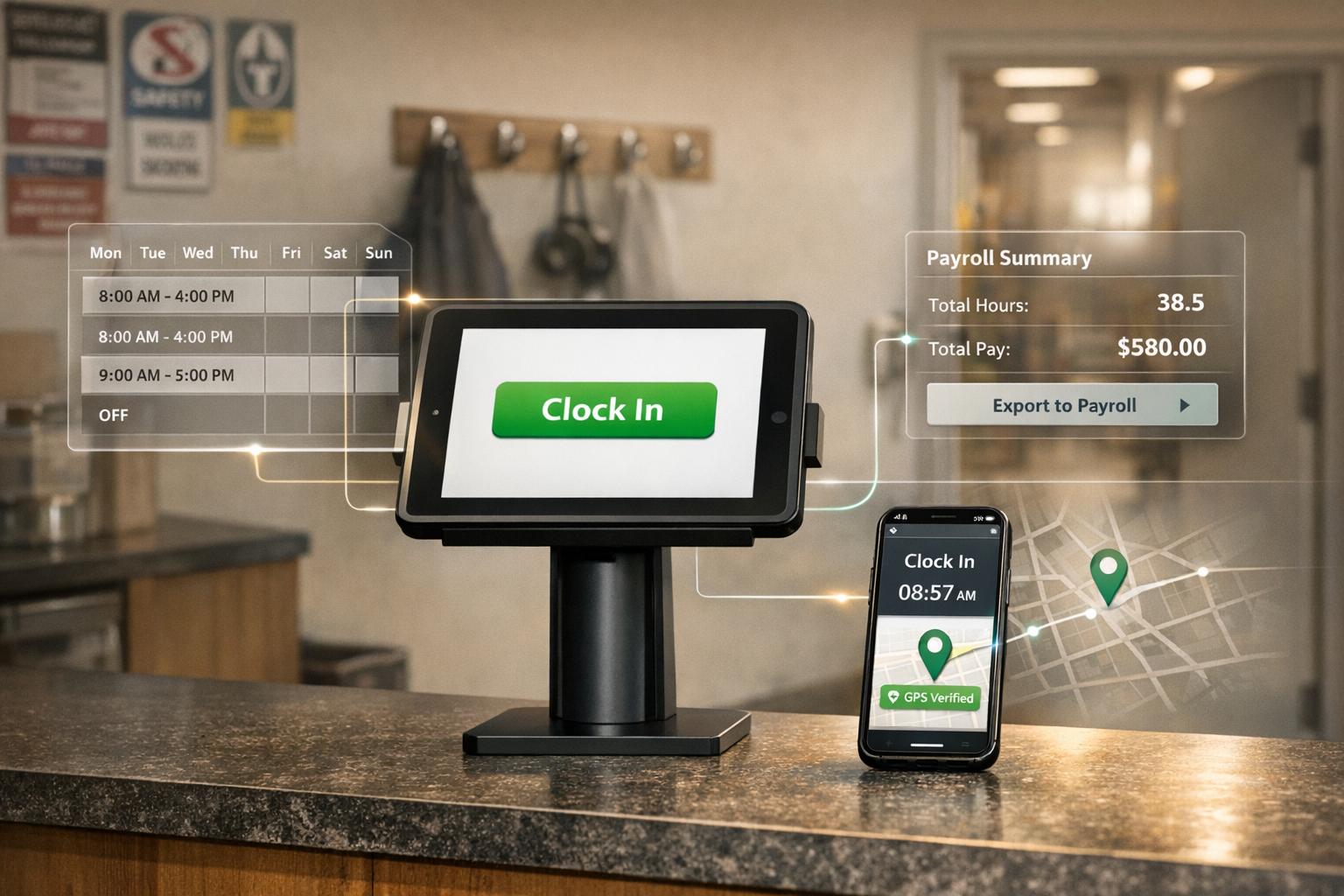
That’s when we discovered Pebb’s Clock-In feature. It changed everything. Employees could clock in using their phones or a kiosk, with GPS verification ensuring accuracy. Suddenly, payroll errors dropped, disputes faded, and my team actually started trusting the system. In this guide, I’ll share how it works, key features to look for, and tips for making the switch without the headaches. Let’s dive in - you’re going to love how much easier this can make your life.
Key Features to Look for in Employee Clock In Software
When it comes to clock-in software, it’s not just about recording punches - it’s about meeting the unique needs of diverse frontline teams. Let me walk you through the features that really make a difference.
Mobile and Kiosk Clock In Options
Having flexible clock-in options is a game-changer. With native iOS and Android apps, employees can clock in with just a tap on their phones. But what about those without personal devices? That’s where kiosk mode shines. Picture a shared tablet stationed at the store entrance or break room, allowing employees to log in securely using a PIN or QR code. The device stays locked to the clock-in interface, keeping things simple and secure.
And here’s a lifesaver: offline clock-ins. When connectivity drops, punches are stored locally and sync automatically once the device is back online. No more worrying about lost data during downtime.
Now, let’s take it up a notch with GPS and geofencing.
GPS and Geofencing for Location Verification
GPS timestamps are like a digital handshake - they confirm not just when but where an employee clocks in. Add geofencing into the mix, and you’ve got a virtual boundary that ensures punches happen only in approved locations. This feature is a powerful deterrent for issues like buddy punching or off-site time fraud.
But here’s the thing: in the U.S., location tracking comes with privacy responsibilities. You’ll need written employee consent that explains exactly what’s being tracked (just clock-in and clock-out events), who can access the data, and how long it’s kept. This level of transparency is especially important in states like California and New York, where privacy standards are strict.
Integration with Shift Scheduling and PTO Management
Let’s be honest - standalone clock-in tools only solve part of the problem. The real magic happens when time tracking integrates with shift scheduling and PTO management. For example, Pebb’s Shifts Scheduling tool creates a seamless flow of information. Managers get real-time alerts for missed punches, making it easy to adjust staffing on the fly. And when PTO requests are approved, the system blocks out clock-in options automatically, cutting down on manual fixes and payroll headaches.
Speaking of payroll, let’s talk about how integration can simplify compliance.
Payroll Integration and Labor Law Compliance
Accurate time tracking doesn’t stop at clocking in - it needs to flow directly into payroll. This means mapping hours, overtime, and leave to the right codes effortlessly. For U.S. employers, it’s crucial to follow FLSA overtime rules (like the 40-hour workweek threshold for non-exempt employees) and state-specific laws, such as California’s daily overtime and meal break requirements.
Audit logs are another must-have. Every change to a timecard should be timestamped and linked to the person who made it. This creates a clear trail that can protect your business during wage disputes or labor audits.
All-in-One Platform Advantages
Here’s where things come together: an all-in-one platform. By combining time tracking, scheduling, PTO management, and even team communication in one app, you eliminate the headaches of juggling multiple systems. With Pebb, frontline employees only need to learn one interface, and managers can resolve issues like missed punches or shift swaps without hopping between tools.
And the best part? It’s affordable to get started. Our free Standard plan supports up to 15 employees, while the Premium plan offers even more features at just $4 per user/month. It’s a simple, accessible way to streamline your operations without breaking the bank.
Benefits of Digital Clock In Software for Frontline Teams
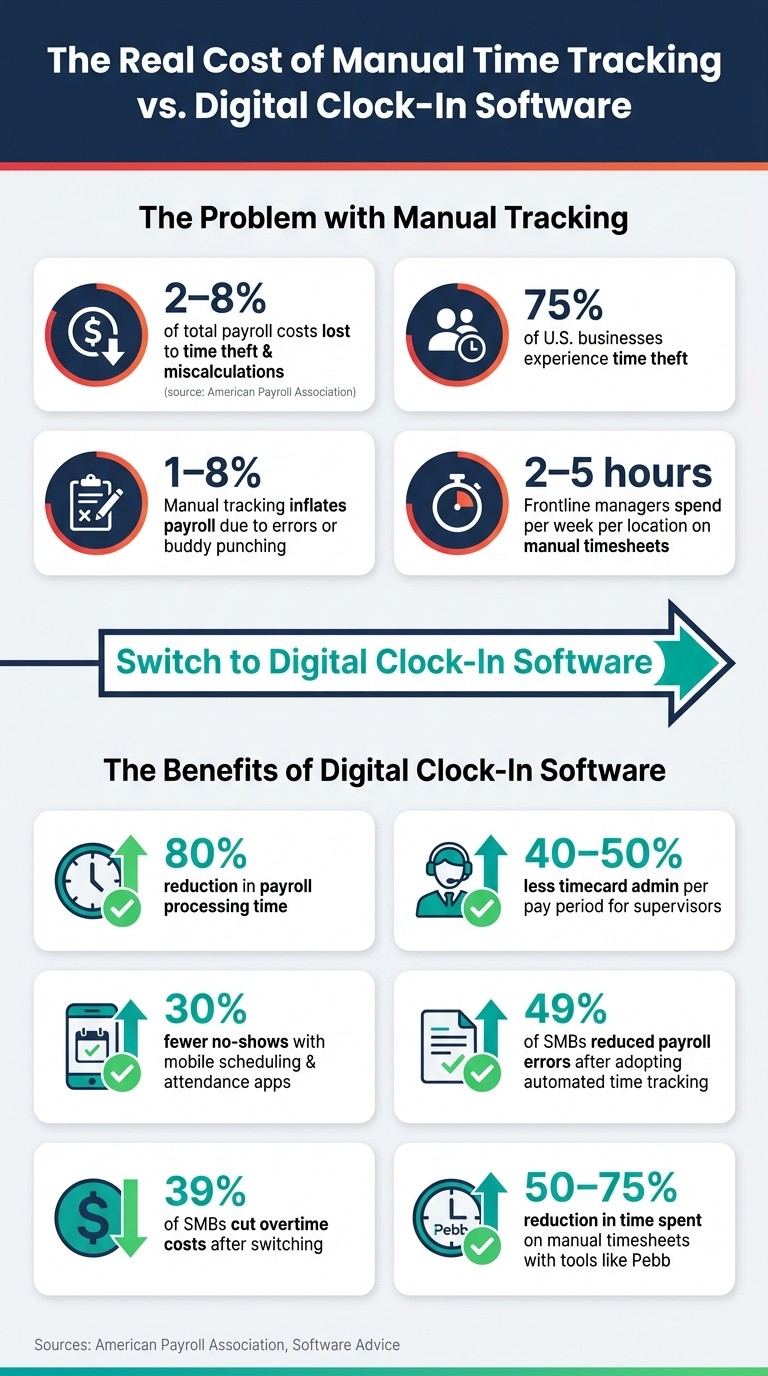
The Real Cost of Manual Time Tracking: Key Stats & Benefits of Digital Clock-In Software
Switching from paper timesheets to digital clock-in tools has been a game-changer for frontline operations. Let me walk you through how these features translate into real-world benefits for teams on the ground.
More Accurate Records and Fewer Disputes
Manual timesheets? They’re a recipe for errors. Digital clock-in systems, on the other hand, record exact timestamps the moment someone clocks in or out. This creates a centralized, tamper-proof record with a clear audit trail. No more guessing, no more messy corrections.
Here’s a stat that might surprise you: up to 75% of U.S. businesses deal with time theft, according to the American Payroll Association. Manual tracking can inflate payroll by 1–8% due to errors or "buddy punching." But with automated systems, employees can check their logged hours directly in a mobile app. This transparency cuts disputes and builds trust between staff and management.
"It's about building a foundation of trust from the first minute of the workday, guaranteeing every employee is paid accurately for every minute they work. No more disputes. No more guesswork." - Dan Robin, Founder, Pebb
Less Admin Work for Managers and HR
Let’s be honest - manually collecting and reconciling timesheets is a time sink. Automated systems take that burden off managers and HR teams. In fact, research shows these tools can cut payroll processing time by 80%. For frontline supervisors, they slash timecard-related admin by 40–50% per pay period. That’s hours saved, which can be spent coaching teams or solving customer issues instead.
Real-Time Data for Better Staffing Decisions
Here’s where things get even more practical. With digital clock-in tools, you get real-time dashboards that show exactly who’s on shift, who’s running late, and where you might have gaps. This instant visibility is a lifesaver in fast-paced industries like retail, food service, and healthcare, where staffing needs can change by the hour. Mobile apps for scheduling and attendance have even been shown to reduce no-shows by 30%. That means fewer last-minute scrambles and smoother operations.
Audit-Ready Records and Reduced Legal Risk
Staying compliant with U.S. labor laws is non-negotiable. Digital clock-in systems help by keeping detailed, timestamped logs of every punch, break, and edit. These records ensure compliance with FLSA overtime rules and state-specific laws like California’s daily overtime and meal break requirements. Every change is logged with a timestamp and user ID, giving you a defensible, audit-ready system. Compare that to sifting through piles of paper records - it’s no contest.
Better Team Communication Through One Platform
Here’s the cherry on top: when your clock-in system is part of the same platform as chat and shift updates, everything just flows. Frontline workers without corporate email can still get shift-wide announcements, submit coverage requests, and see who’s on shift in real time. Managers get the full picture too - who approved a swap, when a call-out happened - all in one connected record. This kind of integration reduces miscommunication and keeps everyone, from the floor to the front office, on the same page.
Switching to digital clock-in tools isn’t just about saving time - it’s about creating a smoother, more connected work environment for everyone involved.
How to Choose the Right Clock-In Software for Your Team
Picking the right clock-in software can feel like a daunting task. But here's the thing: if you approach it by breaking it down into four key areas - team needs, usability, cost, and platform strategy - the decision becomes much more manageable. And trust me, getting this right makes a huge difference in how smoothly your team operates.
Start by Defining Your Team's Needs
The first step is to really understand what your team requires. Think about their workflow and the tools they already have:
Do your employees use personal smartphones, or is there a shared kiosk at a workstation?
Are you dealing with multiple job sites, some of which might have spotty Wi-Fi?
Are your schedules fixed, or do they change frequently?
Do you need to track things like breaks, job codes, or shift differentials?
These questions will help you narrow down your options. For example, what works for a construction crew in the field is going to be very different from what a restaurant's back-of-house team needs. Getting specific about your team’s situation can save you from investing in software that looks great during a demo but falls short in real-world use.
Usability and Key Features Matter
The best software is the one your team actually uses. If clocking in or requesting a shift swap feels like solving a puzzle, adoption will tank. Frontline workers shouldn’t need a crash course just to do the basics. Look for software where clocking in and out takes just a few taps.
On top of simplicity, there are some must-have features that can save you a ton of headaches:
Mobile clock-in with GPS and geofencing
Offline sync for areas with poor connectivity
Integration with shift scheduling
PTO management and direct payroll export
Alerts for missed punches or early clock-ins
These kinds of features keep things running smoothly and help avoid payroll chaos.
"The best software is the one your team doesn't secretly resent using. It should feel like a helping hand, not another task on a to-do list." - Dan Robin, Founder, Pebb
Don’t Overlook Cost and Vendor Support
It’s easy to focus on the per-user price, but that’s just one piece of the puzzle. Make sure you’re looking at the total cost, including things like setup fees, kiosk hardware, and any extra charges for advanced features like GPS or reporting. For example, a tool that costs $8 per user per month but requires separate apps for scheduling and payroll could end up being more expensive than an all-in-one solution priced at $4 per user per month.
Vendor support is another big one, especially for frontline teams. Imagine a clock-in system failing at 6:00 a.m. on a Monday - without responsive support, that can snowball into payroll issues and compliance risks. Check if live support is available during your operating hours, how quickly issues are resolved, and whether onboarding is included. These details can make or break your experience with the software.
All-in-One Platform vs. Multiple Standalone Tools
Here’s where you need to think about your overall approach. Using multiple standalone tools - like pairing Microsoft Teams Shifts with a separate time-tracking app and a PTO manager - can create extra work. You’ll deal with integration issues, duplicate data entry, and multiple logins, which can be frustrating for frontline workers already juggling a lot.
On the flip side, an all-in-one platform like Pebb combines clock-in, shift scheduling, PTO management, and team chat into a single app. It’s one login, one interface, and one source of truth. For teams with high turnover or limited IT resources, this simplicity can be a game-changer. However, if you’re already deeply invested in tools like Microsoft 365 or Slack, a tightly integrated point solution might make sense. Still, for most frontline teams, fewer tools mean fewer gaps - and fewer gaps mean fewer payroll headaches.
Steps to Roll Out Clock In Software for Frontline Teams
Rolling out clock-in software for frontline teams isn’t just about flipping a switch and hoping for the best. A thoughtful, step-by-step approach can make all the difference between smooth adoption and a frustrating experience for everyone involved. Let me walk you through how we’ve tackled this at Pebb.io.
Pilot the Software Before Full Deployment
We always start small. Instead of launching company-wide, we pick one team or location to run a pilot. Ideally, this lasts for a full pay cycle - about 2 to 4 weeks - so we can test every part of the process, from clocking in to payroll.
During the pilot, we try to break the system (in a good way). For example, we check how accurate the GPS is near the building’s entry points, see how offline mode works in areas with spotty Wi-Fi, and test how breaks are tracked across different shift lengths. We even simulate scenarios like someone forgetting to clock out. To make this work, we assign pilot champions - a lead supervisor and a couple of frontline "super-users" - who help spot issues and provide feedback. Every hiccup and its solution gets documented, creating a playbook for the larger rollout.
Set Up Policies and Train Managers
Before rolling out to everyone, we make sure the software aligns with both company policies and legal requirements. This includes configuring clock-in windows (usually 5–10 minutes), setting up break tracking, and defining overtime alerts. If you're in a state like California, where meal and rest break laws are stricter, these rules need to be baked into the system too.
Managers are the key to making this work. We hold focused, hands-on training sessions (60–90 minutes) where they learn how to review timesheets, handle missed punches, respond to overtime alerts, and spot trends like repeated early clock-outs. We also give them a quick-reference checklist - a simple one-pager they can use daily. When managers feel confident, their teams are more likely to trust and adopt the system.
Onboard Employees with Clear Instructions
For employees, we keep training short and to the point. During shift huddles, we do live demos, showing them step-by-step how to clock in, start a break, and check their hours. We also post a one-page cheat sheet with screenshots at every clock-in station.
Here’s where it gets personal: we explain what’s in it for them. Accurate pay? Faster corrections? Full visibility into their hours and PTO? These are big wins for employees. And we’re upfront about concerns like GPS tracking, clarifying that it only applies when they’re on the clock. Addressing these worries early can ease resistance significantly.
Track Results and Improve Over Time
Before rolling out, we gather baseline data - things like missed punches, timecard corrections, and overtime frequency - from the old system. Once the new software is live, we track metrics weekly for the first month: on-time clock-ins, missed punches, unapproved overtime, and manual edits.
Here’s the thing: the benefits don’t just happen by magic. According to Software Advice, 49% of small and midsize businesses reduced payroll errors, and 39% cut overtime costs after adopting automated time tracking. But those results come from actively monitoring the data and making adjustments.
We also gather feedback through quick surveys after the first pay cycle. This helps us catch issues that dashboards might miss - like a geofence that’s too restrictive or a kiosk causing delays during shift changes. The rollout isn’t a one-and-done deal; it’s an ongoing process of tweaking and improving based on what we learn.
Conclusion: Better Frontline Workforce Management with Pebb
Let’s face it - managing a frontline team can feel like a never-ending juggling act. Between verifying attendance, fixing missed punches, and chasing down paper timesheets, the admin work alone can eat up hours of your week. That’s where digital clock-in software becomes a game-changer. It eliminates the guesswork by providing accurate, timestamped records - data you can rely on, just like we’ve been discussing throughout this guide.
Here’s a stat that might surprise you: U.S. frontline managers typically spend 2–5 hours per week per location just handling manual timesheets. That’s a lot of time that could be better spent elsewhere. With automated clock-ins and built-in scheduling, teams using tools like Pebb often cut that time by 50–75%. And with every clock-in tied to a GPS-verified location and user profile, issues like buddy punching and time disputes quickly become a thing of the past. When your team is earning $15–$25 an hour, every single minute saved makes a difference.
Pebb is designed for exactly this kind of efficiency. It combines time tracking, scheduling, and team communication into one seamless platform. Need to request time off? The schedule updates automatically. Got a shift change? The whole team gets notified instantly - right in the app. No switching between tools, no manual updates. This all-in-one approach doesn’t just save time; it ensures your workforce stays aligned and consistent.
We also know that rolling out new software can be a headache, especially when adoption falls flat. That’s why Pebb is built for quick onboarding. Most frontline employees are set up in minutes with just an invite link - no need for a corporate email or complicated instructions. And with the Premium plan priced at just $4 per user per month, or free for teams of up to 15, it’s a solution that practically pays for itself by cutting admin time and reducing payroll errors.
If you’re still relying on spreadsheets, paper logs, or disconnected tools, Pebb offers your frontline team a single, dependable system for time tracking, scheduling, and everyday coordination. It’s everything you need to simplify workforce management - and we’d love to show you how it can work for your team.
FAQs
How does GPS clock-in work without tracking employees all day?
GPS clock-in works by using geofencing technology to verify an employee’s location only during clock-in or clock-out moments. This means it confirms they’re at the correct job site without tracking their movements throughout the day. It’s a smart way to improve attendance accuracy while respecting employee privacy. By focusing solely on the beginning and end of shifts, it helps avoid timekeeping mistakes and eliminates the need for constant monitoring.
What happens if an employee clocks in without internet or Wi-Fi?
If an employee clocks in while offline - without internet or Wi-Fi - Pebb takes care of it. The clock-in is stored directly on the mobile device, ensuring no data is lost. Once the device reconnects to the internet, the attendance records sync automatically in real time. No extra steps, no hassle.
How do I connect clock-ins to schedules, PTO, and payroll?
Pebb takes the hassle out of workforce management by bringing everything - clock-ins, schedules, and PTO - under one roof. When someone requests time off, the system automatically checks their balance and flags any scheduling conflicts, keeping everything running smoothly. Plus, clock-in data syncs effortlessly to create accurate timesheets without the usual back-and-forth.
And when it’s payroll time? You’re covered. Pebb integrates with over 50 providers, including big names like ADP, Gusto, and QuickBooks. This means payroll data transfers automatically, cutting down on manual errors and giving you back precious hours in your day.
