

Author: Ron Daniel
A step-by-step guide to digitalizing your staff shift rotations
Map workflows, clean employee data, pick one system, build templates, and manage swaps to streamline staff shift rotations.
Most schedule problems do not start with lazy managers. They start with too many tools, too many versions, and too many last-minute messages. I’ve seen teams spend up to 10 hours a week fixing schedules by hand, only to still deal with no-shows, missed PTO updates, and coverage gaps.
At Pebb.io, we kept seeing the same pattern: paper rosters, spreadsheets, texts, and email approvals were all fighting each other. And with 80% of the global workforce working away from desks, that kind of setup breaks fast. One clean digital workflow cuts the noise, keeps one version of the schedule live, and helps managers spend less time chasing updates.
To answer this, I’m going to walk through the path we use at Pebb: map the current process, clean the data, set up one system, publish schedules, and handle swaps and call-outs without losing control.
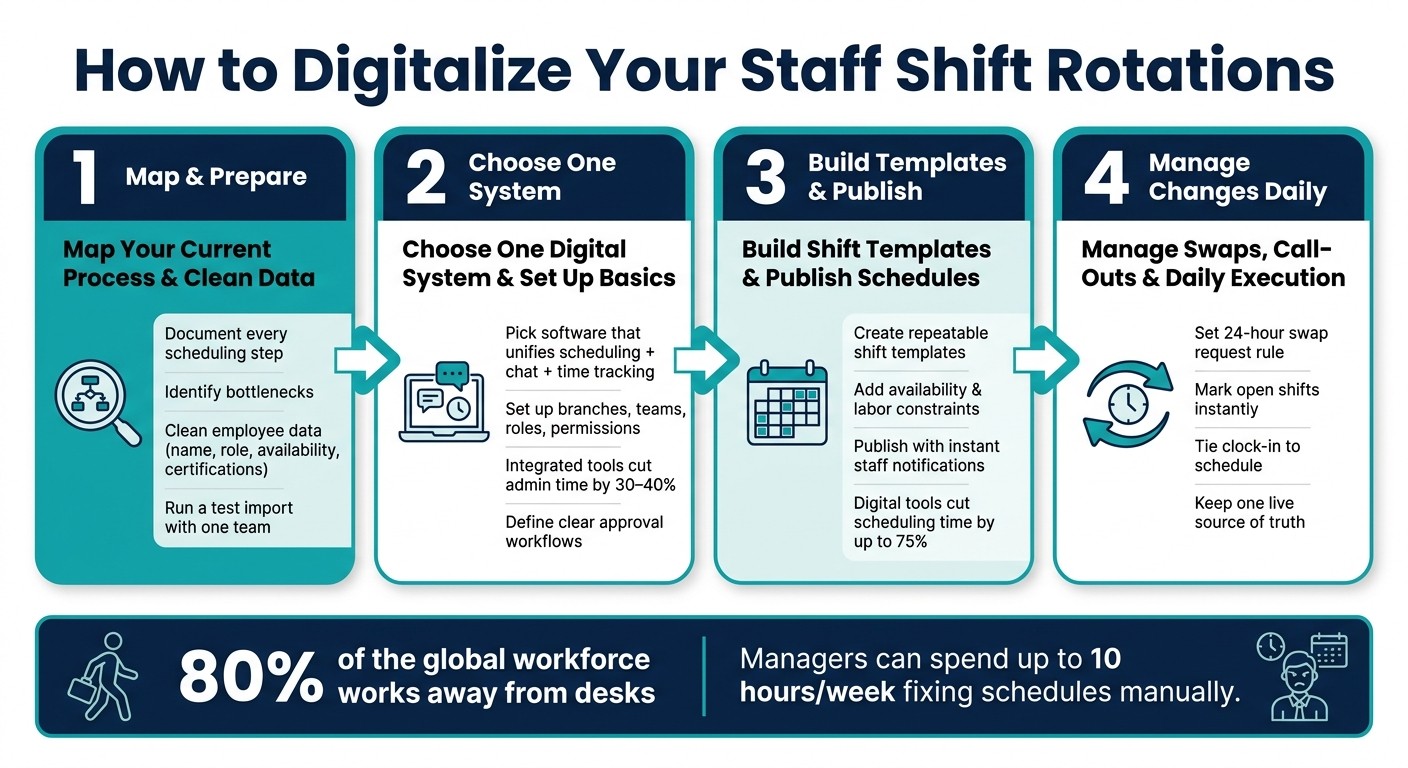
How to Digitalize Staff Shift Rotations: 4-Step Process
Step 1: map your current process and prepare your scheduling data
The first time we helped a team move off patchy spreadsheets and last-minute texts, we made a mistake I still remember. We looked at software first. Bad move.
Here’s what happened next: the tool was fine, but the process behind it was messy. Managers were doing parts of the schedule in one sheet, shift changes in text threads, and payroll checks in another system. So even with new software, the same bottlenecks stayed put.
That’s why, at Pebb.io, I always start here first. Before you pick any platform, map your scheduling workflow from end to end.
List every step in your current rotation workflow
I’d get the people in the room who deal with scheduling every week, not just leadership. That usually means store managers, supervisors, and HR or payroll staff. Then I’d walk through the whole flow, from the first staffing request all the way to payroll or compliance review.
The goal is simple: see the process as it actually works, not how people think it works.
A basic flow might look like this:
regional labor targets → schedule draft → coverage review → posting → change requests → final version sent to payroll
When we do this at Pebb.io, we also note every tool in play and who owns each step. That part matters more than most teams think. A schedule can fall apart fast when no one is sure who is supposed to approve a change or send the final version.
This map becomes the blueprint for your digital workflow.
I’d also flag the spots where things slow down or go sideways. Maybe approvals sit too long. Maybe shift swaps come in through three channels. Maybe payroll gets a schedule version that’s already out of date. Those are the cracks you want to see early.
Then record your baseline numbers. For example:
Hours spent updating schedules
Monthly coverage gaps
Time spent fixing errors or chasing approvals
Those numbers give you a clean before-and-after view once you move to a digital system.
Use this checklist to map each step:
Scheduling Step | What to Document |
|---|---|
Schedule creation | Who builds it, which tool, how long it takes |
Approval | Who signs off, how long approvals take |
Communication | How staff find out (print, text, email, chat) |
Swaps & changes | How requests come in, who approves, how updates are shared |
PTO & availability | Where requests go, how they're tracked, how they reach the scheduler |
Time tracking | How clock-ins are recorded and matched to the schedule |
Clean the employee data you will import
Once the process is mapped, I move to the part a lot of teams want to skip: cleaning employee data.
I get it. It’s not glamorous. But I’ve seen bad data wreck a rollout faster than almost anything else. One wrong phone number, one duplicate employee record, one missing availability field, and suddenly people miss shifts or get scheduled when they can’t work.
Most digital scheduling systems need a solid set of core fields. In my experience, that usually includes full name, employee ID, job role, department, branch or location, employment type such as full-time, part-time, or seasonal, contact details, direct manager, availability by day and time, maximum weekly hours, and any legal or contract limits like overtime caps or rest periods between shifts.
You’ll also want role-based certifications when the job calls for them. Think ServSafe for food handlers, CDL Class A for drivers, or forklift licenses for warehouse roles.
At Pebb.io, we’d pull that data from wherever it lives now, whether that’s HR systems, payroll tools, paper files, or spreadsheets, and bring it into one master spreadsheet. After that, we clean it line by line:
Fix naming that doesn’t match
Remove duplicate records
Verify mobile numbers in U.S. format
Fill in blank fields before import
Bad data creates bad schedules.
One thing I always tell teams: don’t roll this out to everyone on day one. Run a test import with one team or one branch first. That small pilot usually catches formatting issues, missing fields, and odd edge cases before they spread across the whole company.
With the workflow mapped and the data cleaned, you’re in a much better spot to pick one system in Step 2.
Step 2: choose one digital system and set up the basics
I’ve seen this part go sideways more times than I’d like to admit.
At Pebb.io, we’ve talked to teams that had scheduling in one app, chat in another, and time tracking somewhere else entirely. On paper, it sounds fine. In daily work, it turns into a mess. A manager updates a shift in one tool, someone shares a screenshot of the old schedule, and suddenly the wrong people show up at the wrong time. That version drift is brutal, and it happens fast.
Choose software that keeps scheduling and communication in one place
Once your process and data are mapped, the next move is simple: pick one system that can run that workflow from start to finish.
Here’s the thing... the biggest mistake I see is stacking too many tools. One for scheduling. One for team chat. One for time tracking. It feels organized at first, but it usually creates confusion instead of order.
Slack, Teams, Workvivo, Staffbase, Firstup, and simpplr are all strong for company-wide communication, but they don’t bring scheduling, chat, and time tracking into one workflow. I’ve seen teams spend more money and more setup time on enterprise comms suites, only to find out they still haven’t fixed shift scheduling.
That’s why I always push for one system where schedule changes, updates, and clock-ins live in the same place. At Pebb, we built Pebb to keep shift scheduling, group chat, clock-in, PTO, and the news feed in one app. We also offer a free Standard plan for teams up to 15, and Premium starts at $4 per user per month.
And this isn’t just about convenience. Integrated tools can cut schedule administration time by 30–40%. If you’re managing shift rotations every week, that time savings adds up in a hurry.
Once you choose the platform, don’t force your operation to fit the software. Set the software up around how your operation already runs.
Set up branches, teams, roles, and permissions
When I help teams roll this out, I follow the same order every time: branches, teams, roles, and permissions.
That order matters more than people think. If you skip ahead or try to do it all at once, you usually end up backtracking.
Create your branches first. Use clear, real-world names with city names, like "Main Street Café – Denver" or "Clinic North – Phoenix." Each branch becomes its own home for schedules, staff lists, and local announcements.
Define teams within each branch. In a restaurant, that could be "Front of House", "Back of House", and "Bar." In a clinic network, it might look more like "Nurses", "Front Desk", and "Physicians."
Assign job roles to each employee. In Pebb, roles like "Line Cook", "Server", "Shift Lead", or "RN" attach right to shifts. You can also add optional hourly wages to each role, which helps the system calculate estimated labor costs while you build schedules.
Set permissions with care. Employees can view their shifts and chat. Supervisors can propose changes but not publish. Branch managers can create, edit, and publish schedules for their branch. Regional managers can view all branches. Swap and PTO approvals should go to the manager who owns the schedule.
Let me tell you what happened next on one rollout I watched closely. The team wanted to launch across every branch at once. We pushed them to start with one branch instead. Good thing we did. That small pilot exposed a few permission gaps and a missing role before the rollout got bigger and harder to fix.
Getting this setup right keeps the whole thing from coming apart once you scale. And once the system is in place, you’re ready to turn recurring shifts into templates and publish the first schedule.
Step 3: build shift templates, assign availability, and publish schedules
I remember the first time I built recurring schedules at Pebb.io without relying on a spreadsheet. It felt almost too simple. Before that, I was doing the same thing over and over again, rebuilding morning, lunch, and closing shifts by hand. That’s the point where scheduling starts to eat your week.
This step is where I usually start seeing time come back.
Create repeatable shift templates that match real operations
When I set up a shift template, I try to think like an operator, not just a scheduler. If the template is weak, the whole schedule gets messy fast.
A good template includes the basics you need every single time:
Shift name like "Opening Cashier – Store 101"
Start and end times in U.S. 12-hour format, like 7:00 AM–3:00 PM
Paid and unpaid breaks
The role
The days it repeats
In Pebb, I can also switch on Repeating Shift so patterns auto-recur, like "Every Monday morning" or "Every weekday".
Here’s the thing: the best templates match how the business actually runs. In restaurants, I’ve seen teams set them up around meal periods like Breakfast (7:00 AM–11:00 AM), Lunch (11:00 AM–3:00 PM), and Dinner (5:00 PM–10:00 PM). In retail or healthcare, it’s more common to build around role coverage and minimum staffing.
What’s worked for me is keeping the setup simple:
Use fixed templates when demand stays steady
Use flexible templates when traffic shifts week to week
Use role-based templates when certain jobs need the right person in place
And when a team needs both skill coverage and location coverage, I combine role-based templates with location-level planning so I can see both in one view.
Once that pattern is in place, I’m not starting from zero anymore. I’m filling in the schedule with actual people, actual availability, and actual labor rules.
Add availability, labor constraints, and role requirements
Let me tell you what happened next when we skipped this part once: the schedule looked fine on paper, but two people were assigned outside their normal availability, one employee was drifting toward overtime, and a role that needed a certain qualification was about to be covered by the wrong person. We caught it late, and fixing it was a headache.
That’s why I never assign shifts before availability is up to date.
At Pebb, employees submit availability right in the app. That includes workdays, preferred time windows, weekly targets, and recurring limits. Managers approve it, which helps keep the process under control. Then, when I’m building the schedule, I can filter for who is actually available for that time slot and role.
Availability is only part of it, though. I also make sure hard limits are set before anything goes live. That means overtime thresholds, minimum rest periods, and role or certification needs. If those rules are in place, the system can flag problems before the schedule is published .
That saves a lot of cleanup later.
Publish schedules and notify staff through the app
Once the shifts are covered and the labor rules check out, I publish the schedule in the app.
Right before I do, I always run one last check. Nothing fancy. I just make sure each role and location meets minimum staffing, scan for overtime flags, and confirm nobody is booked outside their stated availability.
In Pebb, the Schedule Summary Bar makes this part much easier. I can see open slots, hours, and labor cost at a glance, which helps me spot gaps or budget issues before they turn into bigger problems.
After I publish, employees get an instant notification. They can see shifts on their phones and get updates in the same place. That may sound small, but it cuts out a ton of noise. No screenshots. No group texts. No wondering which version of the schedule is the latest. Questions stay in work chat, so one schedule of record stays current.
I’ve seen why this matters up close. When everything lives in one place, people stop missing updates, and managers stop repeating themselves.
And the time savings are hard to ignore. Digital scheduling tools can cut the time managers spend on scheduling by up to 75%.
After that, I use the same workflow for swaps, coverage requests, and last-minute changes.
Step 4: manage swaps, last-minute changes, and daily execution
The moment I publish a schedule, the job changes. It stops being a file and starts being a live workflow.
That’s when the real stuff begins: swaps, call-outs, and same-day coverage. At Pebb.io, I’ve learned that this is where a clean schedule can either stay clean or fall apart by lunch.
Set a clear digital process for shift swaps and coverage requests
I learned this the hard way: if the swap process is fuzzy, people fill in the gaps on their own. Texts start flying, side deals happen, and then someone shows up thinking they’re off while I’m staring at a gap on the schedule.
So before anything goes live, I set the rules first. I define:
who can request a swap
who has to approve it
what skills or qualifications the replacement needs
when the request must be sent in
A rule that works well for me is simple: every swap request needs to come in at least 24 hours before the shift, unless I mark it as urgent.
In Pebb, I can turn on Allow Swap Requests and set a cutoff, like stopping new swap requests 2 hours before a shift starts. That one setting saves a lot of last-second chaos.
Here’s the thing: I don’t want swap requests living in texts, sticky notes, or random DMs. I want them in one place. Employees send the request in the app, I check it against the live schedule using the same role, branch, and availability rules from the published schedule, and once I approve it, the schedule updates on its own.
I also make the request form do some of the heavy lifting for me. The faster path is usually the one with fewer follow-up questions. So I make sure it collects:
shift date
start and end time
location or department
role
reason for the change
proposed substitute
When people send a complete request, I can approve it faster. No back-and-forth. No guesswork.
Once routine swaps are under control, the next headache usually shows up fast: call-outs.
Handle last-minute changes without creating schedule confusion
Call-outs are different. They need coverage NOW, not a formal swap flow.
I’ve had those moments where someone calls out 15 minutes before a shift, and there’s no time for a neat approval chain. In that case, I mark the shift open in the app and move fast.
My workflow is pretty simple. I mark the shift as open, notify qualified staff, assign the first approved replacement, and then confirm the change in work chat so everyone sees the same update.
Let me tell you what happened next the first time I skipped that last part. I made the fix in one place, forgot to post it for the team, and suddenly two people thought they were covering the same shift. Since then, I’ve been strict about one thing: the live schedule stays the only source of truth, and the team gets one clear message.
For same-day changes, I use a timestamped note like, "Schedule update for 3:00 PM - [Name] is now covering the closing shift at Store 101."
That kind of message cuts down confusion fast. If the change is approved in the app, it shows there right away. That’s the version everyone should trust.
Use clock-in and PTO tracking to keep the schedule accurate
I don’t just use the live schedule to see who’s working. I use it to stop bad assignments before they happen.
Clock-in data helps me confirm attendance. When clock-in is tied to scheduling, I can compare the posted shift with who actually showed up, when they clocked in, and when they left.
That matters more than people think. A schedule can look perfect on paper and still be off in practice. Clock-in records show me the gap between what was planned and what happened.
PTO plays a big part too. Approved leave should block that employee from being scheduled during that time. It should also update availability on its own, so when I build the next schedule, I’m working from current data instead of stale info.
At Pebb.io, I’ve seen how much smoother daily execution gets when swaps, call-outs, attendance, and PTO all run in one place. Fewer surprises. Fewer duplicate updates. A lot less scrambling.
Conclusion: move from scheduling chaos to one clear workflow
I’ve lived this problem with teams at Pebb.io, and I can tell you this: scheduling feels messy right up until you put one clean process in place.
That shift is bigger than it sounds.
Once we map the workflow, digitize it, publish it, and handle changes in one place, the whole week starts to feel less frantic. We see fewer errors. We get schedules out faster. And there’s a lot less of that Monday-morning scramble where everyone’s trying to figure out who’s working, who swapped, and what changed at the last minute.
Frontline staff feel the difference too. Instead of chasing texts, emails, and screenshots, they get real-time access to shifts, swaps, and updates in one place. That alone saves a ton of back-and-forth.
Here’s the thing: you do NOT need to roll this out across your whole company on day one. The fastest start is usually the simplest one - one team, one clean data set, and one published schedule.
If I were starting this week, this is exactly how I’d do it:
Audit your current workflow - write down every step you take to build and share a schedule today. Be honest about where errors happen and how much time those mistakes cost.
Centralize your employee data - pull names, roles, availability, and PTO rules into one clean list before importing anything. A messy list at the start usually turns into a messy schedule later.
Pick one team or location - pilot the digital workflow with a single group first. That gives you room to fix issues before rolling it out more broadly.
Build three to five core templates - cover your opening, mid-day, and closing shifts first. In my experience, that gets most teams moving fast without overbuilding.
Publish your first schedule in Pebb - then make it the only source of truth. Let me tell you what happened next when we did this internally: confusion dropped fast, simply because people stopped checking five different places for the same answer.
Small start. Clean setup. One place for everyone to look.
That’s usually when scheduling stops feeling like a fire drill and starts feeling under control.
FAQs
How long does it take to digitalize shift rotations?
I’ve seen this pain up close at Pebb.io. Before teams move shift planning into one place, managers often burn 3 to 10+ hours a week on admin alone. And honestly, that time disappears fast - one spreadsheet here, a paper note there, then a few chat messages that somehow hold the latest update until they don’t.
With Pebb, that same shift rotation work can drop to just minutes.
Here’s what changes: instead of juggling paper schedules, spreadsheets, and scattered messages, we bring everything into one app. That means managers can build weekly or monthly schedules much faster, without digging through old files, chasing people for updates, or cleaning up avoidable conflicts after the fact.
I’ve watched teams go from patching schedules together piece by piece to handling the whole thing in one smooth flow. The time savings are obvious, but so is the drop in day-to-day stress. When the schedule lives in one place, the work around the schedule stops eating up your week.
What data should I clean before importing employees?
I learned this one the hard way: if your employee data is messy at the start, the mess doesn’t stay small for long.
When we bring employees into Pebb, I always tell teams to pause for a minute and clean up their records first. It saves a lot of friction later. A clean setup means your digital system starts with the right info instead of dragging old errors into a new place.
Here’s what I usually check with my team before import:
Staff are grouped into the right teams, departments, or branches
Roles are clear, current, and assigned the right way
Contact details and employment records are checked and up to date
Here’s the thing: this step helps cut sync errors before they show up and waste your time.
Once the import is done, we can invite employees with a single link. From there, they can jump into Pebb and add their availability and scheduling preferences right inside the platform.
How can I prevent swap and call-out confusion?
I learned this one the hard way at Pebb.io.
For a while, shift changes lived in too many places. A text here. A chat message there. A manager note that never made it back to the team. It worked until it didn’t. Someone would show up for the wrong shift, another person would think a swap was approved when it wasn’t, and suddenly a simple change turned into a small mess.
That’s why we started centralizing scheduling in Pebb. It gave us one place to manage the whole thing, and honestly, that changed everything.
Now, employees can request a shift swap right from their phones. The system checks for conflicts before anything moves forward, which saves managers from playing detective. Then the manager can approve the swap with one tap.
Here’s the thing: once it’s approved, the schedule updates instantly and notifications go out to everyone involved. No guessing. No “I thought you told them.” Just one clear version of the schedule that the whole team can trust.
We also use a dedicated #shift-swaps work chat to keep requests easy to track. That channel helps us keep the back-and-forth out of random chats, and we pin the ground rules there so nobody has to hunt them down later.
One small habit helped us even more: we ask employees to keep their availability updated in the app. That way, the dashboard stays current, and managers aren’t making calls based on old info.
It sounds simple, but simple is the point. When scheduling lives in one place, the whole process gets a lot less chaotic.
