
Author: Ron Daniel
How to Create a Staff Shift Schedule That Actually Works
Guide to forecasting demand, matching skills, automating shifts, and keeping schedules fair, compliant, and predictable.
"Have you ever felt like your schedule was a ticking time bomb waiting to explode?" That’s exactly how I felt during my first month as a manager at a bustling restaurant. Sunday nights were my least favorite - I'd sit there dreading the inevitable last-minute call-out or frantic group chat scramble to fill a shift. It wasn’t just stressful; it felt like the whole system was broken. And I wasn’t the only one feeling it - my team was frustrated, morale was low, and overtime costs were through the roof.
Here’s the kicker: shift scheduling isn’t just about plugging names into a spreadsheet. It’s about balancing labor costs, staying compliant with laws like the Fair Labor Standards Act, and - most importantly - respecting your team’s time. When I joined Pebb, I realized how much easier this process could be with the right tools. We’ve seen firsthand how smart scheduling can save hours of work, reduce no-shows, and even improve team retention.
In this guide, I’ll share the lessons we’ve learned at Pebb to help you build schedules that actually work - for your business and your team. From understanding staffing needs to using data for better planning, let’s break it down step by step. Ready? Let’s dive in.
Staff Shift Scheduling: Key Stats & Impact Numbers
Understand Your Operational Requirements
Let me tell you, skipping this step is a recipe for chaos. Picture this: three employees standing around on a slow Tuesday morning, twiddling their thumbs, while Friday’s dinner rush turns into a full-blown disaster because nobody was scheduled. Yep, I’ve seen it happen, and trust me, it’s not pretty.
Define Your Core Business Needs
First things first, you need to map out your business hours, peak times, and the bare minimum staff required to keep things running like clockwork. Take a restaurant, for example. Lunch might only need two servers and one cook, but dinner? That’s a whole different ballgame - five servers, two cooks, and a floor manager are probably non-negotiable.
But it’s not just about headcount. Think about the specific roles you need to fill. Some shifts might require a certified forklift operator, a licensed nurse, or a barista who can whip up a mean latte. Scheduling someone without the right skills? That’s a fast track to operational headaches - or worse, liability issues. Before you even think about assigning shifts, jot down those must-haves. This clarity will save you from a world of trouble later.
Factor in Labor Budgets and Compliance
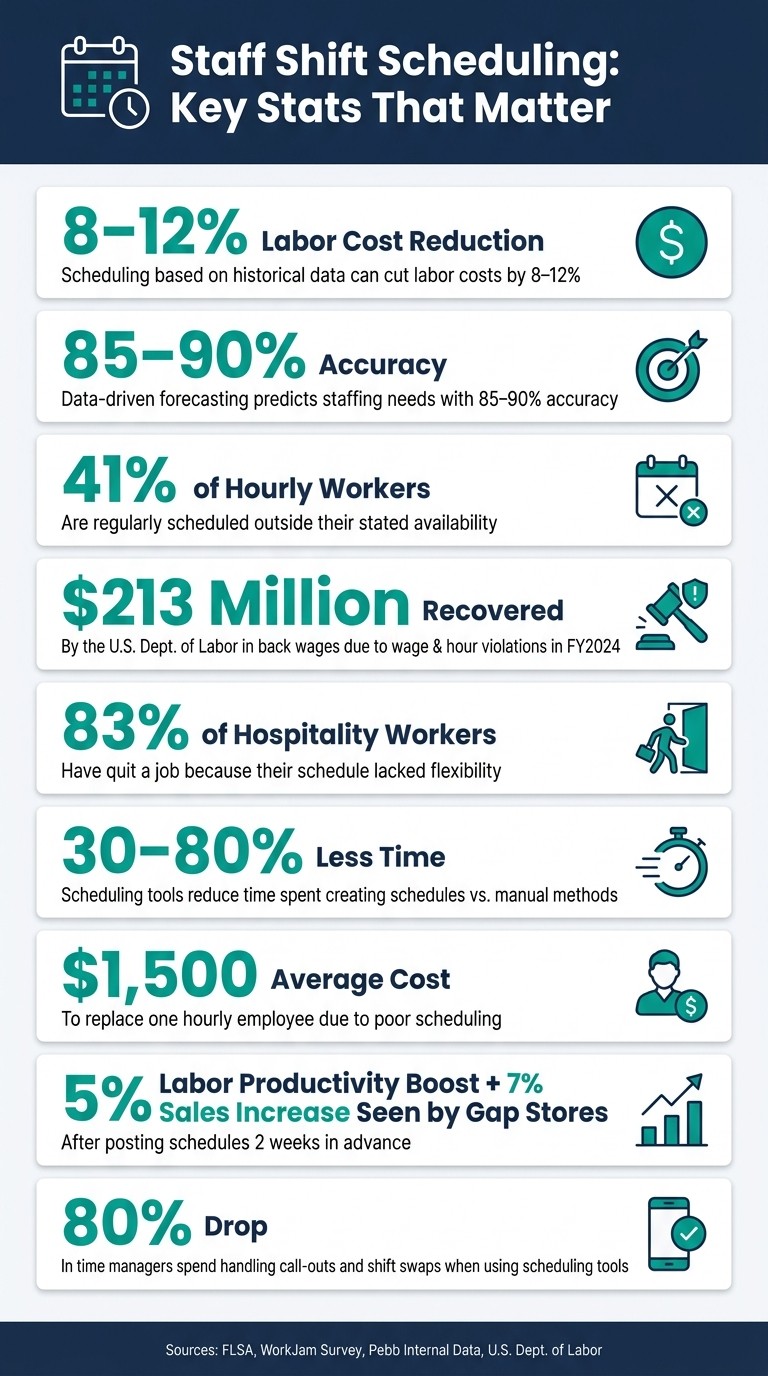
Here’s the thing: labor costs are often the biggest chunk of your operations budget. But the good news? Building schedules based on historical data can slash those costs by 8–12%. That’s real money back in your pocket.
Now, let’s talk compliance because ignoring it isn’t an option. Under the Fair Labor Standards Act (FLSA), non-exempt employees must get overtime pay at 1.5x their regular rate for any hours over 40 in a week. And that’s just the federal level. States like California require a 30-minute unpaid meal break for shifts over five hours. Washington mandates a 10-minute paid rest break for every four hours worked. If you’re in cities like Chicago, Seattle, or New York, Fair Workweek laws kick in, meaning schedules need to be posted 7–14 days ahead. Make last-minute changes, and you could owe employees “predictability pay” - an extra hour of wages.
Here’s a wake-up call: in fiscal year 2024, the U.S. Department of Labor recovered more than $213 million in back wages due to wage and hour violations. That’s not a risk you want to take.
Once you’ve nailed down your budget and compliance requirements, the next step is all about getting precise with your data.
Use Data to Forecast Staffing Needs
Forget guesswork - data is your best friend here. With your operational boundaries set, data analysis ensures your schedule matches actual demand. In fact, analyzing past metrics can predict staffing needs with 85–90% accuracy. That means fewer frantic calls to cover shifts and better coverage when it counts.
Dive into your POS sales data, appointment logs, or foot traffic reports to identify trends. You might find your busiest times aren’t what you assumed. And don’t overlook external factors like a local concert, a holiday weekend, or even a sunny day - they can all throw your regular patterns out the window. As Dan Robin from Pebb once said:
"A schedule built on assumptions is built to fail. A schedule built on data gives your team the support they actually need."
The beauty of this approach? You don’t need to be a data wizard. Just use the tools you already have - sales reports, ticket volumes, or historical schedules - to make smarter, more informed decisions before the chaos of the week begins.
Gather and Organize Employee Availability
Once you’ve nailed down your operational needs, the next step is figuring out who’s available to work. Trust me, this part is crucial. If your scheduling doesn’t match up with real-time staff availability, you’re setting yourself up for chaos - think no-shows, last-minute calls, and frustrated employees who feel like their personal time isn’t respected. Here’s a stat that stuck with me: a WorkJam survey revealed that 41% of hourly workers are often scheduled outside their stated availability. That’s a recipe for burnout and turnover.
Collect Employee Preferences and Constraints
Here’s where it gets interesting. Not all availability is created equal, so you’ve got to distinguish between what’s non-negotiable and what’s just a preference. For example:
A hard constraint might be, “I can’t work after 5:00 p.m. because I have to pick up my kids,” or, “I’m unavailable Sundays due to religious commitments.” These are firm boundaries.
A soft preference could be something like, “I’d rather not close on weekdays.” It’s flexible if needed but still worth noting.
The key is to document both in a consistent, structured way. A digital form works wonders here. Employees can select their available days and time slots (using a 12-hour clock, like 7:00 a.m.–3:00 p.m.), flag recurring obligations, and even set their ideal weekly hours. Make it a habit to update this info at least quarterly - life happens, and things like school schedules, childcare, or second jobs can shift. Also, set clear deadlines for updates, like requiring changes to be submitted two weeks before the next scheduling period. And here’s a pro tip: keep everything centralized in Pebb. No more chasing down random texts or verbal updates.
Track Skills and Certifications
Availability is just one piece of the puzzle. You also need to know what each employee is qualified to do. For instance:
In food service, this could mean valid food handler cards or ServSafe certifications.
In warehousing, think forklift licenses or OSHA safety training.
In healthcare, you’re looking at nursing licenses, CPR/BLS credentials, and specialty certifications.
Scheduling someone without the right qualifications isn’t just inconvenient - it’s risky. You could face compliance issues, and that’s the last thing anyone needs. This is where Pebb's people directory becomes your lifesaver. You can store every employee’s credentials right in their profile, including the type, issuing body, and expiration date. Need a keyholder with an alcohol certification for Saturday night’s close? No problem - you can filter for exactly that. Plus, Pebb tracks expiration dates, so you’ll never be blindsided by a lapsed certification mid-schedule.
Centralize Availability in One Place
Let’s be real - managing availability through sticky notes, random texts, or side conversations doesn’t cut it. It’s messy, and it leads to unnecessary conflicts. You’ve probably heard the dreaded, “But I told you I couldn’t work Fridays!” With no record of it, trust takes a hit - and that’s completely avoidable.
When you centralize everything in one system, you create a single source of truth. Every availability window, time-off request, and certification is logged and accessible in seconds. This saves managers hours every week - time that adds up to nearly $4,000 a year if you’re paying $25 an hour. Plus, when employees can see their recorded availability in real time, it eliminates those “I didn’t know I was scheduled” moments. It’s all about trust and transparency. And with Pebb, it’s even better because everything - availability, chat, news, and shift management - lives in one app. No extra tools, no extra logins. It’s simple, efficient, and sets the stage for fair and stress-free scheduling.
Build a Fair and Flexible Shift Structure
Once you've gathered data on availability and skills, the next step is designing a shift structure that works for both the business and the team. At Pebb, we’ve found that crafting shifts with fairness and flexibility in mind not only meets operational needs but also improves employee satisfaction.
Choose the Right Shift Patterns
The type of shift patterns you choose can make or break your scheduling strategy. Fixed shifts are great for employees who need consistency in their schedules, while rotating shifts help ensure coverage across mornings, evenings, and weekends. Split shifts, though useful for handling peak hours, can be tough for employees with long commutes or family obligations.
It's also critical to stay compliant with local labor laws, particularly when it comes to rest periods between shifts and providing advance notice. Once you’ve chosen the shift patterns, the next step is aligning roles and skills to match the demands of each time slot.
Match Roles and Skills to Shifts
Here’s where things get interesting. Each shift has its own unique needs - a keyholder, a forklift operator, or maybe a lead barista. But here’s the kicker: only 14% of business leaders say their teams make full use of available skills. That’s a lot of untapped potential.
This is where Pebb’s integrated people directory shines. It tracks certifications and qualifications in real time, so you can quickly find the right person for the right shift. Pairing experienced employees with newer hires on the same shift isn’t just good for skill-building - it also reduces the need for constant managerial oversight and fosters teamwork.
Respect Employee Shift Preferences
Rigid scheduling is a fast track to losing trust - and employees. Did you know 83% of hospitality workers have left jobs because their schedules weren’t flexible enough? And nearly half of frontline workers across industries switched jobs in a single year due to poor work-life balance.
Now, respecting preferences doesn’t mean giving everyone their dream shifts every week. It’s about fairness. For example, rotate those less desirable shifts - like holiday closings - so no one feels stuck with them all the time. With Pebb’s scheduling tool, managers can post open shifts for employees to claim, creating a more collaborative and empowering process. When people feel like they have a say in their schedules, they’re more likely to stay engaged - and stay put.
Create, Automate, and Share the Schedule
Picture this: your team gets their schedule before they even think to ask for it. That’s the magic of turning your planning into a polished, actionable schedule. Let me walk you through how we do it at Pebb.
Draft and Finalize the Schedule
Most teams in the U.S. stick to weekly or biweekly schedules - it just works better with payroll cycles and what employees expect. At Pebb, we start by plugging in staffing needs. Think about those peak hours when customer service or supervisory roles are critical. Then, we assign employees based on their availability, skill sets, and approved time off.
Before hitting "publish", we always run a quick conflict check. This step catches coverage gaps, double-booked shifts, and compliance issues like inadequate rest periods or employees nearing overtime limits under the FLSA. Trust me, it’s worth double-checking open and close times and those shift handoff windows - those are the sneaky spots where things can go wrong.
Automate Repetitive Scheduling Tasks
Here’s where the magic happens: automation. Instead of starting from scratch each week, save yourself the headache by creating reusable templates in Pebb. Studies show scheduling tools can slash the time spent on schedule creation by 30–80% compared to manual methods. For example, you can save a "standard week" template and roll it out at the start of each new period.
Got employees with consistent schedules? Set up recurring shifts - like "Sam works Mon–Thu, 9:00 a.m.–5:00 p.m." - so the system fills those in automatically. If demand shifts, you only need to tweak the exceptions. One quick-service restaurant manager in Ohio made the switch and cut their scheduling time from 4 hours in Excel to just 45 minutes. On top of that, they saw a 20% drop in overtime incidents because Pebb flagged workers nearing 40 hours in real time. It’s a game-changer.
Publish Schedules and Notify Staff
Publishing schedules early - ideally 10–14 days in advance - can make a big difference. In cities like New York, Seattle, San Francisco, and Chicago, it’s even required by law for industries like retail, hospitality, and food service. But even if it’s not mandatory where you are, giving your team that extra runway helps parents, students, and caregivers plan their lives better.
With Pebb, publishing is as easy as flipping a switch. Change the schedule status from "Draft" to "Published", and your team instantly gets a push notification on their phones. No more calls to the manager or hunting down a paper schedule. Employees can see their exact shift details - times, location, and role - right in the app. And if you make a change? Pebb sends an automatic update, so excuses like "I didn’t see the new schedule" become a thing of the past.
Handle Shift Swaps and Last-Minute Changes
We all know last-minute call-offs happen. But here’s the thing: they don’t have to throw your day into chaos.
"A last-minute opening doesn't have to be a fire you need to put out. With the right system, it's just information for the team to act on." - Dan Robin, Pebb
The key is setting clear rules upfront. Decide who can swap shifts (e.g., employees in the same role with the right certifications), how much notice is required for non-emergency swaps, and whether swaps could lead to overtime. In Pebb, employees can submit swap requests directly in the app. The system only shows eligible coworkers - so, for example, a kitchen shift requiring a food-safety certification won’t pop up for someone who doesn’t have it.
Managers get a notification to approve or decline the request, and the live schedule updates instantly. Everything stays within one documented channel, so there’s no more chasing down decisions lost in text threads. It’s smooth, efficient, and keeps the whole team on the same page.
Monitor and Improve Your Scheduling Over Time
Publishing a schedule is just the first step. The real magic happens when you commit to refining it over time. The best scheduling teams see every cycle as a chance to learn and tweak for better results.
Track Key Scheduling Metrics
Let’s talk numbers. Keeping tabs on metrics like overtime hours, no-show rates, last-minute shift changes, and coverage vs. forecasted demand can reveal a lot about how well your schedule is working. On a broader scale, it’s also worth monitoring labor cost as a percentage of revenue, schedule stability (how often you have to revise a published schedule), and employee turnover by role every month.
Here’s why turnover is a big deal: replacing just one hourly employee costs about $1,500 when you factor in recruiting, onboarding, and training. Poor scheduling is a top reason employees quit, especially in industries like leisure and hospitality, where monthly quit rates often top 4%. Those costs add up fast, and they’re avoidable.
With Pebb's analytics, this process becomes a whole lot easier. Instead of drowning in spreadsheets, you can quickly filter overtime by employee or department to spot patterns. For example, if the same three employees are hitting 40 hours by Thursday each week, that’s a sign you might need to rebalance shifts or even address a hiring gap before it spirals into a bigger issue.
Collect Employee Feedback
While the data tells you what’s happening, feedback from your team explains why. Pebb’s news feed makes it simple to gather input - like quick polls to check if schedules feel fair or confirm they’re being published at least 14 days in advance.
Another great tool? A monthly digital form with an open-ended question, such as: "What’s one thing you’d change about our current schedule?" It only takes a couple of minutes to fill out, but the insights can be eye-opening. For instance, you might discover that several closing shift employees rely on a bus line that stops running at 11:30 p.m. - a detail you’d never catch in the data alone.
"A schedule only truly works if it works for the people who live it every day." - Dan Robin, Pebb
The best part? Pebb automates reminders, so you’re not chasing people down for feedback. And once you have those insights, you can act on them right away.
Adjust Schedules Based on What You Learn
This is where the rubber meets the road - turning data and feedback into action. Let’s say a particular shift has a recurring no-show problem. Sometimes, a small tweak like moving the start time from 6:00 a.m. to 6:30 a.m. can make all the difference. Or, if you notice Friday overtime is consistently spiking, you might add a second closer or redistribute hours earlier in the week. And if surveys show the same two employees are always stuck with weekend closing shifts, you can use Pebb’s templates to rotate those shifts more fairly.
Here’s a real-world example: Gap stores that started posting schedules two weeks in advance saw a 5% boost in labor productivity and a 7% increase in sales. Giving employees more stability doesn’t just improve their experience - it directly impacts your bottom line. Each scheduling cycle is an opportunity to review, adjust, and refine. Make small changes, build them into your templates, and watch the improvements stick.
Conclusion: Schedules That Work for Your Team and Your Business
Let me share a truth I’ve learned firsthand: effective scheduling can turn workplace chaos into a smooth, people-focused system. When you strike the right balance between meeting your business needs and respecting your employees’ time, everything else tends to fall into place.
Here’s a stat that really drives this home: 83% of hospitality workers have quit a job because their schedules lacked flexibility. That’s not just a number - it’s a wake-up call. Schedules that honor employees' time aren’t just a perk; they’re a powerful way to keep your team happy and sticking around.
This is exactly why we designed Pebb the way we did. With Pebb’s Shift Scheduling feature, everything you need is in one spot - availability, shift assignments, swaps, notifications, and even team communication. Forget those endless text threads and version-control headaches. Managers using tools like Pebb have seen an 80% drop in time spent managing call-outs and shift swaps. That’s time they can now spend on what really matters - running their business.
The best schedules are predictable enough for employees to plan their lives, flexible enough to handle those inevitable curveballs, and transparent enough to build trust across the team. With Pebb, you get all of that in a system that’s efficient and puts your team’s needs front and center.
FAQs
What data should I use to forecast staffing needs?
To predict staffing needs effectively, I rely on three key elements: current workforce data (like skills, availability, and capacity), business goals (including operational objectives and anticipated future demands), and historical workload data (such as past demand trends broken down by location, day, and role). By conducting a gap analysis, I can pinpoint areas where we might face staffing shortages or even overstaffing. Then, I review operational data - things like shift reports, attendance records, and availability - to ensure our schedules match the projected demand. This process helps us fine-tune staffing plans and boost overall efficiency.
How do I keep schedules compliant with overtime and break laws?
When it comes to staying on top of overtime and break laws, it’s all about understanding and adhering to both federal and state regulations. For instance, the Fair Labor Standards Act (FLSA) requires that employees receive overtime pay at 1.5 times their regular rate for any hours worked over 40 in a week. Simple enough, right? But here’s the catch: while federal law doesn’t mandate breaks, many state laws do. Depending on where you operate, you might need to ensure employees get rest or meal breaks.
This is where tools like Pebb come in handy. They can track work hours and rest periods automatically, helping you stay compliant and avoid potential headaches. It’s a straightforward way to reduce risks while keeping everything running smoothly.
What’s the best process for handling shift swaps without chaos?
Handling shift swaps can be a headache, but I’ve found that using a centralized platform like Pebb makes the entire process seamless. It creates clarity, provides real-time updates, and keeps things fair, which means fewer misunderstandings and conflicts.
Here’s how it works:
Centralized Scheduling: With Pebb, all schedules and swap requests live in one place. No more hunting through emails or messy spreadsheets.
Employee-Initiated Requests: Team members can request swaps directly in the platform, and managers can approve or deny them with just a click.
Automatic Notifications: Once a swap is approved, everyone involved gets notified instantly, and the schedule updates automatically. No confusion, no missed shifts.
It’s a system that keeps everything organized and ensures everyone stays on the same page. Trust me, it’s a game-changer for managing swaps efficiently!
