

Author: Ron Daniel
How to coordinate field service technicians with real-time chat
Use targeted channels, one-to-one messages, and standardized updates tied to schedules and forms to cut delays and coordinate field techs.
The average service delay doesn’t start with a hard repair. It starts with a missed message. At Pebb.io, I’ve watched one canceled visit turn into extra miles, late arrivals, and a chain reaction of phone calls because dispatch, supervisors, and techs were all looking at different updates.
That problem adds up fast. Field teams deal with shifting routes, same-day job swaps, traffic, parts delays, and urgent calls, all while people are spread across a large area. When updates live in texts, calls, and scattered apps, teams lose one time-stamped record of what changed, who saw it, and what needs to happen next. I’ve found that a single chat system tied to schedules, clock-ins, and job updates cuts a lot of that waste.
Based on that pattern, here’s what works: set up chat around how dispatch already runs, keep job updates short and repeatable, and use one thread to carry the job from assignment to closeout. I’ll walk through the setup I’d use, the mistakes I’ve seen, and the habits that help field teams stay aligned all day.
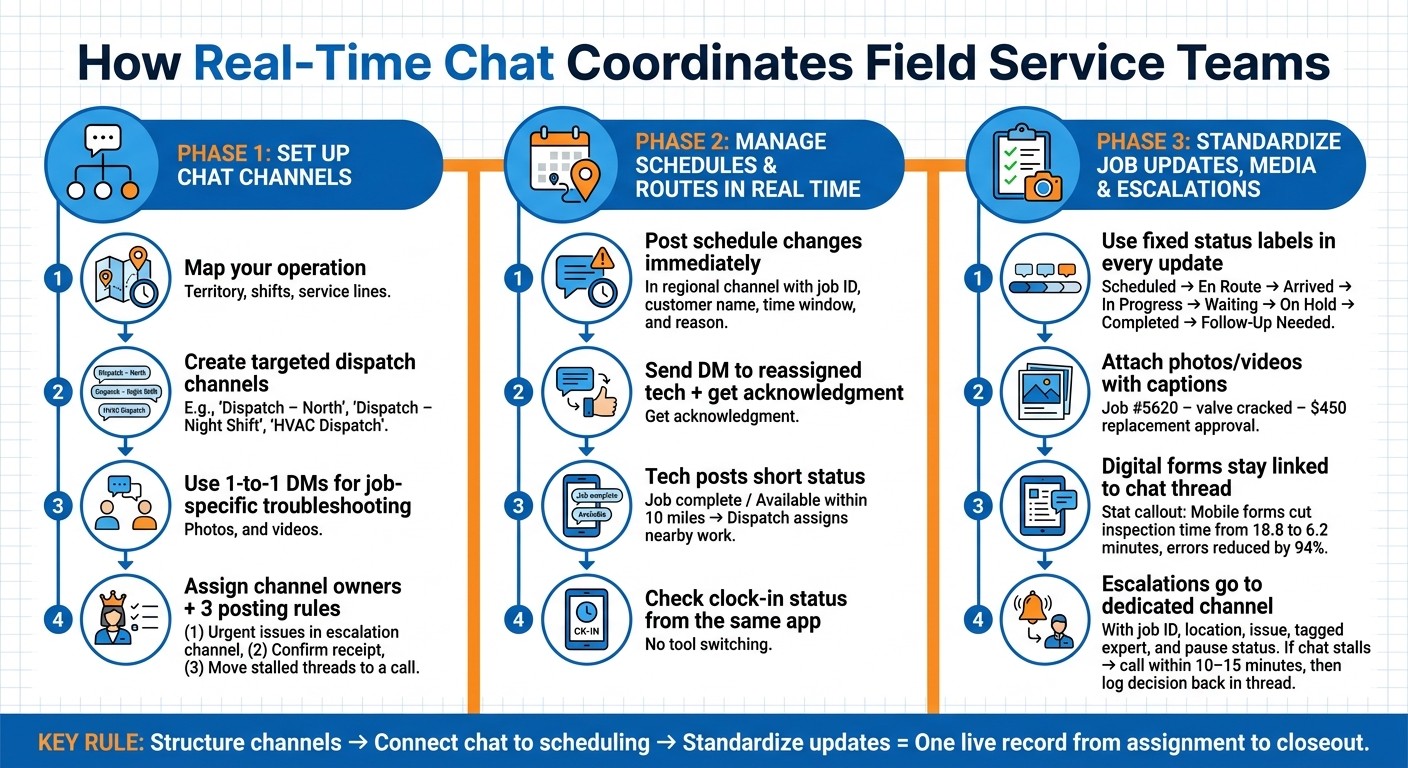
Real-Time Chat Workflow for Field Service Coordination
Set up chat channels that match how field work actually runs
I learned this one the hard way at Pebb.io.
Early on, I watched teams dump everything into one giant group chat. At first, it felt easy. One place, everyone included, no chance of missing anything. Then the noise hit. Dispatch updates got buried, techs muted the channel, and the messages that mattered most showed up too late.
Here’s the thing: the goal is simple. Get the right update to the right technician fast. That means setting up channels around how field work actually runs, not how we wish it ran on paper.
In most cases, that means organizing channels by territory, shift, and service line.
Create dispatch group chats by region, shift, or service line
When we help teams set this up at Pebb.io, we start with the same step every time: map the operation first.
How are jobs dispatched? How is the territory divided? Are there multiple shifts?
Those answers should shape the channels.
A North territory dispatch team doesn’t need every message meant for the South crew. And night shift techs don’t need to scroll through day-shift route changes that have nothing to do with them. That kind of overlap slows people down.
I’ve seen the best results when channel names match the way dispatch already talks. Names like "Dispatch – North", "Dispatch – South", "Dispatch – Night Shift," or "HVAC Dispatch" work because no one has to stop and decode them. The name tells people exactly where they belong.
That kind of targeted messaging by shift, role, or region cuts confusion and keeps updates tied to the people who need them.
Broader group chats still have a place, but I’d use them sparingly. Channels like "All HVAC Techs – Region North" or "All Field Techs – Weather Alerts" make sense only when the update hits everyone at once, like:
a major highway closure
a severe weather advisory
a system-wide policy change
One small move helps a lot here: limit posting in those broad channels to dispatch leads or field supervisors only. That keeps them from turning into another noisy feed no one trusts.
Once the channels line up with the work, dispatch can move schedule changes through the right path without delay.
Use one-to-one chats for job-specific support
Not every conversation belongs in a group channel. I’ve seen this go sideways fast.
A technician is standing in front of a commercial HVAC unit, staring at an unfamiliar fault code, and suddenly the regional dispatch chat gets flooded with a ten-message back-and-forth. Now everyone else has to read around it while trying to catch route updates.
That’s clutter. And in field work, clutter costs time.
For job-specific issues, sensitive details, and technical troubleshooting, direct messages are usually the better call. That includes sharing:
photos
annotated images
short videos tied to one job
That keeps the main group channel clean while still giving the tech help in the moment.
One thing we’ve found useful at Pebb.io: if the same fix keeps coming up, don’t let it stay buried in DMs. Summarize the repeat fix in the right team channel so the next person can find it without starting from zero.
From there, the next job for chat is pushing schedule changes and route updates in real time.
Assign channel owners and basic posting rules
This part sounds small, but it saves a lot of mess.
Give each channel an owner. Dispatch leads should manage dispatch channels. Senior techs should manage technical support channels. When ownership is clear, dispatch decisions stay visible, and there’s less back-and-forth from people trying to figure out who should answer.
I’ve also found that owners help keep channels useful over time. They can pin quick-reference info at the top, clean up outdated notes, and resolve the issue when threads close.
The posting rules don’t need to turn into some giant policy doc nobody reads. In my experience, three simple standards cover most situations:
keep urgent issues in one escalation channel
confirm receipt with a short reply
move any stalled thread to a call after a few messages
That’s usually enough to keep things moving without adding friction.
Once those rules are in place, chat becomes a lot more than just a place to talk. It starts handling schedule changes, route shifts, and technician availability without the usual chaos.
Use chat to manage schedules, route changes, and technician availability
I’ve seen this play out more times than I can count at Pebb.io: the day starts clean, everyone’s on schedule, and then by 10:30 a.m. the whole plan gets knocked sideways.
A customer cancels. A tech gets stuck on I-95. Then an emergency call lands at 2:30 p.m. and suddenly dispatch is juggling five moving pieces at once.
That’s the moment when you can tell if a team is locked in or just winging it. Chat is usually the fastest way to steady the day and keep work moving. Once the channel setup is in place, the next part is what dispatch does in those minute-by-minute moments.
Send schedule changes and job reassignments right away
When we deal with a same-day schedule change, I’ve found the fastest move is also the simplest: post the update in the channel, then send a DM to the reassigned technician and get a quick acknowledgment.
If there’s a cancellation or a parts delay, dispatch drops the change into the right regional channel with the details everyone needs right away: job ID, customer name, original time window, and the reason for the change. Something like: Job 4582 – Smith, 10–12 a.m. canceled; parts delayed. North region, who has availability?
That one message gives the whole team visibility. No one has to stop and ask what happened.
Then dispatch follows up directly with the technician who’s getting the new assignment. We ask for a quick confirmation. That small step matters more than people think. It creates a clear record and removes any doubt about whether the message was seen.
Here’s the thing: a lot of schedule problems don’t turn into big problems because of the change itself. They turn into big problems because nobody knows who owns the next move.
Cut travel time with live dispatch coordination
This is where chat starts pulling serious weight.
When dispatch has a live view of who’s wrapping up a job and where they are, we can stack nearby work instead of sending someone across town for no good reason. That cuts travel time and helps techs finish more jobs in a day.
In practice, it’s pretty simple. A technician posts a short update in the dispatch channel, like "Job complete" or "available within 10 miles of the job." Dispatch sees that, checks for same-day work nearby, and sends the next assignment by direct message.
No phone tag. No guesswork. The tech gets the address and goes.
I like this setup because it works in the real world, not just on paper. If traffic backs up or a road closure changes the route, dispatch can message the affected techs right away and move the job to whoever is already on the right side of town. That kind of live coordination helps keep appointment windows in place and cuts down on the backtracking that quietly burns hours during a shift.
I’ve learned that small route fixes, made at the right moment, can save more time than a big end-of-day cleanup.
Connect chat with shift scheduling and clock-in
This is the part where having everything in one app makes life a lot easier.
In Pebb, we can open a dispatch channel, check who has clocked in, see current shift status - on duty, on break, or clocked out - and make the next call without jumping into a separate scheduling tool.
Let me tell you what happened next in one case like this. A tech was set for an 8:00 a.m. start but still hadn’t clocked in by 8:15. Instead of calling around or bouncing between systems, dispatch sent a quick one-to-one message, checked what was going on, and decided right there whether the assignment needed to move.
That speed matters.
A shared dashboard shows who is on duty, so managers can act without switching tools. I’ve seen how much smoother things run when teams stop reacting late and start managing the day as it unfolds. Instead of hunting for who’s free, the answer is already sitting in front of you, with the chat right there to act on it.
From there, the same chat thread can carry job updates, photos, forms, and escalations.
Standardize job updates, site photos, forms, and escalations
I learned this one the hard way at Pebb.io.
Early on, we’d get dispatch lined up, the job would go out, and then the thread would go quiet. A tech might text a photo to one person, call someone else with a problem, and send a form later - if it got sent at all. By the end of the day, we had pieces of the story, not the full picture.
Here’s the thing: once dispatch is set, the same chat thread should carry the rest of the job. Updates. Photos. Forms. Escalations. That’s what turns chat from random back-and-forth into a process people can count on. It tracks progress, stores proof, and gives everyone one place to look instead of chasing details across calls, texts, email, and paper.
Use short status updates to track job progress
The easiest way I’ve seen teams clean this up is with a fixed set of status labels that every technician uses the same way: Scheduled, En route, Arrived, In progress, Waiting, On hold, Completed, and Follow-up needed.
That may sound basic, but the format matters just as much as the label.
A good update looks like this: Arrived – 10:15 AM – Job #45821 – AC unit at 72°F, tenant on site.
That one line tells dispatch what’s happening without picking up the phone. They can scan the thread and know where the job stands right away.
What worked for us was pinning the status rules in the channel so new techs saw them on day one. Then managers backed it up by following up every time an update was missing. Not in a heavy-handed way - just enough to make the habit stick.
Once those updates are standardized, something shifts. Managers make fewer calls, and they get more proof straight from the job site.
Share photos, videos, and digital forms from the job site
Let me tell you what happened next on a lot of field teams we worked with: once techs started posting media in the thread, decisions got a lot faster.
Photos and short videos are some of the most useful things a technician can send from the field. A before-and-after photo of a repaired valve. A short video of an odd motor noise. A final equipment photo with gauge readings. That kind of proof gives managers and remote experts enough context to decide what to do without being on site.
The key is to attach the media to the job thread and add a clear caption.
Something like: Job #5620 – main shutoff valve cracked, leaking ~1 gallon/hour – requesting approval for replacement, estimated cost $450.00
That gives dispatch what they need to approve the work on the spot.
In Pebb, digital forms work the same way. A technician fills out a safety checklist or inspection report on their phone, and the form stays linked to the chat thread and job ID. I like this because everything stays together. You’re not digging through email, flipping through paper, or asking who got the text.
One study found mobile forms cut inspection time from 18.8 to 6.2 minutes and reduced errors by 94%.
And once chat starts holding that kind of proof, it naturally becomes the fastest route for escalation too.
Build clear escalation paths for technical or safety issues
This is where a lot of teams either stay calm or spin out.
When a technician hits something beyond their scope - or sees a safety risk - they shouldn’t have to guess where to go. A dedicated Escalations or Tech Support channel gives them one clear path.
The post should include the job ID, location, and issue. For example: Escalation – Job #7321 – Dallas, TX – rooftop unit compressor tripping breaker
Then they attach photos or a short video, tag the right expert like @SeniorHVAC, and note whether work is paused.
That last part matters. If work is paused, everyone needs to know right away.
We’ve also seen teams keep one simple rule: if chat stalls, move to a call within 10–15 minutes. But even then, the main decisions still need to go back into the thread. Otherwise, the team gets the answer but loses the record.
After that, the resolution should turn into a task with a due time, like Replace breaker and test load – due by 4:00 PM.
In Pebb, those tasks stay attached to the escalation thread, so you get a full trail from the first report to the final fix. And that paper trail - well, digital trail - can matter a lot later for OSHA compliance, customer disputes, and warranty claims.
Conclusion: combine chat, scheduling, and field operations in one system
A while back, I watched one of our teams juggle job updates across calls, texts, and a couple of disconnected apps. It was messy. A tech was already on the road, dispatch had one version of the plan, and the manager had another. Everyone was working hard, but the system was working against them.
Here’s the thing: real-time chat keeps field service moving when jobs change, techs are in transit, and dispatch needs one live record. From what I’ve seen at Pebb.io, these workflows run far better in one connected system, not split across separate tools.
We’ve learned to keep it simple. I always come back to one rule: structure channels, connect chat to scheduling and clock-in, and standardize the small set of updates technicians use most. That’s usually where things click. Once teams stop hunting for info, they can focus on the work in front of them.
That’s exactly the kind of workflow Pebb is built to support. We combine work chat, shift scheduling, PTO management, clock-in, digital forms, and company updates in one app, so managers spend less time chasing updates and more time running the day. We also offer a free all-in-one communication solution, plus a premium plan at $4 per user per month.
If I were rolling this out, I wouldn’t try to change everything overnight. I’d start with one region or one shift, get the process working, and then expand from there.
FAQs
How many chat channels should a field team create?
I learned this one the hard way at Pebb.io. Early on, we made the classic mistake: too many channels, too fast. What looked organized on day one turned into a mess by the end of the week. Updates got buried, people posted in the wrong places, and no one was quite sure where to look.
Here’s the thing: there’s no fixed number of channels that works for every team. I’ve seen small teams run smoothly with just a handful, and I’ve seen bigger groups need more structure. What matters is creating only the channels you need to keep work clear and easy to follow.
We’ve had the best results when we set up simple boundaries that match how the team already works. That usually means channels based on things like:
routes
departments
locations
functions like shift swaps or weekly schedules
Let me tell you what happened next when we simplified things. People stopped hunting for updates. Managers knew where to post. Frontline staff didn’t have to guess. That one change cut down a lot of noise.
The key was setting clear rules for where each type of conversation should happen. If schedule changes belong in one channel, keep them there. If route updates belong somewhere else, make that the norm. Simple rules save a lot of back-and-forth.
I’d also start small. At Pebb.io, we’ve seen that a small pilot group makes this way easier. You can test the setup, spot confusion early, and fix what’s not working before rolling it out to everyone.
What should technicians include in every job update?
I learned this the hard way at Pebb.io: when job updates are vague, the whole day gets messy fast.
A tech says a task is “done.” The office thinks the work is wrapped up. Then 20 minutes later, someone’s calling to ask, “Wait, was it actually finished?” That kind of back-and-forth eats time and frustrates everyone.
So we got stricter about one simple habit. Every job update needs clear, concise status information so the office and the team stay in sync. No guesswork. No chasing people down for missing details.
When a task is finished, we ask technicians to mark it as complete and add a photo. That photo gives the team immediate visual confirmation, which saves a surprising amount of time. It also cuts down on those “Can you send proof?” messages that tend to pile up when things get busy.
Here’s the thing: updates work best when they live next to the job itself.
That’s why sharing updates through integrated work chat makes such a difference. The conversation stays tied to the right job ticket or route, so progress is easy to track without extra follow-up calls or paperwork. In my experience, that keeps the day moving and helps everyone stay on the same page.
How do managers roll out real-time chat without disrupting operations?
I’ve seen this go sideways when teams try to force a new way of working from the top down. On paper, it looks neat. In real life, it can feel like micromanagement fast.
At Pebb.io, we’ve learned it’s smarter to start small. Instead of rolling something out to everyone at once, I’d begin with a pilot group - maybe one route or one shift. That gives us room to spot friction, fix what’s clunky, and learn what people actually need before we push it across the whole team.
Here’s the thing: the early test usually tells you more than a dozen planning meetings ever will.
Training matters too, but only if it fits the job. I’d keep it role-specific and simple, with quick cheat sheets people can use on the go instead of long training docs nobody reads twice. I’d also set clear rules for channels and escalation, so people know where to post, when to flag an issue, and who needs to see it.
And if the tool doesn’t work well on a phone, that’s usually where the plan starts to crack. That’s one reason we lean toward a mobile-first platform like Pebb. It makes chat feel like part of the daily workflow instead of one more thing employees have to fight with during a busy shift.
