
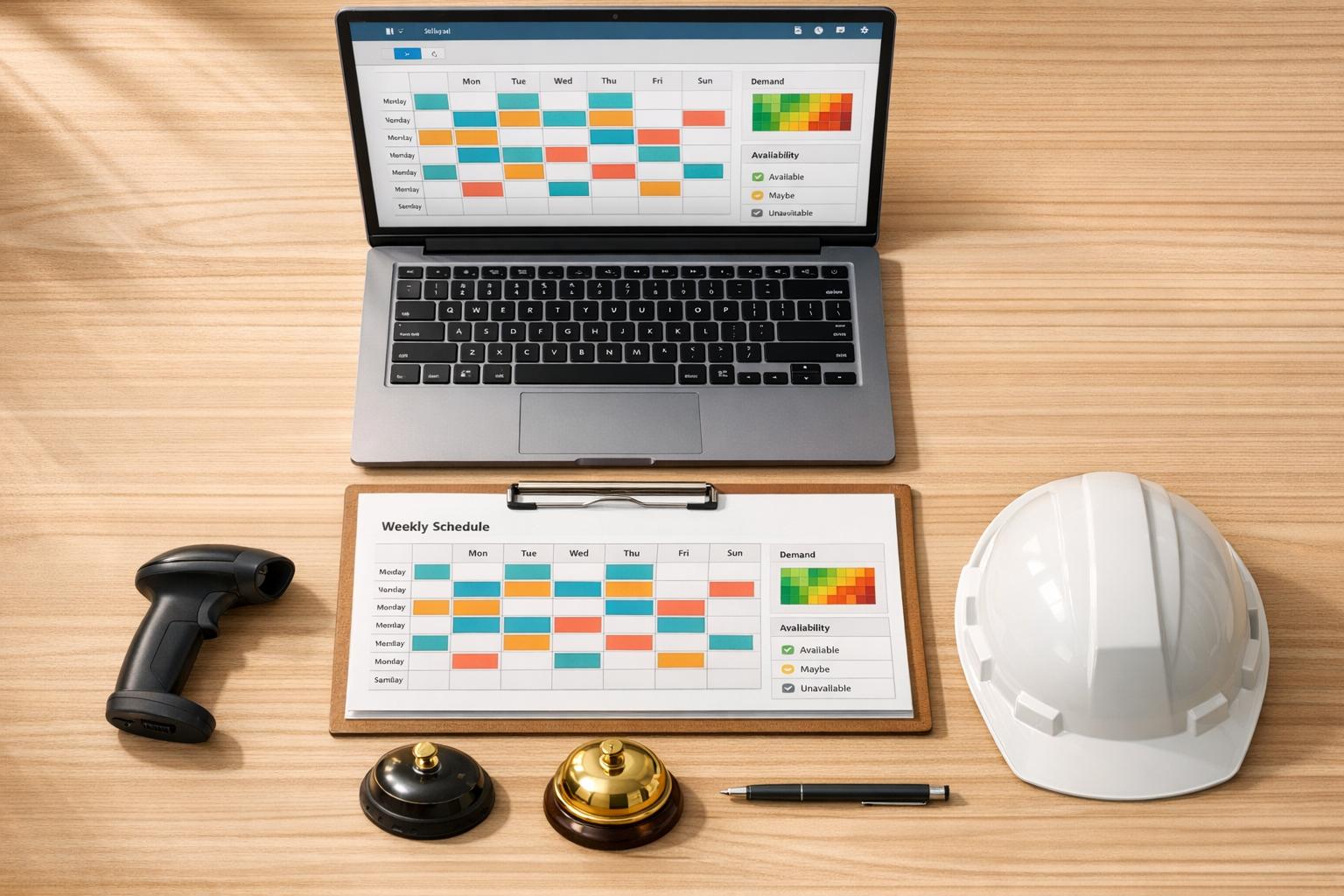
Author: Ron Daniel
The Complete Guide to Employee Scheduling for Retail, Hospitality & Field Teams
Smart, fair schedules reduce turnover and manager hours by matching staffing to demand and employee availability.
Have you ever had to scramble to cover a shift at the last minute? If you’re nodding, you’re not alone. I’ve been there too - staring at a spreadsheet at 10 PM, juggling texts from employees who can’t make it, and trying to avoid a meltdown. It’s not just stressful; it’s a drain on time, energy, and morale.
Here’s the kicker: I’m not the only one who’s felt this pain. Did you know that 56% of managers spend 3 to over 10 hours a week wrestling with scheduling? That’s time that could’ve been spent coaching teams or improving operations. And for employees, unpredictable schedules wreak havoc on their lives - 60% of service-sector workers get less than two weeks’ notice. Imagine trying to plan your life around that.
At Pebb, we’ve had our fair share of scheduling challenges, but we’ve also learned what works (and what doesn’t). In this guide, I’ll walk you through the strategies, tools, and lessons we’ve picked up. From tackling fluctuating demand to creating schedules your team can rely on, I’ll share exactly how we’ve turned chaos into clarity. Ready to dive in? Let’s get started.
Common Scheduling Challenges in Retail, Hospitality, and Field Operations
Before we can fix scheduling issues, we need to pinpoint what’s causing the headaches. In retail, hospitality, and field operations, these challenges aren’t just frustrating - they’re draining resources and driving employees away. Let’s dive into the top three culprits.
Handling Fluctuating Customer Demand
Customer demand is anything but steady. A café might need a full team during the breakfast rush but barely anyone during the mid-afternoon lull. Retail stores experience weekend shopping surges and holiday chaos, while weekdays stay quiet. Field teams? They’re at the mercy of weather, emergency calls, and project delays that can completely upend their plans.
Guesswork won’t cut it here. Instead, it’s essential to analyze your operational patterns - look at sales data, foot traffic, or production logs hour by hour. This helps you spot predictable trends and adjust staffing accordingly, while leaving room for those inevitable surprises. Once you’ve nailed down these demand patterns, you’re better equipped to tackle the next big challenge: managing your team’s varied availability.
Working with Different Employee Availability
Your workforce is juggling a lot - students balancing class schedules, parents managing childcare, employees with second jobs, and those with personal shift preferences. Manually creating schedules that accommodate all these factors can feel like solving a puzzle without all the pieces. As a result, managers often default to building schedules that suit the business first, leaving employees to figure out how to make it work.
But here’s the thing: 82% of shift workers say having control over their schedules is a top priority, and 40% would even take a pay cut to gain more say in their hours. If employees feel like their personal needs are ignored, they’re likely to leave - and replacing them is far more expensive than investing in flexible scheduling. The key is consistency. By applying clear, documented rules for scheduling and time-off requests, you create a sense of fairness. When employees see that their availability is respected and schedules are built fairly, they’re more likely to stick around.
Using Fair Scheduling to Reduce Turnover
Fair scheduling isn’t just a nice gesture - it’s a retention tool. Constantly shifting schedules, favoritism in shift assignments, and on-call demands can quickly breed resentment. And in industries already struggling with high turnover, losing good employees over avoidable scheduling issues is a costly mistake.
Here’s some proof: flexible scheduling reduces employee burnout by 22%. But flexibility doesn’t mean chaos. It means having structured processes in place - like clear SOPs for handling requests, setting minimum rest periods between shifts (10 hours is a good benchmark), and giving employees advance notice (aim for at least 14 days). As Dan Robin from Pebb puts it, “Fairness isn’t about treating everyone the same. It’s about applying the same rules to everyone, every single time. That’s what builds trust”.
When your team knows the rules and sees them enforced consistently, they stop questioning whether they’re being treated fairly - they know they are. Not only does this build trust, but it also simplifies operations, making life easier for everyone involved. It’s a win-win that keeps both employees and managers happy.
Scheduling Strategies That Work for Frontline Teams
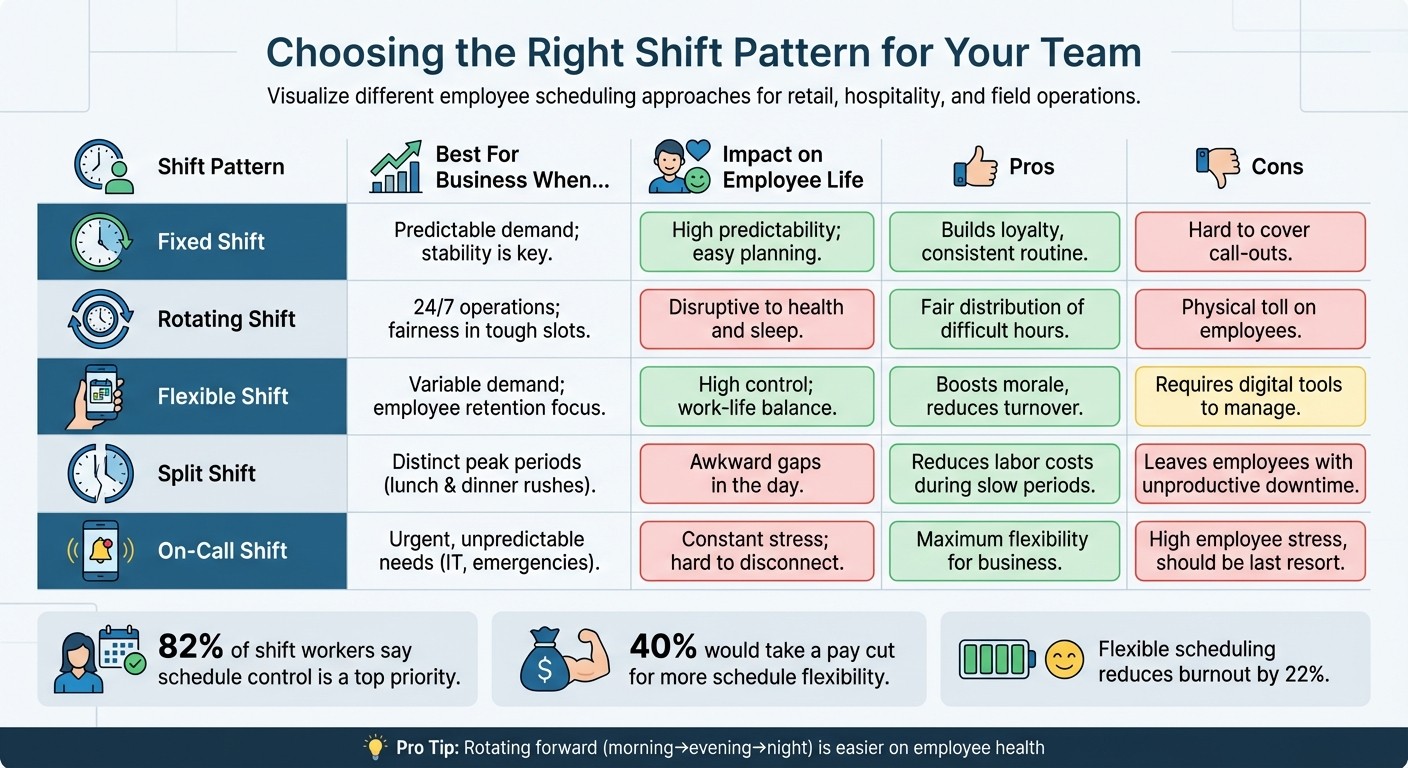
Employee Shift Pattern Comparison Guide for Retail and Hospitality
Let’s get real - scheduling frontline teams can feel like solving a Rubik’s Cube blindfolded. But here’s the good news: with the right strategies, you can create schedules that not only keep your business running smoothly but also make your team feel valued and supported. Let me walk you through what’s worked for us with retail, hospitality, and field teams.
Fixed, Rotating, and Flexible Shifts: What Works When?
Not all shift types are created equal, and choosing the wrong one can lead to frustrated employees and operational headaches. Here’s a breakdown of the most common shift patterns and when they shine (or don’t).
Fixed shifts: These are the classic “9-to-5” schedules, offering consistency that’s perfect for employees juggling school pickups or other commitments. They’re great for building loyalty, but if someone calls out, you’re often left scrambling to fill the gap.
Rotating shifts: By cycling employees through mornings, evenings, and nights, you spread the tough time slots more evenly. It’s a fair approach for 24/7 operations, but the constant shift changes can wear people out. Pro tip: rotating forward (morning to evening to night) is easier on the body.
Flexible shifts: These have quickly become a must-have. Letting employees pick up open shifts or trade with coworkers through apps gives them control over their schedules. This not only boosts morale but also helps create a self-sustaining system.
Split shifts: These divide the workday into two blocks (like covering lunch and dinner rushes). While they save on labor costs during slow periods, they leave employees stuck with awkward downtime.
On-call shifts: These should be a last resort. Keeping employees tethered to their phones creates constant stress, so if you use them, offer fair compensation for the mental load.
Let’s put it all together in a quick reference table:
Shift Pattern | Best For Business When... | Impact on Employee Life |
|---|---|---|
Fixed Shift | Predictable demand; stability is key. | High predictability; easy planning. |
Rotating Shift | 24/7 operations; fairness in tough slots. | Disruptive to health and sleep. |
Split Shift | Distinct peak periods, like restaurants. | Awkward gaps in the day. |
On-Call Shift | Urgent, unpredictable needs (e.g., IT). | Constant stress; hard to disconnect. |
Choosing the right shift pattern is a start, but you’ll also need to prepare for the unexpected.
Cross-Training and Backup Plans: Your Safety Net
Let’s face it - people call out, and emergencies happen. That’s why cross-training is a lifesaver. By training employees to handle multiple roles, you gain flexibility and reduce chaos.
Here’s how we do it: instead of saying, “We need three people for the morning shift,” we break it down - “We need two baristas and one cashier.” This clarity makes it easier to spot gaps and train employees accordingly.
We also maintain a pool of “float” employees - team members who can jump in when needed. These might be part-timers looking for extra hours or staff who enjoy flexible work. Keeping this list updated and ensuring they’re trained across roles is key.
One thing we’ve learned the hard way: overtime can sneak up on you. That’s why we use tools like Pebb. They monitor overtime in real time and send alerts before anyone crosses the limit. It’s saved us from turning one problem (coverage) into another (unexpected labor costs).
Aligning Schedules with Business Goals
A good schedule doesn’t just fill shifts - it works in harmony with your business. Start by mapping your operational rhythm using actual data - sales, foot traffic, service tickets, you name it. Look at patterns hour by hour. For example, maybe Tuesdays are slow until 2:00 PM, or Saturdays need double coverage from 11:00 AM to 3:00 PM.
Once you’ve got the data, match your staffing to demand. If you’re running a restaurant with lunch and dinner rushes, split shifts might make sense despite their drawbacks. For teams handling emergencies, a small on-call rotation could be unavoidable. The trick is to let data - not habits - drive your decisions.
Another game-changer? Publishing schedules 14 days in advance. It’s not just a nice-to-have; it’s becoming a legal requirement in many places. Workers with less than three days’ notice have a 39% turnover rate, compared to 24% for those who get two weeks’ notice. That’s a huge difference when you consider the costs of recruiting and training replacements.
Tools like Pebb make this process smoother. From aligning schedules with operational data to managing employee availability, it’s all automated. Plus, documenting your scheduling rules - like how shifts are assigned and how swaps are handled - builds trust. When everyone knows the rules and sees them applied fairly, it reduces tension and boosts morale.
As Dan Robin from Pebb says, “The schedule is more than a list of times. It’s the framework upon which your team builds their lives”. That’s a perspective worth keeping in mind.
Using Technology to Simplify Scheduling
Let me paint a picture: you're buried in spreadsheets, juggling group texts, and trying to piece together a schedule that works for everyone. Sound familiar? It's a time-sucking, error-prone mess. From double-booking employees to the dreaded "I never saw the schedule" excuse, it’s a headache no manager wants. That’s where digital scheduling tools come in - they make life easier by cutting down on chaos and creating systems that actually work.
Why Digital Scheduling Solutions Save Time
Here’s what I’ve learned: digital scheduling platforms are game-changers. They eliminate those tedious hours spent on data entry, checking availability, and resolving conflicts. Instead of bouncing between a dozen tools, everything lives in one place - a real-time system that updates instantly.
And the market agrees. The employee scheduling software industry is expected to grow from $485.32 million in 2026 to $1.37 billion by 2035. Why? Because automating things like conflict management - making sure no one’s scheduled during their PTO or over their hour limit - not only prevents costly mistakes but also builds trust with your team.
With features like drag-and-drop interfaces and reusable shift templates, what once took hours now takes minutes. Need to cover a lunch rush or send backup to another location? Mobile access lets managers fill gaps on the fly. These tools are perfect for handling challenges like fluctuating demand and diverse employee availability. And at Pebb, we’ve taken these benefits to the next level with solutions designed specifically for frontline teams.
How Pebb Simplifies Scheduling for Frontline Teams
Let me tell you about how we do it at Pebb. Our Shifts Scheduling feature is built with frontline teams in mind - retail, hospitality, field teams, you name it. These are the folks dealing with unpredictable demand, coordinating across locations, and needing flexible schedules.
Here’s how it works: managers can create recurring shifts in just minutes using our drag-and-drop builder. The system automatically factors in time-off requests, so you’re not double-booking anyone. Got a "Friday dinner rush" or "weekend inventory" shift? Set it up once and reuse it with a single click. Plus, everything connects seamlessly to our PTO management, attendance tracking, and payroll tools - no more transferring data between systems.
And here’s the kicker: Pebb is the all-in-one employee app for communication and operations. For just $4/user/month (or free for teams of up to 15 employees), you get scheduling, work chat, a news feed, task management, digital forms, calendar events, clock in, PTO management, knowledge library, and more - all in one app. Compare that to Slack Pro at $7.25 per user or Microsoft Teams at $4+ per user, where you’d still need extra scheduling tools. We’ve even included voice and video calls, integrations, and enterprise SSO in Premium, so no matter how your team works, everyone stays on the same page.
Keeping Teams Informed with Real-Time Updates
Here’s the problem with static schedules: they’re outdated the second you print or email them. With Pebb, any change - a shift swap, a last-minute addition, or an emergency reassignment - shows up instantly on everyone’s phones via push notifications.
We’ve added read indicators so managers can see who’s viewed the updated schedule. Employees can request swaps, mark availability, and confirm shifts directly in the app. It’s all built into the workflow, so there’s no need for chaotic group texts or missed emails. For teams spread across multiple locations, this level of instant sync is a lifesaver.
Here’s why this matters: approximately 60% of frontline staff are paid hourly. For them, predictable schedules aren’t just helpful - they’re critical for managing things like childcare, second jobs, and personal commitments. When you consistently publish schedules (say, every Wednesday at 2:00 PM) and deliver them through a dedicated app, you’re showing your team that you respect their time. And that respect? It reduces turnover and builds loyalty.
With Pebb’s all-in-one platform, we’ve made real-time communication a priority. It’s about keeping every team member informed, no matter where they are. That’s how you simplify scheduling and create a system your team can count on.
Best Practices for Employee Scheduling
When it comes to scheduling, the right habits can make all the difference. Pairing smart practices with tools like Pebb's Shifts Scheduling can turn a decent system into one that feels seamless and fair for everyone involved. These aren't flashy secrets - they're straightforward steps that reduce headaches, keep your team motivated, and ensure you're staying compliant with labor laws. Let me walk you through what’s been working for us.
Share Schedules Early and Communicate Openly
Life doesn’t stop when employees clock out. Many are juggling childcare, side gigs, appointments, or other responsibilities. Dropping a last-minute schedule on them? That’s a recipe for no-shows, frustration, and even turnover.
We’ve found that publishing schedules at least two weeks ahead works wonders. It’s not just about checking a box for compliance - it’s about showing your team that their time matters. And accessibility is key. With mobile apps, employees can check their shifts whenever they need to. At Pebb, for example, schedules sync across devices instantly, and push notifications alert everyone about updates. No more "I didn’t see the email" excuses.
Transparency is just as important. Encourage your team to voice concerns about conflicts, availability, or swap requests. Clear policies for time-off requests and shift changes help keep everyone on the same page. Open communication builds trust and sets the stage for smarter, data-driven scheduling.
Use Data to Forecast Demand and Plan Shifts
Guessing your way through scheduling? That’s a fast track to overstaffing during slow times or scrambling to cover a busy period. Neither is good for morale - or your bottom line.
Instead, lean into the data. Look at sales patterns, foot traffic, reservations, or even local events to predict when you’ll need more hands on deck. Retailers can dig into POS data to figure out peak shopping hours, while hospitality teams might track booking trends or occupancy rates. For field teams, even weather patterns and seasonal shifts can provide valuable clues .
Here’s a quick success story: Some of our customers have reported that using performance-based scheduling - integrated with POS data - has boosted profitability per employee by up to 6%. Guest satisfaction scores? Up 13%. That’s the kind of impact data-driven decisions can have.
At Pebb, we’ve designed our scheduling tools to work alongside your operational data. This means you can avoid the chaos of being short-staffed during a Friday dinner rush or wasting resources on a quiet weekday afternoon. And as conditions change, you can adjust your plans accordingly.
Review and Adjust Schedules Regularly
Scheduling isn’t a “set it and forget it” kind of task. Things change - demand, team dynamics, and even labor laws. That’s why regular reviews are crucial for keeping everything running smoothly.
Feedback is your friend. Whether it’s through surveys or casual conversations, listening to your team can uncover patterns - like someone consistently needing Sundays off or frequent late arrivals on certain shifts - that help you fine-tune schedules.
Keep an eye on labor costs, too. Regular reviews can catch issues like excessive overtime or under-staffed shifts before they spiral out of control. Automated tools can also flag potential compliance problems, like back-to-back shifts or overworked employees, so you don’t get caught off guard.
At Pebb, we’ve baked reporting and analytics into our platform to make this process easier. You can track attendance trends, labor costs, and scheduling patterns all in one place. This way, scheduling becomes a dynamic, ever-evolving process that supports both your team and your business goals.
Wrapping It All Up
Let me tell you, scheduling doesn’t have to be the nightmare it’s been for years. When you strike the right balance between customer demand, employee preferences, and business goals, everything starts to fall into place. Productivity rises, conflicts fade, and - get this - your team actually wants to show up for their shifts. Here’s a stat that always sticks with me: retailers using performance-based scheduling see up to 6% higher profitability per employee and 13% better guest satisfaction scores. That’s the magic of smart scheduling.
The old-school methods - spreadsheets, frantic last-minute texts, and pure guesswork - just don’t cut it anymore. Your team deserves better, and let’s be real, so do you. That’s where Pebb steps in. Our digital tools take the chaos out of the equation with features like real-time visibility, automated alerts, and mobile access. Need to check a shift, swap one, or plan ahead? It’s all in one place, easy and stress-free.
And here’s something to think about: 82% of shift workers say having control over their schedule is a top priority. Fair rotation, advance notice, and clear policies aren’t just extras - they’re essentials. In industries where turnover rates are sky-high, keeping your team happy and engaged can make all the difference.
That’s why we designed Pebb’s all-in-one employee app to handle everything seamlessly. Drag-and-drop scheduling? Check. Overtime alerts? Got it. Shift swaps with approvals? Absolutely. And it’s all integrated into the same platform your team already uses to communicate. No app-juggling, no fragmented processes - just scheduling that works for everyone.
Start by posting schedules at least two weeks in advance and use feedback and data to tweak as you go. The results? They pile up fast. Your team will notice the difference right away. When you align scheduling with both business goals and employee well-being, you’re setting yourself up for long-term success. With Pebb’s platform, you’ll see a boost in team morale and productivity that makes every part of your operation run smoother. Let’s make scheduling work for you - not against you.
FAQs
How do I forecast staffing needs with limited data?
To predict staffing needs when data is scarce, I always start by digging into historical patterns. Whether it’s past shifts, sales numbers, or foot traffic, these clues help pinpoint peak activity times. For example, using Pebb’s shift scheduling feature, I can pull reports that break down hours worked, attendance rates, and recurring trends. These insights make decision-making far easier.
Another game-changer? Embracing flexible scheduling. By adjusting schedules based on real-time observations, we’ve seen accuracy improve significantly over time. It’s like fine-tuning a machine - each tweak gets you closer to the perfect setup.
What scheduling rules reduce no-shows and callouts?
To keep no-shows and last-minute callouts to a minimum, it’s all about setting clear expectations while offering some wiggle room where it matters. Start by laying out straightforward policies for shift swaps and availability requests - this helps everyone stay on the same page and avoids unnecessary back-and-forth.
One thing we’ve found super helpful is giving employees real-time access to their schedules through mobile apps like Pebb. It’s a game-changer when everyone can see their shifts, request changes, or even get automated reminders right from their phones. Speaking of reminders, those little nudges can make a big difference in keeping attendance on track.
Another tip? Ask for advance notice - say, 24 to 48 hours - when someone needs time off or wants to swap a shift. This buffer makes it easier to manage changes without throwing the whole schedule into chaos. It’s a simple step that can save you a ton of headaches and keep operations running smoothly.
How can I roll out scheduling software without pushback?
Rolling out scheduling software can feel like a daunting task, but trust me, it doesn’t have to be. The key is to focus on how tools like Pebb can cut through the chaos, save time, and make communication a breeze. Let’s face it - spreadsheets and whiteboards just don’t cut it anymore. Pebb’s mobile-friendly platform streamlines shift management, making those outdated methods a thing of the past.
Here’s what worked for us: we got the team involved early. We showed them how Pebb simplifies tasks they deal with every day - like swapping shifts or checking schedules in real time. Once people saw how much easier their lives could be, buy-in was almost automatic.
Of course, a smooth transition doesn’t happen by magic. We made sure to provide plenty of support and hands-on training. When people feel confident using the new system, the shift (pun intended) becomes almost seamless.
