
Author: Ron Daniel
The Complete Guide to Employee Rosters for 2026
One bad roster can cost thousands — this guide shows how to build compliant, fair, and efficient employee schedules using data and modern tools.
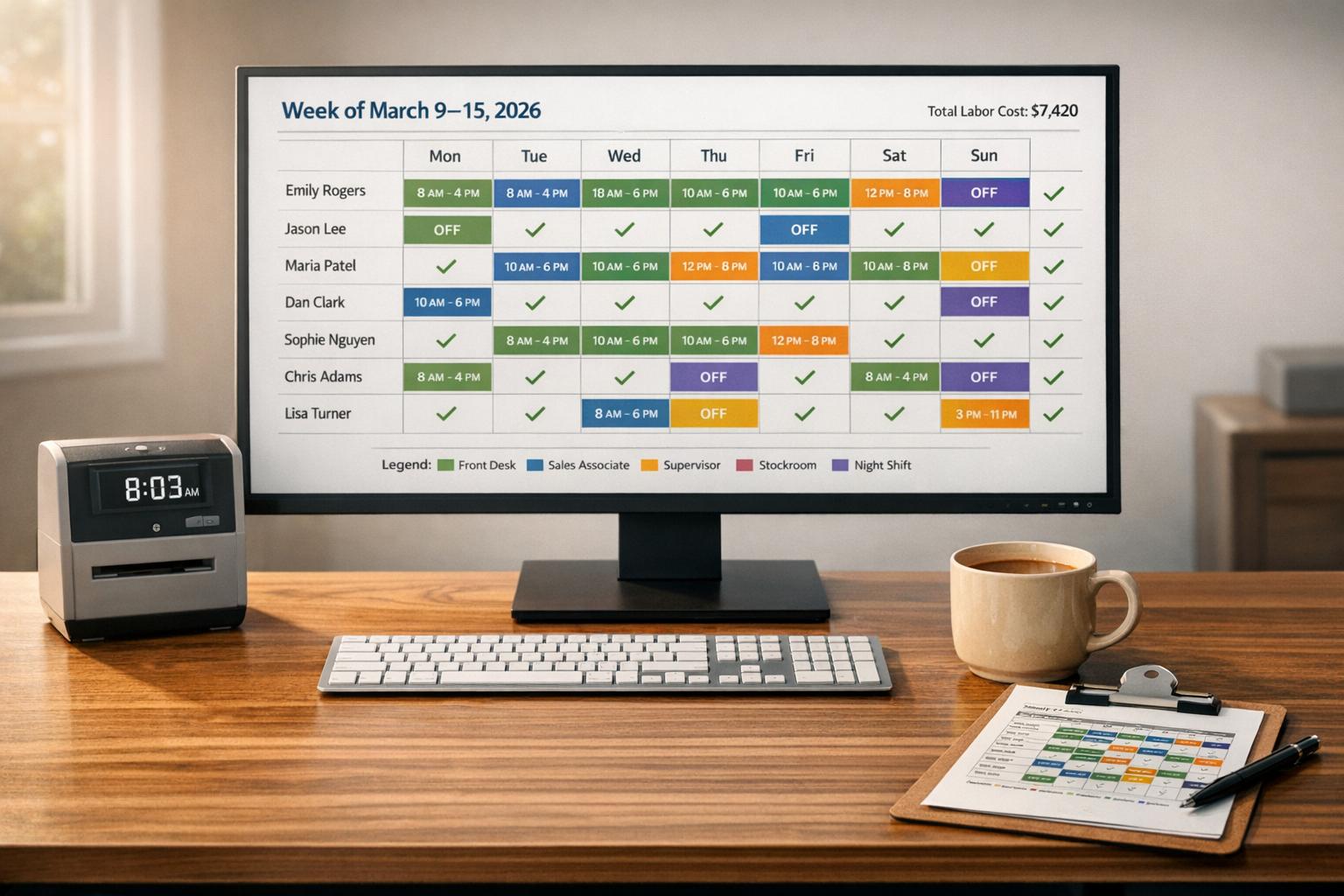
What if I told you that one bad roster could cost your business thousands? Sounds dramatic, right? But I’ve seen it happen. Back when I first started managing schedules, we used spreadsheets and sticky notes - tools that felt fine until they weren’t. One week, a missed shift overlap led to overtime costs that blew our budget. The kicker? It could’ve all been avoided with better planning.
Here’s the deal: in 2026, scheduling isn’t just about filling shifts - it’s about balancing labor costs, compliance, and employee satisfaction. With New York’s minimum wage now at $17.00/hour and weekly exempt salary thresholds hitting $1,275.50, every mistake stings. And let’s not even start on the chaos of last-minute changes or compliance slip-ups.
But here’s the good news: technology has changed the game. All-in-one employee apps like Pebb bring shift scheduling, internal chat, company updates, clock in and out, vacation days, tasks, profiles, groups, and more into one place, and even let employees manage their schedules on the go. In this guide, I’ll share the exact strategies we use at Pebb to build smarter, more efficient rosters that keep teams happy and businesses thriving. Let’s dive in.
Common Problems with Employee Rostering
Employee rostering can feel like a never-ending puzzle, especially in 2026. Managers often face the chaos of filling last-minute gaps, dealing with ballooning overtime costs, and calming employees frustrated by unpredictable schedules. Tackling these challenges head-on is the first step toward finding smarter, more efficient solutions.
Understaffing, Overstaffing, and Compliance Issues
Let’s talk numbers. Labor costs typically make up 60–70% of total expenses in the service sector. That means getting the roster wrong isn’t just a headache - it’s a costly mistake. Understaffing can lead to stressed-out employees and missed deadlines, while overstaffing drains resources unnecessarily.
Then there’s compliance. Labor laws have become stricter, with rules around rest breaks, overtime limits, and dreaded "clopen" shifts (where someone closes at night and opens the next morning). Trying to manage all this manually is a recipe for disaster. A single error - like skipping a required rest period - could lead to fines or even legal trouble.
"Inaccurate time data continues to be one of the biggest contributors to payroll errors and compliance issues." - Danté McSharry, Softworks
Here’s a real-world example: MUJI North America shaved off over 4,000 hours annually by switching to an AI-driven workforce management platform. This system automated demand forecasting and even factored in employee preferences. On the other side of the globe, Intel Chengdu saw a 30% jump in productivity and a 15% boost in picking output by using real-time data to optimize workforce deployment.
Modern platforms are game-changers. They can flag compliance issues as you build the schedule, while AI forecasts use historical trends, sales data, and even weather predictions to determine exactly how many staff members you need. This eliminates guesswork, reduces labor costs, and keeps you compliant. But there’s more to effective scheduling than just numbers - how about balancing employee needs with business goals?
Balancing Employee Preferences with Business Needs
Your employees aren’t just workers; they’re people with commitments - like classes, childcare, or medical appointments. Overlooking these "soft constraints" can push your top talent out the door.
The old first-come, first-served approach to scheduling? It’s outdated and unfair. It rewards whoever checks their phone fastest instead of prioritizing actual needs. In 2026, sticking to rigid scheduling practices is a surefire way to hurt retention. Plus, if shifts aren’t aligned with the right skills and certifications, you risk delays and costly rework.
The solution? Preference-based scheduling. Today’s platforms let employees input their availability and constraints upfront. Then, the system builds rosters that balance personal needs with operational demands. Take Delaware North, for instance - they cut their roster creation time from six hours to just 30 minutes by using a platform that aligned staff preferences with business goals. And let’s not forget the inevitable curveballs - last-minute changes. Let’s dive into managing those.
Managing Last-Minute Changes
Here’s the reality: last-minute changes happen. Someone calls in sick at 6:00 AM, a family emergency pops up, or an employee wants to swap shifts. These sudden changes can throw your schedule into chaos.
Manual systems just can’t keep up. Texting employees to check availability takes precious time, and you might accidentally schedule someone into overtime or violate rest-break rules in the process.
That’s where digital scheduling platforms shine. They flag last-minute changes that could break labor laws and provide real-time insights into labor budgets. This means you can immediately see if a shift swap will blow your weekly budget.
Take Sheraton Grand Chicago as an example. By ditching manual processes for rules-based automation, they slashed their weekly scheduling time from seven hours to less than one hour - an 86% boost in efficiency. When unexpected changes arise, the platform takes care of the heavy lifting: checking compliance, notifying employees, and updating the roster in real time.
"A schedule that looks efficient but breaks people isn't efficient at all. It's simply a delayed cost." - Qlector
The bottom line? With the right tools, last-minute changes go from being emergencies to just another part of the day.
How to Build an Employee Roster in 2026
Creating an effective roster in 2026 is all about leveraging data, listening to your team, and using Pebb's all-in-one employee app to make the process seamless.
Forecast Staffing Needs Based on Demand
Let’s start with the numbers. Modern tools now analyze historical demand patterns, role requirements, staff availability, and skill coverage to create rosters in just seconds. Instead of relying on guesswork, you’re using solid data - like past sales numbers, foot traffic, or seasonal trends - to shape your schedule.
You can also set labor budgets in real time. By defining limits on total hours, wage costs, or department-specific thresholds, you’ll see instant alerts if you’re about to overspend. This means no more overstaffing during quiet Tuesdays or scrambling to cover a Friday night rush.
And here’s the kicker: automated shift reporting. These reports track hours, attendance, and time-off patterns, giving you the insights to fine-tune your staffing plans for the weeks and months ahead. The more data you collect, the sharper your forecasts become. But data alone isn’t enough - you also need input from your team.
Collect and Organize Employee Availability and Skills
Nobody knows their availability better than your employees, right? That’s why giving them tools to share that info directly is a game-changer. Through self-service availability, team members can mark when they’re free, request shift swaps, and update preferences - all through the app. At Pebb, managers can approve or deny these requests instantly, cutting out those endless back-and-forth emails.
Why does this matter? Because respecting “soft constraints” - like study schedules, childcare needs, or medical appointments - builds trust. And trust keeps your team sticking around.
With mobile-first communication, updates and last-minute changes reach everyone immediately through chat, news feed posts, and voice and video calls, reducing no-shows and chaos. Plus, by linking scheduling with PTO and attendance data, you get a single source of truth - no more digging through spreadsheets or sticky notes.
Use Digital Tools for Scheduling and Communication
Once you’ve nailed down staffing needs and organized employee data, it’s time to put digital tools to work. Pebb’s platform combines scheduling, clock-in features, communication, tasks, calendar events, digital forms, files, and a knowledge base into one easy-to-use system.
With drag-and-drop tools, you can visually build and adjust schedules. Need to move a shift? Just drag it to a new time slot. Want to reuse a schedule pattern? Save it as a template and apply it in seconds. This saves hours of manual work every week.
Publishing rosters early gives employees time to review and request swaps directly in the app. And when changes happen, push notifications keep everyone in the loop instantly. For schedule-related conversations, the in-app chat ensures everything stays documented and visible to the right people.
The end result? A roster that’s accurate, efficient, and built in a fraction of the time it used to take. Plus, your team stays informed and connected - all without juggling multiple platforms.
Best Practices for Fair and Efficient Rostering
When it comes to employee scheduling, fairness isn’t just a nice-to-have - it’s essential for keeping your team engaged and your operations running smoothly. At Pebb, we’ve seen firsthand how equitable rostering can reduce turnover and foster a sense of trust among employees. After all, nobody wants to feel like they’re always stuck with the short end of the stick. So, let’s dive into how you can create schedules that balance fairness with efficiency.
Publish Rosters Early and Make Them Accessible
Imagine trying to plan a doctor’s appointment, a family outing, or even a study session without knowing your work schedule. Frustrating, right? That’s why publishing rosters at least one to two weeks in advance is a game-changer. It gives your team the breathing room they need to organize their lives around their shifts.
And here’s the kicker: making those rosters available digitally - through mobile apps or online platforms - keeps everyone in the loop. Employees can check their schedules anytime, anywhere, which reduces confusion and those dreaded last-minute changes.
Rotate Shifts for a Fair Balance
Nobody wants to be the person who’s always stuck with the graveyard shift or every single weekend. Rotating shifts is one of the simplest ways to keep things fair. It spreads out those less-desirable hours so that no one feels like they’re getting the raw end of the deal.
As Steve Harris from RosterElf wisely points out:
"Preference-based systems don't guarantee ideal outcomes for every employee, they create transparency and consistency - two factors that significantly reduce roster disputes."
Steve Harris, Workforce Management Expert, RosterElf
Modern tools like Pebb take this a step further by factoring in employee preferences, availability, and even caregiving responsibilities. This means you can rotate shifts fairly while still meeting business needs. It’s a win-win for everyone.
Let Automation Handle the Heavy Lifting
Let’s face it - manual scheduling is a minefield. Double bookings? Missed rest breaks? They’re not just frustrating; they can also lead to compliance headaches. That’s where automation steps in to save the day.
With Pebb’s platform, errors like these are flagged in real-time. The system checks everything from who’s on PTO to who has the right skills for a particular shift. This isn’t just about making your life easier (though it definitely does); it’s about ensuring every employee gets fair treatment under labor laws. When the system takes care of the details, you can focus on what really matters - your team.
How Technology Changes Modern Rostering
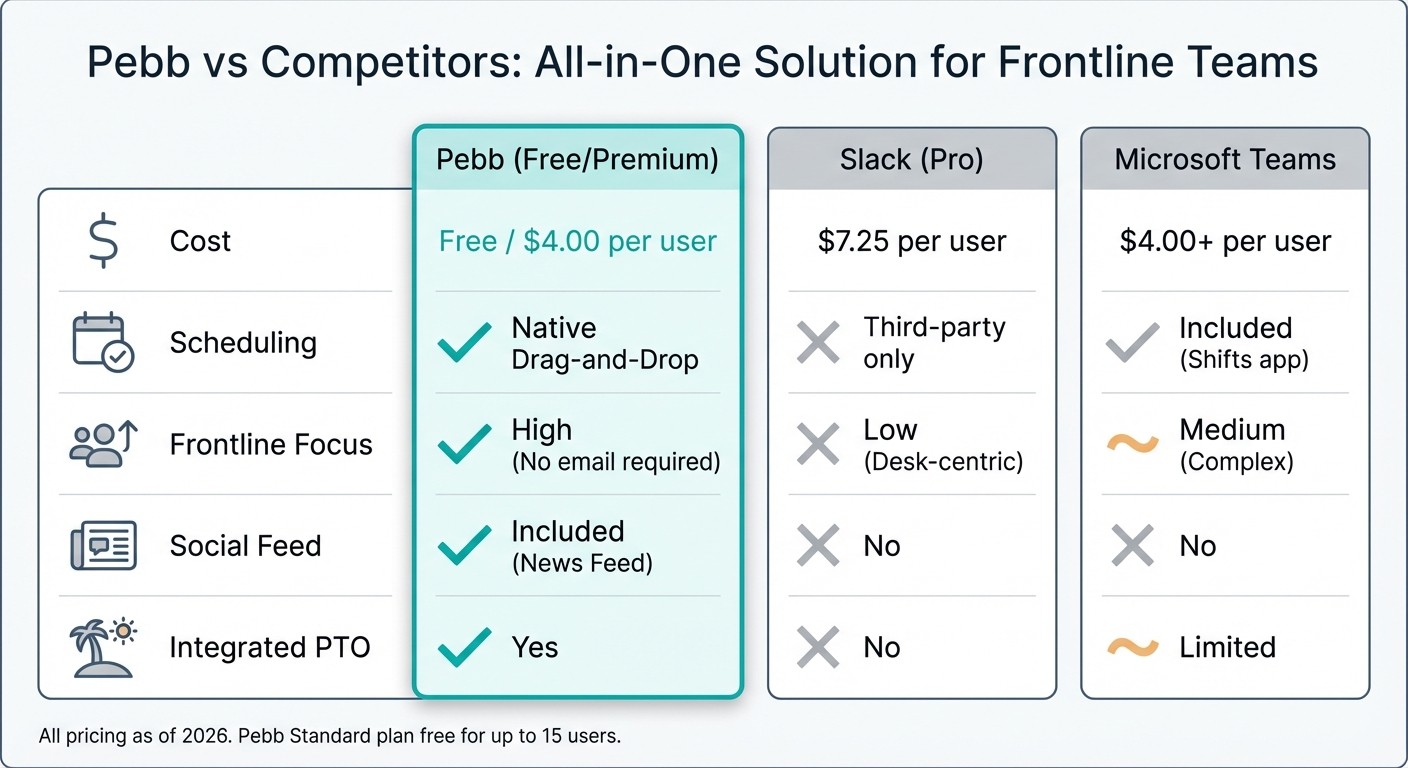
Pebb vs Slack vs Microsoft Teams: Feature and Pricing Comparison for Frontline Teams
Remember the days of juggling paper schedules, endless group texts, and clunky spreadsheets? It wasn’t just time-consuming - it left plenty of room for mistakes. Fast forward to 2026, and the game has completely changed. Technology now brings scheduling, communication, and operations together in one place, simplifying workflows and cutting out the chaos.
Pebb's All-in-One Employee App Features
Let me share how Pebb fits into this transformation. It’s not just about creating schedules - it’s about doing it smarter and faster. With Pebb’s drag-and-drop builder, managers can whip up shift templates in minutes and reuse them whenever needed. The best part? Any changes sync instantly to employees' phones, so everyone’s always in the loop.
Here’s another handy feature: employees can swap shifts directly in the app. Once a manager gives the green light, the schedule updates automatically - no back-and-forth emails or texts needed. And because Pebb doesn’t require a corporate email to sign up, it’s perfect for frontline workers who don’t have desks. They just download the app, clock in with a tap, and check their schedules, company updates, and team chats all in one place.
Oh, and did I mention the pricing? Pebb’s Standard plan is completely free for teams of up to 15 employees. It includes shift scheduling, PTO management, clock-in features, work chat with unlimited history, a news feed, a knowledge library, tasks, digital forms, calendar, apps, and unlimited spaces, teams, and branches. If you’re running a larger team or want extras like analytics, voice and video calls, permissions control, advanced work chat, advanced posts, integrations, Enterprise SSO, and premium SLA support, the Premium plan is just $4/user/month - a small price for keeping everything organized and in one spot.
Why Pebb Stands Out Among Competitors
Now, let’s talk about what makes Pebb different. Unlike platforms that require multiple apps to cover frontline needs, Pebb bundles everything into a single solution. Sure, tools like Slack and Microsoft Teams are great for desk workers, but they don’t have built-in features like shift scheduling or PTO tracking. Teams using these platforms often end up paying more and still need extra integrations to fill the gaps.
Here’s a quick comparison:
Feature | Pebb (Free/Premium) | Slack (Pro) | Microsoft Teams |
|---|---|---|---|
Cost | Free / $4.00 per user | $7.25 per user | $4.00+ per user |
Scheduling | Native Drag-and-Drop | Third-party only | Included (Shifts app) |
Frontline Focus | High (No email required) | Low (Desk-centric) | Medium (Complex) |
Social Feed | Included (News Feed) | No | No |
Integrated PTO | Yes | No | Limited |
With Pebb, everything is in one place. Need to check your schedule, request time off, or send a quick message to a coworker? It’s all there, no app-switching required. It’s built specifically for teams on the floor - whether that’s in retail, restaurants, or on job sites.
Connecting Rosters with Communication Tools
Scheduling is just one piece of the puzzle. At Pebb, we’ve seen how connecting rosters with communication, tasks, events, digital forms, files, and knowledge tools takes efficiency to a whole new level. For example, managers can post weekly schedules directly to the news feed as a PDF or image. Employees see the schedule as soon as they log in, no hunting required.
Need to keep conversations organized? Dedicated chat channels like #shift-swaps or #weekly-schedules make it easy. Managers can even see who hasn’t viewed the latest roster, so they can follow up before shifts start and avoid no-shows.
And here’s a bonus: the Knowledge Library. It’s a lifesaver for employees who need quick access to training materials or SOPs during their shifts. Alongside files, links, tasks, calendar events, and digital forms, it keeps everything right there in the app, ready when they are. Everything your team needs, right in their pocket.
Wrapping Up
Building an effective employee roster in 2026 isn’t about grinding harder - it’s about working smarter. We’ve tackled some of the biggest challenges, like understaffing, last-minute changes, and compliance headaches, and explored practical solutions: predicting demand, organizing availability, publishing schedules early, and rotating shifts fairly. These strategies don’t just keep things running smoothly - they improve productivity, boost team morale, and even increase profitability. And when you pair these with modern scheduling tools, the benefits multiply.
With Pebb, we’ve made scheduling easier than ever. Forget juggling spreadsheets and group texts. Pebb’s integrated scheduling, communication, tasks, calendar, digital forms, files, and knowledge features give you real-time visibility and make communication a breeze - all in one platform. Your team can swap shifts, request time off, or check their schedules instantly, without the endless back-and-forth. It’s a game-changer for managers and employees alike.
I’ve seen how the right scheduling tool can transform operations. It’s not just about filling shifts; it’s about creating a system where employees feel valued, managers stay on top of things, and everyone’s on the same page. When your roster runs like a well-oiled machine, everything else falls into place - fewer no-shows, happier staff, and a business that operates seamlessly.
If you’re ready to end the scheduling chaos, Pebb has you covered. Whether you’re managing a small team of five or a large crew of 500, our free Standard plan (for up to 15 employees) or Premium plan at just $4/user/month has everything you need to build reliable, efficient rosters that keep your business thriving and your team engaged. Let’s make scheduling one less thing to worry about.
FAQs
How far ahead should I publish the roster?
Publishing the roster at least a day ahead makes a world of difference. It gives everyone on the team enough time to check their shifts, flag any conflicts, and sort out changes if needed. Plus, it helps keep communication flowing smoothly and ensures the team is ready to hit the ground running.
How do I prevent overtime and compliance violations?
Keeping track of employee hours can feel like a juggling act, especially when you’re trying to avoid overtime and stay on the right side of labor laws. That’s where tools like Pebb come in handy. With real-time monitoring, Pebb makes it easier to stay on top of hours worked without breaking a sweat.
Here’s how it works: Pebb provides clock-in tools, PTO management, and real-time updates to help you keep tabs on hours and spot potential overtime before it becomes an issue. Plus, managing availability or handling shift swaps is a breeze since everything happens right in the app. This not only keeps schedules aligned with labor laws but also minimizes the chances of compliance headaches.
What’s the fastest way to handle last-minute callouts?
Managing last-minute callouts can feel like juggling flaming torches - stressful and chaotic. But here’s where a tool like Pebb comes in to save the day. With its digital shift scheduling features, managers can instantly reassign shifts, approve swaps, and update team availability in real time.
This doesn’t just smooth out communication - it practically eliminates those frustrating delays that throw everything off balance. Your team stays in the loop, disruptions are kept to a minimum, and the whole operation runs a lot more smoothly. It’s like having a safety net for those unpredictable moments.
