
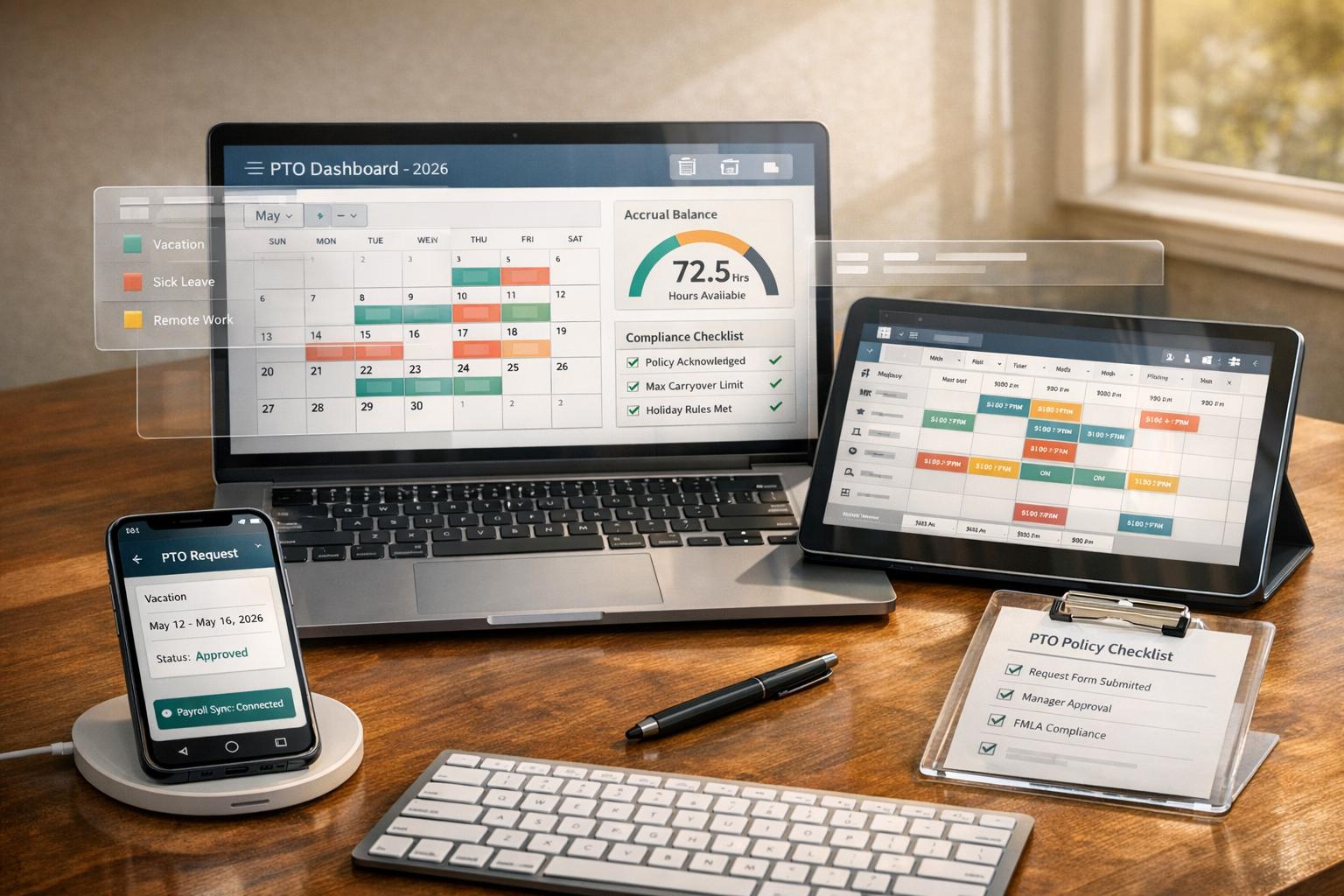
Author: Ron Daniel
The Complete Guide to Employee PTO Trackers (2026 Edition)
Choose and implement PTO trackers with compliance, accrual rules, payroll/scheduling integration, and mobile-first workflows.
Have you ever had a PTO request vanish into thin air? I have. A few years back, I was managing a team, and one of my employees sent me a time-off request via email. I thought I approved it, but somehow, it got buried under a mountain of messages. The result? A double-booked schedule, an upset team member, and a frantic scramble to fix it all. It was a mess - and one I vowed to never repeat.
Fast forward to today, and the way we manage PTO has completely changed. With 70% of U.S. companies now working in dispersed teams, relying on spreadsheets and email chains feels like trying to navigate with a paper map in the age of GPS. Manual tracking isn’t just outdated - it’s costly. Did you know it can lead to a 25% increase in approval errors? And for frontline workers, where 40% of PTO requests get delayed or lost, the stakes are even higher.
So, how do you avoid these headaches? That’s what we’re diving into today. From the challenges of outdated systems to the game-changing tools that make PTO management smoother for everyone, I’ll share what’s working, what’s not, and how we at Pebb have tackled these issues head-on. Let’s get into it.
PTO Policies and Legal Requirements
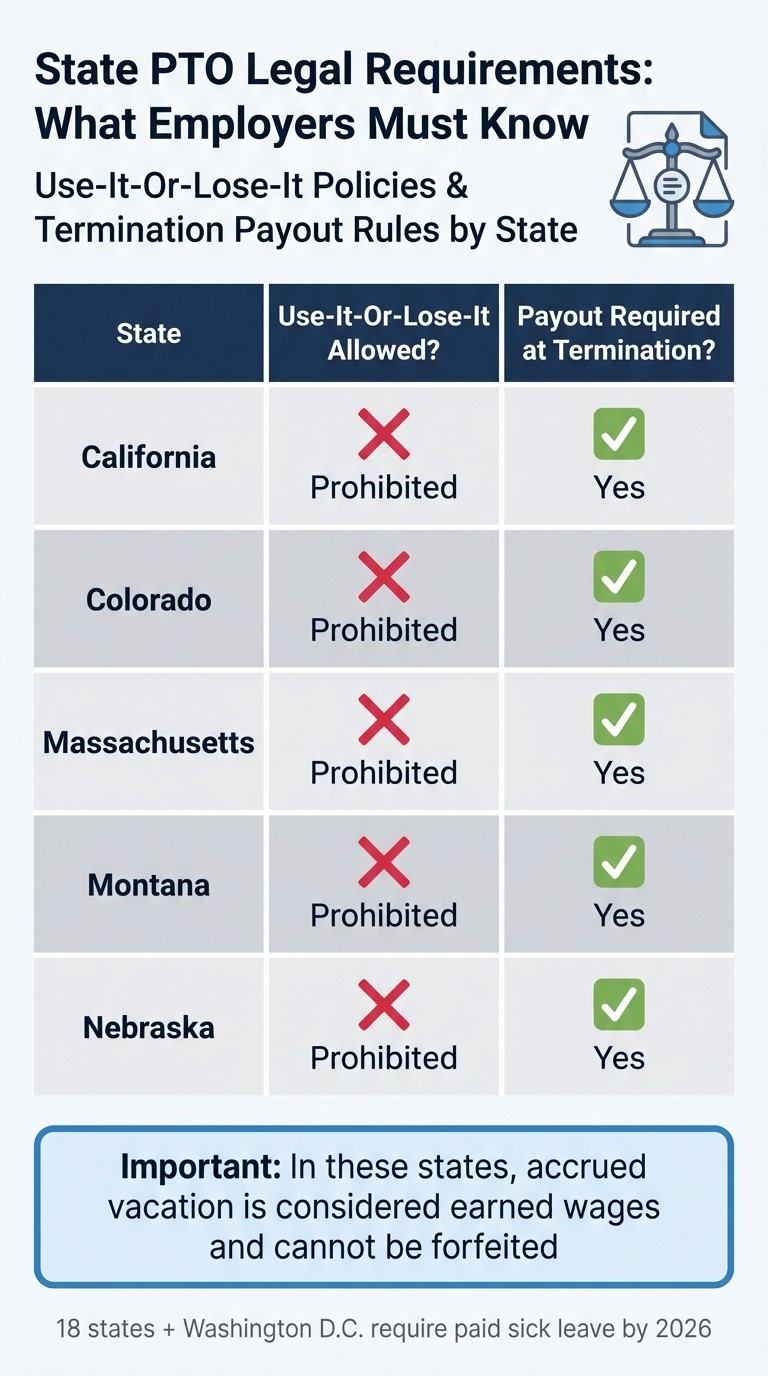
State PTO Laws: Use-It-Or-Lose-It Policies and Termination Payout Requirements
Let me tell you, PTO policies aren't just another piece of paperwork - they're a big deal. They can either shield your company from legal trouble or leave you wide open to it. With 18 states and Washington, D.C. requiring paid sick leave by 2026, nailing down the details isn't just a good idea - it's essential.
What to Include in Your PTO Policy
A well-thought-out PTO policy should cover all the bases. Think of it like a roadmap that includes:
Accrual rates: For example, 1 hour of PTO for every 30 hours worked.
Eligibility rules: Who qualifies and when.
Usage guidelines: Notice periods, blackout dates, and other restrictions.
Carryover limits: How much unused time can roll over.
You’ll also need to decide on a PTO model: accrual-based, lump-sum, or unlimited PTO. Here’s an interesting stat - 47% of workers now have consolidated PTO plans (combining sick and vacation time), up from just 21% in 2010. If you go this route, you’ll need to track the sick leave portion separately to meet state minimums during audits.
Now, here’s something that might surprise you: employees with unlimited PTO actually take fewer days off - 12.1 days on average - compared to 14.3 days for those with fixed PTO allowances.
When it comes to unused time, steer clear of "use-it-or-lose-it" policies. States like California, Colorado, Montana, and Nebraska don’t allow employees to forfeit unused PTO - it’s simply not legal. Instead, set a cap - say 1.5 times the annual accrual rate - where PTO stops accruing until some of it is used. This keeps things fair and keeps your liabilities in check.
Once your policy is rock-solid, the next step is making sure it aligns with state-specific laws.
US Legal Requirements for PTO
Here’s the thing: there’s no federal law requiring paid time off. The Fair Labor Standards Act (FLSA) leaves PTO decisions entirely up to employers. But state laws? They’re a whole different ballgame. For example, in California, Colorado, and Massachusetts, accrued vacation is considered earned wages. That means it can’t be taken away and must be paid out when an employee leaves.
Keeping detailed records is non-negotiable. You’ll need an audit trail for every approval and balance adjustment to protect your company during audits or wage claims. If you operate in multiple states, it’s smart to create a base policy with state-specific addenda. Take New York, for instance - they’ve recently added a requirement for 20 hours of paid prenatal personal leave annually, separate from sick leave.
Here’s a quick look at some state-specific rules:
State | Use-it-or-lose-it Allowed? | Payout Required at Termination? |
|---|---|---|
California | Prohibited | Yes |
Colorado | Prohibited | Yes |
Massachusetts | Prohibited | Yes |
Montana | Prohibited | Yes |
Nebraska | Prohibited | Yes |
To stay compliant and efficient, document everything - accrual caps, payout terms, blackout periods - in your employee handbook. This not only prevents inconsistent management but also minimizes the risk of legal claims. And trust me, tools like Pebb make tracking and managing PTO a breeze.
What to Look for in a PTO Tracker
Let’s face it - not all PTO trackers are created equal. Some still rely on clunky spreadsheets that are more trouble than they’re worth, while others make leave management a breeze. The right tool should save time, cut down on mistakes, and keep everyone - from frontline workers to managers - on the same page.
Automation and User-Friendly Design
Manually tracking PTO is a recipe for disaster. It leads to missed accruals, data errors, and hours wasted on calculations. A good PTO tracker takes care of all that for you. It should handle accruals automatically based on hours worked, update balances in real time, and send out reminders when approvals are needed.
Here’s the kicker: if the system isn’t simple to use, no one’s going to use it. A mobile-first design is a must. Employees should be able to request time off, and managers should be able to approve it, in less than 30 seconds. Anything slower creates bottlenecks and headaches. At Pebb, we’ve seen firsthand that straightforward designs lead to higher adoption rates. And trust me, training managers first is key - if they’re comfortable with the workflow, the whole system runs smoother. When they’re not, requests pile up, and employees lose faith in the process.
This kind of automation doesn’t just save time; it also fits seamlessly into broader workforce management systems, setting you up for better scheduling and payroll integration.
Integration with Workforce Tools
Your PTO tracker can’t operate in isolation. It needs to sync with payroll, detect scheduling conflicts, and integrate with shared calendars to avoid staffing nightmares. Payroll sync is especially important - it eliminates manual entry errors and ensures everything’s accurate when it’s time to process paychecks or final payouts. Nobody wants to deal with miscalculated wages or missed accruals.
And let’s talk about conflict detection. Overlapping leave requests can leave teams short-staffed, which is the last thing anyone wants. A good PTO tracker flags these conflicts before they become problems. Shared calendar views are another lifesaver, letting employees check who’s already off before making their own requests and helping managers make smarter decisions.
If your team works in shifts, integration with scheduling tools is a game-changer. When your PTO tracker and shift scheduler work together, you can spot coverage gaps before they happen. At Pebb, we’ve combined PTO management, shift scheduling, and team communication into one platform, so you’re not juggling multiple tools - and paying extra for each one.
Real-Time Updates and Clear Approval Workflows
Here’s the thing: outdated PTO balances are a trust killer. Employees should be able to log in and see their current balance instantly - not a number from two weeks ago. Real-time updates ensure that everyone’s working with accurate, up-to-date information, which cuts down on confusion and disputes.
Approval workflows also need to be clear and transparent. Employees should know exactly where their request stands - whether it’s pending, approved, or denied - without having to chase down their managers. On the flip side, managers need an easy way to review requests and make decisions quickly.
Here’s a breakdown of the features that make the biggest difference:
Feature | Importance | Advantage |
|---|---|---|
Mobile Access | High (Essential for frontline workers) | Lets requests and approvals happen in seconds |
Payroll Sync | High | Reduces errors and ensures compliance |
Conflict Detection | Medium/High | Flags overlapping leave to prevent understaffing |
Custom Accruals | Medium | Automates complex rules like 1 hour per 30 worked |
Shared Calendar | Medium | Improves transparency and team planning |
At the end of the day, your PTO tracker should make leave management easier for everyone involved. Anything less just isn’t worth it.
How Pebb Handles PTO Management
Let me tell you, managing PTO can feel like a juggling act - especially when you're dealing with frontline teams or companies with complex schedules. At Pebb, we’ve taken the chaos out of PTO tracking with a mobile-first solution that works seamlessly for modern teams. No more spreadsheets, endless email threads, or chasing down approvals. Everything you need is in one place, and it’s as easy as tapping your phone.
Pebb's PTO Tracking Features
Here’s how it works: Pebb updates PTO balances in real time, giving employees and managers a clear view of team availability, upcoming requests, and usage trends. The system automatically adjusts balances based on your company’s accrual policies - whether it’s earning 1 hour for every 30 worked or a fixed monthly amount. Employees can check their current balance anytime, right from their phones. No guesswork, no confusion.
Submitting a request? It’s as simple as one tap. Managers get instant push notifications, and for straightforward cases that don’t cause scheduling conflicts, you can even set up automated approvals to save time. Every action is logged for compliance, which is a lifesaver if you’re in one of the 16 states requiring PTO payouts at termination. This automation isn’t just convenient - it reduces manual errors by 80% and speeds up approvals by 50%. When you’re managing deskless teams, that’s a huge win.
Conflict detection is another standout feature. It flags double-bookings and coverage gaps before they happen, syncing with shift schedules to ensure smooth operations. For frontline workers, predictive alerts help avoid last-minute surprises, keeping everything running like clockwork.
Why Pebb's All-in-One Platform Works Better
Here’s the thing: standalone PTO trackers might get the job done, but they’re not exactly efficient. Pebb takes it a step further by integrating PTO tracking with shift scheduling, work chat, and team calendars - all in one platform. When someone requests time off, the system automatically updates the shift schedule and notifies the team via chat. Managers can view a color-coded, shared calendar synced with active shifts. This kind of integration reduces miscommunications by 70% compared to juggling multiple tools.
Let me share a couple of examples. A retail chain we worked with used Pebb to auto-fill shifts during the busy holiday season, eliminating the need for manual adjustments. Meanwhile, a construction firm relied on our chat-linked approvals to handle last-minute requests without disrupting job sites. Both saw faster onboarding and higher adoption rates - plus way less stress for their teams.
And here’s the kicker: by consolidating everything into one platform, you save on licensing fees - up to 30-50% - and cut admin time by 60%. For teams that don’t rely on company email, having everything accessible through a single mobile app is a total game-changer.
Pricing That Works for Any Team Size
We know budgets matter, so our pricing is designed to be straightforward and affordable. The Standard plan is always free for teams of up to 15 users. It includes PTO tracking, shift scheduling, unlimited chat history, and clock-in tools - everything you need to get started.
For larger teams or those looking for advanced features, the Premium plan costs just $4 per user per month (billed annually). This plan includes everything in Standard, plus voice and video calls, advanced analytics, HRIS integrations, and enterprise SSO. No hidden fees, no surprises.
Feature | Standard (Free) | Premium ($4/user) |
|---|---|---|
User Limit | Up to 15 users | Unlimited |
PTO Tracking | Included | Included |
Shift Scheduling | Included | Included |
Chat History | Unlimited | Unlimited |
Voice & Video Calls | Not included | Included |
Advanced Analytics | Not included | Included |
HRIS Integrations | Not included | Included |
At $4 per user, Pebb is more affordable than competitors like BambooHR, which costs $6-8 per user. Plus, we’re built with frontline workers in mind. Teams using Pebb have reported a 25% ROI in their first year from time savings alone. Whether you’re running a 10-person startup or managing a 500-person enterprise, Pebb scales with your needs - and your budget.
How to Implement a PTO Tracker in 2026
Let me tell you something I’ve learned the hard way: jumping into a new PTO tracker without fixing your policies first is like trying to organize a messy closet by just shutting the door. As our CEO Dan Robin wisely says:
"A new tool won't fix a broken process. It will just automate the chaos".
So, before you even think about software, nail down your policies. Write out your accrual methods, rollover rules, blackout dates, and how approvals should work. Keep it simple and clear - plain English is your best friend here. Once that’s locked in, the rest of the process flows so much easier.
Getting Your Team on Board
Here’s the trick: start small. Instead of rolling out the new tracker to everyone at once, begin with your managers. Train them first, and let them become the go-to experts. When managers are on board and excited, the rest of the team follows. Trust me, it’s a game-changer.
Focus on the benefits they’ll care about most - like instant balance checks, quicker approvals, and better visibility. And don’t just explain what buttons to click; show them why it matters. For example, faster approvals mean less back-and-forth, and transparency means no more guessing games about PTO balances.
Here’s a pro tip: run the new tracker alongside your old system for one pay period. This gives you a chance to catch and fix any discrepancies before the official launch. Oh, and don’t forget to import all previously approved leave into the new system. It’ll save you from scheduling headaches later.
Customizing PTO Settings for Your Company
Your company isn’t a cookie-cutter operation, so your tracker shouldn’t be either. Take the time to tailor the settings to your policies. For instance:
If new hires have to wait 90 days before using PTO, set that up.
Got a cap on accruals? Configure it - like pausing accruals once someone hits 80 hours.
Decide your rollover policy. Can employees carry over 40 hours, or is it a use-it-or-lose-it situation?
These details matter, especially since 76.5% of workers receive payouts for unused PTO when they leave. Accurate tracking here isn’t just about fairness - it’s about protecting your bottom line too.
If your company deals with more complex scenarios, like union contracts or teams across multiple locations, start small. Test the system with one department first. It’s way easier to sort out edge cases early than to fix them after the system goes live.
Tracking and Improving Your PTO System
Once the tracker is up and running, don’t just set it and forget it. Check in after two payroll cycles. Are employees actually using it? Are managers approving requests faster? Use the system’s analytics to dig into trends. For example, if a team isn’t taking any time off, that could be a red flag for burnout. And here’s a stat that might surprise you: U.S. workers only use 48% of their PTO on average, with 23% skipping time off entirely because they’re too swamped.
One simple tweak that works wonders? Make team calendars visible. This lets employees coordinate their time off without having to ask managers for updates. It’s a small change, but it can cut down on up to 50% of manager questions.
And don’t underestimate the power of leading by example. Encourage leadership to take their own vacations - and to truly unplug. When the boss steps away guilt-free, it sets the tone for everyone else. As Dan says:
"The goal is to make taking a vacation feel as normal as charging your phone. You don't feel guilty about plugging it in when the battery is low".
Follow these steps, and you’ll have a PTO system that not only works well on day one but keeps improving as your team grows and changes.
Conclusion
What Modern PTO Trackers Deliver
Modern PTO trackers have completely changed how leave management works. By automating requests and approvals, they take the manual effort out of the process, while self-service portals give employees real-time access to their balances. Plus, these tools ensure compliance with FMLA and state-specific regulations, which is a huge relief for HR teams. According to Gartner's 2026 HR Tech Report, companies using integrated PTO software experience 25% faster approval times and 40% fewer unplanned absences. On top of that, a Forbes HR Study from 2025 found that 92% of employees prefer self-service PTO apps, and this preference leads to a 15% boost in retention rates. These numbers paint a clear picture of why modern PTO solutions are a game-changer.
Why Pebb Is the Right Choice
Here’s where Pebb stands out. It’s not just another PTO tracker - it’s a comprehensive platform designed for both deskless and office-based teams. What sets Pebb apart is its ability to integrate PTO management with other essential tools like shift scheduling, work chat, and a news feed. This integration solves common headaches, like tracking errors and last-minute scrambling to cover shifts when someone takes time off. With Pebb, the system automatically helps manage coverage when a PTO request comes in, so you’re not left scrambling.
And let’s talk about pricing. Pebb's Premium plan is just $4 per user per month, offering unlimited PTO tracking, scheduling, and collaboration tools. For smaller teams, the free plan supports up to 15 users and still includes full PTO features - making it one of the best value options out there. One retail chain with 500 employees saw incredible results: 100% PTO compliance, a 28% increase in employee satisfaction thanks to app-based requests, and 60% less admin time spent on leave management. With Pebb, you’re not just getting a PTO tracker - you’re getting a platform that simplifies work and grows alongside your team.
FAQs
How do I stay compliant with different state PTO and sick-leave laws?
To navigate the maze of state-specific PTO and sick-leave laws, it’s crucial to get familiar with the rules in each state where your employees work. The key is crafting a PTO policy that’s crystal clear about accrual, usage, and carryover - and making sure it lines up with local regulations.
Here’s where things get easier: using a PTO management tool like Pebb. It takes the guesswork out of compliance by automating accrual tracking, customizing policies, and streamlining leave approvals. Not only does this save time, but it also cuts down on errors and lowers the risk of legal headaches, especially when juggling requirements across multiple states.
What integrations should a PTO tracker have with payroll and scheduling?
Managing PTO can get messy without the right tools, especially when payroll and scheduling are involved. That’s why a solid PTO tracker needs to sync seamlessly with both systems. Here’s how it works: payroll integration automatically updates PTO balances, cutting down on errors and ensuring employees get paid correctly. On the scheduling side, integration helps avoid shift conflicts by giving managers real-time insights into who’s available and when.
At Pebb, we’ve taken it a step further by combining PTO requests, scheduling, and payroll into one unified platform. This means less manual work, fewer mistakes, and a clearer process for everyone - from managers trying to plan ahead to employees checking their balances. It’s all about making life easier and more transparent for the whole team.
How can I roll out a PTO tracker without disrupting our current process?
To get a PTO tracker up and running without a hitch, the first step is to take a closer look at your current process. Where are the gaps? What’s not working? Understanding these pain points will help ensure the new system solves the right problems.
Next, pick a solution that’s easy to use and works well on mobile - something like Pebb is a great choice for seamless integration. When it’s time to roll it out, don’t try to do everything at once. A gradual launch works best. Make sure to clearly communicate the benefits to your team and offer training for both employees and managers so everyone feels confident using it.
Finally, keep an ear out for feedback. Pay attention to what’s working and what’s not, and make adjustments along the way. The goal is to improve your workflow, not add unnecessary headaches.
