
Author: Ron Daniel
Clock In App vs Paper Timesheets - What’s Better?
Compare paper timesheets and clock-in apps for accuracy, payroll efficiency, compliance, and hidden costs of manual tracking.
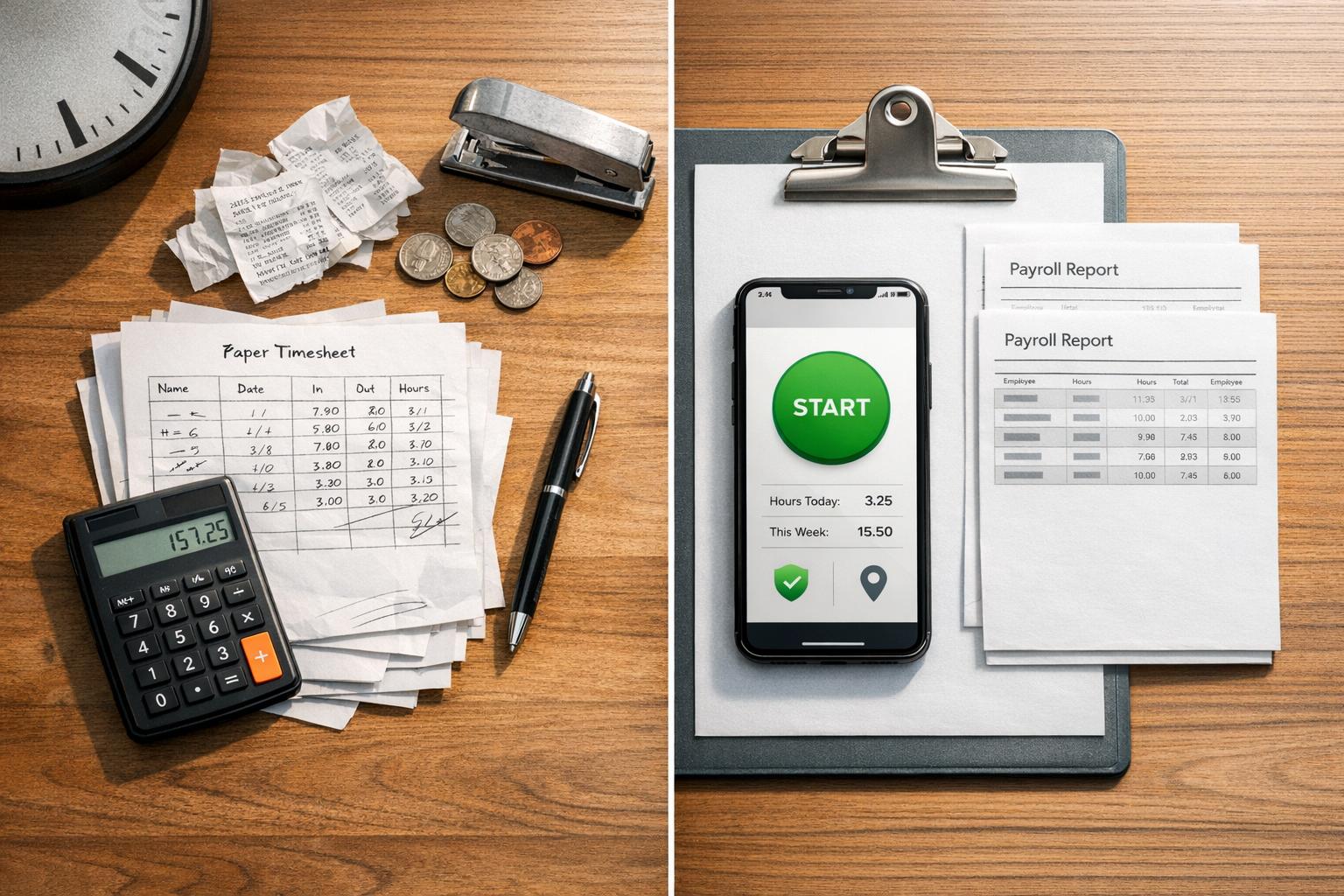
Let's be honest - tracking employee hours shouldn’t feel like solving a puzzle. But I’ve seen it firsthand: stacks of paper timesheets, scribbled start times, and payroll teams squinting at numbers that could be a “7” or a “9.” It’s a mess. And if you’re still using paper for this, you’re not alone - 40% of businesses in the U.S. still rely on manual methods. But here’s the kicker: those manual systems are costing companies up to 7% of their annual payroll. Ouch.
Here’s what I’ve learned at Pebb: time tracking doesn’t have to be this painful. Clock-in apps, like the one we’ve built, capture hours in real time, eliminate guesswork, and save hours of admin work every week. It’s not just about making payroll easier - it’s about accuracy, accountability, and giving your team a tool that actually works for them.
In this article, I’ll compare paper timesheets to digital clock-in apps, breaking down the pros, cons, and the hidden costs you might not even realize you’re paying. By the end, you’ll see why modern tools are the way forward. Let’s dive in.
Paper Timesheets: How They Work and Where They Fall Short
Paper timesheets might seem straightforward - employees jot down their start times, breaks, and clock-out times, then hand them in weekly. But beneath that simplicity lies a minefield of inefficiencies and errors. Let me walk you through the main pain points, starting with the big one: manual entry.
Manual Entry and Error Risks
Here's the thing: when employees fill out timesheets after the fact, accuracy takes a hit. They often estimate their hours - rounding 8:14 AM to 8:00 AM or 4:53 PM to 5:00 PM. Over time, these little adjustments can snowball into hefty financial losses for the company.
And don’t even get me started on handwriting. Payroll teams frequently find themselves squinting at forms, trying to figure out if that messy scrawl is a "7" or a "9". A single misread digit can mess up an entire paycheck. Worse yet, paper timesheets offer no defense against buddy punching - when one employee clocks in for a coworker who’s not even there. These aren’t rare occurrences, either. In fact, manual errors can drain up to 7% of a company’s annual payroll.
Storage and Accessibility Problems
Federal regulations require businesses to keep timesheets on file for two to three years. That means stacks of paper piling up in storage rooms, and when you need to find a specific record? Good luck. It’s a manual, time-consuming process.
Then there’s the lack of an audit trail. If someone crosses out a number and writes in a new one, there’s no way to track when or why the change was made. And if a timesheet gets lost or damaged? That data is gone for good. No backups, no recovery.
But the inefficiencies don’t stop there. Let’s talk about how this system bogs down payroll.
How Paper Timesheets Slow Down Payroll
Every single paper timesheet has to be manually entered into the payroll system. For a team of 20 employees, that adds up to 4 to 6 hours of extra work per pay period.
"The best tools don't add friction; they remove it. A great clock in app should feel less like a chore and more like a helpful part of the workday." - Dan Robin, Pebb
And here’s the ripple effect: late or incorrect timesheets delay payroll processing. That means employees don’t get paid on time, which isn’t just frustrating - it chips away at trust. When people start questioning whether they’ll get their paycheck on schedule, morale takes a hit.
Paper timesheets might have worked in the past, but their flaws are hard to ignore in today’s fast-paced workplace.
How Clock-In Apps Work and What They Offer
Clock-in apps have changed the game when it comes to tracking employee hours. With just a smartphone or browser, employees can log their exact start and stop times, cutting out the hassle of messy handwriting and manual calculations.
Automated Time Tracking and Fewer Errors
One of the standout features of clock-in apps is their precision. Instead of vague, rounded timestamps, these apps log exact times - like 8:47 AM - and often include safeguards like GPS geofencing. This ensures employees can only clock in when they're physically at the job site, reducing the risk of "buddy punching."
The numbers speak for themselves. The American Payroll Association reports that manual timesheets can carry an 8–12% error rate, while automated systems bring that down to less than 1%. These apps also handle the nitty-gritty: calculating overtime, breaks, and shift differentials automatically. That kind of accuracy not only prevents costly mistakes but also makes integrating with other systems much smoother.
Integration with Scheduling and Payroll Tools
Here’s where things get even better: clock-in data doesn’t just sit there. With Pebb, for example, this data syncs directly with scheduling tools, so managers can instantly spot early or late arrivals. And when it comes to payroll, the integration means wages are calculated automatically - no need for manual data entry.
"Integration is what turns a time clock from a simple record-keeper into a powerful operational tool. It saves countless hours of administrative work and prevents the costly human errors that creep in when people are forced to copy and paste data." - Dan Robin, Pebb
Research from ADP backs this up, showing that integrated time tracking systems can cut payroll processing time by 50%. For teams that used to spend 4–6 hours per pay period on manual entry, that’s a game-changer. And because Pebb bundles these features - scheduling, payroll syncing, and real-time tracking - into one platform, it’s a one-stop solution for both frontline and office teams.
Real-Time Access to Attendance Data
The magic of seamless integration doesn’t stop there. Real-time access to attendance data is another huge perk. With Pebb’s manager dashboard, leaders can see exactly who’s clocked in, who’s running late, and how hours are stacking up against the schedule - all from any device.
"Instead of getting a nasty surprise on the payroll report, a manager can see overtime hours building up in real time." - Dan Robin, Pebb
This real-time visibility allows managers to adjust schedules on the fly. And it works - a 2025 When I Work survey found that 78% of managers reported better attendance accuracy after switching to mobile clock-in apps. This isn’t just a small improvement; it’s a whole new way to manage teams more effectively.
Paper Timesheets vs. Clock-In Apps: A Side-by-Side Look
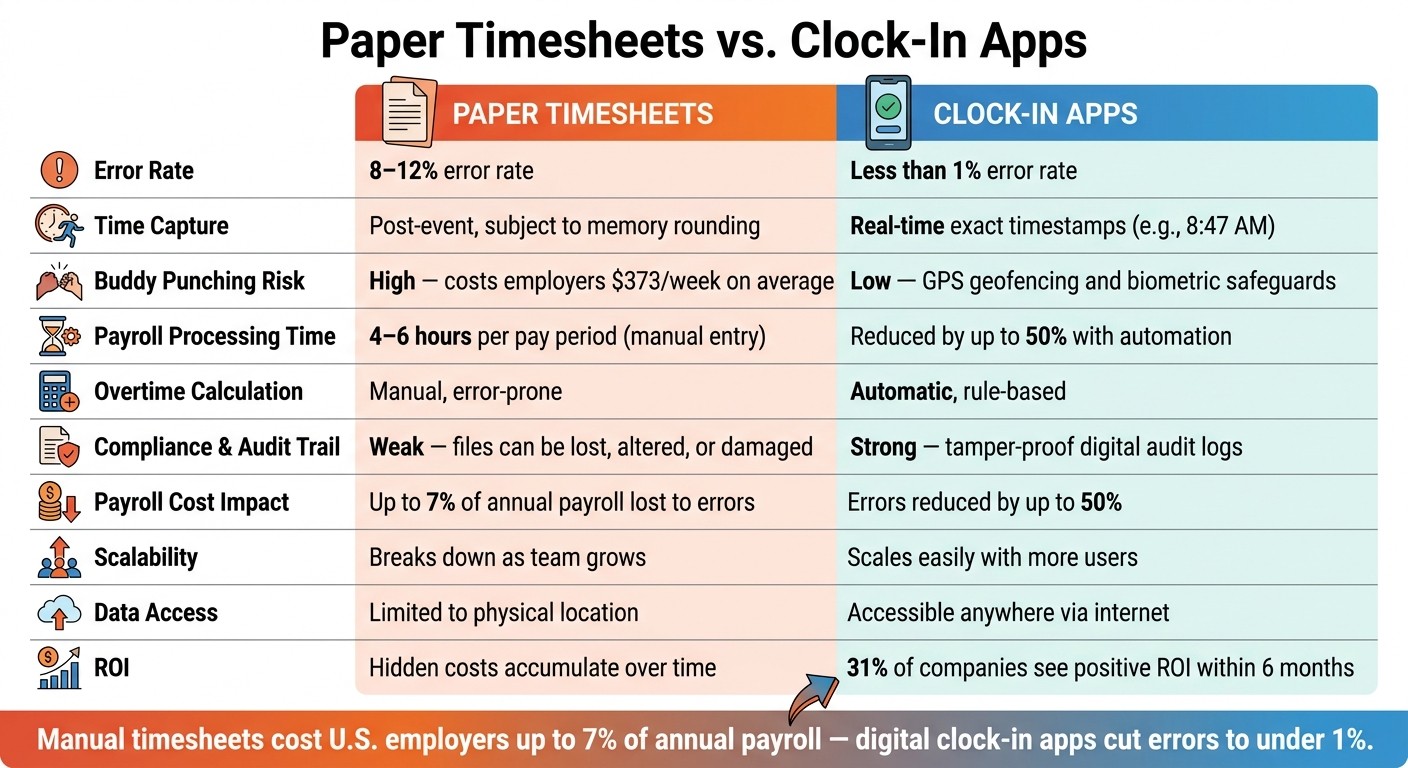
Paper Timesheets vs. Clock-In Apps: Key Stats & Differences
Let me walk you through a comparison of paper timesheets and clock-in apps. Trust me, the differences are eye-opening.
Accuracy and Error Reduction
Here's the thing about paper timesheets: they rely on memory. Employees often round their start and end times to the nearest 15 minutes. For instance, someone clocking in at 8:14 AM might write down 8:00 AM. Now imagine this happening daily across a team - it adds up. On the flip side, clock-in apps capture exact timestamps in real time. Plus, many apps use GPS to confirm employees are actually on-site.
Feature | Paper Timesheets | Clock-In Apps |
|---|---|---|
Error Rate | High error risk due to manual entry | Low error risk with automation |
Time Capture | Post-event (subject to memory errors) | Real-time (exact timestamps) |
Verification & Audit Trail | Weak (manual review, signatures, handwritten notes) | Strong (automated timestamps, GPS, digital logs) |
Time Theft Risk | High (buddy punching is easy) | Low (GPS and biometric safeguards) |
Did you know that buddy punching alone costs U.S. employers an average of $373 per week? That’s money down the drain, and it’s completely avoidable with a clock-in app. This level of precision also feeds directly into payroll efficiency, which brings me to the next point.
Time Savings and Payroll Efficiency
If you've ever managed paper-based payroll, you know the pain - chasing late submissions, squinting at illegible handwriting, and manually entering data. It’s a time sink. Clock-in apps eliminate this hassle. They generate payroll-ready reports automatically, cutting down errors and freeing up hours of admin time.
Feature | Paper Timesheets | Clock-In Apps |
|---|---|---|
Payroll Processing Time | High (manual input and chasing) | Low (automated data and bulk approval) |
Overtime Calculation | Manual | Automatic (rule-based) |
Automation Benefits | None | High (syncing and auto-calculations) |
Scalability | Breaks down as the team grows | Scales easily with more users |
Lucy Cobb from BrightHR sums it up perfectly:
"Manual timesheets can lead to errors... although they can be as simple as calculating hours incorrectly, this could massively cost your business, especially when it comes to your payroll processing."
For small and mid-sized businesses, switching to automated time tracking can save managers 5 to 7 hours of payroll admin work every week. Just think about what else you could achieve with that time.
Cost, Storage, and Compliance
At first glance, paper timesheets seem cheaper. But dig a little deeper, and you'll find hidden costs - admin hours, payroll errors, and compliance risks. Manual errors can eat up 7% of your annual payroll, and missing logs could cost around $78,700 per 1,000 employees annually. Plus, physical files are vulnerable to damage or loss.
Feature | Paper Timesheets | Clock-In Apps |
|---|---|---|
Upfront Cost | Very low (paper and ink) | Varies (subscription fee) |
Ongoing Expenses | Medium (storage space and admin time) | Low (digital cloud storage) |
Compliance Risks | High (files can be lost or tampered with) | Low (secure audit trails and auto-logs) |
Data Access | Limited to a physical location | Accessible anywhere with an internet connection |
With clock-in apps like Pebb, everything is securely stored in the cloud. You get restricted access, a full audit trail, and the peace of mind that comes with knowing your data is safe. Plus, 31% of companies report a positive ROI within just six months of switching to automated time tracking. That’s a quick win, no matter how you look at it.
How Pebb's Clock-In Feature Works in Practice
Let me walk you through how Pebb's Clock-In feature makes life easier for everyone involved. Employees simply open the app, tap to clock in, and the system captures an exact timestamp - no rounding, no guesswork, and no end-of-day paperwork. It's as straightforward as it sounds.
What makes this feature even more practical is how it integrates into Pebb's platform. The moment an employee clocks in, managers can see real-time updates on who's on shift versus who’s scheduled. If someone’s running late or hasn’t clocked in yet, it’s immediately visible - no waiting until hours later to figure out what went wrong.
We’ve also added optional GPS and geofencing verification to ensure employees are physically on-site when they clock in. This isn’t about micromanaging; it’s about transparency and accountability. The GPS check happens only at the start and end of a shift, so there’s no ongoing tracking - just a quick confirmation that keeps everyone on the same page.
One feature we’re particularly proud of is the immutable audit log. Every clock-in, edit, and approval is recorded in a tamper-proof system. This ensures compliance and provides a rock-solid record for resolving any pay disputes. As Dan Robin from Pebb says:
"A fair system for tracking time isn't just an operational upgrade; it's a promise to your team that their work is valued."
Since Pebb is an all-in-one platform, Clock-In data doesn’t just sit in isolation. It flows seamlessly into shift scheduling and PTO management - no messy exports or manual data entry. Overtime is calculated automatically based on your rules, and payroll-ready reports are created without any extra effort. Research shows that tools like Pebb can cut payroll errors by up to 50% and reduce supervisor admin work by as much as 40%. That means saving hours of time every week.
And here’s the kicker: Pebb offers all of this as part of its free communication solution, with a premium plan available for just $4 per user. It’s not just time tracking; it’s a bridge that connects timekeeping with the broader scope of employee management.
Conclusion: Why Clock-In Apps Are the Better Choice for Most Teams
Let me break it down: paper timesheets might have worked in the past, but they rely on memory, manual calculations, and a whole lot of trust. That’s a recipe for trouble, especially as your team grows. Clock-in apps, on the other hand, do the heavy lifting for you. They log hours instantly, handle the math, and keep a tamper-proof digital record. It’s like trading a flip phone for a smartphone - there’s just no contest.
Here’s a stat that might surprise you: manual timesheets can have error rates as high as 8%, which ends up costing U.S. employers around 2.8% of their gross payroll. That’s not pocket change! Meanwhile, digital tools like ours save managers 5 to 7 hours of admin work every single week. Think about what you could do with that extra time - focus on strategy, support your team, or even just breathe a little easier.
For most teams, the choice is obvious. Pebb’s Clock-In feature doesn’t just track time; it’s part of a whole ecosystem that includes shift scheduling, PTO management, and work chat. And here’s the kicker: it’s free for teams of up to 15 people and only $4 per user per month after that.
"The best tools don't add friction; they remove it. A great clock-in app should feel less like a chore and more like a helpful part of the workday." - Dan Robin, Pebb
So, if you’re still stuck in the paper era, why not give Pebb a shot? Try it free and see how much smoother time tracking - and your entire workday - can be.
FAQs
How hard is it to switch from paper timesheets to Pebb?
Switching from paper timesheets to Pebb is a breeze, and you’ll be up and running in no time. Here’s how it works: first, you sign up and set up your team and their shifts. Next, you train your employees to clock in and out using the app - it’s super straightforward, thanks to Pebb’s intuitive design.
What makes the transition even smoother are features like automatic timesheet generation, GPS verification, and payroll exports. These tools not only simplify time tracking but also cut down on errors. Most teams complete the entire process within just a few days, making it a quick and efficient upgrade.
Do employees need a smartphone to use Pebb Clock-In?
Employees don’t need a smartphone to use Pebb Clock-In. They can clock in and out using any device - whether it’s a phone, tablet, or web browser. This makes it easy for everyone on the team to access the system, no matter what device they prefer.
How does Pebb handle time edits and approvals?
Managing time edits and approvals has never been easier with Pebb. Employees simply clock in and out using the app, which automatically creates detailed timesheet summaries. For managers, this means a quick and easy way to review, approve, or tweak hours before processing payroll. The result? Fewer manual mistakes, reduced risk of time theft, and smoother payroll compliance. It's a big step up from the old-school chaos of paper-based systems.
