

Author: Ron Daniel
The best way to manage catering staff for large scale events
Plan headcount by format, assign clear shift owners, and use one mobile system for schedules, checklists, and live communication.
Most event staffing problems don’t start on the floor. In my experience at Pebb.io, they start hours earlier when the team is still using three systems for one job: a spreadsheet for shifts, text messages for updates, and paper sheets for roles. Then one person calls out, the guest count jumps, and a 250-person dinner starts feeling shaky before the first tray leaves the kitchen.
I’ve seen the same pattern across plated dinners, buffets, and cocktail receptions. The teams that stay in control usually do three things well: they staff by format, assign one owner to each phase, and keep schedules, chat, checklists, and clock-ins in one mobile place. Even a 10% to 20% buffer and a simple 48 to 72-hour attendance check can stop last-minute chaos before it spreads.
Based on that pattern, I’m going to walk through what I’ve seen work best: how I plan headcount, assign shift ownership, keep service updates clear, and close out the event with clean notes for the next one. If you run large catering events, this is the system I’d use.
Build your staffing plan around the event format
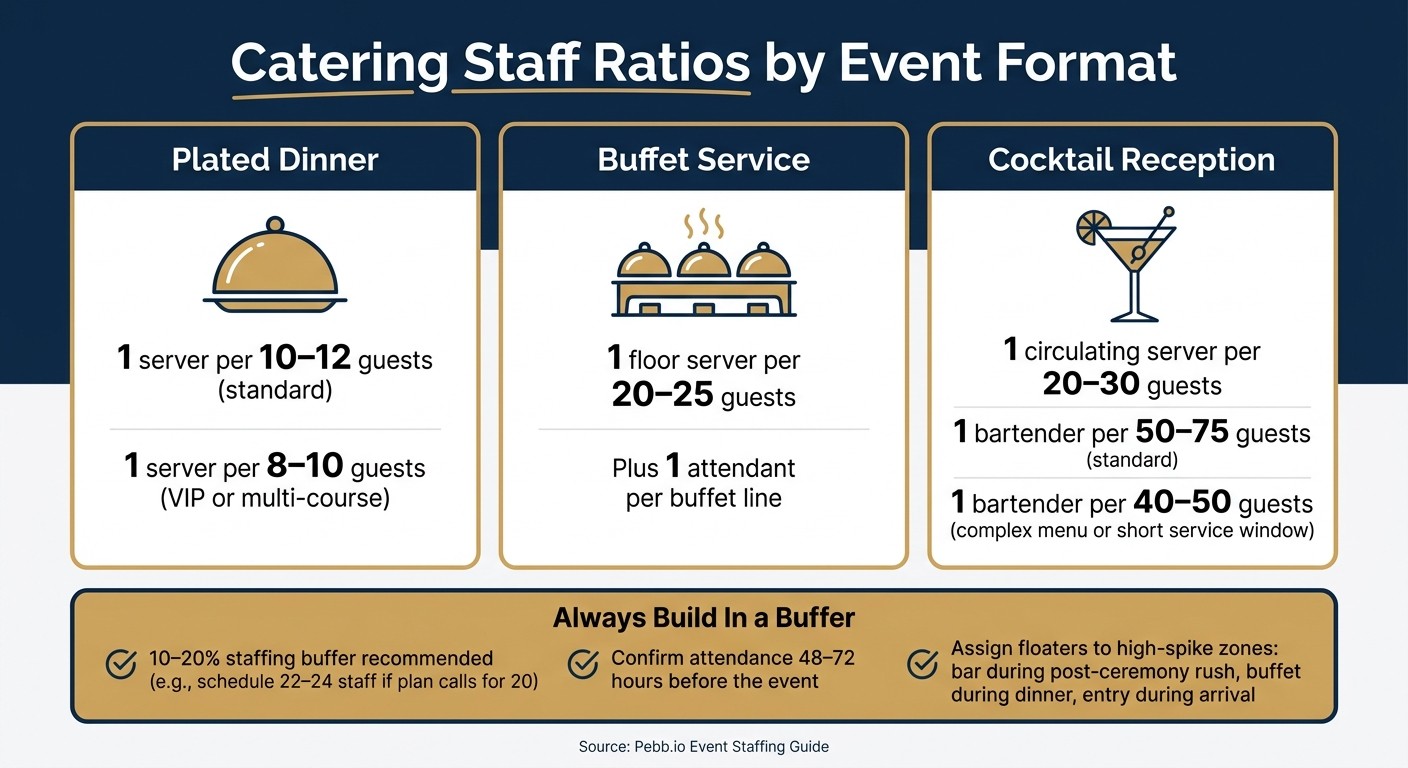
Catering Staff Ratios by Event Format
I’ve seen this go both ways at Pebb.io.
On one event, the team looked fine on paper. Then service started, one area got slammed, another ran short, and suddenly the whole night felt like we were playing catch-up. On another event, we built the staffing plan around the format first, locked roles early, and the service moved like clockwork.
Here’s the thing: the staffing plan is often the difference between an event that stays on time and one that slips behind. I always start with the event format, then size the team from there. Those headcount calls don’t just live in a spreadsheet either. They flow straight into the live mobile schedule our leads check and update during service.
Estimate headcount by guest count, service style, and venue layout
Service style gives me the starting point.
For a plated dinner, I plan around 1 server per 10–12 guests. If it’s a VIP event or a multi-course menu where timing has to stay tight, I bring that closer to 1:8–10. Buffet service usually needs about 1 floor server per 20–25 guests, plus attendants for each buffet line so replenishment and presentation don’t fall apart midway through service. For cocktail receptions with passed appetizers, I plan for 1 circulating server per 20–30 guests. At the bar, I use 1 bartender per 50–75 guests. If the cocktail menu is more involved or the service window is short, I drop that to 1:40–50.
I don’t treat those numbers like theory. They’re the raw inputs for a schedule we can actually use when the room changes shape in real time.
Venue layout matters just as much. A single-room event is usually simpler because one central team can cover the space. But spread that same guest count across an outdoor cocktail area, a main dining room, and a separate bar lounge, and I stop thinking about it as one event. I treat each zone as its own staffing unit.
That means each area gets its own servers, bussers, and bar staff assigned to that space. I don’t like borrowing people from one zone to rescue another once things get busy, because that usually just moves the problem. We put those zone assignments into one live schedule so leads can check coverage at a glance.
Account for every role across setup, service, and breakdown
This is where a lot of plans start to crack.
Runners, bussers, and cleanup staff are often the first roles people trim. They’re also the roles teams miss most once service is underway. At Pebb.io, I’ve learned that a staffing plan only works if it covers all three phases: setup, service, and breakdown.
So I make sure the plan spells out every role:
event lead or captain
servers
bussers
bartenders
barbacks
runners
kitchen support
setup crew
dedicated cleanup team
Each one needs to connect to a named shift owner later in the workflow.
Let me tell you what happened next on one job where that didn’t happen. Everyone assumed replenishment would be handled by “the team.” It sounded fine during prep. Then the buffet started running low, servers were tied up, and no one actually owned the refill task. Same story at breakdown. People were tired, guests were leaving, and cleanup drifted because nobody had been assigned to lead it.
That’s why I assign replenishment and breakdown to named staff, not “everyone pitches in.” When a task belongs to a person, it gets done.
Build in backup coverage for no-shows, breaks, and peak demand
I almost never trust the baseline number alone.
I build in a 10–20% staffing buffer. So if the plan calls for 20 front-of-house staff, I schedule 22–24 and mark 2–4 of them as floaters. That small cushion has saved us more than once.
I assign floaters before service even starts. Usually that means placing them near the spots most likely to spike, like:
the bar during the post-ceremony rush
the buffet line during dinner service
the entry during guest arrival
I also stagger breaks on purpose and use floaters to cover sections so no area gets left open during peak windows. And I always confirm availability with every staff member 48–72 hours before the event. That way, if someone drops, we find out before event day instead of during check-in.
Once I’ve locked headcount, I assign one lead per shift and get clear on who owns each phase. After that, it’s much easier for me to move every person into the right shift owner and team structure.
Assign clear roles and shift ownership
I’ve learned this the hard way at Pebb.io: even when staffing looks perfect on paper, an event can still go sideways if ownership is fuzzy. I’ve seen nights where we had enough people, enough prep, and enough time, but one small gap in responsibility turned into three missed tasks and a stressed-out team.
Here’s the thing: once staffing is locked, the next move is simple. I give every person one clear owner, one shift, one zone, and one task list. That’s what makes the plan hold up on the floor.
Give each shift one lead and a defined team structure
For me, one event captain owns the night. No gray area. That captain reviews the event order (BEO), leads the pre-shift briefing, coordinates timing with the kitchen and bar, handles client issues, and signs off on breakdown.
Under that captain, I set section leads for each main area: bar, dining floor, kitchen support, and setup/breakdown. Each lead runs a 5-minute pre-shift briefing with their zone before doors open, checks that staff have arrived, watches the pace during service, and sends up only the big issues to the captain. Frontline staff - servers, bartenders, runners, and bussers - report to their section lead.
That reporting line keeps the night from getting messy:
staff → section lead → event captain
It sounds basic, but it saves a ton of time. When everyone knows who they answer to, small problems get handled fast instead of bouncing around the room.
Assign tasks by stage: prep, service, replenishment, and cleanup
Most missed tasks don’t come from laziness. They come from blurry ownership. I’ve seen it again and again: when a task belongs to everyone, it belongs to no one.
So I map each role to a stage and make ownership plain:
Setup: Setup crew owns tables, linens, place settings, and signage. Kitchen support stocks stations and labels holding areas.
Active service: Floor servers run table service. The bar team handles drinks and barback coordination. The floor lead watches pace and guest experience.
Replenishment: Named runners or floaters own restocking - buffet levels, glassware, ice, and condiments. Replenishment goes to named staff, not “whoever sees it.”
Breakdown: A breakdown lead and dedicated crew own table clearing, trash removal, packing rentals, and final load-out.
Let me tell you what happened next the first time we got strict about this. Handoffs got smoother almost overnight. And that matters just as much as the first assignment.
Ownership should stay with one person per task, even when the work moves between teams. Before guests are seated, the setup lead confirms to the floor lead that everything is set. At dessert, the floor and breakdown leads sync on timing. Leads drop short digital notes - things like "Bar 2 running low on ice" - so the next-stage team gets full context without making anyone repeat the same update three times.
Share schedules and role assignments in one mobile view
I’ve also found that publishing a schedule means nothing if people can’t find it or don’t trust that it’s current. The minute one person is using an old spreadsheet and another is going off a text thread, you start losing time you won’t get back mid-event.
At Pebb.io, we use Pebb for this. Pebb’s shift scheduling lets me assign each person to a specific role, stage, and zone. Staff get notified when the schedule goes live, and they see updates at once in the app. If something changes on the morning of the event, one tap from the directory connects any staff member to the event captain or section lead in seconds.
That’s the part I like most. Once every role is visible in one mobile schedule, live communication gets a lot faster.
Centralize live communication during the event
I’ve learned this the hard way at Pebb.io: once roles are set and the schedule is locked, the next thing that can make or break an event is communication.
And I don’t mean more communication.
I mean putting it all in one place.
When messages are spread across texts, calls, and random side chats, things get messy fast. I’ve seen prep slow down, service get choppy, and breakdown drag because one person got an update and three others didn’t. The same shift setup that runs the schedule should also run live communication. The answer isn’t sending more messages. It’s sending the right message in the right place.
Use role-based group chat for arrivals, delays, and service changes
The setup I use is simple: one platform, grouped by role.
At Pebb.io, we keep setup crew, servers, bar staff, kitchen support, and captains in their own groups. That way, updates go only to the people who need to act on them. No extra noise. No pileup. No one digging through chat trying to figure out if a message matters to them.
Here’s the thing: that structure saves time when something shifts at the last minute.
If the rental truck is running 30 minutes late, the captain posts in the Setup group: "Truck delayed - prioritize tablecloths and buffet tables first. Glassware will be staged after." That’s it. The setup crew adjusts and keeps moving. The bar team never sees it. The server team never sees it. They don’t need to.
I’ve found that this kind of role-based chat keeps people calm during the rush. Instead of everyone reacting to everything, each team stays focused on its own lane.
Those same role groups should also get the event brief before doors open, so nobody starts a shift guessing.
Send event briefs, contacts, and SOPs directly to every phone
Let me tell you what happened next the last time I relied too much on paper. A printed packet went missing before service, one team had an old version, and a few staff members never got the update at all. That was enough for me.
Paper packets get lost, damaged, or never make it to the full crew. So now I send the full event brief straight to every staff member’s phone 24 to 48 hours before the event.
That brief includes:
floor plan
run of show with timestamps
menu and service style
allergen flags
emergency contacts
Inside Pebb, I use the news feed to post the brief and pin it so it stays at the top. Then I send role-based files to the right groups. Bar staff get bar SOPs. Servers get table assignments and course timing.
The knowledge base is where I keep long-term docs like venue floor plans and general service standards. That matters more than people think. If someone needs the official version, they know exactly where to find it without digging through old chat threads.
And when guest count changes hit on the morning of the event, which happens more than anyone likes to admit, I update one post. Everyone sees the new number right away, and there’s no old paper copy drifting around the floor.
Resolve urgent issues fast with voice calls and direct messages
Group chat is great for broad updates. But not every issue belongs in a group thread.
If a bartender hasn’t arrived and doors open in 10 minutes, I’m not typing into a chat and hoping they see it. I’m calling.
If a VIP guest has an allergy that wasn’t in the brief, the server calls me directly so we can confirm a safe alternative with the kitchen in real time.
My rule is pretty simple:
Use group chat for team-wide updates
Use direct message or a call for urgent one-offs
Then post a short recap in the right group
That last step is the part people skip, and it matters. A quick recap keeps everyone aligned without dragging the whole team into the original back-and-forth.
Track execution, clock-ins, and close out the event
I learned this the hard way at Pebb.io during a large event with 400 guests split between a ballroom and a cocktail terrace. We had the messages flying, the team in motion, and all the right people on site. But live chat alone didn’t finish the job. What moved the event from busy to under control was execution tracking.
Here’s the thing: updates feel productive, but checked-off work is what saves the night.
Use digital checklists for setup, service milestones, and cleanup
I’ve worked events where paper checklists looked fine at first, then vanished into an apron pocket, got skipped, or got filled out long after the work was supposed to happen. That’s why I stopped leaning on paper.
For a big event, I set up checklists by phase, zone, and shift owner. That keeps the work clear and gives each lead one slice of the event to own.
Setup checks usually cover things like:
linens placed
bar stock loaded
POS terminals tested
Once service starts, I set milestone checks every 10–15 minutes. We’re looking at things like buffet stocked, glassware filled back in, and water stations topped off. Then cleanup checks kick in, with trash rotation on schedule and every rental item counted against the manifest before the truck loads out.
In Pebb, each checklist item is tied to a role and time-stamped when someone marks it done. I can see status live, which means I’m not chasing people down for updates. That same view also makes late arrivals and open roles easy to catch before they become a bigger problem.
Confirm clock-ins and task progress in real time
This part has saved me more than once.
With Pebb, our staff clock in from their phones when they arrive on site. The app logs both time and location, so I can pull up the roster and see who’s there, who’s late, and which roles still need coverage. And I can do all of that without leaving the kitchen.
Let me tell you what happened next at one event: one team member hadn’t clocked in 15 minutes after their shift start. The system flagged it right away. That gave me enough time to call in backup and move one person over before service took a hit.
The same thing happens with task progress. As staff finish work, the checklist updates on my screen. So if “buffet stocked” is still open at 6:30 p.m. and doors opened at 6:00 p.m., I don’t have to guess. I message the buffet lead right then and fix it while there’s still time.
That’s the big win for me. I’m not waiting for a post-event recap to learn what went wrong. I’m seeing it while I still have a shot to fix it.
Record handoff notes and update the next schedule
Closing out the event is where a lot of teams drop the ball. Everyone’s tired, people want to leave, and the notes never get written down. I’ve seen that happen, and it means the next event starts from zero.
So now, right after breakdown, I have each lead at Pebb.io submit a short digital log inside Pebb. That includes prep, service, bar, and cleanup. The notes cover staffing gaps, overtime risk, inventory shortages, incidents, and timing delays like a late plating window.
Those notes go straight into the knowledge base and get tagged by event type. That way, when we run a similar format again, we’re not relying on memory or gut feel.
And yes, those notes shape the next schedule in a direct way. If bar lines ran long, we add a barback. If setup needed more time, we move that crew’s start time 45 minutes earlier. Small changes like that add up fast.
Over time, I’ve watched this turn into a real playbook. Not a pile of spreadsheets, random texts, and paper notes. Just one app, one system, and one event after another getting a little tighter.
FAQs
How do I staff for mixed-format events?
I’ve seen what happens when a team tries to juggle scheduling in one app, tasks in another, and messages buried somewhere in a group chat. It gets messy fast. At Pebb.io, we built things to feel a lot simpler on the ground, especially for teams that live on their phones and need answers NOW, not after three logins and a search party.
Use Pebb to manage scheduling, tasks, and communication in one mobile-first platform. That matters more than it sounds. When I’m working with teams that move all day, like kitchen staff, front-of-house, or event crews, the last thing they need is scattered updates. So we set up role-based groups, and that way the right message goes to the right people without noise.
Here’s what that looks like in practice:
Kitchen staff get prep updates and shift notes
Front-of-house teams see service changes and floor coverage info
Event crews get timing, task updates, and last-minute changes
Let me tell you what happened next when teams started using this setup more consistently: fewer missed updates, less back-and-forth, and a lot less “I didn’t see that message.”
We also made scheduling easier to handle in real life, not just on paper. You can build shifts with the drag-and-drop scheduler, use reusable templates for recurring events, and manage availability, PTO, and shift swaps right in the app. So instead of chasing texts, fixing spreadsheets, or dealing with stale schedules on the wall, we keep schedules accurate in real time.
Here’s the thing: when scheduling, tasks, and communication live in one place, the day runs smoother for everyone. And from what I’ve seen inside Pebb.io, that small change can save teams a ton of friction.
What should I do if multiple staff call out?
I learned this one the hard way at Pebb.io during a rough shift where multiple people called out almost back-to-back. For about 10 minutes, we were stuck in that awful gray area where everyone knew there was a problem, but no one had posted it clearly. That lag cost us time.
Now, when several staff call out, I post the urgent coverage gap in the right shift or team space immediately so the people affected get push notifications right away. That one move cuts through the noise fast and helps us react before service starts slipping.
Here’s the thing: speed matters, but so does order. Once the gap is posted, I reassign coverage using our shared, up-to-date schedule before service falls behind. I don’t rely on memory, side chats, or guesswork. I go straight to the schedule everyone can see.
After that, I document every change in the same system so we keep one source of truth. If someone swaps, moves, or picks up a task, it goes there. Let me tell you what happened next when we started doing this the right way: fewer mix-ups, less back-and-forth, and a team that could recover without chaos.
I also use task checklists to reset prep, service, and cleanup priorities for the team that’s still on the floor. That matters more than people think. When you’re short-staffed, the old plan usually doesn’t fit anymore. A simple checklist helps us refocus on what has to happen now, what can wait, and who owns each piece.
How can I track service without slowing the team down?
I learned this the hard way during a busy shift when a manager tried to track task progress with paper notes and walkie-talkies. It fell apart fast. People were moving, priorities changed on the fly, and nobody had time to stop and explain what was done and what was still sitting there.
That’s why I lean on a mobile-first, real-time task tracking setup tied to shifts.
At Pebb.io, we’ve seen how much smoother things run when service tasks are assigned through digital checklists right on staff phones. Team members can mark items complete as they go, and the timestamps show progress in real time. No chasing people down. No interrupting them in the middle of a rush. You just open the app and see what’s moving and what needs attention.
Here’s the thing: shift work changes fast. What looked fine at 10:00 AM can be a mess by 10:20 AM.
When that happens, I don’t want managers bouncing between tools or posting updates where half the team won’t see them. I want one place to handle it. So when plans change, we send updates through the same app’s work chat or news feed, and the right teams get instant push notifications.
That’s the part I like most about Pebb. It supports this all-in-one workflow, so tasks, updates, and team communication all live in the same place. In my experience, that cuts confusion and helps teams stay on track without adding more noise to an already busy shift.
