
Author: Ron Daniel
Best Time Clock Apps for Hotels and Restaurants
Compare top time clock apps for hotels and restaurants — features, pricing, GPS geofencing, photo verification, scheduling, and compliance to cut time theft.
Running a hotel or restaurant without the right tools is like trying to cook a five-course meal with a butter knife. Trust me, I’ve seen it happen. A few years ago, I worked with a restaurant manager who still relied on paper timecards. One morning, he discovered two employees had been "buddy punching" for months - clocking each other in early to rack up extra hours. The result? Thousands of dollars in payroll losses and one very stressed-out manager. Sound familiar?
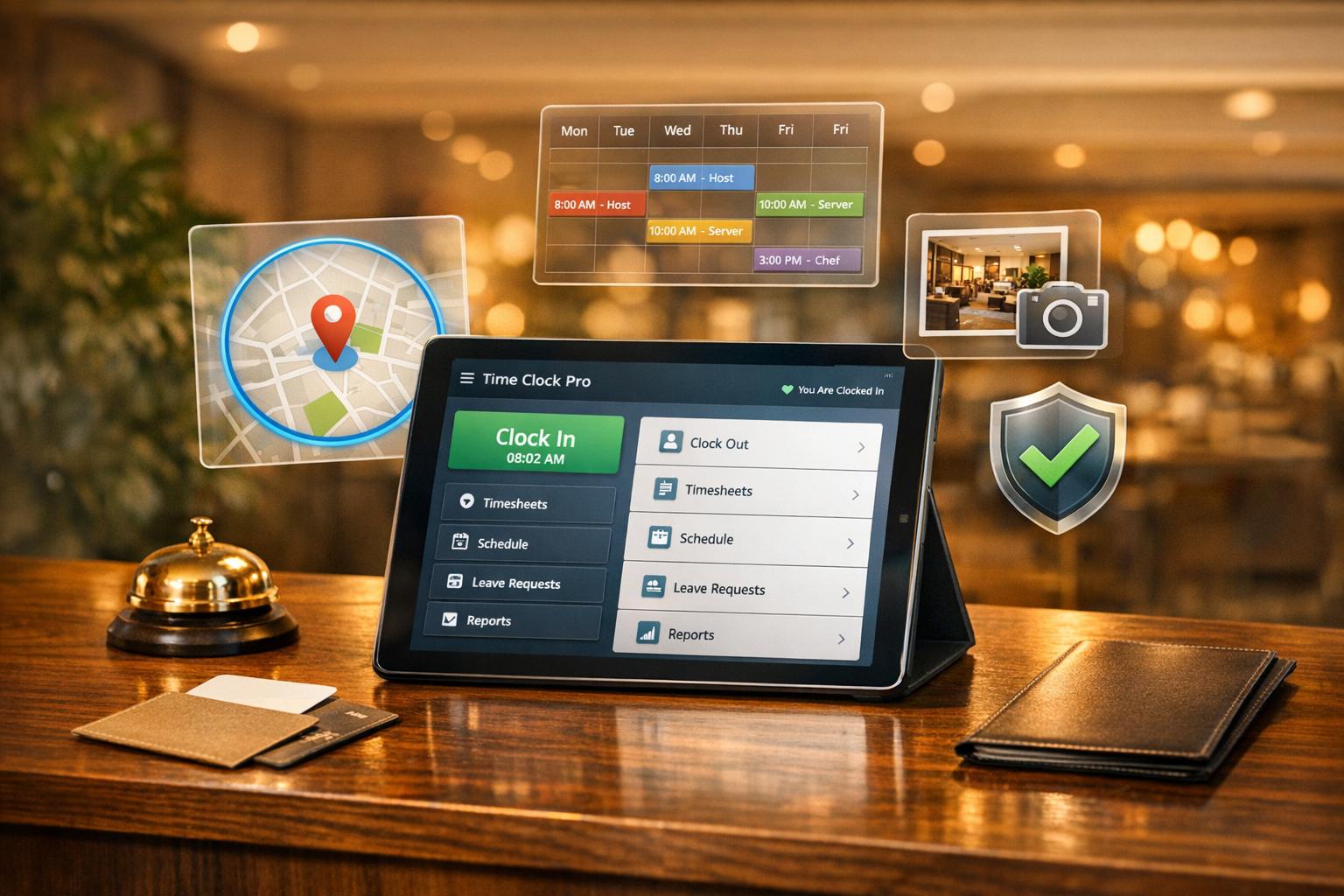
Here’s the kicker: time theft isn’t rare. In fact, it eats up 4% of gross payroll in the hospitality industry. And when you’re already working with razor-thin margins, that’s a cost you can’t afford to ignore. That’s where time clock apps come in. These tools don’t just track hours - they stop buddy punching with features like GPS geofencing and photo verification. They also make compliance a breeze, ensuring you meet labor laws and avoid costly lawsuits.
In this guide, I’ll walk you through the best time clock apps for hotels and restaurants in 2026. From Pebb’s all-in-one solution to tools like 7shifts and Deputy, I’ll share what works, what doesn’t, and how these apps can save you time and money. Let’s dive in.
1. Pebb
Hospitality teams already have enough on their plates - literally. Managing schedules, tracking time, and keeping communication clear shouldn’t require juggling a dozen apps. That’s why we built Pebb, an all-in-one employee app for communication and operations that simplifies clock-ins, shift swaps, tasks, events, digital forms, and more. No more bouncing between logins or losing track of critical updates.
Shift Scheduling
With Pebb, scheduling happens in "Spaces" - dedicated hubs tailored to specific teams. Think of it like this: you can create separate Spaces for your Front of House crew and Kitchen Staff, keeping everything organized and easy to manage. Here’s where it gets even better: when someone calls in sick, the shift coverage conversation happens right on the schedule. No need to dig through chat threads or switch apps.
Our founder, Dan Robin, sums it up perfectly:
"A last-minute shift change isn't just a calendar update; it's a conversation that needs to happen right now. Pebb keeps that conversation tied directly to the schedule, so nothing gets lost in the jump between apps."
This approach ensures your team stays on the same page, even in those chaotic moments.
Time Tracking Features
Time tracking with Pebb is just as seamless. Employees can clock in straight from their phones, and managers get a real-time view of who’s on the clock. Need to track PTO? That’s built into the same Space, too.
But we didn’t stop there. We’ve included a Knowledge Base where you can store everything from training manuals to health code checklists or even seasonal menu updates. It’s all in one place, alongside schedules and time tracking. Onboarding new team members is as simple as sending them a link - they’ll have access to everything they need right from the start.
Pricing
Here’s the deal: we offer a free plan for teams of up to 15 employees. It includes work chat, news feed, scheduling, clock-ins, PTO management, tasks, digital forms, calendar events, apps, unlimited Spaces, Teams & Branches, and access to the Knowledge Library. For larger teams or those who want extra features, our Premium plan is just $4 per user per month. It adds analytics, unlimited admins, permissions control, advanced work chat, advanced posts, voice and video calls, premium SLA support, integrations, and enterprise SSO.
With Pebb, you’re not just saving time - you’re cutting out the clutter of multiple subscriptions while giving your team everything they need in one app. It’s streamlined, simple, and built with hospitality teams in mind.
2. Connecteam
Connecteam is a go-to choice for over 80,000 hospitality businesses worldwide. Its standout features, like drag-and-drop scheduling and GPS-verified clock-ins, make managing restaurant and hotel operations far less stressful. Plus, it even helps prevent issues like buddy punching, which can save a lot of headaches.
Shift Scheduling
The scheduling tool is both flexible and smart. Managers can either manually drag and drop employees into open shifts or use the auto-scheduling option. This feature considers availability, skills, and business needs to create optimized schedules. What’s more, you can attach tasks with detailed checklists, photos, or videos for employees to review before clocking out. Cristen Gros, VP of Special Projects, summed it up perfectly:
"I had people that we would just schedule for work and hope and pray that they show up. And now, we have an average of a 90-95% attendance rate."
Connecteam also syncs with POS systems like Lightspeed, so managers can match labor hours with real-time sales data. This helps avoid overstaffing during slow times. And if there’s a potential scheduling conflict - like double-bookings, overtime risks, or shifts overlapping with approved PTO - the system flags it right away.
All of this ties seamlessly into its time tracking capabilities.
Time Tracking Features
The time clock doesn’t just track hours - it uses geofencing to ensure employees clock in only when they’re physically on-site. For added flexibility, staff can switch roles (like going from server to bartender or from housekeeping to front desk) without needing to clock out. This keeps labor costs allocated accurately by department.
Don’t have personal devices? No problem. Teams can use kiosk mode, which turns any shared tablet into a time clock. Employees log in using a PIN or selfie verification, making it both secure and easy to use.
Compliance Tools
Connecteam’s compliance features are tailor-made for hospitality. It keeps you on top of labor laws with tools like automated break tracking (manual or auto-deduct), overtime calculations for different pay periods, and digital timesheets that integrate directly with payroll systems like QuickBooks, Gusto, ADP, and Paychex. Plus, an "Issues" column flags potential problems like scheduling conflicts, helping to avoid payroll errors before they happen.
Pricing
For smaller teams, Connecteam offers a free-for-life plan for up to 10 users, with access to all features. Paid plans start at $29 per month for up to 30 users, with advanced options available at $49 and expert features at $99 per month. Adding extra users costs between $0.80 and $4.20 per person per month. With a 4.6/5 rating on both Capterra and G2, users frequently highlight the platform’s 24/7 live customer support as a major plus.
3. 7shifts
7shifts has earned its spot as a go-to tool for restaurant operators, currently serving over 55,000 locations and 1.5 million restaurant professionals. It's designed to tackle the everyday headaches of hospitality scheduling, like last-minute shift changes and keeping labor costs in check, all while staying simple to use. With features tailored specifically for restaurants, it’s no wonder it’s become a favorite.
Shift Scheduling
The scheduling process is incredibly user-friendly, thanks to its drag-and-drop builder. You can create recurring templates, and the system proactively flags potential issues like double-bookings or overtime before they cause problems. For those using the Gourmet plan, the AI Auto-Scheduler is a game-changer. It studies 8–10 past schedules along with guest flow trends to generate labor-efficient schedules that account for seasonality and real demand.
Tayler Book, Co-founder of Beechwood Doughnuts, summed it up perfectly:
"I just copy over the schedule from the week prior, make whatever changes I need; it takes 15 minutes. 7shifts has given me time back to focus on the day-to-day operations."
On average, managers save about 13.5 hours per month on scheduling alone.
Another standout feature is the Shift Pool, which allows employees to offer, trade, or bid on open shifts. Managers can approve these changes with a single tap, and the master schedule updates instantly. Plus, by integrating with POS systems like Toast, Square, and Clover, 7shifts pulls real-time sales data. This means schedules are built on accurate labor-to-sales forecasts instead of guesswork - something every restaurant operator can appreciate.
Time Tracking Features
Time tracking is handled through the companion app, 7punches, which ensures employees can only clock in when scheduled. To prevent time theft, the app uses photo verification for clock-ins and clock-outs, stopping practices like buddy punching. Geofencing further tightens the reins by limiting mobile clock-ins to a specific area around your business. Managers also get real-time alerts for late arrivals, missed punches, and potential overtime.
Gerad Coles, Owner of Prairie Dog Brewing, shared his experience:
"7shifts cuts down 5-10 hours a week of admin time... We use the free 7punches app to track time punches, which helps us manage labor costs and keep tabs on lateness."
Once timesheets are approved, they can be synced directly to 7shifts Payroll or exported to other providers like ADP, Gusto, and QuickBooks.
Compliance Tools
Staying compliant with labor laws is a breeze with 7shifts. The platform supports Fair Workweek laws in places like California, New York City, and Philadelphia, where predictive scheduling rules are strict. It tracks mandatory breaks, calculates overtime, and even prevents problematic "clopen" shifts (where employees close one day and open the next). Employees are required to confirm their breaks at clock-out, creating a digital record that can protect businesses from labor disputes. The system also flags minor employees based on their birthdate to ensure compliance with age-related labor restrictions.
Chad Stevens, Owner of French Truck Coffee, highlighted this feature:
"If an employee works over 6 hours, they get a 30-minute break. They also get 10 minute paid breaks after certain hours as well. 7shifts allows us to define that and track it."
On average, users save $589 per month by avoiding labor infractions with these tools.
Pricing
Plan | Price | Employee Limit | Key Features |
|---|---|---|---|
Comp | Free | Up to 20 | Basic scheduling, time clock, team chat |
Entrée | $39.99/mo | Up to 30 | Templates, labor budgeting, live support |
The Works | $79.99/mo | Unlimited | Labor compliance, overtime alerts, log book |
Gourmet | $135/mo | Unlimited | AI auto-scheduling, task management, onboarding |
Optional add-ons include Payroll ($39.99 + $6 per employee), Tip Management ($49.99), and Task Management ($12.99). With a 4.8/5 rating on the Apple App Store from over 25,000 reviews and a 4.7/5 rating on Capterra, it’s clear 7shifts is a trusted choice.
4. Deputy
Deputy is trusted by over 385,000 workplaces worldwide. It's a powerful tool that combines AI-driven scheduling with flexible time tracking, catering especially to the unpredictable demands of industries like hospitality and dining. Whether you're overseeing front desk operations, housekeeping, or kitchen teams, Deputy's features are built to help you keep everything running smoothly.
Shift Scheduling
Deputy's AI demand forecasting is like having a crystal ball for staffing. It uses historical sales data, foot traffic patterns, and hotel occupancy rates to predict exactly how many team members you’ll need. This means you’re not overstaffing during quiet times or scrambling during peak hours. Plus, the auto-scheduling tool can create entire schedules in just one click, taking into account both employee availability and business priorities.
Need to break down shifts into smaller tasks? Deputy's micro-scheduling lets you do just that - like assigning someone to handle check-ins during busy hours and then pivoting them to event service later. Employees also have the flexibility to swap shifts or pick up open ones directly through the mobile app, cutting down on endless email or text chains.
Here’s a real-world example: Catherine Le, Co-founder of Krav Maga Seattle, shared that Deputy’s automated tools helped her cut scheduling and payroll management time by 75%. That’s a game-changer for small business owners juggling multiple responsibilities.
Time Tracking Features
Time tracking with Deputy is seamless and versatile. Employees can clock in using the mobile app with GPS verification, facial recognition on a tablet, or even a browser. Managers get a real-time view of who’s on shift, on break, or running late - all from a simple dashboard. For environments like kitchens where hygiene is critical, touchless clock-ins are a lifesaver.
The system automatically generates digital timesheets based on clock-in data, which managers can approve in bulk and send straight to payroll providers like ADP, Gusto, or QuickBooks. For instance, Michelle Wilcox, Manager at University Veterinary Hospital, noted that Deputy cut clock-in errors by 50%.
And here’s a cool feature: the iPad Kiosk app can store up to 24 hours of clock-in data offline, syncing it once the internet is back up. This ensures no data is lost, even during connectivity hiccups.
Compliance Tools
Deputy doesn’t stop at scheduling and clock-ins - it also helps businesses stay compliant with labor laws. It automatically enforces rules around meal and rest breaks, overtime limits, and Fair Workweek requirements. If an employee misses a break or clocks in late, the system prompts them to provide a digital sign-off with an explanation, creating a clear record.
Catherine Know, District Manager at Mud Bay, highlighted how Deputy made a difference:
"The biggest goal Deputy helped us meet is being able to track the secure scheduling rules. That's our biggest win business-wise."
To tackle burnout, Deputy’s fatigue management feature lets managers set limits on daily or weekly hours, avoiding premium pay triggers. And for businesses with strict scheduling rules, like avoiding back-to-back "clopening" shifts, Deputy ensures compliance while also posting schedules well in advance.
Pricing
Plan | Price (per user/month) | Key Features |
|---|---|---|
Lite | $5.00 | Basic scheduling, timesheets, labor law compliance, shift swaps, messaging |
Core | $6.50 | Everything in Lite, plus AI auto-scheduling, demand forecasting, micro-scheduling, biometrics |
Pro | $9.00 | Everything in Core, plus custom access levels, location hierarchies, 24/7 live chat support |
As of September 1, 2025, there’s a minimum monthly spend of $30 for all plans. With a 4.6/5 rating on Capterra (based on 756 reviews) and G2 (based on 746 reviews), Deputy has earned its spot as a trusted solution in the hospitality industry. Ana Claudia Lopez, Founder of Olivia Macaron, reported an impressive 83% reduction in payroll processing time after adopting Deputy.
5. When I Work
When I Work has become a go-to tool for over 200,000 workplaces across 50 countries. It’s especially popular among hotels and restaurants that need simple, no-fuss scheduling and time tracking.
Shift Scheduling
With its mobile app, employees can handle everything from updating their availability to bidding on open shifts or swapping shifts (with manager approval) right from their phones. Managers, on the other hand, can save time with the Auto-Assign feature, which builds schedules in just one click while checking employee eligibility and availability. Another handy tool is the Job Sites feature, which allows managers to assign staff to specific areas - like the front desk or housekeeping - or even share labor across restaurant locations, all without risking overstaffing.
Roz Catania, an Operations Trainer at Elephants Delicatessen, summed it up perfectly:
"With When I Work we can find coverage for shifts within minutes and build accountability with employees".
Time Tracking Features
Here’s a cool feature: any internet-enabled device can double as a time clock with When I Work. Employees can clock in and out with their hours automatically syncing to the schedule. For added security, the platform includes photo-verified clock-ins and uses GPS/geofencing to confirm employees are on-site. And for tipped employees, there’s a built-in tip tracking tool that lets them log tips at the end of their shifts, making compliance and payroll much easier.
Donna Rea from Caring Transitions shared her experience:
"I have been able to take my employee scheduling from 8 hours a week to merely 15 minutes a week thanks to how easy it is to use When I Work".
Compliance Tools
When I Work also helps businesses keep labor costs in check while staying compliant with labor laws. It sends real-time alerts when employees are nearing overtime. Plus, it tracks both paid and unpaid breaks, ensuring staff can log their breaks accurately. Businesses using the platform have reported cutting labor costs by 20% and seeing a threefold drop in employee no-shows.
Pricing
Plan | Price (per user/month) | Key Features |
|---|---|---|
Essentials | $2.50 | Standard scheduling, team messaging, and availability management |
Standard | $4.00 | All Essentials features plus time and attendance tracking and photo clock-in |
When I Work offers a 14-day free trial - no credit card required - along with zero setup fees or hidden contracts. For companies with multiple locations, the cost goes up to $5.00 per user/month, which includes unlimited job sites and custom reporting. With a 99.9% uptime and a solid 4.4/5 rating on G2 and Capterra, it’s clear why so many businesses rely on it.
Up next, let’s dive into Time Clock Wizard, another tool that’s making life easier for hospitality teams.
6. Time Clock Wizard
Wrapping up our review, Time Clock Wizard brings some standout features that are especially useful for large hospitality teams. With over 100,000 businesses relying on it and more than 300 million employee hours tracked, it’s clear this platform has earned its place. One of its biggest perks? Flat-rate pricing for unlimited users, which makes it a game-changer for larger teams.
Time Tracking Features
Employees can clock in using a browser, mobile app, SMS, or a wall-mounted tablet kiosk. The kiosk mode, paired with a unique 4-digit PIN, works perfectly in places like restaurant break rooms or hotel front desks. To curb buddy punching, the system can require a selfie for clock-ins and outs. Plus, its "Clockpoints" feature leverages GPS and IP recognition to confirm employees are actually where they’re supposed to be.
Leslie Broadland, a Jamba franchisee, shared her thoughts:
"I love the time clock view because you can see who exactly is clocked in and when they clocked in, so I know if they got there late."
Shift Scheduling
The graphical schedule builder simplifies creating daily, weekly, or monthly schedules. Employees can request shift changes or swaps directly from their dashboard, cutting down on endless back-and-forth messages. Managers can also assign tasks - like opening checklists or cleaning duties - and track their progress in real time, thanks to the built-in task management system.
Compliance Tools
Labor compliance can be tricky, especially in the hospitality industry, but Time Clock Wizard has tools to help. It tracks daily and weekly overtime automatically and sends alerts when employees are nearing overtime limits. PTO accruals and vacation requests are also handled seamlessly. However, it only supports one break type and basic overtime tracking, which might be a limitation in regions with more complex labor laws.
Pricing
Here’s a quick breakdown of the pricing plans:
Plan | Monthly Price | Annual Price (per month) | Key Features |
|---|---|---|---|
Free | $0 | $0 | Basic time tracking for unlimited users |
Value | $34.95 | $29.95 | Everything in Free, plus mobile apps and timesheet reports |
Pro | $54.95 | $49.95 | Everything in Value, plus scheduling, payroll, PTO, photo capture, and GPS |
Enterprise | $249.95 | $219.95 | Everything in Pro, plus priority support and a dedicated account manager |
You can try any plan free for 14 days without a credit card. With ratings of 4.6/5 on G2 and 4.4/5 on Capterra, users seem to appreciate what Time Clock Wizard offers. That said, one downside is that its mobile app requires an internet connection - there’s no offline mode.
Vivienne Callaghan summed up her experience like this:
"Time Clock Wizard is without doubt, the best time tracking software on the market…my whole payroll process has been reduced to about 20 minutes."
With its clear pricing structure and reliable tracking tools, Time Clock Wizard is a solid choice for businesses. Next, let’s dive into the overall pros and cons to help you weigh your options.
Pros and Cons
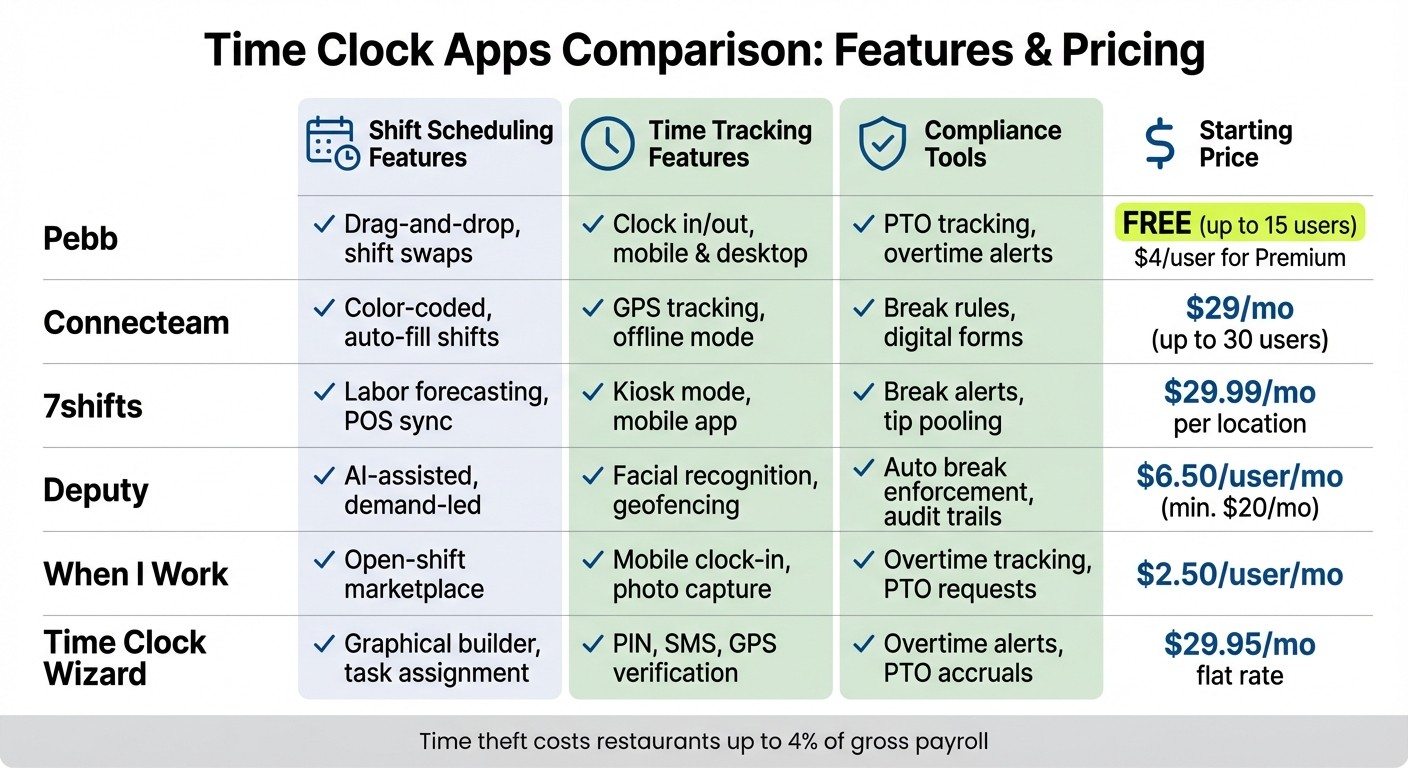
Time Clock Apps Comparison: Features and Pricing for Hotels and Restaurants
Let me break down the key strengths and trade-offs of each tool to help you figure out what works best for your hospitality operations. Here's the lowdown:
Pebb is our pride and joy - a free, all-in-one employee app for communication and operations tailored for hospitality teams. It’s designed to keep things simple and budget-friendly. With Pebb, you get scheduling, time tracking, PTO management, team communication, tasks, calendar events, digital forms, and a knowledge library all rolled into one. And if you want to unlock premium features, it’s just $4 per user. The only downside? Larger chains that need advanced restaurant analytics might find it lacking in that department.
Connecteam stands out with its flat pricing of $29/month for up to 30 users, which is perfect for field teams, especially with its offline clock-in feature. That said, getting the hang of its advanced modules can take some time, which could slow down your rollout.
7shifts is built specifically for restaurants and can save you tons of time. It claims to cut scheduling time by 80% and reduce work-related texts by 70%. However, if you’re on a lower pricing tier, you might find its payroll features a bit limited.
Deputy excels in compliance, offering AI-assisted rostering and strong support for legal requirements. But here’s the catch - it can be tricky to set up.
When I Work keeps things straightforward with its mobile-first design and an open-shift marketplace. It’s great for simple scheduling needs, but it doesn’t offer much in terms of deeper HR tools.
Time Clock Wizard makes budgeting easy with its flat-rate pricing starting at $29.95/month. However, its tiered features can be a bit confusing to navigate.
Here’s a quick comparison chart to make things even easier:
Summary Chart:
App | Shift Scheduling | Time Tracking | Compliance Tools | Starting Price |
|---|---|---|---|---|
Pebb | ✓ Drag-and-drop, shift swaps, tasks, calendar events | ✓ Clock in/out, mobile & desktop, digital forms | ✓ PTO tracking, permissions control, enterprise SSO | Free (up to 15 users), $4/user for Premium |
Connecteam | ✓ Color-coded, auto-fill shifts | ✓ GPS tracking, offline mode | ✓ Break rules, digital forms | $29/mo (up to 30 users) |
7shifts | ✓ Labor forecasting, POS sync | ✓ Kiosk mode, mobile app | ✓ Break alerts, tip pooling | $29.99/mo per location |
Deputy | ✓ AI-assisted, demand-led | ✓ Facial recognition, geofencing | ✓ Auto break enforcement, audit trails | $6.50/user/mo (min. $20/mo) |
When I Work | ✓ Open-shift marketplace | ✓ Mobile clock-in, photo capture | ✓ Overtime tracking, PTO requests | $2.50/user/mo |
Time Clock Wizard | ✓ Graphical builder, task assignment | ✓ PIN, SMS, GPS verification | ✓ Overtime alerts, PTO accruals | $29.95/mo flat rate |
Here’s something to keep in mind: time theft can cost restaurants up to 4% of gross payroll, so features like geofencing and photo capture aren’t just nice-to-haves - they’re essential. Plus, having solid digital audit trails can save you from a lot of legal headaches down the road.
Wrapping It Up
When it comes to picking the right time clock app for your hotel or restaurant, it all boils down to what your team truly needs. At Pebb, we’ve created an all-in-one employee app for communication and operations that brings scheduling, time tracking, PTO management, team communication, tasks, events, and digital forms together. It’s free for teams of up to 15 users, and if you’re looking for more, premium features are just $4 per user. It’s a great fit for hospitality teams who want everything in one place.
Of course, there are other tools that shine in specific areas. If you’re running a high-volume restaurant and need advanced tip pooling or POS integration, 7shifts is a solid choice. Managing multi-site teams? Connecteam offers GPS tracking and geofencing for $29 a month. And for businesses focused on labor law compliance, Deputy, at $6.50 per user per month, delivers exactly what’s needed.
Here’s the thing: there’s no one-size-fits-all solution. With nearly half of U.S. workers admitting to time theft, features like photo verification and geofencing aren’t just nice to have - they’re essential.
The right app can do more than just track time; it can simplify your operations and save you money. Find the one that works for your budget, scales with your team, and makes life easier for everyone. After all, the best tool is the one your team actually uses every day without adding extra headaches.
FAQs
How can I prevent buddy punching without making it harder for staff to clock in?
Biometric verification methods, like facial recognition or requiring a quick selfie during clock-in, are a great way to prevent buddy punching while keeping things straightforward for your team. These tools offer a reliable way to track attendance without overcomplicating the process. They’re designed for both accuracy and convenience, striking a balance that ensures accountability without frustrating your staff.
What’s the easiest way to handle last-minute shift swaps and call-outs?
Managing last-minute shift swaps and call-outs can be a headache - unless you’ve got the right tools in place. With Pebb, the process becomes seamless. Features like shift swapping, instant messaging, and real-time notifications let staff request and approve changes directly in the app. It’s all about keeping things simple and efficient.
Sure, other apps like 7shifts and Homebase also handle shift exchanges, but Pebb stands out with its all-in-one platform. And the best part? Our Premium plan is just $4 per user per month, making it a smart choice for teams looking to streamline their scheduling without breaking the bank.
What compliance features should a hotel or restaurant time clock app include?
When it comes to a time clock app for hotels or restaurants, there are a few must-have features that make life a whole lot easier. For starters, accurate hour tracking is non-negotiable - it ensures every shift is logged correctly. Add in automatic overtime calculations, and you’re not left scrambling to do the math when employees go beyond their scheduled hours. Plus, having detailed audit trails for schedule changes keeps everything transparent and helps avoid disputes.
Now, here’s where things get even smarter: tools like GPS tracking and geofencing. These features ensure employees clock in and out only from approved locations, which is especially handy in the hustle of hospitality. And let’s not forget about seamless payroll integration. This ties everything together, making sure wages are processed correctly while minimizing errors and staying compliant with labor laws - a big deal in fast-paced environments like hotels and restaurants.
