
Author: Ron Daniel
Best Free Shift App for Delivery, Logistics & On-Site Crews
Compare free shift scheduling apps for delivery, logistics, and on-site crews—features, limits, and which fits different team needs.
What if managing your team’s schedule didn’t feel like a full-time job? That’s the question I asked myself a few years ago when I was knee-deep in spreadsheets, trying to juggle last-minute shift swaps, no-shows, and constant phone calls from my team. It was chaos. And if you’ve ever tried to organize a group of delivery drivers, warehouse crews, or logistics teams, you know exactly what I’m talking about.
Here’s the thing: traditional scheduling tools just don’t cut it for mobile teams. They’re clunky, slow, and don’t account for the unpredictable nature of the job. That’s when I realized we needed something better - something built for teams that are always on the go.
Fast forward to today, and I’m proud to say we’ve created that solution at Pebb. In this article, I’ll walk you through how our free shift scheduling app (and a few others worth mentioning) can save you hours of work, cut down on labor costs, and keep your team running like clockwork. Whether you’re managing 10 people or 50, there’s a tool here that can make your life a lot easier. Let’s dive in.
1. Pebb
At Pebb, we’ve built a tool specifically designed for delivery, logistics, and on-site teams who need software that works as hard as they do. Our free plan covers up to 15 employees and packs everything you need to manage shifts, track time, and keep everyone in sync - all from one easy-to-use mobile app. Let me walk you through how it can simplify your operations.
Take scheduling, for example. Our drag-and-drop shift builder is a lifesaver. You can create weekly or monthly schedules in just minutes. As soon as you publish or update a schedule, your team gets instant push notifications. They can even request shift swaps or update their availability right from their phones. One logistics manager shared with us that Pebb slashed their scheduling time from 2 hours to just 15 minutes a week, while improving scheduling efficiency by 30%. That’s a game-changer.
Now, let’s talk communication. Our Work Group Chat replaces endless, messy messages with organized team chats, shift notes, and a live news feed. You can create up to three "Spaces" to keep conversations focused, whether it’s by team or location. Think about managing multiple delivery zones or warehouse shifts - this setup makes it a breeze. Some teams have reported cutting response times in half when coordinating last-minute route changes or filling in for shifts.
Another standout feature is our mobile clock-in. It uses GPS geofencing and photo verification to ensure drivers clock in at the right pickup points. It also tracks breaks, sends overtime alerts, and exports timesheets directly to QuickBooks for payroll. Teams using this feature have seen time discrepancies drop by 20–25%, which means fewer headaches and more accurate payroll.
And here’s the best part: our free plan gives you all the essentials - scheduling, communication tools, PTO management, task assignments, digital forms, and even a searchable directory. No watermarks, no feature restrictions, and no hidden fees. When your team grows beyond 15 users, you can upgrade to our premium plan for just $4 per user per month. This unlocks voice and video calls, advanced analytics, and unlimited Spaces, giving you even more tools to stay ahead.
2. Connecteam
If you're managing a small team in the fast-paced world of delivery and logistics, Connecteam might just be your new best friend. It’s designed to handle the unique challenges of dynamic environments, and the Small Business Plan is a standout feature. Why? Because it’s free for up to 10 users and includes scheduling, communication, and time tracking - all packed into one mobile app.
Here’s what makes it shine: the drag-and-drop scheduler is super intuitive, and the GPS-enabled time clock ensures your team is where they need to be. Plus, there’s a built-in team chat for quick communication. But what really sets Connecteam apart is how it handles shift layers. You can assign specific resources - like trucks or equipment - directly to shifts. And their AI-powered auto-scheduler (currently in Beta) is a game-changer, flagging any availability conflicts before you even hit publish. For logistics teams, where tracking assets is just as important as managing people, this feature is a huge win.
Their time tracking capabilities are equally impressive. The GPS geolocation stamps and geofencing (available for up to 10 sites on the free plan) let you verify that drivers are clocking in exactly where they should be - whether it’s at a pickup point or a delivery location. Cristen Gros, a VP of Special Projects, summed it up perfectly:
"I had people that we would just schedule for work and hope and pray that they show up. And now, we have an average of a 90-95% attendance rate."
That’s a massive boost in reliability, and it makes a real difference when every minute counts.
Connecteam doesn’t just stop at scheduling and time tracking. It simplifies those tedious admin tasks too. Employees can request time off directly through the app, and managers get real-time notifications to approve or deny requests - no auto-approvals here! And when it’s time to handle payroll, Connecteam integrates seamlessly with tools like QuickBooks, Gusto, and Xero, making timesheet exports a breeze.
Of course, there are some limitations. The 10-user cap on the free plan is a big one. If your team is growing or you’re juggling multiple departments, you’ll outgrow this plan pretty quickly. Upgrading to the Basic Plan costs $29/month for up to 30 users - not bad, but it’s still a jump from free. Another thing to keep in mind is the initial setup. Configuring roles, scheduling rules, and asset tracking can take a bit of time, so be prepared to invest some effort upfront.
All in all, Connecteam delivers a solid package for small teams, especially in logistics. Just be mindful of the user cap and the setup process if you’re planning to scale.
3. 7shifts
7shifts is built with restaurant and hospitality operations in mind, and it’s made some adjustments to cater to the rise in delivery roles. Since the pandemic, there’s been a 43% increase in delivery-related roles scheduled on the platform. It’s impressive to note that over 55,000 restaurant locations depend on 7shifts for handling high-volume scheduling. But while these numbers are impressive, it’s worth diving into how 7shifts operates and where it might fall short compared to an all-in-one platform like Pebb.
One standout feature of 7shifts is its Shift Pool. This tool allows employees to offer, trade, or claim open shifts with manager approval, making shift trades smoother for everyone involved. Shelley Ackerman, Co-Owner of Alpine Grind Coffeehouse, shared her experience:
"I love that I can review everyone's hours and then import into payroll software. We quit using Slack and do all our communication through 7shifts."
That said, 7shifts takes a more fragmented approach to time tracking. Instead of being built into the main platform, time tracking is handled through a separate app called 7punches. This is a notable difference from Pebb, where everything is integrated into one seamless system.
For smaller teams, 7shifts offers a free plan - covering up to 30 employees at a single location. This plan includes basic scheduling, time clocking, and team chat. However, more advanced features like labor forecasting and availability approvals are locked behind paid tiers starting at $34.99 per month. Time-off management is fairly simple: employees submit requests through the app, and managers can set notice periods to avoid last-minute gaps. The system even flags potential scheduling conflicts. But if you want tighter controls, like approving every availability change, you’ll need to upgrade to a paid plan.
While the free plan does include announcements and team chat, these features feel limited compared to Pebb’s dynamic, real-time communication tools. The segmented nature of 7shifts’ features highlights why a fully integrated solution like Pebb is often a better fit for delivery and on-site teams. It’s all about having everything in one place, working together seamlessly.
4. Homebase
Homebase has earned the trust of over 150,000 businesses and supports more than 2,000,000 workers, helping teams cut labor costs by up to 20%. While it combines scheduling and communication in one platform, its limitations - like user caps and auto-approved time-off - set it apart from Pebb's more flexible, integrated features.
The free "Basic" plan is designed for small teams, accommodating up to 10 employees at a single location. It offers a drag-and-drop schedule builder, shift templates, and the ability to post open shifts for employees to claim. Clock-in options are versatile, working on tablets, computers, and POS devices, with timesheets stored for up to 90 days. Real-time team messaging and shift-specific notes are also included. Fred S., owner of Fix Coffee + Bikes, highlights the value of these features:
"We take advantage of the notes in the scheduling function because sometimes there's something people need to know about their shift. If they're training or if we're expecting some sort of special event or if we're a little short staffed and we want to give them a heads up."
However, a notable drawback of the free plan is that time-off requests are auto-approved, leaving managers with less control - a potential issue for industries like delivery and logistics, where proper coverage is essential. To access advanced capabilities like geofencing for mobile clock-ins, custom messaging channels, or PTO accrual tracking, businesses must upgrade to paid plans, which start at $24–$30 per location per month.
Homebase also integrates with popular POS systems like Square and Toast, making it appealing to businesses already using those platforms. But here's where Pebb stands out: its free plan supports unlimited users and provides full control over time-off approvals, along with seamless scheduling, team communication, and PTO management. For businesses managing larger teams or requiring tighter oversight, Homebase's free tier may feel restrictive, especially when compared to Pebb's all-in-one approach.
Pros and Cons
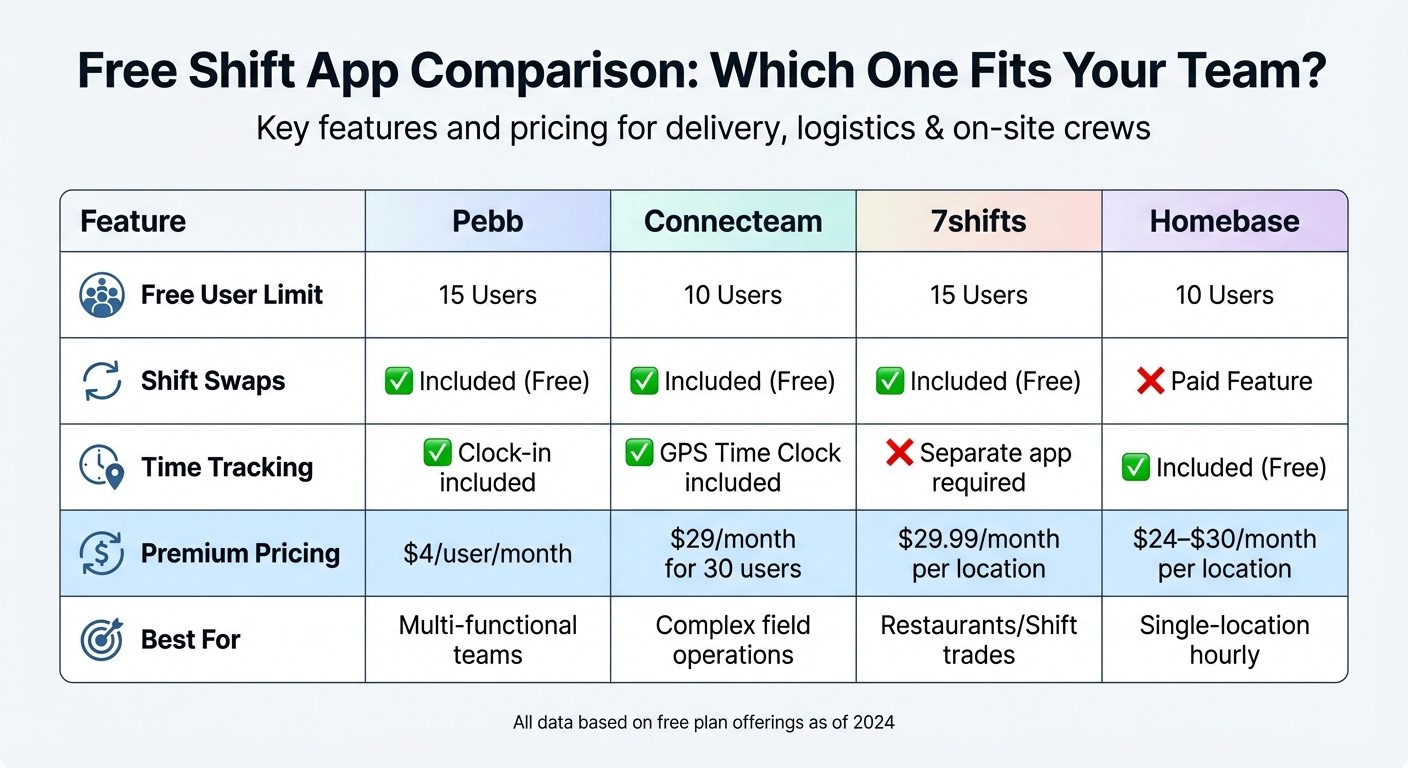
Comparison of Best Free Shift Scheduling Apps for Delivery and Logistics Teams
When it comes to picking the right shift app for your team, the decision often boils down to the features you need most. Let me break it down for you - here’s a quick look at the advantages and drawbacks of the top platforms.
Pebb is your go-to if you’re looking for an all-in-one solution. It handles shift scheduling, team chat, clock-ins, and PTO management all in one place. What’s great is that you don’t have to upgrade to manage basic tasks like time-off requests - it’s all included. This makes it perfect for teams juggling multiple functions without wanting to hop between tools. That said, if your business relies on advanced features like location tracking or industry-specific needs (think tip pooling for restaurants), you might find Pebb a bit lacking.
Connecteam shines with features like scheduling, shift swaps, and even an AI Auto Scheduler. Its GPS-enabled time tracking with geofencing is a game-changer for mobile teams, ensuring everyone clocks in at the right spot. However, it doesn’t offer built-in hiring or onboarding tools, and if your requirements are pretty straightforward, you might find it overly complicated.
7shifts is tailor-made for the restaurant industry and has earned a stellar 4.7/5 rating on Capterra. The standout feature here is its Shift Pool, which simplifies shift trades. But there’s a catch - time tracking requires a separate app, which can lead to some headaches. Plus, if you’re not in hospitality, you may find many of its features irrelevant.
Homebase excels in HR compliance and hiring. It offers tools for job postings and onboarding that other platforms don’t. Its GPS time tracking with photo verification adds a layer of accountability for field teams. On the downside, time-off requests on the free plan are auto-approved, and it lacks task management features, which could be a dealbreaker for some on-site teams.
Here’s a quick comparison to help you decide:
Feature | Pebb | Connecteam | 7shifts | Homebase |
|---|---|---|---|---|
Free User Limit | 15 Users | 10 Users | 15 Users | 10 Users |
Shift Swaps | Included (Free) | Included (Free) | Included (Free) | Paid Feature |
Time Tracking | Clock in included | GPS Time Clock included | Separate app required | Included (Free) |
Premium Pricing | $4/user/month | $29/month for 30 users | $29.99/month per location | $24–$30/month per location |
Best For | Multi-functional teams | Complex field operations | Restaurants/Shift trades | Single-location hourly |
Each platform has its strengths, but understanding your team’s specific needs will help you zero in on the best fit.
Wrapping It Up
From my time at Pebb.io, I’ve seen firsthand how choosing the right shift app can make or break operations for delivery teams, logistics crews, or on-site staff. It all boils down to what your team needs most. Apps like Connecteam shine with GPS-enabled time tracking for mobile teams, while 7shifts and Homebase cater to single-location setups. But here’s what I’ve learned: simplicity and a unified platform often win the day.
That’s why we designed Pebb to offer an Always Free plan that includes shift scheduling, clock-ins, work chat, and PTO management for up to 15 users - completely free. And when it’s time to grow? Scaling up is easy and budget-friendly with our premium plan, priced at just $4 per user per month. No hidden per-location fees, no surprises.
For teams constantly on the move, staying connected and organized is critical. With over 10,000 customers trusting Pebb, we’ve seen how our platform transforms messy scheduling into smooth, streamlined operations.
Why not see for yourself? Start with our Always Free plan today and experience how Pebb can simplify your workforce management.
FAQs
How hard is it to set up Pebb for my team?
Getting started with Pebb is a breeze. In just a few minutes, you can invite your team members and dive into features like chat, shift scheduling, and updates. The platform is built with simplicity in mind, so managers can create and tweak schedules without needing any fancy tools or technical know-how. Everything about Pebb is designed to make onboarding seamless for teams of all sizes.
Can Pebb prevent off-site clock-ins and timesheet errors?
At Pebb, we’ve tackled the headache of off-site clock-ins and timesheet errors with a simple yet effective solution: geofence rules. Here’s how it works - employees can only clock in when they’re physically present at the job site. No more clocking in from the parking lot or, worse, from home. This approach not only cuts down on unauthorized clock-ins but also keeps timesheets accurate and reliable. It’s a game-changer for managing attendance seamlessly.
What happens when my team grows past 15 users?
Pebb is free for teams with up to 15 users. If your team grows beyond that, you can expand by adding users at just $4 per user per month. With the premium plan, you’ll unlock unlimited spaces, teams, and branches, giving your expanding team everything it needs to stay organized and productive.
