
Author: Ron Daniel
Best Employee Scheduling Software in 2026 (Free & Paid Options)
Compare the best employee scheduling tools of 2026 - free and paid plans, pricing, AI scheduling, integrations, and industry fit.
Most businesses I talk to have the same problem: scheduling employees feels like trying to solve a 1,000-piece puzzle - except half the pieces are missing, and the rest don’t fit. A few years ago, I was managing a team of 20, juggling spreadsheets, text messages, and sticky notes to keep shifts organized. Sound familiar? It was chaos. Double-booked shifts, last-minute call-outs, and frustrated employees swapping shifts without telling anyone. I knew there had to be a better way.
Turns out, I wasn’t alone. A recent study showed that 86.9% of businesses using scheduling software have automated their repetitive tasks, and 86.5% are saving money by optimizing schedules. That’s when I realized the right software could turn my scheduling nightmare into a well-oiled machine.
Fast forward to today, and I’ve had the chance to work with Pebb, a platform designed to solve these exact headaches. Whether you’re managing a small café or running multiple locations, scheduling software can simplify operations, reduce costs, and make your team happier. In this guide, I’ll walk you through the top scheduling tools of 2026 - free and paid options alike - and share what makes each one worth considering.
Ready to find the perfect fit for your team? Let’s dive in.
1. Pebb
Pebb brings scheduling, communication, and operations together in one seamless platform. It’s an all-in-one employee app that keeps your team connected and organized without the hassle of juggling multiple apps.
Pricing
We’ve kept our pricing straightforward and budget-friendly. The Standard plan is completely free for teams of up to 15 employees, offering all the essentials: shift scheduling, PTO management, unlimited work chat history, a news feed, knowledge library, tasks, digital forms, calendar, clock in, apps, and unlimited spaces, teams, and branches. Need more? The Premium plan is just $4 per user per month - making it a cost-effective choice compared to other big-name competitors.
Free Plan Features
Even if you stick with the free plan, you’ll get plenty of tools to keep things running smoothly:
Shift scheduling
PTO management
Work chat with unlimited history
News feed
Tasks and calendar events
Digital forms, clock in, and knowledge library
Support for multiple teams or locations
Advanced Scheduling Tools
For teams looking to level up, the Premium plan unlocks some serious perks like voice and video calls, analytics, unlimited admin accounts, permissions control, advanced work chat, advanced posts, integrations, and enterprise SSO. Plus, it includes integrations to simplify your operations. The analytics tools are a game-changer, providing insights to fine-tune staffing and make your workflow more efficient.
Industry Suitability
Pebb was built with both frontline and office teams in mind. Whether you’re running a retail store, a bustling restaurant, or a tech company, Pebb adapts to how your team works. It’s perfect for keeping everyone - whether they’re on the floor or at a desk - connected, informed, and ready to tackle the day.
With all these features, Pebb is a solid choice for streamlining your team’s communication and operations. Up next, we’ll take a closer look at other top solutions to help you decide what works best for your business.
2. Connecteam
Connecteam focuses on frontline teams in industries like retail, construction, and healthcare, offering a mobile-first platform that simplifies scheduling, time tracking, and team communication. With over 80,000 companies worldwide relying on it, Connecteam has carved out a reputation for being dependable and user-friendly. Let’s dive into its pricing and features to see what makes it tick.
Pricing
Connecteam’s pricing is built with small and growing teams in mind. Here’s the standout: their Small Business Plan is completely free for up to 10 employees. That’s right - no cost, and you still get access to premium features like AI auto-scheduling, geofencing, HR tools, and training modules.
For teams with 11–30 users, the Limited Plan steps in, starting at $29 per month for the first 30 users. Need to add more people? Expect incremental charges - $0.50 per user on the Basic plan, $1.50 on Advanced, and $3.00 on Expert. If you opt for annual billing, you’ll save about 18%.
Free Plan Features
The Small Business Plan is a powerhouse, offering tools that many competitors reserve for paid tiers. Think unlimited job scheduling, GPS clock-in, shift swapping, and geofencing for as many locations as you need. Plus, you get communication tools like in-app chat and a news feed, along with HR essentials like training modules and onboarding checklists. For small teams, this free plan packs a punch.
Advanced Scheduling Tools
Connecteam’s advanced tools take the guesswork out of managing schedules. Their AI auto-scheduling feature creates rosters based on availability, skills, and fair hour distribution. Geofencing is another game-changer - it ensures employees can only clock in when they’re physically at the job site. For industries with strict compliance needs, managers can attach checklists, forms, or safety protocols directly to shifts.
Cristen Gros, VP of Special Projects, put it best:
"I had people that we would just schedule for work and hope and pray that they show up. And now, we have an average of a 90-95% attendance rate."
Industry Suitability
Connecteam shines in industries where precision and accountability are critical. In construction and field services, its GPS tracking and geofencing features are indispensable. Retail and hospitality teams benefit from tools like shift swapping and training modules, which help manage the challenges of high employee turnover. For healthcare providers, the platform even offers HIPAA-compliant options (available for an extra fee), ensuring sensitive patient data stays secure. And with support for over 30 languages, it’s well-suited for global teams.
That said, as your team grows beyond the free user limit, costs can climb - especially if you need full access to all three hubs: Operations, Communications, and HR & Skills. But for small teams or businesses with intricate scheduling needs, Connecteam delivers serious value in a mobile-friendly package. Up next, we’ll explore more scheduling options to help you find the perfect fit for your business.
3. Homebase
Homebase has earned the trust of over 150,000 small businesses, helping 3.5 million employees log an impressive 1.2 billion hours annually. It’s designed with hourly teams in mind, offering straightforward scheduling, dependable time tracking, and user-friendly tools that don’t require a steep learning curve.
Pricing
Let’s break down Homebase’s pricing, which is structured by location rather than by user. Here’s how it works:
The Basic plan is completely free for one location with up to 10 employees. It includes weekly scheduling, basic time tracking (via tablet, computer, or POS), and team messaging.
For growing teams, the Essentials plan starts at $24 per month per location (billed annually) or $30 month-to-month. This plan unlocks advanced scheduling features and supports unlimited employees.
The Plus plan costs $56 per month (annual billing) or $70 monthly and introduces AI-powered scheduling along with PTO controls.
At the top tier, the All-in-One plan is priced at $96 per month annually or $120 monthly, offering a complete suite of HR and compliance tools.
There’s also an optional payroll add-on for $39 per month plus $6 per employee.
Free Plan Features
Even the free plan packs a punch. It includes scheduling, time tracking, hiring tools (such as job postings and applicant tracking), and POS integrations - features that competitors often reserve for their paid tiers.
Eve Hogan, owner of The Sacred Garden, shared how Homebase transformed her business:
"Finding Homebase was a game changer. It made setting up the schedule super easy. My staff and I all really like being able to see the schedule from our phones, know who is working, getting reminders and having a simple way to manage schedule changes."
Advanced Scheduling Tools
Homebase introduced its AI Scheduling Assistant in late 2025, and it’s been a huge time-saver for managers. This tool automates shift creation, flags scheduling conflicts, considers employee availability, and even uses sales forecasts and labor targets to optimize schedules. It also tracks real-time labor costs and sends overtime alerts. According to Homebase, managers save an average of 20 hours per month by combining scheduling, time tracking, and payroll into one streamlined system. For businesses that need to adapt quickly, these tools are a game-changer.
Industry Suitability
Homebase shines in industries like retail, restaurants, and other service-based businesses such as salons and fitness studios. Its seamless POS integrations with platforms like Clover, Square, and Toast make it particularly valuable for hospitality businesses, where schedules often need to align with real-time sales and foot traffic. Restaurants can also take advantage of the Tip Manager add-on, which costs $25 per month per location. This feature automatically pulls tip data from the POS and syncs it directly to timesheets.
With a stellar 4.8/5 rating on the App Store from over 84,000 reviews, Homebase continues to be a go-to solution for managing hourly teams. It’s no wonder businesses across industries rely on it to keep operations running smoothly.
4. Deputy
Deputy is a scheduling powerhouse, trusted by over 385,000 workplaces worldwide. By combining AI-driven automation with essential shift-management tools, it simplifies the complex task of workforce scheduling. Let me walk you through what makes Deputy tick, starting with its pricing.
Pricing
Deputy offers flexible pricing options designed to grow with your business. If you're just starting out, the Starter plan is completely free. It includes up to 100 shifts and 100 approved timesheets per month - perfect for small teams dipping their toes into automated scheduling.
When you're ready to scale, the Lite plan steps in at $5.00 per user per month, offering unlimited shifts, basic time clocking, and leave management tools. Need more? The Core plan at $6.50 per user per month adds AI-powered auto-scheduling and demand forecasting, while the Pro plan, priced at $9.00 per user per month, unlocks advanced features like custom access levels and single sign-on. Keep in mind, all paid plans require a minimum monthly spend of $30 as of September 1, 2025.
Advanced Scheduling Tools
Deputy’s advanced tools take scheduling to the next level. The AI Auto-Scheduling feature builds shifts automatically by factoring in business needs, employee availability, and labor rules. It even syncs with POS systems and foot traffic data to ensure you're never over- or understaffed. For even more precision, the micro-scheduling feature lets you split shifts into smaller sub-shifts, giving you granular control over staffing.
Andrew Mulholland, Assistant Manager at West Salem Ace Hardware, summed it up perfectly:
"Deputy has allowed us to be more strategic. We can easily do an entire month's schedule in about 20 minutes."
That’s a game-changer for busy managers juggling multiple priorities.
Industry Suitability
Deputy shines in shift-based industries where compliance and labor cost management are critical. Its Flexi Weekly pricing model - at $2.50 per active user per week - is particularly useful for seasonal businesses. You only pay for employees who are actively working during peak periods, saving money when staffing needs fluctuate.
For industries like healthcare and security, Deputy offers tools to track skill sets and certifications, ensuring only qualified staff are scheduled for specialized tasks. It also supports compliance with Fair Workweek regulations, meal and rest break planning, and even flags problematic "clopen" shifts (where employees close late and open early).
With a solid 4.6/5 rating on Capterra from 756 reviews, it’s clear that Deputy isn’t just another scheduling tool - it’s a reliable partner for businesses across a wide range of industries.
5. 7shifts
If you're running a restaurant, café, or bar, let me tell you about a tool that feels like it was made just for you: 7shifts. With over 55,000 restaurants and 1.5 million food service professionals already onboard, this platform has a laser focus on tackling the unique challenges of hospitality operations. Let’s break down what makes it such a standout choice.
Pricing That Fits Hospitality Needs
7shifts has pricing plans designed with the hospitality industry in mind. Here’s how they stack up:
Comp Plan: Perfect for single locations with up to 15 employees, this free option includes basic scheduling, availability tracking, and time-off requests. It’s a no-cost way to dip your toes into digital scheduling.
Essentials Plan: At $39.99/month per location (billed annually), this plan supports up to 30 employees and adds advanced scheduling tools and team messaging.
Pro Plan: For $79.99/month per location, you can manage up to 60 employees and access labor compliance tools and PTO tracking.
Premium Plan: Need unlimited employee support? For $134.99/month per location, this plan unlocks full labor forecasting and tip management.
No matter your size, there’s a plan that scales with your business.
What You Get for Free
The free Comp Plan is more than just an entry-level offering - it’s a solid tool for independent businesses. It covers essential scheduling, employee availability, and time-off requests, all accessible through a mobile app. One of my favorite features? The Shift Pool, which lets employees offer, trade, or claim shifts without managers needing to step in constantly. It’s like handing your team the keys to smoother shift management.
Advanced Tools That Save Time
Here’s where 7shifts really shines: its advanced scheduling tools. By integrating with POS systems like Toast, Square, and Clover, it uses predicted sales data to create accurate labor forecasts. It even considers external factors to ensure staffing levels hit the sweet spot.
Another standout is the Tip Management add-on, which automates tip pooling and syncs directly with payroll. Managers report saving an average of two hours a week with this feature alone. And to help you stay on the right side of labor laws, the platform includes built-in compliance alerts for overtime and mandated breaks.
Tayler Book, Co-founder of Beechwood Doughnuts, summed up the time savings perfectly:
"I just copy over the schedule from the week prior, make whatever changes I need; it takes 15 minutes. 7shifts has given me time back to focus on the day-to-day operations and the future of the business."
Built for the Food Service Industry
7shifts isn’t a one-size-fits-all tool - it’s purpose-built for bakeries, bars, cafés, breweries, catering companies, and pizzerias. Features like section stations, the Manager Log Book for shift notes, and tools for collecting shift feedback make it a natural fit for hospitality businesses.
And it’s not just me saying this. With a 4.7/5 rating across major app stores and over 1 million downloads, the feedback speaks volumes. Even more impressive, businesses using 7shifts have reported reducing employee turnover by up to 13% - a big deal in an industry notorious for high churn rates.
Next, I’ll dive into how these features stack up against other platforms in this review. Stay tuned!
6. QuickBooks Time
If you're already using QuickBooks in your business, QuickBooks Time is like the missing puzzle piece that brings scheduling, time tracking, and payroll together seamlessly. It's especially handy for field teams in industries like construction, landscaping, or professional services. Since it syncs directly with QuickBooks accounting, it keeps both your scheduling and financial tracking in perfect harmony.
Pricing
QuickBooks Time keeps its pricing simple with a base fee plus a per-user charge. The Time Premium plan is $20 per month plus $8 per user, while the Time Elite plan comes in at $40 per month plus $10 per user.
While there's no permanent free plan, they do offer a 30-day free trial, giving you a chance to test the waters. If you’re already using QuickBooks Online, bundled pricing can make it even more appealing. For example, the Time Premium plan bundled with Payroll Premium costs $88 per month plus $10 per employee. These pricing tiers make it clear what you're getting, especially if you're looking for a solution that blends scheduling with financial tools.
Advanced Scheduling Tools
What sets QuickBooks Time apart is its focus on productivity-enhancing features. The drag-and-drop scheduler is a game changer, making it easy to manage recurring shifts. Plus, the real-time map view makes dispatching field teams a breeze.
One standout feature is job costing. You can track labor costs for specific projects, separate billable from non-billable hours, and sync all of it directly to invoices. Businesses have reported saving an average of 3.21 hours per week on managing employee time, and those tracking gross payroll costs have seen savings of about 4%.
The Elite plan steps it up with geofencing, which prompts employees to clock in automatically when they arrive at a job site. There's also the Time Kiosk feature, which uses facial recognition for on-site clock-ins - pretty slick if you ask me.
Industry Suitability
QuickBooks Time shines brightest in industries like field services, construction, and professional services. Its precise job costing and GPS tracking make it a go-to for these sectors. That said, onboarding could be a bit tricky for larger teams, so it's worth keeping that in mind.
The platform boasts an impressive 4.7 out of 5 average rating on major review sites and has even been named the #1 time tracking software for small businesses by G2. Users love the seamless integration with QuickBooks and the accuracy of its GPS tracking. However, if you're managing a large team, the costs can add up quickly. And if QuickBooks isn't already part of your accounting setup, the pricing might feel a bit steep compared to standalone options.
For businesses that need precise scheduling and job costing, especially in field services, QuickBooks Time delivers a level of efficiency that's hard to beat. It’s a solid choice if you're already in the QuickBooks ecosystem.
7. Sling

Sling by Toast simplifies scheduling for restaurants, retail shops, and other shift-based businesses. It's built with hourly workers in mind, offering an interface that feels as natural as scrolling through your favorite social media app. The ease of use ensures your team can jump right in without a steep learning curve. Now, let’s break down Sling’s pricing and features.
Pricing
Sling keeps things simple with three pricing tiers:
Free Plan: Perfect for smaller teams, this plan supports up to 30 users (as of March 1, 2025) and covers basic scheduling needs.
Premium Plan: For $1.70 per user per month (billed annually) or $2.00 monthly, you get features like mobile time tracking and labor cost management.
Business Plan: At $3.40 per user per month (billed annually) or $4.00 monthly, this plan includes advanced tools like auto-assigning shifts and kiosk-based time tracking.
Here’s a bonus: Sling only charges for active users. If someone leaves your team, your account is adjusted automatically - no need to worry about overpaying.
Free Plan Features
The free tier is surprisingly robust. It covers:
Shift scheduling with templates
Time-off requests and long-term scheduling
Private messaging to keep communication simple
Shift alarms and open-shift postings to fill gaps quickly
If your needs are basic, this free plan can handle the essentials without pushing you toward an upgrade.
Advanced Scheduling Tools
Sling doesn’t just schedule - it solves problems before they happen. The platform uses AI to flag double-bookings and overlapping shifts. If you opt for the Business plan, it even auto-assigns shifts based on employee availability and budgets. Kenneth Taylor from Expeditors shared his experience:
"Sling drastically reduced the amount of time I spend scheduling. I post weekly schedule in minutes and it replicates to future weeks".
Sling also keeps managers informed with real-time labor cost insights, sending alerts for potential overtime. For restaurants using Toast POS, it takes things a step further by comparing labor costs to sales data. Eddie Dyer from Vessel NOLA praised it, saying:
"Sling provides a consistent view of all schedules, both to all management and staff. It also allows us to predict labor costs, warn of overtime, and easily make adjustments".
The platform also tackles compliance issues with features like "clopening" alerts, which ensure employees get enough rest between shifts, and automated break tracking. That said, some users have noted minor hiccups, like difficulties setting recurring unavailability and occasional delays in shift notifications.
Industry Suitability
Sling has found a home in industries like healthcare, retail, education, and transportation. With a 4.7-star rating on the Apple App Store from over 27,000 reviews, it’s clear users appreciate its functionality. For hospitality businesses, the Toast integration is a game-changer. Plus, its Facebook-like communication tools - complete with a newsfeed and group messaging - keep everyone on the same page without endless email threads or Slack messages.
Pros and Cons of Each Software
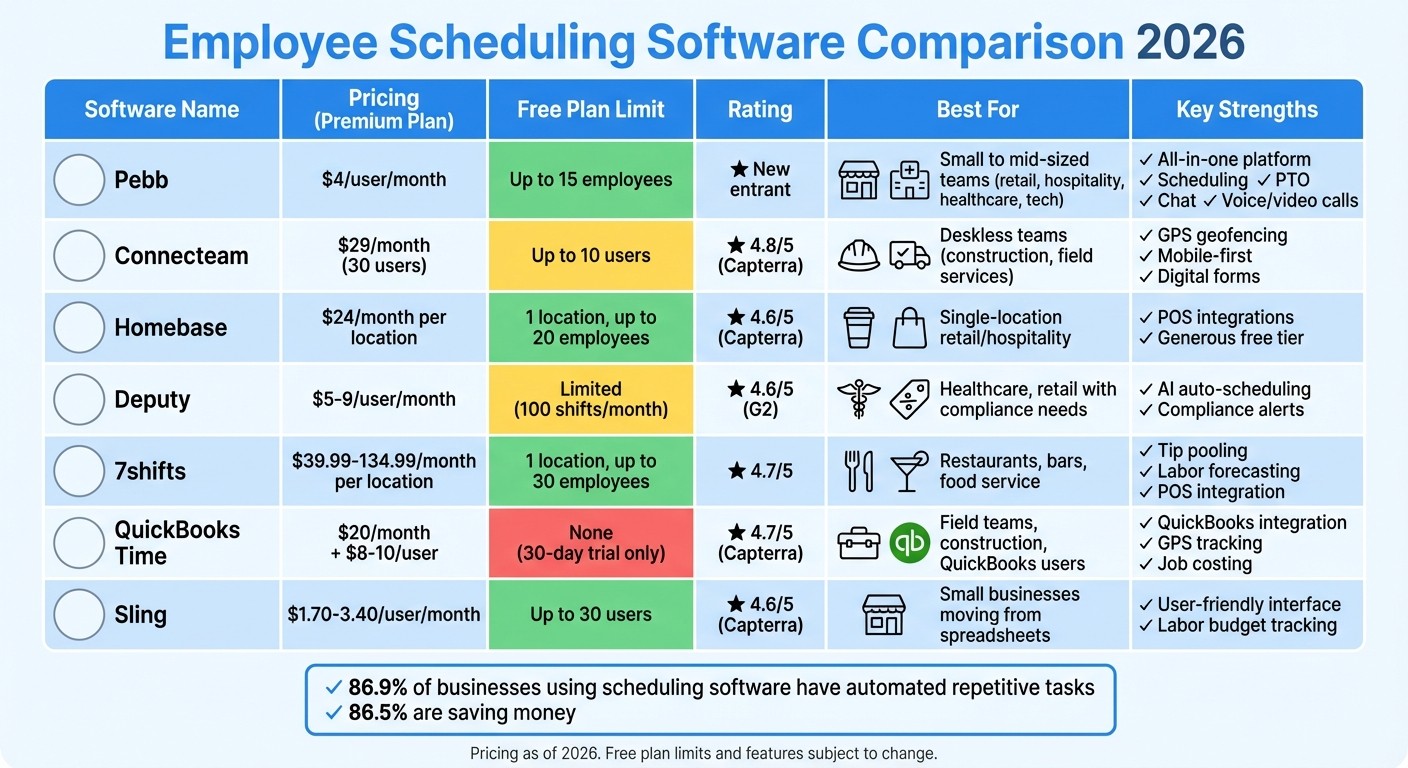
Employee Scheduling Software Comparison 2026: Features, Pricing & Free Plan Limits
Let me break down the strengths and weaknesses of each tool we’ve reviewed. To make it easy, I’ve put together this quick-reference table, so you can see how these platforms compare in terms of pricing, free plan limits, standout features, and the industries they’re best suited for.
Software | Pros | Cons | Free Plan Limit | Best For |
|---|---|---|---|---|
Pebb | Offers scheduling, PTO management, chat, news feed, tasks, digital forms, calendar, clock in, knowledge library, and voice/video calls for just $4/user/month - one of the best deals out there. The free plan supports up to 15 employees with full access to scheduling, communication, and operations tools. | - | Up to 15 employees | Small to mid-sized teams in retail, hospitality, healthcare, and tech |
Connecteam | Designed for mobile teams, with GPS geofencing, digital forms, and task management. Flat-fee pricing for the first 30 users keeps costs predictable. Rated 4.8/5 on Capterra. | Limited payroll system integrations compared to competitors. | Up to 10 users | Deskless teams in construction, field services, and other mobile industries |
Homebase | Generous free plan for one location (up to 10 employees) and excellent POS integrations with Square, Clover, and Toast. Rated 4.6/5 on Capterra. | Pricing per location can add up for multi-site businesses. Advanced labor forecasting is only available in higher tiers. | 1 location, up to 10 employees | Small retail shops, cafes, and single-location hospitality businesses |
Deputy | Features AI-powered auto-scheduling and compliance alerts for breaks and overtime. Facial recognition helps reduce buddy punching. Rated 4.6/5 on G2. | Per-user pricing can get expensive for larger teams. The setup process can be time-consuming. | Limited free tier | Healthcare, retail, and hospitality businesses with strict labor law requirements |
7shifts | Tailored for restaurants, offering tip pooling, sales-based labor forecasting, and POS integrations. Rated 4.7/5 on Capterra. | Not versatile outside of the hospitality industry, and integration support can be slow. | 1 location, up to 30 employees | Restaurants, bars, and food service operations of all sizes |
QuickBooks Time | Seamlessly integrates with QuickBooks and includes high-accuracy GPS tracking with a "Who's Working" map. Rated 4.7/5 on Capterra. | No free plan - only a 30-day trial. Pricing starts at $20/month plus $8–$10/user/month, with a challenging onboarding process. | No free plan (30-day trial only) | Field teams, construction crews, and businesses already using QuickBooks for payroll |
Sling | Free tier supports up to 30 users and features a user-friendly, Facebook-like interface with labor budget tracking. Rated 4.6/5 on Capterra. | Not ideal for very large teams and lacks advanced customization for complex scheduling needs. | Up to 30 users | Small businesses looking to move away from spreadsheets on a budget |
So, what’s the takeaway? Pebb stands out for its all-in-one approach and unbeatable pricing, making it a great fit for teams across various industries. Connecteam shines with its mobile-first design, while 7shifts is a go-to for restaurants. Meanwhile, Deputy brings compliance features to the table, and Sling offers a budget-friendly option for smaller teams. Each tool has its niche, and finding the right fit depends on your team’s specific needs and priorities.
Conclusion
When it comes to choosing employee scheduling software, it all boils down to what your team truly needs. At Pebb, we’ve designed an all-in-one employee app for communication and operations that caters to small and mid-sized businesses across industries like retail, hospitality, healthcare, and tech. Our premium plan, priced at just $4 per user per month, offers a full suite of tools: scheduling, PTO management, work chat, a news feed, tasks, digital forms, calendar events, clock in, knowledge library, and even voice/video calls. For smaller teams, our free plan supports up to 15 employees - a step above what Homebase and Connecteam offer in their free tiers.
That said, we understand that some industries have unique demands. For instance:
Restaurants and food service teams might find 7shifts a better fit.
Mobile and field teams often lean toward Connecteam for its flexibility.
Single-location retail shops or cafes might benefit from Homebase's free plan, which supports up to 10 employees.
Here’s the thing: AI-driven scheduling is a game-changer. It’s saving managers up to 4 hours a week by integrating communication, scheduling, and task management into a single platform. That’s exactly why we built Pebb - to simplify communication and operations and eliminate the need for juggling multiple apps.
In a world where inefficiency can cost you time and money, having the right scheduling system isn’t just smart - it’s essential. Take a moment to assess your team size, industry-specific needs, and budget. While specialized tools are out there, Pebb’s all-in-one approach delivers a balance of value and features that’s hard to beat for growing teams in 2026.
FAQs
What are the main advantages of using employee scheduling software like Pebb?
Using Pebb for employee scheduling is a game-changer when it comes to saving time, cutting down on mistakes, and keeping workforce management on point. By bringing shift planning, communication, and operations into one app, Pebb takes the guesswork out of scheduling. It ensures your team’s schedule matches your actual labor needs, helping to keep labor costs in check.
But that’s not all. Pebb makes it super easy to handle time-off requests, track attendance, and deal with those inevitable last-minute changes. With tools like shift scheduling, PTO management, built-in work chat, and real-time updates, it keeps everyone - from your frontline crew to your office staff - on the same page. And here’s the best part: Pebb’s all-in-one platform is intuitive and budget-friendly, with a free plan for up to 15 employees and pricing starting at just $4 per user per month.
How does Pebb's pricing compare to other employee scheduling tools?
Pebb has carved a niche for itself by offering a free all-in-one employee app for communication and operations alongside a premium plan that’s just $4 per user per month. It’s hard to beat that kind of value, especially when you consider the robust set of features included - shift scheduling, PTO management, work chat, tasks, digital forms, calendar, clock in, and more all in one place.
Sure, there are other tools like When I Work and Deputy, which start at $3 and $3.50 per user per month, respectively. But here’s the catch: they often fall short when it comes to the depth and breadth of features you get with Pebb. On the flip side, platforms like Homebase and Connecteam come with much heftier price tags - $20 and $29 per month, to be exact. That’s a big jump, especially for small businesses trying to keep costs in check.
If you’re looking for a solution that balances affordability with functionality, Pebb hits the sweet spot. It’s designed to give businesses everything they need without breaking the bank.
What industries benefit the most from Pebb's features?
Pebb brings together a range of tools - work chat, shift scheduling, PTO management, news feeds, tasks, calendar events, digital forms, groups, clock in, and voice/video calls - that are perfect for industries where shift work and seamless communication are non-negotiable. Think about healthcare, hospitality, and logistics - fields where keeping schedules aligned, filling shifts in a pinch, and sharing updates quickly can make or break the day.
What makes Pebb stand out is how it bridges the gap between desk-based staff and frontline employees. Whether you're coordinating a hospital team or managing hotel operations, having everything in one place simplifies the chaos. And here's the kicker - Pebb offers a free plan, plus a premium option that's only $4 per user. It's an affordable way to boost communication, teamwork, and engagement across your entire workforce.
