
Author: Ron Daniel
5 Best Employee Roster Apps to Try in 2026
Compare five top roster apps for shift scheduling, mobile access, PTO and payroll integrations to find the best fit for your frontline or office team.
Have you ever spent hours perfecting a shift schedule, only to have it crumble when someone calls out sick or forgets they’re even on the roster? It’s maddening. I’ve been there, staring at a spreadsheet, wondering if there’s a better way. Spoiler alert: there is.
Here’s the deal - managing a team in 2026 isn’t what it used to be. Between stricter labor laws, employees demanding flexibility, and the constant chaos of last-minute changes, old-school tools just don’t cut it anymore. That’s why we at Pebb set out to solve this problem. And let me tell you, we’ve learned a lot along the way.
In this guide, I’ll walk you through the top five roster apps that are changing the game this year. Whether you’re running a small coffee shop or managing a multi-location retail chain, these tools can save you time, reduce scheduling headaches, and keep your team in sync. Let’s dive in.
1. Pebb
At Pebb, we saw a problem that many teams were facing - juggling a chaotic mix of tools for scheduling, communication, PTO tracking, company updates, digital forms, and events. It was like trying to piece together a puzzle where none of the pieces fit. So, we decided to fix it. We built an all-in-one employee app that does it all: shift scheduling, team chats, PTO management, task tracking, digital forms, calendar events, and even a knowledge library. And the best part? It’s just $4 per user per month, or completely free for teams of up to 15 employees. No more digital clutter, just everything your team needs in one place.
Shift Scheduling and Management
Here’s the thing about scheduling: it’s not just about plugging names into a calendar. It’s a conversation. As Dan Robin, one of our team members, says:
"A schedule is a conversation, so why would you force that conversation to happen in a different app, away from all context?"
With Pebb, you can manage that conversation right on the schedule itself. Need to swap a shift or adjust hours? You can do it directly on the calendar, and everyone stays in the loop.
We also made it easy to keep things organized with configurable "Spaces". You can create specific hubs for teams like "Front of House" or "Kitchen Staff", each with its own schedules, documents, and chat threads. Plus, if you’re running on a predictable routine, you can save recurring schedules as templates to save time every week. It’s a game-changer for businesses with consistent patterns.
And yes, all of this works seamlessly on mobile.
Mobile Accessibility
Most scheduling apps claim to be "mobile-friendly", but let’s be honest - many of them are clunky and frustrating. Pebb, on the other hand, was designed mobile-first from the very beginning. We built it for people who don’t have time to wrestle with complicated software. Onboarding your team is as simple as sharing a link - no IT headaches required.
Our users have given us 4 out of 5 stars for our intuitive design and quick onboarding process. Whether your team is on the shop floor, in the field, or at a desk, they can check schedules, swap shifts, request time off, and chat with coworkers - all from their phones. It’s designed to meet the needs of both frontline workers and office staff, without skipping a beat.
And speaking of seamless, let’s talk about how affordable Pebb is.
Pricing and Affordability
We know budgets are tight, so we made Pebb as accessible as possible. Our Standard plan is completely free for teams of up to 15 employees. Need more advanced features? Our Premium plan is just $4 per user per month. No hidden fees, no surprise charges - just straightforward pricing.
Here’s a quick breakdown of what you get:
Plan | Price | Key Features |
|---|---|---|
Standard | Free (up to 15 users) | Shift scheduling, PTO, work chat, news feed, tasks, digital forms, calendar, clock in, knowledge library |
Premium | $4/user/month | Everything in Standard plus voice & video calls, advanced analytics, unlimited admins, integrations, Enterprise SSO |
2. Connecteam
Connecteam has made its mark with over 80,000 companies and 1.2 million users worldwide relying on its platform. It's a mobile-first app that wraps scheduling, time tracking, and communication tools into one neat package, perfect for teams working across various job sites.
Shift Scheduling and Management
The scheduling tool is a standout feature. Its drag-and-drop interface works seamlessly with an AI auto-scheduler, which builds rosters in seconds by factoring in employee availability, skills, and business needs. What’s more, built-in conflict alerts catch errors like double-booked shifts or scheduling someone during their approved time off before these issues escalate. Managers can also attach shift-specific details such as tasks, checklists, or even photos directly to a shift, ensuring employees know exactly what’s expected when they clock in.
Mobile Accessibility
Connecteam truly shines when it comes to its mobile app, designed specifically for deskless workers. The GPS-enabled time clock with geofencing guarantees that employees can only clock in when they’re physically on-site. This not only reduces "buddy punching" but also ensures payroll records are spot-on. With stellar ratings - 4.8 stars on the App Store from over 41,000 reviews and 4.7 stars on Google Play from more than 14,000 reviews - the app is praised for its user-friendly design, even for those less tech-savvy. Cristen Gros, VP of Special Projects, summed it up perfectly:
"I had people that we would just schedule for work and hope and pray that they show up. And now, we have an average of a 90-95% attendance rate".
Integration with Payroll/HR Systems
Payroll integration is another strong suit. Connecteam syncs effortlessly with major providers like QuickBooks Online, Gusto, ADP, Paychex, and Xero. Employee hours feed directly into digital timesheets, ready for manager approval and easy export to payroll software. This streamlining saves time and reduces errors.
Pricing and Affordability
Here’s the good news: Connecteam offers a free Small Business plan for up to 10 users, making it an easy choice for those wanting to give it a trial run. For larger teams, their Basic plan starts at $29 per month for the first 30 users. That said, Pebb provides an even more budget-friendly alternative at just $4 per user, making it a strong contender for growing teams.
3. Homebase
Homebase has become a go-to for over 100,000 small businesses, offering tools for scheduling, time tracking, and payroll. Its pricing structure, based on location rather than the number of users, is especially appealing for larger single-site teams.
Shift Scheduling and Management
For businesses looking to stay compliant without breaking the bank, Homebase delivers a scheduling system that stands out. Managers can build schedules quickly using an interface that flags potential labor law violations - covering everything from California's break laws to New York's Fair Workweek rules and federal overtime regulations. Employees can also bid for open shifts, which not only boosts flexibility but reportedly saves managers over five hours each week.
Mobile Accessibility
Homebase’s mobile app, available on both iOS and Android, makes life easier for employees. They can check their schedules, claim open shifts, and even swap shifts with manager approval - all from their phones. To ensure accountability, the app includes a GPS-enabled time clock with geofencing and photo verification, so you know your team is clocking in from the right location. Plus, the real-time earnings tracker lets employees keep tabs on their pay as they work.
Integration with Payroll/HR Systems
Homebase doesn’t stop at scheduling - it takes payroll processing to the next level. The platform handles payroll natively, with features like automatic tax filing and direct deposits. For those already using tools like QuickBooks, Gusto, ADP, or Square, Homebase syncs timesheets directly, cutting out the hassle of manual data entry.
Pricing and Affordability
One of Homebase’s biggest draws is its affordability. The Basic plan is free for one location and up to 20 employees. Paid plans start at $24.95 per location per month, with the Plus plan at $59.95 (which includes AI-powered scheduling) and the All-in-One package at $99.95. If you need payroll, it’s an additional $39.95 per month, plus $6 per active employee. While this per-location model is ideal for single-site businesses, a per-user pricing system like Pebb’s could be a better fit for teams planning to expand across multiple locations.
4. 7shifts
If you’re in the restaurant or hospitality game, 7shifts was made with you in mind. It’s trusted by over 50,000 locations to handle scheduling, all tailored specifically for the food service industry.
Shift Scheduling and Management
Building rosters is a breeze with 7shifts' drag-and-drop interface. You can map out your entire week and assign shifts effortlessly. Here’s where it gets even better - budget tracking. You can set hourly and weekly cost goals for different roles (like $15/hour for servers or $20/hour for cooks) and compare those costs with real-time sales data. This way, you can spot overstaffing before it becomes an issue. Plus, you can save time by creating templates for your regular schedules.
Mobile Accessibility
The mobile app takes convenience to another level. Employees can view their schedules, pick up shifts, and clock in - all from their phones. Customer Experience Manager Tom sums it up perfectly:
"An all-in-one app that does pretty much everything. Scheduling, to time clocking, to event calendar, to messaging, to task assigning. Price is fair and function is easy to use".
The app also integrates seamlessly with POS systems like Toast, Square, and Clover. This makes it simple to track scheduled hours and avoid costly overtime.
Integration with Payroll/HR Systems
Payroll headaches? Not with 7shifts. It syncs with payroll and HR heavyweights like ADP (Run and Workforce Now), Gusto, QuickBooks Online, Paychex, Wagepoint, Rippling, and Zenefits. It pulls employee data and hours worked automatically. Combine this with its POS system integrations, and you’ve got a full view of labor costs alongside sales data - no manual calculations needed.
Pricing and Affordability
For smaller operations, the Comp plan is totally free for single locations with up to 20 employees. If you need more, paid plans start at $39.99 per month for Essentials (up to 30 employees), $79.99 per month for Pro (up to 60 employees), and $134.99 per month for Premium, which supports unlimited employees. There’s even a 14-day free trial to test the waters. That said, if your team isn’t in hospitality, other platforms might suit you better.
Next, we’ll dive into how 7shifts stacks up against its competitors in terms of features and pricing.
5. QuickBooks Time
If your business operates in the field - whether it’s construction, landscaping, or any industry with mobile teams - QuickBooks Time could be just what you need. It’s tailored for small businesses juggling job costing, invoicing, and scheduling. The focus on tracking project-based labor costs makes it a go-to for businesses managing multiple job sites while keeping payroll and scheduling efficient.
Shift Scheduling Made Simple
QuickBooks Time takes the headache out of scheduling with its drag-and-drop interface. You can easily assign shifts, color-code roles (think blue for swing shifts or green for mornings), and even save schedules as drafts before they’re finalized. On top of that, it tracks labor costs by project and distinguishes between billable and non-billable hours, which is a lifesaver for accurate job costing.
Mobile Access for Teams on the Move
The mobile app is a game-changer for teams spread out across various job sites. Employees can clock in from their phones, check their schedules, and even request time off - all while on the go. It’s like having a mini HR office in their pocket, ensuring everyone stays connected no matter where they are.
Payroll and HR Integration
One of the standout features is how seamlessly QuickBooks Time integrates with payroll systems. It automatically syncs employee hours, PTO, and job codes, cutting down on manual data entry and reducing errors. Plus, it generates detailed financial reports - like profit and loss statements or tax reports - using real-time labor data. This kind of integration saves time and helps you make better financial decisions.
Pricing Breakdown
QuickBooks Time keeps things straightforward with two pricing plans:
Time Premium: Costs $20 per month plus $8 per user. It includes features like drag-and-drop scheduling, mobile access, and payroll integration.
Time Elite: Priced at $40 per month plus $10 per user, this plan offers extras like geofencing, project tracking, and a time kiosk equipped with facial recognition.
Take a look below for a deeper dive into how these features stack up.
Feature and Price Comparison
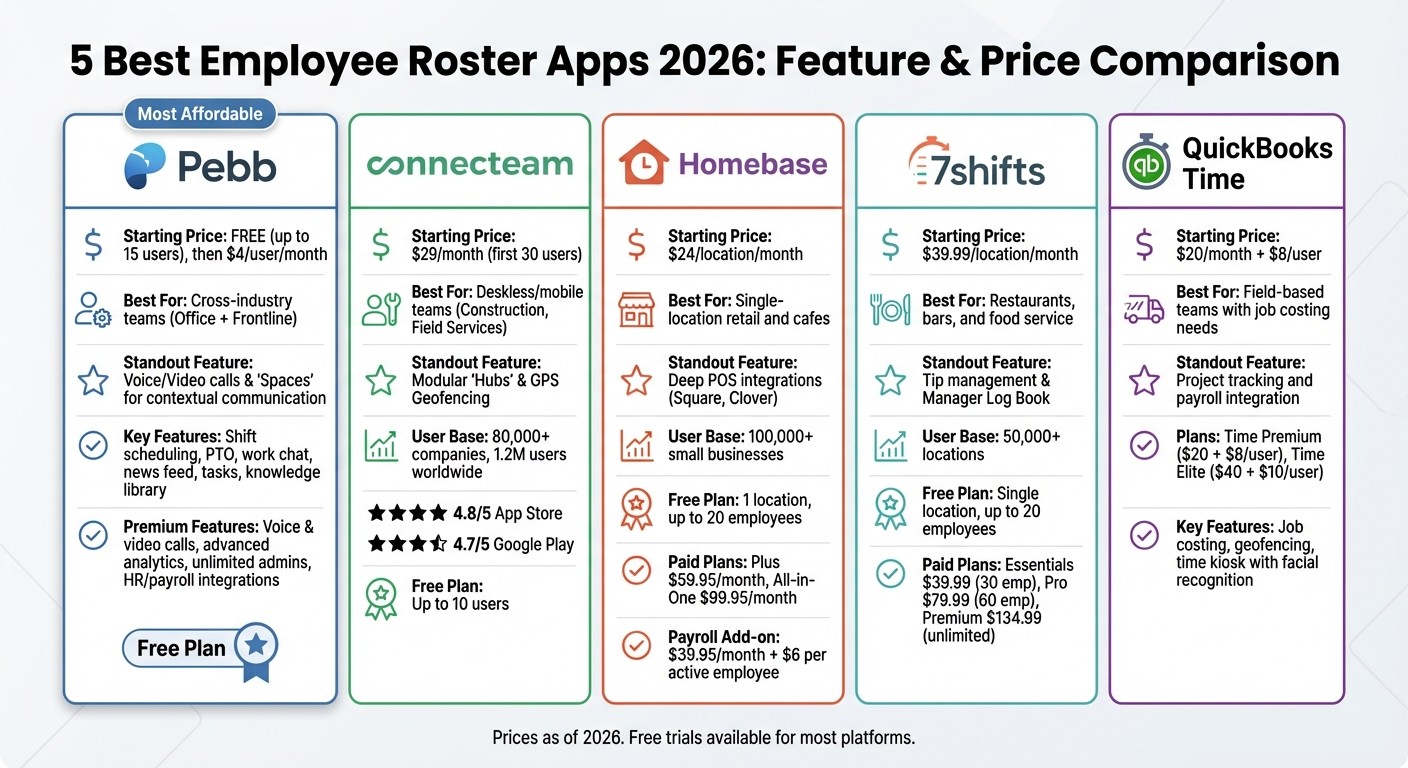
Employee Roster Apps Comparison 2026: Features and Pricing
Let’s break down how five top roster apps stack up in terms of pricing and features:
App | Starting Price | Best For | Standout Feature |
|---|---|---|---|
Pebb | Free (up to 15 users), then $4/user/month | Cross-industry teams (Office + Frontline) | Voice/Video calls & "Spaces" for contextual communication |
Connecteam | $29/month (first 30 users) | Deskless/mobile teams (Construction, Field Services) | Modular "Hubs" & GPS Geofencing |
Homebase | $24/location/month | Single-location retail and cafes | Deep POS integrations (Square, Clover) |
7shifts | $39.99/location/month | Restaurants, bars, and food service | Tip management & Manager Log Book |
QuickBooks Time | $20/month + $8/user | Field-based teams with job costing needs | Project tracking and payroll integration |
This table lays out the key differences to help you decide which app fits your needs.
If you’re keeping an eye on costs, Pebb stands out with its free plan for small teams (up to 15 users) and an affordable premium option at just $4 per user. On the other hand, Connecteam and Homebase use tiered pricing models based on locations or user counts, which can add up quickly for multi-site operations. For niche industries, 7shifts caters to food service with features like tip management, while QuickBooks Time is tailored for field teams needing job costing and payroll tools.
Where these apps really shine is in how they integrate scheduling into their ecosystems:
Pebb keeps everything in one place with "Spaces", linking conversations directly to shifts and tasks.
Connecteam leverages geofencing to keep mobile teams on track.
Homebase simplifies labor forecasting with its POS integrations.
7shifts offers unique tools like tip pooling and a Manager Log Book for restaurant staff.
QuickBooks Time excels in project tracking and payroll for field operations.
For teams looking for a balance of value and functionality, Pebb is hard to beat. It combines scheduling with communication, engagement, and collaboration - all in one platform and at a price that doesn’t break the bank. This all-in-one approach eliminates the need for multiple subscriptions or expensive add-ons, making it a practical choice for a wide range of teams.
Wrapping It Up
Choosing the right roster app boils down to understanding your team's unique needs. At Pebb, we’ve packed scheduling, messaging, video calls, tasks, digital forms, calendar events, and more into one seamless platform - all for just $4 per user per month. Our goal? To keep both frontline and office teams connected without the hassle of juggling multiple tools.
Other options cater to specific niches: Connecteam shines for deskless workers with mobile-first features and GPS geofencing, Homebase is ideal for single-location retail shops with POS integration, 7shifts simplifies tip management and sales forecasting for restaurant managers, and QuickBooks Time supports field teams with streamlined payroll and job costing. Each app has its strengths, so testing is key to finding the one that fits your team’s workflow.
Here’s the game plan: take advantage of free trials (usually 14 to 30 days) to test mobile usability, especially if your team is always on the move. Budget and location needs also play a role - Pebb offers a free plan for up to 15 employees with features like work chat, news feed, tasks, digital forms, calendar, clock in, shift scheduling, and PTO management, while location-based models might increase costs for multi-site operations. Running a small pilot program with one department can reveal how features like shift swapping and clock-ins perform across devices. Trust me, mobile usability can make or break adoption for teams on the go!
FAQs
How do I choose the right roster app for my team?
To find the best roster app for your team, focus on tools that cover the essentials: shift scheduling, communication features, and workforce management. For example, Pebb stands out as an all-in-one employee app for communication and operations priced at just $4 per user per month. It’s also important to check for integration options - like payroll and time-tracking systems - and make sure the app is easy to use without breaking the budget. With its balance of affordability and powerful features, Pebb is a strong contender for teams looking to streamline their operations.
Will employees actually use a roster app on their phones?
Yes, most employees are likely to rely on roster apps through their phones. These apps are built with mobile convenience in mind, making it easy to stay connected. They streamline communication and help manage those inevitable last-minute changes or unexpected no-shows without causing chaos. For shift workers, this kind of practicality is a game-changer.
What should I test during a free trial before switching?
During a free trial, I always make it a point to dive into the essentials: core features like shift scheduling, PTO management, and team communication. These are the backbone of any workforce management app, so they need to work seamlessly. I also take time to assess how intuitive the platform is - nobody wants to wrestle with clunky software - and check how well it performs on mobile devices. Let’s face it, mobile accessibility is non-negotiable these days.
Beyond that, I test if it plays nice with the tools we already use, handles user management efficiently, and offers reliable communication features. And here’s a tip: don’t skip evaluating customer support. I like to see how quickly they respond and whether they provide helpful training resources. These steps make sure the app ticks all the right boxes before making any long-term commitments.
