
Author: Ron Daniel
Best Employee Management Apps With Clock-In, PTO & Shifts
Compare top employee management apps for clock-ins, PTO, and shift scheduling, plus pricing and key pros for small businesses.
Have you ever felt like you're spending more time managing tools than managing your team? I’ve been there. A few years ago, I worked with a team that relied on three separate apps for clock-ins, PTO tracking, and shift scheduling. It was a mess - data was scattered everywhere, errors crept into payroll, and we wasted hours shuffling between platforms. The frustration was real, and I knew there had to be a better way.
Here’s a stat that still surprises me: 74% of small businesses use separate tools for these tasks, which increases admin work by up to 30%. That’s not just time lost - it’s money and morale, too. And when 15% of payrolls have errors due to fragmented systems, you realize the stakes are high. That’s why we built Pebb - to bring everything together in one app and eliminate the chaos.
In this article, I’ll walk you through how Pebb stacks up against other apps like Connecteam, When I Work, and Homebase. We’re talking features, pricing, and the impact these tools can have on your team. Let’s dive in and find out which one might work best for you.
1. Pebb
At Pebb, we’ve brought clock-ins, PTO, and scheduling together in one app, making it a go-to solution for teams tired of juggling tools like WhatsApp groups and Google Sheets.
Pricing
We offer a free plan for up to 15 users, packed with essentials like clock-in, shift scheduling, PTO management, and unlimited chat history. For teams needing more, our Premium plan costs $4 per user per month, unlocking features like voice and video calls, advanced analytics, integrations, and enterprise-level security such as SSO. No hidden fees or surprises - just clear, upfront pricing in USD. Let’s dive into what makes Pebb’s clock-in features a game-changer.
Clock-In Features
Pebb’s clock-in system is built to simplify workforce management. Using GPS geofencing with 50-foot accuracy, it ensures employees check in on-site. We also offer other options like QR code scans, facial recognition, and kiosk mode for shared devices. Plus, the system automatically applies US state-specific overtime rules, including California’s daily overtime policies, and generates timesheets in MM/DD/YYYY format.
Here’s a real-world example: a 50-employee retail chain in Texas reported a 99% improvement in clock-in accuracy and a 95% drop in buddy punching after adopting Pebb’s system.
PTO Management
Requesting time off is easy with Pebb. Employees submit requests directly through the app, and managers get instant push notifications to approve or deny them. Accrual tracking is automated - for example, 10 days per year vesting monthly - and US federal holidays like July 4th are preloaded. You can also customize policies for specific state requirements, such as New York’s paid sick leave laws.
That same Texas retailer? They slashed PTO disputes by 90% and saved $15,000 annually on administrative costs.
Shift Scheduling
Our drag-and-drop scheduler is designed to save time. You can create recurring templates, and the system uses AI to auto-fill shifts based on employee availability and skills, cutting scheduling time by 70%. Employees are instantly notified via mobile alerts and can swap or bid on open shifts. The system also flags potential issues like overlapping shifts or overtime before they become problems.
For instance, the Texas retailer saw their shifts automatically adjust for peak shopping times like Black Friday.
Additional Engagement Tools
Pebb includes tools to keep teams connected and engaged. Features like in-app chat, announcement broadcasts, recognition badges (think "Shift Star"), and pulse surveys help boost morale. In fact, small businesses using these tools have seen retention rates increase by 20%. You can even run fun team polls - like “What’s your favorite NFL team?” - and integrate with Slack for seamless communication. Whether your team is on the sales floor or working remotely, Pebb helps everyone stay in sync.
2. Connecteam
Connecteam takes a modular approach to employee management, allowing you to choose and pay for specific "hubs" - Operations, Communications, or HR & Skills. This setup gives you the flexibility to pay only for the tools you need. However, if you want access to all features, subscribing to all three hubs can drive up costs significantly. This is something to keep in mind when budgeting.
Pricing
Unlike Pebb's straightforward $4 per user flat rate, Connecteam's pricing depends on the hubs you select. For example, to access features like clock-ins, PTO management, and team communication, you'll need subscriptions to multiple hubs. Let’s take a closer look at how Connecteam handles clock-ins.
Clock-In Features
Connecteam’s clock-in system uses GPS geofencing and real-time location tracking, meaning it monitors employee locations throughout their shifts, not just at clock-in. The app supports over 30 languages and has earned a 4.7/5 rating on Google Play from 14,000+ reviews. Many users highlight its mobile-friendly design as a major plus.
PTO Management
PTO management is part of the HR & Skills hub, where employees can request time off directly through the app. Managers are instantly notified via push notifications, and the system flags scheduling conflicts like overlaps or double-bookings during shift planning. While Connecteam offers PTO management as a separate module, Pebb includes these features as part of its all-in-one platform.
Shift Scheduling
Connecteam provides a drag-and-drop scheduler with color-coded shifts, AI-powered auto-scheduling, and reusable templates. For example, Caremark Home Care Services used Connecteam to centralize training and communication for remote care assistants, cutting training completion time by 50%. While these tools are helpful, they’re only accessible through specific paid hubs. In contrast, Pebb includes AI auto-scheduling as part of its integrated platform. Connecteam also offers frontline worker engagement tools like a social-style news feed, surveys, polls, and digital badges, but again, these require additional paid hubs. Next, let’s take a look at When I Work.
3. When I Work
When I Work is a scheduling platform built with simplicity and speed in mind. With over 200,000 workplaces using it and handling 10% of employee clock-ins, it’s clear that this tool resonates with businesses looking for efficient shift management. It tackles scheduling, time tracking, and PTO management in a straightforward way, making it a go-to for many organizations.
Pricing
When I Work uses a tiered pricing model to cater to different needs. Here’s the breakdown:
Essentials Plan: $2.50 per user per month. This includes basic scheduling, auto-scheduling, and team messaging.
Pro Plan: $5.00 per user per month. Adds advanced scheduling rules and labor sharing across locations.
Premium Plan: $8.00 per user per month. Comes with API access and SSO.
In comparison, Pebb offers an all-in-one solution for $4 per user per month. Plus, When I Work provides a 14-day free trial without needing a credit card. Now, let’s dive into what makes its clock-in features so effective for workforce management.
Clock-In Features
The platform’s clock-in system is designed to ensure accuracy and accountability. It uses GPS-enforced geofencing, meaning employees can only clock in if they’re physically on-site. This helps eliminate issues like buddy punching or early clock-ins. Managers can track attendance in real time across multiple job sites, giving them a live view of who’s working. Employees have the flexibility to clock in using their smartphones or a dedicated terminal.
One user, Tommy Hamilton from Goldfish Swim School, shared how the platform saved him over 7 hours a week on schedule adjustments. His scheduling time dropped to just 15 minutes. That’s a massive time-saver for anyone juggling a busy workforce.
PTO Management
Managing time-off requests can be a headache, but When I Work simplifies this process. Employees can submit PTO requests straight from the mobile app, and managers can approve or deny them in seconds. Once approved, the system automatically updates the schedule, which helps avoid double-bookings or assigning shifts by mistake.
Shift Scheduling
Scheduling shifts is where this platform really shines. It features drag-and-drop functionality, color-coded positions, reusable templates, and schedule copying for convenience. The "OpenShifts" feature is a game-changer - it lets managers post available shifts that employees can claim, making last-minute scheduling less stressful.
To help prevent overstaffing, the platform includes labor forecasting, which compares scheduled hours to anticipated demand. Chris Koehnen from 1-800-GOT-JUNK shared that his team cut scheduling time per employee by 50%, and new hires can learn the system in under 10 minutes. Users have also reported significant time savings, with scheduling taking up to 8x less time and a 3x drop in employee no-shows.
4. Homebase
Homebase is a tool that supports over 150,000 workplaces and 3.5 million employees, with an impressive track record of managing over 1.2 billion hours in the past year.
Pricing
Homebase offers a free Basic plan for up to 10 employees per location, but its paid plans come with tiered pricing. Here's a quick breakdown:
Essentials: $24/month (annual) or $30/month (monthly)
Plus: $56/month (annual) or $70/month (monthly)
All-in-One: $96/month (annual) or $120/month (monthly)
Payroll add-on: $39/month plus $6 per employee
However, if you're looking for PTO management, you'll need to upgrade to the Plus plan or higher - a significant jump compared to Pebb's all-in-one solution at just $4 per user per month. Pebb bundles everything you need, right from the start, without additional costs for features like PTO.
Clock-In Features
Homebase's clock-in system is flexible and works across iOS, Android, tablets, computers, and even integrates with various POS systems. It uses GPS-enabled tracking and photo capture at clock-in to ensure accuracy. Managers can set helpful rules to block early clock-ins and receive real-time alerts for late arrivals or overtime risks.
Ashley Ortiz, Co-owner of Antique Taco, shared her experience:
"Before Homebase, we were printing out timesheets and manually calculating hours. To keep up with the times, we have switched to Homebase, and it has made our lives so much more efficient!"
On average, Homebase saves managers 5 hours per week on time-tracking tasks. And when paired with scheduling and payroll integration, those savings can jump to 20 hours per month.
PTO Management
PTO management is one area where Homebase's tiered pricing might feel restrictive. It’s not included in the Basic or Essentials plans - you’ll need to upgrade to the Plus plan or higher. Once unlocked, employees can request time off directly in the app, and managers can approve or deny requests with just a tap. The system syncs with payroll automatically and ensures requests are limited to accrued PTO, avoiding negative balances.
Homebase also provides access to HR experts who review PTO policies to ensure compliance with labor laws. They even send alerts when regulations change. That said, Pebb simplifies things by offering integrated clock-in, PTO, and scheduling features from day one without requiring upgrades.
Shift Scheduling
Homebase builds on its time-tracking capabilities with tools that simplify shift scheduling. Features like drag-and-drop builders, templates, and "Open Shifts" (which allow employees to claim available slots) make managing schedules easier. For those on higher-tier plans, the AI Scheduling Assistant optimizes shifts based on labor goals and availability while flagging potential conflicts or overtime.
Eve Hogan, owner of The Sacred Garden, praised the scheduling tools:
"It made setting up the schedule super easy. My staff and I all really like being able to see the schedule from our phones, know who is working, getting reminders and having a simple way to manage schedule changes."
Employees can also handle shift trades, request covers, and update their availability through the mobile app. Homebase has earned glowing reviews, with a 4.8 out of 5 rating on the Apple App Store from 84,000 reviews and similar praise on G2 from 1,122 reviews.
Pros and Cons
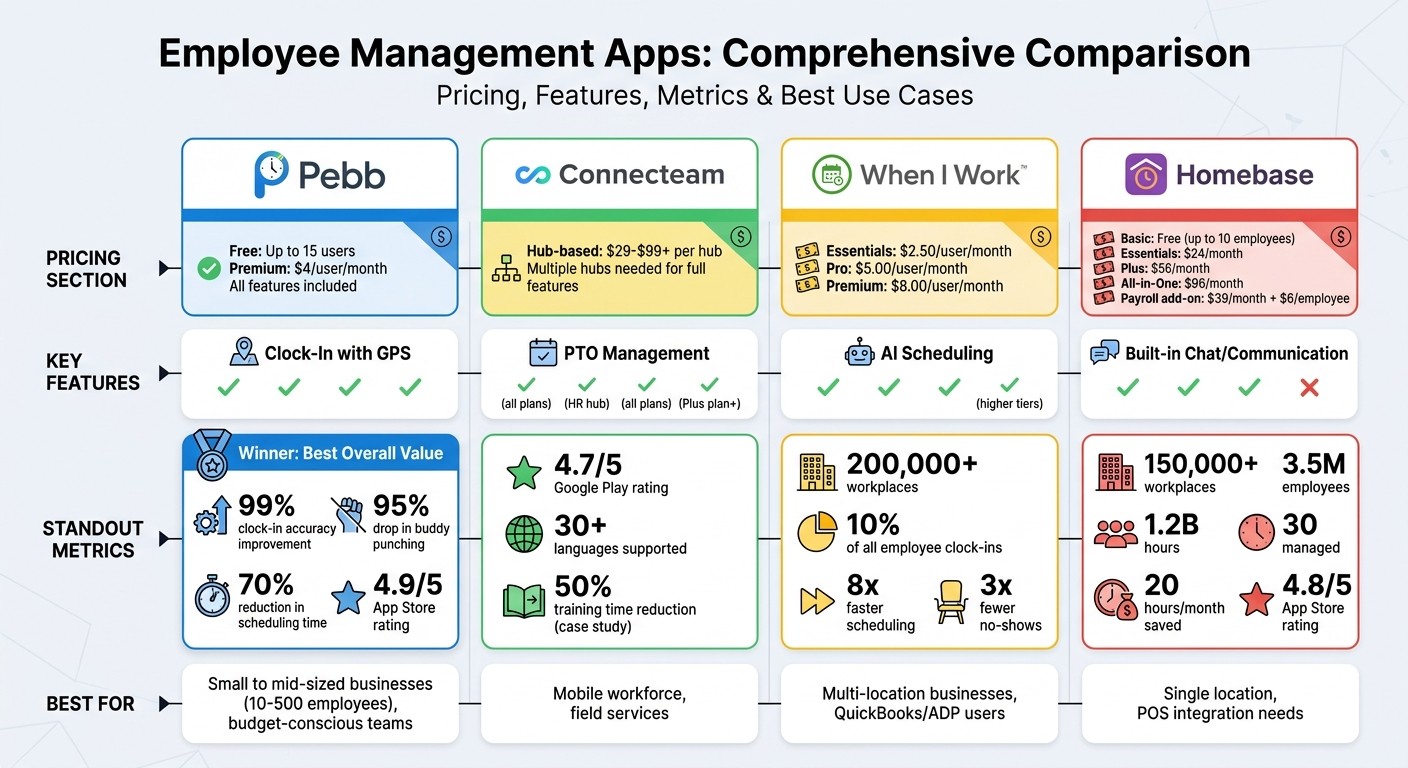
Employee Management Apps Comparison: Pricing, Features & Key Metrics
When it comes to picking the best employee management app, it's all about balancing the perks with the potential drawbacks. Let me walk you through how the top contenders stack up.
Pebb is a standout for startups and small teams, thanks to its free plan for up to 15 users. This plan includes essentials like clock-in, PTO tracking, and shift scheduling. And if you’re ready to grow, the paid plan is just $4 per user per month, offering unlimited features without locking you into long-term contracts. The catch? Larger teams might feel the pinch as costs add up, and enterprise pricing isn’t standardized.
Connecteam shines with its AI-powered auto-scheduling and GPS tracking, which even includes "breadcrumb" trails for mobile workers. But here's where it gets tricky: their hub-based pricing (ranging from $29 to $99+ per hub) can be hard to navigate. Plus, some of the most engaging features, like social feeds and recognition tools, are only available on higher-tier plans. And while their facial recognition clock-in feature boasts 99% accuracy and claims a 30% reduction in time theft, it could raise privacy concerns under laws like Illinois' BIPA.
When I Work is a favorite for its automated PTO accrual that aligns with US state laws, such as California's unlimited PTO tracking. It also integrates seamlessly with QuickBooks and ADP, making payroll a breeze. However, advanced scheduling rules are tucked behind pricier plans, and customization for complex union agreements is limited. Want to set carryover caps? That’ll cost you about $2 extra per user each month.
Homebase simplifies scheduling with its drag-and-drop interface and labor cost forecasting, which can cut overtime by up to 20%. But, effective PTO management is locked behind the Plus plan, which runs $56 per month (billed annually). The free plan is limited to just one location, and if you need to manage multiple locations, it’s an extra $24.95 per month per location. Also, don’t expect AI-powered demand forecasting here.
Here's a quick comparison of the key strengths and weaknesses of each app:
App | Pros | Cons |
|---|---|---|
Pebb | Free for up to 15 users; $4/user for unlimited features; built-in chat, video calls, news feed; no long-term contracts | Costs can rise for larger teams; enterprise pricing isn’t fixed |
Connecteam | AI-powered auto-scheduling; GPS breadcrumb tracking; social feed and recognition tools | Confusing hub-based pricing; key features locked to higher tiers; potential privacy concerns |
When I Work | Automated PTO accrual by state laws; QuickBooks/ADP integration; OpenShifts for labor forecasting | Advanced scheduling rules cost more; limited union rule customization |
Homebase | Drag-and-drop scheduling; labor cost forecasting; reduces overtime by 20%; GPS/photo clock-in | PTO management requires Plus plan ($56/month); free plan limited to one location; lacks AI-driven forecasting |
At the end of the day, Pebb sets itself apart with its no-cost, all-in-one solution for small teams and unbeatable $4-per-user pricing for unlimited features. It’s a strong contender for businesses looking for a budget-friendly, scalable option.
Conclusion
Managing a fragmented workforce can feel like herding cats, especially when you're juggling multiple tools for clock-ins, PTO tracking, and scheduling. That’s why we built Pebb - to simplify everything into one seamless platform for just $4 per user per month.
Here’s what makes Pebb a game-changer: GPS-enabled clock-ins, automated PTO workflows, and AI-powered shift scheduling - all without the headache of tiered pricing. By consolidating systems, businesses eliminate the chaos of managing WhatsApp groups, Google Sheets, and scattered apps. The results speak for themselves: a 50-employee retail chain slashed scheduling time by 30%, and users regularly report a 35% drop in scheduling conflicts. With a 4.9/5 App Store rating and over 10,000 customers globally, Pebb is tackling clock-in errors, PTO delays, and fragmented scheduling head-on.
If you’re running a small to mid-sized business with 10 to 500 employees in retail, hospitality, or field services, Pebb is designed with you in mind. While startups with fewer than 20 employees or enterprises with over 500 might explore other options, Pebb offers unparalleled value for most US businesses looking to consolidate workforce management.
Ready to see the difference? Start with Pebb’s free plan for up to 15 users or take Premium for a spin with a 14-day trial. Integration takes less than two hours, training your team is a breeze with in-app tutorials, and you can cut PTO approval times to under 24 hours - starting today.
FAQs
How does Pebb stop buddy punching?
Pebb tackles the issue of "buddy punching" head-on with photo clock-in and facial recognition features. These tools ensure that employees can only clock in or out for themselves, making it nearly impossible for someone to punch the clock on a coworker’s behalf.
Can Pebb handle my state’s overtime and PTO rules?
Pebb makes handling your state’s overtime and PTO rules straightforward. Its PTO tracking tools are fully customizable, so you can tailor them to match specific state regulations and company policies. This not only helps ensure compliance but also streamlines workforce management, saving you time and hassle.
How fast can my team get set up on Pebb?
Getting started with Pebb is a breeze. We’ve designed the platform to be straightforward and easy to use, so your team can hit the ground running in no time. The setup process is smooth and efficient, thanks to its all-in-one design that keeps everything simple and hassle-free.
