

Author: Ron Daniel
The benefits of a searchable employee directory for large teams
How a searchable employee directory speeds decisions, reduces duplicate work, and improves coordination across large, multi-site teams.
Most large teams don’t have a people problem. They have a find-the-right-person problem.
I’ve seen this up close at Pebb.io. Once a company spreads across sites, shifts, and departments, a simple question like “Who handles this?” can eat up far too much time. McKinsey found employees spend 1.8 hours a day searching for information or the right coworker, and IDC estimates a company with 1,000 knowledge workers can lose about $5.7 million per year from search-related delays. Those numbers sound big, but the day-to-day pain is even clearer: wrong messages, slow replies, repeat questions, and managers pulled into routing work that should never hit their inbox.
I’ve also learned that a plain contact list doesn’t fix this. What helps is a searchable employee directory with filters, current profiles, reporting lines, and direct ways to message or call the right person right away.
So let’s look at what this solves, where teams get stuck, and why the best directories work inside one employee app instead of sitting off to the side.
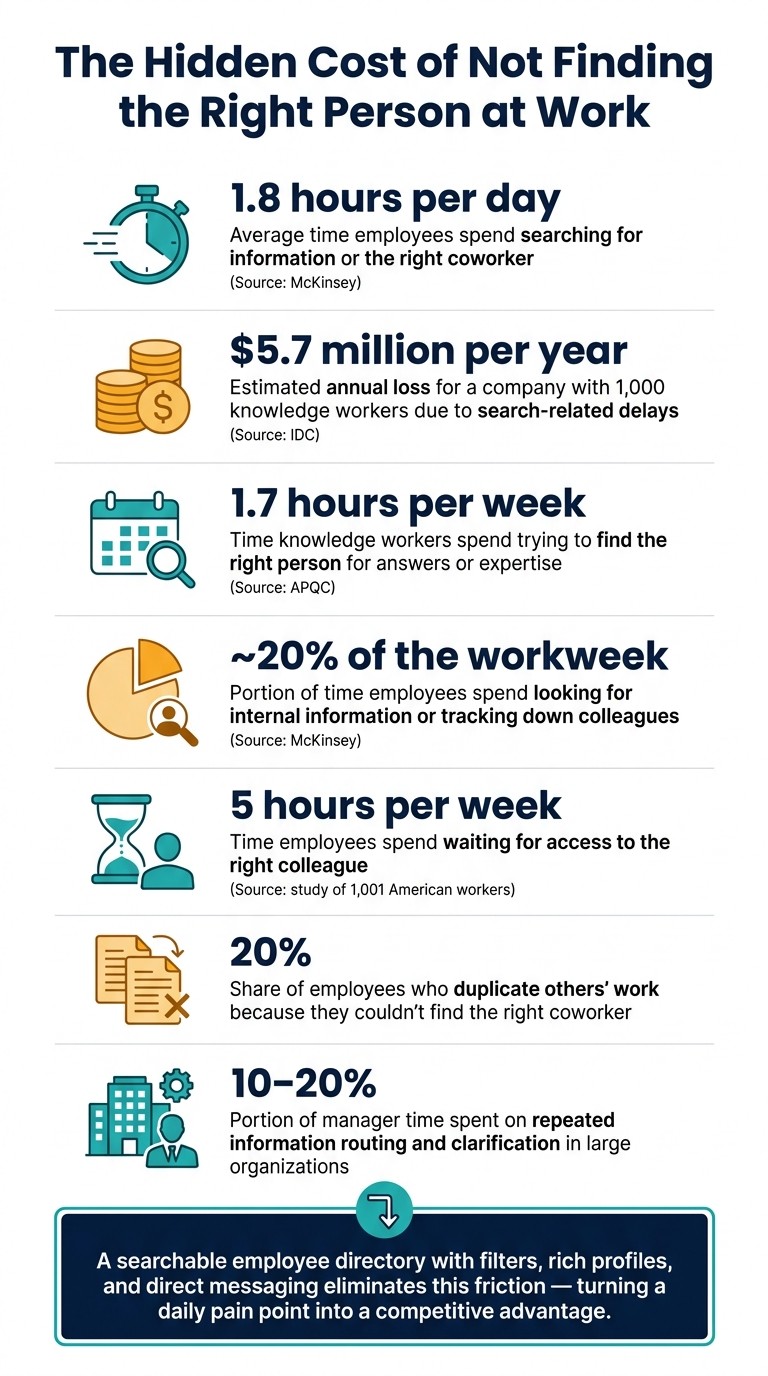
The Hidden Cost of Not Finding the Right Person at Work
The main problems a searchable directory solves
I’ve seen this problem up close at Pebb.io, and I don’t think it gets talked about enough. On paper, it sounds small: someone can’t find the right person, so they send a message and wait. But in practice? That tiny delay spreads fast.
One message goes to the wrong person. A simple question gets asked three times. A manager stops what they’re doing just to point someone in the right direction. Across a company with hundreds or thousands of people, that adds up in a big way. APQC found that knowledge workers spend 1.7 hours per week trying to find the right person for answers or expertise.
That’s not just lost time. It’s friction people feel every single day.
Misdirected messages slow down decisions
I’ve watched this happen in a way that feels almost painfully normal. A store associate has an urgent staffing issue and emails the person they think is the store manager. But that manager already moved to another location. The message sits there. Then it gets forwarded. Then someone else has to ask for context all over again.
What should’ve taken five minutes can drag into hours.
The same pattern shows up with HR questions. An employee sends a benefits or payroll issue to a general HR inbox instead of their assigned HR business partner. They get a generic response, sit in a queue, and then have to follow up again just to reach the right person. In logistics or manufacturing, it can get even messier. If someone asks in a group chat who’s supervising a shift instead of checking a current roster, a safety issue can sit unresolved while people sort out who’s even on duty.
Here’s the thing: misdirected messages don’t just burn time. They create rework. And that rework slows decisions right when speed matters most.
Duplicate questions create extra work for managers and support teams
When people can’t find out who owns payroll, onboarding, scheduling, or maintenance, they do the most human thing possible: they ask their manager.
Then someone else asks the same thing. Then another person does too.
I’ve seen this pile up fast, especially in big teams. Research on how managers spend their time shows that managers in large organizations can spend 10%–20% of their time on repeated information routing and clarification.
That’s a brutal drain.
HR and support teams get hit too. They end up with stacks of tickets that were sent to the wrong place and need to be sorted and forwarded before any real help even starts. In shift-based workplaces like hospitals, distribution centers, and retail chains, it gets worse every time there’s a new hire or a rotation. People keep having to relearn who handles what.
The result is pretty predictable:
support slows down
burnout creeps in
the work that matters most gets less attention
I’ve seen teams mistake this for a staffing problem, when part of it is just a find-the-right-person problem.
Limited visibility makes cross-team coordination harder
This one is less obvious, but it causes plenty of damage. If employees can’t tell who works in another department, who reports to whom, or who has a certain certification or speaks a second language, cross-team work starts to stall before it even gets moving.
Let me give you a simple picture. A store manager wants to roll out a new merchandising plan but doesn’t know who the regional visual merchandising specialist is. So they email a broad distribution list and wait. In a multi-location health system, a clinician may not know which colleague has the subspecialty or language skill needed for a patient referral. And when org visibility is weak, people often skip the right mid-level owner and go straight to senior leadership, which adds load at the top while the actual task sits there untouched.
I’ve seen that kind of escalation happen for no good reason other than, “I didn’t know who else to ask.”
Principal Financial said it plainly: in a large organization, employees simply know very few people outside their immediate team. That’s the gap. And from what I’ve seen at Pebb.io, that’s exactly the kind of gap a searchable directory is meant to fix.
How a searchable employee directory improves speed and coordination
I’ve seen this play out up close at Pebb.io: a directory sounds simple on paper, but it only earns its keep when people can use it fast. If search is clunky or profiles are half-empty, people go right back to pinging three coworkers, waiting around, and hoping someone knows the answer.
Here’s the thing: the win doesn’t come from just having a list of employees. It comes from search with real filters, rich profiles, and org visibility that gives people the right context before they send a message.
Search by name, role, department, location, skill, or shift
The first payoff is pretty direct. People stop guessing and start searching.
I’ve watched teams save time just by filtering by department, function, region, or role instead of asking around in chat. A night-shift associate can find the on-duty supervisor in seconds. A manager can look up a bilingual teammate or someone with CPR training without turning it into a group hunt. The same goes for finding a forklift-certified operator on a certain shift at a certain facility.
That may sound like a small thing, but those small delays pile up fast.
McKinsey research shows employees spend nearly 20% of their workweek looking for internal information or tracking down colleagues who can help with specific tasks.
When I look at that stat, it hits home. That’s not just lost time. That’s friction people feel every day. Filters cut into that by replacing guesswork with a targeted search that takes seconds.
Profiles and org visibility reduce guesswork
I’ve learned that a good profile should answer four things right away: Who is this person? What do they own? Where are they based? Who do they report to?
When employees can see title, manager, branch, responsibilities, and contact details at a glance, they stop second-guessing whether they’re talking to the right person. That alone cuts a lot of back-and-forth.
Org charts and reporting lines help just as much. If a store manager is out, the employee shouldn’t have to wait or send messages into the void. They should be able to see the regional director right away and reach out. We’ve found that this kind of visibility matters even more when the directory lives next to team communication apps, scheduling, and knowledge tools, because people can move from finding someone to fixing the issue in one flow.
Faster problem solving improves the employee experience
This is where it gets practical fast.
A cashier dealing with a double-booked shift can find the scheduling coordinator for that store and sort it out before clocking in. A warehouse associate who spots a safety issue can look up the on-shift safety lead by name, role, and location, then send a message in under a minute.
That kind of speed changes the day-to-day experience more than most teams expect.
A study of 1,001 American workers found that employees spend 5 hours per week waiting for access to the right colleague, and 20% said they duplicate others' work because they couldn't find the right coworker.
I’ve seen that duplicate-work problem show up in simple ways: two people chasing the same answer, or one person redoing a task because they didn’t know who owned it. When search sits inside staff communication apps that combine scheduling and knowledge, those delays shrink a lot. People find the right coworker, reach out right away, and keep moving.
Why a directory works better inside an all-in-one employee app
I’ve seen this play out over and over at Pebb.io: a directory stops being useful the second people have to jump between apps just to act on what they found.
Here’s the thing. Finding the right person is only half the job. The next step is what matters most: can you reach them right there, without switching tools?
That’s why a directory works best inside an all-in-one employee apps. The smoothest flow is simple: search, open the profile, then message or call. No bouncing between tabs. No digging through another tool. No wasted time.
Let me give you a real-world example. Picture someone on a retail floor dealing with a customer issue. They should be able to search for the right store manager, open the profile, and tap Message, Voice Call, or Video Call on the spot. That kind of speed matters when the pressure is on.
It gets even better when availability indicators are built into the profile. If I can see that someone is on shift until 5:00 PM or currently on PTO, I don’t have to guess. I can pick the right channel right away, or contact the next person instead. In urgent moments like a cash discrepancy, a safety incident, or an equipment failure, that single-step workflow cuts response time.
I learned pretty fast that knowing who someone is helps, but knowing whether they’re working right now is what keeps messages from going to the wrong person. That’s where the profile needs to do more than list a name and title.
A better setup shows:
who is on shift
who is off
who backs them up
When you link profiles to schedules, PTO, backups, and SOPs, employees can route questions the right way on the first try. That saves time, avoids confusion, and keeps work moving.
At Pebb, we built around that model. People search connects straight to chat, calls, scheduling, PTO, and knowledge. So when someone opens a coworker’s profile in Pebb, they can start a chat, place a voice call, or launch a video conversation without leaving the app. For large teams, that turns the directory from a static contact list into part of daily work.
Conclusion: A searchable directory becomes core infrastructure for large teams
I’ve seen this happen up close at Pebb.io.
At first, a people directory sounds like a nice extra. Something helpful. Something you might use now and then. But once we fixed the big pain points around search, speed, and team coordination, the role of the directory changed. It stopped being a side tool and started becoming part of daily work.
That’s when it clicked for me: a searchable directory becomes core infrastructure for large teams.
People use it to find the right supervisor, send a question to the correct HR contact, or check who’s on shift before they message someone. Those sound like small moments, but in a big company, small delays pile up fast. One wrong message here, five minutes lost there, a missed handoff after that - and suddenly the day feels heavier than it should.
The cost of that drag is huge. IDC estimates that an enterprise with 1,000 knowledge workers loses about $5.7 million per year because of delays tied to information search.
Here’s the thing: adoption doesn’t happen just because a directory exists. I’ve learned it depends on three simple things:
Profiles stay complete
Profiles stay current
Profiles connect to day-to-day coordination
When those three pieces are in place, the directory sticks. It stops being a dusty org chart and starts helping people work. Instead of guessing who handles what, employees get current, searchable profiles they can use in the moment.
At Pebb.io, we’ve woven the people directory into chat, voice and video calls, scheduling, and knowledge access. That’s the part that changes everything. The directory isn’t sitting off to the side. It’s part of how we move through the workday.
And if your team is still leaning on manual workarounds just to figure out who to call, that’s usually the gap a searchable directory closes.
FAQs
What should an employee directory include?
I learned this one early at Pebb.io after wasting way too much time hunting for the right person.
One day, I needed to loop in a teammate on a customer issue. I knew her first name. That was it. No team name, no manager, no clue where she sat in the org. What should’ve taken 30 seconds turned into a mini scavenger hunt across chat threads and old notes.
That’s when it hit me: a good employee directory isn’t just a nice add-on. It saves people from daily friction.
At the bare minimum, I want an employee directory to show each person’s photo, full name, job title, department or team, location, manager, and direct contact details.
That basic setup already does a lot. You can put a face to a name, figure out who does what, and reach the right person without playing detective.
But here’s where it gets much better.
When the directory also includes searchable skills or specialties, org charts, and short bios, it becomes far more than a contact list. It turns into a simple way for all of us at Pebb.io to find the right person for a task, a question, or a project.
And when those profiles live inside communication tools like Pebb, the whole thing feels smooth. I can find someone, message them, call them, or start a video meeting right away. No tab switching. No wasted motion. Just find the person and go.
That kind of setup may sound small, but in my day-to-day work, it makes a big difference.
How do you keep directory profiles accurate?
I learned this one the hard way at Pebb.io.
Early on, we had a few profile details drift out of date. A team member changed locations, another moved teams, and one new hire showed up in the wrong branch. Nothing dramatic on its own, but once those little errors pile up, people stop trusting the directory.
Here’s what worked for us: we kept directory profiles accurate with a mix of automation and clear admin oversight.
Pebb can sync with your existing HR or payroll platforms for real-time updates, which cuts down on manual work and helps keep things current. When a company prefers more hands-on control, admins can also manage roles, team assignments, and branch locations manually.
That balance matters. Automation handles the day-to-day flow, and admin review helps catch the stuff systems miss.
We also found it helps to assign clear ownership. In most cases, that’s HR or operations managers. They usually handle:
profile updates
new hires
removals
And one more thing: we always encourage employees to review their profiles on a regular basis. Let me tell you what happened next when we pushed that habit internally - even small fixes from employees made the whole directory more reliable and much easier to use day to day.
Who benefits most from a searchable directory?
I’ve seen this play out most clearly in big, spread-out teams.
At Pebb.io, the people who get the most out of this are often the ones in large, multi-location, high-turnover teams and, of course, frontline staff. They’re usually the ones moving fast, covering shifts, and trying to get answers without digging through five tools or waiting on the wrong person to reply.
Here’s what changes in practice: they can find coworkers fast by name, role, department, location, skills, or shift. That sounds simple on paper, but in day-to-day work, it saves a ton of back-and-forth.
Instead of hitting a wall and thinking, “Who do I even ask?”, they can reach the right person sooner, cut down delays, and avoid asking the same question twice in two different places. In busy teams, that kind of speed matters a lot.
