
Author: Ron Daniel
All-in-One Employee App for Shifts, PTO, and Communication - 2026 Guide
Mobile-first app for shift scheduling, PTO, clock-in, and team chat—cut admin time, reduce errors, and improve shift coverage.
"Why is scheduling always such a nightmare?" That’s what a manager at one of our client companies blurted out during a demo last year. She wasn’t wrong. Between juggling spreadsheets, hunting down PTO approvals buried in email threads, and trying to track last-minute shift swaps in WhatsApp groups, her team was losing hours every week. And the kicker? Despite all that effort, scheduling errors still happened - double-booked shifts, no-shows, you name it.
Here’s the thing: this isn’t just her problem. Research shows managers spend up to 10 hours a week on scheduling alone, while employees miss updates buried in endless messages. This often stems from a lack of internal communication examples that actually work for frontline staff. It’s a mess for everyone. That’s exactly why we built Pebb - a single app to handle shifts, PTO, and team communication in one place. No more tool-hopping. No more wasted time. Just one platform that works.
In this guide, I’ll share how Pebb can help your team save time, cut errors, and stay connected with an effective internal communications strategy. We’ll cover what makes an all-in-one app so effective, how Pebb’s features simplify your workflow, and how to get started without the headaches. Let’s dive in and see how this can change the way you manage your team.
Why Businesses Need an All-in-One Employee App
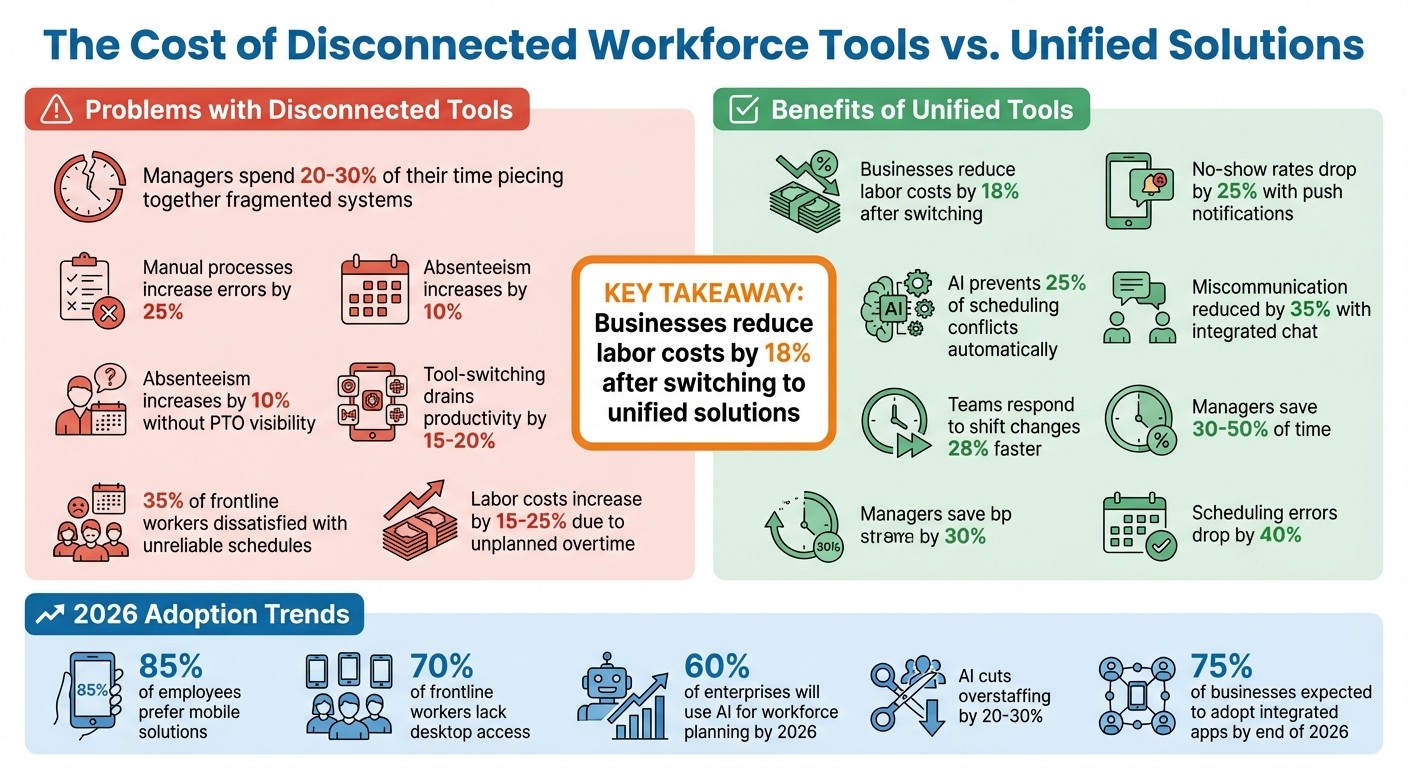
Workforce Management Statistics: Impact of Disconnected vs Unified Tools
Problems with Disconnected Workforce Tools
Let me paint you a picture: managers spending hours juggling spreadsheets for schedules, wading through email chains for PTO requests, and chasing down updates scattered across various chat apps. Sound familiar? This kind of fragmented system eats up 20–30% of managers' time just trying to piece everything together. And the fallout? Double-booked shifts, missed changes, and employees either showing up when they’re not needed - or worse, staying home when they’re supposed to be on the clock.
The stats are hard to ignore. Manual processes, like using Excel for scheduling or paper forms for PTO, bump up errors by 25%. One retail chain we worked with saw absenteeism jump 10% because employees didn’t have easy access to their PTO balances. They’d request days off without realizing they didn’t have any left, leading to denied requests and growing frustration. On top of that, switching between tools drains productivity by 15–20%, leaving 35% of frontline workers dissatisfied with unreliable schedules that often lead to burnout.
And then there’s the money. Disconnected systems can drive up labor costs by 15–25% due to unplanned overtime. But here’s the kicker: businesses that moved to unified tools slashed those costs by 18%. It’s not about your team slacking - it’s about outdated systems that can’t keep up with modern workforce demands. As trends shift, the need for mobile-first, AI-powered solutions becomes impossible to ignore.
Workforce Management Trends in 2026
Fast forward to 2026, and mobile-first platforms are no longer optional - they’re essential. Did you know 85% of employees now prefer mobile solutions for things like updates and scheduling? And for frontline workers, 70% don’t even have regular access to a desktop computer. Companies that use push notifications for shift changes have seen no-show rates drop by 25%. That’s a game-changer.
Speaking of game-changers, AI is stepping in to reshape workforce management. By 2026, 60% of enterprises are expected to use AI for workforce planning. Predictive analytics are already helping businesses cut overstaffing by 20–30%. Plus, real-time AI notifications are solving scheduling conflicts before they even happen, avoiding 25% of potential clashes automatically.
And let’s not forget communication. Integrated chat features are replacing those endless email threads and scattered texts, reducing miscommunication by 35%. For industries like retail and hospitality, which make up half of the frontline workforce, this means teams can respond to shift changes 28% faster. By the end of 2026, 75% of businesses are expected to adopt integrated apps. Managers who’ve made the switch report 30–50% time savings and a 40% drop in scheduling errors compared to those clinging to disconnected tools.
The bottom line? Unified employee apps aren’t just a nice-to-have - they’re becoming the backbone of efficient, modern workforce management. And the results speak for themselves.
How Pebb Addresses Workforce Management Challenges
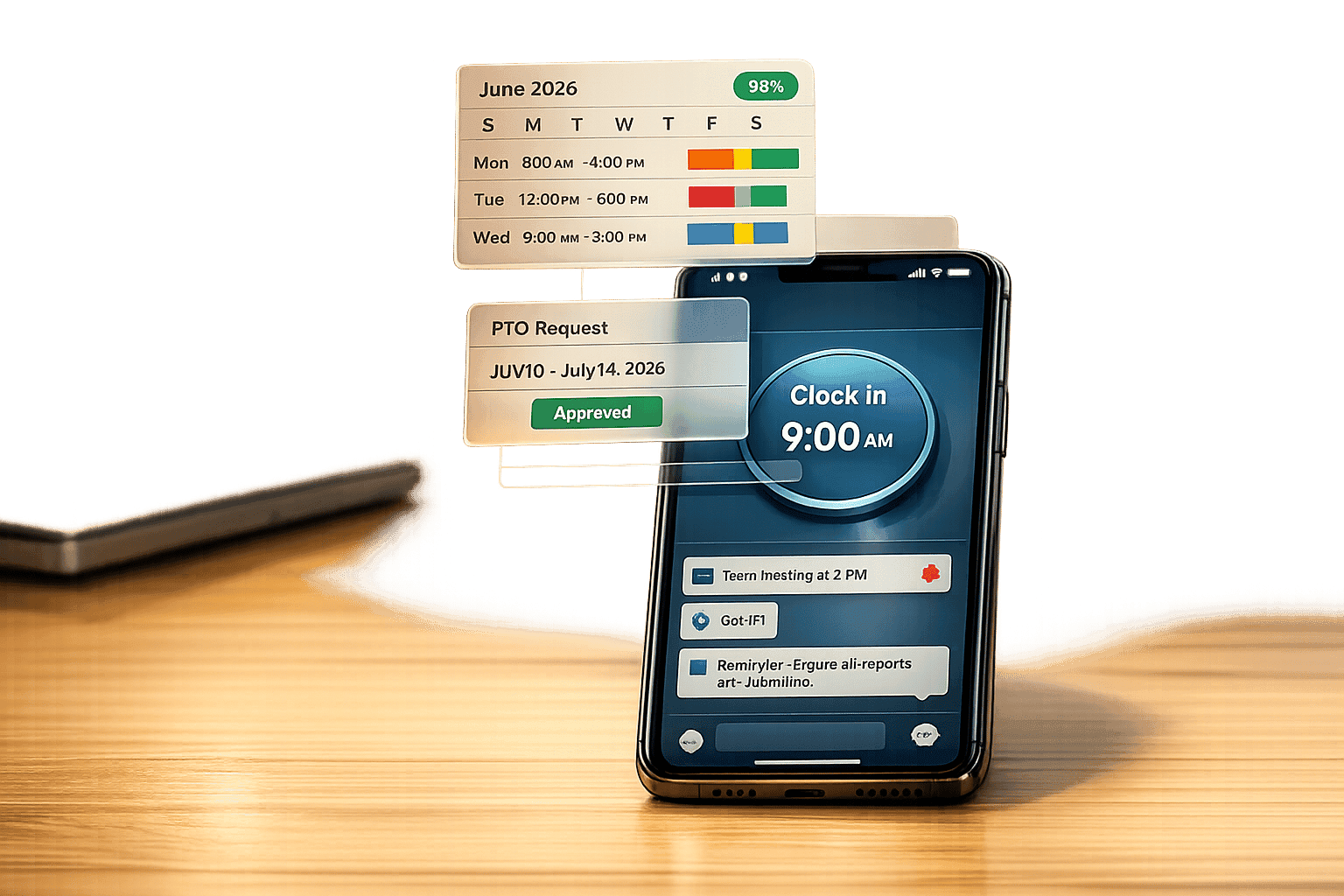
Picture this: you're managing a team, and every task - scheduling shifts, approving PTO, and communicating updates - requires a different app. It’s a recipe for frustration, right? That’s where Pebb steps in. We’ve taken all those disjointed tools and rolled them into one seamless, mobile-first platform. Whether you’re on the frontline or in the office, everything you need is right there, in one system.
Here’s how it works: retail associates can check schedules, request swaps, and message managers - all from the same app they use to clock in. Meanwhile, office staff can approve time-off requests, send out company-wide updates, or hop on a quick video call without juggling multiple tools. It’s all about making life easier for everyone. In fact, a manufacturing company with 200 frontline workers saw shift conflicts drop by 45%, and a hybrid team of 30 people boosted engagement by 28% after switching to Pebb’s unified system.
Let me walk you through the features that make this possible.
Pebb's Main Features and What They Do
1. Drag-and-Drop Scheduling
Our scheduling tool is designed to save time and reduce headaches. You can build rosters in minutes, auto-fill shifts based on availability, and send real-time push notifications for any changes. Employees can even grab open shifts or request swaps directly through the app, with built-in approval workflows. This setup has cut scheduling errors by up to 30% - a game-changer for teams adapting to the fast-paced gig economy.
2. PTO Management
Handling time-off requests has never been smoother. Employees submit requests through an integrated calendar that automatically checks for coverage conflicts. Managers get one-tap approvals, and disputes drop by 60%. Plus, what used to take days now gets done in just hours.
3. Communication Tools
Forget switching between apps for updates and messages. Pebb’s chat, news feed, groups, and video calls are all tied directly to scheduling and PTO. Need to notify a team about a shift change? It’s automatic. Managers can broadcast updates, resolve issues via video calls, and even target specific departments. Cross-shift handoffs are now 35% faster.
4. Clock-In Functionality
With GPS tracking, payroll integration, and automatic discrepancy alerts, our clock-in feature keeps everything running smoothly. One logistics firm using Pebb verified 500 daily clock-ins without a hitch and reduced payroll errors by 20%. It’s accurate, efficient, and stress-free.
Pebb's Pricing and Value
Now, let’s talk about cost. Pebb isn’t just about features; it’s about delivering value. Our Standard plan is free for teams of up to 15 employees and includes scheduling, PTO management, basic chat, a news feed, tasks, a calendar, and clock-in functionality. For larger teams or those needing extras like video calls, analytics, and unlimited admins, the Premium plan is just $4.00 per user per month (billed annually).
Compare that to competitors charging $6.00 to $10.00 per user per month, and the savings are clear. A 50-person team using Pebb Premium can save about $2,500 per year - and that’s just from reduced admin time. Factor in fewer scheduling errors and lower overtime costs, and the ROI only grows.
Here’s a quick look at how Pebb stacks up against the competition:
Feature | Pebb (Premium) | Slack (Pro) | ||
|---|---|---|---|---|
Monthly Cost | $4.00/user | $12.50/user | $5.00–$9.00/user | $24.95–$99.95/location |
Scheduling | Native Included | Third-party only | AI-powered | Drag-and-drop |
PTO Management | Native Included | Third-party only | Included | Included |
Communication | Chat, News Feed, Voice/Video | Chat only | Basic (Add-on for Messaging+) | Basic Messaging |
Free Tier | Up to 15 users | Limited history | 100 shifts/month | 1 location (up to 10 users) |
With Pebb, you’re not just getting a tool - you’re getting a solution that simplifies workforce management and saves money. And that’s something every team can appreciate.
How to Implement Pebb in Your Organization
Getting Pebb up and running in your organization is surprisingly fast - most teams are fully set up within a month, and many hit the ground running in just a few days.
Setup Steps
With Pebb’s all-in-one features, the setup process is straightforward. Here’s how to get started:
Sign up and set up your account: Use your business email to sign up, then verify your account through the link sent to you. Once logged in, create your team account by entering key details like your company name, time zone, and preferred date/time settings. You can also set up a basic structure, such as departments or locations, to match your organization.
Invite your team: Send email invites to employees or share a simple link for those without company emails (like frontline workers). From there, you can create shift templates based on your operational hours, configure PTO policies (e.g., one day of accrual per month), and assign roles - admins for setup, managers for approvals, and employees for day-to-day tasks.
Start with a pilot group: Choose 10–20 employees to test Pebb for two weeks. Have them explore features like viewing shifts on the mobile app, submitting PTO requests, and using the built-in chat. Their feedback will be invaluable for fine-tuning your approach.
Expand gradually: After gathering input from the pilot group, roll out Pebb organization-wide. Use bulk invites to add employees and integrate with tools like Google Calendar or Outlook. Track your progress week by week: Week 1 for the pilot, Week 2 for feedback, and aim for full implementation by the end of Month 1.
Once Pebb is up and running, the next step is driving adoption across your team to make the most of its features.
Tips for Successful Adoption
Here’s how to ensure your team embraces Pebb seamlessly:
Communicate clearly from the start: Set up a dedicated announcement channel to share updates and policies, like “PTO requests must be submitted 48 hours in advance.” Kick things off with a meeting that includes a Q&A session and visual guides to help everyone get familiar.
Offer mobile-friendly training: Create short, under-five-minute videos that cover the basics - downloading the app, logging in with biometric options, and using core features. Host a live demo on Day 1, then provide checklists and quick-reference guides employees can access anytime. Hands-on practice sessions are a great way to build confidence.
Appoint champions: Select team members in each department to act as go-to resources for their peers. These champions can answer questions and provide support. You could even gamify the process by awarding badges for completing tasks like submitting a PTO request for the first time.
Track progress regularly: Use simple metrics to measure success. For example, aim for 90% of employees to sign up within 48 hours and 70% to submit PTO requests in Week 1. Pebb’s dashboard makes it easy to track these numbers, or you can use a Google Sheet for manual tracking.
One mid-sized retail chain in the U.S. with 200 employees followed this approach and achieved impressive results: a 40% drop in scheduling emails, 25% faster PTO approvals, and 85% app adoption within just four weeks. These kinds of outcomes show what’s possible with a thoughtful implementation plan.
How to Measure Results with Pebb
When Pebb becomes part of your organization, you’ll want to see the difference it’s making. That’s why we’ve included an analytics dashboard to help you track key metrics across scheduling, PTO management, and communication. Let me walk you through how you can measure these results effectively.
Metrics to Track
Start by establishing a baseline and reviewing key metrics monthly. Here’s what to keep an eye on:
Time Savings: Companies using workforce apps like Pebb typically reduce time spent on scheduling and PTO management by 20–30%.
Shift Coverage Rates: Aim for above 95%, with top-performing teams reaching around 98% coverage.
PTO Approval Speed: With automated workflows, approval cycles can drop to under 4 hours.
Shift Fill Rates: The goal is to cover open shifts in under 30 minutes, leveraging push notifications to speed things up.
Engagement Metrics: Track app open rates (targeting 80%+ daily), message response times (under 2 hours is ideal), and quarterly NPS surveys - scores above 70 indicate strong satisfaction.
Here’s a real-world example: A mid-sized retail chain using Pebb managed to slash scheduling costs by 45%, saving about $15,000 annually through a 50% reduction in overtime. Likewise, a hospitality group reduced administrative overhead by 35%, translating to $22,000 in annual savings thanks to PTO automation.
These insights aren’t just numbers - they’re a roadmap for refining your operations and achieving long-term success.
Long-Term Benefits
Pebb’s value doesn’t stop at efficiency gains. Over time, the platform helps foster better retention and adaptability. For instance:
Lower Turnover: Real-time messaging has been shown to reduce turnover by 28% and boost retention by 15–25% year-over-year. This means less spending on hiring and training while retaining more institutional knowledge.
Future-Proofing: Whether it’s managing hybrid shifts, adjusting to regulatory updates, or scaling for busy seasons, Pebb’s dashboard can forecast trends to keep you ahead. For compliance, aim for 100% audit pass rates on PTO rules, and for new features like AI forecasting, target 70%+ adoption.
Sharing these results is simple. All your data can be exported to CSV or PDF and integrates seamlessly with tools like Google Workspace or Microsoft Teams. Whether you’re presenting to stakeholders or fine-tuning your strategy, Pebb makes it easy to keep everyone aligned.
Wrapping It All Up
Let me share why I believe Pebb is the solution your team has been waiting for.
Managing today’s workforce doesn’t have to feel like a constant juggling act with too many tools. That’s exactly why we created Pebb - to simplify shift scheduling, PTO management, and team communication into one easy-to-use platform. After all, doesn’t your team deserve a solution that actually makes life easier?
Here’s what we’ve seen: companies using Pebb save time, improve shift coverage, and reduce turnover. When everything is centralized, managers can focus less on tedious admin work and more on supporting their teams. Meanwhile, employees get the transparency and flexibility they need to stay connected and engaged.
What’s great is that Pebb works for businesses of all sizes. Whether you’re running a retail chain or managing a distributed team, it scales effortlessly. We even offer a free plan for teams of up to 15 employees, and our premium plan is just $4.00 per user per month. That’s a fraction of what you’d pay for platforms like Slack or Teams, and with no hidden fees, the pricing is as straightforward as the platform itself.
As we’ve discussed, the workforce management game is changing. The tools we rely on need to be flexible, provide real-time insights, and connect teams seamlessly. Pebb does all that by cutting out data silos, reducing manual errors, and serving as the single source of truth for your workforce data. Your team can check schedules, approve PTO, and communicate directly - all from their phones.
If this sounds like the solution you’ve been searching for, I encourage you to give Pebb a try. Your team will thank you, and so will your bottom line.
FAQs
Does Pebb work for hourly and salaried teams?
Pebb brings together shift scheduling, PTO management, and team communication into one streamlined platform. Whether you're managing hourly workers on the frontlines or salaried employees in the office, Pebb is built to simplify the way teams operate and stay connected.
Can Pebb handle multiple locations and departments?
Pebb is built to handle the complexity of managing multiple locations and departments. By bringing together communication, scheduling, and operational tools in one place, it helps organizations with diverse teams stay connected and work efficiently. Whether your teams are spread across different offices or departments, Pebb ensures everything runs smoothly, fostering collaboration across the board.
How does Pebb protect employee data and privacy?
Pebb takes employee data and privacy seriously by implementing AES-256 encryption, one of the toughest encryption standards available. On top of that, we use strict role-based access controls to make sure sensitive information is only accessible to the right people. This combination helps us maintain a strong level of security and keeps confidential information protected.
